Specs are compiled from manufacturer listings and verified buyer reviews and can change over time — please confirm the key details on the product page before buying.
If you have ever stood in a cold server room holding a laptop with no serial port and a switch that needs a factory reset, you already know the problem this list solves. A USB to RJ45 console cable is the single lead that lets you plug your modern laptop straight into a router, switch, or firewall console port and take control. This guide covers the seven that network engineers actually keep in their bags. One note upfront: this list uses flexible, human-like matching for USB to RJ45 console cables (serial console or rollover cables for managing network gear, not standard Ethernet patch cables), so not every pick is the exact model number you searched — the nearest same-type cable serves the same job. None of them are Ethernet cables, so check your device’s console port before you order.
This guide is built by comparing the manufacturers’ published specifications and the patterns across verified customer reviews, so you get each pick’s real strengths and trade-offs instead of marketing spin.
The short version: a working console cable depends on an FTDI chip inside the USB plug and a rollover pin-out that matches your gear. Everything else is length and build quality. These are the RJ45 to USB console cable picks that keep your gear reachable when the network is down.
Top Picks

How To Choose The Best RJ45 to USB Console Cable
Most people buy the wrong cable once before they buy the right one. That first mistake is almost always thinking the little blue lead is a network patch cable. It is not. A console cable carries a serial data stream from your laptop’s USB port into the RJ45 console socket on the back of a router or switch — the port that still answers when the network itself is down. Get the chip and the pin-out right and the rest of the decision is easy.
Start with the chip, not the color
Inside the USB plug sits a small converter chip, and it is the thing your operating system has to recognise. The FTDI FT232RL is the chip most of these cables carry, and it is the one network gear expects to see. A cable built around that chip usually appears in Device Manager or your Mac’s port list without a separate driver download, because Windows and macOS often ship with FTDI support built in. Cheaper cables that use an unknown chip can leave you hunting for a driver in a room with no internet.
Match the pin-out to your gear
A rollover cable reverses all eight pins end to end, which is exactly what Cisco-style console ports want. If your pin-out is wrong, the cable will physically fit and still show you nothing but blank output in your terminal software. Check the listing says console or rollover, not Ethernet, and confirm the devices it names match what you are managing. Cisco, Juniper, Ubiquiti, HP, Mikrotik, Fortigate, and TP-Link all appear across these picks.
Check the connector on your laptop first
This is the step people skip. If your laptop only has USB-C ports, a USB-A cable forces you into an adapter you will lose. If it only has USB-A, a USB-C cable is useless. Decide which end you need before anything else, then pick a length that actually reaches. Six feet is fine on a desk; ten feet lets you push a cart back from the rack.
Side-by-Side Comparison
| Model | Best For | Connector | Length | Transfer Rate | Amazon |
|---|---|---|---|---|---|
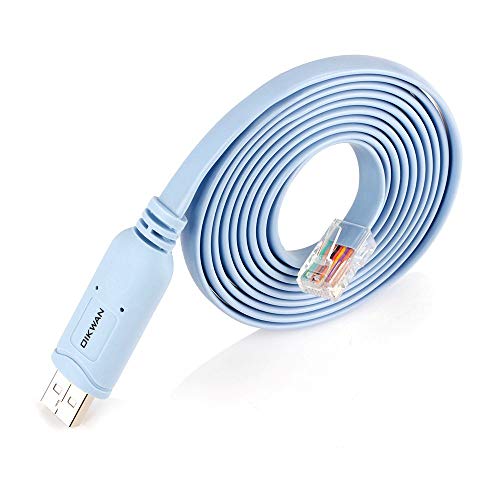
| OIKWAN USB to RJ45 Console Cable★ Best Overall | Most people, every day | USB-A to RJ45 | 12 ft | 20 Mbps | Amazon |
| OIKWAN 10ft USB-C to RJ45 Serial AdapterBest for USB-C Laptops | USB-C laptops at the rack | USB-C to RJ45 | 10 ft | — | Amazon |
| Cable Matters USB to RJ45 Console Cable | Snag-free reliability | USB-A to RJ45 | 6 ft | 5 Gbps | Amazon |
| Aexus FTDI USB to RJ45 Console Cable | Break-key work on tight budgets | USB-A to RJ45 | 6 ft | 9600 bps | Amazon |
| DSD TECH SH-RJ45B | Short USB-C runs | USB-C to RJ45 | 1.8 m | 2 Mbps | Amazon |
| OIKWAN USB-C Console Cable 2-Pack | Keeping one in two bags | USB-C to RJ45 | 6 ft | — | Amazon |
| StarTech.com Cisco USB Console Cable | Tested, certified builds | USB-A to RJ45 | 6 ft | 460 Kbps | Amazon |
Detailed Reviews
1. USB Cisco Console Cable 12ft
Our pick — 4.5+★ from 5,000+ verified ratings; the strongest balance of quality and price.
Twelve feet of rollover cable with the FTDI chip already inside the plug — the one that ends the adapter hunt.
If you manage switches and want one cable that reaches from a laptop across the room, this is the pick. It is a USB-A to RJ45 console cable — a serial rollover lead, not an Ethernet patch cord — and it replaces the RS232 DB-25 and DB-9 adapters people used to carry in a pouch. The run is 12 feet, which is enough to sit at a desk while the gear stays in the rack. Inside sits the FT232RL chip from FTDI, the converter your operating system looks for before it will show you a COM port.
What wins people over is that it replaces a bag of DB-9 and DB-25 adapters and usually shows up as a COM port without a driver download. Plug it in and it tends to appear on its own. The connector fits any laptop or desktop USB port and runs into the console socket on Cisco, Ubiquiti, Juniper, Fortigate, Mikrotik, TP-Link and HP ProCurve hardware.
The honest catch is that the first plug-in sometimes needs administrator rights on a work laptop, which is a permission fight rather than a hardware fault. A few people also hit a mismatch when their device expects a different pin arrangement — the listing itself warns you to check the pins before ordering, and that warning is worth heeding. On Windows, Mac, Linux and Android it will usually behave; Chrome OS is the one system explicitly left off.
Where this one earns its keep
- 12 feet of reach, so you can work from a chair while the switch sits deeper in the rack
- FT232RL FTDI chip means most computers see it without downloading anything extra
- Runs Cisco, Ubiquiti, Juniper, Fortigate, Mikrotik, TP-Link and HP ProCurve console ports
- Replaces a whole bag of DB-9 and DB-25 adapters with one lead
- 20 Mbps rated transfer wall beside a console session that only needs a trickle of data
What to plan around
- Some locked-down work PCs need admin rights before the driver will install
- Check the pin layout against your device first — the maker puts that warning on the page for a reason
- Chrome OS is not on the supported list
- USB-A only, so a laptop with just USB-C needs an adapter
Grab this if: you want one rollover cable that reaches the rack, runs the major switch brands, and almost never asks you to hunt for software.
Think twice if: your laptop has no USB-A port at all, or you need the break-key sequence support that the FTDI chip family is known for and want to confirm it against your device.
2. 10ft USB-C to RJ45 Serial Adapter
The ten-foot USB-C lead that lets a modern laptop plug straight into a switch without a dongle in sight.
Here is the direct comparison that matters for USB-C owners: this cable runs 10 feet of length, while the Aexus FTDI rollover lead below runs 6 feet. That extra reach is the whole point — it puts real distance between you and the rack. If your laptop dropped the older rectangular USB port years ago, this is the cable that removes the adapter from your kit entirely. It is built around the FT232R chip plus an RS232 level shifter (the small circuit that translates the chip’s signals into the voltage your console port expects).
The length earns its own following. It is genuinely long enough to set your laptop on a cart and roll back a little, which is the difference between crouching by the rack and working comfortably. Drivers are usually not needed; Windows 11 picks it up and PuTTY finds it straight away. It has run cleanly against Arista console ports, Macs on Big Sur, Sophos firewalls, and switches at work, which is a broad enough spread to trust it with mixed-brand floors.
The trade-off is at the connector boot, not the wire. The strain relief where the plug meets the cable is the weak point — an occasional unit has had the boot clips break off, which leaves the cable prone to slipping out. Treat it as a cable you coil carefully rather than stuff into a pocket. It is also USB-C only, so a desktop with USB-A needs a different lead. For a portable kit built around a USB-C laptop, 10 feet of reach with no driver to install is genuinely hard to argue with.
The reach payoff: 10 feet versus the 6 feet on the Aexus pick below means you are not tethered to the rack — set the laptop down, open your terminal, and work standing up.
Hands-on reality: no drivers to chase on modern Windows or Mac, and it has handled Arista console ports and Sophos firewalls without fuss.
Reach for this if: your laptop only speaks USB-C and you want enough length to actually stand back from the equipment.
Handle with care: the boot at the plug end is the part that gives out first, so coil it loosely instead of folding it into a bag pocket.
3. Cable Matters USB to RJ45 Console Cable FTDI 6ft
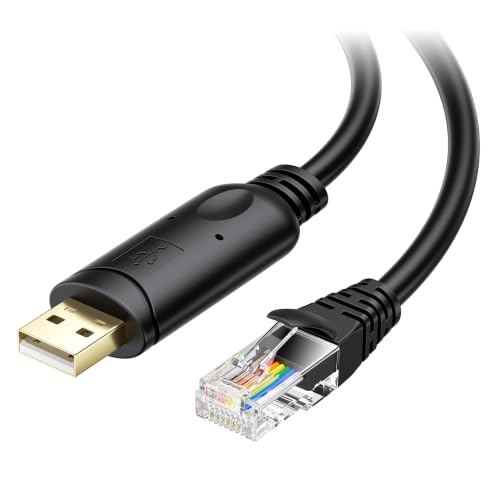
A snagless boot that protects the little tab from snapping off inside the console port — small thing, big save.
The detail that separates this Cable Matters lead from most of the field is the snagless RJ45 connector. That molded shield over the release tab keeps it from catching on a cable bundle and snapping off, which is exactly the failure that turns a working console cable into a paperweight stuck halfway into a switch. It is a 6-foot USB-A to RJ45 rollover cable with an FTDI chipset inside, and it reverses all eight pins to talk to a standard Cisco console port.
Setup leans on the operating system doing the work. Windows 10 and recent macOS builds tend to carry FTDI drivers already, and the maker keeps drivers and instructions available for download for the rest. The published transfer rate is 5 gigabits per second — far beyond what a serial console needs, and a sign of a fully specified lead rather than a cut-down one. It has configured an EdgeRouter 4, a Sophos XG firewall on an old Intel Mac, Cisco N9K switches, and HP 5900 gear.
The clearest limitation is simply the sixth-foot run compared to the twelve-foot OIKWAN above — plenty on a desk, tight if your gear is racked high or deep. Build quality is where this earns its price; the recurring praise is that it feels well made and needs nothing installed on Windows 10. If you configure switches and routers routinely and want a 6-foot FTDI cable whose release tab will not snap off in the port, this is the quiet professional choice.
Why engineers reach for it: the snagless tab guard is an unglamorous feature that heads off the single most common console-cable failure, and it pairs with an FTDI chipset that most systems recognise on their own.
Where it stops: 6 feet of cable, so tall racks and deep cabinets will leave you stretching.
Best fit for: anyone who configures networking gear regularly and wants a cable that survives being coiled and carried week after week.
Look elsewhere if: you need serious reach to a racked device — the twelve-foot OIKWAN is the better answer there.
4. Replacement Console Cable for Cisco FTDI 6ft
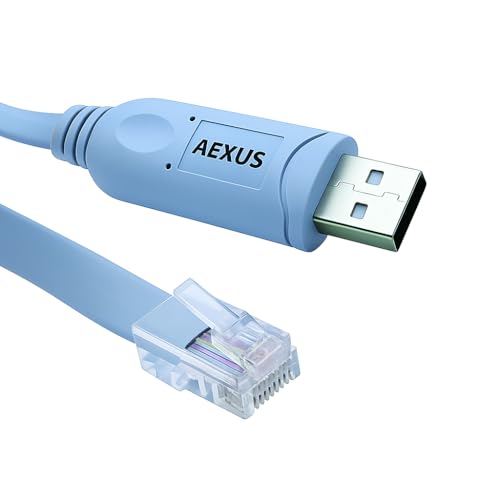
The one that can send a break-key sequence — the trick that gets you into a router’s recovery prompt.
This Aexus lead carries an embedded FTDI chip from the UK, and the maker states it is fully capable of sending a break key sequence — a detail most listings never mention. It also supports UART settings for 7 or 8 data bits, 1 or 2 stop bits, and odd, even, mark, space, or no parity, which is the full spread a serial terminal expects.
The practical angle is that it replaces both a DB9 serial dongle and the Cisco 72-3383-01 rollover cable with one lead. Plug the USB end into a laptop, the RJ45 end into a console port, and there is no adapter in the middle to lose. Signed drivers mean Windows 10, 7, and Vista see it without an install disc; Linux, macOS, and Android drivers are available for download. It is built with anti-stress connectors aimed at network engineers who expect gear to take a knock.
The paper spec showing 9600 bits per second is worth reading correctly — that is the classic serial console baud rate, not a cap on the cable itself. If you try to read it as a fast-data cable you will misjudge it. It works with Cisco, Huawei, HP, Arista, Opengear, Aruba, and Juniper routers and switches, which is a wide net for a single 6-foot lead.
What makes it different
- Break-key sequence support for recovery and interrupt work
- UART control across 7 or 8 data bits and up to 2 stop bits
- Replaces both a DB9 dongle and the 72-3383-01 rollover cable
- Signed drivers for Windows 10, 7, and Vista with no disc required
- Runs Cisco, Huawei, HP, Arista, Opengear, Aruba, and Juniper gear
Fit notes to weigh
- Six feet only, so it will not stretch to a distant rack
- Linux, macOS, and Android users still need to fetch drivers
- The 9600 bps figure describes serial console speed, not file transfer speed
Pick this when: the job involves a break sequence, a recovery prompt, or an odd parity setting — the UART and break-key support is the reason to choose it.
Skip the stretch: it is a 6-foot cable, so plan for a laptop close to the device.
5. DSD TECH SH-RJ45B USB C to RJ45 Console Cable

An industrial-grade FTDI chip in a compact five-point-nine-foot USB-C lead for tight desk setups.
If your laptop is USB-C and your gear sits within arm’s reach, this DSD TECH cable does the job with a chip built for hard use. It carries an industrial-grade FTDI FT232RL, the same converter family the rest of this list leans on, and it is aimed at routers, switches, firewalls, and wireless LAN controllers with console ports. Windows, macOS, and Linux are all supported, as long as the machine has a USB-C port to plug into.
Length is the number to look at. At 1.8 metres it is shorter than the ten-foot OIKWAN USB-C adapter above, so it suits a bench, a desk, or a switch close to your seat rather than a deep rack. DSD TECH backs it with permanent technical support and a one-year replacement service, which is the kind of after-sale cover that matters on a tool you depend on during outages.
The one thing to accept is the short run. If your hardware lives at the back of a cabinet, you will be kneeling. For everything else, it is a tidy, well-supported USB-C console cable that connects Cisco, Ubiquiti, Juniper, Fortigate, Mikrotik, TP-Link, Huawei, and HP ProCurve devices without an adapter.
The chip story: an industrial-grade FT232RL inside means it is built for repeated use across many device types, from Cisco to Huawei to HP ProCurve.
Plan for the short reach: at 1.8 metres it is a desk cable, not a rack cable — those deep cabinets belong to the ten-foot USB-C option.
Worth choosing for: USB-C laptops working at a bench or a nearby console, backed by a one-year replacement service.
Not the one if: your gear is racked far from where you sit — you would want the longer lead.
6. USB-C Console Cable 2pack

Two six-foot USB-C console cables — one for the go bag, one that stays at the desk.
Running out of console cables is a real problem when you maintain several sites. This pack hands you two of the same six-foot USB-C to RJ45 lead, so you can leave one in the field kit and keep one at the bench. Each carries the FT232R chip plus an RS232 level shifter, which is the pairing that lets a USB-C laptop talk to a router’s serial console port. It suits Cisco, Juniper, HP, and the other common brands with console sockets.
The specs are plain: 6 feet per cable, a one-year warranty, and Windows, Linux, and macOS support on any computer with a USB-C port. The listing includes an instruction manual, worth reading on the first use if you are new to console work.
The limitation is structural: these are six-foot leads, so the deepest racks will still need you close. And because both cables are identical, you are buying spare convenience rather than a longer reach. If your work takes you between sites and you would rather not arrive without a USB-C console cable, the two-pack is a sensible hedge.
The redundancy logic: two identical FT232R-equipped six-foot USB-C cables means one lives in the vehicle and one stays on the desk, so you are never caught without a way in.
The honest limit: both are six feet, so this is about having a spare, not about reaching further.
Good call for: field engineers who rotate between sites and want a duplicate cable ready wherever they land.
Not needed if: you only ever work at one desk — a single cable covers that fine.
7. StarTech.com Cisco USB Console Cable ICUSBROLLOVR

A rollover cable that carries CE, FCC and REACH certification — the paperwork other cables leave out.
For buyers who have to justify a purchase in an enterprise environment, this StarTech lead has something the rest of the field skips: listed external testing certification for CE, FCC, and REACH. That is the compliance trail some procurement teams want to see. It is a 6-foot, 1.8-metre USB-A to RJ45 rollover cable that connects a USB-equipped laptop or desktop straight to the console port of a router, with no adapter in the middle.
The rated transfer is 460 Kbps — comfortably above the slow trickle a console session needs, and a clear spec rather than a vague claim. It runs from a USB 2.0 port to the RJ45 socket on a router, server, firewall, or switch, and works with Cisco, Juniper, Ubiquiti, and TP-Link hardware. Build quality is the pitch: StarTech rates the materials for the wear of regular console work.
The thing to weigh against the OIKWAN at the top is that this is a 6-foot cable with a slower listed data rate — 460 Kbps against the OIKWAN’s 20 Mbps. Neither number limits a console session in practice, so the real decider is reach: this is the desk-and-cabinet-drawer cable, not the cross-the-room one. If certification and the StarTech name matter to your purchasing process, that is the reason to choose it.
Where it stands out: CE, FCC, and REACH certification on the listing, which is the kind of compliance detail enterprise buyers ask for and rarely find on a console cable.
The honest comparison: 460 Kbps listed against the 20 Mbps OIKWAN is a real gap on paper, but a console session never needs either — pick on reach and certification, not on that number.
Choose this if: your purchase needs certification on the spec sheet and the cable only has to span a desk or nearby port.
Pass over if: you need long reach to a deep rack — the twelve-foot OIKWAN covers that far better.
Know the Specs
The FTDI Chip Inside the Plug
The USB end of a console cable contains a converter chip, and the FTDI FT232RL is the one most network gear expects. That chip is the reason your operating system shows a COM port at all. In plain terms: a cable with an FTDI chip inside usually appears on its own, because Windows and macOS often carry the driver already. A cable with an unknown chip can leave you hunting for software at exactly the wrong moment. When you compare listings, look for the chip name before anything else.
Rollover Pin-Out vs Ethernet
A console cable is not an Ethernet patch cable, even though both end in the same RJ45 plug. A rollover cable reverses all eight pins from one end to the other, which is the arrangement Cisco-style console ports read. An Ethernet cable does not. That is why a plain network patch cord will fit a console port, sit there, and show you nothing. On every listing, confirm the words console or rollover before you order, and check the pin layout matches the device.
Transfer Rate and What It Means
Listings quote data rates from a slow trickle up to full network speeds, and the numbers can look alarming next to each other. Here is the plain reading: a console session carries typed commands and text output, so it needs very little bandwidth. A cable rated at a modest rate still handles that work fine. The transfer figure is note, but it is not the number that decides whether your terminal connects — the chip and pin-out are. Do not let a high figure alone convince you.
Length and Connector Type
The run length decides how much room you get between you and the hardware. Six feet covers a desk or a nearby port; ten or twelve feet lets you step back from a rack and work comfortably. Then match the plug to your laptop: USB-A if it has the older rectangular port, USB-C if it does not. A USB-C machine with a USB-A cable needs an adapter, and that adapter is the thing people lose. Confirm both ends before you commit.
Common Questions
Is a USB to RJ45 console cable the same as an Ethernet cable?
Will this cable work with my Cisco switch factory reset?
Do I need to install a driver for an FTDI console cable?
What does the FTDI FT232RL chip actually do?
Will a USB-C console cable work on a laptop with only USB-A ports?
How long should a console cable be for rack work?
What is the break key sequence and which cable supports it?
Why does my console cable fit but show no output in the terminal?
Can I use a console cable to configure a device with no network connection?
The Bottom Line
For most people, the best RJ45 to USB console cable is the OIKWAN USB to RJ45 Console Cable because its twelve-foot run reaches the rack, its FTDI chip (a common USB-to-serial chip) usually appears without a driver hunt, and it covers the major switch brands. If your laptop only has USB-C and you want to stand back from the gear, grab the OIKWAN 10ft USB-C to RJ45 Serial Adapter. And for break-key recovery work (sending the break signal to interrupt boot) on a tight budget, the Aexus FTDI USB to RJ45 Console Cable is the one to reach for. One honest nudge: the top pick has earned its place on volume and consistency, so if you are unsure which end your laptop needs, start there and check the port before you order.
How we choose
We do not accept paid placement. Every pick is matched to a real buyer and a real use-case; we do not hands-on test units.
Sources
Specifications: manufacturer listings and product documentation. Review insights: verified customer reviews, as of November 2026. Pricing: not shown on this page (it changes often); check the current price via the retailer link.
As an Amazon Associate, Tactical Gear Guy earns from qualifying purchases. This does not affect which products we feature.