Specs are compiled from manufacturer listings and verified buyer reviews and can change over time — please confirm the key details on the product page before buying.
If you have more wired devices than wall jacks, a 10/100 switch is the cheapest fix there is: it turns one live cable into several live ports, instantly and without software. Every pick below moves data at Fast Ethernet speeds (10 or 100 megabits per second — plenty for cameras, printers, and office PCs). They range from a five-port box you can hide behind a desk to a 24-port rack unit for a whole wiring closet. What actually separates them is port count, how they get their power, and whether they can survive a hot cabinet or a cold workshop.
This guide is built by comparing the manufacturers’ published specifications and the patterns across verified customer reviews, so you get each pick’s real strengths and trade-offs instead of marketing spin.
A switch does not boost your internet speed — it only shares one connection across more devices. Below you will find port counts, power budgets, and mounting options laid out plainly, so you can pick the right 10/100 switch for your desk, closet, or control panel without guessing.
Top Picks

How To Choose The Best 10/100 Switch
Start with a simple count: how many devices need a live cable at the same time? A five-port switch covers a printer plus two PCs and a spare. If you are feeding a rack of security cameras or a row of office desks, you want 16 or 24 ports so you are not daisy-chaining boxes together. Buy for the ports you will actually fill, plus two spare.
Power over Ethernet: the feature that changes what you can install
PoE (Power over Ethernet) sends electricity down the same cable that carries data, so a camera or access point needs no separate wall adapter. The number that matters is the total PoE budget — the shared pool of watts the switch can hand out across all ports. A switch rated for 30W per port with a 65W total budget will not run eight 30W devices at once; the pool runs dry first. Check the budget against the sum of your devices, not just the per-port ceiling.
Mounting and environment: desk, closet, or control cabinet
A desktop switch with rubber feet is fine on a shelf. A wiring closet wants a rack-mount kit in the box, so you are not hunting for brackets later. For a factory floor, a warehouse, or an outdoor enclosure, look for an industrial-rated unit: a metal housing, a wide operating temperature range, and DIN rail mounting (the standard clip-on rail used inside electrical cabinets). Those units usually take DC power from a terminal block rather than a wall adapter.
Where 10/100 is the right call — and where it is not
Fast Ethernet caps each port at 100 Mbps. That is fine for IP cameras, printers, point-of-sale terminals, and most office browsing. It is the wrong choice for large file transfers between computers on the same network, or for a household pulling huge downloads over one line. If your internet plan or your backups routinely push past that ceiling, step up to a gigabit switch. For cameras, printers, and office PCs, 10/100 keeps the hardware simple and the cost low.
Side-by-Side Comparison
| Model | Best For | Ports | Switching Capacity | Case / Mounting | Amazon |
|---|---|---|---|---|---|
| TP-Link TL-SF1009P★ Best Overall | PoE cameras and access points | 9 | — | Metal / desktop | Amazon |
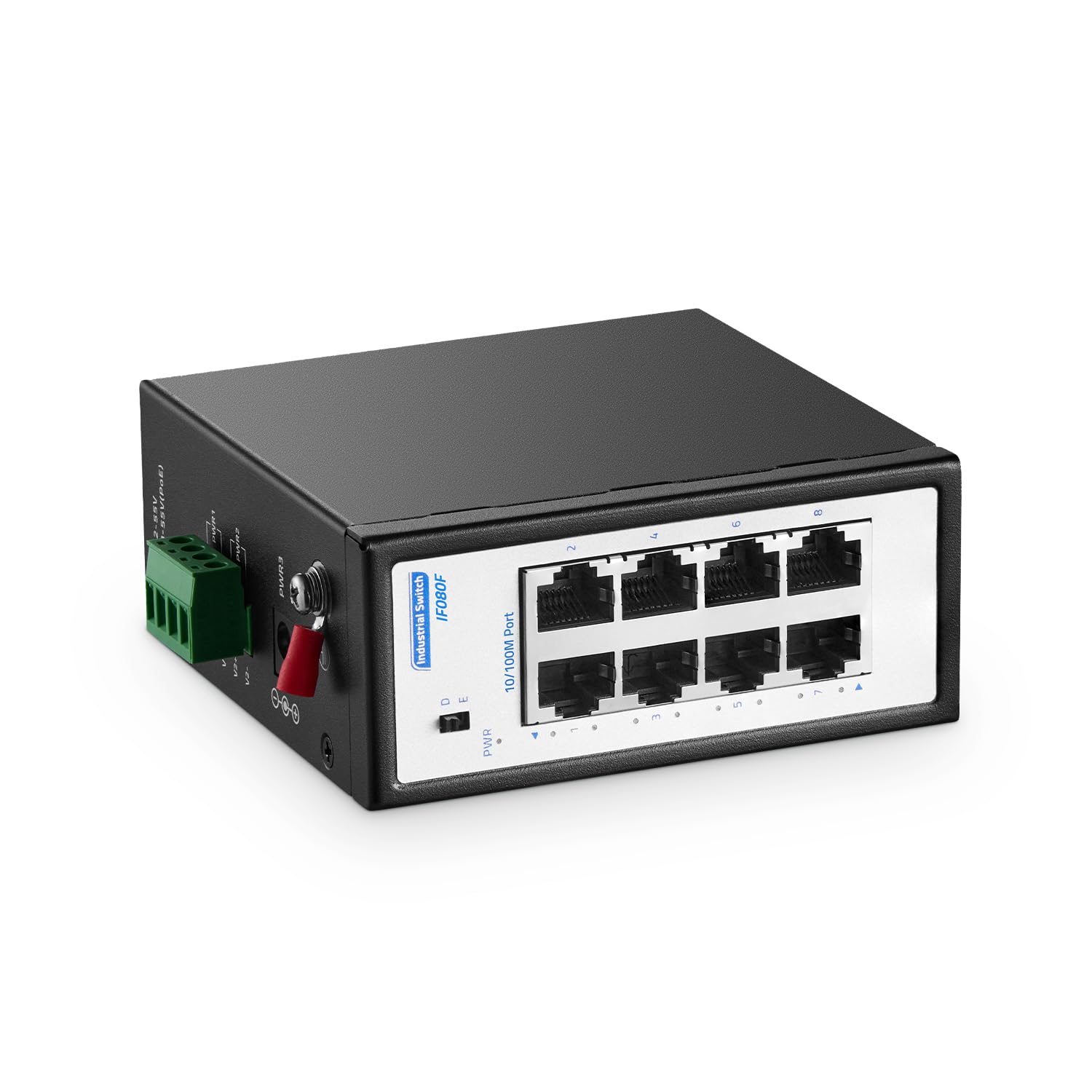
| YuLinca 8 Port Industrial SwitchIndustrial Grade | Harsh industrial cabinets | 8 | — | Aluminum / DIN rail and wall | Amazon |
| TP-Link TL-SF1016D | Home and small-office port clusters | 16 | 3.2 Gbps | Plastic / desktop | Amazon |
| WIWAV WDH-5ET-DC | Low-power remote installs | 5 | — | Metal / DIN rail | Amazon |
| NETGEAR FS105 | Quiet desktop expansion | 5 | — | Plastic / desktop and wall | Amazon |
| NETGEAR JFS524 | Large office racks | 24 | — | Metal / rack mount | Amazon |
Detailed Reviews
1. TP-Link TL-SF1009P 9 Port Fast Ethernet PoE Switch
Our pick — 4.5+★ from 250+ verified ratings; the strongest balance of quality and price.
The one-box answer for cameras that need power and data down a single cable.
This is the crowd favorite of the group, and it earns that spot by solving the problem most people actually have: too many devices that each want both a data cable and a wall outlet. Eight of its nine ports are PoE+ (Power over Ethernet Plus, which sends up to 30W per port down the network cable), and the whole switch draws from a shared 65W pool. That combination covers the classic install — a handful of security cameras in a metal housing, fed by one cable run instead of a daisy-chain of adapters.
What wins people over is sheer versatility. Extend Mode pushes data and power a claimed 250m (roughly eight times a standard Ethernet run) for surveillance work, though speed drops to 10 Mbps in that mode — fine for camera streams, not for a PC. Priority Mode keeps ports 1-2 at the front of the queue so video and voice stay clean. Isolation Mode walls off broadcast storms so one misbehaving device cannot flood the ports that stay logical. For anything port-adjacent, four non-PoE devices still get wired in on top of the powered eight, which is why the nine-port layout keeps appearing in setups that start small and grow.
The catch is arithmetic, not quality. The 65W budget is the hard ceiling, so a camera array of high-draw units can exhaust it before all eight ports are lit. Plan the total wattage, not the per-port figure. The metal body and shielded ports suit a closet shelf; there is no rack kit in the box. Also worth noting: the 1.3A current rating is more than double the 0.6A of the TL-SF1016D below, which makes sense given it is feeding powered devices.
PoE on nine ports
- Eight PoE+ ports draw power over the data cable, so cameras need no separate adapter
- Extend Mode reaches up to 250m for surveillance runs at 10 Mbps
- Priority Mode protects ports 1-2 for video and voice traffic
- Isolation Mode blocks broadcast storms for cleaner port security
- Metal housing with shielded ports backs a 3-year warranty
Fast Ethernet only
- The 65W total budget limits how many high-draw devices you can power at once
- Extend Mode cuts the link to 10 Mbps
- No rack-mount hardware included
need PoE cheaply: you are wiring security cameras or access points and want one cable per device doing both jobs.
want gigabit: every device you own is high-draw — the 65W pool runs out before the eight ports do.
2. YuLinca 8 Port Mini Industrial Switch, DIN Rail & Wall Mount
Built for the cabinet that freezes in January and bakes in July.
Eight 10/100 ports in a small aluminum case, and a working temperature range of -40 to 75°C (-40 to 185°F). That range is the whole point: this switch will keep running in a chilled storage room, a hot rooftop enclosure, or an unheated workshop where a plastic desktop unit would quit. The IP30 rating means the housing blocks solid objects like tools and grit, though it is not sealed against water. A DIN rail bracket and wall mount kit both come in the box, so it clips straight into a control panel.
Power is where it gets clever for panel work. There is one DC jack plus two industrial power inputs on a 4-pin terminal block — three ways to feed it in total, with automatic switching if one source fails. Anti-reverse connection protection means a mixed-up wire does not fry the unit. No fan, so no noise inside a cabinet. Against the five-port WIWAV below, this one gives you 8 ports to that unit’s 5, which is the difference between one spare and four when you are counting drops in a panel.
Be clear-eyed about the power adapter: it is not included. You supply your own DC source, which is normal for panel installs but a hiccup for a home user expecting a plug-in brick. The other quiet trade-off is that this is a plain unmanaged switch — no VLANs, no management interface. It moves frames, quietly, which is exactly what most cabinets need.
panel installs: the switch lives in a control box, warehouse, or any spot where temperature swings are real.
desk use: you want a wall adapter in the box — you will be sourcing your own DC feed here.
3. TP-Link TL-SF1016D 16 Port Unmanaged Ethernet Switch

Sixteen live jacks for the busy corner of the house that keeps growing cables.
Sixteen ports is the balance for a home office that has quietly turned into a small network — the TV, the console, the NAS backup drive, two laptops, and a printer all wanting a wire. It forwards at full wire-speed with a 3.2Gbps switching capacity (3.2 gigabits per second of total throughput), which is more than enough headroom for sixteen 100 Mbps ports to talk at once. It also handles 9K jumbo frames (larger data chunks that make big file transfers between devices a little smoother).
The practical details are what make it easy to live with. Fanless, so it disappears into a closet without a hum. Auto-negotiation on every port picks 10 or 100 Mbps by itself, and the energy-efficient circuitry claims up to 70% power savings at idle. A 0.6A current rating puts it in the same low-draw class as the 24-port TL-SF1024D, which also runs 0.6A — useful if you are counting load on a shared circuit.
The honest sticking point is that this is the one pick in the group associated with mixed long-term reliability, and a few buyers report links that top out well below the 100 Mbps ceiling. Most buyers never see either issue, but if you are wiring a business that cannot tolerate a swap-out, a metal-cased unit with a longer warranty is the safer bet. Volume and reliability are the two things to weigh here, not port count.
Sixteen plain ports: sixteen plug-and-play ports, jumbo frame support, and a fanless plastic case that fits a shelf and never makes a sound.
Fine for a home cluster, less so for a critical business drop.
simple expansion: the home or small office that needs a lot of jacks cheaply and can tolerate a swap if one goes.
power devices: a mission-critical install where downtime costs money.
4. WIWAV WDH-5ET-DC 5-Port Industrial Ethernet Switch

Five ports that sip power and shrug off a freezing or sweltering cabinet.
If the switch is going somewhere power is scarce and temperatures are not polite, this is the tightest package on the list. It draws under 1 watt, versus 3.19 watts for the 24-port TP-Link — a fraction of the load on a remote solar or battery setup. The 12/24/36/48V DC terminal block input (a screw-down connector that takes bare DC wires) accepts whatever supply you have on hand, which is why it keeps turning up in remote installs. A built-in DIN rail bracket (a clip that snaps onto standard equipment rails) and a sturdy IP30 metal housing (IP30 means it blocks solid objects but not water) mean it clips into an enclosure and stays mounted.
It is certified to UL, cUL, CE, FCC, PSE, REACH, and RoHS, with overload and reverse-connect protection. Five ports with auto MDI/MDI-X crossover means you never worry about which cable type plugs where. The operating range of -30 to 75°C (-22 to 167°F) covers the outdoor box, the cold storage room, and the factory floor. For a small enclosure running a PLC and an HMI, the compact footprint leaves room for other gear.
The obvious catch: five ports fills up fast if you grow, and there is no power supply in the box — just a DC jack pigtail and ground cables, so you bring your own DC source. That is normal for panel equipment, but it is a step up in effort from a plug-and-play desktop box.
harsh sites: the install is remote, low-power, and temperature-hostile, and five ports is enough.
bigger networks: you need more than five jacks or want a plug-in adapter included.
5. NETGEAR FS105 5-Port Fast Ethernet Switch

The quiet little box with the backup plan built into the warranty.
Five 10/100 Mbps ports in a compact desktop footprint, and the feature that separates it from every other small switch here: ProSAFE Lifetime Protection. That means a lifetime limited hardware warranty plus next-business-day replacement and 24/7 chat with a NETGEAR expert. For a home user who never wants to touch the switch again, that warranty outweighs extra ports. It also runs fanless for zero added noise, and mounts either on a desk or on a wall.
A printer, a couple of laptops, and a spare jack connect with zero configuration. Energy-efficient Ethernet mode trims power use when ports sit idle. It is the smallest unit in this group at the desktop tier, which is what you want when the switch is hiding behind a monitor. Against the WIWAV five-port industrial unit, this one is the living-room version: plastic case, wall or desk mount, and no DC terminal-block wiring to figure out.
The trade-off is the port count and the plastic build. Five ports go fast, and this is not a cabinet-grade unit — it wants a comfortable indoor spot. If you need to power cameras or feed a rack, go up the list. For a single desk that just needs more jacks, it is the simplest pick here.
single desk link: a home or small desk that needs a few extra ports and values a lifetime warranty over port count.
future growth: you already know you will outgrow five ports — step up to the 16-port TP-Link instead.
6. NETGEAR JFS524 ProSafe 24-Port Fast Ethernet Switch

Steel-cased, rack-mounted, and happy to quietly run a whole floor.
Twenty-four 10/100 ports with auto-sensing speed and duplex, so each device negotiates its own link without a manual setting. Auto Uplink technology means you never need to worry about crossover cables — the switch sorts out the right connection for you. It ships in a metal case with a rack mount kit included, and it is the heaviest unit in the group at 4.7 pounds, which is the price of that steel chassis. This is the switch that turns one uplink into a full row of office drops.
What makes it dependable is the boring stuff. No fans, so the closet stays quiet. It simply powers on and forwards traffic — the recurring theme in owner experiences is that it just sits there and works, year after year, which is the highest praise a switch can get. For a shop floor or a small office with twenty-odd PCs, that predictability is worth as much as a spec sheet.
The obvious caveat is that this is a commodity-tier 10/100 box in a market where gigabit is now common — you are buying reliability and rack mounting, not speed. Port labeling in the spec sheet lists four ports, but the product description and the whole category make the intended count twenty-four; confirm against the listing before you order if you need the full row. And like the rest, it is unmanaged, with no configuration to speak of.
ProSafe rack build: a 24-port metal rack switch with Auto Uplink, auto-sensing ports, and a track record of just running for years.
Aging spec sheet: it is a Fast Ethernet unit, so it tops out at 100 Mbps per port — great for a floor of PCs, wrong for big in-house file transfers.
budget rack fill: a solid rack-mount pick for an office or shop that wants many drops and zero fuss.
new deployments: your network moves large files between machines and you really want gigabit.
Know the Specs
Switching Capacity (Gbps)
Think of switching capacity as the total bandwidth the internal circuitry can move at once, measured in gigabits per second (Gbps). A 10/100 switch with a 3.2Gbps capacity has enough throughput for all its Fast Ethernet ports to run at full speed together — the wider the figure, the more simultaneous traffic it can handle without slowing. For home and small-office use, even a modest figure is well beyond what 10/100 devices will actually push.
PoE Budget (Watts)
The PoE budget is the total pool of electricity an Ethernet switch can send out to powered devices over data cables. A per-port ceiling like 30W is a cap on any single device, but the shared pool is the real limit — the sum of all powered devices cannot exceed it. Match the budget to the combined draw of your cameras or access points so the pool does not run dry.
Common Questions
Will a 10/100 switch slow down my internet connection?
Can I plug a 10/100 switch into a gigabit router?
Do I need a PoE switch for security cameras?
What is the difference between an unmanaged and a managed switch?
Can I connect two of these switches together for more ports?
What does the DIN rail on the industrial switches do?
Why do some industrial switches not include a power supply?
Is 10/100 fast enough for streaming and gaming?
Do these switches need a fan or make noise?
How do I know how many ports I need?
The Bottom Line
For the widest range of real jobs, the winner in this field is the TP-Link TL-SF1009P, because its eight PoE+ ports (ports that send power and data down one cable) and 65W budget cover cameras and access points with one cable each, and it stays simple with plug-and-play setup. If you need to fill a rack or a full patch panel, the TP-Link TL-SF1024D gives you twenty-four ports and a 4.8Gbps switching capacity with a rack kit in the box. And for a remote, cold, or hot cabinet where power is tight, the WIWAV WDH-5ET-DC draws under 1 watt and shrugs off the temperature swing. Whichever you pick, count your ports and your PoE wattage first — those two numbers settle the choice faster than anything else.
How we choose
We do not accept paid placement. Every pick is matched to a real buyer and a real use-case; we do not hands-on test units.
Sources
Specifications: manufacturer listings and product documentation. Review insights: verified customer reviews, as of November 2026. Pricing: not shown on this page (it changes often); check the current price via the retailer link.
As an Amazon Associate, Tactical Gear Guy earns from qualifying purchases. This does not affect which products we feature.