Specs are compiled from manufacturer listings and verified buyer reviews and can change over time — please confirm the key details on the product page before buying.
You want one small box that takes the terrible hotel, café, or campground WiFi and turns it into your own private network — so every device you own logs in once and stays logged in. That is exactly what a portable WiFi router does, and the pick that does it most dependably is the GL.iNet Beryl AX. Below are nine devices that genuinely fit in a bag, sorted by what each one is actually good at, so you can match one to your trip instead of guessing from a spec sheet.
This guide is built by comparing the manufacturers’ published specifications and the patterns across verified customer reviews, so you get each pick’s real strengths and trade-offs instead of marketing spin.
Some of these need a SIM card and a data plan, some just repeat a WiFi signal you already have, and one arrives with data already loaded. The rest of this page sorts them by that difference, because you cannot swap a WiFi-only router for a SIM hotspot once you are standing in a hotel lobby. Here is how the Best Portable WiFi Router options stack up for real travel.
Top Picks


How To Choose The Best Portable WiFi Router
The first thing to settle is where your internet comes from. A travel router grabs a signal that already exists — hotel WiFi, a café network, an Ethernet wall jack — and rebroadcasts it as your own private network. A mobile hotspot makes its own internet from a cellular SIM card. Several devices here are one or the other, and a couple can do both. Pick the wrong type and you are carrying a router that cannot reach the internet for the whole trip.
Travel router or cellular hotspot — pick your source first
If you stay in hotels and rentals that hand out a WiFi password, you want a travel router. Public WiFi is often per-device, so your phone, tablet, and laptop each need their own login; a travel router logs in once and every device rides that one connection. If you drive an RV, camp off-grid, or work from places with no WiFi at all, you need a hotspot with a SIM slot and a data plan behind it.
Match the wireless standard to what you will actually do
A WiFi 6 router moves data on two bands at once, with the 5 GHz band carrying the heavy load. WiFi 7 adds Multi-Link Operation (MLO), which lets a device use more than one band at the same time for steadier throughput. For email, browsing, and video calls, a WiFi 6 router like the Beryl AX is plenty. For streaming to several screens or gaming on the road, WiFi 7’s Multi-Link Operation earns its keep.
Check the ports before you fall for the speed numbers
A 2.5 Gbps WAN port (the socket that takes internet in) feeds the router faster than a plain 1 Gbps port, which matters if your hotel or rental offers a wired jack. A USB port lets you tether a phone or share a drive. Count the LAN ports you need for wired gear — a laptop, a console, a printer — and confirm the device has them.
Battery, power, and size for real travel
Built-in batteries free you from wall outlets; USB-C power means you can run the router from the same charger or power bank as your phone. Watch the weight and footprint if you are carrying it daily. A router that feels heavy in a daypack is one you stop carrying by the second week.
Side-by-Side Comparison
| Model | Best For | Internet Source | Max Wireless Speed | Device Capacity | Amazon |
|---|---|---|---|---|---|
| GL.iNet GL-MT3000 Beryl AX★ Best Overall | Everyday travel, VPN users | WiFi / Ethernet / USB | 2402 Mbps (5 GHz) | Not listed | Amazon |
| TP-Link Roam 6 AX3000Best Value | Budget hotel WiFi | WiFi / Ethernet / USB | 2402 Mbps (5 GHz) | Not listed | Amazon |
| SCHOK 4G LTE HotspotBest for Off-Grid | Cellular backup, no WiFi around | 4G LTE SIM | 600 Mbps download | 16 devices | Amazon |
| TP-Link Roam 7 BE3600 | Big groups, WiFi 7 | WiFi / Ethernet / USB | 2882 Mbps (5 GHz) | 90 devices | Amazon |
| Global Pocket WiFi T8 | Overseas trips, no SIM shopping | eSIM (vSIM), 140+ countries | Not listed | 8 devices | Amazon |
| ASUS RT-BE58 Go | Work travel and road gaming | WiFi / Ethernet / USB / 4G / 5G | 2882 Mbps | Not listed | Amazon |
| GL.iNet GL-E750V2 MUDI | RV, camping, SIM-based roaming | 4G LTE SIM / WiFi | 433 Mbps (5 GHz) | Not listed | Amazon |
| NETGEAR Nighthawk M6 Pro | Heavy 5G data use | 5G / 4G LTE SIM | 2.9 Gbps (5 GHz/6 GHz) | 32 devices | Amazon |
| SIMO Solis 5G | International travel, no contract | Virtual multi-carrier 5G/4G | Not listed | 16 devices | Amazon |
Detailed Reviews
1. GL.iNet GL-MT3000 Beryl AX Wi-Fi 6 Travel Router
Our pick — 4.5+★ from 5,500+ verified ratings; the strongest balance of quality and price.
The travel router hotel work actually runs on — fast, plug-and-play, and built to be configured once.
Speeds of 574 Mbps on the 2.4 GHz band and 2402 Mbps on 5 GHz mean this box keeps up with streaming and video calls while the hotel lobby WiFi is shared with everyone else in the building. The 2.5G WAN port (the input socket that takes internet in) and a 1G LAN port let you plug into a wired wall jack when the wireless signal is thin. A USB 3.0 port lets you tether a phone or share a drive. It measures 4.17 inches long by 3.27 inches wide by 1.3 inches tall, so it drops into a laptop bag without a second thought.
What earns it the top spot is how it handles networks that make other routers stumble. OpenVPN and WireGuard are pre-installed and it works with more than 30 VPN service providers, so once you log in, everything on your little network is encrypted — not just your laptop. Maximum VPN speed is 150 Mbps over OpenVPN and 300 Mbps over WireGuard, which covers browsing and streaming handily. The firmware is OpenWrt 21.02, and it takes more than 5,000 add-on packages through a no-code admin panel. A physical toggle switch flips your chosen VPN or AdGuard Home on and off without digging through menus.
The honest trade-off is that this is a router, not a hotspot — it needs a WiFi or wired source, and there is no SIM slot. There is also a learning curve on the advanced side. The admin panel is friendly, but the deep settings assume you have poked around a router before. Expect to spend a few minutes with the setup guide. Owners tend to stay loyal: it carries a 4.5+ star score with 5,500+ ratings, and the recurring thread in the reviews is that it simply keeps working, trip after trip.
What the spec sheet gives you
- OpenVPN and WireGuard pre-installed across 30+ providers
- 2.5G WAN plus a 1G LAN port for wired connections
- OpenWrt 21.02 with 5,000+ add-on packages
- USB 3.0 port for phone tethering
Where it asks a little of you
- No cellular radio — you must supply a WiFi or Ethernet source
- The advanced panel rewards people who already know routers
Reach for this if: you bounce between hotels and rentals and want every device protected by one VPN login.
Look elsewhere if: you need a hotspot that creates internet from a SIM card with no WiFi around.
2. TP-Link Roam 6 AX3000 Dual-Band Wi-Fi 6 Travel Router
A pocket-sized WiFi 6 box that logs into hotel WiFi once and hands you a private network.
The headline number here is 2402 Mbps on the 5 GHz band and 574 Mbps on 2.4 GHz — the same wireless standard as the pick above, from a smaller and more affordable device. There is a single 2.5 Gbps WAN/LAN port (it carries internet in or out) plus a 1 Gbps LAN port for a wired device. A USB 3.0 port takes external drives and microSD cards up to 512GB, so you can back up files and share them on your own network. It powers over USB-C from the included adapter or any 5V PD power source, which means one power bank can keep it running.
The one-step captive portal login is the feature that matters most on arrival. You sign in once through the Tether app, and every device on your network clears the hotel splash screen without repeating it. OpenVPN and WireGuard both work in client and server mode, and the firmware adds PPTP and L2TP. Where this model gives ground is stability on fussy public networks. The performance reviews are split — some buyers report it locking in cleanly, while a handful hit trouble connecting back to a network that plays hard to get.
Small footprint, real ports: the pocket-sized body carries a 2.5 Gbps WAN/LAN and a 1 Gbps LAN, so a wired laptop or console can ride along with everything else.
Know before you buy: this model does not run OpenWrt, so if you want deep customization on the router itself, the Beryl AX above gives you more room to tinker.
Pick it for: travelers who want WiFi 6 speeds and a one-tap hotel portal login on a budget-friendly budget.
Hold off if: you plan to stack it onto a hotel network with strict per-device limits — connection reliability is the reported weak point.
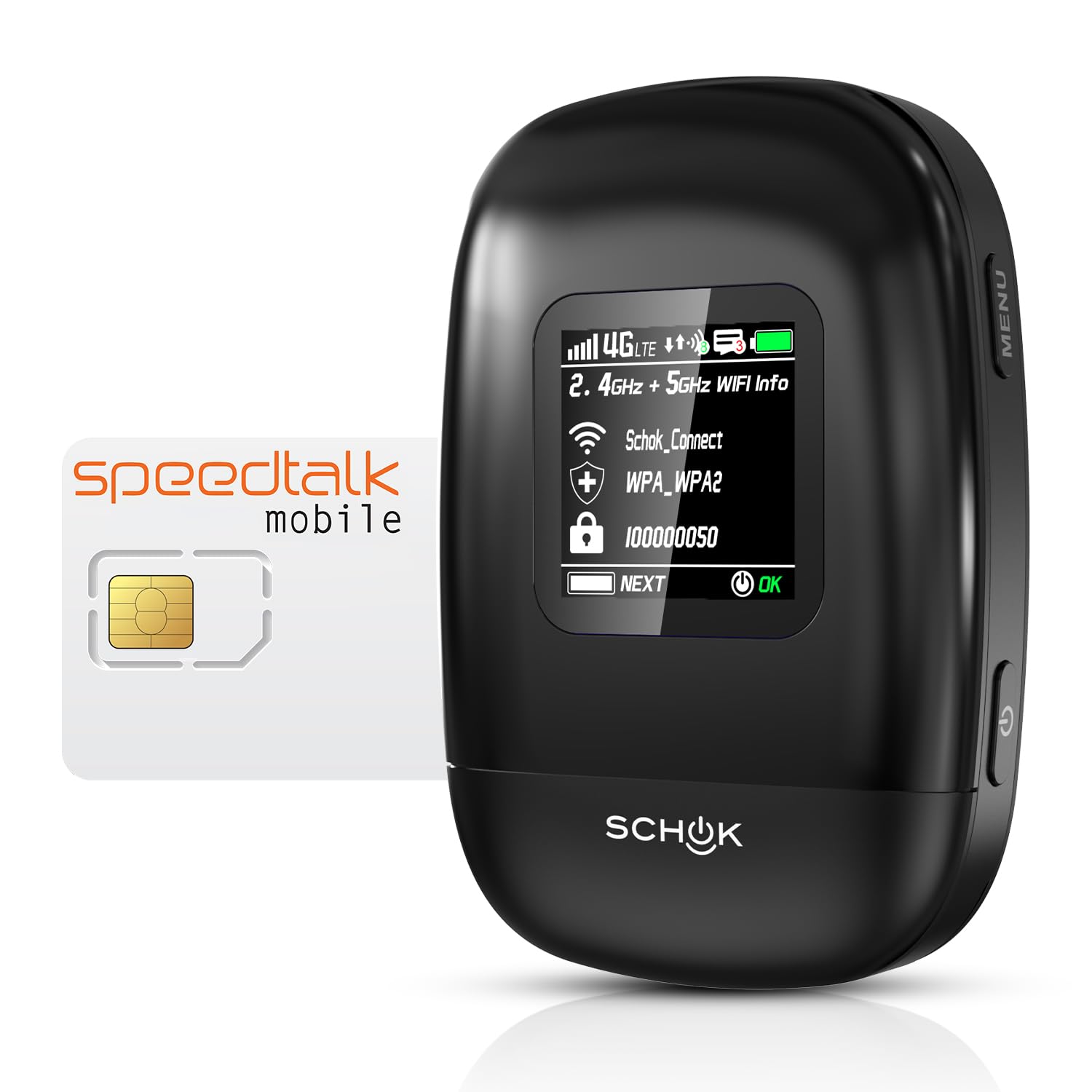
3. SCHOK 4G LTE Portable WiFi Mobile Hotspot
When there is no WiFi to repeat, this hotspot builds its own from a carrier SIM.
The connection here comes from 4G LTE Cat 12 with 4CA (quad carrier aggregation, which bonds four chunks of signal together) for download speeds up to a 600 Mbps theoretical ceiling. Dual bands at 2.4 GHz and 5 GHz with 2×2 MIMO feed up to 16 devices at once — phones, tablets, a laptop for the kids. It ships with a Speedtalk SIM and works with Verizon, T-Mobile, AT&T, Speedtalk, Rogers, Fido, and TELUS. The 4000mAh battery is removable, so you can swap in a fresh one instead of waiting on a wall outlet.
Two things to check before checkout. It is a data-only device, so you need a mobile hotspot data plan — a standard phone plan may not work. And the SIM that fits it must be open up, not a carrier-subsidized card. The device itself is compact at 2.76 inches long by 0.59 inches wide by 3.94 inches tall and 5 ounces, which is smaller in hand than the GL.iNet Beryl AX. That makes it an easy pocket carry. With only a small batch of ratings on the listing, there is less owner history to lean on than the bigger names here, which is a reason to read the plan requirements carefully.
Strong suit
- Runs on 4G LTE where no WiFi exists
- Up to 16 devices at once
- Removable 4000mAh battery for quick swaps
Setup homework
- Needs a data-only hotspot plan, not a standard phone plan
- Will not take a locked or subsidized SIM
The right call for: anyone whose trip happens where the WiFi map runs out.
Pass it over if: you already have a hotel WiFi password to work with and would rather not shop for a data plan.
4. TP-Link Roam 7 BE3600 Wi-Fi 7 Portable Travel Router

Ninety devices on one hotel connection — the number that sets this apart from every other pick here.
That 90-device figure matters on family trips and small group travel, where phones, tablets, laptops, and game consoles stack up fast. The SCHOK hotspot down the list tops out at 16 devices by comparison. Wireless speeds reach 2882 Mbps on the 5 GHz band and 688 Mbps on 2.4 GHz, with WiFi 7 and Multi-Link Operation (bands working together for steadier throughput). It covers up to 1800 square feet, and a 2.5 Gbps WAN port plus a 1 Gbps LAN port give you wired options. It runs from USB-C off the included adapter or a 5V PD power bank.
Three modes cover most travel situations: Router Mode for Ethernet or phone USB tethering, Hotspot Mode for signing into public WiFi, and AP/RE/Client Mode to extend an existing network or bring a wired device onto WiFi. OpenVPN and WireGuard run in both client and server mode, and the Tether app handles the one-step captive portal login. The recurring gripe is boot time — the router takes a while to come up, which is a minor annoyance when you just want to get online in a hotel room. It earns a 4.0+ star score across 400+ ratings, with reliability the thing people talk about most.
The group-trip case: 90 devices on one private network is a number the rest of this list cannot touch, and WiFi 7 keeps throughput even when the whole crew is streaming.
The slow start: boot time is the reported weak point, so budget an extra minute between power-on and productive browsing — and this model does not run OpenWrt if tinkering matters to you.
Built for: families and crews who need one hotel connection shared among a whole bag of devices.
Better to skip if: you travel solo and want the fastest possible boot to get online.
5. Global Pocket WiFi Hotspot T8 — No SIM, 140+ Countries
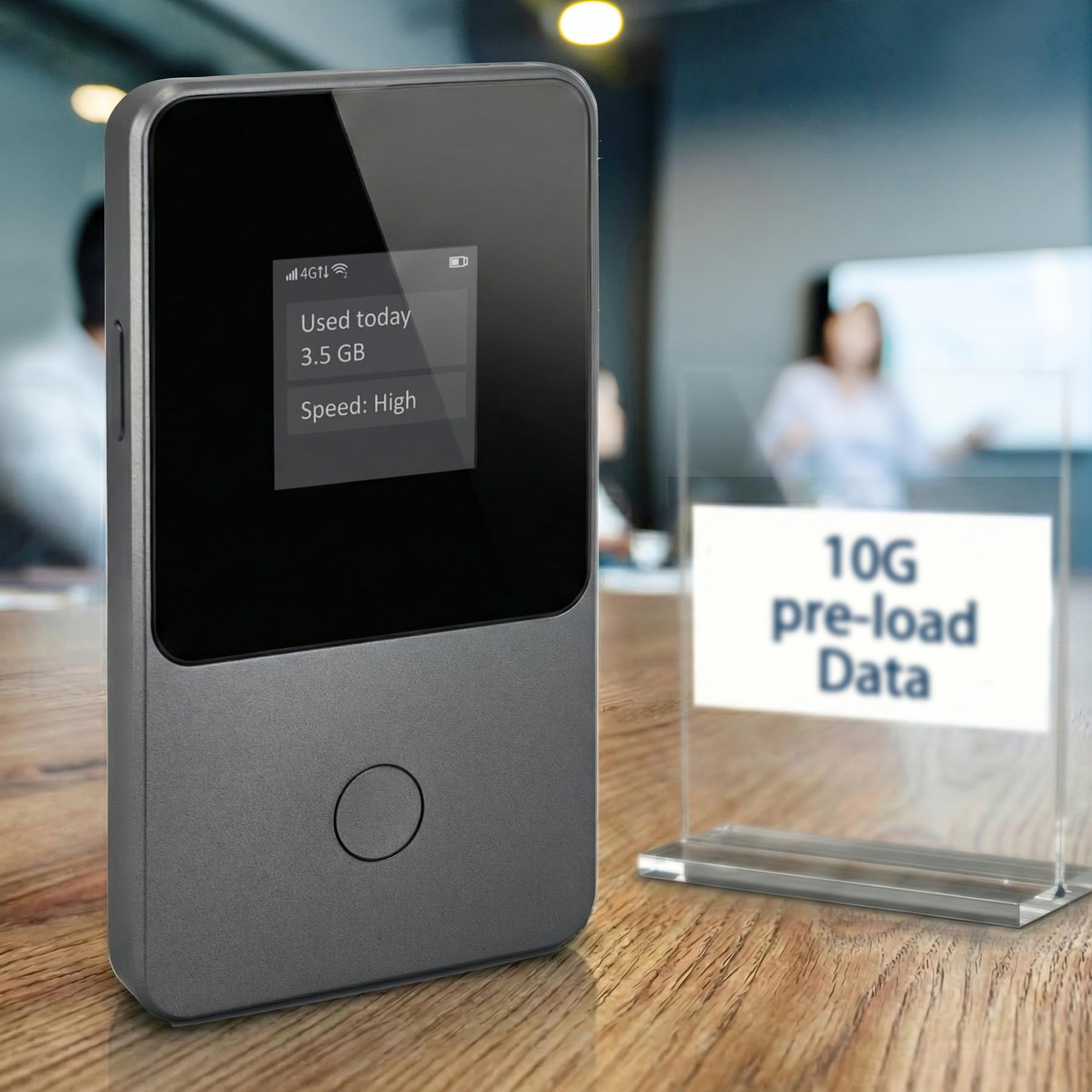
Ten gigabytes already loaded and 140+ countries covered — no SIM card to buy at the airport.
This is the one device on the list that works the moment you switch it on. It ships with 10GB of preloaded US data, so there is no top-up and no first purchase before you can browse. The eSIM (vSIM) technology connects automatically to the best local network in over 140 countries and regions, pulling from more than 300 carriers. It handles up to 8 devices at once across 4G LTE bands, and the app lets you buy more data and watch your usage from your phone.
The 3500mAh battery is rated for up to 15 hours of continuous use, which covers most travel days, and the whole unit weighs only 100g — light enough to carry all day without noticing. At 4.33 inches long by 2.36 inches wide by 0.55 inches tall, it slips into a jacket pocket. The honest catch is that the data has to keep coming. The preloaded 10GB is a starter, not a permanent plan, so you will buy more through the app after it runs down. A few reviews report dead-on-arrival units and “no internet” errors in certain countries. With a modest batch of ratings, that is worth checking on arrival, not the night before a flight.
Made for: a traveler who lands, turns it on, and starts browsing with zero setup.
Think twice if: you want a device that takes a physical SIM you already own.
6. ASUS RT-BE58 Go Travel Router WiFi 7 Dual-Band
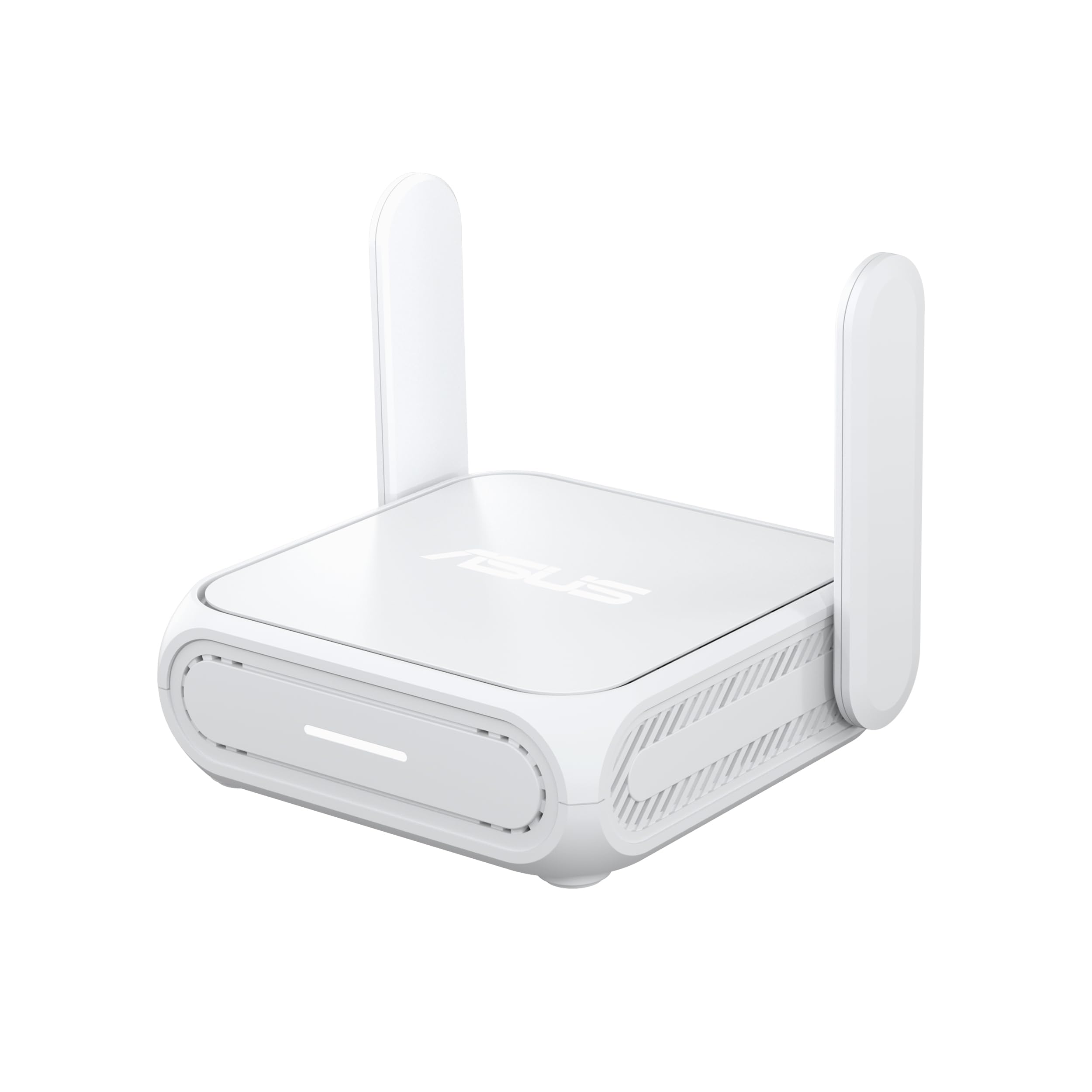
A WiFi 7 travel router that takes 4G and 5G tethering and charges off the same cable as your laptop.
WiFi 7 push speeds to 3600 Mbps, with Multi-Link Operation and 4K-QAM (a denser signal encoding scheme that packs more data into each transmission) keeping the link low-latency on public networks. In WISP mode (which grabs public WiFi and turns it into your own password-protected hot spot), a single toggle switch locks your traffic down in a hotel or on a cruise ship. There is one 2.5G port for a wired device, and it can tether a phone’s 4G or 5G connection to share it forward.
USB-C Power Delivery at 18W is the quiet win here. You can run the router and your laptop from the same charger, which saves a brick in the bag. If you need coverage beyond one room, AiMesh lets this box team up with other ASUS routers as a node later. The setup is a three-step process through the ASUS Router app, and Guest Network Pro carves out a separate network for visitors or smart-home devices. It scores 4.0+ stars over 150+ ratings, and the reviewers who rave about it cite stability over speed — no random disconnects, no mid-trip reboots.
Suitcase economy: 18W USB-C delivery and the same charger as your laptop means one less power adapter to pack, and a 3-year manufacturer warranty backs the hardware.
One nitpick from the field: the included adapter takes up more pocket space than owners expected — swap it for a compact USB-C brick and the problem goes away.
Count on it for: work trips where you game or stream after hours and refuse to carry a second charger.
Keep browsing if: you are on a tight budget — this sits squarely in the premium tier.
7. GL.iNet GL-E750V2 MUDI 4G LTE Portable Travel Router

A 7000mAh battery and a 4G SIM slot — this one keeps the network alive in the middle of nowhere.
The combination is the point. A 7000mAh battery is rated for up to 8 hours of use, and the SIM slot with a pre-installed EM060K Cat6 4G modem means you can roam on a carrier of your choice. It weighs 285g and measures 5.7 inches by 3.1 inches by 0.9 inches, so it rides in a pack without complaint. Combined WiFi speeds run 300 Mbps on 2.4 GHz and 433 Mbps on 5 GHz. Built-in OpenVPN and WireGuard support 30+ VPN servers, with WireGuard up to 50 Mbps and OpenVPN up to 10 Mbps.
The storage and expandability are unusual for this class. It carries DDR2 128MB RAM, 16MB NOR flash and 128MB NAND flash, accepts a MicroSD card up to 1TB, and adds a USB 2.0 port. It runs on OpenWrt, and it supports GL.iNet’s physical eSIM card (sold separately) so you can store several carrier profiles and switch countries without swapping cards. The honest limit is speed — this is 4G data only, not 5G, so you pay a speed penalty against the 5G units here. The device also runs warm under load. Treat that as normal for a modem with a large battery inside. It lands at 4.0+ stars over 400+ ratings.
Why RVers keep it charged
- 7000mAh battery rated for 8 hours of use
- SIM slot with pre-installed 4G module
- MicroSD up to 1TB and USB 2.0
- OpenWrt with 30+ VPN servers
Set expectations here
- 4G only — not a 5G modem
- Runs warm during long sessions
- The physical eSIM card is sold separately
Suits: RV owners and campers who want their own cellular internet with hours of battery behind it.
Better for someone else if: your work depends on the fastest available cellular speeds.
8. NETGEAR Nighthawk M6 Pro 5G Mobile Hotspot

The heavy hitter of the group — a 5G modem with a 2.8-inch color touchscreen and a 2.5G Ethernet port.
On paper this is the most capable hotspot here, with a Qualcomm SD X65 chipset, 5G mmWave and Sub-6 bands, and a max throughput of 3600 Mbps (2.9 Gbps on the 5 GHz/6 GHz bands, 700 Mbps on 2.4 GHz). It drives up to 32 devices, and the 2.5G Ethernet port lets you plug in a laptop or a router without the wireless hop. There is a 2.8-inch color touch screen and a 5040mAh battery inside an 8.96-ounce body. Guest WiFi privacy separation keeps visitors off your main network.
The biggest real-world variable is carrier compatibility. The listing bills it as an AT&T-open up unit that also works on T-Mobile, MetroPCS, and others. Some owners mention it flying on T-Mobile; others say it will not activate on Verizon regardless. It does not come with a SIM card or service, so you need a data-only plan from the carrier of your choice. Before you commit, confirm the carrier supports the open up device. Its 3.5+ star score over 500+ ratings reflects that mixed carrier experience, though the hardware review on Wi-Fi performance is strong.
Where it flies: the 5G modem with mmWave support and 32-device capacity makes it the strongest option for heavy data days, and the 2.5G Ethernet port keeps a laptop off the wireless lane.
Carrier roulette: the open up AT&T label does not guarantee activation on every network, so verify yours before the trip — one reviewer compared it to home-grade WiFi, another hit dead ends on Verizon.
Worth it for: data-heavy travelers on a carrier that supports the open up unit.
Look elsewhere if: you are locked to a network with strict activation rules — the compatibility split is this pick’s real weak spot.
9. SIMO Solis 5G WiFi Mobile Hotspot

Virtual multi-carrier 5G in 135+ countries with no contract, wrapped in a ruggedized shell.
Instead of a single SIM, this hotspot runs a virtual multi-carrier network that jumps to the strongest available signal in over 135 countries. When coverage dips, SignalScan lets you switch carriers by hand. The IP54 ruggedized design (a rating meaning it shrugs off drops, dust, and water splashes) makes it the only device here built to take a knock. It also doubles as a power bank for your phone, and a 2.4-inch LCD touch screen shows data usage, signal strength, and WiFi credentials without an app.
A lifetime plan comes bundled — 1GB of global data every month at no monthly contract. That is a lifeline, not a heavy-use allowance, so you will likely top up for streaming or video calls. The tricky part is account management: if you change your email, you can lose that lifetime plan, which is a quirk worth knowing up front. Coverage and setup reviews are strong, but value and reliability are split — some owners find it dependable, others report holes in coverage and consider it pricey. It supports up to 16 devices and carries a modest review history, so read the fine print on the data plan before you commit.
Built for the long haul
- Virtual multi-carrier 5G and 4G across 135+ countries
- IP54 ruggedized body for hands-on travel
- 1GB lifetime monthly data included, no contract
- Doubles as a power bank
Know the fine print
- The free monthly data is a lifeline, not a binge allowance
- Changing your account email can put the lifetime plan at risk
- Coverage gaps reported in some regions
Choose this when: you cross borders often and want one device that finds a carrier on its own.
Look past it if: you need a big data allowance built in without topping up.
Know the Specs
2.4 GHz vs 5 GHz bands
Every WiFi router here runs on two bands, and the difference matters. The 2.4 GHz band reaches farther and pushes through walls better, which is why it covers the whole hotel room. The 5 GHz band is faster but has a shorter reach. A device like the Roam 6 lists 2402 Mbps on 5 GHz and 574 Mbps on 2.4 GHz — that gap is why heavy streaming belongs on 5 GHz, while a phone on the far side of the room can stay on 2.4 GHz.
WAN vs LAN ports
A WAN port (wide area network) takes internet in from the wall or modem. A LAN port (local area network) sends it out to a wired device like a laptop or console. The Beryl AX has a 2.5G WAN and a 1G LAN, while the Roam 7 and RT-BE58 Go pair a 2.5G port with a 1G stub. On a hotel with slow WiFi but a fast wall jack, a 2.5G WAN feeds your whole private network at full speed.
Multi-Link Operation and WiFi 7
WiFi 7 adds Multi-Link Operation, which lets a device use several bands at the same time instead of picking one. In plain terms it means fewer dropped frames when several people stream at once. The Roam 7 and the ASUS RT-BE58 Go both use it. On WiFi 6 gear, you get one band at a time, which is fine for a couple of devices but starts to show its limits in a crowded room.
VPN client vs VPN server
A VPN client sends your traffic out through a privacy service so nobody on the hotel network can watch it. A VPN server does the reverse — it lets you tunnel back into your home network from the road. The Beryl AX and the RT-BE58 Go run both at the same time, so you can reach a printer at home while also hiding your traffic from the hotel. Free VPNs rarely match paid throughput, so check a provider’s peak speed before relying on it for streaming.
Common Questions
Will a portable WiFi router work on a cruise ship?
Do I need a SIM card for a portable WiFi router to work?
Can I run a portable WiFi router off a power bank?
What is the difference between a travel router and a mobile hotspot?
How many devices can a portable WiFi router handle?
Will a travel router save me money on hotel WiFi fees?
Does 5G matter on a portable hotspot?
Do I need to change my phone plan for a mobile hotspot?
Can a portable WiFi router extend my home network while traveling?
Is a ruggedized hotspot worth it for a beach trip?
The Bottom Line
For most travelers, the best portable wifi router is the GL.iNet Beryl AX. It covers the common case — hotel or rental WiFi missing — with fast dual-band speeds and a VPN that protects every device at once. If you need to create internet where none exists, the SCHOK 4G LTE hotspot handles the SIM side, and the ASUS RT-BE58 Go is the pick for work trips where you game or stream after hours. And if your priority is group travel and 90-device capacity, the Roam 7 is the one that fits a whole crew on one login. Its 4.5+ star score across 5,500+ ratings is the quiet argument for putting it in your bag.
How we choose
We do not accept paid placement. Every pick is matched to a real buyer and a real use-case; we do not hands-on test units.
Sources
Specifications: manufacturer listings and product documentation. Review insights: verified customer reviews, as of November 2026. Pricing: not shown on this page (it changes often); check the current price via the retailer link.
As an Amazon Associate, Tactical Gear Guy earns from qualifying purchases. This does not affect which products we feature.