Specs are compiled from manufacturer listings and verified buyer reviews and can change over time — please confirm the key details on the product page before buying.
An external GPU enclosure only works if your laptop, handheld, or mini PC has a Thunderbolt 3 or USB4 port, since plain USB-C cannot carry the PCIe lane the card needs. It also needs a power supply and card clearance that match the card you plan to install. Buying a box whose port, power supply, or card clearance does not match your setup is the most expensive mistake in this category. This guide sorts nine enclosures by controller, included PSU, charging wattage, and card clearance so you can match one to your machine.
This guide is built by comparing the manufacturers’ published specifications and the patterns across verified customer reviews, so you get each pick’s real strengths and trade-offs instead of marketing spin.
Below you will find how to read controller and bandwidth specs, a side-by-side table, and honest notes on the fit limits of each enclosure. Every pick here has been checked against its own data sheet, so read on for the thunderbolt 3 egpu whose controller, PSU, and card limits fit your machine.
Top Picks

How To Choose The Best Thunderbolt 3 eGPU
An external GPU enclosure is a metal box with a PCIe slot, a power connector, and one Thunderbolt cable going back to your computer. The enclosure adds no frames on its own; the GPU card inside does the rendering. The card inside does. So the enclosure’s job is to feed that card power, keep it cool, and move data fast enough that your laptop stops being the bottleneck.
Check your port before anything else
Plain USB-C is not enough. You need a port labelled Thunderbolt 3, Thunderbolt 4, or USB4 — these carry the PCIe data lane an eGPU needs. A regular USB-C port will not detect the card at all, and every enclosure here lists that limit in its own notes. Plug into a plain USB-C port and no driver install will help, because the PCIe lane simply is not there.
The controller chip is the spec nobody advertises loudly
Inside each box sits an Intel controller that handles the PCIe-over-Thunderbolt handoff. The JHL7440 and JHL7540 are the common parts in this group, and they pair with a PCIe 4.0 slot. Real transfer speed lands around 32Gbps on the better units, which is the ceiling of the Thunderbolt 3 pipe itself. That ceiling is why a card in an enclosure never quite matches the same card seated in a desktop tower.
Does the box include a power supply
This is where buyers get caught: a frame-only enclosure plus a card plus a PSU can cost far more than the listing price suggests. Several enclosures here ship as the frame, the controller, and the cabling only — you add your own ATX, SFX, FLEX, or DC 12V supply. A premium card needs a serious supply to run, so budget for that part of the build. Others, like the Sonnet boxes, arrive with a 750W supply already installed.
GPU length and slot clearance
A long triple-fan card can foul the front of a small chassis or butt against the supply. Open-frame designs remove that worry because there is no front wall to hit. Closed boxes publish their internal limits, and one here states support up to 312mm with 375W of continuous GPU power. Measure your card before you commit.
Side-by-Side Comparison
| Model | Best For | Controller | Charging | PSU Included | Amazon |
|---|---|---|---|---|---|
| Maskedfish MK-L18★ Best Overall | Handheld and laptop owners who want one cable | JHL7540/7440 | 85W PD | No — ATX required | Amazon |
| VIKINYEE VK-Y900Best for Handhelds | ROG Ally X owners chasing 30W Turbo Mode | JHL7440/7450 | 85W PD | No — ATX required | Amazon |
| ANQUORA ANQ-L336Most Ports | Desktop and mini PC builders with a spare PSU | JHL7440 | 85W PD | No — ATX/SFX/FLEX/DC | Amazon |
| Sonnet Breakaway Box 750 | Mac and Windows editors who want quiet | Thunderbolt 3 | 100W cable | Yes — 750W | Amazon |
| Sonnet Breakaway Box 750ex | Laptop setups needing extra ports | Thunderbolt 3 | — | Yes — 750W | Amazon |
| ONEXGPU RX 7600M XT | Travellers who want the card built in | RX 7600M XT built in | 100W USB-C | Yes — 330W GaN | Amazon |
| BOSGAME GVP-7600M | Mini PC and handheld gaming | RX 7600M XT built in | — | — | Amazon |
| Khadas Mind Graphics | Desk setups that want a full hub | RTX 4060 Ti built in | 85W | Yes — 300W GaN | Amazon |
| GIGABYTE AORUS RTX 3080 Gaming Box | Thunderbolt laptops chasing 4K frames | RTX 3080 built in | — | — | Amazon |
Detailed Reviews
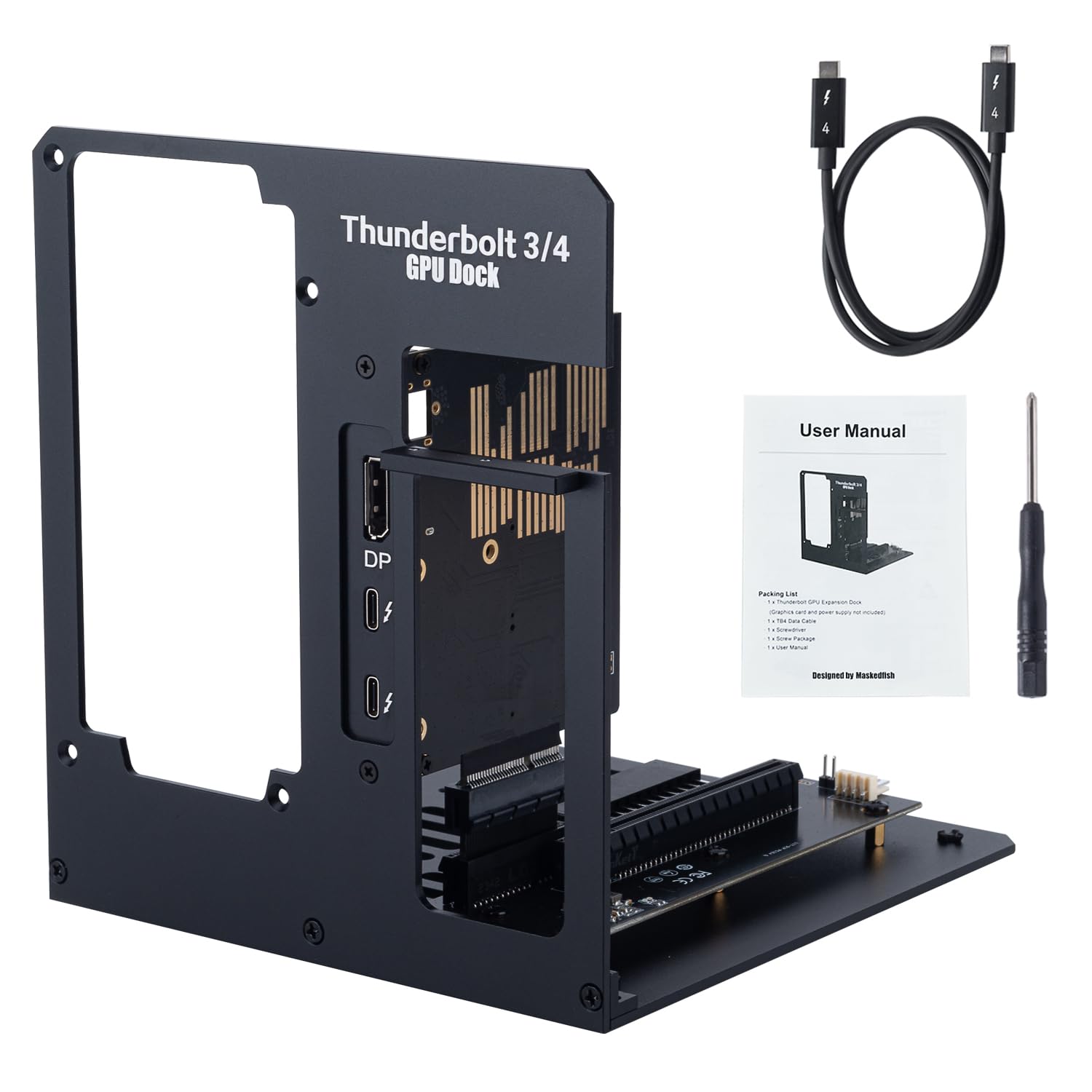
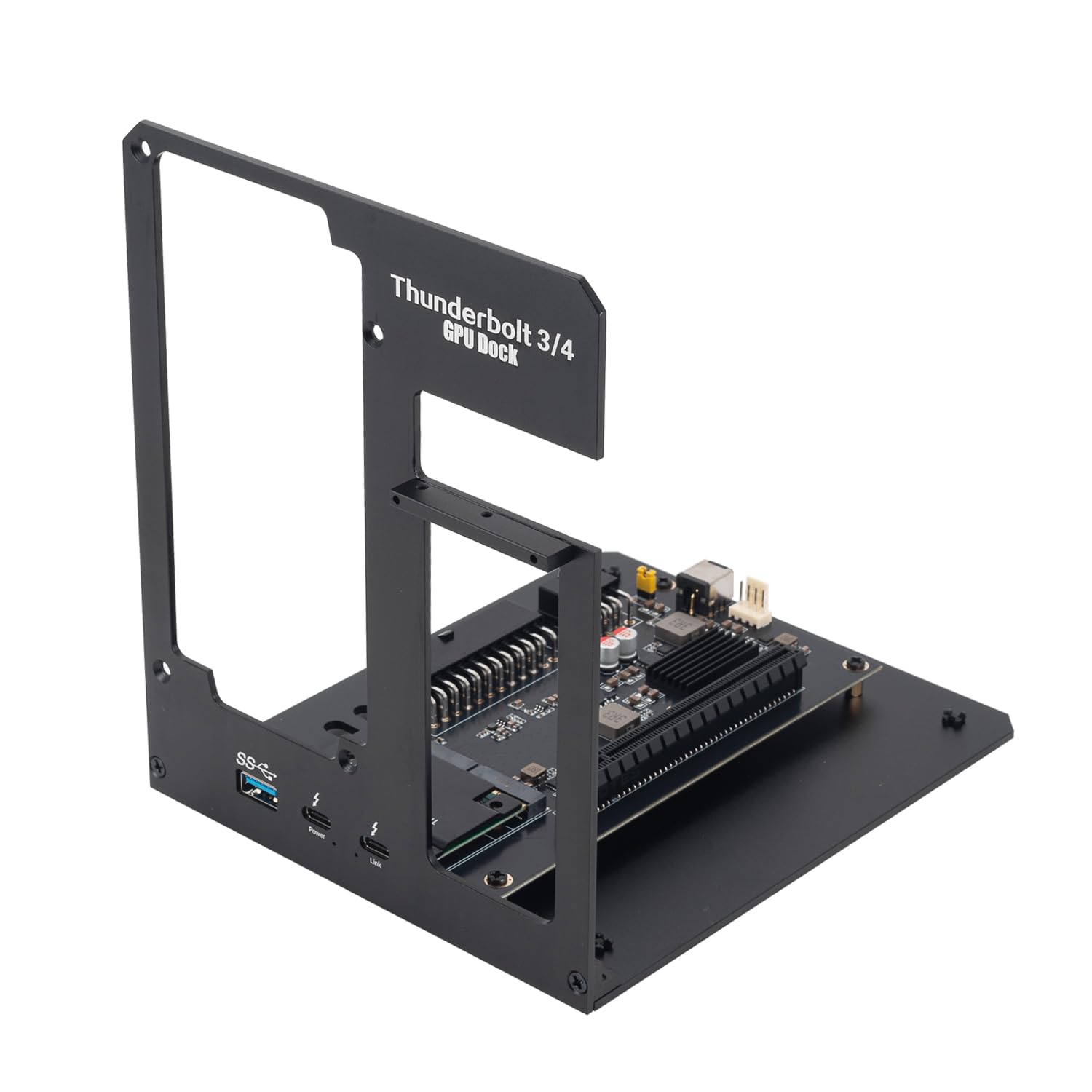
1. Maskedfish MK-L18 eGPU Enclosure
Our pick — 4.0+★ from 30+ verified ratings; the strongest balance of quality and price.
An open metal frame that lets a full-size card breathe and still charges your handheld from one cable.
The MK-L18 wins this list because it does the two hard jobs at once. It carries officially certified JHL7540/7440 controllers (the Intel chips that hand PCIe data to your Thunderbolt port) and runs a PCIe 4.0 x16 slot at 32Gbps. In plain terms, you get the fastest data path a Thunderbolt 3 cable can carry. Then it throws 85W of power-delivery charging back down that same cable, so your ROG Ally X sits in 30W Turbo Mode while the card does the rendering. One cable, no second charger on the desk.
You get straightforward performance in real use: running local AI models and watching token output (the generated text) land close to a far pricier Apple machine. Buyers also report clean detection with an RTX 3080 Ti and a Windows 11 install. Compatibility runs a close second, and the reports skew toward modern cards: RTX 50-series models up to the 5090 D, RX 7000 series, plus Windows 10, Windows 11, Linux, and select macOS machines.
Now the honest catch, and it is a big one for first-timers. This ships as a frame — you supply the ATX power supply and assemble it yourself. Parts quality holds up and the build goes together cleanly, but the paper instructions leave gaps, so expect to look up a video for the wiring order. If you want something that arrives complete, the Sonnet boxes below take that route instead. For anyone willing to screw in a supply, this is the best balance of speed, charging, and airflow on the list.
Where it earns the crown
- Certified JHL7540/7440 controllers with a 32Gbps path and PCIe 4.0 x16 slot
- 85W PD charging triggers ROG Ally X 30W Turbo Mode on the same cable
- Open anodized aluminum frame imposes no limit on card length
- Dual Thunderbolt ports plus a DisplayPort output
What you have to bring
- No power supply in the box — an ATX unit is required
- Instructions skim the assembly steps, so plan on a tutorial
- Non-Thunderbolt and non-USB4 Type-C ports are simply not supported
Reach for this if: you own a handheld or a Thunderbolt laptop, have a spare ATX supply, and want the fastest throughput with charging folded in.
Look elsewhere if: you would rather not assemble anything — the Sonnet route arrives with the power supply already inside.
2. VIKINYEE VK-Y900 eGPU Enclosure
Built to hand a ROG Ally X its 30W Turbo Mode while an external card handles the heavy lifting.
Start with the number that decides fit: 339 g. That makes the VK-Y900 a shade lighter than the MK-L18 above at 369 g, and it is the smaller footprint of the two as well. If you carry the enclosure between a desk and a TV, that is a real difference in a backpack.
The controller here is the Intel JHL7440/7450, paired with an ENIG (Electroless Nickel Immersion Gold) circuit board — a gold-plated finish that resists oxidization over years of use. Two Thunderbolt ports split the work: one at 15W and one at 85W PD. That 85W port is the one that matters for a handheld, because it passes enough power through to trigger Turbo Mode while the card renders. An extra DisplayPort rounds out the outputs. Card support stretches to the RTX 50 series and AMD Radeon RX up to the 9000 series.
Here is the trade-off worth knowing before you click. This listing carries no verified owner feedback yet, so the longevity picture is unknown rather than proven either way. You also still supply your own ATX power supply. Buy it on the spec sheet alone if the 85W single-cable setup is exactly what your handheld needs — just go in with eyes open on the support side.
Compact-build note: at 339 g with dual Thunderbolt ports and an 85W PD rail, this is the enclosure to pick if portability plus handheld charging outweighs a proven review record.
Best matched to: a ROG Ally X or similar USB4 handheld owner who wants the lightest dual-port box here.
Think twice if: you want to lean on an established track record of owner reports before spending.
3. ANQUORA ANQ-L336 Thunderbolt 4 to PCIe eGPU Enclosure
An enclosure that pulls double duty as a hub, with six ports and a 10Gbps USB-A slot for your peripherals.
Six ports is the headline. Alongside its certified JHL7440 controller and PCIe 4.0 x4 slot running at 32Gbps, the ANQ-L336 adds a single 10Gbps USB-A port and two Thunderbolt 4 ports, so it doubles as a dock for external drives and accessories. It also takes the widest range of power supplies here — ATX, SFX, FLEX, or DC 12V, none of which are included. That flexibility is handy if you already own a spare supply of one of those types.
The honest picture is split. Card fit and detection is the most-discussed part of this enclosure, and it is genuinely mixed: some builds boot the card instantly with an RTX 3070 or a Pro 6000, while other setups never see it at all. Getting the card seated takes some fiddling for a fair share of buyers. That is a fit-match story, not a broken-product story: when the card and port line up, this box runs. What draws the praise is overall build and working quality once you are past the setup hill.
Where it stands apart is port count among the mid-tier frames — nothing else in this group offers that 10Gbps USB-A hub slot. If your desk is short on connections, that single port pulls a lot of weight. Just go in ready to troubleshoot, and confirm your exact card and laptop combo before ordering.
Setup reality check: budget an evening for driver work and card seating — the payoff is a 32Gbps slot plus a genuine hub for your desk accessories.
Made for: tinkerers who want a gaming and AI dock with extra USB in one box and already own a compatible supply.
Not the fit for: anyone who needs a guaranteed first-boot detection with zero fiddling.
4. Sonnet eGPU Breakaway Box 750

Arrives with the power supply already bolted in, and a temperature-controlled fan that keeps the noise down.
The 750W power supply is the reason many buyers land here. It ships installed, which removes the single most common snag on the cheaper frames above — no supply to buy, no wiring to sort out. It supports the power draw of current cards and leaves headroom for heavier ones later. A 0.7-meter Thunderbolt 3 cable at 40Gbps and 100W comes in the box too.
For Mac and Windows editors, the acceleration target is concrete: rendering, color grading, animation, and effects work all get the GPU’s help. Supported cards stretch across AMD Radeon VII, RX, RX Vega, Pro W, and Pro WX models, plus NVIDIA GeForce RTX, TITAN, and Quadro lines. One thing to know up front: M1 Macs are not compatible with external GPUs at all, and neither Thunderbolt 2 nor plain USB-C ports will drive it.
The trade-off to weigh is that plugging a card into a Thunderbolt pipe never matches a full desktop tower. The gap is real and documented in owner discussion. Setup itself tends to be quick — several builds run with no driver work at all. There is a wide reliability spread in the reports, so treat the box as a machine that wants a clean, well-matched card rather than a universal fit. Also note the GPU card itself is not included.
Why buyers choose it
- 750W supply already installed — nothing to buy or wire
- Variable-speed, temperature-controlled fan keeps acoustics down
- Includes a 0.7-meter Thunderbolt 3 cable rated 40Gbps and 100W
- Straightforward setup with no driver hunt for many builds
The limitations to plan around
- Not compatible with M1 Macs, Thunderbolt 2, or plain USB-C
- You lose throughput against a card in a desktop tower
- GPU card is not included in the box
Pick it when: you are on Intel Mac or Windows and want a completed, quiet box rather than a kit.
Steer away if: your machine is an M1 Mac — that combination never works.
5. Sonnet Breakaway Box 750ex

The 750W chassis gains four USB-A ports and a wired ethernet jack, turning the dock into a desk hub.
What separates the 750ex from the plain 750 above is the added connectivity. Four 5Gb/s USB Type A ports and an RJ45 Gigabit Ethernet port ride along with the 750W supply, so you can run peripherals and a wired network off the same box. For a laptop user, that is the difference between an enclosure and a full docking station.
Internally it holds a PCI-Express x16 slot, supports GPUs up to 312mm, and delivers 375W of continuous GPU power. Those two figures are the ones to check against your card: measure its length, then confirm its draw sits inside that ceiling. Radeon VII, RX, RX Vega, Pro W and Pro WX models are listed, as are GeForce RTX, TITAN, and Quadro cards. It shares the same M1 Mac exclusion as the 750.
Reliability is what people talk about most here, and it is the good kind — long stretches of trouble-free use, a solid enclosure, and plug-and-play once a laptop’s BIOS is set right. Quiet running under load comes up too. The honest caveat sits with card fit: the largest triple-slot cards can foul the space, and a few builds never got going at all. Match your card to the 312mm and 375W numbers and you sidestep most of that.
The hub argument: four USB-A ports plus ethernet on a 750W backbone is a lot of desk solved in one cable run.
Match the card: 312mm length and 375W continuous draw are the two limits to check before ordering.
The right call for: laptop owners who want eGPU power and a USB-plus-ethernet hub from a single enclosure.
Skip the fit guess: measure long cards against the 312mm limit first — oversize ones do not clear.
6. ONEXGPU Radeon RX 7600M XT Dock

A graphics card already inside the box, sized to slip into a bag rather than sit on a desk.
This is a different animal from the frames above. There is no card to buy — a Radeon RX 7600M XT with 8GB of GDDR6 and RDNA3 architecture is built in, matched in performance to an RTX 4060 laptop. The whole thing weighs 1.92lb with an aluminum alloy shell, so it travels in a backpack where a frame-and-card build never would. A 330W GaN charger comes with it, running 100W of laptop charging through USB-C at the same time.
The flexibility on offer is genuinely wide. It accepts Thunderbolt 3/4, USB 4, or OCuLink connections, works with laptops, PCs, handhelds, Legion Go, and Intel-CPU MacBooks, and can swallow up to 4TB of SSD expansion through its M.2 2280 PCIe 3.0 slot. Outputs run to two HDMI 2.1 at 4k60Hz and two DisplayPort 2.0 at 4k120Hz across four screens. There is also a Turbo Button that lifts the GPU from its default 100W TDP to 120W for more headroom.
Set your expectations on setup, because this one demands real work. It is not plug and play — drivers need coaxing, and the built-in card has a mixed record across owners, with detection problems reported. Buy it for the portability that no other pick here offers. Do not buy it expecting to unbox and play.
What the portability buys you
- Radeon RX 7600M XT with 8GB GDDR6 already installed — no card purchase
- 1.92lb aluminum body with a 330W GaN charger in the box
- Turbo Button shifts the GPU from 100W to 120W
- OCuLink, Thunderbolt 3/4, and USB 4 support plus 4TB SSD expansion
The cost of going tiny
- Not plug and play — expect a driver session before it works
- Card detection has been inconsistent across setups
- You cannot swap the GPU out later the way a frame lets you
Built for: someone who moves between locations and wants a full GPU smaller than a textbook.
Only if you accept: a troubleshooting session on arrival — this is a tinkerer’s travel dock.
7. BOSGAME GVP-7600M eGPU Dock
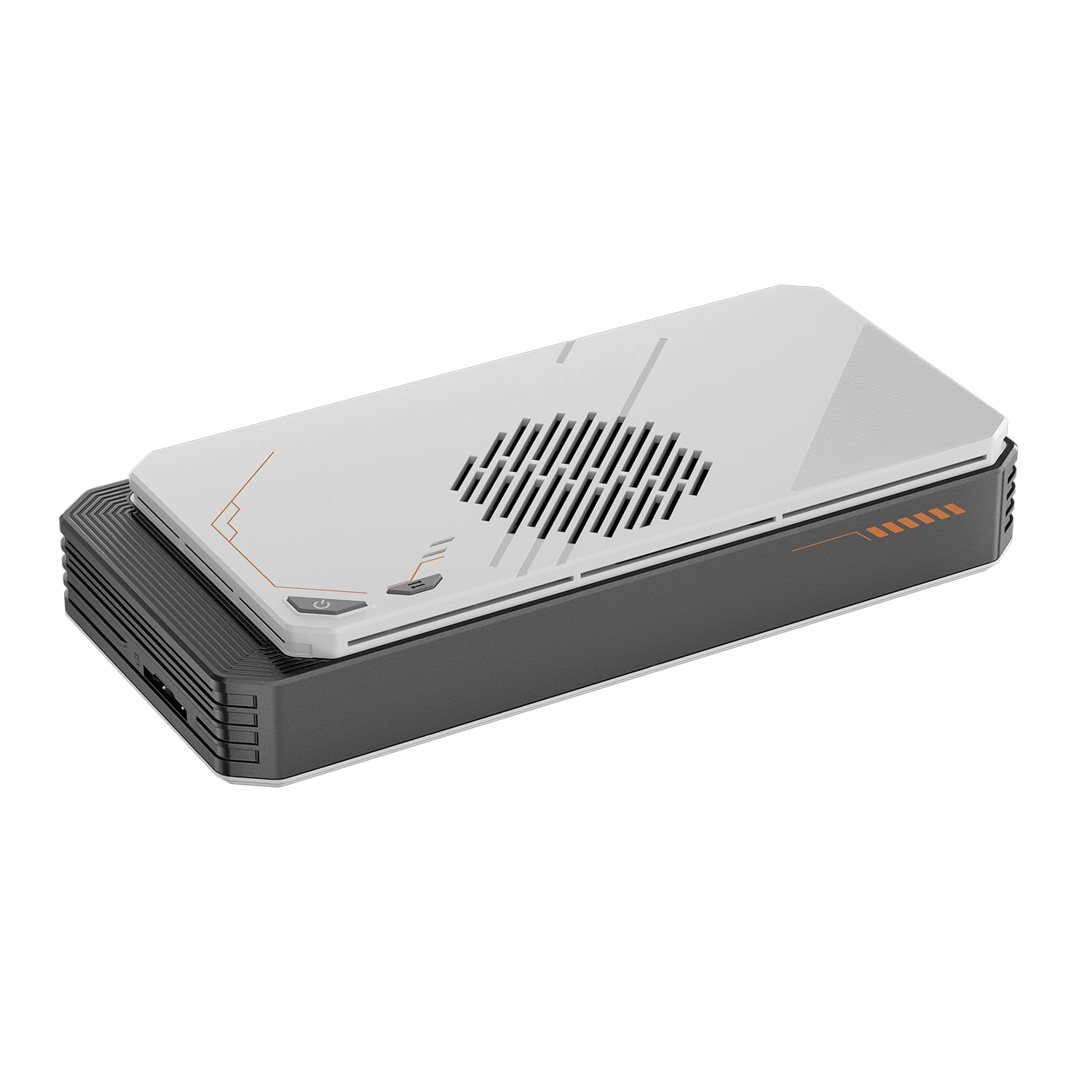
A pocket-sized box with the card built in and OCuLink on board for the lowest-latency hookup.
Same core idea as the ONEXGPU — an integrated AMD Radeon RX 7600M XT with 8GB GDDR6 and RDNA3 architecture, rated to match an RTX 4050 laptop — but tuned for value. It weighs 1.92lb, runs the GPU at a 100W TDP with a Turbo Button up to 120W, and takes Thunderbolt 3/4, USB 4, or OCuLink connections. The old M.2 2280 PCIe 3.0 slot allows up to 4TB of SSD expansion, and outputs cover two HDMI 2.1 at 4k60Hz plus two DisplayPort 2.0 at 4k120Hz across four displays.
What draws the praise first is the price-to-performance ratio, with graphics output a close second — 4K video running smoothly and rendering described as easy work. OCuLink comes up as the connection of choice for the lowest overhead, and Steam OS compatibility is reported via an M.2 adapter. Where it wobbles is consistency: the performance record is mixed, with some units installing cleanly and others fighting through a rough setup. That spread is the honest caveat worth pricing in.
Warranty coverage is stated at a year, with FCC, ROHS, and CE certifications listed alongside factory support and round-the-clock online service. If you want integrated graphics, a compact shell, and the widest port menu without moving up into premium territory, this is the value play to weigh against the ONEXGPU.
Why it earns its spot: an RX 7600M XT, 4TB SSD expansion, and a four-display output in one small shell — that is a lot of capability per dollar for a travel setup.
The smart pick for: budget-conscious travellers who want a built-in card and OCuLink without paying premium prices.
Go in warned: installation varies widely between units, so plan for a possible rough first setup.
8. Khadas Mind Graphics RTX 4060 Ti Dock

A desk-side box with a desktop RTX 4060 Ti inside, speakers on the front, and a lock that holds the GPU connection.
Where the ONEXGPU and BOSGAME go for travel, this one goes for the desktop. A desktop GeForce RTX 4060 Ti on Ada Lovelace architecture sits inside with 16GB of GDDR6, running a GPU clock of 2310 MHz. Paired with a Khadas Mind mini PC, it pushes up to 128 GT/s of transfer speed through PCIe 4.0 x8. Over Thunderbolt 4 or 3 it hands your laptop better graphics, faster processing, and up to 85W of recharge power down the same cable.
The expansion panel is the standout detail for a tidy desk. It carries USB-C, USB-A 3.2, HDMI, DisplayPort, 2.5Gbps ethernet, an SD 4.0 card reader, and a 3.5mm headphone jack — and displays run to 8K at 60Hz across four screens. An integrated 300W GaN supply and a compact cooling system keep the whole chassis to 2.5 liters. A far-field microphone array with noise reduction and dual speakers round it out as an entertainment hub. The Mind Lock Mechanism is the practical touch: it guards the GPU connection against the accidental disconnects that plain eGPU boxes are prone to.
The catch is that this is a closed system — the card is fixed, so you cannot swap it later like the frames. There is also no owner feedback logged yet, so the long-run story is unproven rather than assured. A 1-year warranty covers it. Buy on the spec sheet if the RTX 4060 Ti and the port spread are exactly what you need.
Desk-hub verdict: 2.5 liters holding a desktop RTX 4060 Ti, a 300W GaN supply, two speakers, and a nine-way port panel is a complete workstation in one footprint.
Suits you if: you want a fixed desk hub with serious graphics, audio, and connectivity from one box.
Not for: anyone who plans to upgrade the card later — it is sealed inside.
9. GIGABYTE AORUS RTX 3080 Gaming Box

A water-cooled RTX 3080 sealed inside a plug-and-play Thunderbolt 3 box for serious desktop-level frames.
The headline is the 10GB GeForce RTX 3080 sitting inside, paired with a WATERFORCE all-in-one liquid cooling loop instead of the air coolers used on every frame above. It outputs up to 7680×4320 across supported displays, handles 3D, creative work, and AI tasks, and adds three USB 3.0 ports plus an Ethernet jack. Thunderbolt 3 plug-and-play is the connection method, and the maker warns against unofficial software in the driver chain.
This box shines at raw capability on a laptop. Running modern titles on ultra settings is the use case it was built for, and the liquid loop (a closed cooling system that pumps coolant over the card) keeps the temperature in check under long load. Detecting the card on a Thunderbolt laptop is where the real work lands, though: depending on your machine, it may need some coaxing to come online, and the driver path is the most-discussed subject in the whole listing. That is the fit-note to respect, not a reason to avoid it.
The honest downside is that a 10GB card from this generation is now a mature choice, and the reports mix high praise with outright frustration across units. That spread comes with the territory of a heavyweight box at this power level. If your laptop is Thunderbolt 3 and you want the strongest built-in card on this list, it delivers the frames when it settles in.
Power-first argument
- GeForce RTX 3080 with 10GB for desktop-class frame rates on a laptop
- WATERFORCE all-in-one liquid cooling keeps load temps in check
- Three USB 3.0 ports and an Ethernet jack on the chassis
- Thunderbolt 3 plug-and-play for compatible laptops
What can trip you up
- Driver setup varies by laptop and can need real coaxing
- Some units arrive faulty — reliability is not uniform
- The card is sealed in, so there is no swapping it later
Go for this if: you want the strongest GPU in this group and are prepared to sort the driver connection on your laptop.
Prefer a frame instead if: you value swappable cards and carry about the long-term.
Know the Specs
The Thunderbolt controller chip
The little chip inside each box — the JHL7440 or JHL7540 on most of these — is what translates your GPU’s PCIe data into a Thunderbolt signal. Certified versions pair with a PCIe 4.0 slot and run around 32Gbps, the top of what a Thunderbolt 3 cable can do. When the spec reads PCIe 4.0 x16 or x8, that describes the slot width the card seats into; the Thunderbolt pipe itself is the real ceiling, so a bigger slot does not mean unlimited speed.
Power delivery and the PSU question
PD, or power delivery, is the trickle of charge that rides the same cable back to your laptop or handheld. On these boxes it usually lands around 85W, which is enough to trigger the higher Turbo Mode on a handheld like the ROG Ally X. The GPU itself is fed by a separate power supply — either an ATX/SFX/FLEX unit you add yourself, or a 750W supply pre-installed on the Sonnet boxes. Check that the supply can feed your card, because the GPU is the hungriest part of the build.
OCuLink versus Thunderbolt
OCuLink is a direct PCIe connector that skips the Thunderbolt wrapper and tends to cut latency, which is why some of the compact docks list it alongside Thunderbolt and USB 4. Thunderbolt has the advantage of charging and hot-plug convenience in one cable. If your machine has an OCuLink port, it is often the faster of the two paths; if not, Thunderbolt 3/4 or USB 4 handles the job.
Outputs and resolutions
Display figures here range from 4K UHD across the Sonnet and compact docks up to 8K at 60Hz on the Khadas. More displays and higher resolution mean more pixel bandwidth, so check the port menu against your monitor plan — two HDMI 2.1 and two DisplayPort 2.0 across four screens is a common configuration on the built-in-card docks.
Common Questions
Will a Thunderbolt 3 eGPU enclosure work with my plain USB-C laptop port?
Does the enclosure come with a graphics card inside?
Do I have to buy a power supply separately?
How much performance do I lose compared to a desktop tower?
Can I use a Thunderbolt 3 eGPU with an M1 Mac?
What is the largest graphics card I can fit in a frame?
Is OCuLink better than Thunderbolt for an eGPU?
Do I need special drivers for an eGPU enclosure?
Will the enclosure charge my laptop while running the GPU?
The Bottom Line
For most buyers, the best thunderbolt 3 egpu pick is the Maskedfish MK-L18. It uses certified JHL7540/7440 controllers (the chips that handle the Thunderbolt connection), a 32Gbps path (32 gigabits per second of bandwidth), and 85W PD charging (power delivery that charges your device) — a balance of speed and handheld convenience. If you want a completed, quiet box with the power supply already in place, the Sonnet Breakaway Box 750ex adds four USB-A ports and ethernet for a full desk hub. And if travel and portability are your priority, the BOSGAME GVP-7600M delivers an integrated RX 7600M XT with OCuLink (an external PCIe cable standard) in a compact shell.
One honest nudge before you decide. The MK-L18 earns its top spot on real spec and owner feedback, so if the single-cable charging setup is what your handheld needs, it is the one to start with.
How we choose
We do not accept paid placement. Every pick is matched to a real buyer and a real use-case; we do not hands-on test units.
Sources
Specifications: manufacturer listings and product documentation. Review insights: verified customer reviews, as of November 2026. Pricing: not shown on this page (it changes often); check the current price via the retailer link.
As an Amazon Associate, Tactical Gear Guy earns from qualifying purchases. This does not affect which products we feature.