Specs are compiled from manufacturer listings and verified buyer reviews and can change over time — please confirm the key details on the product page before buying.
If you just want the short answer: buy the DualSense controller first, because it is the one accessory every PS5 owner actually touches. After that, a charging dock saves you from hunting for cables, and a storage drive saves you from deleting games. Everything else on this list fixes a specific annoyance rather than a general one. The picks below are ordered by how much daily grief each one removes, and the budget-friendly options sit at the bottom where they belong.
This guide is built by comparing the manufacturers’ published specifications and the patterns across verified customer reviews, so you get each pick’s real strengths and trade-offs instead of marketing spin.
Some of these accessories plug straight into the console, while others need a spare wall outlet or a USB port on the back of the machine. Knowing which is which before you buy prevents a return trip, so this guide walks through the best sony ps5 accessories by what each one actually solves for you.
Top Picks

How To Choose The Best Sony PS5 Accessories
Your PS5 comes with exactly one controller and no way to charge a second one while you play. That single fact is why most people start their accessory shopping with a controller and a dock. The rest of the list depends on what bothers you most — storage, cooling, audio, or a racing setup.
Start with what plugs into the console and what does not
Some accessories draw power straight from the PS5’s USB ports, front or back. A charging dock like the OIVO uses a USB cable to the console or an AC adapter, so it never needs its own wall socket. Others, like a cooling stand with a fan, sit under the console and add ports of their own. Check the cable length before buying — the OIVO’s cable runs 34.8 inches, which is long enough to reach from the back of a shelf-mounted console.
Match the controller count to the people in the room
One controller is fine for solo play. Two is the minimum for couch co-op, and three is what happens when kids are involved. The OIVO charges two at once in a claimed 2-hour full charge. The Tokluck stand charges dual controllers in a claimed 2.5 hours. If you have a single DualSense and no plans to add a second, a dock is still worth it for the storage and the tidy cable run.
Check the SSD slot spec before you buy storage
The PS5 takes an M.2 2280 drive (a thin stick-shaped drive about 80mm long) with a PCIe 4.0 interface. Both storage picks on this list are 1TB and both come with a heatsink already attached. The SIX drive reads up to 7350MB/s and the FIKWOT reads up to 7100MB/s. Both need a software update and an on-screen format before the console will use them, and formatting erases whatever is on the drive.
Decide if you want audio or silence
A headset solves late-night gaming and voice chat in one move. Look at the connection first: the Sony INZONE H5 runs on a 2.4GHz USB transceiver or a 3.5mm cable, while the Logitech G Astro A20 X lists Bluetooth 5.3 and PLAYSYNC for switching between two systems. Battery life is the second spec to check — the INZONE claims up to 28 hours of continuous wireless play.
Side-by-Side Comparison
| Model | Best For | Connection | Key Spec | Rated | Amazon |
|---|---|---|---|---|---|
| PlayStation DualSense Wireless Controller★ Best Overall | Everyone’s first upgrade | Bluetooth / USB-C | 14 buttons, 280 g | 4.7 | Amazon |
| OIVO PS5 Controller Charger StationBest Value | Two-controller households | USB (34.8-inch cable) | 2-hour full charge | 4.7 | Amazon |
| Tokluck PS5 Cooling StationBest for Desks | Desk setups and long sessions | USB, 3 extra ports | 3-level auto fan, 2.5-hour charge | 4.4 | Amazon |
| Sony INZONE H5 Wireless Headset | Late-night solo play | 2.4GHz dongle / 3.5mm | 40mm drivers, up to 28 hours | 4.4 | Amazon |
| Logitech G Astro A20 X | Multi-console gamers | Bluetooth 5.3 | Under 300 g, 30m range | 4.4 | Amazon |
| HORI Wireless Racing Wheel Apex | Racing game fans | Wireless receiver, 32ft range | 23 buttons, up to 10 hours | 4.3 | Amazon |
| SIX X7400 1TB NVMe SSD | Big game libraries | PCIe Gen4x4, M.2 2280 | Up to 7350MB/s read | 4.5 | Amazon |
| SCUF OMEGA PS5 Controller | Competitive shooters | USB-C, 2.4GHz, Bluetooth 5.0 | 29 buttons, 0.25 kg | 4.3 | Amazon |
| FIKWOT FX910 1TB NVMe SSD | Plug-and-play storage | PCIe 4.0 x4, M.2 2280 | Up to 7100MB/s read | 4.7 | Amazon |
Detailed Reviews
1. PlayStation DualSense Wireless Controller – Midnight Black
Our pick — 4.5+★ from 51,500+ verified ratings; the strongest balance of quality and price.
The one accessory every PS5 game is built around, and the first thing to buy
Nothing else on this list matters if you are still playing on a worn-out pad. The DualSense is the controller Sony built for the PS5, and its two headline features are the reason it earns the top spot. Haptic feedback means the pad physically reacts to what happens on screen — you feel the rumble of a road surface through the grips. Adaptive triggers mean the L2 and R2 buttons push back with different tension, so pulling a bowstring or squeezing a brake pedal feels heavier than a light tap. No standard gamepad pushes back like that.
The practical numbers are just as relevant. It carries 14 buttons and weighs 280 g, which keeps long sessions comfortable without feeling hollow. You get a built-in microphone for quick chat and a 3.5mm jack for plugging in a headset directly. The dedicated mute button kills voice capture with one press, which is the fastest way to silence a room mid-match. Connection is Bluetooth or USB-C, and it pairs with Windows PC, Mac, Android, iOS, and the PS5 — so one pad covers your console and your laptop.
What wins people over is the build. Buyers report the buttons stay crisp after a year of daily use, and the battery lasts long enough that charging is a once-a-week habit rather than a nightly ritual. The honest trade-off is the thumbsticks — a plastic-on-plastic design that can develop a faint creak or drift after heavy use, which is exactly why a charging dock and a spare pad are worth considering together. As owners put it about the build: “Over a year of constant use and still going strong.”
What earns it first place
- Haptic feedback and adaptive triggers turn in-game actions into physical sensations you can feel through the grips
- Works across PS5, PC, Mac, Android, and iOS with Bluetooth or the USB-C cable
- Built-in mic plus a 3.5mm headset jack and a one-press mute button
- 280 g and 14 buttons — comfortable for long sessions without feeling flimsy
Where it asks for care
- The thumbsticks can develop a creak or drift after heavy use, so treat them as the wear part
- Value is the one split topic in owner feedback — some find it a fair deal, others expect more for the same money
Buy this if: you own a PS5 and want the pad its games were designed around — the haptics and trigger tension are the whole point of the console.
Think twice if: you mainly play competitive shooters and want swappable sticks and rear paddles; the SCUF further down is built for that job.
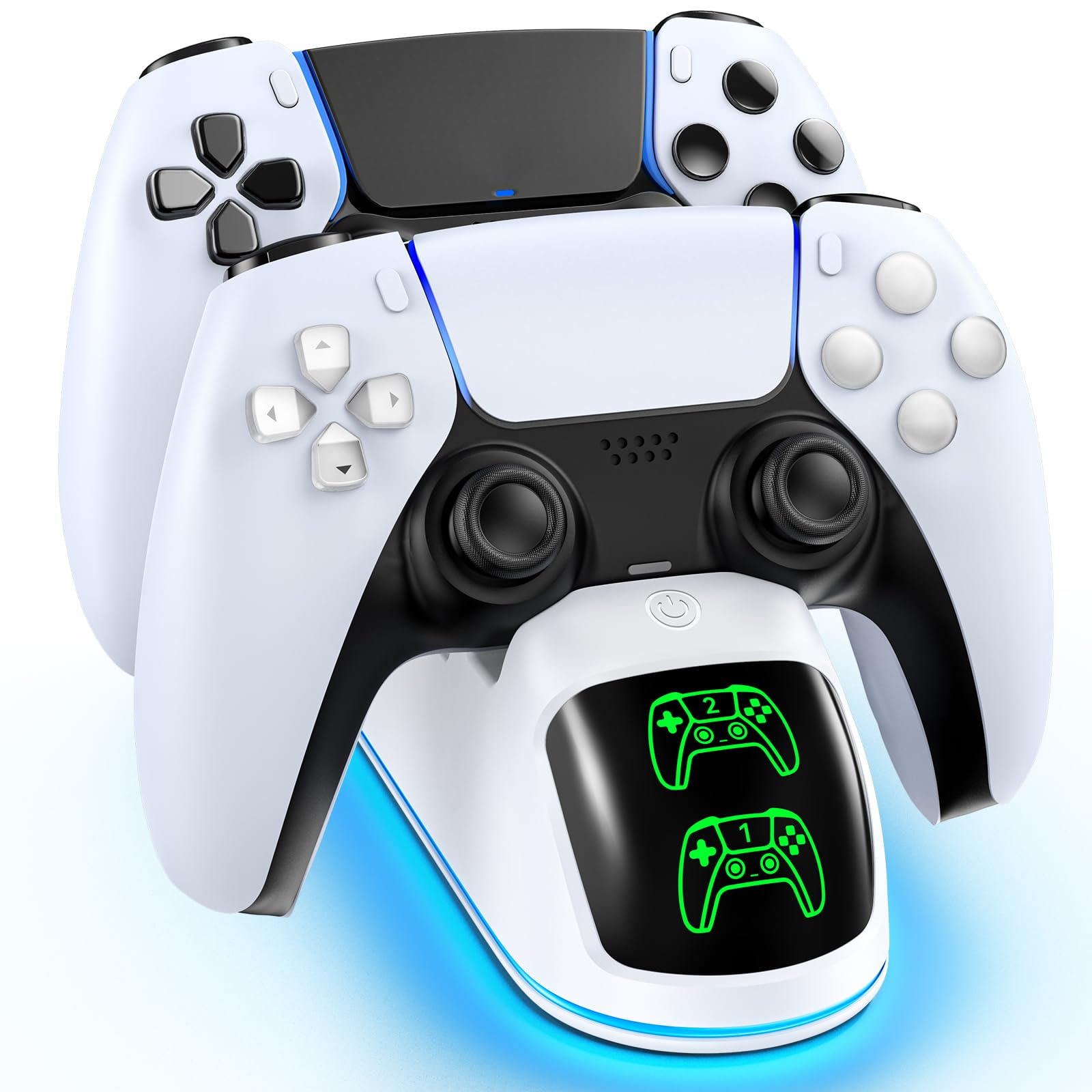
2. OIVO PS5 Controller Charger Station
Two controllers, one dock, and no more hunting for the charging cable
Two hours gets both pads from empty to full. That is the number that matters here, and it is the reason this dock is the easiest add-on to justify. It charges a DualSense and a DualSense Edge at the same time, and the 34.8-inch USB cable reaches the PS5’s front or back ports without an extension. Drop a controller on the cradle and it starts charging — no plug to line up, no fiddling in the dark.
The RGB strip is the fun part, not the reason to buy. It runs 9 lighting modes with touch control, and a long press shuts it off entirely for a bedroom setup. What actually earns the dock its place is the dual status LEDs: red while charging, green when done, one light per controller. That means you can see at a glance whether both pads are ready before a session starts. The non-slip pads underneath keep the whole thing planted when you drop a controller onto it one-handed.
What wins people over is how thoroughly it fixes the cable problem. It charges reliably, docks without fiddling, and the built-in protective chip guards against over-current, over-voltage, and short circuits — which is what makes overnight charging a reasonable habit. The recurring gripe is cosmetic in comparison: the housing is light plastic, and a rare unit has needed replacing. Compared with the Tokluck stand lower down, this one has no fan and no console mount — it just charges, and it charges well.
Why two pads change things: a second controller is useless if it is always dead. This dock keeps both topped up, so couch co-op stops being a negotiation about who gets the charged one.
The size of the trade: no cooling fan and no console cradle. If you want your PS5 mounted vertically with active airflow, that is the Tokluck’s job.
The right call for: any household with two controllers and one wall outlet already spoken for.
Look elsewhere when: your PS5 needs airflow help or a vertical stand — this dock does one job only.
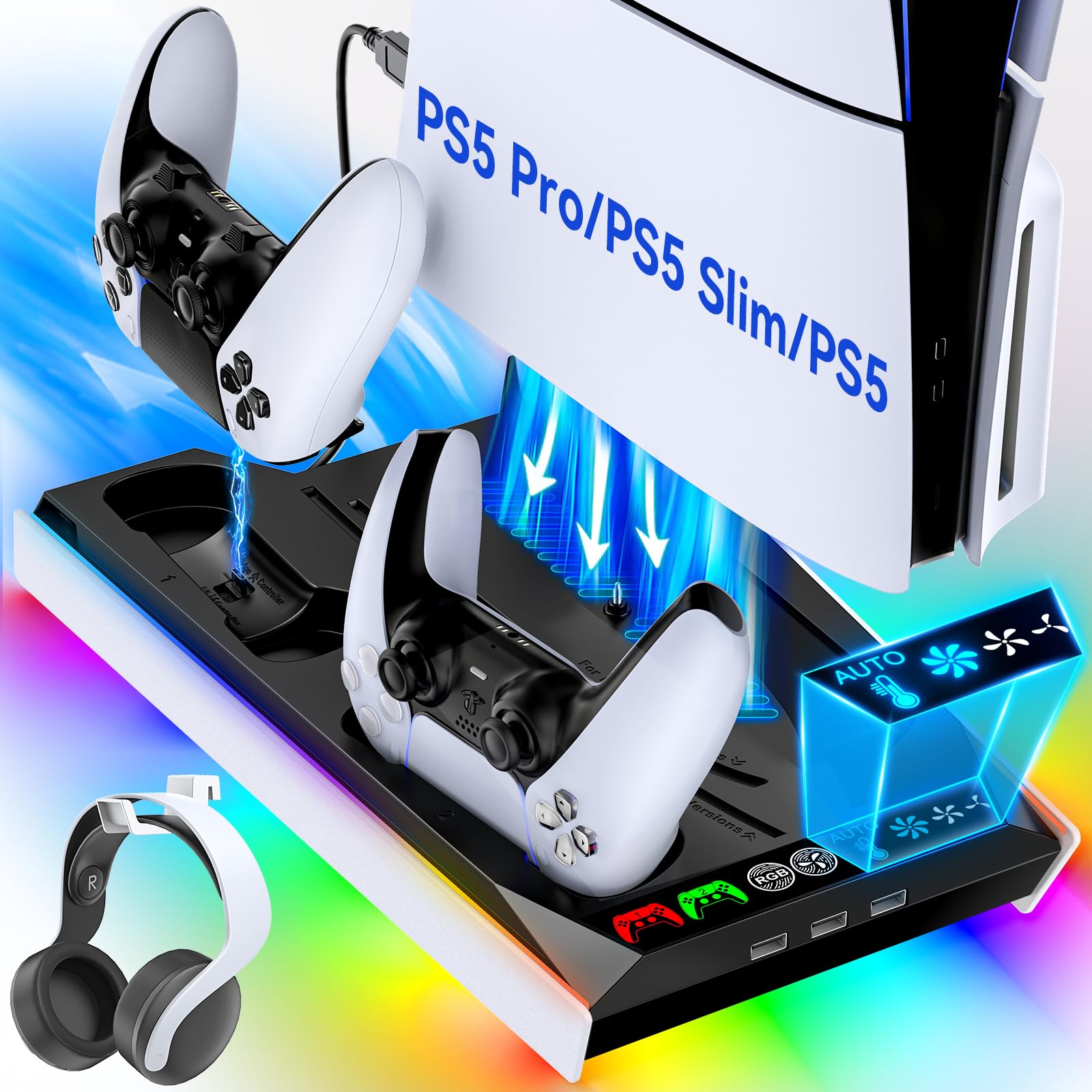
3. Tokluck PS5 Cooling Station with Auto Turbofan
A vertical stand that watches the temperature and changes fan speed on its own
Here is the a neat extra: a built-in temperature probe decides the fan speed for you. The automatic mode steps between low below 95°F, medium from 95 to 98.6°F, and high above 98.6°F. Press the switch and you can take manual control instead, cycling high, medium, low, auto, and off. The fan also remembers the last speed it used when you power the console back up, so you are not re-selecting it every session.
It holds the console vertically, which is the arrangement most people want on a shelf. The base mounts with screws, and a 0.39-inch charging cable routes up from underneath, so nothing dangles across the front. Add three USB ports on the side and you have somewhere to plug in a headset dongle or a controller charging cable. The controller cradle has a movable port that slides up or down to fit either the original DualSense or the Edge model, with a claimed 2.5-hour full charge and a red-to-green LED.
Cooling is the honest split. Some owners find it does its job on long sessions and in summer heat, and the stand is genuinely easy to assemble. Others notice no temperature difference at all, and a few units have arrived with controller ports that do not connect. Treat the fan as gentle airflow support rather than a fix for a badly ventilated cabinet, and press each controller firmly into the sliding port until it seats. Nine RGB modes and a brightness control round it out, with a memory function that recalls your last setting.
The parts that earn their desk space
- Automatic fan speed driven by a temperature probe, with a manual high/medium/low/auto/off override
- Sliding charging port fits both the standard DualSense and the Edge controller
- Three side USB ports for headset dongles and extra cables
- Screw-mounted base and a 0.39-inch internal cable run keep the console stable and tidy
What to go in knowing
- The fan is airflow support, not a cure — inside a closed cabinet it will not rescue a hot console
- The 9 RGB modes glow, which is charming in a living room and less so in a bedroom
Reach for this if: you want your PS5 standing upright with its controllers docked and a few spare USB ports on the desk.
Pass on it if: your console already sits in open air and you have no interest in a fan — a plain charging dock does the same job for less clutter.
4. Sony INZONE H5 Wireless Over-Ear Gaming Headset

Sony’s own headset, with on-screen PS5 audio controls and up to 28 hours per charge
Sony makes both the console and this headset, and that shows up in the details. Plug the 2.4GHz USB transceiver into the PS5 and the console shows automatic on-screen settings plus a game/chat balance slider on the dashboard. No app hunting, no driver install. The 40mm dynamic drivers handle the low end, and Personalized 360 Spatial Sound gives you directional cues — useful when a rival’s footsteps should tell you which side of the room they are on.
Battery life is the standout figure: up to 28 hours of continuous wireless play, with a 3.5-hour charge time. As a rough math, that covers a long weekend of sessions between top-ups. A detachable boom microphone with AI-based noise canceling strips room noise out of your voice, and you can fall back to a 3.5mm cable when the battery is low or when you want zero wireless risk. Sony built it with FNATIC, an esports organisation, which explains the aggressive fit and the INZONE Hub software for equalizer and mic tweaks.
The recurring gripe is size — the cups are bulky, closer to aviation gear than a sleek pair of headphones, and the headband clamps firmly. Some owners also find the mic mixed: clear for some, thin for others. And as with any Sony accessory, check the warranty path before you lean on it, because a few units have gone quiet after the return window. Compared with the Logitech below, this one wins on console integration and loses on multi-system switching.
The spec to weigh: up to 28 hours of wireless play is the number that keeps you off the charging cable for days, and the 2.4GHz dongle is what delivers it without Bluetooth dropouts.
Best for: PS5-only players who want the console’s own on-screen audio controls without leaving the game.
Not for: anyone who needs one headset across a PS5, an Xbox, and a Switch — the Logitech handles that hand-off far better.
5. Logitech G Astro A20 X Gaming Headset
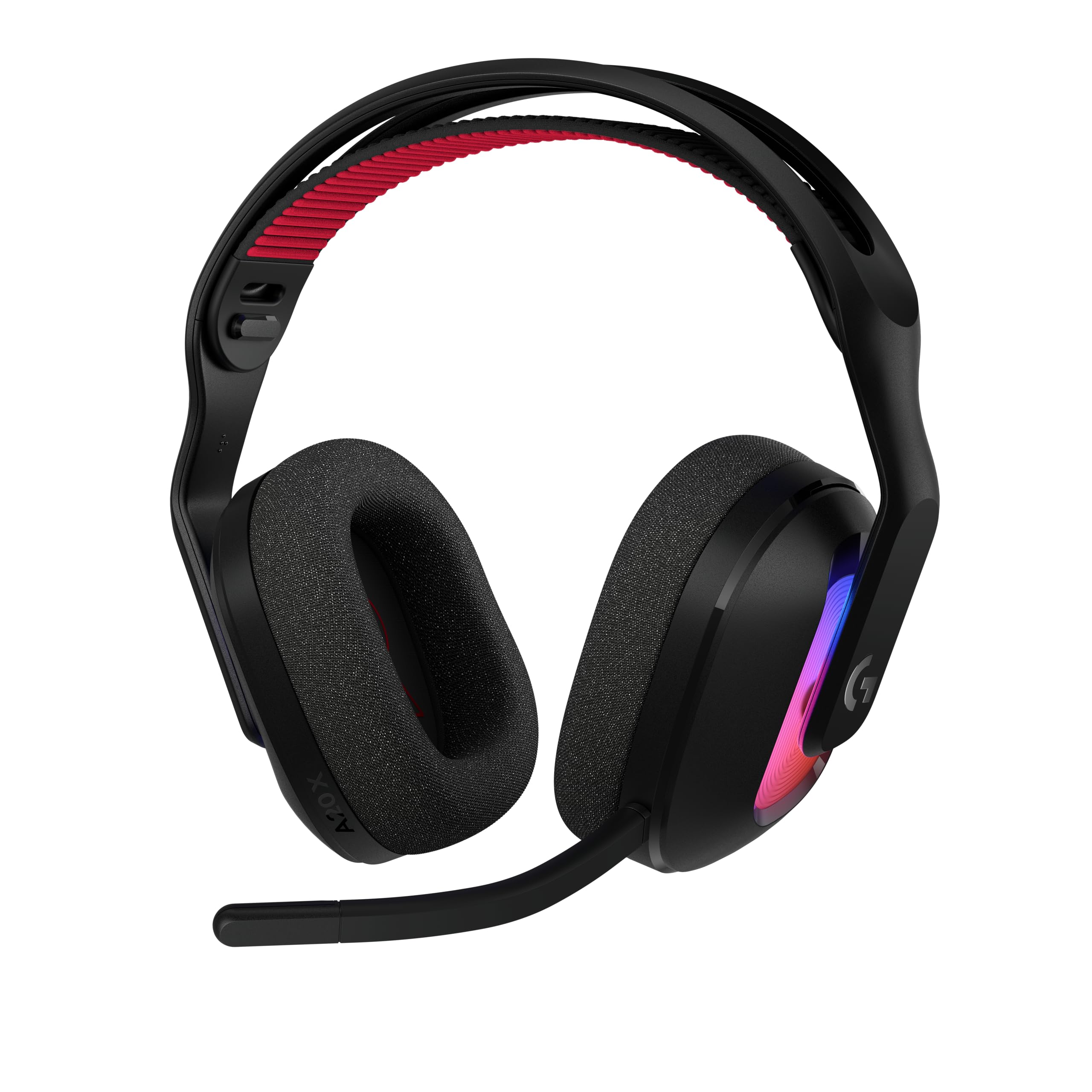
PLAYSYNC swaps audio between PS5/PC and Xbox/Switch without unplugging a dongle
If your gaming spans more than one console, this is the pick. PLAYSYNC AUDIO lets you switch audio between a PS5/PC setup and an Xbox/Switch/Switch 2 setup, so you are not unplugging dongles every time you change seats. Bluetooth 5.3 covers the wireless side with a listed range of 30 meters, and the whole headset weighs under 300 g — light enough that the top of your head is not the thing that ends a session.
The microphone is the sleeper feature. It runs at 48 kHz with Blue VO!CE tuning, which is a software layer that shapes your voice before it leaves the headset. In practice that means your friends hear you clearly rather than through a tin can, and you can mute yourself with a button press on the earcup. The 8-zone LIGHTSYNC RGB is there if you want a lit-up headset, and the built-in MixAmp lets you balance game and chat volume without leaving the game — on PC and Xbox specifically.
The trade-off is Bluetooth coexistence: game audio and a Bluetooth call cannot always run at the same time, and you will notice it if you take calls while playing. Otherwise the sound is clean, the connection holds, and the bass lands hard without swallowing the mids. Against the Sony INZONE above, this one gives up console-native menus but gains the ability to serve every machine in the house.
Why multi-console owners pick it
- PLAYSYNC swaps audio between PS5/PC and Xbox/Switch setups without rewiring
- 48 kHz boom mic with Blue VO!CE tuning keeps voice chat clear
- Under 300 g with a listed 30-meter Bluetooth range
- Built-in MixAmp for game/chat balance and an easy on-earcup mute
Before you commit
- Bluetooth audio and game sound do not always run together, which bites if you take calls mid-session
- MixAmp balancing is listed for PC and Xbox, so PS5 chat balancing is less flexible than on those systems
Pick this one if: your entertainment center has more than one console under it and one headset has to serve them all.
Skip the hassle if: you only ever play on the PS5 — the Sony’s console-native menu integration is cleaner for that single job.
6. HORI Wireless Racing Wheel Apex

A wheel, paddle shifters, and full-size pedals for less than a mid-range controller
Twenty-three buttons, paddle shifters, and a full-size pedal set — this is a proper racing layout rather than a motion-sensing gimmick. The wheel clamps to a desk, table, or racing stand, and the clamp is sturdy enough that it stays put when you wrestle the wheel through a tight corner. At 2,520 g it is heavy enough to feel planted, which is the point: a light wheel that slides around is worse than no wheel at all.
Wireless range is listed at up to 32 feet through the included receiver, and battery life runs up to 10 hours. The box includes a 6.6ft charging cable so you can keep playing wired while it tops up — a sensible fallback given that 10 hours is a weekend figure, not a month. Sony officially licenses it, which is why it connects to the PS5 cleanly and shows up as a recognised controller. It also works on PS4 and Windows 11/10.
The honest catch is the wireless link. Mid-race disconnects are the single most repeated complaint, and there is no headphone jack on the wheel for private audio. The pedals also shift a little under hard braking. None of that makes it a bad buy — it is the cheapest serious wheel on this list and the setup is quick. Just plan to sit close to the receiver and keep the charging cable handy for long sessions.
What you are really buying: paddle shifters, full-size pedals, and a 32ft wireless range for a desk-mounted setup that feels like a cockpit rather than a pad.
The limit to accept: no headphone jack and a wireless link that can drop mid-race — a wired session solves the second one.
Worth it for: racing game fans who want wheel-and-pedal feel without a full rig commitment.
Wait if: you play competitive online races where a dropped connection costs you the finish — a wired wheel is the safer bet there.
7. SIX X7400 1TB NVMe M.2 SSD for PS5
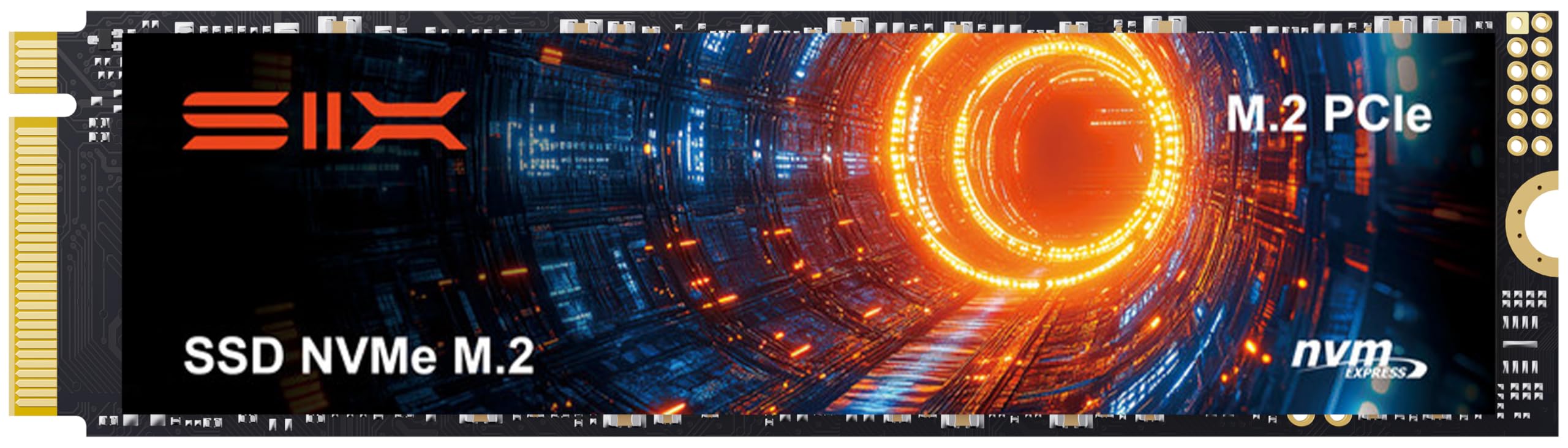
The fastest read speed on this list, and it comes with the screwdriver to install it
Up to 7350MB/s sequential read puts this drive at the top of the storage picks here. That figure is a PCIe Gen4x4 speed — four lanes of data moving at once — and it is the reason games load at the same pace they do from the console’s own internal drive. The drive is an M.2 2280 stick with a heatsink already fitted, and the box includes a screw, a screwdriver, and a quick start guide so you are not hunting for hardware mid-install.
SIX backs it with a 5-year limited warranty. The drive is compatible with laptops and desktops as well as the PS5, which matters if you ever transplant it out of the console. Owners mention the boot and responsiveness jump when moving off an older drive, and the formatting process on PS5 is quick once the console software is updated. Firmware-level compatibility with Gen3 slots means it will still work in a machine that cannot feed it the full speed.
One practical note: the installation guide does not walk you through the PS5 slot in detail, and a few buyers relied on video walkthroughs to fit the heatsink and seat the drive. That is a documentation gap, not a hardware fault. Against the FIKWOT below, this drive reads 7350MB/s versus 7100MB/s, so it edges ahead on raw speed while the FIKWOT edges ahead on rated satisfaction.
Where the drive delivers
- Up to 7350MB/s PCIe Gen4x4 reads — the quickest figure on this list
- Heatsink, screw, and screwdriver all in the box
- 5-year limited warranty and compatibility with PS5, laptop, and desktop
- Formatting on the console is quick once the system software is current
The honest friction points
- The printed guide is thin on PS5-specific steps, so budget a few minutes for a video walkthrough
- The included screwdriver is not magnetic, which makes seating the screw fiddlier than it should be
Choose it for: a big library of PS5 games and the fastest read speed available on this list, with every install part in the box.
Consider the other drive if: you would rather save the walkthrough and get a heatsink that arrives pre-fitted with clearer fitment notes.
8. SCUF OMEGA PS5 Wireless Performance Controller
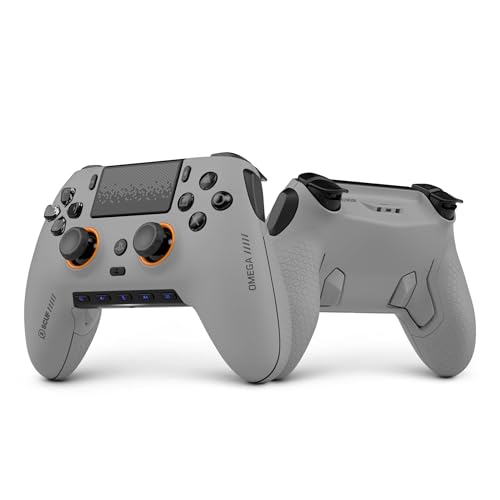
Eleven extra inputs for the player who wants a paddle under every finger
Count the inputs and you see the point. There are four rear paddles, two side action buttons, and G-Keys on top of the standard layout, for 29 buttons total. On a standard DualSense you get 14. That gap is what this controller is selling: more things your fingers can reach without leaving the sticks. The Omron mechanical switches give the triggers and D-Pad a mouse-click feel — a shallower, faster press than a membrane button.
The SCUF Mobile App is where the tuning happens. You can reshape your trigger and thumbstick response curves, remap the four action buttons, and dial in a true 0% thumbstick deadzone from your phone. The Thumbsticks are TMR units, built to resist the wear that leads to drift and jitter. The faceplate is magnetic and lifts off with no tools, so swapping thumbsticks, the D-Pad, or the anti-friction rings takes seconds. Concave or domed, short or tall — short for faster movement, tall for finer aim.
Wireless runs on tune 2.4GHz PS5 connectivity, with Bluetooth 5.0 as a fallback for tablets and phones. The build is the thing that wins people over: the whole unit weighs 0.25 kg and feels dense and precise in hand, and the buttons snap back cleanly. The catch is price positioning and the occasional connectivity hiccup — a dropped connection has been reported before a firmware update through the app sorted it out. Left-stick drift also gets mentioned, which is worth knowing since drift is exactly what the TMR sticks are meant to prevent.
The number that sells it: 29 buttons against the DualSense’s 14 — the extra paddles and side buttons let your fingers stay on the sticks while you jump, crouch, and reload.
Built for: Warzone and shooter players who want trigger stops, paddle inputs, and a phone-tunable deadzone.
Overkill for: single-player story games and casual couch play, where the DualSense’s haptics do more for you than extra paddles will.
9. FIKWOT FX910 1TB NVMe SSD for PS5

1TB of extra storage with the heatsink pre-attached — one screw and a format, about five minutes
Adding 1TB of internal storage is the single biggest quality-of-life fix for a PS5 owner, and this drive makes it about as painless as the job gets. The aluminium heatsink arrives already attached, so you are not assembling anything or guessing at thermal pads. It is a PCIe 4.0 x4 NVMe drive in the M.2 2280 shape the PS5 expects, and it reads at up to 7100MB/s. The process is: update the console software, power down, fit the drive, then let the on-screen steps format it.
FIKWOT backs it with 5-year after-sales service, and the box includes the drive, a screwdriver, and a printed manual. Owners describe the install as a five-minute job with one screw, and the formatting as quick once the console restarts. Games run straight from the drive at internal-drive speeds, so your library stops being a list of things to delete. The heatsink keeps temperatures in check during long sessions, which is the part that protects the drive’s lifespan rather than its speed.
The catch is raw pace: at up to 7100MB/s it reads 250MB/s slower than the SIX drive above, and on a PS5 you will not feel that gap in load times. What you do get is a cleaner install experience and a drive rated slightly higher on satisfaction than its faster rival. The aluminium heatsink adds a little thickness, so if you also plan to fit it in a desktop PC, check clearance first.
The friction it removes: no heatsink assembly, no thermal pad guesswork — just update, power off, one screw, format. That is the entire job.
What you give up: a little top-end read speed against the SIX drive, which on a PS5 is a number on paper rather than a difference you notice.
Right for: anyone who wants the storage expansion done in one sitting with the fewest possible steps.
Not the one for: PC builders who need a specific heatsink height to clear a graphics card — check fitment rather than assume.
Know the Specs
PCIe Gen4x4 Read Speed (MB/s)
This is how fast data can be pulled off an SSD, measured in megabytes per second (MB/s). The PS5 uses a PCIe 4.0 slot, so a Gen4x4 drive (four data lanes running at once) is the target. The SIX X7400 lists up to 7350MB/s and the FIKWOT FX910 lists up to 7100MB/s. Both sit above what the console needs to run games directly, which is why load times feel identical on either drive. A higher number is a nice bullet point, but it does not translate into a faster game once you pass the console’s requirement.
M.2 2280 and the Heatsink
M.2 2280 describes the physical shape of the drive: 22mm wide and 80mm long. That is the size the PS5’s expansion bay is built to accept. The heatsink is a metal plate that pulls heat away from the drive’s chips; without one, a fast SSD can slow itself down to avoid overheating. Both storage picks here include a heatsink — the FIKWOT’s aluminium one comes pre-attached, while the SIX ships one in the box with the mounting hardware. Never run a PS5 expansion drive bare, and never stack the console’s own metal cover over an unfitted heatsink.
Common Questions
Do I need a separate charging dock, or can I just plug the controller into the PS5?
Will an M.2 2280 SSD void my PS5 warranty?
What is the difference between the two SSDs on this list?
Does a PS5 cooling stand actually lower console temperature?
Can I use a PS5 headset on PC as well?
How long does the DualSense battery last, and should I buy a second controller?
Is a racing wheel worth it over a standard controller for racing games?
Will a performance controller like the SCUF OMEGA work on the PS5 without extra software?
How do I keep my controllers from drifting?
Do I need a cooling stand if my PS5 already sits in open air?
The Bottom Line
Most players should buy the PlayStation DualSense Wireless Controller first. It is the one piece of hardware every game is built around, and its haptic feedback (fine vibration that mimics surfaces and impacts) and adaptive triggers (triggers that push back with real resistance) are physical sensations no add-on can fake. Want the cable clutter gone and two pads always ready? The OIVO PS5 Controller Charger Station fills two controllers in a claimed 2-hour charge and shows you when each is done. For the biggest quality-of-life fix on the whole list, reach for the FIKWOT FX910 1TB NVMe SSD (a 1TB NVMe drive, a fast stick-shaped storage drive). Its heatsink (a metal plate that pulls heat off the drive) arrives pre-attached, so expanding your game library takes one screw and a quick format. If racing is your game, swap that last pick for the HORI Wireless Racing Wheel Apex instead, and you get pedals and paddle shifters for the price of a mid-range accessory. The DualSense backs that up with 4.5+ stars across 51,000+ owners, the longest track record of any pick here.
How we choose
We do not accept paid placement. Every pick is matched to a real buyer and a real use-case; we do not hands-on test units.
Sources
Specifications: manufacturer listings and product documentation. Review insights: verified customer reviews, as of November 2026. Pricing: not shown on this page (it changes often); check the current price via the retailer link.
As an Amazon Associate, Tactical Gear Guy earns from qualifying purchases. This does not affect which products we feature.