Specs are compiled from manufacturer listings and verified buyer reviews and can change over time — please confirm the key details on the product page before buying.
If you want the shortest answer: a truly slim wireless mouse should disappear into a bag pocket and still track cleanly on a cafe table. The Logitech Pebble Wireless Mouse gets closest to that balance, holding 4.5+ stars across 39,000+ owners, and it pairs over Bluetooth or a 2.4 GHz receiver without fuss. Below you will find nine low-profile mice worth knowing about, sorted so the strongest all-rounder comes first and the specialist picks follow.
This guide is built by comparing the manufacturers’ published specifications and the patterns across verified customer reviews, so you get each pick’s real strengths and trade-offs instead of marketing spin.
Slimness is only half the story here — a mouse that slides into a tablet sleeve but cramps your hand by lunchtime is a false economy. That trade-off shapes every pick in this slimmest wireless mouse roundup.
Top Picks


How To Choose The Best Slimmest Wireless Mouse
The thin mouse you actually keep using is the one whose shell height matches your grip — not the one with the smallest number on the spec sheet. A flat shell that measures barely more than half an inch tall forces your fingers into a claw position. That is fine for short bursts and brutal for an eight-hour spreadsheet day. Pick the shell height for your grip first; treat thickness and DPI as tiebreakers.
Thickness and shape: the real first question
Thickness is the headline number in this category, and it is the one buyers fixate on. A mouse around 0.9 inches thick, like the Magnito, slips into a jeans pocket with room to spare. A twist-to-flat model like the Dell MS700 or the Microsoft Arc can shrink even further for packing. Just be honest with yourself about the cost: the flatter the shell, the less of your palm gets to rest on anything.
Ask yourself where the mouse lives. If it rides in a backpack pocket and gets pulled out a few times a day, flat is a win. If it sits on a desk for hours at a stretch, a shell with a little arc under your hand will save you cramping later.
Bluetooth versus a USB receiver
Bluetooth means no dongle to lose and an instant pair with a laptop or tablet. A 2.4 GHz receiver (a small USB plug that talks to the mouse on its own dedicated channel) is the safer bet if you have ever fought with a dropped Bluetooth link. Several picks here offer both, which is the arrangement worth hunting for — you get the dongle for a stubborn work laptop and Bluetooth for the tablet on the train.
Battery life: months versus rechargeable
Two philosophies collide in this category. Alkaline mice like the Logitech Pebble run for many months on a single cell and never need a cable. Rechargeable models such as the Satechi Slim EX and the DELUX MF20 use an internal battery and a USB-C port, so you trade a cable every so often for never buying batteries again. Neither is wrong — just decide whether you would rather swap AA cells or plug in a USB-C cable.
Quiet clicks and sensor accuracy
Silent switches matter more than they sound if you share a library table, a train carriage, or an open-plan office. As for the sensor, most slim mice are pitched at everyday pointing and scrolling, and that is exactly what they are good at. DPI (dots per inch — how far the cursor travels for each inch you move the mouse) ranges from a modest 1200 on the HP Z3700 G2 up to 4000 on the DELUX MF20, and higher is only useful if you want fast cursor sweeps across a big monitor.
Side-by-Side Comparison
| Model | Best For | Connectivity | Battery | DPI | Amazon |
|---|---|---|---|---|---|
| Logitech Pebble (Blueberry)★ Best Overall | Everyday all-rounder | Bluetooth + USB | 19 months | — | Amazon |
| Logitech M350s Pebble 2Best for Multi-Device | Three-device hopping | Bluetooth + USB | 18 months | — | Amazon |
| HP Z3700 G2Best Plug-and-Go | Simple plug-and-go | 2.4 GHz wireless | 16 months | 1200 | Amazon |
| Magnito Magnetic Mouse | Tablet and MacBook pairing | Bluetooth 5.0/3.0 | 18 months | — | Amazon |
| DELUX MF20 Sliding Mouse | Highest sensitivity | Bluetooth 5.2 + USB | 300mAh rechargeable | 4000 | Amazon |
| Satechi Slim EX | Desk-worthy build | 2x Bluetooth 5.3 + USB-C | Rechargeable, 3 months | — | Amazon |
| Dell MS700 Travel Mouse | Twist-to-off travel | Bluetooth 5.0 | 2 x AAA | 4000 | Amazon |
| Microsoft Surface Arc (Violet) | Folds flat | Bluetooth | 2 x AAA | — | Amazon |
| Microsoft Arc Mouse (Black) | Snap-flat portability | Bluetooth | Batteries included | — | Amazon |
Detailed Reviews
1. Logitech Pebble Wireless Mouse Blueberry
Our pick — 4.5+★ from 39,500+ verified ratings; the strongest balance of quality and price.
A pocket-sized pebble shell that runs 19 months on one AA battery.
This is the mouse to buy if you want one slim shape that handles the office desk, the train tray table, and the coffee shop without extra gear. Logitech’s 19-month battery figure is the number that makes it a set-and-forget accessory. That dwarfs the 16 months the HP Z3700 G2 gives you on its single AA, so you are swapping far fewer cells over a working year.
Its rounded shell is easy to scoop up off a table, and the rubber scroll wheel has a wider feel than the thin plastic strips some flat mice use. Bluetooth pairs in seconds to a MacBook or iPad, and the 2.4 GHz receiver is there when a work laptop wants a dedicated link instead. Silent clicks mean your left and right taps do not carry across an open-plan desk.
The catch is the flattening itself. A shell this low gives your palm nothing to lean on, so very long sessions can bring on a dull ache in the base of your hand. That is the price of slipping it into a pocket without a bulge. Buyers put it plainly: “It’s small and unobtrusive and it is silent.”
What earns it first place
- 19 months on a battery — you stop thinking about charging entirely.
- Bluetooth and a 2.4 GHz receiver in one body, so no laptop is left out.
- Rubber enclosure and matte finish that resist a scuff in the bag.
- A shape that scoops up easily and fits small hands comfortably.
The honest trade-off
- Low shell height means no palm rest for long marathon sessions.
- Some Mac pairings can feel skittish — the safe fallback is the included receiver.
Go for it if: you want one inexpensive slim mouse that travels light and lasts months without a cable.
Think twice if: your hand wants a taller arch under the palm for eight-hour days.
2. Logitech M350s Pebble 2 Mouse
Three devices, one button press, and a shell made partly from old plastic.
If you bounce between a work laptop, a home PC, and a tablet all day, this is the one to look at first. An Easy-Switch button lets you pair Bluetooth to three devices and hop between them without re-pairing anything. Logitech rates it at 18 months of battery life, and it goes to sleep on its own to stretch that further. A battery is included, so it works out of the bag.
The slim round body measures 4.3 inches long by 3 inches wide, which keeps it small enough for a laptop sleeve without feeling toy-like under your fingers. Its plastic shell is made from a minimum of 58% certified post-consumer recycled plastic — an easy win if that matters to you. Silent Touch Technology is claimed to remove 90% of click noise, so the click is dulled rather than sharp.
The middle button is customizable through the Logi Options+ app, and you can assign shortcuts to apps like WhatsApp and Spotify. That is a small feature with real value for a commuter. Note that the Logi Bolt USB receiver is not included, so a Bluetooth-resistant machine is not the target here.
Where it shines: the three-device switching is a genuine time-saver on a shared desk, and the recycled-plastic build costs the buyer nothing in feel.
Small caveat: it relies on Bluetooth, so if your laptop has a flaky radio, this is the pick to skip past for a receiver-based one.
The right call for: anyone whose day hops between screens and who wants that without a dongle or a cable.
Not the one for: a machine that fights Bluetooth — the Bolt receiver is sold separately.
3. HP Z3700 G2 Wireless Mouse – Natural Silver
A plug-and-go 2.4 GHz travel mouse with a 16-month AA battery.
This is the pick for anyone who wants a mouse that just works — plug the 2.4 GHz receiver into a laptop and the cursor moves. HP rates it at 16 months on one AA battery, which is a shorter run than the Logitech Pebble’s 19 months but still long enough to forget about for a whole year. Blue LED tracking lets the sensor keep grip on surfaces where a shiny desk would defeat it.
The claimed headline on quality is the number here: it is the aspect buyers praise most, with 295 mentions, and that is a lot of goodwill for a mouse in the value tier. Its slim profile rides well in a backpack’s small pocket, and the 1200 DPI optical sensor is plenty for everyday pointing and clicking. At 2 buttons it stays deliberately simple, so there are no extra shortcuts to learn.
Functionality gets mixed feedback, with some mentioning scroll wheel trouble — the one recurring gripe worth knowing. Most buyers seem to land on a working unit and get on with their day. It is a modest, dependable tool rather than a fancy one.
Why it earns a place
- Genuinely slim profile that slips into laptop sleeves and small pockets.
- Blue LED sensor tracking that handles uneven surfaces better than many rivals.
- Simple 2-button layout that needs no setup beyond plugging in the dongle.
What to weigh
- Scroll wheel gets the mixed feedback — check it works on arrival.
- No Bluetooth, so you need a free USB-A port for the receiver.
Buy this one if: you want the simplest possible connection and a bag-friendly shell on a smaller budget.
Steer away if: you need Bluetooth or a third button for shortcuts.
4. Magnito Magnetic Bluetooth Mouse
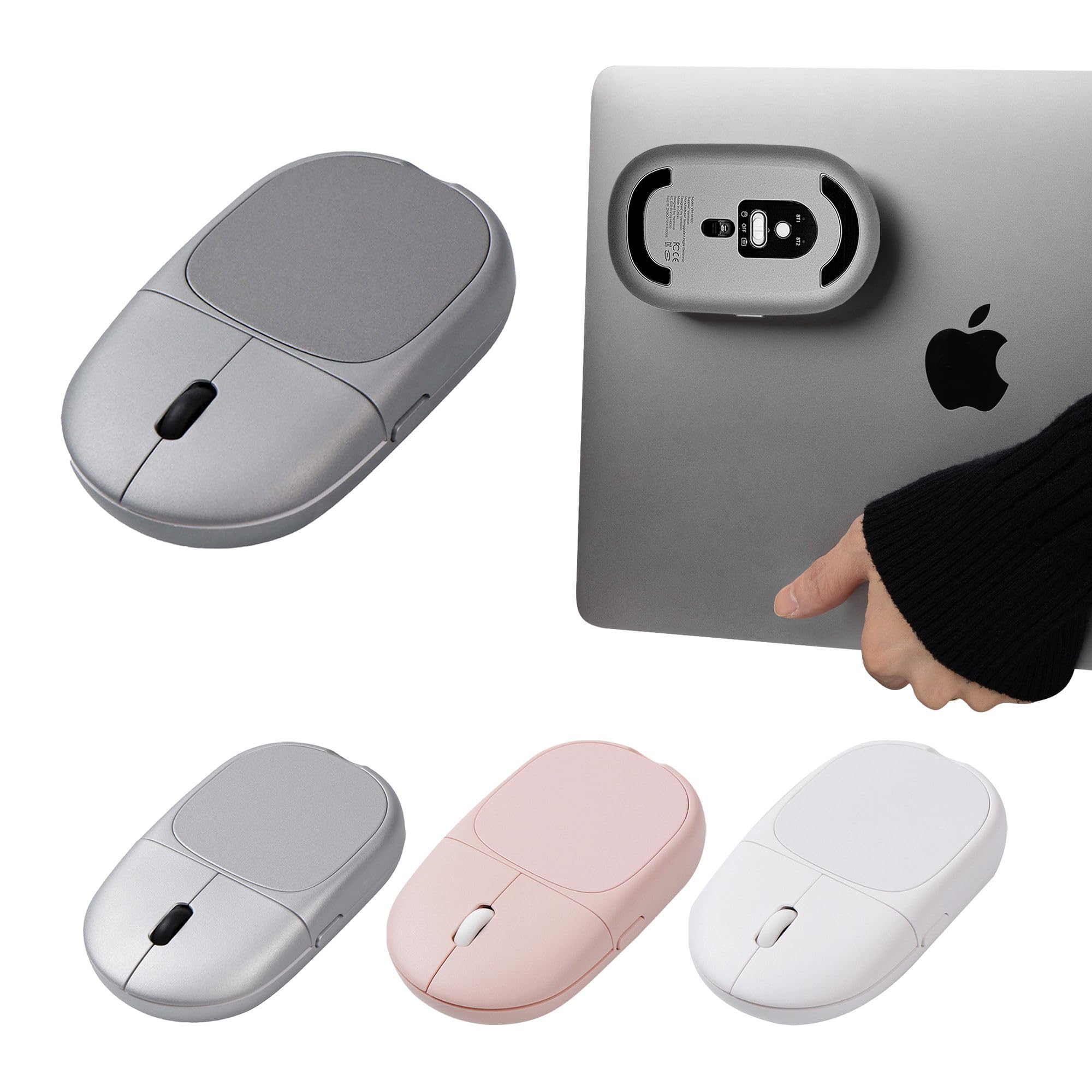
A mouse that sticks to your tablet lid with a magnet, then doubles as a remote.
The pitch here is clever: a reusable magnetic pad sticks the mouse to a tablet or laptop lid, so you are never hunting for it in a bag. At 0.9 inches thick it is genuinely pocketable, and the Space Gray finish is designed to sit beside a MacBook or iPad. It connects over Bluetooth 5.0 and 3.0 to two devices, so you can flip between a laptop and a tablet.
It also works as a remote control from up to 33 to 50 feet, letting you trigger the camera or control YouTube and Netflix playback from across a room. That is a genuinely unusual extra in a category of near-identical pebbles. Design is what wins people over, with 15 mentions, and silent clicking means it does not carry in a library or train carriage.
The trade-off is real and worth your attention: this is a mouse you grip rather than rest your hand on. Several owners find the palm-off-shell shape uncomfortable for extended use, and the battery cover can work loose. It is built for short bursts of pointing on the move, not for a full working day.
Its real trick: the magnetic pad plus the 33-to-50-foot remote mode makes it the most unusual travel mouse in the lineup.
The shape caveat: this is a pointer you hold, not a palm rest — long sessions get uncomfortable.
Reach for this if: you travel with a tablet and like the idea of a mouse that clips on and doubles as a remote.
Look elsewhere if: you want full palm support for long desk sessions or a battery door that stays put.
5. DELUX MF20-Black Pocket Mouse
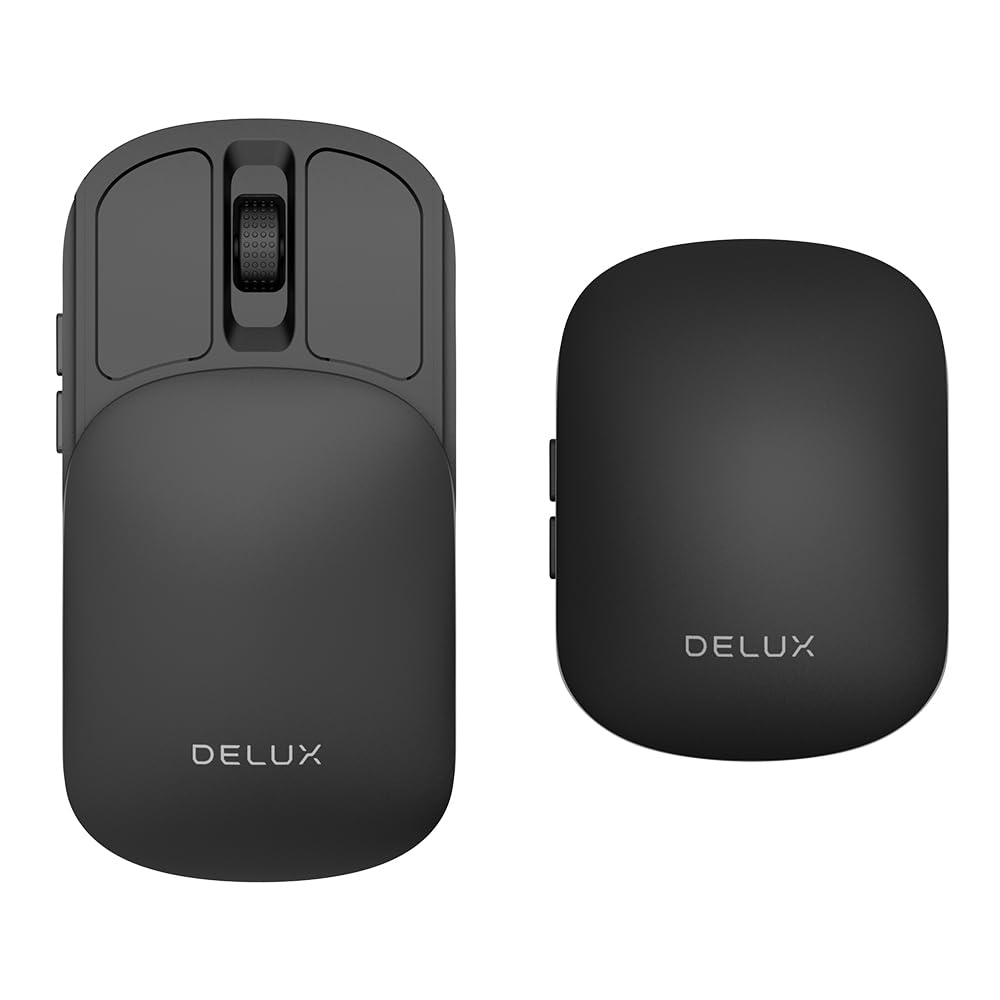
It slides shut like a pocket knife and packs 4000 DPI under the hood.
The sliding body is the defining idea: it shrinks to a flat shape and shields the sensor while it rides in your jeans or a mini bag. Inside sits a 300mAh lithium-ion battery that gives up to 7 consecutive working hours on a 1-hour full charge, plus a 3-month standby. A front-mounted USB-C port lets you charge while you keep working.
On sensitivity this one leaves most rivals behind. Its 5 adjustable DPI levels top out at 4000, and that is well above the 1200 DPI the HP Z3700 G2 offers — a big gap that pays off when you want the cursor to fly across a large monitor. A bottom switch flips between the levels, so you can drop to 800 for fine photo-editing work. Dual-mode pairing covers Bluetooth 5.2 and 2.4 GHz, so you can hop from a work laptop to a personal tablet in seconds.
It weighs 50 g and measures 4.27 inches long by 2.2 inches wide, so it disappears in a pocket. The catch is the sliding mechanism itself and the shape: some units develop charging or longevity trouble, and the flat body can feel cramped for larger hands. Functionality is praised most, with 33 mentions, which says the concept lands for most owners.
What stands out
- 4000 DPI tops a 5-level range for fast, precise cursor control.
- USB-C rechargeable with a 3-month standby — no battery drawer to open.
- Sliding shell protects the sensor and packs down to almost nothing.
- Switches between Bluetooth 5.2 and 2.4 GHz without re-pairing.
The trade-offs to weigh
- Ergonomics split opinions — larger hands find this shape cramped.
- Battery life is rated at 7 working hours per charge, short of an all-day desk run.
Your pick if: precision matters — photo editing, big-monitor sweeps — and you want a pocket shape that folds down.
Keep moving if: you want a battery that survives a full week away from a charger.
6. Satechi Slim EX Wireless Mouse
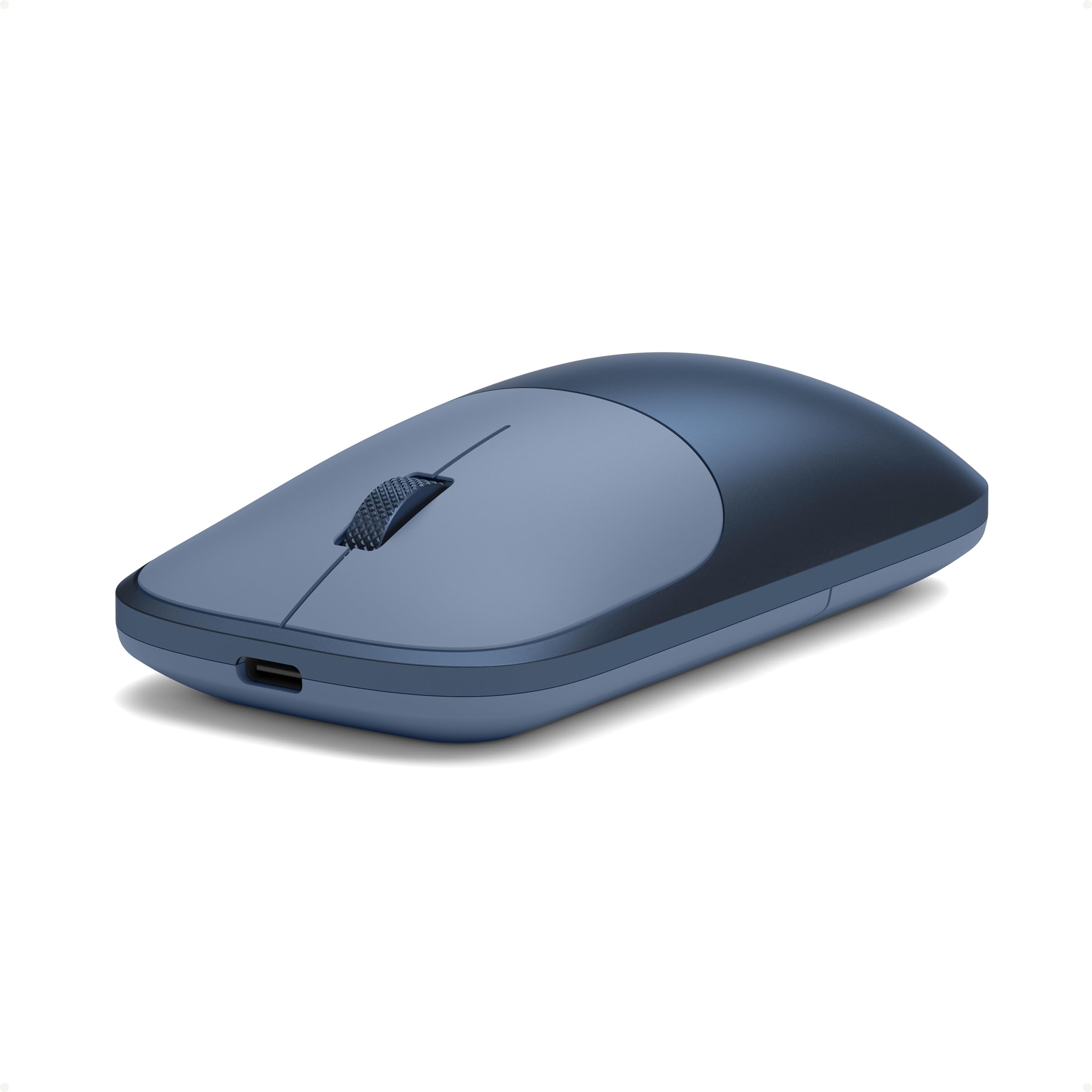
An anodized aluminum slim mouse with a metal scroll wheel and a planted 90 g feel.
If you care how the thing sitting on your desk looks, this is the one. The anodized shell and metal scroll wheel give it a weight and solidity that the plastic shells in this list simply cannot match. At 90 g it feels planted rather than skimpy, and the matte Indigo finish is meant to run alongside a Mac setup.
Under that shell is real flexibility: two Bluetooth 5.3 channels plus a 2.4 GHz USB-C receiver let you control a Mac, a Windows machine, a tablet, and a desktop without re-pairing any of them. Its rechargeable, removable battery delivers up to three months of continuous use and over a year in sleep mode, so you rarely think about the USB-C cable. A 2-year limited warranty backs it, and the quality of build is praised most, with 56 mentions.
The honest caveat is height. This is a very flat mouse, and for some hands that means a constant, light grip to keep it steady. Buyers who want a tall arch under their palm will find it slippery after a few hours.
What sells it: aluminum body, metal wheel, and 3-in-1 switching — a rare combination at any tier of this category.
Where it can slip: the flatter the shell, the more you have to grip it — some find it needs constant light pressure.
Match for: a desk-driven Mac or Windows setup where build quality and clean looks matter as much as slimness.
Pass on it if: your hand wants a taller shell to lean on, or you dislike actively gripping a mouse.
7. Dell Bluetooth Travel Mouse MS700, 4000 DPI, 2 Buttons

Twist it flat to switch off and stow — the travel ritual done properly.
At 56.9 grams this mouse nearly floats, and the twist mechanism does double duty: it turns the power off and flattens the shell for a sleeve. Bluetooth 5.0 pairs to three devices, so one button click swaps you between a work laptop, home PC, and iPad. Dell Pair handles the initial connection in a single click, which takes the guesswork out of setup.
Its 4000 DPI adjustable sensor gives you precise cursor control, and it sits level with the DELUX MF20’s top end rather than trailing it. Quiet click buttons and touch scrolling keep the whole interface smooth. It measures 4.59 inches long by 2.25 inches wide, so it slips into a backpack with room to spare.
Two gripes come through the review pages clearly. The scroll area is narrow, so data-entry work — where you are scrolling constantly — feels more strained than it should. Some buyers also find that the shape is small for long sessions, and a couple of units sync unevenly with certain laptops. For short bursts of pointing on the road, none of that gets in the way.
Where it wins: the twist-to-stow shell plus a 56.9 g body make it one of the lightest travel shapes here.
What to plan around: the narrow touch scroll strip is hard going for spreadsheet-length work.
Built for: the traveler who wants a mouse that folds flat and swaps across three devices.
Skip if: data entry or heavy scrolling is most of your day.
8. Microsoft Surface Arc Bluetooth Mouse

It snaps flat like a bookmark and slides into a laptop sleeve without a bulge.
This is the shape to pick when bag space is truly at a premium. The shell folds down flat, so it slides into a laptop sleeve beside a charger rather than needing its own pocket. Bluetooth pairing with Windows 11 or 10 is quick, and the Violet finish is part of a four-color lineup that also includes Black, Platinum, and Ocean. Batteries are included, so it runs as soon as it is charged up.
The full scroll plane is the feature that separates it from a conventional slim mouse. It supports both vertical and horizontal scrolling from one surface, which makes long web pages and spreadsheets far easier to navigate without a side-scroll wheel or a drag bar. The finish is a smooth, refined one that feels comfortable against a fingertip.
The obvious caveat is exactly what makes it so packable. A mouse that folds away this completely does not give your hand anything to lean on, so think short sessions rather than all-day desk work. It is also sold at the premium end of this category, so the value is in the cleverness and the finish, not the specs.
Standout strengths
- Folds flat to fit into nearly any sleeve or pocket.
- Full scroll plane handles both vertical and horizontal navigation.
- Four-color lineup that fits a personal setup.
Reasons to pause
- Ultra-flat shell gives no palm support for long days.
- Premium-tier positioning — the value is in the travel design.
Best fit for: the tablet-and-laptop traveler who wants a mouse that folds away flat and scrolls in two directions.
Avoid if: your wrist wants a tall shape to rest on all day.
9. Srfc Arc Mouse SC Bluetooth EN/XD/XX Black

The snap-flat classic in black — a bag-friendly curve that folds away.
This is the same folding idea in a straightforward black finish, and it is built for a right hand. It arcs up for use and snaps flat for the bag, so it packs into a briefcase or laptop sleeve without taking up room. Bluetooth keeps the connection wireless, and it runs on included batteries.
Its design earns genuine admiration: the scroll feels smooth, the click feels solid, and the magnetic snap closing is pleasing to use. Quality is what buyers praise most, with 43 mentions, and the fold-flat portability follows close behind. It measures 6.25 inches long by 3.25 inches wide and uses three buttons.
Two things are worth knowing before you commit. The Bluetooth link is mixed in practice — some buyers find it instant, others fight a connection that will not hold. And the flat shape, as with all of these, gives no palm support. The fold is the whole point, and that trade-off is baked in.
Why consider it: the snap-flat fold plus a right-hand curve make it a natural fit for a laptop bag.
What may catch you out: the Bluetooth connection can be inconsistent from one unit to another.
Choose it if: you want the fold-flat travel shape in a simple black finish and a right-hand fit.
Compare it if: a rock-solid Bluetooth link is your top priority.
Know the Specs
Slimness and shell height
The thickness number tells you how easily a mouse disappears into a pocket or sleeve. A shell around 0.9 inches, like the Magnito, is genuinely pocketable, while a fold-flat model can shrink even further for packing. What the number cannot tell you is how much palm support remains — the flatter the shell, the more your hand has to grip it to keep it steady.
DPI and cursor speed
DPI stands for dots per inch, and it measures how far the cursor travels for every inch you move the mouse. A 1200 DPI sensor like the HP Z3700 G2’s is fine for everyday pointing. A 4000 DPI model such as the DELUX MF20 or the Dell MS700 lets you sweep across a large monitor with less arm movement, though most tasks do not need it.
Bluetooth versus 2.4 GHz
Bluetooth skips the dongle and pairs straight to a laptop or tablet, which is why most slim mice here use it. A 2.4 GHz receiver is a small USB plug that gives the mouse its own channel, so it sidesteps a flaky laptop radio. The mice that offer both, like the Logitech Pebble and M350s, are the most flexible for mixed gear.
Battery ratings you can trust
Alkaline models quote long runs measured in months — 19 months for the Logitech Pebble and 16 for the HP Z3700 G2. Rechargeable ones talk in hours and standby: the DELUX MF20 gives up to 7 working hours per charge, while the Satechi Slim EX runs up to three months of continuous use. Match the battery figure to your daily hours, not the biggest number on the page.
Common Questions
Will a slim wireless mouse cramp my hand during long work sessions?
Do these mice work with an iPad or MacBook?
How thin is actually thin enough to fit in a jeans pocket?
Can I use a Bluetooth mouse with a laptop that also has a USB receiver option?
How long does the battery really last on a rechargeable slim mouse?
Does a higher DPI make a slim mouse better?
Will a quiet-click mouse really be silent in a library?
Are fold-flat mice durable enough for daily bag travel?
Can I switch between a work laptop and a personal tablet without re-pairing?
Does a slim mouse still work on a train tray table or uneven surface?
The Bottom Line
For most people, the slimmest wireless mouse winner is the Logitech Pebble in Blueberry, because it gives you Bluetooth and a 2.4 GHz receiver in one calm, pocket-friendly shell and backs it with 19 months of battery life. If you want the shell that shrinks to nearly nothing for travel, grab the Dell MS700 with its 56.9 g twist-to-off body. And if you need the sharpest cursor control from a slim design, the DELUX MF20 with its 4000 DPI sensor is the one to reach for.
One last nudge: the Logitech Pebble is the quiet default precisely because it asks so little of you — a single battery, two ways to connect, and a shape that slips into any bag pocket. Buy it for the everyday carry and pick a taller shell separately if you keep a second mouse at the desk.
How we choose
We do not accept paid placement. Every pick is matched to a real buyer and a real use-case; we do not hands-on test units.
Sources
Specifications: manufacturer listings and product documentation. Review insights: verified customer reviews, as of November 2026. Pricing: not shown on this page (it changes often); check the current price via the retailer link.
As an Amazon Associate, Tactical Gear Guy earns from qualifying purchases. This does not affect which products we feature.