Specs are compiled from manufacturer listings and verified buyer reviews and can change over time — please confirm the key details on the product page before buying.
You do not need a separate WiFi card to get your new PC online — the right motherboard has the wireless radio built right into the board. Onboard WiFi frees a PCIe slot, skips the antenna cable routing to an add-in card, and avoids a separate driver install. The nine boards below all ship with onboard WiFi, and they split cleanly into two camps: Intel Socket LGA 1700 builds on one side and AMD Socket AM5 builds on the other. Pick your processor family first, because a board and a chip that do not share a socket will never fit together.
This guide is built by comparing the manufacturers’ published specifications and the patterns across verified customer reviews, so you get each pick’s real strengths and trade-offs instead of marketing spin.
Matching the socket to your CPU, the memory type to your kit, and the WiFi generation to your router is what separates a smooth build from a return label. Below you will find the full breakdown to pick the right wireless internet motherboard for your build.
Top Picks


How To Choose The Best Wireless Internet Motherboard
The built-in WiFi is the headline here, but it is not the first thing to check. Your processor dictates the socket, and the socket dictates every board you are allowed to buy. Get that wrong and nothing else saves you.
Start With The Socket, Not The WiFi
Intel 12th, 13th and 14th Gen chips drop into an LGA 1700 socket. AMD Ryzen 7000, 8000 and 9000 series chips need an AM5 socket. Those two families do not cross over. If you already own a processor, find its socket name before you look at a single board. If you are buying both at once, decide the CPU first and let it pick the board for you.
Know Which WiFi Generation You Are Paying For
Wi-Fi 6E (an extended version of the Wi-Fi 6 standard that adds a cleaner high-frequency band) is the common floor on mid-range boards. Wi-Fi 7 (the newer standard that can use several bands at once for steadier throughput) shows up on the premium picks. Your router has to support the same generation to see any gain. On an older router, a Wi-Fi 7 board simply runs in a slower mode.
Check Memory Type Before Anything Else
DDR5 is the memory standard across nearly every board here, and the rated speed is the overclocked ceiling you enable in the BIOS, not a guarantee at stock settings. One board in this list takes DDR4 instead. That matters: DDR4 and DDR5 sticks are keyed differently and will not fit each other’s slots. Buy the memory your board actually lists.
Side-by-Side Comparison
| Model | Best For | Wireless | Memory | M.2 Slots | Amazon |
|---|---|---|---|---|---|
| MSI B760 Gaming Plus WiFi★ Best Overall | Intel builds on a budget | Wi-Fi 6E + Bluetooth 5.3 | DDR5 6800 MHz, 4 slots | 2 (Gen4) | Amazon |
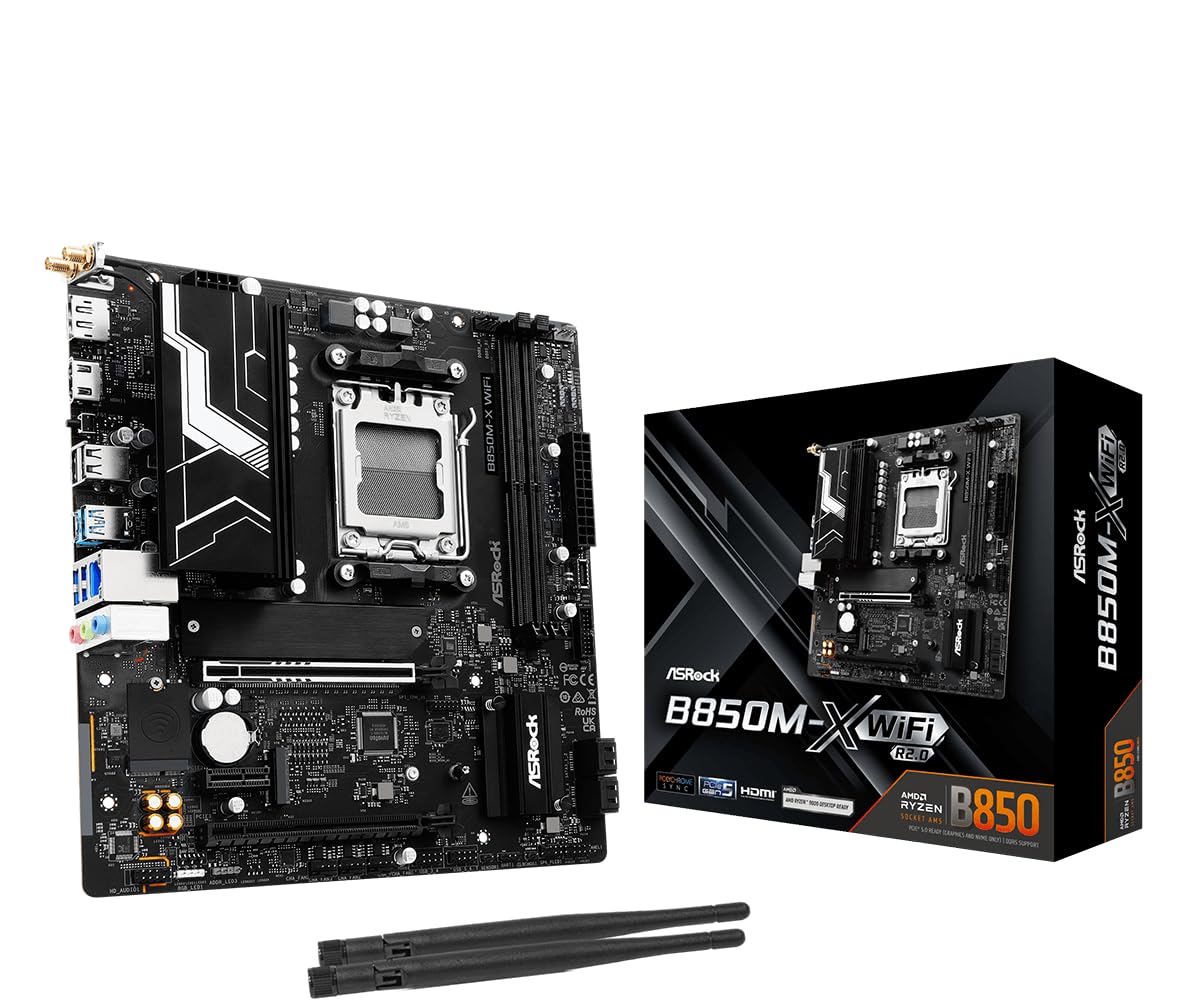
| ASRock B850M-X WiFi R2.0Compact Pick | Small Micro-ATX AM5 builds | Wi-Fi 6E + Bluetooth | DDR5 8200 MHz, 2 slots | 2 (Gen5 + Gen4) | Amazon |
| MSI PRO B760-P WiFi DDR4Best Value | Reusing DDR4 memory | Wi-Fi 6E + Bluetooth 5.3 | DDR4 5333 MHz, 4 slots | M.2 with Shield Frozr | Amazon |
| GIGABYTE B850 Eagle WIFI6E | Value AM5 with room to grow | Wi-Fi 6E | DDR5 5200 MHz, 4 slots | 3 | Amazon |
| ASUS TUF Gaming X870-PLUS WiFi | Heavy connectivity load | Wi-Fi 7 + 2.5Gb LAN | DDR5, 4 slots | 4 | Amazon |
| ASUS TUF Gaming B850-PLUS WiFi | Strong onboard WiFi signal | Wi-Fi 7 + 2.5Gb LAN | DDR5 8000 MHz, 4 slots | 3 | Amazon |
| GIGABYTE X870 AORUS Elite WIFI7 ICE | White-themed showcase builds | Wi-Fi 7 + 2.5GbE LAN | DDR5 5600 MHz, 4 slots | 4 (3 Gen5) | Amazon |
| ASRock Phantom Gaming X870E Nova WiFi | Multi-drive professional work | Dual USB4 Type-C | DDR5 8200 MHz, 4 slots | 5 | Amazon |
Detailed Reviews
1. MSI B760 Gaming Plus WiFi Motherboard
Our pick — 4.5+★ from 750+ verified ratings; the strongest balance of quality and price.
The do-it-all LGA 1700 board that covers Wi-Fi 6E, DDR5 and cooled M.2 storage without a premium price.
You get the most value for your money here if you are building around a 12th, 13th or 14th Gen Intel chip. The board pairs an Intel Wi-Fi 6E module (a fast wireless standard) with Bluetooth 5.3 and a 2.5Gbps LAN port — that last figure means a wired connection rated at 2.5 gigabits per second, roughly two and a half times the speed of a standard gigabit port. So large game downloads and file transfers clear the pipe faster when you plug in a cable.
The memory side is generous for the price. DDR5 runs up to 6800 MHz with Memory Boost, which is the overclocked ceiling you switch on in the BIOS. Four memory slots mean you can start with two sticks and add more later without binning anything. Two M.2 Gen4 slots handle your NVMe storage, and the primary slot is wrapped in MSI’s Shield Frozr heatsink — a metal cover that spreads heat so a fast drive does not slow itself down. Both slots run at x4 64Gbps.
Cooling is where the board earns its keep. A 12+1+1 Duet Rail Power System with DrMOS power stages (power components that feed the processor cleanly) keeps your CPU stable, and 7W/mK MOSFET thermal pads (a pad rated for how readily it moves heat) sit under an advanced heatsink design for sustained work rather than a quick burst. The one number that looks odd is the listed item weight of 2 g — treat that as a data-entry slip rather than anything you would feel in your hand.
Who it rewards: An Intel builder who wants WiFi, fast DDR5 and cooled M.2 storage without stepping into premium territory. The 14th, 13th and 12th Gen compatibility covers a wide span of chips, so a mid-cycle upgrade stays on the table. At 4.5+ stars across 700+ ratings, it is the crowd-approved default.
What lands well
- Wi-Fi 6E plus Bluetooth 5.3 built in, so no add-in card and no spare slot burned
- 2.5Gbps LAN for fast wired transfers when wireless is not ideal
- DDR5 up to 6800 MHz across 4 slots, leaving upgrade headroom
- Two M.2 Gen4 slots at 64Gbps with a heatsink on the first
Where it asks patience
- LGA 1700 only — an AM5 Ryzen chip will not seat here
- No Wi-Fi 7, so a Wi-Fi 7 router runs it at the older standard
Solid yes for: First-time Intel builders who want the wireless handled for them at a sensible price.
Pass if: Your CPU is AMD, or your router is Wi-Fi 7 and you want to use that band.
2. ASRock B850M-X WiFi R2.0 AM5 Micro-ATX Motherboard
A small-board AM5 build that puts a Gen5 drive slot and Wi-Fi 6E into a tighter footprint.
Modern AMD Ryzen 9000, 8000 and 7000 chips all seat in this AM5 socket, so a wide spread of processors works here. The Micro-ATX size gives up some expansion room compared with a full ATX board, and that trade-off shows up most in the memory slots — just two DDR5 DIMMs. Against the MSI MAG B850 Tomahawk’s four slots, that halves your upgrade path. You can still run up to 128 GB of memory, but you fill it with two big sticks rather than growing into four.
What you keep is speed. Memory clocks to 8200+ (OC) MHz, a high ceiling for a board this size. Storage covers a Blazing M.2 slot at PCIe Gen5 across four lanes and a second Hyper M.2 at Gen4 across four lanes, plus 4 SATA3 ports for older drives. A 6+1+1 phase power design with Dr.MOS stages feeds the CPU, and there is one PCIe 5.0 x16 slot for your graphics card alongside a Gen4 x16 and a Gen4 x1.
Connectivity rounds out nicely for the size: Realtek 2.5G LAN, 802.11axe Wi-Fi 6E, and Bluetooth. Two USB 3.2 Gen1 Type-C ports (one rear, one front) plus five USB 3.2 Gen1 and six USB 2.0 ports give you plenty of places to plug in. HDMI and DisplayPort cover monitor output, and BIOS Flashback lets you recover or update firmware without a working CPU installed. ASRock flags a caveat worth doing: confirm your specific system or case compatibility before you buy.
Why small builds want it
- PCIe Gen5 M.2 slot available on a Micro-ATX footprint
- DDR5 memory ceiling of 8200+ (OC) MHz keeps pace with far larger boards
- BIOS Flashback recovery without a bootable CPU
The honest ceiling
- Only 2 memory slots, versus 4 on the MSI Tomahawk below
- 128 GB max memory against the Tomahawk’s 256 GB
- Fewer expansion slots than full ATX options
Right call when: You want a compact AM5 build with modern storage and wireless built in.
Think twice if: You plan to quadruple memory over the build’s life — two slots leave no room.
3. MSI PRO B760-P WiFi DDR4 ProSeries Motherboard
The one LGA 1700 board here that runs DDR4, so an existing memory kit skips the DDR5 upgrade entirely.
DDR4 memory is the reason to look here. Where most boards in this list demand DDR5, this one runs dual-channel DDR4 at 5333+ MHz (OC). If you already own DDR4 sticks or a spare kit, that decision alone can shave real cost off a full build without touching your frame rates. The LGA 1700 socket takes 12th, 13th and 14th Gen Intel Core chips along with Pentium Gold and Celeron, so the processor range matches the MSI B760 Gaming Plus at the top of this list.
The build quality carries weight, and owners keep coming back to it. The 6-layer PCB is made with 2oz thickened copper and server-grade material, which means a sturdier board that resists flex during a heavy graphics card install. Power delivery runs 12+1 Duet Rail with P-PAK and 8-pin plus 4-pin CPU connectors — those extra pins let the board feed a hungry processor without strain. Thermal coverage includes an extended heatsink, MOSFET pads rated for 7W/mK, extra choke thermal pads and M.2 Shield Frozr.
WiFi is the whole point of this list, and it does not disappoint. Wi-Fi 6E and Bluetooth 5.3 sit onboard, so you skip the add-in card entirely. The M.2 slots also matter — fast NVMe drives (storage sticks that plug straight into the board) tame load times, and USB 3.2 Gen2 gives you quick external transfers. What surprises people is longevity: this is an older model that keeps earning its place, because the socket and memory still line up with a huge range of parts.
The real draw: DDR4 support and a sturdy 6-layer copper PCB at a value price. It fits owners carrying memory over from a previous build, and it swallows 12th through 14th Gen Intel chips without complaint.
The one trade: This board stops at DDR4, so if you want DDR5 headroom later, look at the MSI B760 Gaming Plus instead.
Built for: Anyone holding a DDR4 kit and an LGA 1700 Intel chip who wants WiFi without a card.
Move along if: Your plan is a DDR5 future — this slot will not take those sticks.
4. GIGABYTE B850 Eagle WIFI6E AMD AM5 ATX Motherboard

Three M.2 bays and a five-year warranty make this Eagle the long-game AM5 choice.
Storage flexibility is the reason this board stands out in the mid-range. Three M.2 slots mean room for three NVMe drives without a single SATA cable, and the PCIe 5.0 interface keeps one of those lanes ready for the fastest drives on the market. Against the ASRock B850M-X’s two slots, that extra bay is a real difference when your game library and project files both want their own drive. Memory runs to 5200 MHz across four DDR5 DIMMs — the lowest rating in this comparison, which is the honest trade for the storage count.
Power delivery uses an 8+2+2 phase design with fully covered MOSFET heatsinks, so the voltage regulators stay cool under sustained load. AM5 covers Ryzen 9000, 8000 and 7000 series processors, and the ATX size gives you a full spread of expansion. USB-C rounds out the rear connectivity. Stability is what buyers keep returning to here — fast boots, no tinkering, and a BIOS that walks you through a quick setup without a manual in hand.
What wins people over is quality, and the design backs it up. The fully covered MOSFET heatsinks handle the thermal side, and owners describe the install as smooth from cable-plug to component-seat. A five-year warranty is the longest coverage in this comparison, and it is the clearest sign this board is built to stay in service through future upgrades. The white-themed crowd will want the AORUS ICE instead, but a standard dark build looks right at home here.
Why it earns a spot
- 3 M.2 slots including PCIe 5.0, more storage than the ASRock B850M-X
- 5-year warranty, the longest coverage in this comparison
- 8+2+2 power phases with fully covered MOSFET heatsinks
- User-friendly BIOS that makes a first setup quick
What to know up front
- DDR5 5200 MHz is the lowest memory ceiling here
- Gigabit LAN only, not the 2.5G or 5G seen on pricier boards
Best fit: AM5 builders who want three drive bays and years of coverage over a sky-high memory rating.
Look elsewhere if: You are chasing maximum DDR5 frequency for heavy overclocking.
5. ASUS TUF Gaming X870-PLUS WiFi AMD AM5 X870 ATX Motherboard

Wi-Fi 7 and four M.2 bays in a board built to carry a heavy load of drives.
Port count is the headline. Four M.2 slots (slots for fast NVMe SSDs) give you room for a large NVMe array, and the rear panel adds USB4 at 40Gbps (a single port rated at forty gigabits per second, fast enough to move huge video files without a long wait). Wi-Fi 7 pairs with a 2.5Gb LAN port. If you work with big media or run multiple drives, this is a board that stops making you choose which project gets to stay loaded.
The power design steps up to premium territory: 16+2+1 with 80A SPS power stages, an 8-layer PCB, ProCool connectors, alloy chokes and durable capacitors. Those SPS stages are smart power stages that switch precisely under load, which keeps voltage steady when a top-tier processor pulls hard. ASUS AI Overclocking, AI Cooling II and AEMP handle tuning in the software layer, while Dynamic OC Switcher, Core Flex and PBO Enhancement cover the manual side. This is the board for a Ryzen 9000 system you intend to push.
Build quality is what owners settle on here, and the metal and PCB argue the same case. The honest wrinkle is network reliability. With this much connectivity packed in, a few builders run into WiFi or Bluetooth dropouts, and Linux users have flagged ethernet driver support as rough. Windows 11 users report the board runs clean once the drive is installed correctly. If your daily driver is Linux or your wireless card has to be bulletproof, plan around that.
What earns the upgrade
- Wi-Fi 7 with four M.2 slots for serious storage arrays
- USB4 at 40Gbps for fast external transfers
- 16+2+1 power stages with 80A SPS and an 8-layer PCB
- AI Overclocking and AI Cooling II simplify tuning
Where the friction sits
- Wireless drops reported on some units
- Linux ethernet driver support needs care
Made for: AM5 builders running multiple NVMe drives and Windows 11 who want Wi-Fi 7 from the board.
Skip if: Linux is your daily OS or you need rock-solid wireless on every boot.
6. ASUS TUF Gaming B850-PLUS WiFi AMD AM5 B850 ATX Motherboard

An AM5 board whose built-in WiFi tops the shortlist for signal strength and stability.
Wireless quality leads the story here, and it does not rely on an add-in card. The onboard WiFi array is strong and stable in real builds, which is exactly the point of a wireless motherboard. Wi-Fi 7 sits alongside Realtek 2.5Gb Ethernet, a rear USB 20Gbps Type-C port, a front USB 10Gbps Type-C connector, and Thunderbolt (USB4) header support. HDMI and DisplayPort cover display output. For a clean wireless build, the rear-panel competition here is genuine.
Power and storage stay solid. The 14+2+1 80A DrMOS power stages and 8-layer PCB work with 8+8 pin ProCool connectors, alloy chokes and durable capacitors to keep voltage steady. Three M.2 slots — one PCIe 5.0 and two PCIe 4.0 — all come with their own heatsinks, so a fast drive keeps its speed. DDR5 memory reaches 8000 MHz across four slots with 192 GB capacity, which leaves real room for a large memory kit. AM5 takes Ryzen 9000, 8000 and 7000 chips.
The trade here lives in the network silicon. The RTL8125D ethernet chip and the wireless card draw mixed feedback — a subset of builds see random WiFi drops and driver headaches, which tracks with what some buyers report as Bluetooth connectivity problems. The board also can act cranky with two sticks of RAM in certain setups. Outside that, owners describe the fit and finish as solid and a black build as properly finished. If wired stability matters most, glance at the RTL8125D warnings before you commit.
Count on this: Strong onboard WiFi and three heatsinked M.2 slots on a board that takes AM5 chips and 192 GB of DDR5.
Go elsewhere if: You need wired ethernet with zero driver risk, or you expect both memory sticks to behave from first boot.
Good match for: A wireless-first AM5 build where signal strength sits above port count.
Not for: A wired-first Linux or server build that cannot tolerate network chip flakiness.
7. GIGABYTE X870 AORUS Elite WIFI7 ICE AMD AM5 Motherboard

The all-white showpiece that turns a dark case into a fully themed build.
Look at it before anything else. The ICE finish is the reason people pick this board, and owners with dark builds describe how it stands out against a black interior. Under the white plating sits a serious platform. Wi-Fi 7 with a directional ultra-high-gain antenna (an antenna tuned to pull in a stronger signal from a specific direction) pairs with 2.5GbE LAN. WIFI EZ-Plug makes the antenna connection a quick screw-in rather than a fiddly thread. EZ-Latch Plus adds quick-release, screwless treatment to the PCIe and M.2 slots.
Storage runs four M.2 slots including three at PCIe 5.0 x4, so a fast-drive array has room to grow. A digital twin 16+2+2 phase VRM drives the power delivery, cooled by VRM Thermal Armor Advanced and M.2 Thermal Guard L. The PCIe 5.0 x16 slot uses PCIe UD Slot X reinforcement with 10X strength for a heavy graphics card, backed by a metal PCIe Armor plate. Dual USB4 Type-C ports add fast external transfer and display output. A five-year spare-part availability window backs the pledge.
Quality is what sellers lean on, and the parts list earns it. Reliability is the sore spot — a small share of boards arrive with error codes or failed posts, enough that caution is fair. The multi-theme, AIO fan control and Q-Flash Auto Scan BIOS is friendly enough, though it lacks the ELCK setting reserved for the top-tier models. Memory runs 4x DIMMs with AMD EXPO support at 5600 MHz, the lowest in this group, so if a sky-high memory kit is your goal, look up the list.
Why the ICE wins eyes
- Stands out in a dark-theme case with a full white finish
- Wi-Fi 7 and 2.5GbE LAN with a directional high-gain antenna
- Four M.2 slots, three of them PCIe 5.0 x4
- Reinforced PCIe and screwless EZ-Latch design
Be aware of
- Some boards arrive with error codes or post failures
- DDR5 5600 MHz trails the rest of the lineup
If the theme is the point: This is the board for a white build that also wants Wi-Fi 7 and four drive bays.
If raw speed leads: Higher memory ceilings sit up the list — 5600 MHz is the floor here.
8. ASRock Phantom Gaming X870E Nova WiFi Motherboard

Five M.2 sockets and a 20+2+1 power stage count — this board is built to work, not to show off.
Storage capacity is the reason this board exists in a high-end list. Five M.2 sockets mean room for five NVMe drives, and one owner notes they can run five drives without stealing bandwidth from the graphics card. For AI workloads or video editing, that means the entire library stays on fast storage at once. The X870E chipset matches AM5 Ryzen 7000, 8000 and 9000 processors, DDR5 runs to 8200 MHz across 4 DIMMs with 256 GB capacity, and Dual USB4 Type-C handles external transfer.
The power hardware is a big step beyond the mid-range. A 20+2+1 phase design (more power phases than most) spreads heat and keeps voltage tight under a heavy load. A toolless multi-layer M.2 heatsink keeps drives cool without screws, and the EZ Release design makes drive swaps trouble-free. tune 5Gbps LAN covers wired networking. A sturdy backplate and a sturdy power stage make the board feel as substantial as it is in use.
Performance is where the story splits. Many owners mention quick boots and steady day-to-day running with no complaints, and a few run full AI workloads and high-end graphics cards with no bandwidth loss. The hard truth: a minority report trouble — at least one build reports the board frying a CPU, with the M.2 capacity and power stage count the only real reasons to pick this over the MSI MAG B850 Tomahawk, which trades this board’s fifth drive socket for a 5G wired port and a far lower thermal-risk profile.
The case for it: Five NVMe sockets at PCIe 5.0 speeds and a 20+2+1 power stage count — the board that does not make you retire a drive to fit a new one.
The risk to weigh: A handful of customers note unstable or dead CPUs. If you need the five drive bays, the trade is yours to make.
Choose it for: A pro-level AM5 workstation where five NVMe drives must all stay live at once.
Steer clear if: You want maximum stability without the risk of a bad board — this is a niche build, not a safe default.
Know the Specs
Wireless Standard: Wi-Fi 6E vs Wi-Fi 7
Wi-Fi 6E extends the Wi-Fi 6 standard into a cleaner high-frequency band, so fewer devices crowd your connection. Wi-Fi 7 adds the ability to use several bands at once for steadier throughput. The generation on your board only matches the speed of your router — older routers will run a newer board at a slower mode, so check both before you buy.
Memory Speed And Capacity Explained
The memory clock speed you see is the overclocked ceiling you switch on in the BIOS, not a guaranteed speed at stock settings. DDR5 runs all the way to 8400 MHz on the fastest board here, while DDR4 boards stop at 5333 MHz. Capacity matters just as much: four slots holding 256 GB give you far more expansion room than two slots holding 128 GB, and DDR4 sticks will not fit DDR5 slots.
M.2 Slots And PCIe Generations
An M.2 slot holds an NVMe drive — a storage stick that plugs directly into the board for fast load times. PCIe 5.0 delivers roughly twice the bandwidth of PCIe 4.0 at the same lane count, which matters for the newest drives and graphics cards. The boards here range from two M.2 slots up to five, so match your planned drive count before choosing.
LAN Speed And Onboard Power Stages
A 2.5Gb or 5Gbps LAN port is a wired ethernet connection rated in gigabits per second, and it clears large files faster than a standard gigabit port when you plug in a cable. Power stages feed the processor: more phases, and higher amp ratings such as 80A, keep voltage steady under load. That clarity matters most when you plan to push a top-tier chip.
Common Questions
Will an AM5 board work with my Ryzen processor?
Do I need a separate WiFi card if the motherboard has WiFi onboard?
Is Wi-Fi 7 worth paying extra for on a motherboard?
What is the difference between M.2 and a regular SATA drive?
Can I use DDR4 memory in a DDR5 board?
Will a 2.5Gb LAN port make my internet faster?
How long should a motherboard last in a build?
Why does my new board boot to BIOS but not my Windows drive?
Does the onboard WiFi need an antenna connected to work well?
Can I run a heavy graphics card and five NVMe drives at the same time?
The Bottom Line
For most Intel builds, the wireless internet motherboard winner is the MSI B760 Gaming Plus WiFi because it puts Wi-Fi 6E, Bluetooth 5.3, a 2.5Gbps LAN port and DDR5 up to 6800 MHz on one board without stepping into premium money — and at 4.5+ stars it is the most proven pick here.
If you are building on AM5 and want the widest drive array and fastest memory, the MSI MAG B850 Tomahawk MAX WiFi leads with four M.2 connectors, DDR5 at 8400+ MT/s and a 5Gbps wired port. And for a compact AM5 machine that still wants a PCIe Gen5 drive slot and Wi-Fi 6E, the ASRock B850M-X WiFi R2.0 fits the bill in a smaller footprint.
One honest nudge before you commit: every board here handles the wireless for you, so the deciding factors are your socket, your memory type and how many drives you plan to run. Get those three right and the rest follows — the MSI B760 Gaming Plus is the safest all-round starting point for a first LGA 1700 wireless build.
How we choose
We do not accept paid placement. Every pick is matched to a real buyer and a real use-case; we do not hands-on test units.
Sources
Specifications: manufacturer listings and product documentation. Review insights: verified customer reviews, as of November 2026. Pricing: not shown on this page (it changes often); check the current price via the retailer link.
As an Amazon Associate, Tactical Gear Guy earns from qualifying purchases. This does not affect which products we feature.