Specs are compiled from manufacturer listings and verified buyer reviews and can change over time — please confirm the key details on the product page before buying.
Two printers on one desk is a scheduling problem and a stability problem at the same time. The right stand solves both: it gives each machine its own weight-rated shelf, keeps paper and toner within arm’s reach, and stays rigid when a laser drum spins up. The short answer is that per-shelf weight rating and shelf depth decide whether a dual-printer stand works or wobbles — 200 lb per shelf and a deep top deck handle a big all-in-one plus a second machine, while a slimmer cart forces you to stack and hope.
This guide is built by comparing the manufacturers’ published specifications and the patterns across verified customer reviews, so you get each pick’s real strengths and trade-offs instead of marketing spin.
A dual-printer stand lives or dies on three numbers: how much each shelf holds, how deep the top deck runs, and how far apart the shelves sit. The picks below are sorted by those numbers and by what owners actually say about them, so you can match a stand to your machines instead of guessing.
Top Picks


How To Choose The Best Printer Stand for 2 Printers
A stand built for one printer rarely survives a second. The second machine adds weight to the top deck, steals the shelf you were saving for paper, and raises the whole tower’s centre of gravity. So you’re not shopping for furniture here — you’re shopping for a per-shelf load rating, a deep enough deck, and enough adjustable shelf height to give each machine its own bay.
Check weight rating per shelf, not per stand
Each tier carries its own load, so a stand rated at 100 lb on each tier is telling you something different from one rated at 200 lb total. Both matter, but the per-shelf figure tells you whether a heavy laser printer can sit on the top deck while the second machine and a ream of paper go below. Look for the per-shelf number first, then confirm the overall frame claim.
Measure depth before you measure anything else
Most all-in-one printers are deep, and a shallow top deck leaves the machine’s feet hanging over the edge — which is exactly how a stand ends up feeling unstable under vibration. The depth figure on the spec sheet, not the width, is the one that keeps a big printer fully supported. If your printer’s footprint is close to the top shelf depth, that’s fine; if it overhangs, keep looking.
Adjustable shelf height is the dual-printer feature
Two printers are almost never the same height. A middle or top shelf that adjusts across several positions lets you build a tall bay for a laser printer and a short bay for a compact inkjet or a scanner. A stand with fixed shelf heights forces you to accept whatever clearance the factory chose.
Locking casters versus foot pads
Wheels make it easy to pull the stand out for rear-port access and easy to push back after. Locks decide whether it stays put while printing. Stands here offer anywhere from two to all four lockable casters, and several include adjustable foot pads as an alternative — useful on uneven floors where a wobble would show up as print misalignment.
Side-by-Side Comparison
| Model | Best For | Tiers | Load Rating | Footprint (W x D) | Amazon |
|---|---|---|---|---|---|
| Fannova 23.6″x18.9″x30″ Large Printer Stand★ Best Overall | Best Overall | 3 | 100 lb per tier | 23.62″ x 18.9″ | Amazon |
| Sedegn Large Printer Stand with StorageMost Versatile | Built-in power and a pull-out cart | 3 | 200 lb total | 24″ x 18″ | Amazon |
| Fannova 2 Tier Under Desk Printer Stand | Sliding under a desk | 2 | 100 lb per tier | 21.65″ x 20.08″ | Amazon |
| EasyCom Extra Large Printer Stand with Drawer | Drawer storage on a wide deck | 3 | — | 23.6″ x 18.9″ | Amazon |
| Fannova 23.6″x23.6″ 2 Tier Square Table | 3D printers and wide footprints | 2 | 200 lb per shelf | 23.62″ x 23.62″ | Amazon |
| METYERRY 24″x23.6″ Printer Stand with Power Outlet | Power outlets on the stand | 3 | 200 lb per shelf | 24″ x 23.6″ | Amazon |
| Fannova 4-Tier Printer Stand | Small rooms with two machines | 4 | — | 20.8″ x 15.7″ | Amazon |
Detailed Reviews
1. Fannova 23.6″x18.9″x30″ Printer Stand
Our pick — 4.5+★ from 650+ verified ratings; the strongest balance of quality and price.
Three shelves, a hundred pounds of support on each, and a middle deck you can raise to fit a second machine.
The number that decides this one for a two-printer desk is 100 lb per tier. That’s not a total load spread across the frame — it’s the rating on each individual shelf, so your heavy laser printer and your second machine can each sit on their own deck without either one borrowing strength from the other. On top of that, the three storage tiers give you room for paper, toner and the odds and ends that normally end up stacked next to the printer.
Height is where it earns the top spot for a dual setup. The middle shelf adjusts across 5 levels, with clear height of 11 in, 12.9 in, 14.9 in, 16.9 in or 18.9 in between the top and middle decks. Practically, that means a tall laser printer fits in one bay while a compact inkjet or a scanner sits in the other, and you’re not wedged into whatever clearance the factory picked. Each shelf is supported by a steel tube running underneath rather than screws driven into the side frame, which is why the deck stays flat under a loaded printer instead of bowing.
Rolling it around is handled by industrial-grade casters, and all four lock, so the stand parks firmly when you’re printing and slides out easily when you need to get at a rear port. The included foot pads are the quieter option if you never plan to move it — they’re adjustable, so they can be fine-tuned to kill a wobble on an uneven floor. Assembly is genuinely uneventful: numbered parts, aligned holes, a spare screw for each type, and the tools in the box.
What holds up under two machines
- 100 lb rating on each of the three tiers, so both printers get their own supported deck
- Middle shelf adjusts to 5 positions, from 11 in to 18.9 in of clear height
- All four casters lock, and adjustable foot pads are included for a fixed setup
- Steel tube bracing under each shelf keeps the decks flat when loaded
Where it asks for your attention
- Overall depth of 18.9 in means a very deep all-in-one may sit close to the front edge
- Three tiers of storage invite clutter if you don’t claim the shelves for paper and toner
Go with this one if: two printers need to share one stand and you want each machine on its own properly rated shelf with room to spare above.
Check your depth first: the 18.9 in deck is generous but not infinite, so measure the deeper of your two machines before you commit.
2. Sedegn 24×18 Inch Printer Table
It borrows a page from workshop furniture: a bottom tray that rolls out and works on its own.
Most dual-printer stands give you fixed shelves and call it done. This one treats the bottom tier as a separate tool — the shelf has built-in wheels, so it tucks under the main frame to hold a shredder or supplies, or pulls all the way out and rolls away as a standalone cart for a PC tower. If your second printer shares the room with a desktop machine, that flexibility is the whole point, and it saves you buying a CPU stand separately.
Above the tray, you get 24 in of width and 30.7 in of height on a 24 in x 18 in deck. Two things matter for a dual setup here: the open top means paper feeds without obstruction, and the frame is rated to support up to 200 lb. Sedegn asks you to confirm your printer’s width and depth don’t exceed 23.8 in x 17.7 in, which is exactly the kind of honesty you want from a stand maker — measure your deeper machine against it before ordering.
The built-in 3-outlet charging station with its 4.9 ft cord is the detail that saves the most daily annoyance. Both printers, a monitor and a lamp can share one organized power point instead of a wall socket hunt behind the desk, and the strip mounts on either side. A reversible side bag holds up to 500 sheets of A4 or letter paper. What wins people over, though, is the build quality — it’s the most-discussed strength in the feedback, with the sturdiness and straightforward assembly close behind. Fit is the one area that splits opinion, leaning on whether your machines land inside that stated footprint. Included tools, labeled hardware and step-by-step instructions make setup uneventful, and it’s backed by an 18-month warranty.
The persuasive part: a 3-outlet power strip wired into the stand, a reversible paper bag for 500 sheets, and a bottom tray that detaches into its own rolling cart — three separate clutter problems solved by one piece of furniture.
The honest caveat: the 24 in x 18 in deck has a hard ceiling at 23.8 in x 17.7 in for printer width and depth, so an oversized all-in-one is the one machine that won’t settle comfortably here.
Reach for this if: your second machine is a shredder or a PC tower and you’d rather plug everything into the stand than chase wall outlets.
Look elsewhere if: both your printers are oversized — the stated footprint limit is the deciding number, not the price tier.
3. Fannova 2 Tier Under Desk Printer Stand, 20 Inches Deep
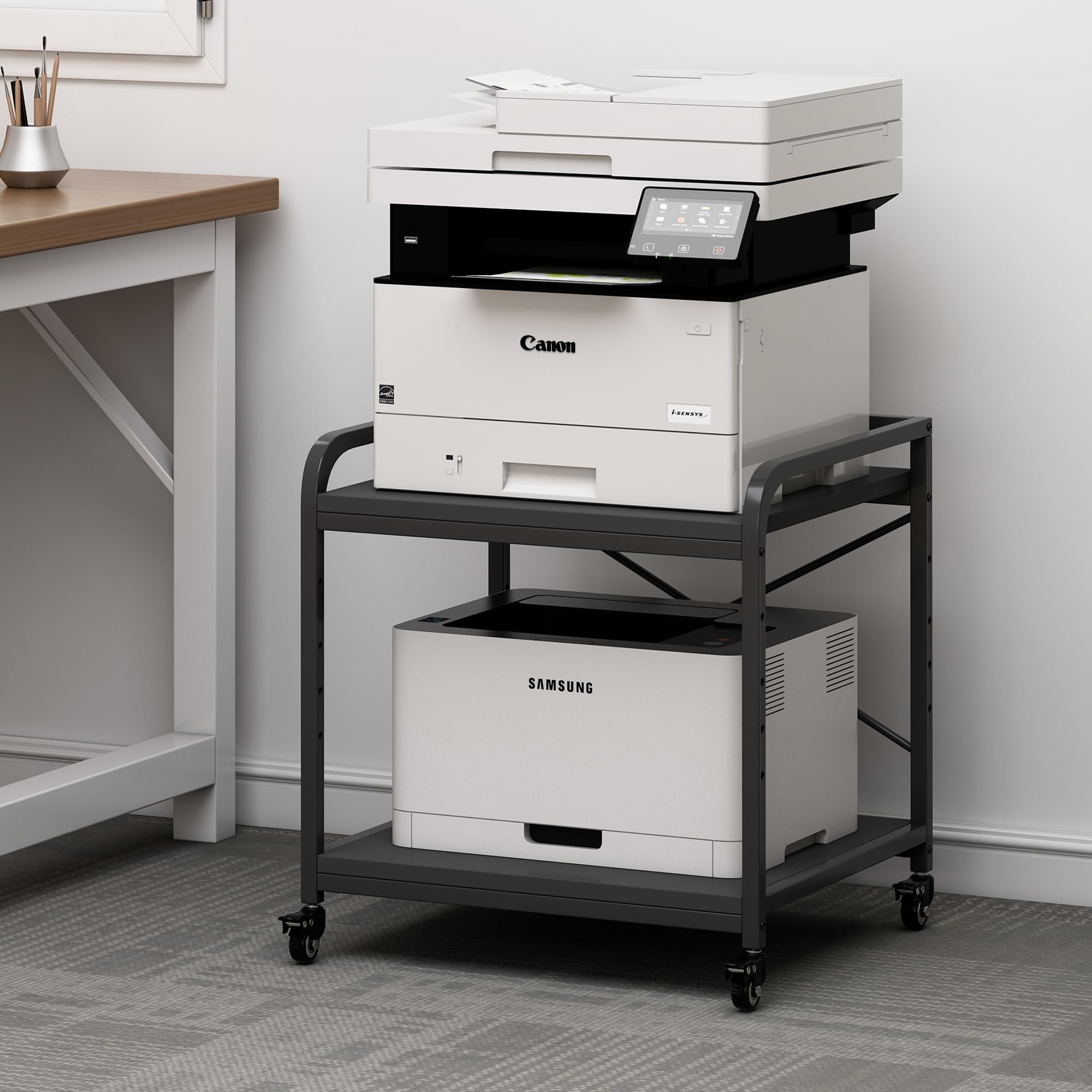
Square shelves, twenty inches on each side, built to slide under a desk and disappear.
This is the pick for a room where floor space is the enemy. It stands 22.24 in tall — the collection’s shortest by a clear margin — so it tucks under a table, and the top shelf is both removable and height-adjustable across 5 levels. That combination lets you set the clearance to match whichever printer goes underneath, then slide the whole thing out of sight. Depth runs 20.08 in against a 21.65 in width, so the square footprint is friendly to tight corners.
Each of the two shelves carries 100 lb, and the shelves are braced by steel tubes underneath with X-shaped bars reinforcing the back. In practice, a large laser printer on top and reams of paper below is well inside what it will take. Four casters handle movement, two of them locking, and foot pads are included if you’d rather it stayed parked beside the desk instead of under it.
What owners keep coming back to is the quality of the build — that’s the aspect praised most in the feedback, with sturdiness and ease of assembly right behind, and smooth rolling on the casters getting its own share of credit. It’s a stand people describe as fitting neatly into the space they had, including for Canon laser printers. The trade-off is simple: two tiers mean two shelves, so if you need a third level for paper and toner, the taller three-tier stands in this list earn their extra footprint.
Why it earns a spot: a 20.08 in depth paired with a 22.24 in height makes this the natural under-desk solution, and the removable, 5-level top shelf lets you shape the bay to your printer rather than the other way round.
Know before you buy: two tiers is the entire storage story here — the second printer and its paper share the same lower shelf.
Buy it for the footprint: the shallow, square profile that slips under a desk and rolls back out when you need the rear ports.
Not the pick for: a setup that needs three separate storage levels — you’d be trading this compact shape for a taller tower.
4. EasyCom 23.6″×18.9″ Printer Stand

A drawer basket for the toner and cables, and five shelf heights so both printers fit the way you want.
The drawer basket is what separates this from a plain three-shelf tower. It’s a dedicated bay for paper, ink cartridges and cables, so the loose stuff that usually colonizes your desk has somewhere to live. Above it, the three tiers carry the machines on a widened desktop measuring 23.6 in by 18.9 in, with five adjustable heights to accommodate differently sized printers and faxes.
Vibration is the quiet killer in a two-printer setup, and this frame takes it seriously. Stability is the second-most-discussed strength in owner feedback, right behind overall build quality, and the assembly process draws plenty of positive comment too — numbered parts, tools in the box, and a stated build time of 20 minutes. Two installation options mean you can run it on the smooth-rolling locking casters or set it down without wheels, which also makes cleaning underneath straightforward. The finish is a rustic brown, and it’s a stand people describe as matching their desk rather than fighting it.
The flexibility extends past the office: the same three tiers will hold speakers, DVD players or small appliances if your setup changes. That’s a genuine advantage when you’re buying furniture for a room that might not stay a print station forever. The catch is that the 18.9 in depth is the shallowest of the wide-deck stands here, so a very deep all-in-one will sit closer to the edge than you might like.
The case for it: a drawer basket plus three wide tiers gives you the storage layout most dual-printer desks actually need, with five heights to fit both machines properly.
Worth a second look: the 18.9 in depth — if your deeper printer runs long, measure it against the deck before you order.
5. Fannova 23.6″x23.6″ Large Printer Stand, 2 Tier Square Table
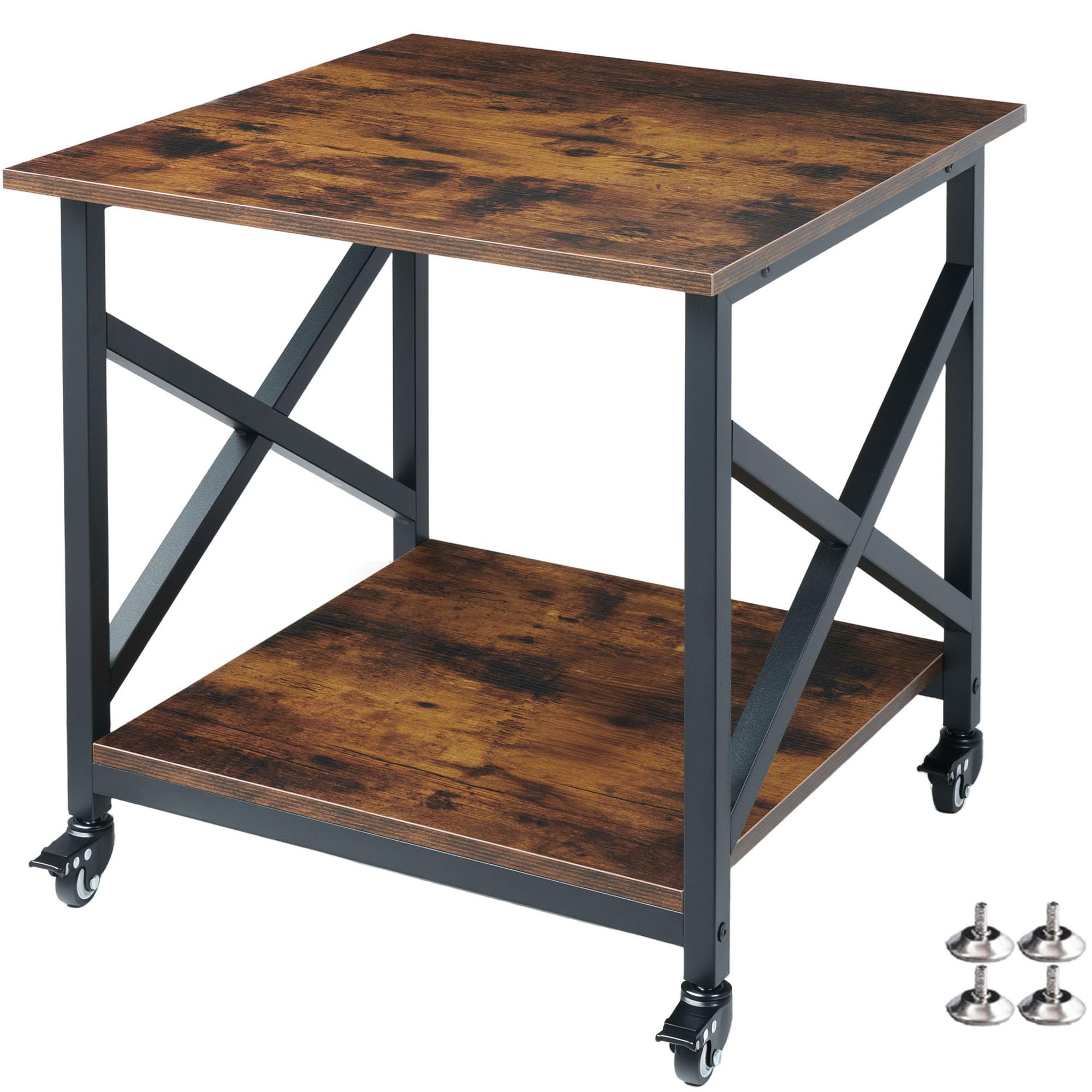
A 23.6 in square deck rated at 200 lb per shelf — built for machines that shake while they work.
If either of your printers is a 3D printer, this is the one to look at first. The top shelf measures 23.6 in by 23.6 in, and the lower shelf gives you a 20 in x 20 in footprint for filament, resin, tools and paper. Each shelf is rated to 200 lb, which is the sort of headroom that means you’re never thinking about the stand while a print runs.
The construction explains the rating. Each deck is 15mm particle board with full-length steel support bars underneath, and the frame uses 0.98 in (25mm) square steel tubes — thicker than the 0.78 in (20mm) tubes common on competing racks. Six horizontal crossbars tie the side frames into a rigid box, which is how the stand absorbs the constant vibration of high-speed printing rather than amplifying it. All four casters lock independently, so the stand stays planted mid-print; foot pads are included for anyone who’d rather not roll at all.
Sturdiness is what owners talk about most, by a wide margin in the feedback, with build quality next in line — the phrase that keeps surfacing is that it holds large laser printers without wobbling, and there’s real appreciation for fitting two printers into very little floor space. It’s also a stand that doesn’t have to stay a printer stand: it works as a side table, a night stand or a mini-fridge stand. The limitation is simply the tier count — two shelves, not three.
What earns the 200 lb rating
- 0.98 in (25mm) square steel tubes versus the 0.78 in (20mm) tubes on many competing racks
- Six horizontal crossbars form a rigid box that damps printing vibration
- All four casters lock independently, keeping the stand planted mid-print
- 23.6 in x 23.6 in top deck with a 20 in x 20 in lower shelf for supplies
The trade-offs in plain terms
- Two tiers only, so a third level of paper storage means looking elsewhere
- The square 23.62 in footprint needs more floor than a compact tower
Made for: a 3D printer that needs a dead-steady deck, or any pair of heavy machines that would overwhelm a lighter cart.
Think twice if: your room is tight — this footprint is the widest square here, and it buys stability rather than saving space.
6. METYERRY 24″x23.6″ 3 Tier Cart
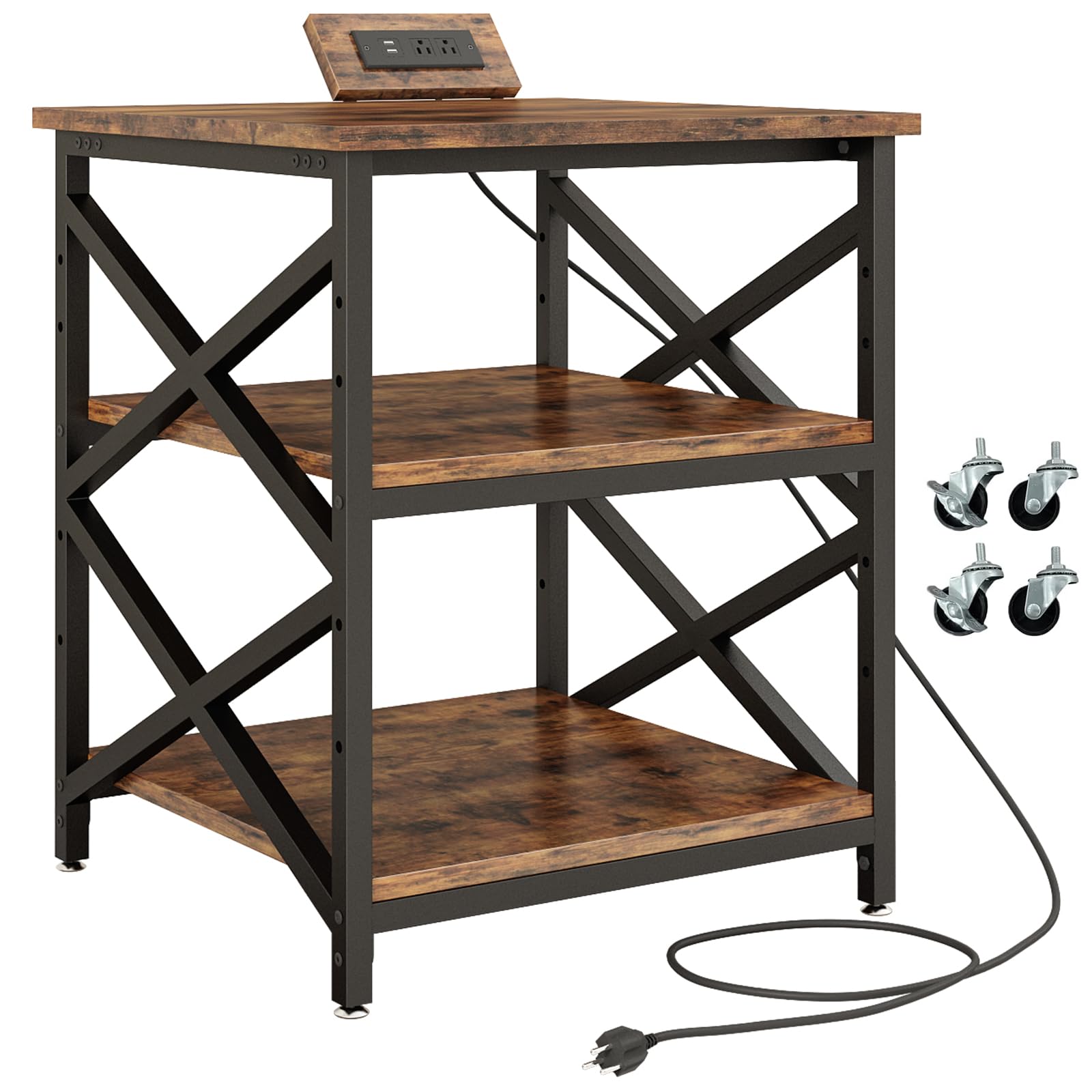
Two printers, two lower shelves, and four outlets built into the frame so nothing reaches for a wall socket.
Start with the deck, because it’s the largest here: 24 in by 23.6 in, rated to 200 lb, with two 20.5 in by 20.5 in lower shelves that each carry up to 200 lb as well. For a dual-printer station that’s three heavy-duty levels — a big all-in-one on top, a second machine on the middle shelf, and paper or a scanner below, all with rated support. The middle shelf is removable and adjusts across 5 height positions; pull it out entirely and you install the included metal support bars at the back to keep the frame rigid.
The built-in power strip is the reason to pick this over a bare stand. It offers 2 AC outlets and 2 USB ports, which is enough to feed both printers plus a lamp or a phone charger without a tangle behind the desk. The strip mounts in 2 positions so it can sit on whichever side your wall outlet lives. The frame uses steel support tubes under each shelf, and the whole stand is finished in rustic brown on particle board with a metal frame.
Sturdiness is by far the most-discussed strength in the feedback, with build quality right alongside it, and the stand earns regular credit for handling multiple 3D printers and for its fit in a room. The mobility story is straightforward: industrial-grade casters roll smoothly, two of them lock, and adjustable foot pads are included for a stationary setup on a slightly uneven floor. At 32 lb it’s the heaviest stand on this list, so plan for a two-person lift during assembly.
Where it wins: a 200 lb rating on all three shelves plus 2 AC outlets and 2 USB ports means both printers and their power live in one place, with the flexibility to pull the middle shelf and run a taller machine.
One thing to plan around: 32 lb of stand arrives flat-packed and heavy — it assembles fine, but budget a second pair of hands to get it upright.
Pick this one when: you’re tired of crawling behind the desk for outlets and want power integrated into a stand that also rates 200 lb on every shelf.
Consider the alternative if: you need all four wheels to lock — this one locks two, and the square-deck Fannova above locks all four.
7. Fannova 4-Tier Printer Stand with Adjustable Storage Shelf

Four shelves stacked vertically, on the narrowest footprint in the group — for rooms where floor space is precious.
Where the wide-deck stands spread out, this one goes up. The 4 tier design measures 20.8 in wide by 15.7 in deep, standing 43.3 in to 44.5 in tall, so it stacks a printer, a scanner and all the paper and files into a narrow column instead of claiming a desk. In a small home office that’s the difference between a print station and a print station you have to walk around.
The vertical arrangement is also the clever part for two machines. The middle two shelves adjust across 6 levels, and the third shelf from the top can be removed without weakening the frame — so you can open up a tall bay for a computer tower or shredder, or drop the second shelf to hold a tall printer at a comfortable height. Three of the four shelves get steel tube bracing underneath, plus two backboards, on a 0.98 in reinforced square steel tube frame that’s thicker than the usual 0.78 in tube.
Build quality is the most-praised aspect in the feedback, with sturdiness and easy assembly right behind, and owners note it doesn’t look utilitarian — the rustic brown finish holds its own in a room. It also earns credit for width, with room enough for a printer plus file storage boxes on the same level. You get both adjustable feet and rolling casters in the box, with two of the four wheels lockable. The honest limitation is the top-deck footprint: at 20.8 in by 15.7 in it’s the smallest of the dual-printer stands here, so measure your wider machine against it before you commit.
The space-saving argument: 4 tiers on a 20.8 in x 15.7 in footprint, with the third shelf removable and the middle two adjustable across 6 levels — vertical storage that two printers can genuinely share.
The measurement to make: that narrow deck is the whole trade-off, so a wide-format printer won’t sit comfortably on it.
Best for: a compact home office where two printers and their paper need to go up rather than out.
Skip if: either machine runs wide — the 20.8 in width is the tightest here and it’s the number that rules this stand in or out.
Know the Specs
Per-shelf load rating
This is how much weight one tier will hold, not the whole stand. A 100 lb-per-tier rating means each shelf is engineered for that load independently, while a 200 lb total rating describes the whole frame’s ceiling. For two printers, the per-shelf figure is the one that tells you whether a heavy laser machine can sit on top while the second machine and paper sit below. Check that the shelf carrying your heaviest printer has a rating well above the machine’s weight.
Shelf clear height and adjustability
Clear height is the gap between one shelf and the next — the space your printer actually occupies. Stands here adjust that gap in steps: 5 levels on several models, 6 levels on the 4-tier stand, with clear spans running from 11 in up to 18.9 in on the Best Overall pick. More adjustment steps mean a better chance that a tall laser printer and a compact inkjet both fit their own bay without wasted air above them.
Caster locks and foot pads
Wheels let you roll the stand out to reach rear ports or clean underneath. Locks decide whether it stays put while printing, and the choices here range from two lockable casters to all four. Foot pads are the stationary alternative, and several stands include adjustable versions — those let you compensate for an uneven floor so the stand doesn’t rock, which matters when print quality depends on the machine sitting level.
Footprint and depth
Width times depth is the floor space the stand claims, and depth is the figure most often overlooked. A deep deck keeps a large all-in-one fully supported instead of letting it overhang the front edge, which is a common cause of a stand feeling unsteady. Depth across these picks runs from 15.7 in on the narrow 4-tier tower up to 23.62 in on the square-deck stand. Match the deck to your deeper machine, then check the width against your room.
Common Questions
Can one printer stand really hold two printers safely?
What is the difference between a per-shelf and a total weight rating?
Will a large all-in-one printer fit on a 24 x 18 inch top shelf?
Should I use the casters or the foot pads?
How much clear height do I need between shelves for a laser printer?
Is a 2 tier stand enough for two printers?
Do these stands need to be assembled from scratch?
Will wheels on a printer stand cause misaligned prints?
Can a printer stand also hold a shredder or PC tower?
How do I stop a printer stand from wobbling on an uneven floor?
The Bottom Line
For most dual-printer setups, the printer stand for 2 printers that gets the balance right is the Fannova 23.6″x18.9″x30″ Large Printer Stand — a 100 lb rating on each of its three tiers, a middle shelf that steps through 5 clear heights, and all four casters locking, which is exactly the combination a heavy laser printer and a second machine need from one frame.
If integrated power matters more than shelf count, the METYERRY 24″x23.6″ stand answers that with 2 AC outlets and 2 USB ports on a 200 lb-per-shelf frame. For a tight room, the Fannova 4-tier tower fits two machines into a 20.8 in x 15.7 in footprint by going upward instead of outward. And if the second thing on your shelf is a 3D printer, the 23.6″x23.6″ square-deck Fannova is built around damping vibration — the detail that decides whether a long print stays clean. Measure the deeper of your two printers against the top deck first; every other choice gets easier after that.
How we choose
We do not accept paid placement. Every pick is matched to a real buyer and a real use-case; we do not hands-on test units.
Sources
Specifications: manufacturer listings and product documentation. Review insights: verified customer reviews, as of November 2026. Pricing: not shown on this page (it changes often); check the current price via the retailer link.
As an Amazon Associate, Tactical Gear Guy earns from qualifying purchases. This does not affect which products we feature.