Specs are compiled from manufacturer listings and verified buyer reviews and can change over time — please confirm the key details on the product page before buying.
If you want the short answer: buy the PDP Afterglow Wave first. It is the only wired pad here that pairs eight RGB zones and two mappable back buttons with a 3.5mm headset jack. Keep a PowerA Advantage in mind if drift protection matters more than glow. Everything below explains which wired pad fits your hands, your dock and your GameChat habits.
This guide is built by comparing the manufacturers’ published specifications and the patterns across verified customer reviews, so you get each pick’s real strengths and trade-offs instead of marketing spin.
A wired pad only works on a docked Switch, so the cable length matters as much as the buttons. This breakdown of the best usb controller for switch covers what each pad actually does in a living room.
Top Picks


How To Choose The Best USB Controller for Switch
A wired USB controller for Switch is a different animal from a wireless Pro Controller. It draws power from the console, so you never charge it and never swap batteries. The trade is that the Switch has to be sitting in its dock with a free USB port. That single fact drives every other decision on this page.
Start with cable length, not button count
Your cable is your leash. A 10ft cable (about 3m) is the standard on every pad here, and it is what lets you sit back on a couch instead of perching on the floor. If your TV is across the room from the sofa, measure that gap before you buy. Shorter cables quietly turn a wired pad into a desktop accessory.
Hall Effect thumbsticks vs standard analog sticks
Hall Effect sticks use magnetic sensors instead of the physical contact pads inside a normal analog stick. The practical result is that there is no wearing surface to grind down, which is the usual cause of stick drift — the slow creep where your character walks on its own. Standard analog sticks still work fine, they just have more parts that can wear. Only two pads here use Hall Effect modules.
Know what the C Button and mappable buttons actually buy you
The C Button is the Switch 2 GameChat shortcut. On pads that have it, you get chat controls without digging through menus. Two pads here ship without it. Mappable back buttons are a separate extra: you assign a face button to the back of the controller so your thumbs stay on the sticks. Both are conveniences, not requirements, so do not pay for them if you play solo.
One honest warning before you pick: no wired pad on this list supports HD rumble, IR, motion controls or Amiibo NFC. The Spectra listing says so outright, and it is the normal ceiling for this category. If you need motion aiming in Splatoon or Amiibo scanning, you are shopping for a different class of controller.
Side-by-Side Comparison
| Model | Best For | Buttons | Connection | Cable | Amazon |
|---|---|---|---|---|---|
| PDP Afterglow Wave★ Best Overall | RGB looks plus back buttons | 10 | USB C | 10 ft | Amazon |
| PowerA Enhanced SpectraCrowd Favorite | Big installed base, LED finish | 16 | USB | 10 ft braided | Amazon |
| Turtle Beach Rematch | Hall Effect sticks on a budget | 14 | USB A | 10 ft | Amazon |
| PowerA Brick Breaker Mario | Party nights and family play | 10 | USB | 10 ft detachable | Amazon |
| Retro-Bit SEGA Saturn | Retro fighters and emulation | 8 | USB | 10 ft | Amazon |
Detailed Reviews
1. PDP Afterglow Wave Wired RGB Gaming Controller
Our pick — 4.5+★ from 400+ verified ratings; the strongest balance of quality and price.
Eight glowing zones, two back buttons, and a cord long enough to reach the far chair.
This is the pad for the player who wants their Switch setup to look like something. Eight RGB zones with four preset modes run along the body, and the grey shell keeps the light from washing out the rest of the room. It is officially licensed by Nintendo for Switch, Switch Lite and the OLED model, and it also works with Switch 2 — with the C Button unavailable on that console.
The two programmable back buttons are the practical half of the story. You remap any function to them, and the reaction time gain shows up in fighting games and anything with a parry window. A 3.5mm headset jack handles private play, and D-pad audio controls mean you are not pausing to fiddle with the TV volume mid-match.
Reviewers praise the build quality more than the lighting. The build quality is the single most talked-about strength in the reviews, and the 10ft cord earns its own fans for letting you sit anywhere in the game room. The catch is connectivity: most units link cleanly, but some buyers hit dropouts that need a re-seat or a different dock port. If yours needs one specific USB port to stay stable, that is common enough to plan for.
Where it lights up
- Eight RGB zones with four preset lighting modes
- Two mappable back buttons for faster reactions
- 3.5mm headset jack plus D-pad audio controls
- 10ft cord covers a normal living-room layout
Before you plug in
- Some units need a dock port swap to hold a stable link
- C Button does not work on Switch 2
- No HD rumble, IR, motion controls or Amiibo NFC
Reach for this if: you want the best-looking wired pad here and you will actually use the back buttons.
Think twice if: your dock port has been fussy with other USB accessories.
2. PowerA Enhanced Wired Controller Spectra
The most button-heavy pad on the list, wrapped in a slow rainbow cycle.
Sixteen buttons is the number that separates this Spectra from everything else here — the Retro-Bit Saturn manages 8 buttons by comparison, so this is double the input surface. Two of those sit on the back as Advanced Gaming Buttons, ready to be mapped. Precision-tuned analog thumbsticks run on smooth anti-friction rings, and a soft-touch finish gives the shell a warmer feel than the hard plastics on the cheaper pads.
The lighting is the hook. Eight colors auto-cycle through a Rainbow Phase mode, or you can lock one in, and the effect is genuinely hard to stop watching during a loading screen. The 10ft braided cable detaches at a snap-lock with an inline release, which is a small thing that saves your dock when a cable gets yanked. A 3.5mm stereo jack covers headset audio, and there is no battery to think about.
Buyers keep returning to build quality, describing this pad as outperforming the Joy-Cons it replaces. Reliability is the split point. Most owners play for months without trouble, while a smaller group hits a unit that quits. With an installed base this large, that spread is normal for the category. Remember the limits too: this is for docked play only, and it does not support HD rumble, IR, motion controls or Amiibo NFC.
What the Spectra brings
- 16 buttons — the highest count on this list
- 8-color auto-cycle Rainbow Phase lighting
- Snap-lock braided 10ft cable with inline release
- Soft-touch shell and anti-friction thumbstick rings
Honest limits
- Docked play only, and the C Button is unavailable on Switch 2
- A small share of units stop working early
- No HD rumble, IR, motion controls or Amiibo NFC
Best match for: players who want the most buttons and the most visual personality in one pad.
Worth knowing: you are buying docked-only play, so a handheld session means putting it back in the cradle.
3. Turtle Beach Rematch Wired Gaming Controller
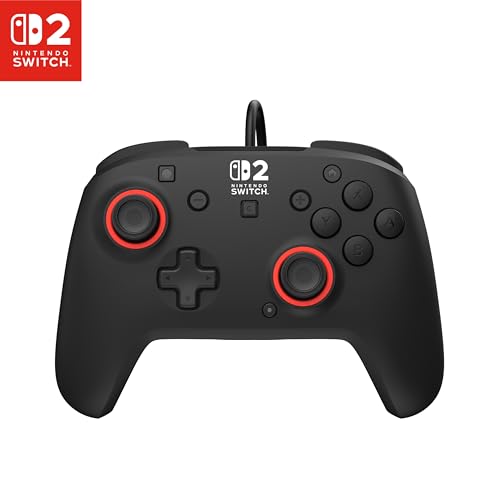
A 172.9g frame with textured grips and the same drift-proof stick tech as pads costing more.
Turtle Beach put Hall-Effect thumbsticks in the Rematch, which means magnetic sensors rather than wearing contact pads — the same anti-drift approach the PowerA Advantage takes. Textured thumbsticks and textured grips are the detail that shows up the moment your palms start to sweat during a long boss fight. At 172.9g it has real presence in the hand without feeling like a brick.
Fourteen buttons, and two of them are dual mappable quick-action back buttons. The C Button handles GameChat, the 3.5mm jack covers headset audio and USB-chat, and D-pad audio controls let you ride the volume without lifting your thumbs off the action. The 10ft / 3m USB cable is a standard length here, though it uses USB-A rather than USB-C, so check which port your dock setup leaves free.
This is the newest pad here and has the thinnest long-term evidence. Build quality is the strength people notice first, while function draws a more divided response — likely partly down to setup and firmware habits on a freshly released pad. If you want proven history, the Spectra has far more of it. If you want Hall-Effect sticks with textured grips, this delivers.
Grip and control: textured thumbsticks plus textured grips plus Hall-Effect sensors is a combination built for long sessions, and 14 buttons covers everything modern Switch titles ask for.
The fair question: the USB-A connection is less flexible than USB-C, and this pad has the shortest track record on the list.
Pick this one if: drift resistance and a grippy shell matter more to you than a long track record.
Look elsewhere if: you want the safest bet on day one, or you need USB-C specifically.
4. PowerA Wired Controller Brick Breaker Mario
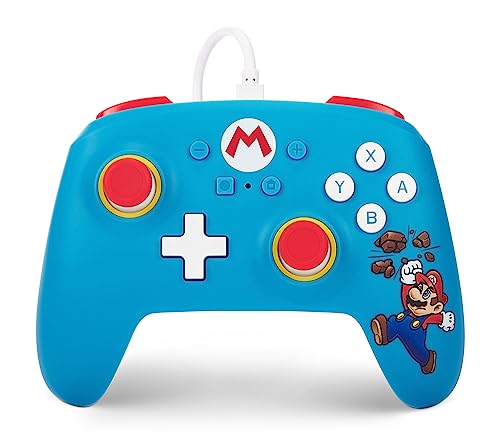
At 4.8 ounces it is the lightest pad here, and the Mario print does the talking.
Weight is the headline. This Brick Breaker Mario model comes in at 4.8 ounces, making it noticeably lighter than the PowerA Enhanced Spectra at 8.48 ounces — a difference kids and smaller hands feel immediately. The Switch button layout matches the console exactly, so anyone who has held a Joy-Con already knows where everything is. Ten buttons, rumble included, and a detachable 10ft (3m) USB cable with a hook-and-loop strap for tidy storage.
The warranty is the underrated part. PowerA backs this one with a two-year warranty when you register at PowerA.com, which is a longer safety net than most pads in this category offer. Plug-and-play setup means no pairing, no menus, no battery. For a family room where four people take turns, that simplicity is worth more than any feature list.
Here is the honest read: this is the most-reviewed pad on the page, and the feedback is genuinely split. Plenty of households get years of use, and plenty of others find it stops working. That spread is the widest on this list, which is why it sits where it does. Treat the two-year warranty as your backup plan, keep the cable strain-free, and it earns its keep as a spare or a kid’s controller.
Where it shines: 4.8 ounces makes it the lightest pad here, and the two-year registered warranty is the longest coverage on the list.
The trade-off: reliability feedback is more divided than on any other pick, so buy it as a secondary pad rather than your only one.
Good fit for: a second controller for guests, kids, or a Mario-obsessed household.
Not the one for: players who want their only Switch pad to be the most proven on the shelf.
5. Retro-Bit SEGA Saturn Wired USB Controller

Eight buttons, a proper six-button layout, and the widest device list on this page.
The layout is the whole point. This is the authentic Sega Saturn six-button arrangement, built under official Sega license, and it is the pad that feels right in a 2D fighter where the other controllers feel like a compromise. Eight buttons total — half the count of the PowerA Enhanced Spectra at 16 — but they are the eight a retro player actually presses.
Compatibility runs far beyond the Switch. It works with the Sega Genesis Mini, PC, Mac, Steam, RetroPie and Raspberry Pi, so one pad covers your emulation box and your docked console. Switching between X-Input and D-Input takes five seconds: hold the START button. That toggle is what makes modern games and emulators both behave properly. The 10ft USB cable gives you room to sit back.
Build quality is where opinions divide — some find it sturdy and true to the original, others call it on the light side. At 381g it is the heaviest pad here by a wide margin, so weight is not actually the issue; the feel is about materials rather than mass. Buy it for the six-button layout and the device list, not for a premium shell. For Genesis and Saturn emulation across a Switch, a PC and a RetroPie box, nothing else here covers that ground.
Why retro players want it
- Authentic six-button layout under official Sega license
- Works with Genesis Mini, Switch, PC, Mac, Steam, RetroPie and Raspberry Pi
- X-Input and D-Input toggle with a 5-second START hold
- 10ft USB cable for couch distance
Where it falls short
- 8 buttons is half what the Spectra offers
- Shell feel draws divided opinions on materials
- No C Button or GameChat support for Switch 2
The one to grab if: your Switch library leans on retro collections, arcade fighters and emulation.
Keep looking if: you need modern extras like a C Button or double-digit button counts.
Know the Specs
Hall Effect Thumbsticks
These are magnetic sensors inside the analog stick rather than the physical contact pads a standard stick uses. Standard sticks wear a track down over time, which is what produces drift — your character creeping in one direction with no input. Hall Effect modules have no rubbing surface, so the wear mechanism is removed rather than reduced. Two pads on this page use them: the PowerA Advantage and the Turtle Beach Rematch.
Button Count and Mappable Back Buttons
Button count tells you how many inputs the shell exposes; the PowerA Enhanced Spectra leads at 16, the Retro-Bit Saturn sits at 8. Mappable back buttons are separate — you assign an existing face-button function to a paddle behind the grip so your thumbs never leave the sticks. If you play fighting games or anything with a dodge timing, that is the feature worth hunting.
The C Button and GameChat
The C Button is the Switch 2 shortcut into GameChat features. Two pads here carry it — the PowerA Advantage and the Turtle Beach Rematch — and two explicitly do not: the PDP Afterglow Wave and the PowerA Enhanced Spectra both note the C Button is unavailable on Switch 2. If you play Switch 2 multiplayer with voice chat, that single button changes your shortlist.
USB-C vs USB-A and Cable Length
Most pads here use USB-C, while the Turtle Beach Rematch uses USB-A. Which one you want depends entirely on which dock ports are already taken by your HDMI cable and power lead. Cable length matters just as much: every pad on this page ships with 10ft, and the detachment point is the safety feature — a detachable cable pops free instead of pulling your dock off the shelf.
Common Questions
Will a wired USB Switch controller work in handheld mode?
What is the difference between Hall Effect sticks and normal analog sticks?
Does the PDP Afterglow Wave work with the original Switch or only Switch 2?
Can I use a SEGA Saturn controller for modern Switch games?
Do any of these wired controllers support Amiibo or motion controls?
Which wired Switch controller has the longest cable?
Is the C Button worth choosing one controller over another?
How many buttons do I actually need on a wired Switch pad?
What does the PowerA two-year warranty cover on the Brick Breaker Mario pad?
Can two different wired controllers be used on one Switch at the same time?
The Bottom Line
For most people shopping for a usb controller for switch, the PDP Afterglow Wave is the one to order — eight RGB zones, two mappable back buttons, a headset jack and a 10ft cord, all with Nintendo licensing behind it. If drift has already cost you a controller, the PowerA Advantage answers that directly with Hall Effect sticks and adds the C Button for GameChat. And if your Switch library is really a retro collection in disguise, the Retro-Bit SEGA Saturn gives you the authentic six-button layout plus Genesis Mini, PC and Raspberry Pi support that nothing else here touches.
One last nudge worth acting on: the Spectra is the most-established pad on this page by a wide margin, and that depth of feedback is exactly what you want when a new pad has only just launched. Whichever you pick, buy the pad that matches how you actually play — docked, with a headset, and with a cable that reaches your chair.
How we choose
We do not accept paid placement. Every pick is matched to a real buyer and a real use-case; we do not hands-on test units.
Sources
Specifications: manufacturer listings and product documentation. Review insights: verified customer reviews, as of November 2026. Pricing: not shown on this page (it changes often); check the current price via the retailer link.
As an Amazon Associate, Tactical Gear Guy earns from qualifying purchases. This does not affect which products we feature.