Specs are compiled from manufacturer listings and verified buyer reviews and can change over time — please confirm the key details on the product page before buying.
If your aim keeps landing a beat behind the target, a slow panel is often the culprit, not your hands. A good 360Hz OLED monitor redraws the screen 360 times every second and switches each pixel in a fraction of a millisecond, so motion turns fluid instead of smeared. This guide separates the four panels really worth your money — which one fits your desk, your graphics card, and your tolerance for burn-in care.
This guide is built by comparing the manufacturers’ published specifications and the patterns across verified customer reviews, so you get each pick’s real strengths and trade-offs instead of marketing spin.
Below you’ll find plain-English explanations of every spec that matters here, an honest read on each panel’s weak spot, and a straight answer on which one to buy. The list of the best 360Hz OLED monitor options starts with the crowd favorite — 4.5+ stars across 300+ ratings — and works down through the specialist picks. best 360hz oled monitor.
Top Picks
How To Choose The Best 360Hz OLED Monitor
Three things decide whether a 360Hz OLED panel feels like a genuine leap or an expensive habit: how fast it redraws, how much motion blur it kills, and whether your graphics card can actually feed it frames. Get those three right and size, stand and ports become secondary.
Response time and what 0.03ms buys you
Response time is how quickly a pixel changes from one colour to another, measured in milliseconds (ms). A 0.03ms gray-to-gray figure — the time a pixel takes to shift between grey shades — is near-instant, which means a fast strafing target leaves almost no grey trail behind it. On a slower panel you see a ghost image smeared behind the enemy; here you see the enemy and nothing else.
Can your graphics card feed 360 frames per second?
A 360Hz screen shows 360 separate images every second, so it only pays off when your card pushes close to that frame rate. At 2560 x 1440, most modern mid-to-high cards will land well short of 360 frames in heavy titles, which is exactly why adaptive sync matters. FreeSync Premium Pro and G-SYNC Compatible both let the panel match the card’s frame rate, so the image stays smooth instead of tearing or stuttering when frames dip.
The burn-in question nobody should skip
OLED pixels dim as they age, and a static element like a taskbar or a game HUD left in one place can leave a faint shadow — that’s burn-in. Every panel here fights it in a different way: custom heatsinks, pulsating heat pipes, logo and taskbar detection that dims static areas, and proximity sensors that blank the screen when you walk away. The more of these systems a monitor carries, the less burn-in babysitting it asks of you.
Side-by-Side Comparison
| Model | Best For | Panel Size | Refresh / Response | Resolution | Amazon |
|---|---|---|---|---|---|
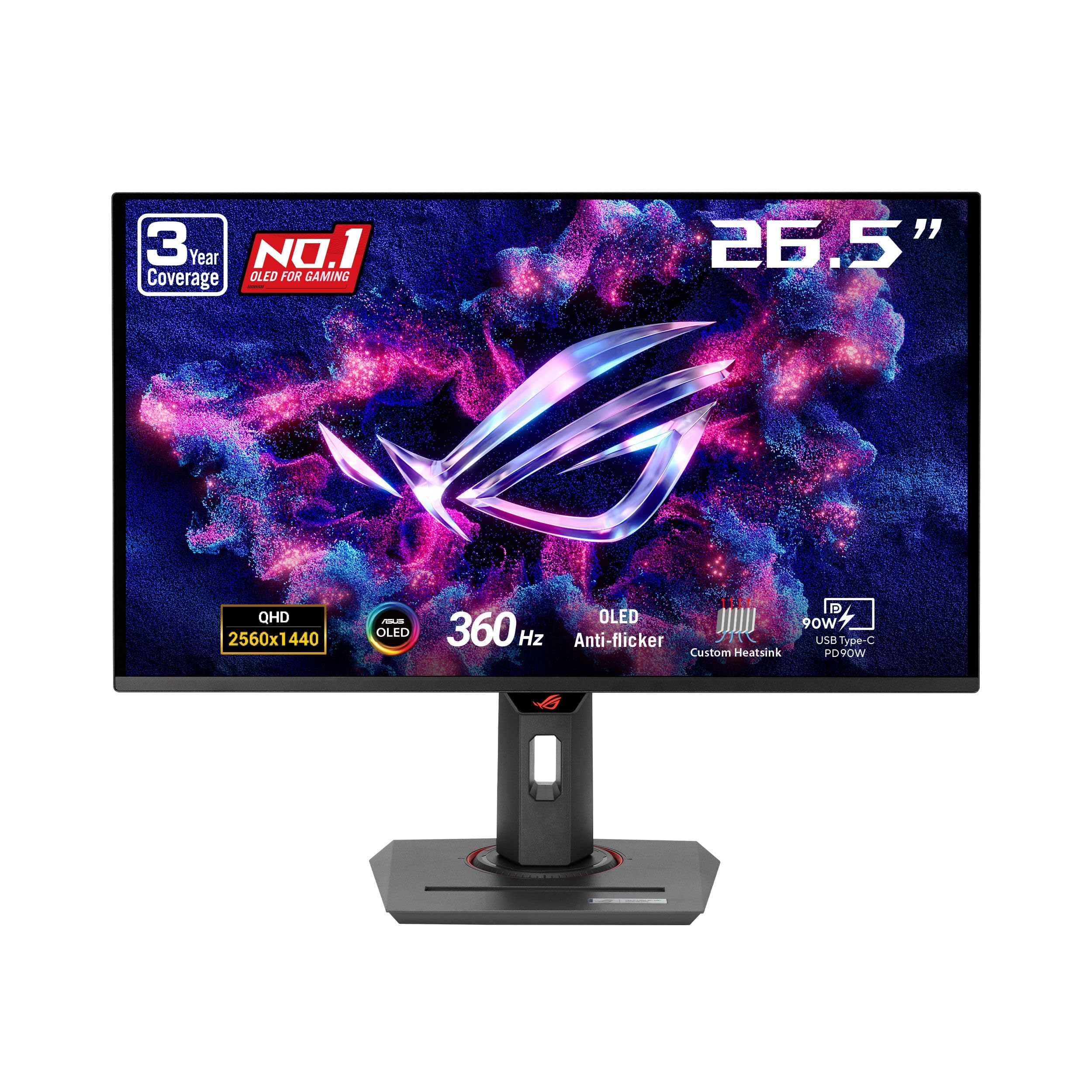
| ASUS ROG Strix XG27ACDNG★ Best Overall | Most gamers | 26.5-inch | 360Hz / 0.03ms | 2560 x 1440 | Amazon |
| Samsung Odyssey OLED G6 (G60SD) | Anti-glare setups | 27-inch | 360Hz / 0.03ms | 2560 x 1440 | Amazon |
| Alienware AW2725DF | Ergonomic desk builds | 26.7-inch | 360Hz / 0.03ms | 2560 x 1440 | Amazon |
| ASUS ROG PG34WCDN | Ultrawide immersion | 34-inch | 360Hz / 0.03ms | 3440 x 1440 | Amazon |
Detailed Reviews
1. ASUS ROG Strix XG27ACDNG Monitor
Our pick — 4.5+★ from 350+ verified ratings; the strongest balance of quality and price.
A 26.5-inch screen that pairs a 360Hz refresh rate (it redraws the picture 360 times a second) with a 0.03ms pixel shift (how fast each pixel changes colour), so fast motion stays clear.
Start with the number that decides close fights: 0.03ms gray-to-gray response time. That is the time a pixel needs to change colour, and at that speed a fast-strafing enemy leaves no grey ghost behind them. Add the 360Hz refresh rate — 360 full redraws every second — and tracking a target across your screen feels continuous rather than stepped. The panel itself is a 26.5-inch QD-OLED at 2560 x 1440, which is dense enough that text stays readable and edges stay sharp.
Colour is where this panel earns its keep. It covers 99% of the DCI-P3 colour gamut (the range of colours used in games and video work) with true 10-bit colour and a Delta E under 2 (a measure of colour error), so the colour error between what the panel shows and the intended shade is small enough that most people cannot see it. It also carries VESA DisplayHDR 400 True Black certification, a standard for HDR screens that must hit a certain brightness while keeping blacks genuinely dark. Next to the Samsung G60SD’s 4000:1 contrast figure, ASUS lists this panel at 1,000,000:1, so dark scenes hold depth without the grey wash you get on an LCD.
What wins people over is build and picture quality — that pairing is the single most-praised thing about this monitor by a wide margin. The custom heatsink and airflow design, plus ASUS OLED Care+ (the panel’s set of burn-in guards), let you game for long sessions without babysitting static elements. There is a catch worth knowing: the OLED Anti-flicker system and overall reliability draw a mixed reception. Some owners see rock-steady behaviour, others hit the occasional random screen cut-out or visible flicker during refresh-rate swings. It is not the majority experience, but it is a real variable on this model. The three-year warranty with burn-in coverage is the safety net that makes it a sensible bet.
Where it wins
- 0.03ms response and 360Hz together kill motion blur in fast shooters
- 99% DCI-P3 with Delta E under 2 keeps colour accurate for editing and play
- Custom heatsink plus OLED Care+ handles burn-in risk for long sessions
- Three-year warranty that includes burn-in coverage
What to weigh first
- Anti-flicker and reliability feedback is genuinely mixed across owners
- 26.5 inches is the smallest panel in this lineup — the ultrawide gives you far more width
Reach for this one if: you want the safest all-round 1440p esports panel with real burn-in protection behind it.
Look elsewhere if: flicker at fluctuating refresh rates would genuinely bother you — that is the one behaviour to test in your return window.
2. Samsung 27” Odyssey OLED G6 (G60SD) Series Gaming Monitor

The window-side pick, thanks to a glare-free coating most OLEDs skip.
If your desk sits near a window or under a lamp, this is the panel that stops fighting you. Samsung’s Glare Free treatment cuts reflections from external light sources, so the QD-OLED blacks stay black instead of turning into a mirror at noon. Contrast is listed at 1,000,000:1 with a QHD 2560 x 1440 resolution on a 27-inch screen — the same 360Hz refresh and 0.03ms gray-to-gray response as the ASUS above, so the speed story is identical.
The burn-in engineering is the other headline. Samsung’s Pulsating Heat Pipe — a sealed loop that evaporates and condenses a coolant — is claimed to diffuse heat 5x better than the older graphite sheet method. A Thermal Modulation System predicts surface temperature and trims brightness accordingly, while logo and taskbar detection dims static elements automatically. The screen also dims after 10 minutes of inactivity and wakes on any input. Between those systems and AMD FreeSync Premium Pro keeping the panel synced to your card, long sessions are handled without you touching a setting.
Picture quality is what the buyer consensus centres on: sharp, clear text and vivid colour with deep inky blacks, plus a slim design that looks the part on a desk. The honest caveat sits with long-term durability — build quality draws a divided response, and some units are reported to fail after several months of use. Treat that as the reason the warranty matters rather than a reason to walk away. For anyone whose monitor lives in a bright room, the glare-free coating is the difference between seeing your game and seeing your own reflection.
The durability question: Samsung covers this panel with a three-year warranty, which is the practical answer to the mixed long-term reports. Register it on day one and keep the receipt in your inbox — that is the whole mitigation strategy.
The colour trade: Samsung lists the colour gamut figure at 0.99 where ASUS prints 99 on the ROG Strix, two different ways of writing the same near-full DCI-P3 coverage, so neither panel gives up meaningful colour range to the other.
Buy it for: a bright room, a shallow desk, and a clean-looking setup that needs the reflection problem solved.
Think twice if: you plan to keep this panel for many years without registering the warranty — the build-quality reports make that paperwork worth doing.
3. Alienware AW2725DF OLED Gaming Monitor

Height, tilt, swivel and pivot — the panel that fits your neck, not the other way round.
Most gaming monitors give you a tilt and call the stand done. This one gives you height, tilt, swivel and pivot, so you can raise it to eye level, swing it sideways for a second setup, or rotate it upright for reading long documents. The screen itself is a 26.7-inch QD-OLED (a panel type that uses quantum dots for colour) running 2560 x 1440 at 360Hz with a 0.03ms gray-to-gray response (how fast a pixel changes from one shade of grey to another), and Dell quotes an infinite contrast ratio with VESA DisplayHDR True Black 400 certification, so dark scenes go properly dark next to bright highlights.
Colour accuracy is measured rather than promised here. The panel covers DCI-P3 99.3% with Delta E under 2, and Alienware ships a factory calibration report in the box so you know what the panel was tested at. That matters more than usual with this monitor, because brightness draws divided reactions — some find the OLED output strong, others call it dim in a bright room. If your room is well controlled, the accuracy is genuinely useful for photo and video work between gaming sessions.
The thing that wins people over is overall quality, and it is not close — that is the aspect buyers bring up far more than any other, with colour running a clear second. Performance and value both split opinion, and durability feedback is the weakest area, so buying this one is best framed as a long-term relationship rather than a one-off. What you get in return is the most flexible stand in this group and a panel that disappears into whatever desk arrangement you already have.
Setup flexibility: if you share a desk, game from an armchair, or just want the panel at true eye height, four-way adjustability is a daily benefit the other three picks do not match.
The honest limit: brightness is the spec to think about before ordering — this panel rewards a room you can dim, and gives less back under direct daylight.
The right call when: ergonomics and calibrated colour matter as much as frame rate to you.
Not the one if: your setup gets strong daylight and you want a panel that punches through it — the glare-free Samsung handles that better.
4. ASUS ROG PG34WCDN Monitor

A 34-inch curved wall of 360Hz OLED that wraps past your peripheral vision.
This is a different class of screen. The 34-inch curved panel runs 3440 x 1440 — that is the standard 1440p height with extra width on each side — at 360Hz with a 0.03ms GTG response (how fast a pixel changes shade), on a 1800R curve (a gentle bend that keeps the far edges roughly equidistant from your eyes). Compared with the 26.5-inch ROG Strix, the diagonal grows considerably and the pixel count climbs with it, so you see more of the map without turning your head.
The panel technology is the real differentiator. It uses an RGB stripe pixel layout, meaning the red, green and blue sub-pixels sit side by side rather than sharing space the way QD-OLED does — which is why text edges come out sharper and colour reproduction stays clean on a screen you also use for work. ASUS adds BlackShield film, claimed to raise panel hardness for 2.5X better scratch resistance and lift perceived black level by up to 40% versus previous-gen QD-OLED panels. Those are the maker’s published figures, and they address the two classic complaints about wide OLED panels: fragility and blacks that grey out.
Burn-in care goes further here than anywhere else in this group. The Neo Proximity Sensor detects when you leave your seat and switches the screen to black automatically, and OLED Care Pro runs the rest of the housekeeping in the background. Connectivity is genuinely future-facing too: DisplayPort 2.1 at UHBR20 with full 80Gbps bandwidth, two HDMI 2.1 ports, and USB-C with 90-watt Power Delivery, so one cable can carry the display signal and charge a laptop. HDR certification reaches VESA DisplayHDR 500 True Black, a step above the 400 tier on the smaller ROG, and colour coverage is listed at 99% DCI-P3. The catch: ultrawide 1440p at 360Hz demands a top-tier graphics card to feed it.
Why it stands apart
- 3440 x 1440 on a 34-inch 1800R curve gives far more visible play area
- RGB stripe sub-pixels keep text and small UI elements sharp
- Neo Proximity Sensor plus OLED Care Pro automates burn-in defence
- USB-C with 90W Power Delivery and DisplayPort 2.1 at 80Gbps
Before you commit
- Ultrawide 1440p at 360Hz needs a very strong graphics card to feed it
- A 34-inch curved panel takes real desk depth and width
Meant for: the desk with room to spare and a card that can chase high frame rates at ultrawide resolution.
The honest trade: you pay for width and connectivity, and you need the hardware and the desk space to use either properly.
Know the Specs
Refresh rate and response time
Refresh rate is how many times per second the panel draws a new image — 360Hz means 360 redraws a second. Response time is how fast one pixel changes shade, and 0.03ms gray-to-gray is near-instant, so moving objects leave almost no trail. The two work as a pair: a fast refresh with a slow pixel still smears, which is why every panel here lists both.
QD-OLED versus RGB stripe OLED
Both are OLED, so each pixel makes its own light and blacks are truly black. QD-OLED uses quantum dots to convert light into colour, which favours vivid saturation. RGB stripe OLED places red, green and blue sub-pixels side by side, which tends to render fine text more cleanly. If you split time between games and documents, that text difference is the spec that matters most to you.
Burn-in and the guards against it
Static images like a taskbar or a health bar can leave a faint permanent shadow on an OLED panel over time. The defences you’ll see listed are heatsinks and heat pipes to pull heat away, logo and taskbar detection that dims static areas, pixel-shift routines, and proximity sensors that black the screen when you step away. More of these systems means less manual care from you.
Ports, bandwidth and adaptive sync
Carrying 360Hz at high resolution needs bandwidth. DisplayPort 2.1 at UHBR20 moves 80Gbps, and HDMI 2.1 is the console-friendly path. Adaptive sync — FreeSync Premium Pro on AMD cards, G-SYNC Compatible on NVIDIA — matches the panel’s refresh to your frame rate, so the image stays smooth when frames dip below the panel’s ceiling. Check both the port version and the sync standard before you buy.
Common Questions
Do I need a 360Hz OLED monitor if my graphics card cannot hit 360 frames per second?
Is QD-OLED or RGB OLED better for reading text on screen?
How long does an OLED monitor last before burn-in sets in?
Which cable do I need for 360Hz at 1440p?
Will a 360Hz OLED monitor work with both an AMD and an NVIDIA card?
Is a 34-inch curved ultrawide worth it over a 27-inch flat panel for gaming?
Does the Samsung Odyssey OLED G6 really cut glare from a window?
What is the difference between DisplayHDR 400 True Black and DisplayHDR 500 True Black?
Do I need to change how I use my desk to protect an OLED panel?
The Bottom Line
The pick that holds up best for most people is the ASUS ROG Strix XG27ACDNG. It pairs the 0.03ms response and 360Hz refresh you came for with 99% DCI-P3 colour, a custom heatsink, OLED Care+ and a three-year warranty that covers burn-in — the full package in the 1440p size most desks can actually take.
If daylight hits your setup, the Samsung Odyssey OLED G6 solves the reflection problem with its Glare Free coating and its Pulsating Heat Pipe cooling. Want the most flexible stand and factory-calibrated colour instead? That is the Alienware AW2725DF with its height, tilt, swivel and pivot adjustability. And if you have the desk and the graphics card for it, the ASUS ROG PG34WCDN wraps 3440 x 1440 around you at the same 360Hz, with RGB stripe text clarity and 90W USB-C charging on the side.
One last thing worth doing before you order any of them: confirm your card’s DisplayPort version and your desk depth. Those two checks decide more about your satisfaction than any spec on the box.
How we choose
We do not accept paid placement. Every pick is matched to a real buyer and a real use-case; we do not hands-on test units.
Sources
Specifications: manufacturer listings and product documentation. Review insights: verified customer reviews, as of November 2026. Pricing: not shown on this page (it changes often); check the current price via the retailer link.
As an Amazon Associate, Tactical Gear Guy earns from qualifying purchases. This does not affect which products we feature.