Specs are compiled from manufacturer listings and verified buyer reviews and can change over time — please confirm the key details on the product page before buying.
If you want the short answer: a plug-in monitor is the easy way to find out what one appliance really costs you, and a panel-mounted monitor is the way to see the whole house at once. Which one fits you depends on how much wiring you are willing to touch. Everything below covers both, with the real numbers so you can pick without guessing.
This guide is built by comparing the manufacturers’ published specifications and the patterns across verified customer reviews, so you get each pick’s real strengths and trade-offs instead of marketing spin.
Some units clamp onto the mains, some just plug into a wall outlet, and each has trade-offs. This guide shows where each one falls short, so you can pick the right fit for your panel and your patience level with a power monitoring device.
Top Picks


How To Choose The Best Power Monitoring Device
The first question is not which brand — it is where you want the measurement to happen. A plug-in unit measures one device at the wall outlet. A panel unit measures the main feed and individual circuits. Choosing the wrong level is the most common buying mistake in this category.
Plug-in versus panel-mounted: pick your level of wiring
A plug-in smart plug needs nothing but an outlet, so you can start measuring in about a minute. A panel-mounted monitor clamps around the mains and branch wires inside your electrical panel, which means opening the panel cover. If you are not comfortable there, budget for an electrician on top of the device itself.
Check your panel type before you buy
Panel monitors only work with the systems they list. Meross states support for single-phase 2-wire, single-split phase 3-wire, and 3-phase 4-wire Wye systems with an earthed neutral — but no Delta. Emporia states the same Wye limitation. Check that line before you order, because the wrong panel type means a return.
How many sensors do you actually need
Two mains sensors tell you the whole-house total. Branch sensors tell you which circuit is eating the power — the air conditioner, the water heater, the dryer. Sixteen branch sensors is the common count on the premium units here, and it covers the big loads in most homes.
The ecosystem question
If you run Home Assistant, check that the unit integrates before anything else. Several picks here are explicitly built around it. If you are on Apple Home or Alexa, Matter certification is the badge to look for, since Matter devices work across platforms regardless of brand.
Side-by-Side Comparison
| Model | Best For | Mounting | Circuits / Outlets | Connectivity | Amazon |
|---|---|---|---|---|---|
| Shelly Pro EM 50A★ Best Overall | Small business load switching | DIN rail | Dual channel, 50A | Wi-Fi, LAN, Bluetooth | Amazon |
| Tapo P110M 4-PackBest Value | Per-appliance tracking on a budget | Wall outlet | 4 plugs, 15A each | Matter, Wi-Fi | Amazon |
| SONOFF POWCTBest for History | Panel install with local history | Panel / inline | 100A clamp | Wi-Fi | Amazon |
| THIRDREALITY ZigBee 4-Pack | ZigBee mesh households | Wall outlet | 4 plugs, 15A each | ZigBee 3.0 | Amazon |
| Tapo P316M Power Strip | Desk and entertainment clusters | Power strip | 6 outlets + 3 USB | Matter, Wi-Fi | Amazon |
| P3 Kill-A-Watt P4400-VP | Quick single-appliance readings | Wall outlet | 1 outlet, 15A | None (screen only) | Amazon |
| Meross EM16 | Solar surplus automation | Panel clamp | 2 main + 16 branch | Wi-Fi, Home Assistant | Amazon |
| Emporia Vue 3 | Whole-home circuit monitoring | Panel clamp | 16 branch (50A) | 2.4 GHz Wi-Fi | Amazon |
| SIEMENS Inhab | Brand-name panel metering | Panel clamp | 16 branch + 2 main | Wi-Fi, mobile app | Amazon |
Detailed Reviews
1. Shelly Pro EM 50A Energy Meter
Our pick — 4.5+★ from 950+ verified ratings; the strongest balance of quality and price.
The meter that does not just watch a circuit — it can switch the load off.
Most monitors here only listen. This one acts. The Shelly Pro EM 50A pairs a single-phase, dual-channel energy meter with an integrated switch that carries potential-free contacts, which is the dry, unpowered kind that triggers a separate contactor rather than switching mains directly. In plain terms, it can cut the power to a water dispenser, a laminator, or a bank of lights on a schedule — and it does that through the Shelly Smart Control App, with notifications for automated events.
Two 50A current transformers come in the box, so you get accurate measurement across two channels. It mounts on a DIN rail (the standard clip-in track inside industrial and commercial panels), measures 4.29 x 3.35 x 3.35 inches, and weighs 63 g. For scale, the Tapo 4-pack plug measures 1.5 x 1.5 x 2.6 inches — a 2.9x gap, which tells you this is a panel component, not something you toss on a desk. It also runs as a Bluetooth gateway and works with Alexa and Google Home with no hub.
The crowd is on board: 4.5+ stars across 900+ ratings. What wins people over most is what the unit actually does in daily service — it is the functionality that gets talked about, with build quality close behind. Installation goes smoothly and there is no programming to wrestle with, which matters when you are standing in a commercial panel. Accuracy is the one place feedback splits, so treat the readings as precise enough to catch a wasteful load rather than as a lab instrument.
Where it pulls ahead
- Integrated contactor switch turns measured loads off, not just logs them
- Two 50A current transformers included in the box
- Wi-Fi, LAN, and Bluetooth all in one unit — no hub required
- Configurable load control can redirect excess solar to devices in the home
What to weigh first
- DIN-rail mounting assumes a panel or enclosure that takes the track
- Accuracy feedback is mixed, so expect solid working numbers rather than certified metering
Made for: small and medium business owners tired of paying for machines and lights that run all night unattended.
Go another route if: you want a plug-in solution with zero panel work — the Tapo 4-pack needs only an outlet.
2. Tapo P110M Smart Plug 4-Pack
Four plugs, one app, and the fastest possible start to energy tracking.
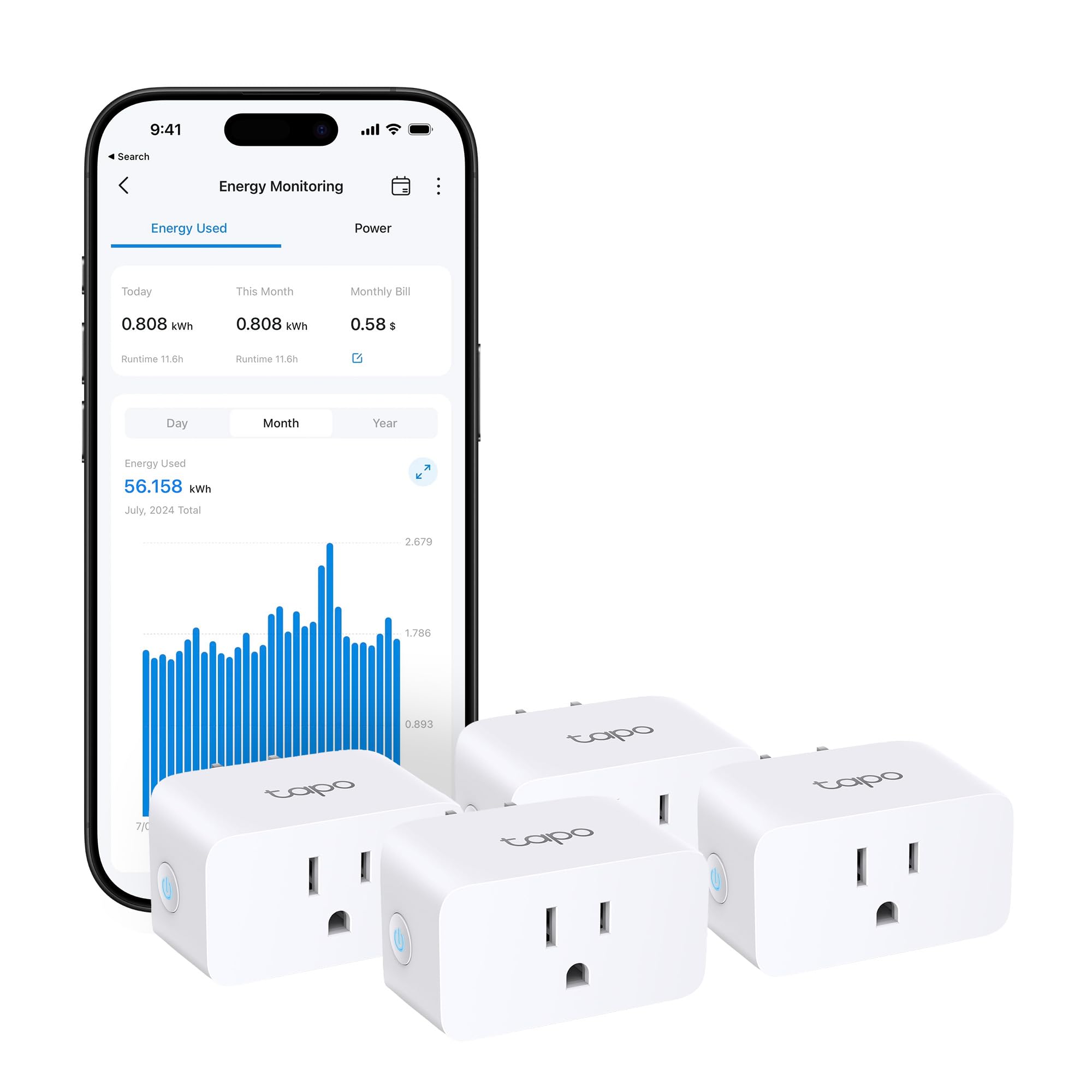
You plug it in, you name it, you see the watts. Setup takes about a minute per plug. Each of the four P110M plugs is rated at 15 A and speaks both Matter and Wi-Fi, so it works with Amazon Alexa, Apple HomeKit, Google Home, and Samsung Smart Things without you picking a side. Against the Shelly Pro EM’s 4.29-inch body, each plug here is 1.5 x 1.5 x 2.6 inches — a 2.9x difference that is exactly why one lives in a panel and one lives in your wall.
The energy tracking is where the value sits. You get in-depth statistics with clear visuals, and the app can take that consumption data and estimate the bill — both single and periodic readings. Programmable scheduling handles the rest: shift the high-consumption devices into off-peak hours, and the app runs them there automatically. There is also overcharge prevention, where the plug cuts power once your device hits a threshold you set, and shuts off when current exceeds your limit.
It rates 4.0+ stars across 700+ ratings, which is a strong number for a four-pack of plugs. The honest trade-off is what plug-in monitoring does not give you: it sees only what is plugged into it, and it cannot touch your hardwired air conditioner, water heater, or furnace. For those you need a panel unit like the Emporia Vue 3.
Why the pack wins: four independently monitored 15 A outlets with Matter compatibility and bill estimation in one purchase covers a whole entertainment wall or a home office without any wiring.
The limit to accept: hardwired household loads stay invisible to it, so pair it with a panel monitor if you want the full picture.
Pick this if: you rent, you are not opening your electrical panel, and you want real numbers on the appliances you can reach.
Not your fit: you need to see what the air conditioner or water heater draws — that measurement has to happen at the panel.
3. SONOFF POWCT Smart Power Meter
Loses power, keeps the numbers — six months of usage survives.
Removing the appliance or riding out an outage does not wipe the record here. The POWCT automatically saves your electricity usage data and holds it for up to 6 months, and you can export that history to a file whenever you want to look back. That is a specific thing most plug-in monitors do not do, and it is the reason to look at this unit for a panel install you intend to leave alone for long stretches.
You get a reading without touching live wires: the clamp is a split-core current transformer (a sensor that opens to wrap around a wire) reading up to 100 A. Release the latches on the side, clamp it around the wire, then close it — no physical contact with energized parts. The unit has an LCD display, a dry contact relay rated at 2 A output (a switch that pairs with a contactor to turn a load on or off), and it works with Amazon Alexa, Google Home, and IFTTT over Wi-Fi.
It is a compact inline piece rather than a full panel module, at 8.7 ounces and 3.86 x 2.13 x 1.22 inches. It holds 4.5+ stars across 200+ ratings. Worth knowing: the panel install itself is the real work here, as with every clamp-style monitor in this guide — nothing about the unit makes the wiring easier.
The standout detail: 6 months of stored usage that survives an outage and exports to a file is data insurance the plug-in units simply do not offer.
Built for: anyone monitoring a room or an appliance circuit over long periods who wants the record to stay intact.
Worth knowing: the 2 A relay is a trigger for a contactor, not a direct switch for heavy loads.
4. THIRDREALITY ZigBee Smart Plug 4-Pack

Already running ZigBee? These plugs double as signal repeaters.
If your home already speaks ZigBee 3.0 — an Echo with a hub built in, Home Assistant, SmartThings, Hubitat, Homey Bridge, Aeotec — these four plugs slot straight into the mesh you have. They also act as ZigBee repeaters, which means each plug strengthens the network for the others instead of just sitting there measuring.
Setup is about as simple as it gets: plug one into the wall, say “Alexa, discover my devices,” and it finds the plug on its own. Each outlet is rated 15 A, and the body is shaped to leave the adjacent socket free — a small thing until you are trying to fit four plugs into a crowded strip of outlets. Real-time energy monitoring shows current consumption of whatever you plug in, supported in Home Assistant, SmartThings, Hubitat, and the THIRDREALITY smart hub Gen2.
There is also a restore-state feature, letting you set whether a plug comes back on or stays off after power returns — supported on THIRDREALITY Hub Gen2 and Home Assistant via ZHA and ZigBee2MQTT. It carries 4.5+ stars across 800+ ratings, and the reliability inside Home Assistant is the theme that keeps coming up. The catch worth planning for: this needs a ZigBee hub. Unlike the Matter-certified Tapo plugs, there is no plug-and-play path without one.
What earns its place
- Doubles as a ZigBee repeater to extend mesh range
- Space-saving body leaves the neighboring socket usable
- Customizable on/off state after a power return
- Works with Home Assistant, SmartThings, Hubitat, and Homey
The condition to accept
- A ZigBee hub is required — it will not run on its own
- Energy monitoring depends on which hub and platform you pair it with
Right match for: an established ZigBee household that wants four monitored outlets and a stronger mesh at the same time.
Wrong match for: a first-time buyer with no hub — the Tapo P110M 4-pack needs nothing extra.
5. Tapo P316M Smart Wi-Fi Power Strip
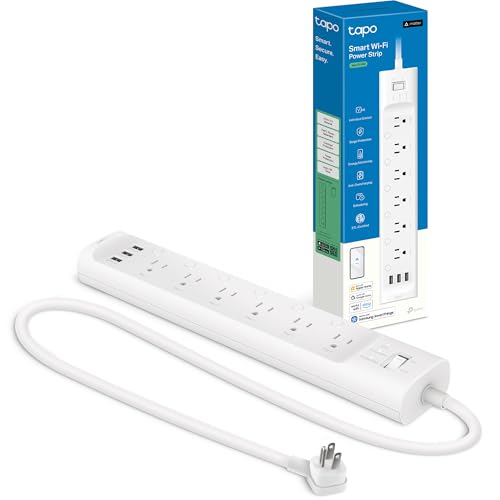
Six measured outlets and three USB ports, all behind one slim strip.
The desk problem has a clean answer: one strip, nine things powered, six of them individually monitored. The P316M runs 6 individually controlled smart AC outlets plus 3 always-on USB ports at 5V 2.4A, with surge protection across the lot. Maximum current is 15 A. It weighs 1.4 pounds and comes on a 3-foot cord with a flush-fitting plug so it sits discreetly behind a couch or a cabinet.
Energy monitoring is per outlet here, so you get comprehensive insights on each AC port rather than a single combined figure. That distinction matters when you are trying to work out whether the culprit is the monitor, the console, or the soundbar. Schedules and timers can be set separately for each outlet, and there is overcharge prevention that shuts an outlet down when a device is fully charged.
This is the most-discussed product of the group in terms of raw feedback, and it earns it — buyers talk most about functionality and quality, with connectivity, ease of setup, and individual control right behind. It is Matter-certified (a smart-home standard), so Alexa, Google Home, Apple HomeKit, and Samsung SmartThings all work, and it supports local control over your LAN (your home network) so the outlets keep responding during an internet outage. One caveat: the three USB ports are always-on and not separately metered, so you cannot get individual power readings per port.
The pitch in one line: six 15 A outlets plus three USB ports with per-outlet energy data makes this the single-strip answer to a crowded entertainment or desk setup.
The one gap: the three USB ports are always-on and not part of the monitored set, so plan on the six AC outlets for measurement.
Best when: your monitoring target is a cluster — a desk, a TV wall, a gaming rig — rather than scattered single appliances.
Look elsewhere if: you need each USB device metered separately.
6. P3 International Kill-A-Watt P4400-VP

No app, no account, no Wi-Fi — just volts, amps, watts and Hz on a screen.
Some buyers do not want another app in their life. This one has no app at all. You plug the P4400-VP between the wall and the appliance, and it displays volts, amps, watts, and Hz on its own readout. It operates at 115VAC with a maximum current of 15 A, and it forecasts your costs from what it reads. Eight measures total, and the model number is right there if you need the full list.
Buyers consistently call it easy to use. Accuracy is the second thing that stands out, with cumulative measurement being the specific quality people lean on, and it earns its keep diagnosing line power on appliances and generators. It stands 2.4 inches wide, 1.7 inches deep, and 5.1 inches tall, and weighs 6.7 ounces, so it travels to a neighbor’s garage or a generator without ceremony.
What it will not do is log anything for you or send an alert while you are away. It is a read-it-now meter with no logging or remote alerts. The 4.5+ stars across 300+ ratings reflect a long-running, simple tool rather than a smart-home hub, and reliability is the aspect that pulls mixed feedback — so treat it as a diagnostic you consult, not an always-on sentinel.
Why it stays useful: 115VAC and 15 A with direct volts, amps, watts, and Hz readings makes this the fastest way to settle an argument about which appliance is the energy hog.
Reach for it when: you want one honest reading on one appliance and no account setup at all.
Skip the purchase if: you need remote alerts or historical logging — a smart plug or panel monitor carries those.
7. Meross Smart Home Energy Monitor EM16
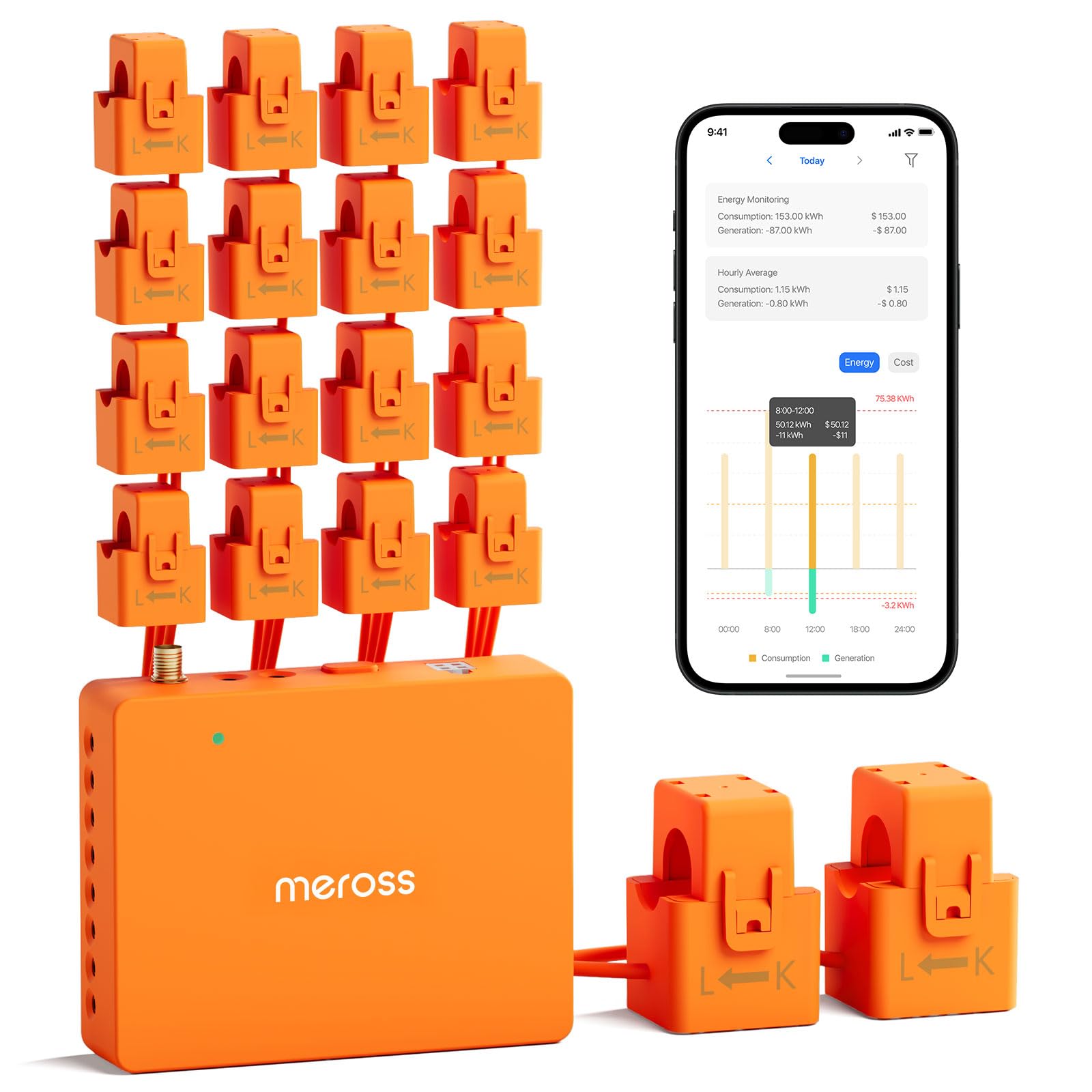
Sixteen branch sensors, two mains, and a solar trigger for your EV charger.
Wide coverage is the headline. This unit covers 2 main circuits at 200A plus 16 branch circuits at 60A, which is enough to separate the air conditioner from the water heater from the dryer instead of lumping them into one number. It reads power, voltage, current, and power factor within ±2% accuracy, and stores up to 5 years of data with hourly report export for the deep dives.
For solar homes, the useful part is the surplus detection: it integrates with Home Assistant, spots when you are generating more than you are using, and powers EV chargers or water heaters with the excess. Meross claims 10–20% energy savings from spotting energy hogs — a manufacturer figure, not an independent test. It is ETL-certified and compliant with the UL 61010 testing standard, and it carries a 2-year warranty.
Installation is clamp-on and described as minutes of work, with the app allowing you to invert CT readings rather than physically flipping a sensor. Two things to plan around: the software setup splits feedback between easy and complicated, and connectivity gets mixed notes. The 4.0+ stars across 150+ ratings put it behind the Emporia Vue 3 on score. What keeps it in the conversation is the solar automation, which the Vue 3 does not list as a surplus-trigger feature.
Reasons this earns the spend
- 2 main circuits at 200A plus 16 branch circuits at 60A
- Solar surplus detection that can fire up EV chargers and water heaters
- All data stays local with no subscription
- ±2% accuracy across power, voltage, current, and power factor
Before you commit
- Software setup feedback splits between easy and complicated
- Connectivity and support both earn mixed marks
Built around: a home with panels on the roof that wants to stop exporting power it could be using.
Consider the Vue 3 instead if: you want the highest-scoring panel monitor and do not need solar surplus triggers.
8. EMPORIA Vue 3 Home Energy Monitor

Sixteen branch sensors, UL Listed, and the highest scorer on this list.
The Vue 3 comes with sixteen branch sensors rated at 50A, which covers the critical loads in a typical home — air conditioner, furnace, water heater, washer, dryer, range. Screw terminals and ports let you trim the CT wires to cut clutter inside the panel. Mounting is clamp-on inside the circuit panel, and the package weighs 4.77 pounds.
Accuracy is stated at ±2%, so readings stay close to what the meter sees. Data is tiered: 1-second data is available in the app while it is actively open and retained for 3 hours, 1-minute data is held in the cloud for 7 days, and 1-hour data is retained indefinitely with export available whenever you want it. It monitors solar and net metering too. It is UL Listed and CE Listed (safety certifications), and carries a 1-year warranty.
Two compatibility points decide this one. It needs 2.4 GHz Wi-Fi with an internet connection to monitor at all. And like the Meross, it supports single phase, single-split phase, and 2-wire systems, plus 3-phase 4-wire Wye with an earthed neutral — but 3-wire systems there need an additional 200A sensor sold separately. It scores 4.5+ stars across 800+ ratings, the same star value as the Shelly Pro EM at the top of this list.
Where it lands: sixteen 50A branch sensors plus UL listing and ±2% accuracy makes this the most complete whole-home circuit monitor here for a standard US panel.
The honest caveat: the internet requirement is real — no 2.4 GHz Wi-Fi connection means no monitoring.
Choose it if: you want to know which specific circuit in the house is spending your money, down to the minute.
Check first: your panel type and your Wi-Fi band, since 3-wire systems need a separate sensor and 5 GHz networks are not supported.
9. SIEMENS Inhab Smart Home Energy Monitor

Measures the mains and sixteen branches — and manages peak demand too.
The Inhab measures rather than estimates: it reads directly at the panel mains and at the individual circuit level for up to 16 branch circuits. In the box you get 2-200Amp main sensors and 16-50Amp branch sensors, plus the wire harness and Wi-Fi assembly. At 4.8 pounds it is the heaviest unit here, and it fits new and existing electrical panels.
The advanced menu goes past monitoring. You get Time of Use Management, Peak Demand Management, Excess Solar Management, Net Metering, and load shedding of compatible EV chargers and other smart devices. Personalized alerts catch abnormal behavior — the example given is an oven left on. The mobile app covers the USA and Canada only, and the unit is CE marked and UL Listed in both countries.
Quality and installation are what get talked about, and the value read is strong. Ease of use is the aspect that splits, which tracks with the reality of panel work: sixteen clamps and a wire harness is a real install, not a five-minute job. It scores 4.5+ stars across fewer ratings than the Vue 3, which is the number to weigh if you are comparing the two — the Emporia holds more feedback at the same star value.
Why the brand matters here: 2-200Amp main sensors plus 16-50Amp branch sensors included, with Time of Use and Peak Demand Management built in, is a different class of tool than a plug-in meter.
Fair warning: the ease-of-use feedback is mixed, and sixteen clamps inside a panel is a job worth hiring out.
The right buyer: a homeowner or small facility manager who wants brand-name hardware doing the metering and peak-demand control.
Weigh it carefully: the Vue 3 has more feedback at the same star value, so this is a pick for the feature set, not the consensus.
Know the Specs
Current transformers and the amp rating
A current transformer, usually called a CT, is a clamp that reads how much current is flowing through a wire without touching the conductor. The number beside it is its ceiling — a 50A CT is meant for circuits up to 50 amps, a 200A CT for a main feed. Match the CT rating to the circuit it wraps, because a clamp sized for a branch circuit will not give meaningful data on the mains.
Matter versus ZigBee versus plain Wi-Fi
Matter is a shared smart-home standard, so a Matter-certified plug works with Apple Home, Alexa, Google, and SmartThings regardless of brand. ZigBee is its own mesh protocol and needs a ZigBee hub — usually an Echo with a hub built in or a Home Assistant setup — but each device also repeats the signal. Plain Wi-Fi units connect directly to your router with no hub but put more devices on your network.
Accuracy figures and what they mean
An accuracy figure like ±2% means the reading can sit two percent above or below the true value. For spotting a wasteful appliance that is plenty precise. For billing disputes it is not. That is why a mixed accuracy note on a panel meter is a soft caveat rather than a reason to walk away — you are looking for trends, not certified revenue metering.
Branch vs mains monitoring
Mains monitoring gives you one number for the whole house. Branch monitoring breaks that down into individual circuits, so you can see the water heater drawing power at 2 a.m. while everything else sleeps. Sixteen branch sensors is the common count on the panel units here, and it is enough to cover the large loads in most homes without metering every lighting circuit.
Common Questions
Will a clamp-on panel monitor work with my electrical panel?
Do I need an electrician to install a panel energy monitor?
What is the difference between a smart plug and a panel energy monitor?
Does a power monitoring device need a subscription?
Can these monitors track solar generation and net metering?
Will a smart plug at 15A handle a space heater?
How much history does each monitor keep?
Which smart home platforms do these work with?
What Wi-Fi band does a whole-home energy monitor need?
Can a power monitoring device shut an appliance off automatically?
The Bottom Line
The winner on this list is the Shelly Pro EM 50A, and the reason is simple: it is the only pick that measures a load and can switch it off, through potential-free contacts and configurable load control. For a business owner tired of equipment running all night, that is the whole job in one DIN-rail unit. The Emporia Vue 3 draws more feedback at the same star value, so if pure circuit-by-circuit household data is your goal, that is where the consensus sits.
Want circuit-level detail across the whole house instead? The EMPORIA Vue 3 brings sixteen 50A branch sensors, UL listing, and ±2% stated accuracy. For a solar home running Home Assistant, the Meross EM16 adds surplus detection that can drive an EV charger or water heater. And if you just want numbers on four reachable appliances without touching a panel, the Tapo P110M 4-pack gets you there in minutes.
One nudge before you decide: open your electrical panel cover and look at what is written on the breaker label. That single check tells you whether a panel monitor is even an option before you buy.
How we choose
We do not accept paid placement. Every pick is matched to a real buyer and a real use-case; we do not hands-on test units.
Sources
Specifications: manufacturer listings and product documentation. Review insights: verified customer reviews, as of November 2026. Pricing: not shown on this page (it changes often); check the current price via the retailer link.
As an Amazon Associate, Tactical Gear Guy earns from qualifying purchases. This does not affect which products we feature.