Specs are compiled from manufacturer listings and verified buyer reviews and can change over time — please confirm the key details on the product page before buying.
You want your Steam Deck on the big screen, and you want it to work the first time you plug in. A good dock gives you a stable 4K picture, a wired network for online play, and enough USB ports for a controller and a keyboard. The pick that does most of that best is the UGREEN 9-in-1, at 4.5+ stars across 2,000+ ratings. Below are nine docks that are all genuinely built for handhelds.
This guide is built by comparing the manufacturers’ published specifications and the patterns across verified customer reviews, so you get each pick’s real strengths and trade-offs instead of marketing spin.
A Steam Deck dock is a small powered hub that holds your console upright and routes video, network, and USB out through one cable. The details decide whether your setup feels clean or frustrating, so here is the honest breakdown of the best valve steam deck dock.
Top Picks


How To Choose The Best Valve Steam Deck Dock
A dock looks like a simple accessory, but four specs decide whether it suits you. Read these first, then scan the table.
Resolution and refresh rate
This is the picture quality number. A 4K@60Hz HDMI port (4K meaning 3840×2160 pixels, 60Hz meaning the screen refreshes 60 times a second) covers most living-room TVs perfectly well. If you own a 120Hz TV and want a smoother image, you need a dock that lists 4K@120Hz or HDMI 2.1 — the cables and the port both have to support it. The Steam Deck OLED itself cannot output 90Hz through every dock, so check the listing if that matters to you.
Power delivery versus what your Deck can take
Docks advertise 100W power delivery, but the Steam Deck tops out at 45W charging. The extra headroom is not wasted — it covers the dock’s own power draw and any peripherals — but do not expect a 100W dock to charge your Deck faster than its 45W limit. A dock that ships without a charger (or a lower-wattage one) may charge slowly or report that the power is insufficient.
Ports, network, and the vent question
Count the ports you will genuinely use: a keyboard, a mouse, a controller receiver, a USB drive, and a wired network cable. Gigabit Ethernet (1000Mbps) is the difference between a laggy online match and a steady one. Finally, look at the stand shape. A cradle with solid plastic across the back can cover the Deck’s heat outlet, while foldable or flip designs leave it clear.
Side-by-Side Comparison
| Model | Best For | Max Display | Ports | Power Input | Amazon |
|---|---|---|---|---|---|
| UGREEN 9-in-1★ Best Overall | All-round desk setup | 4K@60Hz | 9 | 100W PD | Amazon |
| Anker 6-in-1Simplest Setup | Simple TV hookup | 4K@60Hz | 6 | 100W PD-IN | Amazon |
| SABRENT DS-RA6PTravel Pick | Bag-friendly travel dock | 4K@60Hz | 6 | 95W PD | Amazon |
| JSAUX 6-in-1 | High refresh rate on a budget | 4K@120Hz | 6 | 100W PD | Amazon |
| B3 BIGTHREE 6-in-1 | Rock-solid everyday use | 4K@60Hz | 6 | 100W PD | Amazon |
| iVANKY 8-in-1 | 4K@144Hz plus a charger | 4K@144Hz | 6 | 100W max | Amazon |
| Razer Handheld Dock Chroma | Looks and lighting | HDMI 2.0 | 6 | 100W PD | Amazon |
| BenQ GR10 | High-refresh TV gaming | 4K@120Hz / 8K@60Hz | 7 | 100W PD | Amazon |
| DOCKCASE & CHIZHA | Storage and cooling | 4K@120Hz HDR | 8 | 100W PD | Amazon |
Detailed Reviews
1. UGREEN Steam Deck Dock 9-in-1
Our pick — 4.5+★ from 2,500+ verified ratings; the strongest balance of quality and price.
Nine ports, a foldable back panel, and the fastest USB transfer of the whole group.
If your desk has quietly collected a keyboard, a mouse, a controller dongle, and an SD card you keep swapping, this is the dock that swallows all of it. It gives you 9 ports in total, including two USB 3.2 Gen 2 ports (one USB-A, one USB-C) running at 10Gbps. For you, that means moving a big game file from an external drive takes a fraction of the time it would on a slower hub — and it is twice the 5Gbps ceiling of the Anker below.
The stand is the part buyers end up talking about. Two foldable panels mean the back stays open, so the Deck’s heat outlet is not blocked — a real difference during a two-hour session. Video goes out at up to 4K@60Hz, with support for 2K@144Hz and 1080P@240Hz if you prefer a faster monitor over a sharper one. There is also a microSD and full-size SD slot built in, plus Gigabit Ethernet for a wired connection.
Power delivery is where you should read the fine print. The dock accepts up to 100W, but the Steam Deck’s own charging ceiling is 45W, so the extra headroom is really about feeding the dock and your peripherals. A fair number of owners find the power behaviour varies with the charger they pair it with — the fixed set of ports and the heat clearance are what earn this one its place at the top. It is the highest-rated dock here, and it is not the most expensive, which is a combination worth noticing.
What earns it first place
- Nine ports including dual SD slots — no dongle chain needed
- 10Gbps USB 3.2 Gen 2 ports, twice the 5Gbps on the Anker
- Foldable back panel keeps the Deck’s heat vent clear
- 4K@60Hz output with 2K@144Hz and 1080P@240Hz support
What to know before you buy
- Dock accepts 100W but the Steam Deck still caps at 45W charging
- Power behaviour can shift depending on which charger you supply
- Grey plastic finish is plain next to the Razer’s lighting
Made for: anyone building a permanent desk or TV setup who wants every port covered in one purchase.
Think twice if: you plan to carry it around — the foldable stand is a desk fixture, not a pocket accessory.
2. Anker Steam Deck Dock 6-in-1
A short, tidy six-port hub that turns one cable into a full TV setup.
The Anker is the pick for someone who wants to plug in, sit down, and not think about it again. Six ports cover the essentials: a 100W PD-IN port for charging, one 4K@60Hz HDMI output, a 1Gbps Ethernet port, two USB-A ports at 5Gbps each, and one USB-C at 5Gbps. The built-in USB-C cable measures 8.66 inches (220 mm), which is long enough to reach a TV shelf without a tangle of extra cables.
Build quality is the recurring theme in owner feedback — it feels dense and solid in the hand rather than hollow. That 1Gbps Ethernet port is the practical upgrade most people notice first, because a wired connection steadies an online match in a way Wi-Fi rarely manages. Note that the USB-C data port does not carry video, so the HDMI port is your only display route. It also is not listed for the ROG Ally X, so check your handheld before ordering.
The honest catch is charging. Some owners find the Deck stops charging on the dock, while others report fast charging working as expected — so treat charging behaviour as the one variable to test in your first week. At 150 grams it is light enough to leave on a shelf without it feeling like clutter. If your setup is one TV, one controller, and one cable, this removes every extra decision.
Where it wins: Anker’s 6-in-1 keeps the footprint small and the cable short, so the TV shelf stays tidy, and the 1Gbps Ethernet port does the heavy lifting for online play.
The honest limit: charging is inconsistent across owners, and the dock is not listed for the ROG Ally X — worth checking your handheld model before you commit.
Reach for this if: you want a compact, well-built hub for a single TV and do not need a huge port count.
Look elsewhere if: you own a ROG Ally X or need a second video output path.
3. SABRENT 6-Port USB-C Dock DS-RA6P
Flat, white, and built to drop in a bag rather than sit on a stand.
Buy this one if you dock your Deck on holiday, at a friend’s house, or on a desk that has no room for a cradle. SABRENT is upfront about it: this is a connectivity hub, not a stand. It does not hold or prop the console up, so you supply the angle yourself or use the Deck’s own kickstand case. What you get is 4K@60Hz HDMI 2.0 output with HDCP support, three USB-A 3.2 Gen 1 ports at 5Gbps, and one downstream USB-C port, all running at once.
The power arrangement is the key detail. The USB-C input passes up to 95W of PD 3.0 through to your handheld, but no charger is included — you use the one that came with your console. A lower-wattage adapter charges more slowly and may not keep up under load, so bring your original brick. At 220 grams it has more heft than the Anker’s 150 grams, which suits a dock that travels in a bag rather than staying put.
Compatibility is the other thing to verify before ordering. Video only works if your device’s USB-C port supports DisplayPort Alternate Mode, which is what lets a single cable carry a picture. Feedback is genuinely split on whether it works first time for a given device, so confirm your handheld is on the list. When it clicks, it is a clean, low-profile answer for travel.
Why it travels well: the flat body and 95W pass-through let you carry one small brick instead of a cradle, and three USB-A ports still cover a controller, keyboard, and drive.
Read before ordering: no charger in the box, and no stand — pair it with your own Deck case and original power adapter.
Best match: the gamer who moves between rooms and houses and wants ports, not a pedestal.
Not for you if: you want the Deck held upright on a shelf, or you need video from a non-DisplayPort-Alt-Mode device.
4. JSAUX Docking Station 6-in-1
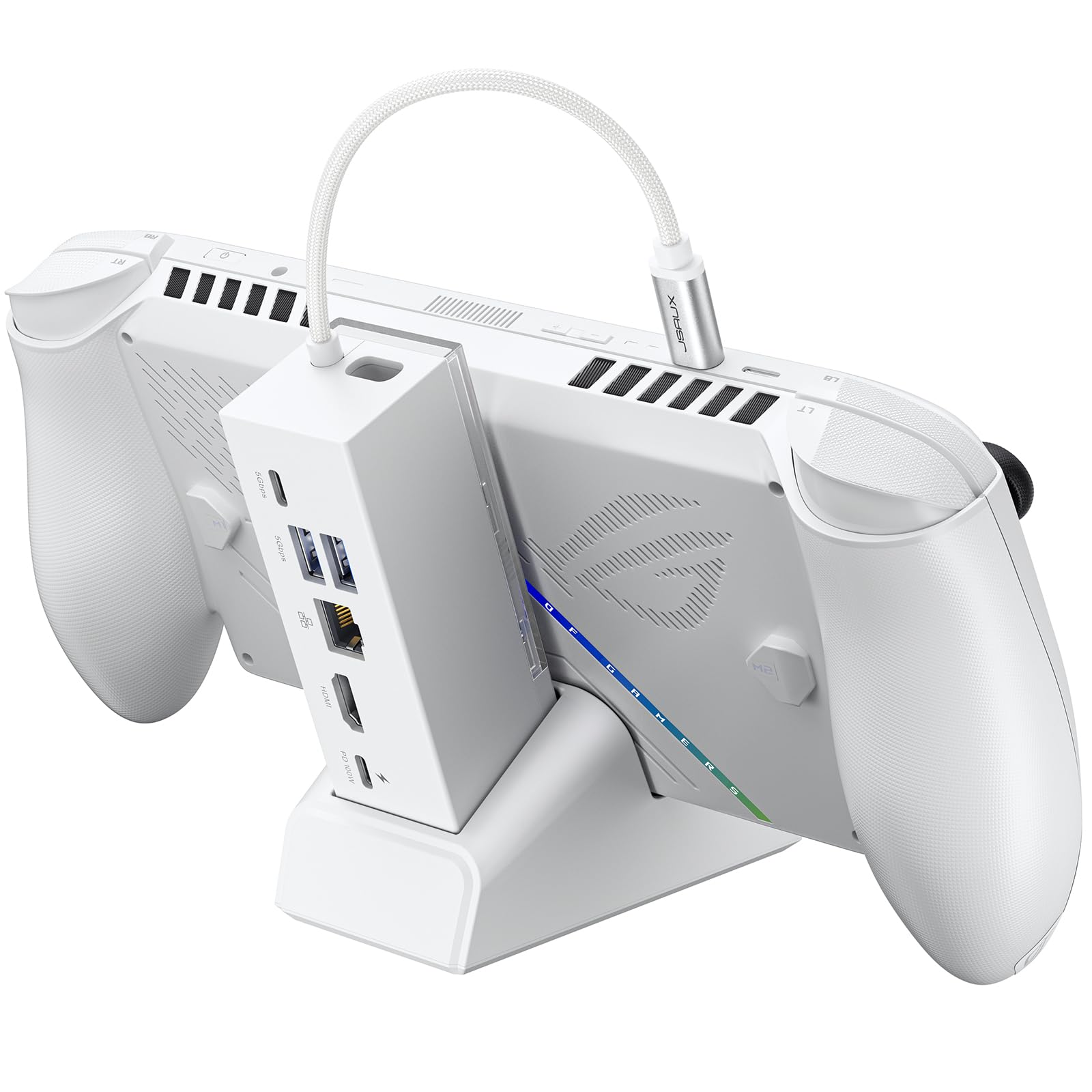
A 120Hz display output that punches above its price bracket.
Pay attention to the display figure here, because it is the standout. This dock drives 4K@120Hz over HDMI, or 1080p at 240Hz if you prefer speed over sharpness — a clear step up on the 4K@60Hz most of this list settles for. If you own a 120Hz TV and want that extra smoothness in a racing game or a fast shooter, this delivers it without jumping into the premium tier. The 100W power delivery is enough to charge a Steam Deck LCD/OLED, ROG Ally, or Legion Go at full speed when paired with the original charger.
The modular base is the second trick. You can seat the console directly on the dock, or detach the base and use it as a standalone stand — handy if you sometimes play handheld and sometimes on the TV. An extra silicone pad keeps the fit snug and stops slipping. Around the back you get Gigabit Ethernet, USB-C 3.2 Gen 1, and dual USB-A 3.2 Gen 1 ports.
Two honest notes. First, if you connect a ROG Xbox Ally or ROG Xbox Ally X, the dock itself uses some of the incoming power. A 65W or lower charger can then trigger a “not enough power” message — the fix is a PD 100W charger (a 100-watt USB-C power supply). Second, this unit does not support VRR or ALLM (variable refresh rate and auto low-latency mode, two picture features some TVs use); JSAUX points buyers to a different model for those. Most handheld players will never miss either.
Why high-refresh owners like it
- 4K@120Hz or 1080p@240Hz output at a mid-range tier
- 100W PD charges Steam Deck, ROG Ally, and Legion Go at full speed
- Detachable base doubles as a standalone stand
- Gigabit Ethernet plus three USB 3.2 Gen 1 data ports
Where it asks for care
- No VRR or ALLM support on this model
- ROG Xbox Ally owners need a 100W charger to avoid a low-power warning
- Some buyers report fit quirks with certain Legion Go S setups
Pick it for: the 120Hz or 240Hz display upgrade at a fair price, especially on a Steam Deck, ROG Ally, or Legion Go.
Skip it for: TV features like VRR and ALLM — this model leaves those out by design.
5. B3 BIGTHREE Docking Station 6-in-1
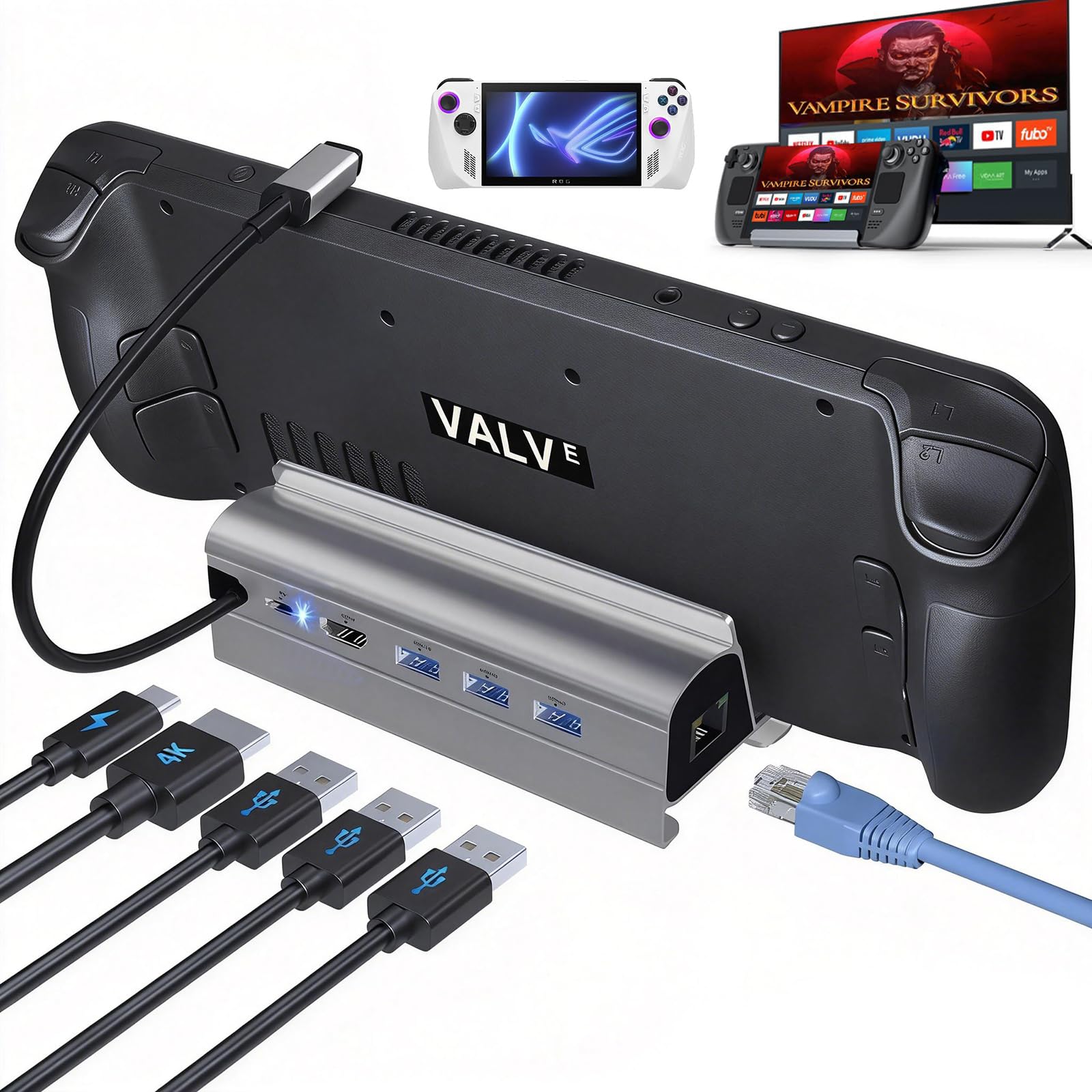
The one buyers describe as simply working, port after port, session after session.
Reliability is the whole story with this dock, and it happens to be the thing that matters most once the novelty wears off. It runs a 4K@60Hz HDMI 2.0 output in both mirror and extended modes (mirror copies your Deck screen, extended gives you a second desktop). Around the back sit three USB-A 3.0 ports at 5Gbps and a 100W USB-C PD input. Owners repeatedly describe every port working as expected and the setup being quick — the kind of quiet competence you stop noticing because nothing breaks.
The network port is a full 1000Mbps Gigabit one, backward compatible with 100Mbps and 10Mbps networks. That makes it the practical pick for anyone who streams or plays online and wants a cable instead of Wi-Fi. At 5.6 ounces it is light enough to leave in place permanently without it dominating a shelf. Note that it does not output 90Hz on a Steam Deck OLED — if that specific refresh rate matters, look elsewhere.
One requirement to plan around: no power adapter is in the box, and the dock wants a 65W or higher USB-C PD charger for best results. Your Deck’s own charger is usually enough, but actual charging speed depends on the charger and the device. Supply a proper brick and this becomes the least fussy dock on the list — which is exactly what some people want from an accessory they will never think about again.
The case for it: a 6-in-1 dock that reviewers describe as dependable, with all ports live at once and a full 1000Mbps Ethernet port for wired play.
Plan around this: no adapter included, so pair it with a 65W-or-higher USB-C PD charger, and do not expect 90Hz output on a Steam Deck OLED.
Good fit for: anyone who values a dock that just works over one that shows off, and wants wired internet without fuss.
Less ideal if: you need Steam Deck OLED 90Hz output or a dock that ships with its own charger.
6. iVANKY 4K@144Hz Steam Deck Dock
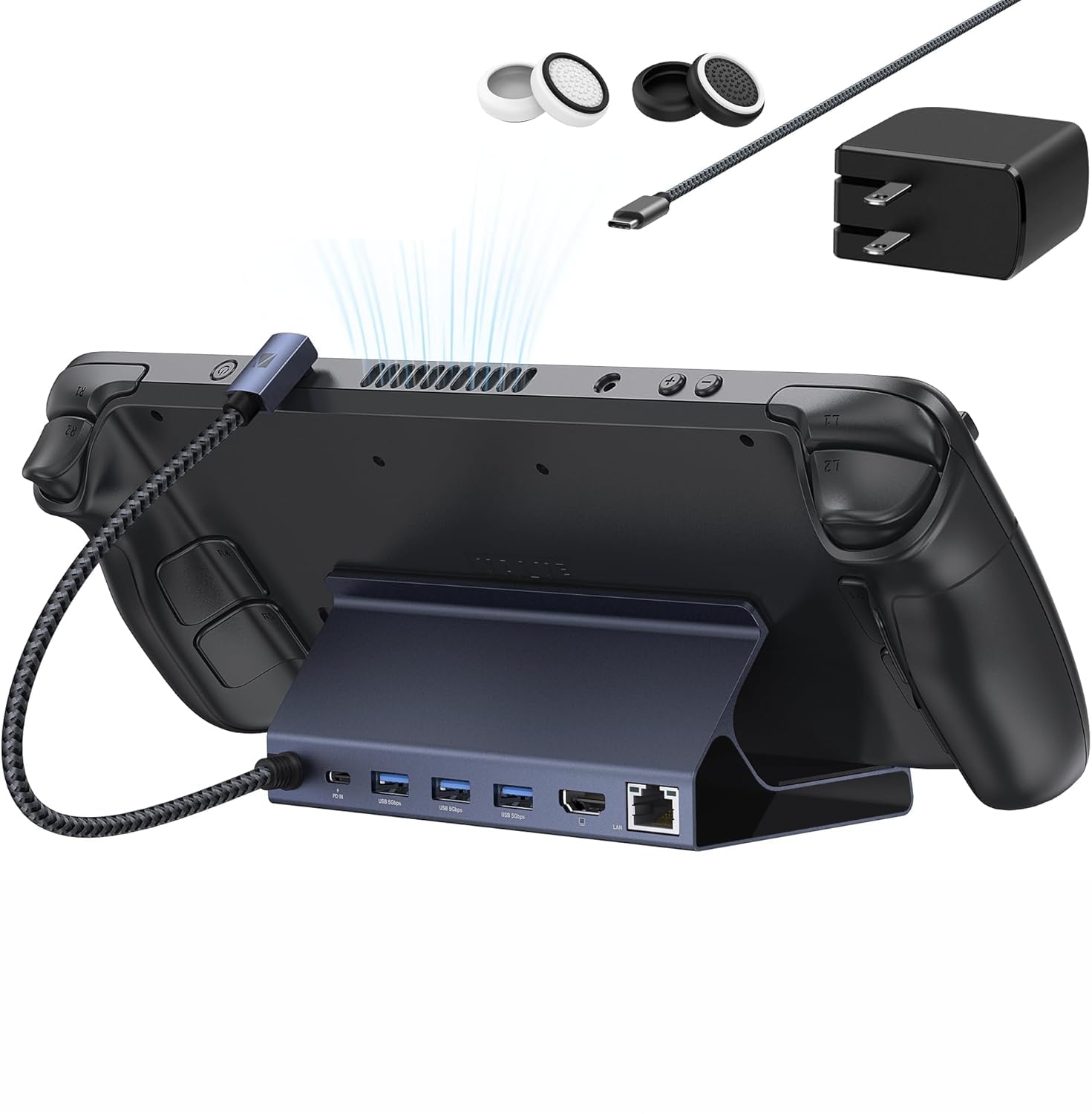
The only dock here that hands you the charger in the same box.
Here is the detail that separates this from every other pick: a 65W PD charger is included. That sounds small until you remember how many docks on this list leave you to supply your own brick. The dock also pushes the refresh ceiling higher than most, with a 4K@144Hz HDMI 2.1 output and 100W max power delivery. With the included charger and the ROG Ally’s 30W Turbo mode supported (on BIOS 323), it is a natural match for an Ally owner who wants one order to cover everything.
The port set is 8-in-1 on paper — HDMI, Gigabit Ethernet, three USB-A 3.0 ports, and a charging USB-C. That is enough for a controller, keyboard, mouse, and a wired network at the same time. The main practical limit is the frame: it is not compatible with a protective case that has a kickstand, so bare console or a thin case only. Feed it your original charger and the Steam Deck still tops out at its own 45W ceiling.
For an Ally or Legion Go owner who wants the fastest panel support and does not want to buy a charger separately, this is the straightforward answer. For a Deck owner on a 60Hz TV, the extra refresh headroom is money spent on a feature you will not see.
What stands out: a 65W charger comes in the box, plus 4K@144Hz HDMI 2.1 output — a combination none of the cheaper docks here offers.
The trade-off: it will not fit a protective case with a kickstand, and the 144Hz headroom is wasted on a 60Hz display.
Choose it when: you want the dock and power supply sorted in one purchase and your display can use the faster refresh.
Pass on it if: you play with a kickstand case attached or you are sticking to a 60Hz TV.
7. Razer Handheld Dock Chroma 100W

A collapsible aluminum dock with RGB lighting and an adjustable hinge.
This is the one you buy if the dock lives on a visible shelf rather than hidden behind a TV. The solid aluminum chassis is built to survive travel, the design folds down for packing, and a dedicated button cycles the Chroma RGB lighting through several effects. The adjustable hinge locks at 45 or 75 degrees, so it doubles as a stand for a phone or tablet as well as a handheld. Owners rate its looks above everything else — it is easily the best-dressed dock here.
The ports are a working 6-port set: HDMI 2.0 for the big screen, three USB-A ports for controllers and devices, a 1GB Ethernet port for a wired connection, and 100W passthrough charging with power delivery. That combination keeps you playing while the console charges. A 2-year manufacturer warranty backs it up. At 500 grams it is the heaviest pick on the list by a wide margin, which is the flip side of that aluminum build.
The genuine drawback is value. The port count is modest for the premium tier, several buyers find the connections a little thin next to cheaper hubs, and the price-to-port ratio is the weakest on this list. If you are counting ports per dollar, this is not the dock for you. If you want a folding aluminum dock that looks the part next to a gaming setup, it earns its place.
Style and build: an aluminum collapsible body, a hinge that locks at 45 or 75 degrees, and Chroma RGB lighting make this the most striking dock on the list.
The honest catch: three USB-A ports is a slim count for the premium tier, and the price-to-port ratio is the weakest here — buy it for the look, not the port math.
Right for: visible setups where a dock doubles as desk décor and a phone or tablet stand.
Wrong for: port-hungry desks that need every connection they can get for the money.
8. BenQ GR10 HDMI 2.1 Steam Deck Dock

An HDMI 2.1 dock that goes all the way to 8K@60Hz.
If your TV is a recent 4K panel and you want every ounce of smoothness out of it, this is the dock built for that job. The HDMI 2.1 output reaches 4K@120Hz, 1080p@360Hz, or 8K@60Hz with HDR10, and it also serves Moonlight and GeForce NOW streaming. The 2.5Gb Ethernet port (2,500Mbps, well above the 1Gbps on most rivals here) keeps a stream steady. A flip-down stand lets you seat the Deck for TV play or flip it up to reclaim desk space.
Data runs at 10Gbps over two USB-A ports and one USB-C port, so a controller, headset, and external drive all keep up. Power delivery is 100W, which covers the Deck’s own ceiling with headroom for the dock. The aluminum alloy shell is there specifically to stop overheating during long sessions — a real concern when a dock sits under a console for hours. Owners describe it as reliable at 120Hz and working cleanly with HDR and VRR settings on their TVs.
Two limits worth knowing. First, there is no HDMI CEC support, which is the feature that lets your TV remote wake the console — you will use the Deck’s own power button. Second, at 7 ports it is priced above the mid-range picks, so it only makes sense if your display can actually use HDMI 2.1. Pair it with an older 60Hz TV and you are paying for refresh headroom you will never see.
What the extra tier buys
- HDMI 2.1 output up to 4K@120Hz, 8K@60Hz, and HDR10
- 2.5Gb Ethernet for stable Moonlight and GeForce NOW streaming
- 10Gbps data across two USB-A and one USB-C port
- Aluminum shell designed to resist overheating over long sessions
What to accept
- No HDMI CEC, so your TV remote will not wake the Deck
- Priced above mid-range picks — only worth it with an HDMI 2.1 display
The match: a 4K 120Hz TV owner who wants HDR, fast streaming, and a 2.5Gb wired link in one dock.
The mismatch: a 60Hz TV or a remote-control-first living room, where the HDMI 2.1 headroom goes unused.
9. DOCKCASE & CHIZHA Docking Station
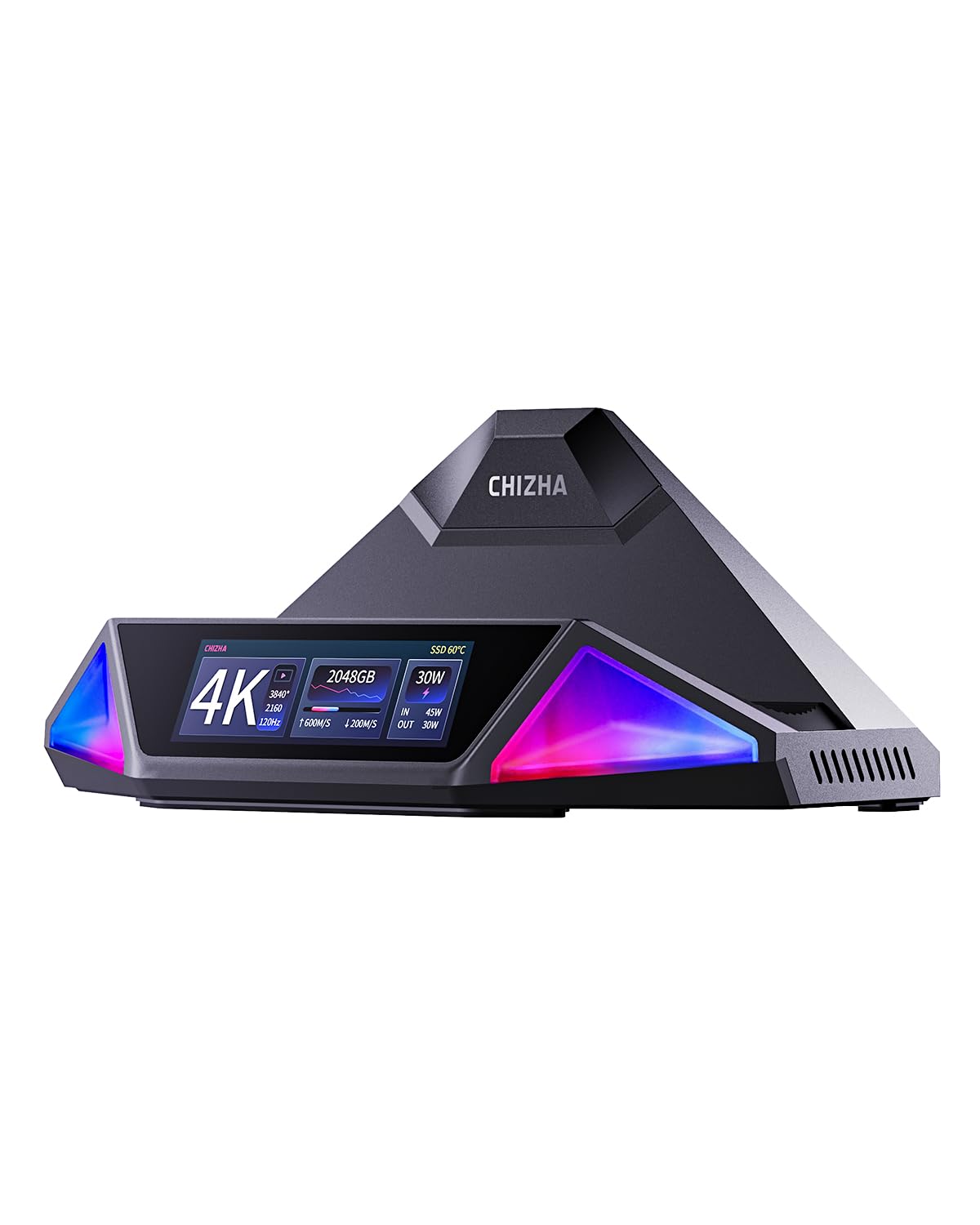
A dock with its own screen, a fan, and room for a 4TB SSD inside.
If you have run out of space on your Deck and you are tired of swapping microSD cards, this unit solves that in hardware. A built-in M.2 slot takes 2230, 2242, or 2280 NVMe drives, up to 4TB, running through USB 3.2 Gen 2 at sequential read and write speeds up to 1000MB/s. That means a large game library lives on the dock instead of the console. Owners single out the SSD slot as the standout feature, and it is the one thing on this list nothing else offers.
The rest is genuinely high-end. Video goes out at 4K HDR up to 120Hz. There is a dedicated optical audio output for soundbars and AV receivers, plus Gigabit Ethernet, a 10Gbps USB-C data port, one USB 3.2 Type-A, and one USB 2.0 Type-A. A touchscreen on the dock shows port activity, power status, display mode, and fan speed in real time. Two airflow channels and a 5000RPM cooling fan (6.7CFM) sit under a multi-angle stand with dual silicone padding.
This is the most expensive dock in the group, and it is only worth the premium if you will use the storage or the cooling. Owners describe it as premium-looking and capable, with 100W PD charging cited as a plus for mainstream handhelds. If your Deck already has enough storage and a clear vent, the extras are money spent on features you will not touch.
What nobody else has: a built-in M.2 NVMe slot for up to 4TB of extra games, plus a live touchscreen and a 5000RPM fan for long sessions.
When it is overkill: if your Deck storage is enough and your setup stays cool, the storage and fan premiums go to waste.
Worth the premium for: a large game library that needs somewhere to live, or long sessions where heat is a concern.
Not worth it for: a light player with plenty of free storage who just wants a picture on the TV.
Know the Specs
HDMI 2.0 versus HDMI 2.1
The HDMI version decides the highest smooth picture a dock can send. HDMI 2.0 typically tops out around 4K@60Hz, which suits most living-room TVs. HDMI 2.1 can reach 4K@120Hz, 8K@60Hz, and HDR — smoother motion for fast games, but only useful if your TV supports it. On a 60Hz panel, the extra refresh rate is invisible.
Power Delivery (PD) in watts
PD is the standard that lets one USB-C cable carry both data and charging power. Docks here specify 95W or 100W input, which is the ceiling the dock can pass through. Your Steam Deck still charges at its own limit — so the headroom mainly feeds the dock’s electronics and any connected peripherals, not a faster Deck charge.
Gigabit and 2.5Gb Ethernet
These numbers describe wired network speed. 1Gbps is 1,000Mbps, plenty for online play and streaming; 2.5Gb is 2,500Mbps and matters most for heavy local streaming like Moonlight. A wired port generally gives a steadier connection than Wi-Fi, which is why online players prioritise it.
USB 3.0, 3.2, and 5Gbps versus 10Gbps
These describe how fast data moves to drives and accessories. Ports rated 5Gbps handle a keyboard, mouse, or controller with no trouble. Ports rated 10Gbps move large game files noticeably faster from an external drive. Two docks in this list offer the 10Gbps tier — worth having if you shuffle big files often.
Common Questions
Will any of these docks work with the Steam Deck OLED?
Do I need to buy a separate charger for a Steam Deck dock?
Can a Steam Deck dock charge the console while I play?
Will a 4K@120Hz dock make my 60Hz TV look smoother?
Why does one dock keep the Deck’s vent clear?
Can I plug a keyboard, mouse, and controller in at once?
Does a Steam Deck dock add storage?
Is a dock the same thing as a USB-C hub?
Do these docks work with a ROG Ally or Legion Go as well?
Why does my dock show a “not enough power” message?
The Bottom Line
For most people, the valve steam deck dock winner is the UGREEN 9-in-1. It covers nine ports, keeps the vent clear with its foldable stand, and moves data at 10Gbps (10 gigabits per second, fast enough to copy big game files quickly). It also holds the highest rating here without sitting in the premium tier. If you want a smoother picture and your TV can show it, grab the JSAUX 6-in-1 for its 4K@120Hz output (4K resolution at 120 frames per second, so fast motion stays smooth). And for a large game library that needs a home, the DOCKCASE & CHIZHA is the one to reach for, with its 4TB NVMe slot (room for a 4-terabyte fast storage drive) and built-in fan.
How we choose
We do not accept paid placement. Every pick is matched to a real buyer and a real use-case; we do not hands-on test units.
Sources
Specifications: manufacturer listings and product documentation. Review insights: verified customer reviews, as of November 2026. Pricing: not shown on this page (it changes often); check the current price via the retailer link.
As an Amazon Associate, Tactical Gear Guy earns from qualifying purchases. This does not affect which products we feature.