Specs are compiled from manufacturer listings and verified buyer reviews and can change over time — please confirm the key details on the product page before buying.
You buy a wireless backlit keyboard and mouse combo, and two problems show up fast: the backlight drains the battery in a week, and the cheap dome keys (rubber-dome switches, the common low-cost key type) start sticking three months in. You avoid both by checking four things: brightness control, a rechargeable battery you can live with, a mouse with real DPI steps (dots per inch, how far the cursor moves per inch of mouse travel), and a connection that doesn’t drop mid-sentence. Nine combos below clear those bars, with the trade-offs spelled out so you pick right the first time.
This guide is built by comparing the manufacturers’ published specifications and the patterns across verified customer reviews, so you get each pick’s real strengths and trade-offs instead of marketing spin.
Night owls, spreadsheet grinders, and desk-clean freaks all want the same thing: keys you can see without flipping on the overhead light. Below is the best wireless backlit keyboard and mouse combo shortlist, ranked by real-world performance.
Top Picks

How To Choose The Best Wireless Backlit Keyboard and Mouse Combo
A backlit combo lives and dies on two things you cannot see in a product photo: how the light behaves when you need it, and how long the batteries survive with it running. Get those right and the rest is comfort. Get them wrong and you end up with a glowing paperweight that dies mid-sentence.
Backlight Behavior: Brightness Levels and Auto-Off
What you want is control — the ability to dim the keys to a faint glow instead of blasting full brightness at 2 a.m. Look for at least three brightness levels and a keyboard that turns its light off on its own after a couple of minutes idle. Single-color is fine if you just want to see the letters; RGB is the draw if you like matching your desk.
Rechargeable vs. Replaceable Batteries
A rechargeable combo with a USB-C cable and a smart auto-sleep function saves you the ritual of digging through a drawer for AA cells. Check the sleep behavior: a keyboard that cuts its backlight after 1.5 minutes idle and the mouse that sleeps after 15 minutes idle keeps the charge where you need it.
Connection: 2.4G Dongle, Bluetooth, or Both
A 2.4GHz dongle (a tiny USB receiver that creates its own private wireless link) gives you the most stable, lag-free typing. Bluetooth is better if you switch between a laptop and a tablet and don’t want to move a dongle around. The best combos give you both, and some models let one dongle run the keyboard and the mouse at once.
Key Feel and Wrist Support
Membrane keys feel soft and quiet; low-profile scissor switches feel like a laptop. If you type all day, a wrist rest or adjustable tilt stand keeps your hands at a neutral angle so fatigue stays low through an eight-hour session.
Side-by-Side Comparison
| Model | Best For | Backlight | Connectivity | Mouse | Amazon |
|---|---|---|---|---|---|
| Logitech MX Keys S Combo Mac★ Best Overall | Mac power users who want the best typing feel | Backlit, auto-on proximity sensor | Bluetooth (3 devices) | MX Master 3S, 8K DPI | Amazon |
| MAGEGEE Wireless ComboBest Value | Budget desktop with a full number pad | RGB, adjustable brightness & speed | 2.4G USB receiver | 3 DPI (800/1200/1600), 6-button | Amazon |
| Hamile Wireless ComboBest With Wrist Rest | Late-night workers who want a wrist rest | RGB, 3 brightness levels | 2.4G USB, Windows & Mac | 3 DPI (800/1200/1600), 22 lighting modes | Amazon |
| EDJO MK30 Backlit Combo | Quiet home-office setup with phone holder | 7 switchable backlights | 2.4G USB, Windows/Linux/Chrome/Mac | 3 DPI (800/1200/1600), 6-button | Amazon |
| SABLUTE Typewriter Combo | Retro-styled desks and shared workspaces | 7 colors, RGB mouse with 11 modes | 2.4G USB, Windows/macOS/Linux/Chrome OS | Matching wireless mouse | Amazon |
| KOPJIPPOM Large Print Combo | Dim-light typing and big-letter readability | 3 brightness levels, single color | 2.4G USB, Windows 10+ | 3 DPI, big scroll wheel | Amazon |
| Redragon S101M-KS | Gamers who want tri-mode flexibility | RGB, 8 patterns | 2.4G / Bluetooth / Wired | 4800 DPI, 5 levels | Amazon |
| seenda COE64-3 Pro | Multi-device desks switching between PC and tablet | 7 colors, 3 brightness levels | USB 2.4G + 2 Bluetooth channels | 800/1200/1600/2400 DPI | Amazon |
| SABLUTE Ergonomic Combo | All-day typists who need wrist support | Multiple colors, soft glow | 2.4G USB-A & USB-C | 700mAh, 3 DPI, 6 buttons | Amazon |
Detailed Reviews
1. Logitech MX Keys S Combo Mac
Our pick — 4.5+★ from 300+ verified ratings; the strongest balance of quality and price.
The backlight that wakes the instant your hands get close — no key press needed.
If you use a MacBook or an iMac, this is the combo that makes everything else feel like a compromise. The backlight is proximity-triggered: the keys glow the moment your fingers hover over them, so you never type in the dark hunting for the first key. And you can dial the backlight duration and brightness through the Logi Options+ app, which means you set the glow once and forget it.
The typing feel is the reason people defend this set. The keys have a laptop-like profile with a spherical dish — a slight scoop that cups your fingertip — and the keyboard sits at a fixed angle that keeps your wrists neutral. The mouse side is where it earns its premium spot. The MX Master 3S uses MagSpeed, Logitech’s magnetic scroll wheel rated at up to 1,000 lines per second, and the 8K DPI sensor tracks on glass, so a glass-topped desk stops being a problem. You can pair it with up to three Macs or iPads over Bluetooth Low Energy and switch with a button press.
The weight tells you it is not a travel kit. At 3.5 pounds this combo is 2.3x heavier than the Hamile set at 1.5 pounds. That is fine sitting on a desk; it is not fine tossed in a bag. The honest caveat: the Mac-first layout and Space Gray finish mean Windows users get a less natural experience, and the price sits at the top of this list.
Where this combo wins
- Proximity backlight lights up before you touch a key, with adjustable duration and brightness via the app
- 8K DPI sensor that tracks on glass and a scroll wheel rated at 1,000 lines per second
- Up to three Apple devices paired with a button to switch — MacBook, iPad, iMac
- 104-key layout with programmable functions for macOS
- Certified post-consumer recycled plastic in the build (27% mouse, 26% keyboard)
Where it asks more of you
- 3.5 pounds — desk furniture, not a travel accessory
- Mac-first key layout is a mismatch for a Windows workflow
- Premium-tier price tag
The fit: Apple users who type all day, want the keys to glow without a keystroke, and value a glass-tracking mouse over saving money.
The trade: it’s the heaviest and most Mac-locked set here, so it stays home.
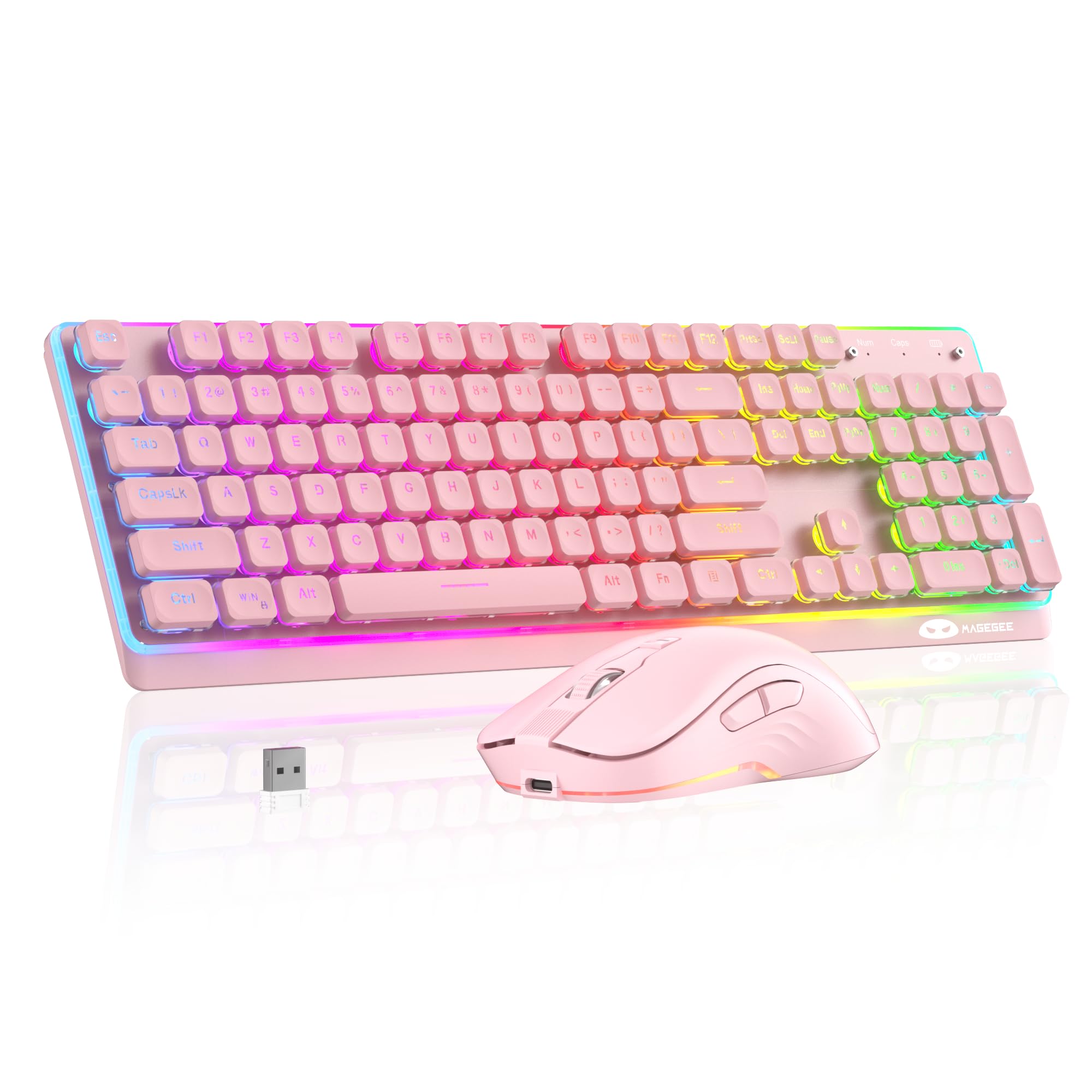
2. MAGEGEE Wireless Keyboard and Mouse Combo
A full 104-key deck with color-cycling RGB for the price of a couple of takeout dinners.
The pitch here is simple: you get the complete layout — number pad, function row, shortcut keys — plus an RGB backlight that you control with shortcut combos, and you spend entry-level money. The backlight lets you switch lighting modes, adjust brightness, change the glow speed, and flip the light off entirely. There’s a Win-key lock and a swap between WASD and arrow keys, which is a nice touch if you use the arrow keys for movement in games.
The mouse covers the basics well: three DPI steps at 800/1200/1600, a six-button layout with forward/backward, a rubber scroll wheel, and auto-sleep to save power. The keyboard is a 104-key full size that handles spreadsheets, emails and schoolwork without hunting for the number pad. It works with both Windows and Mac, and multimedia shortcuts cover volume, music, email and the calculator.
The honest part: the connective tissue here is the weak spot. Buyers report a mixed experience on durability and battery life — some units hold up well while others give out early. Treat this as a desk set you keep plugged into a charger every few days, not a rugged workhorse. For light home office or study use it earns its keep; for heavy daily typing, the pricier picks below will outlast it.
Colors that cost less: real RGB with brightness control and a WASD/arrow swap is rare at the entry level, and it makes this an easy first backlit set for a bedroom desk or dorm room.
What to expect down the road: the mixed durability and battery life are the recurring themes, so charge it regularly and keep the USB receiver in a safe spot — it stores in the back of the mouse.
Pick this if: you want a full-size RGB deck for a kid’s homework station or a secondary desk and you don’t need it to survive years of eight-hour days.
Skip the upgrade debate if: the build quality is the one thing you refuse to gamble on.
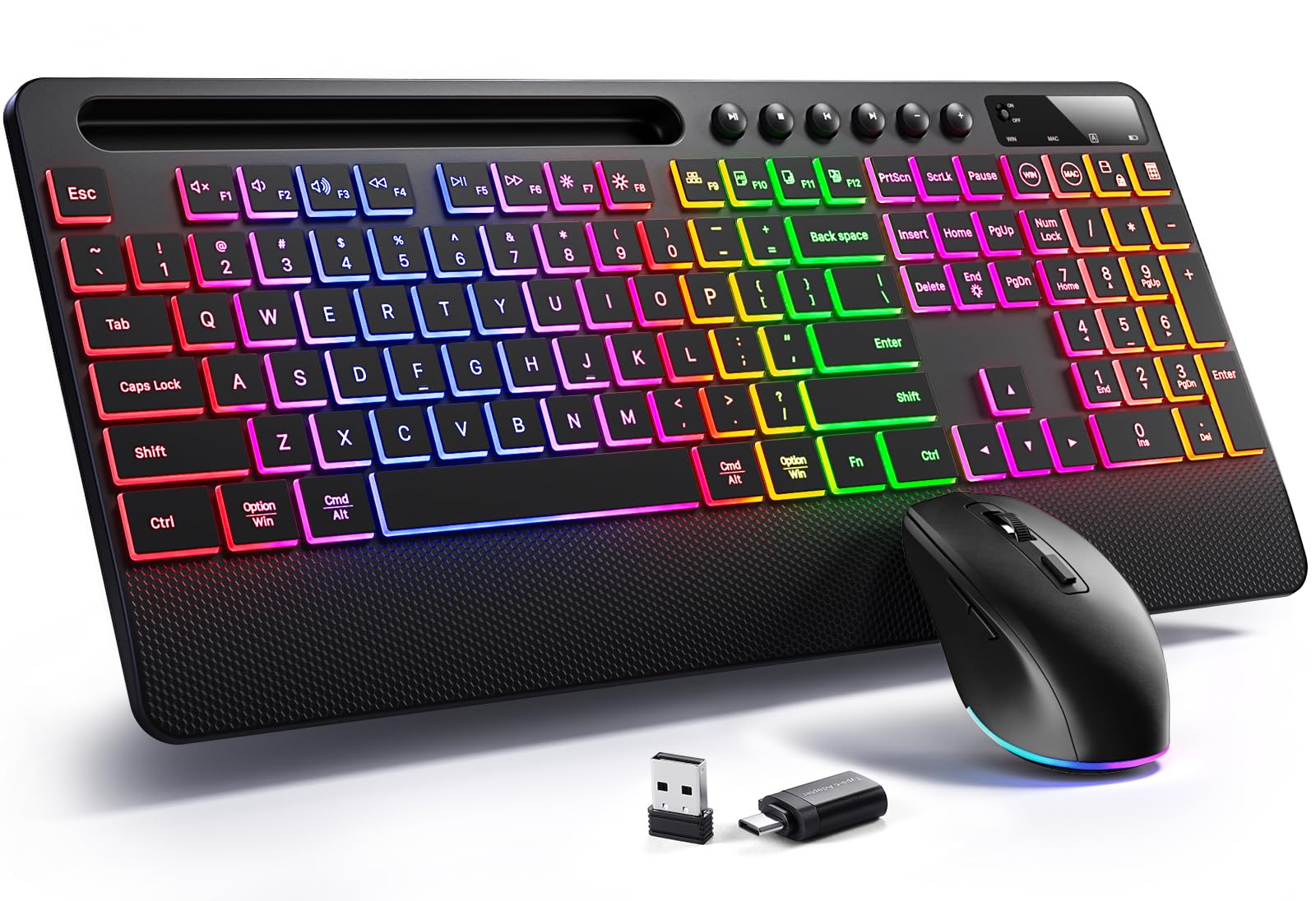
3. Hamile Wireless Keyboard and Mouse Combo
The one that turns your desk into a light show — and keeps your wrists off the hard surface.
Hamile leans hard into the “make it feel like something” angle, and it mostly lands. The keyboard has three adjustable brightness levels for the RGB backlight, and the mouse offers 22 dynamic lighting effects — plenty of variety if you like your desk to have a personality. The palm rest is the real differentiator: it supports your hands to cut typing fatigue over long sessions, and an adjustable tilt stand lets you find a wrist angle that doesn’t hurt after hour three. The contoured mouse fits the palm naturally.
The practical bits are all here: it switches between Windows and macOS with a simple keystroke, and the shortcuts auto-adapt when you switch systems. There’s a built-in phone and tablet holder to keep a screen in view while you work or game. Both parts recharge over a single USB-C cable with auto-sleep that wakes on any key press, and the 2-in-1 USB receiver is plug-and-play. The wireless connection reaches up to 33ft, and owners mention it can work up to 25 feet away without connectivity issues. At 1.5 pounds it is 2.3x lighter than the Logitech MX Keys S Combo above, so moving it between rooms is easy.
The trade-off is the durability question mark. Charging and long-term durability draw mixed reactions, so this is a set to treat gently and charge on a routine rather than a rugged daily driver. The lighting and comfort are the reasons to buy it; the build is the reason to be careful.
Why the comfort crowd likes it
- Palm rest plus adjustable tilt stand for long typing sessions
- 22 mouse lighting modes and 3 keyboard brightness levels
- One-keystroke switch between Windows and macOS with auto-adapting shortcuts
- Built-in phone and tablet holder keeps a second screen in view
- Six hotkeys and a six-button mouse with forward/backward
What to watch
- Charging and long-term durability are the recurring mixed notes
- RGB-heavy design may feel busy on a minimal desk
The right buyer: someone who types or games for hours and wants wrist support plus a light show on a mid-range budget.
One caution: plan on a charging routine — this set rewards care over time.
4. Wireless Keyboard and Mouse Combo

Seven backlight modes, silent clicks, and a phone holder — built for a shared room.
The defining feature on this EDJO set is the quiet. The keys are tuned for stability so you feel the press but barely hear it, and the mouse uses silent micro-motion switches for clicks that are nearly inaudible. That matters if you work in a bedroom, a shared office, or next to a sleeping kid. What wins people over most, though, is the typing quality — the key action feels solid and consistent, and the backlit labels stay legible when the room is dark.
Backlighting is flexible: seven switchable effects and light-up letters, and you can turn the whole thing off when you don’t need it. The rechargeable battery is charged over USB-C, and smart auto-sleep handles the rest — the keyboard light shuts off after 1.5 minutes idle and the mouse sleeps after 15 minutes, both waking on any key press. Together, those sleep timers stretch a charge to weeks between refills. Wireless is 2.4G on a single dongle with a connection that reaches 33ft, and it hops between Mac and Windows with one touch. It also has a foldable stand, a phone/tablet holder, and three DPI settings with forward/backward on the mouse.
Where it gives ground: the note in the listing about charging before first use is not a formality — low voltage causes sticky or delayed keys, so give both parts a full charge from the start. Beyond that, this is a sturdy everyday set; the main thing is to treat the power switch with a little care and not leave it on for weeks.
The silent-room advantage: between the quiet key action and the near-silent mouse clicks, this is the combo to choose for a library, a late shift, or a room where someone else is sleeping.
Charge it first: a full charge before the first session is the difference between smooth typing and sticky keys.
For you if: noise is your biggest complaint about a desk setup and you want the backlight to be adjustable rather than on all night.
Not the one if: you want one of the single-color simplicity sets below — this has more moving light parts than you may need.
5. SABLUTE Wireless Keyboard and Mouse
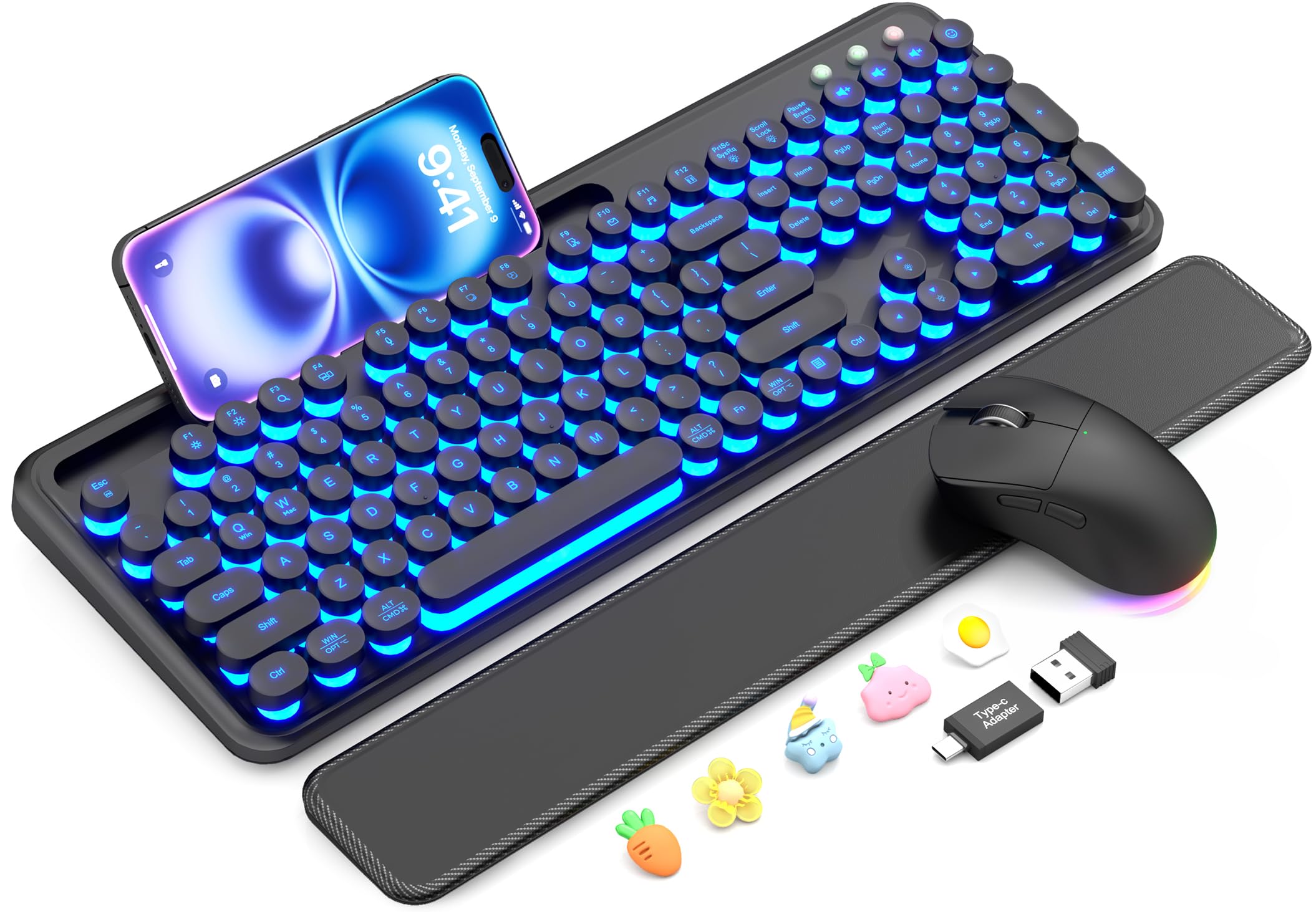
Round keys, seven glow colors, and a wrist rest that clicks off with a magnet.
Most combos are trying to disappear onto your desk. This one is trying to be noticed, and if you like a vintage aesthetic it does it well. The keycaps are round and typewriter-styled, the body has a clean matte finish, and the backlight offers seven soft colors to cycle through. The mouse pairs in with 11 switchable lighting modes. Together they make a desk that looks intentional rather than assembled.
The function matches the form better than you might expect. The magnetic wrist rest is soft sponge padding with a skin-friendly outer surface — it pops off for cleaning, which makes it more practical than a glued-on pad. There’s a built-in phone holder for keeping messages in view, and a single USB receiver connects both parts over 2.4GHz up to 33ft. Charging is USB-C on both, and the keyboard has auto-sleep with a power switch to save energy. It’s compatible with Windows, macOS, Linux, and Chrome OS under one receiver, and it’s spill-resistant.
The trade you need to know: the round keys are a feel, not a standard. If you learned to touch-type on flat rectangular keys, the round caps take a few days to adjust to, and the key action — while comfortable — draws mixed notes from people used to crisp scissor switches. Buy it for the look and the comfort; don’t buy it expecting a mechanical board’s snap.
What it brings to the desk
- Seven backlight colors and an RGB mouse with 11 modes
- Detachable magnetic wrist rest with soft sponge padding
- Built-in phone holder for messages and video calls
- One receiver runs both, plug-and-play over 2.4GHz
- Rechargeable via USB-C with auto-sleep
What surprise people
- Round typewriter keycaps are an acquired typing feel
- Key action feedback doesn’t satisfy everyone who’s used to flat keys
Buy it for the room: a home office, studio, or gift where the look of the desk matters as much as the specs.
Try before committing if: you’re a strict touch-typist who needs the familiar flat-key feel.
6. KOPJIPPOM Large Print Wireless Keyboard and Mouse

Big bright letters that stay readable when the room goes dark.
The KOPJIPPOM set is the one you hand to someone who squints at a standard keyboard. The letters and numbers are oversized and printed large, and the keys are backlit with three brightness levels so you can dial the glow to the room. The whole point is readability: the light makes the big letters stand out in low light, and the big scroll wheel on the mouse is easy to grab without looking.
It’s a full-size layout with a number pad and 12 multimedia hotkeys for internet, email, play/pause and volume. Wireless is 2.4GHz up to 33ft, plug-and-play with a nano receiver stored in the back of the keyboard, and the indicator bar makes the receiver easy to find. Both parts have built-in rechargeable batteries charged by USB-C, and the set enters sleep mode after 10 minutes of no input to save power. The larger lettering is the feature that draws the most positive attention, followed by the backlight itself.
Be realistic about longevity. The keyboard is built for light everyday use, and the recurring honest note is that reliability and durability are mixed — some units last months of steady use while others give out sooner. It’s the right pick for an older parent, a dim home office, or a bedside desk where the big letters do the heavy lifting, not a heavy industrial workstation.
The readability win: three brightness levels plus oversized letters solve the exact problem of typing in a room where you can’t see the legends on a standard keycap.
The honest note: battery life and durability are the themes to manage, so keep the USB-C cable handy and treat it as a light-duty set.
Best served: low-vision users, dim-light typists, and anyone who wants the letters to be readable without a lamp.
Look on if: you need a keyboard to survive years of heavy full-day typing.
7. Redragon S101M-KS Gaming Keyboard and Mouse

Tri-mode wireless, 300-hour battery, and 4800 DPI of game-ready tracking.
Redragon takes the gaming angle seriously, and the headline numbers back it up. The keyboard and mouse run in three modes — wired, Bluetooth, or a 2.4G receiver — and the 2.4G receiver is a 2-in-1 unit that controls both at once. The keyboard is rated for up to 300 hours with the RGB off, and it has a battery indicator so you know when you’re running low before a match. The RGB has eight backlight patterns with adjustable speed and brightness, and the mouse steps through five DPI levels from 800 up to 4800.
For gaming, the details matter: 10 independent multimedia keys and 12 combination keys keep controls close, a WIN lock stops accidental Windows key presses mid-game, and the keyboard has splash resistance. There’s a 6-foot detachable USB-C cable for the wired mode. The mouse is programmable — you can remap its 7 buttons and adjust the polling rate from 125 to 1000Hz through the software. It’s compatible with Windows, PC, and laptop, and each set is covered by a 36-month warranty with a 7-day, 24-hour support team.
Where it asks something in return: the weight, at 1.06 kg, is on the heavy side of this list, and like most gaming boards, it wants to be plugged in every few days if you game on RGB. It’s a gaming keyboard first and an ergonomic desk keyboard second. If you game as much as you type, that’s fine.
The versatility case: three connection modes in one set means you can game wired for latency, go Bluetooth for the laptop, and keep it wireless via 2.4G for the desktop.
The trade: it’s gaming-first — the 300-hour rating is with RGB off, so expect to charge more often if you like the lights on.
Built for: gamers who want one combo to cover a wired setup, a 2.4G desktop, and a Bluetooth laptop with the same hardware.
Falls short for: anyone who wants a light, quiet, minimalist typing set — this is a gaming rig with a backlight.
8. seenda COE64-3 Pro Wireless Keyboard Mouse Combo
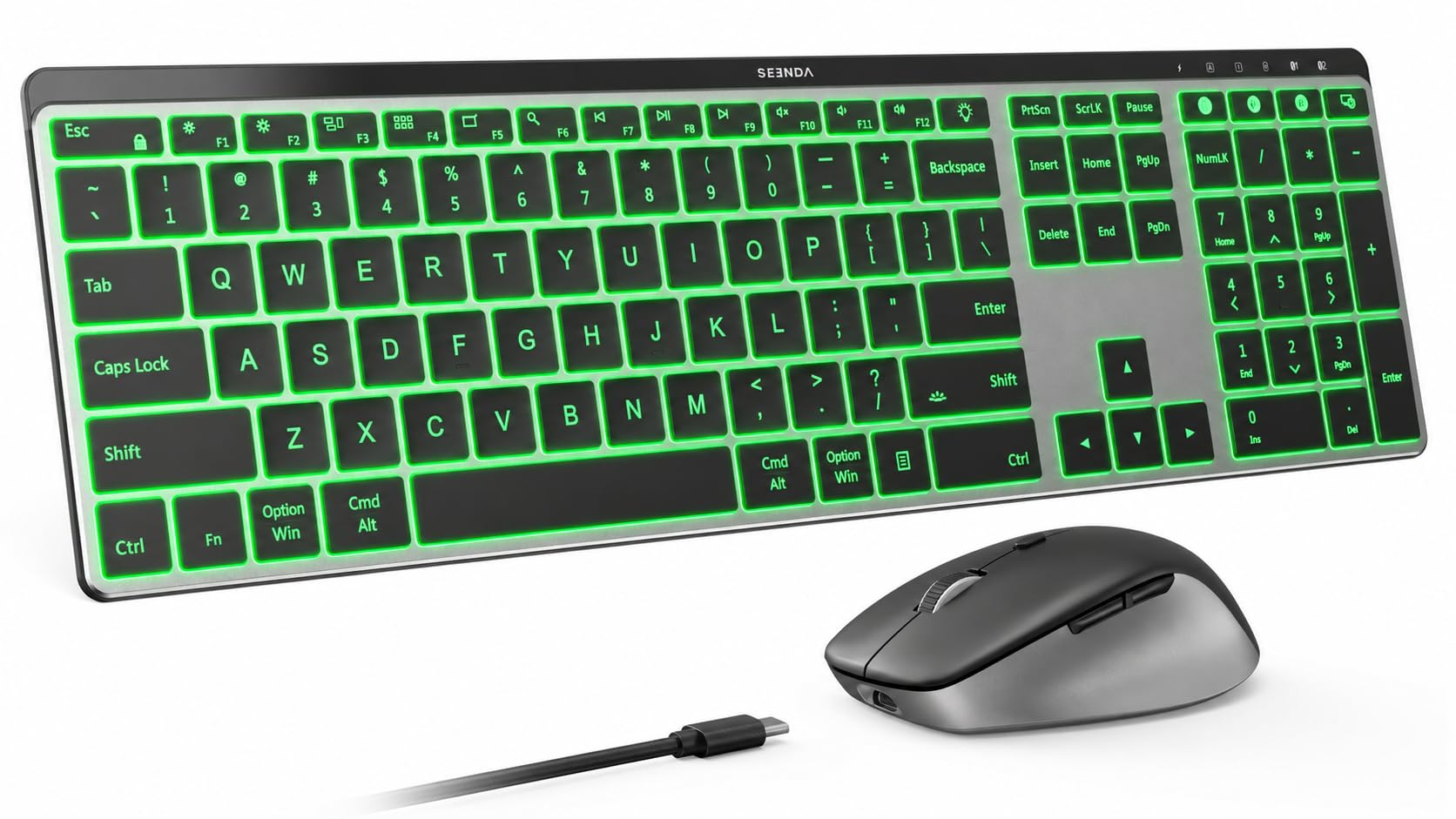
One keyboard, three devices, seven backlight colors — and a 0.18-inch metal body.
If your desk has a PC, a laptop, and a tablet fighting for the same mouse, the seenda solves it. There are three channels: one 2.4G USB connection and two Bluetooth channels, so you keep one keyboard and mouse in place and switch between them with a keystroke. 2.4G works with Windows 11/10/8/7/XP, and Bluetooth supports Windows, macOS 10.12+, iPadOS/iOS 13+, and Android 4.3+, provided your device has Bluetooth 4.0+.
The backlight is practical rather than flashy: seven colors and three brightness levels so you can type through a room that changes light through the day. The keys are low-profile scissor switches for a laptop-like feel with less noise — a good match for a home office or a shared workspace. The full-size QWERTY layout keeps the number pad for spreadsheets and accounting, and the deck is 0.18-inch slim metal at two typing angles (5.5° and 9°). The mouse has forward/back buttons and 800/1200/1600/2400 DPI control, with quiet clicks and a palm-fit curve.
What you’re paying for is endurance and flexibility together: a 3–4 hour charge gives up to 480 hours on the keyboard with the backlight off and up to 110 hours on the mouse. The set includes a keyboard cover and the 2.4G receiver, and Bluetooth handles Mac and mobile devices. One note: the multi-device switching is the whole point, so if you only use one computer, you’re paying for a feature you won’t touch.
The multi-device logic: two Bluetooth channels plus one 2.4G channel is exactly what a hybrid worker needs to move between a work laptop, a personal PC, and a tablet without a second keyboard on the desk.
The quiet bonus: low-profile scissor switches keep typing quiet, which makes this a good fit for a shared office.
Worth it for: the multi-device worker who switches between a PC and a tablet all day and wants one clean setup.
Not the point for: someone with a single computer — you’d pay for channels you never use.
9. SABLUTE Ergonomic Wireless Keyboard and Mouse Combo
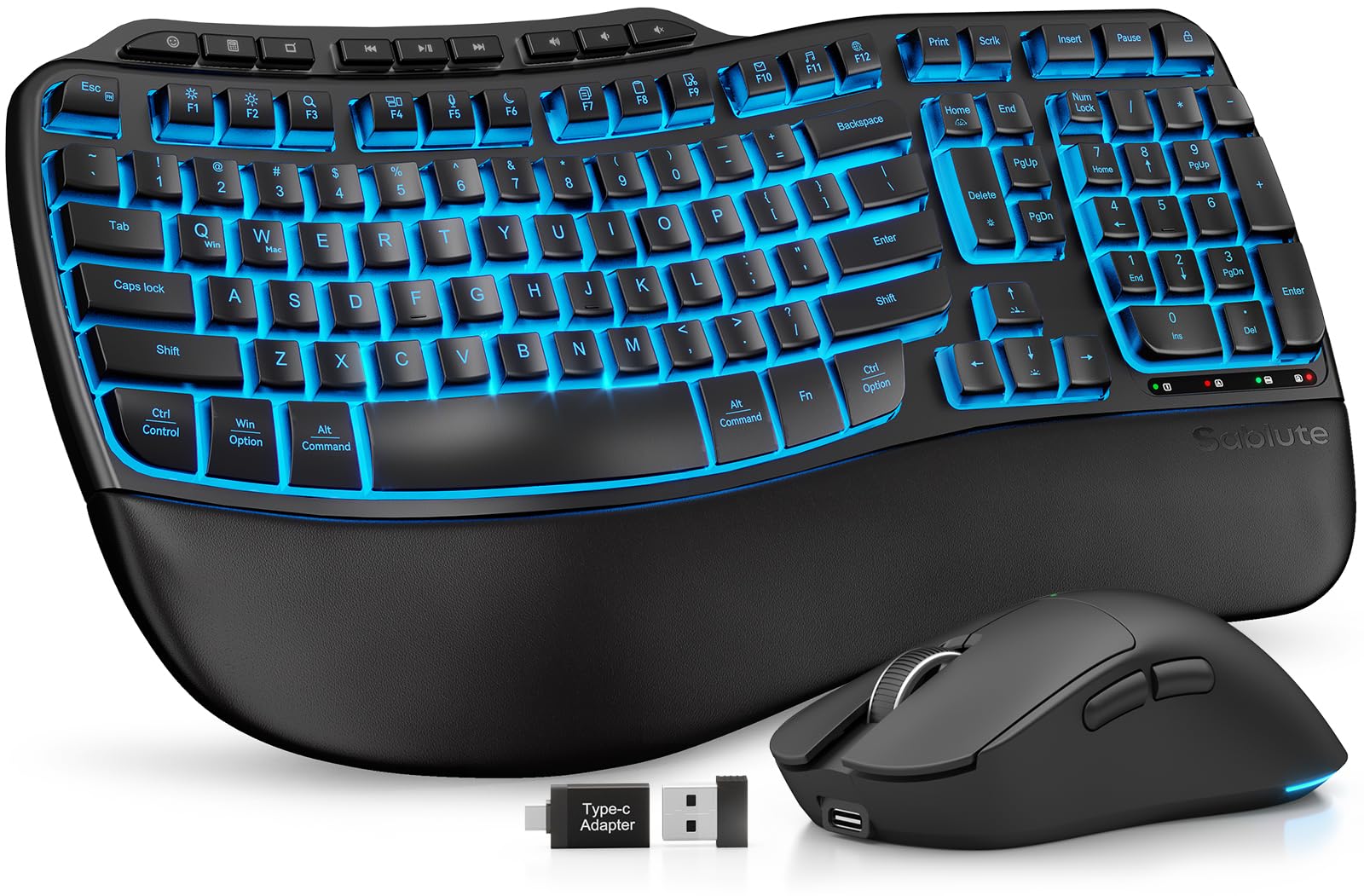
A 4000mAh keyboard with a faux lambskin rest — built for the eight-hour desk marathon.
This is the comfort pick of the list, and the battery is the headline. The keyboard packs a 4000mAh cell, which SABLUTE describes as twice the capacity of standard backlit keyboards, paired with intelligent auto-sleep to stretch a charge to weeks. The mouse has a 700mAh battery, six buttons, three DPI levels at 800/1200/1600, and six fixed colors or five cycle modes to choose from. Between the two, you’re rarely chasing a charger.
The comfort story is the other half. The palm rest is a faux lambskin leather pad with a matte finish — smooth against the skin, sweat-resistant, and easy to wipe down rather than a fabric pad that picks up grime. The keys are wave-shaped to follow your fingers’ natural motion, and adjustable front and back stands let you sit or stand while keeping your wrists at a healthy angle. The keyboard has nine one-touch shortcut keys, and it works with Windows, Mac, and Chrome OS over a single 2.4GHz receiver with a USB-A and USB-C combo for older and newer machines alike. It’s rated for 10 million keystrokes.
One catch to weigh: the combo generally works well, but the mouse is the part that occasionally gives trouble. If a dead mouse would ruin your day, look at the Logitech set instead. For everyone else, the battery and the wrist support are why this sits at the top of the comfort tier.
The comfort-and-endurance case
- 4000mAh keyboard battery with auto-sleep for weeks between charges
- Faux lambskin leather palm rest — sweat-resistant and easy to wipe clean
- Wave keys and adjustable front/back stands for wrist posture
- Nine one-touch shortcut keys and a 700mAh RGB mouse
- Works with Windows, Mac, and Chrome OS from one receiver
What to keep in mind
- The mouse is the part that can give out — the keyboard is the reliable half
- Premium-tier comfort comes at a premium-tier spot in the lineup
The ideal owner: a full-day typist who wants the wrist rest, the wave keys, and a battery that doesn’t need babysitting.
One honest caveat: the mouse is the weaker half of the pair, so a mouse-first buyer may want a different set.
Know the Specs
A backlit combo is a small system, and the specs that matter all feed one question: will it feel good to use at 11 p.m. when you don’t want to turn on the lights? Here’s how to read the numbers that decide it.
Backlight Levels and Modes
This is the brightness control on the keys themselves. Three levels is the practical minimum — a dim setting for a dark room, a mid setting for evening, and full brightness when the sun is in your eyes. Single-color backlighting is just the letters glowing in one hue, which is all you need for typing. RGB gives you a color wheel and lighting effects, which is the draw if you like your desk to match your mood. Look for a keyboard that lets you dim the glow without cycling through the brightest setting first.
Battery Capacity and Auto-Sleep
A bigger mAh number (milliamp-hours — literally how much charge the cell holds) means fewer charges. But the sleep behavior matters just as much: a keyboard that cuts its backlight after a couple of minutes idle and a mouse that sleeps after fifteen keeps the reserve where it counts. The best of the bunch pair a large cell with aggressive auto-sleep, so a charge lasts weeks between refills.
Connection Type: 2.4G vs. Bluetooth
A 2.4G dongle creates a private wireless link between the receiver and the combo, and it’s the most stable for typing and gaming. Bluetooth skips the dongle entirely and pairs directly, which is better for tablets and laptops where USB ports are scarce. The most flexible sets give you both, plus a wired fallback. A 33ft range is common, and a 2-in-1 receiver that runs both the keyboard and the mouse is a nice convenience.
Mouse DPI and Buttons
DPI means dots per inch — how many pixels the cursor travels for each inch you move the mouse. A higher DPI means the cursor covers more screen with less movement. For document work, 800 to 1600 is comfortable; for gaming or a large monitor, 2400 to 4800 gives you finer control. Forward and back buttons on the side are the single most useful extra for web browsing, and a contoured shape that fits your palm means less cramping after a long session.
Common Questions
Will a wireless backlit keyboard work with my Mac if it’s a Windows-focused set?
How long does a backlit keyboard battery actually last?
Do I need Bluetooth or a USB dongle for a backlit combo?
Can I turn the backlight off to save battery?
Is a backlit keyboard worth it if I mostly type in daylight?
What is the difference between a full-size and a tenkeyless keyboard in this category?
Can a wireless combo interfere with my Wi-Fi or drop connection mid-typing?
Is a rechargeable combo better than one with replaceable batteries?
Is a rechargeable combo better than one with replaceable batteries?
Will the mouse work on a glass or reflective desk?
How quiet is a backlit membrane keyboard compared to a mechanical one?
The Bottom Line
For most people, the wireless backlit keyboard and mouse combo winner is the Logitech MX Keys S Combo Mac. Its proximity backlight wakes as your hands approach, and the 8,000 DPI mouse crosses a 4K screen with a short wrist move — a bar the rest of the field is still chasing. If you want the best balance of backlight control and price, grab the Hamile set for its 22 mouse lighting modes and wrist rest. For a multi-device desk, reach for the seenda COE64-3 Pro: two Bluetooth channels and a 2.4G receiver (a small USB dongle) let you switch between a PC and a tablet without a second keyboard.
If you want a big, bright, readable deck for dim-light typing, the KOPJIPPOM large-print set is the obvious pick. If you game as much as you type, the Redragon S101M-KS covers wired, Bluetooth, and 2.4G in one box. And if all-day comfort is the goal, the SABLUTE ergonomic combo with its 4000mAh battery and faux lambskin rest is the one that’ll spare your wrists.
The honest nudge: the top-scoring sets here are also the priciest. If you plan to buy one combo and keep it for years, start with the top pick and work down. The budget picks earn their place for a second desk, a dorm room, or a kid’s homework station — just charge them on a routine and treat them with a little care.
How we choose
We do not accept paid placement. Every pick is matched to a real buyer and a real use-case; we do not hands-on test units.
Sources
Specifications: manufacturer listings and product documentation. Review insights: verified customer reviews, as of November 2026. Pricing: not shown on this page (it changes often); check the current price via the retailer link.
As an Amazon Associate, Tactical Gear Guy earns from qualifying purchases. This does not affect which products we feature.