Specs are compiled from manufacturer listings and verified buyer reviews and can change over time — please confirm the key details on the product page before buying.
Most iPad game controllers fail at the same moment: the clamp lets go, the Bluetooth drops, or the buttons arrive mapped for a phone you don’t own. The fix is not the most expensive pad on the shelf. It is the pad whose clamp actually locks to your screen size and whose Bluetooth sees your iPad as a real controller, not a media remote. Below are the nine models that clear that bar, from a full-size console-feel pad to lightweight telescopic grips.
This guide is built by comparing the manufacturers’ published specifications and the patterns across verified customer reviews, so you get each pick’s real strengths and trade-offs instead of marketing spin.
Start with the clamp range. Then check the mode switch and battery numbers, because those decide whether you finish a match or sit watching a pairing wheel spin. The right wireless game controller for ipad pairs once, clamps tight, and stays out of your way for hours.
Top Picks

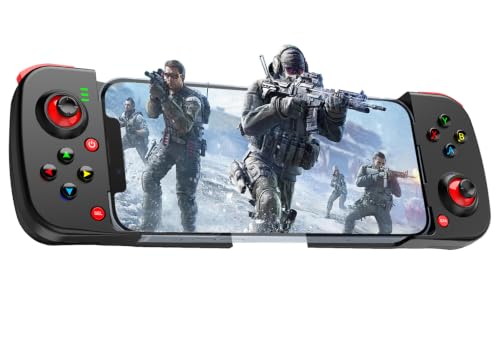

How To Choose The Best Wireless Game Controller for iPad
Your iPad is a screen first and a controller host second. That single fact explains most of the choices here. A pad that sits around a phone like a frame has to either clamp to a tablet or be used as a freestanding wireless pad. Both work — you just have to know which one you bought.
Clamp range versus tablet size
The key number is the maximum span a telescopic or clamping pad can open to, measured in millimeters. A pad built for phones only will snap onto an iPad Mini but slide off a full-size iPad. If you own a 10-inch or larger iPad, look for a model with a locking back clip or plan to use the pad wirelessly as a separate controller.
Hall Effect sticks and why they matter
Hall Effect joysticks and triggers use magnetic sensing instead of physical contact, so they avoid the slow drift that plagues worn carbon-film sticks. In practice, your aim stays centered years in, and your trigger pull stays smooth instead of getting crunchy. On a mobile pad, it is the spec that decides whether your aim holds after a year of play.
Button count and extra controls
A pad with 10 buttons gives you the standard console layout. A pad with 16 or 17 buttons usually adds programmable back paddles, turbo, or macro keys you map yourself. If you play shooters or racing titles, back paddles and turbo keys matter more than the shell finish. If you stick to casual titles, those paddles and macros will sit unused.
Battery, modes, and pairing
Most pads here charge via USB-C and run on an internal battery, with playtime figures that assume moderate use. Some advertise 15 hours, some 8 hours, one 40 hours. The lower number is usually the one with lighting on, so read the fine print. Also check the mode switch or boot key — many pads require a specific button combo (like X+Home) to appear correctly on iOS versus Android.
Side-by-Side Comparison
| Model | Best For | Buttons | Weight | Battery / Power | Amazon |
|---|---|---|---|---|---|
| PlayStation DualSense — Sterling Silver★ Best Overall | Console-feel wireless play | 10 | — | Rechargeable USB-C | Amazon |
| Megadream Mobile Game ControllerMacro Specialist | Macro-heavy mobile play | 12 | 0.21 kg | Rechargeable | Amazon |
| UNIHOW Bluetooth ControllerLong Session Pick | Multi-platform travel pad | — | 0.3 kg | 650mAh / up to 15 hrs | Amazon |
| GameSir X5s | Hall Effect on a budget | — | 174 g | Rechargeable | Amazon |
| Joso iPad & Tablet Controller | Locking clamp for 10.4-inch tablets | 17 | 0.36 kg | 15-hour playtime | Amazon |
| Mocagen MC200 | Grip and RGB on a phone | — | 14.1 oz | 800mAh / up to 8 hrs | Amazon |
| abxylute S8 | Foldable travel pad | 16 | — | Rechargeable | Amazon |
| XBOX Wireless Controller — Ice Breaker | Long battery, familiar layout | 19 | 14.08 oz | Up to 40 hrs | Amazon |
| abxylute S9 | Full-size feel on a tablet | — | 200 g | Rechargeable / 5V 1A pass-through | Amazon |
Detailed Reviews
1. PlayStation DualSense Wireless Controller — Sterling Silver
Our pick — 4.5+★ from 51,500+ verified ratings; the strongest balance of quality and price.
A console pad that treats your iPad as a real screen, not a phone stand
If you want your iPad Pro to feel like a game console, this is the pick. It pairs to your iPad, iPhone, Mac, or Apple TV over Bluetooth, with no clamp and no telescopic arms. You set the iPad on its case or a stand, lean back, and hold a full-size pad. That is the whole appeal — a real controller layout instead of a phone grip stretched around your tablet.
Two trigger actuators sit inside the grips. They replace traditional rumble motors and let the pad physically resist as you pull, which is why racing and shooter titles feel different here than on a stock mobile pad. Ten buttons keep the layout familiar, and a built-in microphone plus a 3.5mm headset jack mean you can talk to your squad without routing audio through the tablet. A touch pad and motion sensor also work in games that support them.
The honest catch is the one the crowd keeps circling. People love how it performs and how the silver finish looks in person, but plenty debate whether the price is justified for casual use. If your iPad gaming is a few sessions a week, a cheaper clamp pad covers the basics. If you play anything with tension in it — recoil, throttle, braking — the difference is felt in your hands, not read on a spec sheet.
Where it earns its keep
- Connects over Bluetooth to iPad, iPhone, Mac, and Apple TV with no clamp
- Dual actuators simulate recoil and environment feedback in supported games
- Built-in mic and 3.5mm jack handle chat without the tablet speaker
- Full-size console layout with a touch pad and motion sensor
Where it costs you
- No clamp, so the iPad needs a stand or case of its own
- Premium-tier spend for what some buyers treat as casual play
- Advanced feedback only works in games built to support it
Grab this if: your iPad sits on a stand and you want the closest thing to console feel in your hands.
Think again if: you want one object that holds the tablet and the controls together on a bus ride.
2. Megadream Mobile Game Controller — Black
Twelve buttons and two macro keys for players who want shortcuts
Macro players, this one is aimed at you. Two programmable back buttons let you map the main keys to M1 and M2, then fire a whole combo with a thumb press. In a shooter that means a slide-cancel without lifting off the sticks. In a farming game it means one press repeats the sequence you set up.
You get real flexibility on the platform side. The pad is certified for iOS (Apple’s official approval) and works with iOS 13.4 and up without a jailbreak (an unofficial open up) or simulator app. It also handles Android 6.0 and up over Bluetooth, with two boot modes (X+Home or RB+Home) that switch the button layout when a game refuses to recognize it. At 0.21 kg it is lighter than the UNIHOW pad at 0.3 kg, so it is easier to hold through a long session around a tablet resting on a table.
The trade-off is the one that shadows budget pads: the crowd splits on reliability. Some buyers get a pad that works from the first pairing and keeps working. Others find it dead on arrival or flaky after a week. The comfortable grip is what wins people over, so if you can live with a return window and want macro buttons, it is a strong fit.
Why the buttons win: 12 buttons plus two macro keys is more control surface than the DualSense’s 10, which matters if combos are your game.
The one you’ll wrestle with: consistency from unit to unit — buy from a seller with an easy return path.
Fits the player who: maps shortcuts and needs a phone-sized pad for an iPad Mini or phone-sized setup.
Keep looking if: you want the heavier, steadier feel of a full console pad in your hands.
3. UNIHOW Bluetooth Controller for Switch/PC/iPad
A 650mAh battery that promises fifteen hours between charges
The spec that earns this pad its place is endurance. The 650mAh built-in battery supports up to 15 hours of playtime, and a full charge takes 3 hours via USB-C. It also plays while charging, so you are not benched during a recharge. For a kid on a road trip or an adult on a long haul flight, that is the number that matters.
It is also unusually programmable for the tier. You can record a loop of operations up to 30 seconds long, including interval and long-press actions. You can also swap the left joystick and D-pad or flip A&B and X&Y without opening a menu. A 6-axis gyro handles motion aiming, and an adjustable turbo setting plus vibration round out the control set.
Where it gets shaky is connection consistency. Mac pairing tends to hold, but PC connections draw mixed reports, and functionality splits between buyers who find it works and those who cannot get it recognized at all. It is heavier than the Megadream at 0.3 kg versus 0.21 kg, so a smaller hand may notice the extra mass. Confirm your exact connection method before you count on it for a tournament night.
Battery-first logic: 15 hours is the headlining number here, and playing while charging keeps a session alive.
Verify before you buy: the 30-second macro loop is genuinely useful, but only if the pad connects to your specific host device reliably.
Reach for it when: long sessions and travel matter more than a perfect connection record on every platform.
skip it if: your primary target is a specific PC setup you cannot test before ordering.
4. GameSir X5s Bluetooth Phone Controller
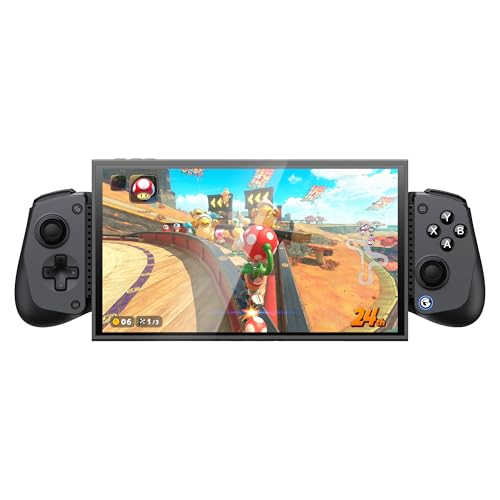
Hall Effect sticks and triggers in a 174g frame you can pack away
The defining feature is the sensor type. Hall Effect sticks and Hall Effect triggers use magnetic sensing instead of friction-based contact, so they hold their center and stay smooth over time. Add a hair-trigger mode (M+LT/RT) and a 360° range, and you get precise aiming and throttle control without worrying about stick drift creeping in.
Comfort was not an afterthought here. Dual HD rumble motors sit in the grips for tactile feedback, a 6-axis gyro handles motion aiming and racing on Switch devices, and the ABXY buttons are physically swappable between Xbox and Switch layouts with a clip included. Turbo works on A/B/X/Y/LB/RB/LT/RT for rapid-fire inputs. The pad connects via Bluetooth to Switch 2, Switch, Android phones, iPhone, and iPad Mini within a 105–213mm range, and a PP storage case is included for travel.
The recurring gripe is the trigger — left trigger failures come up often enough to note. Bluetooth also drops on some setups. The quality of the build is what wins most people over, and it is the budget-friendly entry point to Hall Effect tech in this list. Buy with a return plan and you get a lot of control hardware for the tier.
What lands well
- Hall Effect sticks and triggers resist wear and drift
- 174g weight travels easily, included PP case protects it
- Swappable ABXY layout suits both Xbox and Switch habits
- Turbo on eight buttons for rapid-input games
Where it slips
- Left trigger reliability comes up as a real failure point
- Bluetooth disconnects on some pairings
- Clamp tops out at 213mm, so full-size iPads won’t fit
Yes for: iPad Mini owners who want Hall Effect precision without a premium spend.
No for: full-size iPad users who need a wider clamp than 213mm.
5. Joso Wireless Controller for iPad & Tablet

One of the few pads here that locks a full tablet instead of just gripping it
The feature worth the ink is the back clip. It locks your iPad or tablet in place rather than clipping it under spring tension, which is the difference between a pad that holds during a firefight and one that slides. Buyers with 10.4-inch tablets report a snug fit, so this is the pick aimed at larger iPads rather than phones.
It carries 17 buttons — the most in this list — and Bluetooth 5.0 for low-latency pairing. A mode switch on the left side of the pad lets you pick iPad, iPhone, Android, or another Bluetooth device before you power on, so the pairing step is one tap instead of a menu hunt. The built-in rechargeable battery delivers a 15-hour continuous playtime figure. It handles Call of Duty Mobile, Warzone Mobile, Genshin Impact on iOS, and cloud gaming through xCloud.
Plan around one caveat: pairing is the weak point. Multiple buyers report it taking several attempts before it connects, and some units fail to connect at all. At 0.36 kg it is the heaviest pad in this guide, so a kid holding it one-handed around a tablet will feel the weight. If you get a unit that pairs cleanly on the first try, the locking clamp makes it the most tablet-appropriate pad here.
Clamp-first thinking: the lockable clip is the practical answer for a 10.4-inch tablet that needs to stay put.
Pairing patience: budget a few tries at setup — and keep the return window handy in case your unit fights you.
Best matched to: a 10.4-inch iPad that needs to stay clamped and steady during play.
Second thoughts if: you want set-and-forget pairing from the first power-on.
6. Mocagen MC200 Mobile Gaming Controller

A 7-color RGB ring, an 800mAh battery, and Hall Effect sticks that don’t drift
The joystick spec is the standout. This pad uses a Hall-effect joystick rated for a 5M cycle lifespan, which Mocagen positions as 2.5x the life of standard carbon-film sticks. In practice, your aim stays centered through years of play, and the analog triggers add a hair-trigger switch (M+LT/RT) so you can jump between sim-style throttle control and instant-response shooters.
Around those controls sit the fun bits. A 7-color RGB ring has three brightness levels (off, low, medium, high), and the 800mAh battery delivers up to 8 hours of continuous use with the lighting on. Turbo steps up through 5, 12, or 20 shots per second depending on the game. Dual vibration motors sit in the grips, and the handle has a laser-engraved texture on the back for anti-slip grip. It expands to 8.1 inches, which fits iPhones, iPad Minis, and tablets under 8.1 inches.
The limit is size, and it is not a small one for iPad owners. A full-size iPad will not clamp — Mocagen says you can still connect via Bluetooth and rest the tablet, but you lose the handheld feel. Battery life also drew mixed notes with lighting on. Owners consistently describe the grip as comfortable and Xbox-like, so if a compact phone-sized pad with glowy flair is your thing, it delivers.
Life of the sticks: the 5M cycle Hall-effect rating is the number that matters if you hate replacing pads.
Screen-size reality: 8.1 inches is the clamp ceiling — full-size iPads fall outside it.
Go here for: a phone or iPad Mini grip with Hall sticks and a light-up ring.
Not the one if: your iPad is larger than 8.1 inches and you want it clamped.
7. abxylute S8 Bluetooth Mobile Gaming Controller
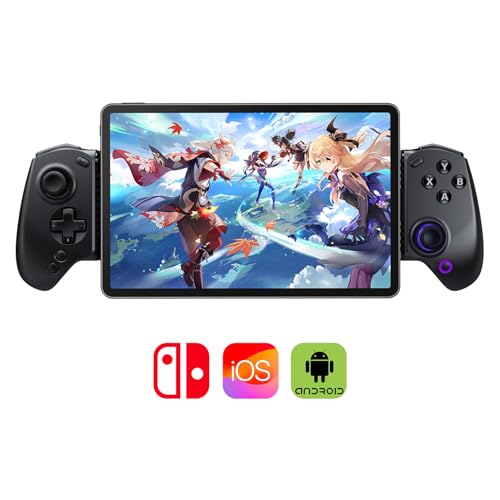
A folding 16-button pad that carves out space for tablets up to 216mm
Portability is the reason this pad exists. It folds down, weighs little, and still fits tablets up to 216mm via Bluetooth — so it takes up less bag space than a rigid clamp pad. The extended grips add thickness and anti-slip texture so a long session does not leave your hands aching.
Inside the shell, you get Hall Effect joysticks and Hall Effect triggers for precision that holds up, plus customizable back buttons and a one-tap screenshot key. Sixteen buttons cover the standard layout with room for the extras. It works with the S8 in clamp mode on a tablet or as a standalone wireless pad when you want distance from the screen. The abxy app adds cloud gaming, emulators, and a game library in one place.
No obvious dealbreaker stands out in the feedback — buyers describe it as comfortable and versatile, with responsive buttons and sticks. The one limitation is the app ecosystem: the abxy app and some features tie you to abxylute’s software rather than Apple’s. If you want a pad that folds flat into a backpack, this is the one built for that job.
Bag-friendly design: the foldable form and 216mm tablet fit is the combination no rigid pad here offers.
One dependency: the abxy app is where the extras live, so plan for it on setup.
Ideal for: travelers who need a pad that folds into a backpack and still fits a tablet.
Less suited if: you refuse to install a companion app for cloud gaming extras.
8. XBOX Wireless Gaming Controller

Forty hours of battery and a layout your thumbs already know
Battery endurance is the headline. This pad advertises up to 40 hours of battery life, which is the top figure in this list — more than double the UNIHOW’s 15 hours and well past the Mocagen’s 8 hours with lighting on. You charge it and forget it for a week of short sessions. It pairs over Xbox Wireless and Bluetooth, with USB-C for direct connection, and it plays across console, PC, mobile, handhelds, and supported VR headsets via Xbox Cloud Gaming.
Nineteen buttons include a dedicated Share key for screenshots and clips, and textured triggers and bumpers give your fingers something to find without looking. The back cases carry rubberized grips for long sessions, and the button mapping is customizable through the Xbox Accessories app, so you can build profiles per game. The Ice Breaker finish mixes iced and frosted blues, which is not for every taste but stands out in a bag.
The trade is that it is a console pad, not a clamp. It will not hold your iPad for you — you rest the tablet on a stand or case and play wirelessly. Durability and value are the two points buyers split on; some praise long life, others report early failure. It is one of the heavier pads at 14.08 ounces, so a small hand may feel it after a long session.
Runs long, plays wide
- Up to 40 hours of battery — the longest listed here
- Xbox Wireless plus Bluetooth plus USB-C connectivity
- 19 buttons with a dedicated Share key
- Rubberized grips and textured triggers for long sessions
Things to weigh
- No clamp — iPad needs its own stand
- Durability reports split between long life and early failure
- At 14.08 oz, it is on the heavier side
A match for: players who want the familiar Xbox layout and can leave the iPad on a stand.
Weigh the risk if: you want a clamp and one-handed portability in the same device.
9. abxylute S9 Full-Size Gaming Controller
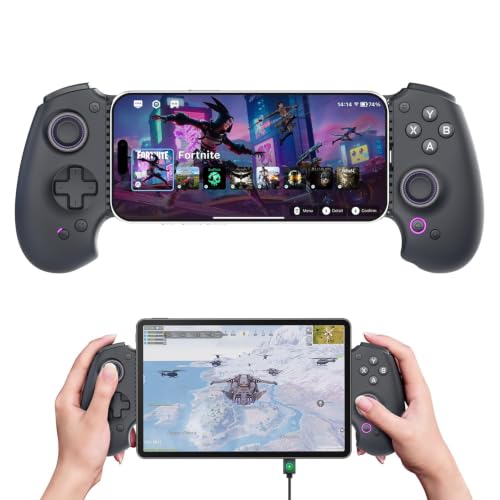
A real full-size gamepad that clamps your iPad Mini, not a phone-sized grip
Most telescopic pads (controllers that stretch to grip a phone or tablet) shrink the grip to save space. This one keeps a full-size gamepad shape instead, so your hands rest the way they do on a console controller. It extends up to 216mm to fit tablets up to 8.8 inches, so an iPad Mini slides in and stays put. It works with iPad Mini 6/7, iPhone 15/16/17 (and iPhone 18 Pro Max, but not the iPhone 17 Pro), plus Android phones from Samsung, Google Pixel, Motorola, ROG, and Legion.
The hardware is where the money goes. Hall Effect joysticks and Hall Effect triggers resist drift, dual rotor vibration motors add feedback, a 6-axis gyroscope handles motion aiming, and programmable back buttons are there for combos. It also supports 5V 1A charging while you play, so you can run it over USB or Bluetooth and keep the session alive while the screen tops up. Both modes matter: the USB plus Bluetooth pairing solves devices that lack OTG support. At 200g it stays light in hand.
Two limits are worth knowing. The iOS version of the abxy app restricts some features, including no virtual touch and a limited local game library, so some niche titles will not show up. And in XInput mode, 3.5mm headphone audio does not output. Owners rave about the ergonomics and the clicky face buttons, so if a full-size feel on an iPad Mini is what you are after, this is the strongest match here.
Console shape, tablet clamp: the full-size grip combined with the 216mm span is what separates it from phone-first pads.
Known limits: iOS app restrictions and no headphone audio in XInput mode are the two things to accept up front.
Made for: iPad Mini owners who want console-style hands and a clamped screen at once.
Look past it if: you rely on niche iOS titles the abxy app does not list.
Know the Specs
Hall Effect Sticks and Triggers
Hall Effect uses magnetic sensing instead of two surfaces rubbing together. That means the joystick reports its position without physical contact, so it resists the drift that shows up on worn pads over time. For you, it means your aim does not slowly pull to one side. Pads with Hall Effect controls here include the GameSir X5s, Mocagen MC200, abxylute S8, and abxylute S9.
Battery Hours and Playtime
Battery figures in this category vary widely — the abxylute S8 and UNIHOW advertise up to 15 hours, the Mocagen MC200 up to 8 hours with lighting on, and the Xbox Ice Breaker up to 40 hours. Read the conditions: lighting on usually lowers playtime. Recharging is typically via USB-C, and several pads let you play while charging.
Clamp Range and Tablet Fit
A telescopic pad’s maximum span decides which iPad it holds. The GameSir X5s spans 105–213mm, the abxylute S8 up to 216mm, and the abxylute S9 up to 216mm for tablets up to 8.8 inches. A full-size iPad will generally need a locking clamp like the Joso or a freestanding pad like the DualSense or Xbox controller.
Buttons, Macros, and Turbo
Button counts range from 10 on the DualSense up to 19 on the Xbox pad, with 17 on the Joso and 16 on the abxylute S8. Extra buttons usually mean programmable back keys, macro loops, or turbo settings. If you play shooters or racing games, back paddles and turbo cut the thumb travel between inputs. If you stick to casual titles, the standard 10-button set covers everything you need.
Common Questions
Will a phone-sized controller clamp a full-size iPad?
Do I need to jailbreak my iPad to use a controller?
What does Hall Effect actually change in everyday play?
How long does the battery last on these iPad controllers?
Can I use a controller with cloud gaming on my iPad?
Why does my controller keep disconnecting mid-game?
Is a full-size controller better than a clamping pad for iPad?
Do these controllers work with an iPad Mini specifically?
Can I charge my iPad while playing with a clamp controller?
What button count do I need for shooters and racing games?
The Bottom Line
For most people buying a wireless game controller for ipad, the winner is the PlayStation DualSense. It pairs straight to your iPad over Bluetooth, so you skip any clamp setup, and it gives you a real console pad with dual actuators (motors that buzz and rumble) that make shooters and racing games feel responsive. If you want a tablet that stays clamped and steady, grab the Joso for its locking back clip. And for a full-size grip on an iPad Mini with Hall Effect sticks (magnetic sticks that resist drift), the abxylute S9 is the one to reach for. One last nudge: the DualSense carries one of the highest ratings in this list, so it is the safest bet if you want console feel without a clamp.
How we choose
We do not accept paid placement. Every pick is matched to a real buyer and a real use-case; we do not hands-on test units.
Sources
Specifications: manufacturer listings and product documentation. Review insights: verified customer reviews, as of November 2026. Pricing: not shown on this page (it changes often); check the current price via the retailer link.
As an Amazon Associate, Tactical Gear Guy earns from qualifying purchases. This does not affect which products we feature.