Specs are compiled from manufacturer listings and verified buyer reviews and can change over time — please confirm the key details on the product page before buying.
You want fast internet in every room, and one router in the hallway is not delivering it. The fix is a mesh system: several small units that share one network name and hand your phone off as you walk from the kitchen to the bedroom. This guide covers nine systems, from budget-friendly three-packs to premium quad-band kits, and tells you which one suits your house size, your device count, and your internet plan.
This guide is built by comparing the manufacturers’ published specifications and the patterns across verified customer reviews, so you get each pick’s real strengths and trade-offs instead of marketing spin.
Coverage, device limits, and the WiFi generation (WiFi 6 versus the newer WiFi 7) decide most of the story. Below, each pick is matched to a real home size and a real load. If your rooms fight the signal, the right wifi system for home here will finally put a strong connection in every corner.
Top Picks


How To Choose The Best WiFi System for Home
Start with your house, not the box. Pick a system whose coverage rating sits comfortably above your floor area, because the marketing figure is measured in open space. Walls, floors, and a microwave in the way all eat into it.
Match the node count to the floors you actually have
A 3-pack spread across two levels beats a single powerful router in most homes. Each unit needs a spot with breathing room, not a cupboard behind the TV. If you can run a cable between units, wired backhaul (a physical Ethernet link carrying data between the mesh units) keeps the wireless lanes clear for your devices.
Check the device limit before you buy
Count your phones, laptops, TVs, consoles, cameras, and smart plugs. A starter system rated for 75 devices can feel stretched in a busy household. Kits rated for 150 or 200+ devices leave headroom for the smart-home gear you will add later.
WiFi 6 or WiFi 7?
WiFi 6 is the current mainstream standard and covers most phones and laptops. WiFi 7 is newer and adds features like multi-link operation (using more than one band at once for a more stable link). Buying WiFi 7 now future-proofs the network, but only newer devices can use its full speed.
Side-by-Side Comparison
| Model | Best For | Coverage | Device Limit | WiFi Generation | Amazon |
|---|---|---|---|---|---|
| TP-Link Deco X55 (3-pack)★ Best Overall | Big homes on a budget | 6,500 sq. ft. | 150 devices | WiFi 6 | Amazon |
| Google WiFi AC1200 (3-Pack)Wisest for the Money | Simple app-first setup | 4,500 sq. ft. | — | WiFi 5 (AC1200) | Amazon |
| TP-Link Deco 7 BE25Best Budget-Entry WiFi 7 | Cheapest WiFi 7 entry | 4,600 sq. ft. | 150+ devices | WiFi 7 | Amazon |
| NETGEAR Orbi RBK663 | Widest coverage per dollar | 6,600 sq. ft. | 75 devices | WiFi 6 | Amazon |
| TP-Link Deco 7 Pro BE63 | Heavy device households | 5,800 sq. ft. | 200+ devices | WiFi 7 | Amazon |
| ASUS ROG Rapture GT6 (2PK) | Gaming and low lag | 5,800 sq. ft. | — | WiFi 6 | Amazon |
| Amazon eero 7 (3-pack) | Set-and-forget WiFi 7 | 6,000 sq. ft. | 120+ devices | WiFi 7 | Amazon |
| ASUS ZenWiFi BT6 (3 PK) | Very large properties | 7,600 sq. ft. | — | WiFi 7 | Amazon |
| NETGEAR Orbi 970 (RBE973S) | Whole-property top tier | 10,000 sq. ft. | 200 devices | WiFi 7 | Amazon |
Detailed Reviews
1. TP-Link Deco X55 AX3000 WiFi 6 Mesh System, Deco X55(3-pack)
Our pick — 4.0+★ from 17,000+ verified ratings; the strongest balance of quality and price.
The three-pack that blankets 6,500 square feet without the premium price tag.
Three units, one network name, and coverage rated to 6,500 square feet — that is the whole pitch, and it lands. Each Deco X55 is an AX3000 unit: 2,402 Mbps on the main band plus 574 Mbps on the slower 2.4 GHz band. The numbers that decide your day are simpler. It handles a stated 150 devices, and each unit carries 3 Gigabit Ethernet ports so consoles and desktop PCs can plug straight in.
What wins people over is dead spots disappearing. Homes in the 4,500-square-foot range over two levels report solid signal room to room — the layout this kit was sized for. The speed jump is the other headline: a wired PC that once struggled now pulls more than 700 Mbps, up from roughly 50 Mbps, when the backhaul is set up right. That is the difference between a stuttering video call and a clean one.
Setup runs through the Deco app with visual prompts, and AI-driven mesh learns your home’s layout to tune the signal. The catch is honest: WiFi 6 tops out below the newer WiFi 7 systems, so if you have a multi-gig internet plan and WiFi 7 laptops, this leaves speed on the table. For everyone on a normal plan, it is the best balance here.
What it does best
- 6,500 sq. ft. of coverage across three units
- Room for 150 devices, up from a single router’s limit
- 3 Gigabit ports per unit with wired backhaul support
- Free HomeShield basics: network security, parental controls, QoS
Where it steps back
- WiFi 6 only — no WiFi 7 multi-link speed
- Best speed needs decent backhaul, which can mean running a cable
Made for: bigger homes that want full coverage and 150 devices without paying premium-tier rates.
Look elsewhere if: you already own WiFi 7 gear and want the newest standard now.
2. Google WiFi AC1200 3-Pack
The simplest setup of the bunch, built for a house that just wants signal everywhere.
Google’s 3-pack is the plainest system here to live with. It rates 1,200 Mbps (AC1200) and covers up to 4,500 square feet. The number that matters on paper is the data rate: 1,200 megabits per second against the Deco 7 BE25’s 5,000 — the WiFi 7 kit carries far more raw throughput. Where Google wins is the app. Setup and device management run through the Google Home app, with parental controls and a guest network built in.
What people actually notice is reach. Coverage is rated to 4,500 square feet, but buyers report the extension reaching difficult corners — the whole point of a three-pack. It connects the internet through the house rather than in one room. If your plan is modest and your devices are older, this is enough.
The ladder up is steeper than it looks. This is WiFi 5, one generation behind WiFi 6 and two behind WiFi 7, so homes with newer laptops and consoles will feel the ceiling. Treat it as the easy-entry pick for apartments and small houses; it is not built for high throughput.
The buy-in: a 3-pack, up to 4,500 sq. ft., and a Google Home app that handles setup, guest networks, and parental controls in one place.
The ceiling: AC1200 and WiFi 5 mean the throughput is the lowest here — fine for streaming and browsing, tight for heavy gaming or multi-gig plans.
Reach for this if: you want the dead zones gone with the least fiddling and have a normal internet plan.
Step up if: you own WiFi 6 or WiFi 7 devices and want to use their speed.
3. TP-Link Deco 7 BE25
The cheapest way into WiFi 7, and the throughput shows it.
Here is the pick for the buyer who wants the newest standard without the premium-tier bill. The BE25 delivers up to 5,000 Mbps total — 4,324 Mbps on the 5 GHz band and 688 Mbps on 2.4 GHz. That is 5,000 Mbps versus the Google WiFi kit’s 1,200 megabits per second. Coverage is rated 4,600 square feet across the two units, for over 150 devices.
What it earns: a 2.5G Ethernet backbone that balances traffic between the two Deco units for steadier whole-home coverage. Coverage reaches patios as well as rooms, which is what owners call out. Setup runs through the Deco app and firmware updates happen there too. Backward compatibility with older WiFi generations means your non-WiFi-7 gadgets still connect.
Two units, not three, is the honest catch. For a sprawling single-story house or a place with thick walls, the two-unit kit may want a third node. And WiFi 7’s headline features reward WiFi 7 devices, so older gear runs at older speeds. As a future-proofed starting point, it is a fair trade.
Why it earns a slot
- Up to 4,324 Mbps on 5 GHz and 688 Mbps on 2.4 GHz
- 2.5G Ethernet and simultaneous wired/wireless backhaul
- Over 150 devices across 4,600 sq. ft.
- Free HomeShield basics plus VPN client support
What to weigh
- Two units only — big or thick-walled homes may want a third
- WiFi 7 speed needs WiFi 7 devices to show off
Best fit: the buyer who wants WiFi 7 now and can expand with another Deco node later.
Think twice if: your house is large enough that a 3-pack would keep you out of a second purchase.
4. NETGEAR Orbi RBK663

One router plus two satellites stretching signal to 6,600 square feet.
The headline here is spread. One router and two satellites cover up to 6,600 square feet, and each unit is rated for 2,200 square feet. That is 6,600 square feet versus the Google WiFi kit’s 4,500-square-foot rating. It is tri-band AX3800 up to 3.8 Gbps, with a dedicated backhaul band keeping router-to-satellite traffic off the lanes your devices use.
Wiring is generous: seven Gigabit Ethernet ports across the three units, three on the router and two on each satellite, so a PC, console, and smart TV all get a cable. A single network name lets devices roam between router and satellites without reconnecting — the fix for a router-plus-extender setup that makes two networks. Raw speed and wide coverage are this kit’s two strengths.
The honest catch is reliability and setup. This system is rated for 75 devices, the lowest device count in this list, and connection drops come up often in the feedback. A cautious note to buyers: this kit wants a good spot for the satellites and a clean backhaul. Set it up patiently and it earns its coverage.
The standout: 6,600 sq. ft. of coverage and 7 Gigabit ports — the most physical ports and the widest reach in this comparison.
The trade-off: the 75-device limit is the tightest here, and connection reliability needs patience during setup.
Pick this for: a large or spread-out home with a moderate gadget count and cables to spare.
Pass if: you have 100+ connected devices or want a setup that just works without tuning.
5. TP-Link Deco 7 Pro BE63
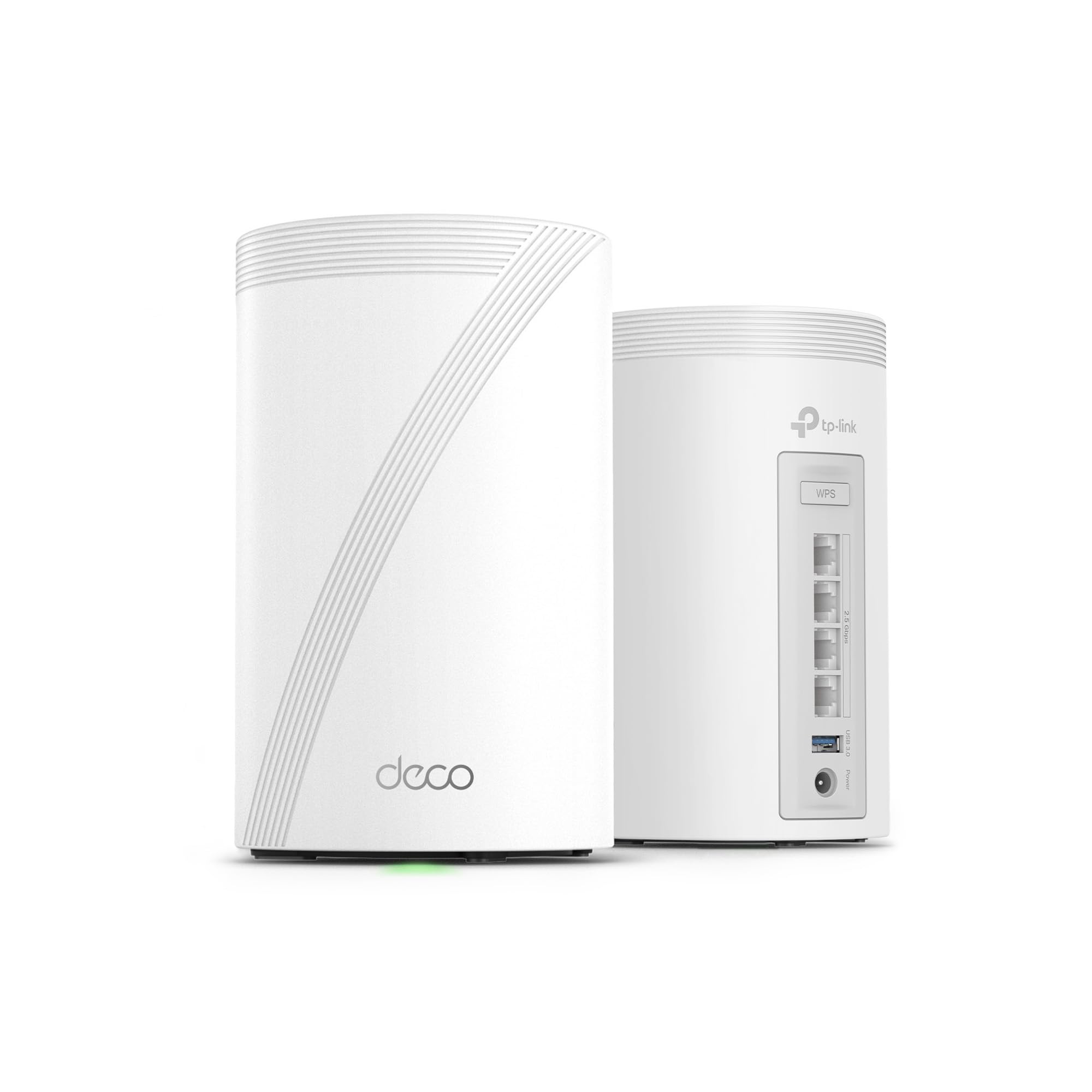
The tri-band workhorse built to feed a houseful of devices at once.
Two things size this system up fast: coverage rated 5,800 square feet and support for over 200 devices across the two-unit pack. The WiFi 7 spread is 5,188 Mbps on the 6 GHz band, 4,324 Mbps on 5 GHz, and 574 Mbps on 2.4 GHz. If you have been counting device slots, note the Orbi RBK663’s 75-device limit in this list — this one clears 200.
Future-proofing is the theme. Four 2.5G WAN/LAN ports and a USB 3.0 port handle a growing wired setup, and a 10G WAN/LAN port on the system keeps pace as your plan scales. AI-driven roaming keeps one network name working smoothly across rooms. HomeShield adds parental controls and IoT protection, and VPN client support lets the whole home reach a remote server without installing software on each gadget.
If you want cable-grade ports and headroom for a smart-home that keeps growing, this is the mid-tier answer. The honest note: a two-pack at this price leaves less coverage room for very large homes — 5,800 square feet is generous, but a 3-pack spreads further. For most busy households, two nodes is plenty.
What matters: 200+ devices, 5,800 sq. ft., and 10G-capable networking — the widest device headroom at the mid-tier.
Who it isn’t for: a sprawling multi-floor home that wants the extra node a 3-pack brings.
The right call for: a busy home packed with devices that also wants wired 2.5G speed and a USB port.
Consider expanding: if your square footage pushes past 5,800, add a compatible node later.
6. ASUS ROG Rapture GT6 2PK

A gaming router with nine antennas and a dedicated lane for the fight.
This is the pick for the buyer who feels a lag spike before the screen even freezes. The ROG Rapture GT6 pairs a 1.7 GHz tri-core processor with 160 MHz channels and a dedicated high-performance backhaul, rated up to 10,000 Mbps. Nine internal antennas and RangeBoost Plus push coverage to 5,800 square feet across the two routers.
Triple-level game acceleration is the feature that earns its keep — it prioritizes game traffic from your device all the way to the game server. A 2.5 Gbps WAN port and LAN aggregation give wired consoles and PCs a fast cable path. A free lifetime AiProtection subscription from Trend Micro adds network security, and Instant Guard secures your connection away from home.
The trade-off is that this is still WiFi 6, one generation behind the WiFi 7 kits on this list. The 10,000 Mbps figure is a tri-band total, so real-world top speeds depend on your devices and plan. For a gaming household that wants low lag and strong cable ports, it holds its own. For the buyer chasing the newest standard, look to the WiFi 7 picks.
The gaming edge
- Triple-level acceleration prioritizes game traffic end to end
- 1.7 GHz tri-core processor with 160 MHz channels
- 2.5 Gbps WAN port plus LAN aggregation for wired play
- Free lifetime AiProtection security subscription
The honest caveats
- WiFi 6, not WiFi 7
- The 10,000 Mbps figure is tri-band total, not one-device speed
Meant for: gaming households that want low-lag priority and serious wired ports.
Not your pick if: future-proofing on WiFi 7 is the thing you care about most.
7. Amazon eero 7 Dual-Band Mesh Wi-Fi 7 Router (3-pack)

WiFi 7 that mostly sets itself up and keeps itself running quietly.
Three eero 7 units cover up to 6,000 square feet and support 120+ devices. The connection handles internet plans up to 2.5 Gbps through two auto-sensing 2.5 GbE ports, with wireless speeds rated up to 1.8 Gbps. For anyone on a fast fiber plan, that 2.5 Gbps port ceiling is the real-world figure worth checking against your plan.
What owners rave about is the quiet competence — performance and reliability top the feedback by a wide margin. A 3,000-square-foot home runs it with no trouble, and setup finishes in about 15 minutes. Coverage handles a 2,000-square-foot space with signal reaching difficult spots. The patented TrueMesh software plus TrueRoam and TrueChannel steer each device to the best connection without you touching anything.
WiFi 7 brings multi-link operation into the mix, and the newest eero routers carry a three-year warranty. The catch: eero’s advanced security, ad blocking, and VPN features sit behind an optional eero Plus subscription. The free basics work fine, but the extras are not included. For a home that wants WiFi 7 with almost no management, this is the easy pick.
Why it tops out
- 6000 sq. ft. of coverage for 120+ devices across three units
- Two 2.5 GbE ports for plans up to 2.5 Gbps
- Setup completes in about 15 minutes
- Three-year warranty and backward-compatible with older eero gear
Where it asks more
- Advanced security and VPN sit behind an eero Plus subscription
- Wireless top speed is 1.8 Gbps, not the 2.5 Gbps port ceiling
Choose it when: you want WiFi 7 coverage that manages itself and you run a fast fiber plan.
Budget a bit more if: you want ad blocking and VPN included rather than as an add-on.
8. ASUS ZenWiFi BT6 3 PK

For the property where the yard has to get signal too.
This is a 3-pack built for scale. AI-powered Smart AiMesh pushes coverage up to 7,600 square feet, and seven internal antennas with eight high-power front-end modules work to wipe out dead zones. Tri-band WiFi 7 speeds reach up to 9.4 Gbps with MLO (multi-link operation, which uses more than one band at once) and 4K-QAM, a denser signal scheme that packs more data per transmission.
What makes it practical in a big home is extendibility — add compatible ASUS routers to stretch coverage further with AiMesh. Smart Home Master SSIDs let you spin off a separate network for IoT gadgets, plus parental controls and VPN setup in one place. Commercial-grade AiProtection Pro and advanced VPNs run protection around the clock.
The caution is that feedback is split on performance — some runs are flawless and some drop out. Signal reaches yards and outbuildings, which is the win for a large property. Treat it as the pick for the buyer with square footage to cover who accepts a little tuning to get there.
Scale on offer: 7,600 sq. ft. across three units, WiFi 7 up to 9.4 Gbps, and AiMesh extendibility for whatever comes next.
The caveat: performance is not uniform for every buyer, so reliability is the one thing to watch.
Ideal owner: someone with a big house, outbuildings, or a yard that needs Wi-Fi.
Look elsewhere if: you want a kit that runs perfectly with zero attention.
9. NETGEAR Orbi 970 RBE973S

The top-tier kit that treats 10,000 square feet and 8K streaming as the baseline.
This is the range-topper. Quad-band WiFi 7 reaches up to 27 Gbps, coverage runs to 10,000 square feet, and device capacity is 200. A 10 Gig internet port keeps pace with the fastest plans, and patented Enhanced Dedicated Backhaul keeps the router-to-satellite link fast so every device stays fast at the same time. That is a different tier than the Orbi RBK663’s 75-device limit further up this list.
What impresses owners is speed consistency — maximum WiFi speeds hold steady with multiple users on at once, no lag. Coverage spans the whole interior and outside the house. Setup takes about two hours to complete, and automatic firmware updates with NETGEAR’s Advanced Router Protection keep the network secure without manual work.
The honest catch is that reliability and value score as mixed with buyers, and the setup is the longest here. Signal quality gets both praise and gripes. This is the pick for a buyer who wants the widest reach and newest standard and will accept a two-hour setup.
The flagship case
- Up to 27 Gbps across four bands, 10,000 sq. ft., 200 devices
- 10 Gig internet port for the fastest plans
- Quad-band with Enhanced Dedicated Backhaul for simultaneous device speed
- Automatic firmware updates and Advanced Router Protection
The honest side
- Setup takes about two hours — the longest here
- Reliability is mixed, so sizing and placement matter
For the buyer who wants it all: maximum coverage, 200 devices, and quad-band WiFi 7 in one kit.
Only if you’ll invest time: two hours of setup is the toll for this tier.
Know the Specs
Coverage in Square Feet
The coverage rating is a best-case number measured in open conditions. Walls, floors, and appliances cut into it, so choose a system whose rating sits above your actual floor area. A three-pack usually spans a home better than one strong router, because each unit sits closer to the devices it serves.
Device Capacity
Every connected gadget takes a slot. Kits here range from 75 devices up to 200+. Count your phones, laptops, TVs, consoles, cameras, and smart plugs, then pick a system with headroom, because smart-home gear tends to multiply after the router arrives.
Backhaul
Backhaul is the link the mesh units use to talk to each other. A dedicated backhaul band keeps that traffic separate from your devices. Wired backhaul, running an Ethernet cable between units, is the steadiest option when you can manage the cable.
WiFi Generation
WiFi 6 is the current mainstream standard; WiFi 7 is newer and adds multi-link operation for steadier connections. WiFi 7 future-proofs the network, but the full speed shows up only on WiFi 7 devices. For older gear, a WiFi 6 system still delivers strong everyday performance.
Common Questions
How much square footage does a home WiFi system really cover?
Will a mesh system work with my existing internet provider?
How many mesh units do I need for a two-story house?
Is WiFi 7 worth it over WiFi 6 right now?
What is a dedicated backhaul and does it matter?
Can I add more units to a mesh system later?
Do I need a separate modem with a mesh WiFi system?
How long does setup usually take?
Does a bigger WiFi system use more electricity at home?
The Bottom Line
The winner for most homes is the TP-Link Deco X55, because it closes the gap between 6,500 square feet of coverage and the price at which most homes actually shop. A crowd favorite at 4.0+ stars across 17,000+ ratings, it handles 150 devices and gives each unit three Gigabit ports. If you want the newest standard without the premium bill, the Deco 7 BE25 brings WiFi 7 within reach. And for a houseful of devices that also wants wired 2.5G speed, the Deco 7 Pro BE63 with 200+ device capacity is the one to reach for.
How we choose
We do not accept paid placement. Every pick is matched to a real buyer and a real use-case; we do not hands-on test units.
Sources
Specifications: manufacturer listings and product documentation. Review insights: verified customer reviews, as of November 2026. Pricing: not shown on this page (it changes often); check the current price via the retailer link.
As an Amazon Associate, Tactical Gear Guy earns from qualifying purchases. This does not affect which products we feature.