Specs are compiled from manufacturer listings and verified buyer reviews and can change over time — please confirm the key details on the product page before buying.
The single thing that decides whether a replacement keyboard works is the part number on the sticker behind your old one — not the model name in your laptop’s advertising. Get that number to match, and the swap is a twenty-minute job. Miss it, and you are packing a keyboard back. This guide walks through seven HP-specific replacement keyboards and palmrest assemblies, names the exact machines and part numbers each one fits, and tells you plainly which one suits your repair.
This guide is built by comparing the manufacturers’ published specifications and the patterns across verified customer reviews, so you get each pick’s real strengths and trade-offs instead of marketing spin.
You will see which options include the backlight, which come without a frame, and which ship as a full palmrest with the touchpad already attached. Every listing here is written for HP laptops, so the decision is about fit and features rather than brand. My breakdown of the best replacement keyboards for hp laptops sorts each pick by the model it actually fits and the parts it includes.
Top Picks


How To Choose The Best Replacement Keyboards for HP Laptops
A replacement keyboard is a drop-in part, not an accessory. It either lines up with the screw holes, ribbon connector, and key cutouts on your exact chassis, or it does not. Everything below is about narrowing the field to the one panel your laptop will accept.
Start with the part number, not the model name
HP sells the same 14-inch shell under several names, and the keyboard inside changes with the revision. The safe move is to flip the laptop over, unscrew the bottom cover, and read the number printed on the keyboard’s ribbon cable or the back of the panel. Cross-check that string against the compatible part numbers listed on the product page. A listing that names both the machine and the part number is giving you two chances to confirm the fit.
Backlight and pointer: match what you had
On EliteBook and ProBook machines, a backlit keyboard (a panel with a light layer under the keys) and a pointer stick (the small red nub between the G, H, and B keys) are separate features. If your original board had both, buy a board with both, because the connector and the cutout in the palmrest are shaped for them. Buying a non-backlit panel to save money means either living without the light or cutting into a chassis that was not built for it.
Frame or no frame: it changes the install
A keyboard with a frame arrives as one solid unit that screws straight into the laptop. A frame-free keyboard is just the key panel, and you transfer your original plastic surround onto it. The frame-free version costs less and is fine if your existing frame is unbroken, but it adds a step and a chance to crack a plastic clip. For a first repair, the framed version removes a variable.
When you need the whole palmrest
Some HP 17-inch and 15-inch models have the keyboard plastic-welded or glued into the top case. On those, you cannot buy the keyboard alone — you buy the palmrest assembly, which is the top cover with the keyboard and, on some listings, the touchpad already fitted. That is a bigger part with a bigger price, and the touchpad type on the label has to match exactly or the assembly will not work.
Side-by-Side Comparison
| Model | Best For | Keys | Backlit | Pointer Stick | Amazon |
|---|---|---|---|---|---|
| TLBTEK EliteBook 745/840 G5-G6 + ZBook 14u★ Best Overall | EliteBook and ZBook owners who want the pointer | 104 | Yes | Yes | Amazon |
| SUNMALL HP 14 Series + Pavilion X360Widest Fit | Widest model coverage across 14-inch HP | 104 | Yes | — | Amazon |
| TLBTEK HP 14 / 240 G7 / Pavilion X360 (no frame) | Reusing your existing keyboard frame | — | Yes | — | Amazon |
| BestParts EliteBook 840 G3/G4, 745 G3/G4 | Older EliteBook G3 and G4 rebuilds | 109 | Yes | Yes | Amazon |
| Jxjslp HP 17-BY / 17-CA Palmrest Assembly | 17-inch rebuilds that need keyboard and touchpad | — | — | — | Amazon |
| Jxjslp HP 15T-DY / 15-DY / 15-EF Palmrest Assembly | 15-inch full top-cover replacement | — | No | — | Amazon |
Detailed Reviews
1. Backlight Keyboard HP EliteBook 745 746 840 846 G5/G6 ZBook 14u
Our pick — 4.0+★ from 30+ verified ratings; the strongest balance of quality and price.
One panel that brings your EliteBook’s pointer stick and backlight back in a single part.
Business-lease laptops live and die on the small features, and the EliteBook 840 G5 and G6 lose both the backlight and the pointer stick when the keyboard fails. This TLBTEK panel restores them together. It carries the pointer (the little red-nub cursor control that sits between the G, H, and B keys) and a single-color backlight, so a docked EliteBook is usable at night again without a clip-on lamp.
Fit is the headline. The listing names HP EliteBook 745-G5, 745-G6, 840-G5, 846-G5, 840-G6, 846-G6 and the ZBook 14u-G5 and 14u-G6, plus part numbers L11307-001, 6037B0138601, L14377-001, and L14378-001. If the string on your old ribbon matches any of those, that is your confirmation. It is a 104-key US QWERTY panel with a metal enclosure, and it ships wrapped in a bubble bag inside a box — the kind of packing that matters when a thin plastic part crosses the country.
What wins people over is the straightforwardness of the swap. The one honest catch: if a few keys are dead after you install it, the fix is usually the ribbon cable seating, not the panel. Clean the metal contact end with a dry cloth, reconnect it, and try a couple of times before you assume the board is faulty — the listing itself walks you through this. A 4.0+ star record across 30+ ratings says most buyers get a working board.
Why this one leads
- Backlight and pointer stick both included, so nothing on the original board is lost.
- Names four compatible part numbers, giving you several ways to confirm the fit.
- Metal enclosure on a 104-key US QWERTY layout.
What to prepare for
- It fits the G5 and G6 EliteBook generations only — check yours before ordering.
- Some buyers need to reseat the ribbon cable a few times before every key responds.
Best match: anyone repairing an EliteBook 745, 846, 840 G5/G6 or a ZBook 14u G5/G6 who needs the pointer and backlight back.
Check first: a newer or older EliteBook generation will not take this panel, so verify the part number on your old ribbon.
2. Replacement Keyboard Compatible with HP 14-BD 14-CK 14-CD 14-CM 14-CS 14-CW 14-DA 14-DG 14-DQ 14-FQ 240 G7 245 G7 246 G7. Pavilion X360 14-DH 14S-DK14S-CR. Pavilion 14-CE. 340 G7 Series Laptop
The broad-coverage pick for the crowded world of 14-inch HP laptops.
Here is the head-to-head that matters most: this SUNMALL is the mass-market option, with a fit list that covers a huge swath of 14-inch HP machines — HP 14-BD, 14-CK, 14-CD, 14-CM, 14-CS, 14-CW, 14-DA, 14-DG, 14-DQ, 14s-DQ, 14-FQ, and 14s-FQ, plus the 240 G7, 245 G7, and 246 G7 — while the TLBTEK above targets the business EliteBook line specifically. If your laptop is a consumer HP 14, this is the one more likely to match.
It also stretches into the Pavilion family: Pavilion X360 14-CD, 14-DH, 14M-CD, 14T-CD, 14T-CM, 14S-DK, 14S-DP, 14S-CR, 14Q-CS, 14Q-CY, Pavilion 14-CE, and the 340 G7 and 340s G7. That breadth is the selling point. It is a 104-key US layout with a backlight, in a silver finish, and the plastic (ABS) enclosure is what you would expect for a drop-in consumer part.
The trade-off is the same one every broad-fit listing carries: the list is long, so you have to do the confirming. A 4.0+ star record across 40+ ratings suggests most buyers match their model correctly. Read the compatible model list line by line against the sticker under your laptop, and if your exact revision is not there, do not gamble — pick a listing that names your machine and its part number.
Where it shines: coverage. Few listings reach across both the HP 14 consumer line and the Pavilion X360 series this way, which makes it the practical first stop for a mainstream 14-inch repair.
What you give up: there is no pointer stick here, so if you are coming from an EliteBook and relied on the nub, this is not a like-for-like swap.
Reach for this if: you own a mainstream HP 14 or Pavilion X360 and want the widest single list to check against.
Look elsewhere if: your machine is a business EliteBook with a pointer stick — the TLBTEK pick covers that shape.
3. Backlight Keyboard Replacement Compatible with HP 14-CK 14-CD 14-CM 14-CS 14-DG 14-DQ 14s-DQ 14-FQ 14s-FQ 240 G7 245 G7 246 G7 240 G8, Pavilion X360 14-CD 14-DH 14M-CD Series Laptop

The fresh-plastic answer for a laptop whose keyboard died but whose frame is still perfect.
This TLBTEK panel arrives as just the keyboard, with no plastic surround — the frame-free design the listing describes in plain terms. You lift your original frame off the old board and seat it onto this one. That keeps the cost down relative to a framed unit, and it means you are not throwing away a surround that still looks new. For a 240 G8 owner, this is one of the few listings that names that machine at all.
Fit is wide and overlaps the SUNMALL above: HP 14-CK, 14-CD, 14-CM, 14-CS, 14-DG, 14-DQ, 14s-DQ, 14-FQ, 14s-FQ, 240 G7, 245 G7, 246 G7, 240 G8, the Pavilion X360 14-CD, 14-DH, 14M-CD, 14T-CD, 14T-CM, 14S-DK, 14S-DP, 14S-CR, 14Q-CS, 14Q-CY, Pavilion 14-CE, 340 G7, 340s G7, and the 17-cd series. The backlight is included, in a single color, on a black key panel.
Two honest points to weigh. First, transferring your frame takes care, and a cracked plastic clip is the most common thing that goes wrong on any frame-free swap. Second, the same ribbon-cable note applies: if keys are unresponsive after install, reseat the contact and try again before deciding the board is at fault. A 4.0+ star record across 30+ ratings says careful fit-list readers get a working keyboard.
Reasons it works
- Identifies both the model families and the 240 G8, a machine many panels skip.
- Backlit, so the night-time keys come back along with the typing.
- Frame-free design lets you keep the original plastic surround.
Where it asks more of you
- No frame means you do the transfer, and cracked clips are the usual mishap.
- Some buyers need to reseat the ribbon cable before all keys respond.
Made for: a careful first-timer or repeat DIYer whose existing frame is intact and who wants a cheaper backlit panel.
Think twice if: your current frame is already cracked or the clips are brittle — the assembled BestParts unit costs more but removes that failure point.
4. US Keyboard Backlit HP EliteBook 840 G3 G4 745 G3 G4
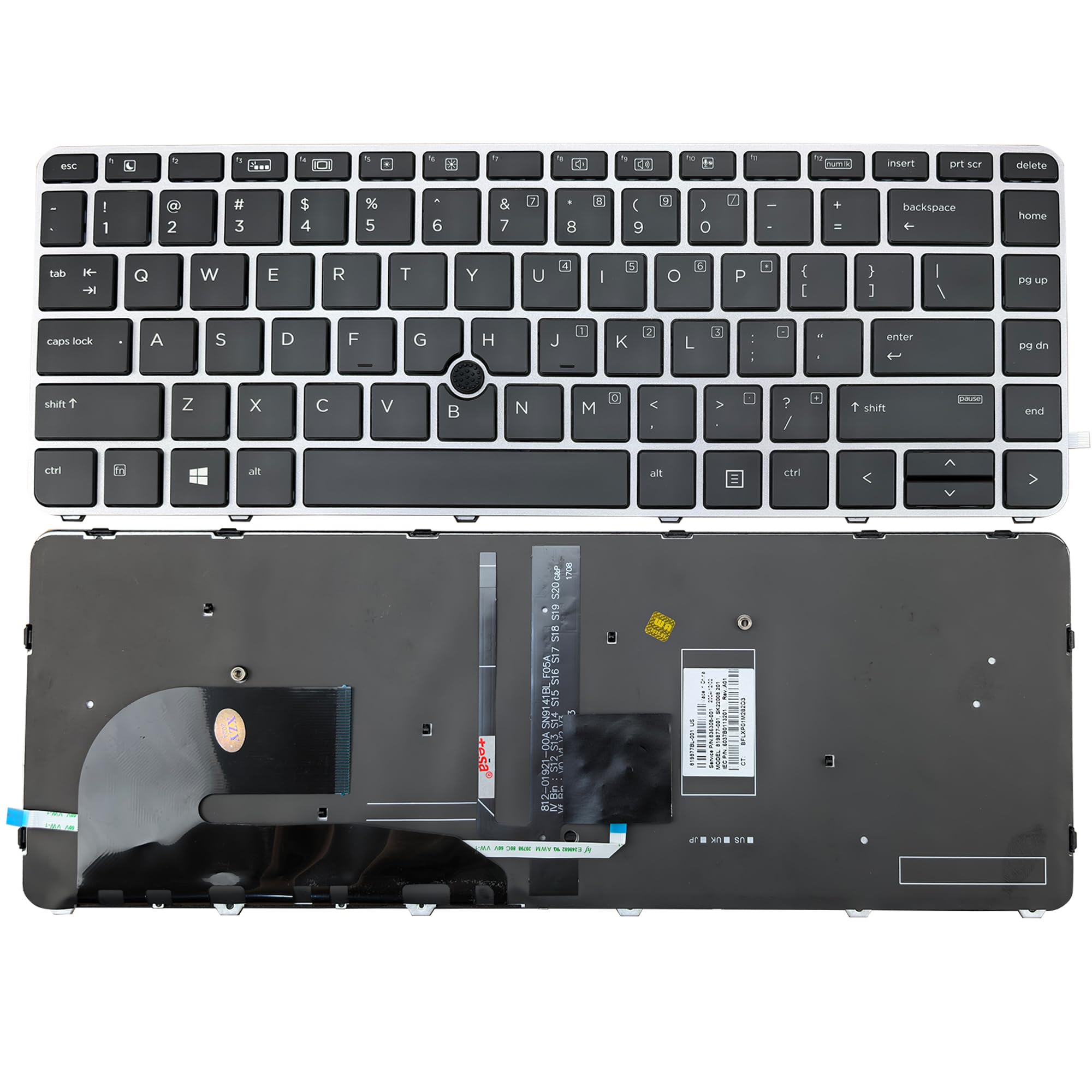
The older-EliteBook rebuild with more keys than the TLBTEK and a pointer to match.
If your EliteBook is a G3 or G4 rather than the newer G5/G6 the TLBTEK targets, this BestParts board is the one that fits. It carries 109 keys — the highest count in this lineup — and that extra real estate over the standard 104-key panel is why it earns its place for the older 840 and 745. It is a US English layout, backlit, and includes the pointer stick.
The part-number list is specific and useful: 901042-001, 919877-001, 903008-001, 836308-001, and 6037B0126901. The enclosure is metal and plastic, and it covers the 840 G3, 840 G4, 745 G3, and 745 G4 only — nothing wider. That tight scope is a plus, because it means the part you get is purpose-built for these generations rather than adapted toward a dozen others. A 6-month warranty covers build defects on the board.
The caveat is the review sample: just 10+ ratings at 4.0+ stars, thinner than the higher-volume picks above. That is a young listing, not a red flag about the keyboard itself, but it does mean you lean harder on the part-number match. Confirm 901042-001 or one of the other listed numbers sits on your old ribbon before you commit.
Standout detail: 109 keys is more than the 104-key TLBTEK, and on an older EliteBook that difference is what lets the board match the original key count exactly.
Fit caution: it is strictly a G3/G4 part — a G5 or G6 EliteBook needs the TLBTEK pick in position one, not this.
Pick it if: you are restoring an EliteBook 840 G3/G4 or 745 G3/G4 and need the pointer and backlight on a 109-key board.
Cross it off if: your machine is any newer EliteBook generation or a ProBook — this board will not line up.
5. Upper Case Palmrest HP 17-by 17-CA 17T-by 17Z-CA L22751-001 L48409-001

A whole top cover for the 17-inch HP, keyboard and touchpad already in place.
On the HP 17-BY and 17-CA, the keyboard is not a simple pop-out part — you replace the palmrest upper case, which brings the US keyboard and the touchpad assembly along with it. That is what this Jxjslp unit is. It fits 17T-BY, 17Z-CA, 17-BY, and 17-CA, and it comes in jet black. At 16.14 x 10.51 x 0.51 inches and 1.72 pounds, it is a substantial piece of a 17-inch laptop, and it feels like the original, which is exactly what buyers report.
The touchpad detail is the make-or-break. The label on your current touchpad must read 73H0 — this assembly is the non-PTP type and will not work if yours ends in 73H1 PTP or 73H3. That is not a small footnote; it is the fit. Check it before ordering. The MPN list is L22751-001, L48409-001, and 6070B1546701, and a 120-day warranty covers manufacturer defects only, not man-made scratch or damage.
Build quality and function are what earn the confidence here — the assembly is treated as a like-for-like replacement that works and holds up. The trade-off is that this is the heaviest and largest part in the lineup, and because it includes the touchpad, the wrong label means it will not fit at all. It is the right buy only if you have confirmed 73H0.
Value of the whole assembly: replacing the palmrest in one piece means you are not fighting with a keyboard that is glued in — and you get a fresh touchpad at the same time.
The one gate to clear: if your touchpad label reads 73H1 PTP or 73H3, stop — this assembly is the non-PTP type and will not work.
Clear match for: a 17-BY or 17-CA owner with the 73H0 touchpad label who wants keyboard and touchpad in one assembly.
Do not force it: any other touchpad type or a 15-inch chassis — this part is sized and keyed for the 17-inch only.
6. Replacement Upper Case Palmrest for HP 15T-DY 15-DY 15-EF 15Z-EF 15s-eq 15s-fq 15s-er 15s-fr Series Laptop Top Cover Non-Backlit Keyboard Assembly M17184-001 L63578-001 Natural Silver

The 15-inch slab that replaces your keyboard, top cover, and the plastic around them at once.
HP’s 15-DY and 15-EF families put the keyboard inside the palmrest, so the repair is a top-cover swap. This Jxjslp unit is that cover, in natural silver, with a non-backlit keyboard already fitted. It is lighter and smaller than the 17-inch assembly above — 1.34 pounds against 1.72 pounds, and 13.98 x 9.37 x 0.39 inches against 16.14 x 10.51 x 0.51 inches. If you are coming from a 17-inch job, this one handles more easily.
The fit list is unusually detailed, naming individual 15-DY and 15-EF variants — 15-DY0025TG, 15-DY0704NR, 15-DY2024NR, the 15s-fq and 15s-eq machine codes, and the 15-EF0021NR, 15-EF1001WM, and 15-EF1021NR machines among them. The part numbers are M17184-001 and L63578-001. Cross-check one of those against your laptop and you have your answer. A 120-day warranty covers manufacturer defects.
The point to flag plainly is the word non-backlit. This assembly does not light up. If your original 15 had a backlit keyboard, this top cover gives you a working keyboard without the glow, which is a real downgrade at night. Buy it when the keyboard or palmrest is physically broken and you do not mind the loss of the light — or when your machine was non-backlit to begin with. A 4.0+ star record across 30+ ratings says the fit is dependable, and the deep model list supports it.
Why the 15-inch owner picks it
- Brings the keyboard and the palmrest top cover as one piece.
- The model list is deep enough to match specific 15-DY and 15-EF variants.
- Natural silver finish matches the original machine’s look.
What you must accept
- The keyboard is non-backlit, so no illuminated keys.
- It is a 15-inch part only — the 17-inch models use a different assembly entirely.
Step up to it if: your 15-DY or 15-EF keyboard or palmrest is damaged and you want the whole top cover in one box.
Hold off if: the backlight matters to you — this assembly does not have one, so keep looking for a lit option.
Know the Specs
Key count (button quantity)
Button quantity is the number of physical keys on the panel. A standard US laptop keyboard is 104 keys; business-grade EliteBook boards like the BestParts unit here run 109 because of extra function rows. Match the count to your original if you can, since a difference usually means a board from a different generation or region.
Backlit vs non-backlit
A backlit keyboard has a light layer beneath the keys so you can type in the dark. Some replacement assemblies are non-backlit even when the original was lit, and if you buy one of those you simply lose the glow. On a laptop that is used at night, that is a real downgrade worth checking against the listing before you buy.
Common Questions
How do I find the right replacement keyboard for my HP laptop?
Will a keyboard from a different HP model fit my laptop?
Why do some replacement keyboards not have a frame?
What does “with pointer” mean on an EliteBook keyboard?
My keys don’t work after installing the new keyboard. What now?
Do I need the whole palmrest assembly instead of just a keyboard?
How do I know whether my touchpad is the 73H0 type or a PTP type?
Can I put a backlit keyboard into a non-backlit HP laptop?
Is a ProBook keyboard interchangeable with an EliteBook keyboard?
The Bottom Line
For most people hunting for the best replacement keyboards for hp laptops, the right call is the TLBTEK EliteBook and ZBook pick because it brings back the backlight and the pointer stick in one board and names four part numbers you can verify. If you own a mainstream 14-inch HP, the SUNMALL 14-series panel reaches the widest set of machines. And for a 17-inch rebuild that needs the keyboard and touchpad together, the Jxjslp palmrest assembly is the one to reach for. The honest nudge: the TLBTEK pick carries the highest-rated record in the lineup, so start there — then confirm the part number and you are ready to type again.
How we choose
We do not accept paid placement. Every pick is matched to a real buyer and a real use-case; we do not hands-on test units.
Sources
Specifications: manufacturer listings and product documentation. Review insights: verified customer reviews, as of November 2026. Pricing: not shown on this page (it changes often); check the current price via the retailer link.
As an Amazon Associate, Tactical Gear Guy earns from qualifying purchases. This does not affect which products we feature.