Specs are compiled from manufacturer listings and verified buyer reviews and can change over time — please confirm the key details on the product page before buying.
The mouse that costs you a round is rarely the one with the weakest sensor — it is the one that drops its Bluetooth link mid-flick or dies with no warning. If you want a wireless gaming mouse that stays connected and stays charged, the Logitech G309 Lightspeed is the pick worth starting with, because it runs on a plain AA battery and keeps a low-latency link instead of making you hunt for a cable between matches.
This guide is built by comparing the manufacturers’ published specifications and the patterns across verified customer reviews, so you get each pick’s real strengths and trade-offs instead of marketing spin.
Below you will find nine Bluetooth-capable gaming mice broken down by sensor, weight, battery and switch feel, with the honest trade-off on each one spelled out. Every pick here connects over Bluetooth as well as a dongle, so you can pair a laptop or tablet without a receiver — the best options for a wireless bluetooth gaming mouse are ranked by what actually holds up in play.
Top Picks


How To Choose The Best Wireless Bluetooth Gaming Mouse
The mistake most buyers make is shopping on DPI alone. A high DPI number (dots per inch — how far the cursor travels for each inch you move the mouse) is easy to print on a box and rarely the reason a mouse feels good in your hand. What decides whether you enjoy a mouse is how it connects, how much it weighs, and how long it runs before you have to think about it again.
Connection mode decides more than you think
Almost every pick here offers three ways to connect: a 2.4GHz dongle (a tiny USB receiver that gives the fastest, most stable link), Bluetooth (pair it to a laptop or tablet with no receiver at all), and a USB-C cable for charging while you play. If you mostly game on one desktop, the dongle is what you will use. Bluetooth matters when you want to swap between a work laptop and a personal machine without carrying a receiver around.
Weight in grams, not adjectives
A mouse listed at 49 g is genuinely in a different class from one at 86 g — lighter bodies cut wrist fatigue over a long session, but some players find a very light mouse harder to control for fine tracking. There is no correct number here. There is only the number that suits how you grip the mouse.
Battery hours and what they are measured on
Battery figures vary wildly between picks, and the honest way to read them is to check which mode they were measured in. A mouse rated at 300+ hours on a AA battery is doing something different from a mouse rated at 70 hours on a 1000Hz polling rate (how often the mouse reports its position to the PC — higher means smoother tracking and more power draw). Match the figure to how you will actually use it, not to the biggest number on the page.
Switches and click lifespan
Switches are the parts under the left and right buttons. Manufacturer click ratings — 20 million, 80 million, 90 million — describe how many presses the switch is rated for before it may fail. Optical switches use a light beam instead of a physical contact, which is how some designs avoid the double-click fault that eventually hits worn mechanical switches.
Side-by-Side Comparison
| Model | Best For | Max DPI | Weight | Battery | Amazon |
|---|---|---|---|---|---|
| Logitech G309 Lightspeed★ Best Overall | All-day wireless play | HERO 25K | 86 g with AA | 300+ hours | Amazon |
| ASUS ROG Strix Impact III WirelessTop Performer | Ambidextrous lightweight | 36,000 | 57 g | 450 / 618 hours | Amazon |
| Razer Cobra ProMost Controls | Customization and RGB | 30,000 | 2.72 oz | 100 / 170 hours | Amazon |
| ASUS ROG Gladius III Wireless Aimpoint | Right-hand ergonomics | 36,000 | 79 g | 119 / 143 hours | Amazon |
| AJAZZ AJ139P V3 MC | Big battery, small outlay | 24,000 | 69 g | 800 mAh | Amazon |
| ATTACK SHARK X3 | Featherweight flick aiming | 26,000 | 49 g | — | Amazon |
| ATTACK SHARK X11 | Charging dock setup | 22,000 | 62 g | — | Amazon |
| ATK VXE Dragonfly R1 SE+ | Small hands, light body | 18,000 | 55 g | 520 mAh / 70 hours | Amazon |
| AULA SC580 | Budget tri-mode entry | 12,000 | 82 g | 500 mAh / 10-14 days | Amazon |
Detailed Reviews
1. Logitech G309 Lightspeed Wireless Gaming Mouse
Our pick — 4.5+★ from 800+ verified ratings; the strongest balance of quality and price.
The one that ends the charging ritual: one AA cell lasts 300+ hours, so you swap it twice a season, not twice a week.
Logitech rates the G309 at 300+ hours on one AA battery, and that is a plain off-the-shelf cell you can swap in seconds rather than a built-in pack you have to wait on. The mouse also supports Bluetooth pairing alongside the LIGHTSPEED dongle, so a laptop and a desktop can both live on it without you unplugging anything.
The sensor is a HERO 25K, which Logitech says tracks to the sub-micron with zero smoothing — in plain terms, the cursor follows your hand without the software quietly filtering small movements. In practice that is what keeps small corrections in a shooter feeling predictable rather than mushy. Six programmable buttons cover the usual shortcuts, and the LIGHTFORCE switches are optical-mechanical: optical speed with a mechanical click feel rather than a flat digital tap.
Weight lands at 86 g with the AA battery installed. That is the heaviest pick in this group, and it is a deliberate trade — you get the enormous battery figure at the cost of heft. If you game with a lighter grip and want the mouse to almost disappear, the ATTACK SHARK X3 at 49 g will suit you better. For everyone who would rather not think about charging, the G309 earns its place at the top.
Where the G309 wins you over
- 300+ hours from one AA battery — no charging cable in your way mid-session
- Dual LIGHTSPEED dongle and Bluetooth, so one mouse serves a PC and a laptop
- HERO 25K sensor with zero smoothing keeps small aim corrections honest
- Ships with grip tape, a receiver extender cable and the AA cell in the box
The bits you give up
- 86 g is the heaviest body here — flick-aim players will feel it
- Drops to 68 g only if you own the POWERPLAY wireless charging system
- Six-badge count exceeds what some lighter rivals offer, but the body is bulky for small hands
Reach for this if: you want to plug in a battery twice a season, not twice a week, and you split your time between a desktop and a laptop.
Look elsewhere if: your aim depends on a body closer to 49 g — the extra weight is the price of that runtime.
2. ASUS ROG Strix Impact III Wireless Gaming Mouse
A 57-gram ambidextrous body rated up to 618 hours over Bluetooth — light in the hand, weeks between charges.
Two numbers define this one. The body weighs 57 g (excluding battery and receiver), and ROG quotes up to 618 hours of battery life. The 450-hour figure also appears in its own spec list, so read the big number as the Bluetooth-mode ceiling and the other as the working figure when you are pushing it. Either way you are measured in weeks, not sessions.
The AimPoint sensor tops out at 36,000 DPI with under 1% deviation — deviation here means how far the cursor drifts from where you actually moved, so a low figure is what keeps your crosshair honest at high sensitivity. You get Bluetooth for up to three paired devices, plus 2.4GHz RF through the ROG Omni Receiver if you would rather run one dongle across several supported devices.
The shape is ambidextrous, which matters if you are left-handed and tired of right-hand-only shells. Four buttons is on the lean side — the Razer Cobra Pro carries ten — so buyers who map a lot of macros should weigh that before committing. What the Impact III delivers instead is a light, simple, low-clutter mouse that barely asks for attention.
The real draw: 57 g in an ambidextrous shell is a rare combination, and the Bluetooth pairing for up to three devices makes it a genuine laptop-and-desktop crossover without a receiver swap.
One thing to weigh: four buttons is fewer than most rivals here, so macro-heavy players will run out of slots sooner than they expect.
Suits you best when: you want a light, neutral shape that either hand can use, and you would rather have weeks of runtime than a bank of extra buttons.
Worth a second thought if: ten remappable controls is a must-have for your game — this one keeps things deliberately simple.
3. Razer Cobra Pro Wireless Gaming Mouse
Ten remappable controls and eleven Chroma RGB zones — a mouse built for players who map every bind.
Most mice here give you five or six buttons and call it a day. The Cobra Pro hands you ten customizable controls, five onboard memory profiles you can switch from a button on the base, and eleven Chroma RGB zones lit by 16.8 million colors. If you play something with a full toolbar of binds — or you just like a desk that glows — nothing else on this list comes close on either count.
Underneath sits a Focus Pro 30K optical sensor that Razer says tracks on a wide range of surfaces including glass, which is the spec that matters if you game on a glass desk without a pad. The Gen-3 optical switches are rated to a 90-million click lifecycle, and the optical design is how this one avoids the double-click fault that eventually kills worn mechanical switches. Actuation is quoted at 0.2 ms.
Battery is the number to read carefully: up to 100 hours on HyperSpeed wireless or 170 hours over Bluetooth. That is a real usable figure, but it sits well below the 300+ hours the Logitech G309 pulls from a single AA. The Cobra Pro pays for its light show and its control count in charge time — a fair swap if the features are the reason you are buying.
The honest trade: ten buttons and eleven light zones are the entire pitch, and they are exactly what drains the battery faster than the simple AA rivals above.
Buy this one for: a bind-heavy game, five swappable profiles, and lighting you actually want to look at.
Pass on it for: long unplugged stretches — 100 hours on HyperSpeed is good, not bottomless.
4. ASUS ROG Gladius III Wireless Aimpoint Gaming Mouse

The palm-filler for right hands: an asymmetrical shell with hot-swappable switches you can replace when a click wears out.
This is the pick for anyone who has ever loved a mouse and then had to throw it away because a button started double-clicking. The Gladius III runs hot-swappable switches, so the switch is a part you can replace rather than a death sentence for the whole mouse. Given how often a worn micro-switch is the reason a good mouse gets retired, that is a genuinely practical feature rather than a spec-sheet flourish.
The shape is asymmetrical and built for right-handed grips, which means palm and claw players get a body that supports the hand instead of making it hover. The AimPoint sensor spans 100 to 36,000 DPI with under 1% deviation, tracks up to 650 inches per second, and handles up to 50 g acceleration — those last two describe how fast you can whip the mouse before the sensor stops keeping up.
Weight is 79 g, and battery is up to 119 hours on 2.4GHz RF or up to 143 hours over Bluetooth. Compared with the Impact III at 57 g, this is noticeably heavier — but it is also a fuller-bodied shape, and for a palm gripper that extra shell can be more comfortable than a wafer. Tri-mode connectivity covers 2.4GHz, Bluetooth fast pairing for up to three devices, and wired USB for charging while you play.
Why the shape earns its keep
- Hot-swappable switches mean a worn click is a swap, not a replacement mouse
- Asymmetrical right-hand body supports palm and claw grips through long sessions
- Up to 143 hours over Bluetooth, up to 119 hours on 2.4GHz RF
- Grip tapes and a paracord cable ship in the box
What to consider first
- 79 g is heavier than the 57 g Impact III and the 49 g X3 — this is not a flick-aim body
- Right-hand only, so left-handed players are out of luck here
Made for: right-handed palm and claw players who want a full-bodied shape and the option to replace switches years down the line.
Not your mouse if: you chase the lowest possible weight — 79 g sits at the heavier end of this group.
5. AJAZZ AJ139P V3 MC Wireless Gaming Mouse
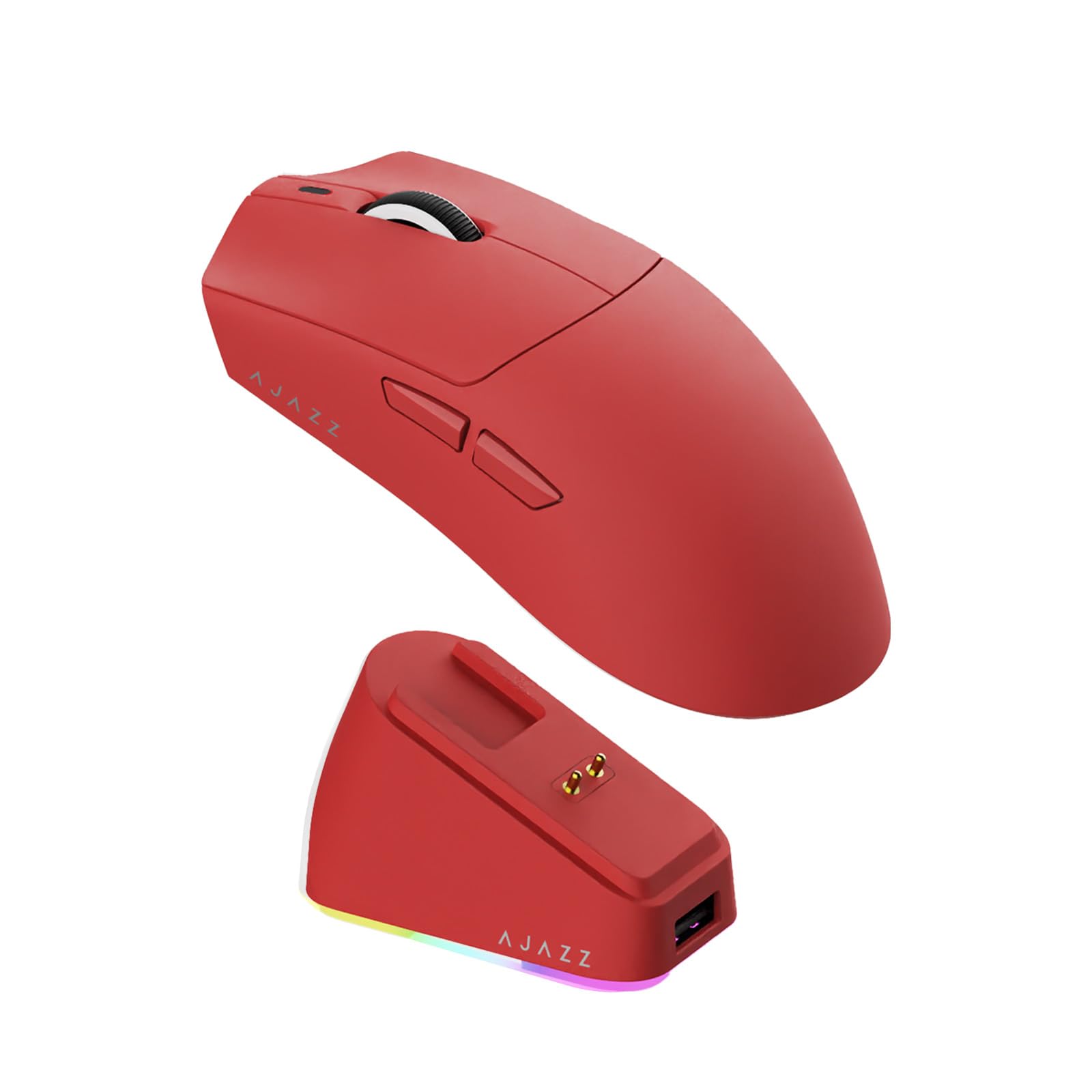
The largest cell in the group — 800 mAh, with a magnetic RGB dock that tops it up between rounds.
Here is the biggest battery number you will find among these picks: an 800 mAh cell, which is the capacity of the rechargeable pack inside the shell. For comparison, the AULA SC580 carries 500 mAh and the ATK VXE 520 mAh. AJAZZ matches that extra capacity with an RGB magnetic charging dock, so the mouse sits down and charges rather than hunting for a cable.
The sensor is a PAW3311 rated to 24,000 DPI with 300 IPS tracking and 1000Hz polling. Polling rate is how often the mouse reports to your PC — at 1000Hz that is once per millisecond, which is what keeps fast movement from jumping between frames. Huano switches carry an 80-million-click lifespan, and the shell is designed for a right hand.
Weight is listed at 66 g in the product copy and 69 grams in the detailed description, so expect a light body in that neighbourhood. The honest caveat: this pick has the thinnest independent review history in the article, so you are largely trusting AJAZZ’s own published specs rather than a long track record. If that bothers you, the well-worn picks above carry more accumulated buyer experience.
What makes it different: 800 mAh in a dock-charged body is the most generous capacity here, and the magnetic cradle removes the cable-in-the-way problem entirely.
What you accept: a lighter review footprint than the established names — the specs read well, but fewer people have lived with one.
Fits your desk if: you want the biggest cell on this list and a dock that keeps it topped up automatically.
Think twice if: you only trust a mouse with a deep pile of long-term owner experience behind it.
6. ATTACK SHARK X3 Lightweight Wireless Gaming Mouse

At 49 g it almost vanishes in the hand — a flick-aim body built around a flagship PAW3395 sensor.
The X3 is the lightest mouse on this list at 49 g, and the jump is not subtle. Set it beside the Logitech G309 at 86 g and you are holding a different animal entirely — one that flicks and stops on a beat rather than carrying its own momentum. If your game lives on quick direction changes, this is where to start looking.
The sensor is the reason it is not just a cheap light shell. The Pixart PAW3395 is a flagship-tier optical sensor, tuned here across six DPI levels from 800 up to 26,000, with 650 IPS tracking and a 50 g acceleration ceiling. That 26,000 DPI is more than double the 12,000 the AULA SC580 offers, and the extra headroom is exactly what buyers at the top of the sensitivity range are paying for. Kailh GM8.0 switches are rated to an 80-million-click lifespan, with a TTC scroll encoder for the wheel.
Connectivity covers 2.4GHz, USB-C wired and Bluetooth 5.2, with up to four devices paired at once. The honest note is the one the specs cannot tell you: build consistency across units is where a very light body like this is easiest to get wrong, and some owners land on a dud. Most do not — but if you want the safest possible bet rather than the lightest one, the Logitech G309 above is the steadier choice.
The pitch in one line: 49 g combined with a PAW3395 sensor at 26,000 DPI is a lot of performance for a body this light.
What keeps it honest: a featherweight shell has less margin for manufacturing variation, so buy from a seller with a clear return path.
Pick this for: fast, low-sensitivity flick aiming and a hand that tires quickly with a heavier mouse.
Skip the gamble if: you want the most consistent build straight from the start and nothing else matters.
7. ATTACK SHARK X11 Wireless Gaming Mouse

The dock does double duty — it stores the 2.4GHz receiver and glows while the mouse tops up.
The detail that makes the X11 worth a look is the charging base. It is RGB backlit, and the USB receiver can sit inside the dock, so you get the 2.4GHz link and a tidy desk without a dongle dangling off your laptop. Set the mouse down and it charges; the cable problem quietly disappears from your setup.
The shell weighs 62 g and is shaped for palm, claw and fingertip grips, with grip tape included that is sweat-resistant and leaves no residue when you pull it off. The PAW3311 sensor reaches 22,000 DPI, which sits between the 18,000 on the ATK VXE and the 26,000 on the X3. Five programmable buttons cover macros, DPI and polling rate through the driver, and HUYU switches plus a TTC encoder are rated to a 20-million-click lifespan.
Connection is the familiar trio: 2.4GHz, Bluetooth 5.2 and USB-C wired, with quick switching between a work laptop and a gaming desktop. Twenty million clicks is the shortest switch rating on this page — the Razer Cobra Pro quotes 90 million — so this is a mouse to buy for the dock and the grip rather than as a decade-long investment.
What the dock buys you
- RGB charging base that also stores the USB receiver, so the dongle stays on the desk
- 62 g shell shaped for palm, claw and fingertip grips alike
- Sweat-resistant grip tape included, with residue-free adhesive
- Tri-mode 2.4GHz, Bluetooth 5.2 and USB-C for swapping between machines
Worth knowing before you buy
- 20-million-click switch rating is the lowest here by a wide margin
- Five buttons is fewer than the eight on the AULA SC580
The right call for: a clean desk, an RGB dock, and one button to switch between work and play.
Look past it if: you want a mouse you will still be using in many years — the switch rating is modest.
8. ATK VXE Dragonfly R1 SE+ Wireless Gaming Mouse
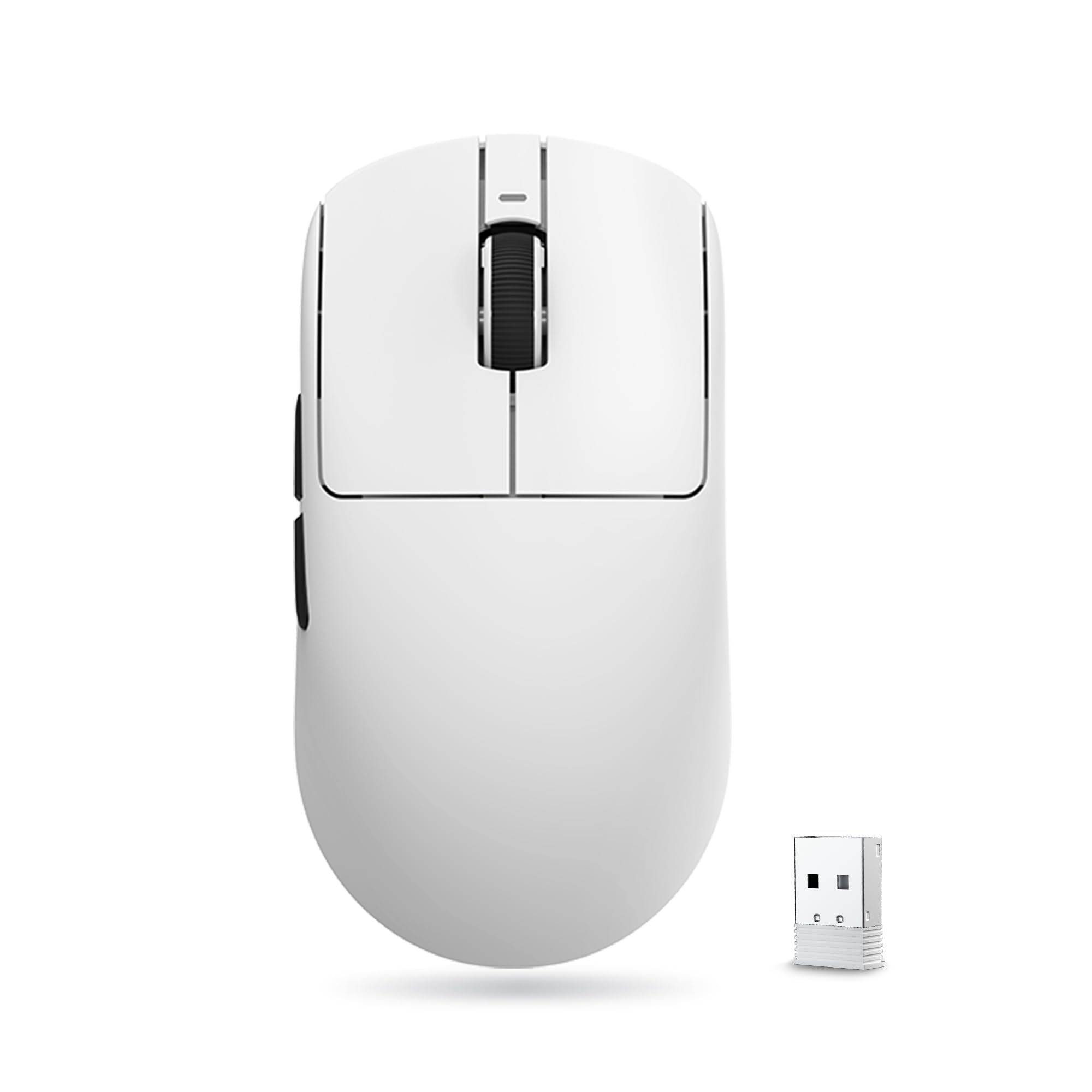
Built for smaller hands: a 55-gram symmetrical shell sized for medium and small grips, so the side buttons stop being a stretch.
Plenty of gaming mice assume a large hand. This one does not. ATK specifies the body as fitting medium and small hands, in a symmetrical shape at 55 g with standard Swift PTFE feet — the low-friction pads on the bottom that decide how smoothly the mouse slides. If a full-size mouse has always left you reaching for the buttons, this is the pick that stops the stretch.
The sensor is a PAW3395 SE spanning 10 to 18,000 DPI with 10 DPI fine stepping, which means you can nudge sensitivity in very small increments rather than jumping between coarse presets. That range tops out lower than the X3’s 26,000 DPI, so this is a mouse for measured control rather than extreme sensitivity. Huano Blue Glow V2 microswitches handle the clicks, with an FSWITCH E10 scroll wheel, and all side and main buttons are programmable through the driver.
Battery is a 520 mAh cell rated to up to 70 hours of continuous runtime at a 1000Hz polling rate. Set that against the Logitech G309’s 300+ hours and you can see the difference between a compact rechargeable pack and a swappable AA. Owners get roughly three weeks of use on a charge in real-world terms — plenty for most people, provided you are fine keeping a cable nearby.
Why it exists: a genuinely small-hands shell at 55 g is rarer than it should be, and the 10 DPI fine stepping gives you precision the coarse presets elsewhere cannot.
The catch to plan around: up to 70 hours at 1000Hz is a real figure but a modest one — this mouse wants a charging routine.
Best matched to: smaller hands and anyone who finds full-size shells a stretch to reach the side buttons.
Choose a different one if: you want to go weeks between charges — the AA-powered picks above run far longer.
9. AULA SC580 Wireless Gaming Mouse

Eight buttons on a budget shell — the most controls per dollar anywhere on this list.
The SC580 is the entry point, and it does not act like one on the button count. If you want a bind-heavy layout without spending much, this is the cheapest way to get there.
Connectivity is three-way: 2.4GHz wireless, Bluetooth 5.0 for up to two devices, and USB-C wired, with a switch on the base to jump between them. Six DPI levels run from 800 to 12,000, and a 1000Hz polling rate keeps the cursor from jumping. The built-in 500 mAh battery covers 10-14 days at five hours of daily use, and a red flashing indicator warns you before it quits.
The trade you make for the button count and the low outlay is the finish. The body is 82 g in a glossy white shell — heavier than most of this group and a fingerprint magnet over time — and the driver software only works on Windows, only over 2.4GHz or wired, with no Bluetooth customization at all. Buy it as a first gaming mouse or a second machine’s spare, not as your endgame.
The value read: eight programmable buttons plus tri-mode connectivity is the most hardware per dollar in this article.
What you live with: 82 g, a glossy finish, and a Windows-only driver that will not configure buttons over Bluetooth.
The smart entry point: a first gaming mouse, or a cheap second one for a laptop you only game on occasionally.
Not for you if: you want a light matte body or you plan to remap buttons on a Mac over Bluetooth.
Know the Specs
DPI (dots per inch)
DPI describes how far the cursor travels for every inch you move the mouse. A higher number means more cursor movement from less hand movement, which is useful on a small desk or at low sensitivity in a game. It is also the easiest spec to inflate, and past a certain point most players never touch the top of the range. A sensor with 18,000 DPI and clean fine stepping is often more useful day to day than a higher number you will never select.
Polling rate
Polling rate is how many times per second the mouse reports its position to your computer. At 1000Hz that is 1000 times a second, which keeps fast movement smooth instead of jumping between frames. The trade is power draw — higher polling drains the battery faster, which is why some published runtime figures are quoted at a specific rate rather than universally.
Weight in grams
Weight decides how the mouse feels to start and stop. A body around 49 g flicks easily but gives up some stability for fine tracking; one at 86 g feels planted but tires your wrist sooner. Weight is also measured inconsistently across manufacturers — some quote the shell alone, others include the battery, so read the fine print before comparing two numbers directly.
Battery: hours vs mAh
Two different units describe the same problem. Hours tell you how long the mouse runs; mAh tells you how much charge the built-in cell holds. A swappable AA design is quoted in hours because you replace the cell, while a built-in rechargeable pack is quoted in both. Neither unit is comparable across connection modes, so always check whether the figure was measured over Bluetooth or a 2.4GHz dongle.
Common Questions
Does Bluetooth add lag compared with the 2.4GHz dongle?
Will a gaming mouse with Bluetooth work with a Mac?
How long does the battery actually last on a wireless gaming mouse?
Is a lighter mouse always better for gaming?
What is the difference between optical and mechanical switches?
Can I use a Bluetooth gaming mouse while it charges?
Do I need a mouse pad for a high-DPI sensor?
How many programmable buttons do I realistically need?
Will a gaming mouse this small actually fit my hand?
Can one mouse switch between a work laptop and a gaming desktop?
The Bottom Line
For most people, the wireless bluetooth gaming mouse worth buying first is the Logitech G309 Lightspeed, because a single AA battery lasts 300+ hours and the HERO 25K sensor keeps your aim clean without a charging cable in the way. If you want more buttons and a dock on your desk, the Razer Cobra Pro gives you ten customizable controls and eleven lighting zones. And for a right-handed palm grip that can have its switches replaced down the line, the ASUS ROG Gladius III is the shape to reach for.
One nudge before you decide: several of these picks have only a thin base of long-term owner experience behind them, so if a steady track record matters more to you than a spec on a box, lean toward the established names above and treat the newer arrivals as promising rather than proven.
How we choose
We do not accept paid placement. Every pick is matched to a real buyer and a real use-case; we do not hands-on test units.
Sources
Specifications: manufacturer listings and product documentation. Review insights: verified customer reviews, as of November 2026. Pricing: not shown on this page (it changes often); check the current price via the retailer link.
As an Amazon Associate, Tactical Gear Guy earns from qualifying purchases. This does not affect which products we feature.