Specs are compiled from manufacturer listings and verified buyer reviews and can change over time — please confirm the key details on the product page before buying.
You want a Windows laptop that runs cool, lasts a full workday, and doesn’t need a charger in your bag at 3pm. The Snapdragon X Plus chip delivers that — but only in the right chassis. This guide separates the seven Snapdragon X Plus machines worth your money from the ones where the chip is great and everything else gets in the way.
This guide is built by comparing the manufacturers’ published specifications and the patterns across verified customer reviews, so you get each pick’s real strengths and trade-offs instead of marketing spin.
Not every machine wearing this chip is built equal, so below are the battery hours, screen tech and port setups that decide whether you’ll enjoy using it every day. Here are the honest picks among snapdragon x plus laptops.
Top Picks


How To Choose The Best Snapdragon X Plus Laptops
The Snapdragon X Plus is an ARM-based chip (a processor built on the same architecture as most phones), which is why these laptops sip power instead of gulping it. That architecture is also the reason some older Windows software feels different here. Battery reality, screen type and port count separate a great Snapdragon X Plus laptop from a frustrating one.
Battery hours are the headline, but check the panel
Snapdragon X Plus machines publish some very big battery numbers — one of the picks here claims 34 hours. That figure comes from a specific test setup, not from you running twelve browser tabs. An OLED panel (a screen where each pixel lights itself) looks richer but can pull more power than a standard LED panel at the same brightness. If all-day unplugged work is why you’re buying this chip, weight the battery spec heavily and keep brightness below maximum.
The NPU is the reason this chip exists
An NPU (neural processing unit) is a dedicated chip for AI tasks, and Microsoft’s Copilot+ PC label requires one. On these machines it powers things like Live Captions, which turns spoken audio into English subtitles on screen in real time. Useful in a video call, useful in a film with the sound low. It won’t make your spreadsheets faster — that’s still the CPU and RAM — so don’t buy the AI badge expecting a speed boost in ordinary office work.
RAM, storage and ports decide how long you keep it
16GB of RAM is the comfortable floor for a Windows machine you plan to keep for years — enough for a tab-heavy browser plus a video call. Storage splits cleanly between 256GB, 512GB and 1TB machines here, and 256GB fills fast once you add photos and a game or two. Ports matter just as much on a thin laptop: check for USB Type-C, USB Type-A and a headphone jack before you commit, because thin chassis often drop the ones you use most.
Side-by-Side Comparison
| Model | Best For | Battery Life | Max CPU Speed | RAM / Storage | Amazon |
|---|---|---|---|---|---|
| Microsoft Surface Laptop (2024) 13.8″★ Best Overall | Everyday all-rounder | 20 hours | — | 16GB / 512GB | Amazon |
| Samsung 15″ Galaxy Book4 EdgeBest for Samsung Owners | Samsung phone owners | 27 hours | 3.4 GHz | — | Amazon |
| Samsung 15.6″ Galaxy Book4 Edge Business | Office and study work | 15 hours | 3.8 GHz | — | Amazon |
| Microsoft Surface Laptop (2025) 13″ | Travel and commuting | 23 hours | 4 GHz | 16GB / 256GB | Amazon |
| HP OmniBook 5 14″ | Long-haul battery | 34 hours | 3.4 GHz | 16GB / 1TB | Amazon |
| HP OmniBook X 16″ OLED Touch | Storage and screen size | — | 3.2 GHz | 16GB / 2TB | Amazon |
Detailed Reviews
1. Microsoft Surface Laptop 2024
Our pick — 4.0+★ from 350+ verified ratings; the strongest balance of quality and price.
The 13.8-inch Surface with the storage and RAM most people should start with.
Here’s where your money goes furthest if you want one machine for work, Netflix and a bit of photo editing. The 10-core Snapdragon X Plus sits alongside 16GB of RAM and a 512GB SSD, so you get double the storage of the two 256GB Surface models below without stepping into a bigger chassis. The 13.8-inch touchscreen with HDR support (a wider brightness and colour range) makes photos and video look richer than a standard panel — helpful if the screen is your only screen at the kitchen table.
The spec that matters most on a Snapdragon machine is battery, and this one is rated at up to 20 hours. That covers a full workday plus the commute home without hunting for an outlet. It also runs Wi-Fi 7 (the newest wireless standard), which future-proofs your connection for a router upgrade later. The chassis carries 16GB and 512GB — a pairing that keeps Windows from slowing down as you add apps over the years, which is the real difference between this and the base models.
Durability of the hardware earns the most praise from the crowd that owns this line, and the battery comes second. It’s not all smooth sailing: a chunk of owners find value-for-money mixed, and a smaller group reports a unit that stopped working after some time — normal for any mass-produced laptop, but worth buying where you can return easily. The 39W power supply is not the fastest charge around, so a full top-up takes patience; keep the charger overnight rather than expecting a five-minute splash to fill it.
Why This Is the Pick
- 20 hours of rated battery gets you through a workday plus the commute home unplugged.
- 512GB SSD doubles the storage of the cheaper Surface models — room for real work files.
- 13.8″ HDR touchscreen, thin design and Wi-Fi 7 support make it a solid long-haul machine.
- Reliability of the build is what wins the Surface crowd most.
Where It Falls Short
- A 39W supply means top-ups are slow compared with fast-charge rivals.
- Some buyers land a unit that misbehaves, so a return-friendly reseller is handy.
Reach for this if: you want a single do-everything laptop with enough storage to last several years.
Look elsewhere if: you’re chasing the fastest charge time or an OLED-level picture.
2. Samsung Galaxy Book4 Edge 15″
A 15.6-inch anti-glare workhorse that talks to your Galaxy phone like a sibling.
Start with the battery: this Samsung is rated at up to 27 hours, which is a big gap behind the 15-hour Book4 Edge Business model listed below. On the same-brand shelf, that is a meaningful pick if you want to leave the charger at home on a Monday. The 15.6-inch FHD LED display with anti-glare coating fights back against window light — a genuine help for anyone working near a sunny desk or a café window.
The Snapdragon X Plus here tops out at 3.4 GHz, and it’s paired with Qualcomm’s Adreno graphics. Connectivity is the other standout: it links cleanly with Samsung phones and tablets, and buyers report one owner hooked it to three 4K 60Hz monitors at once with no trouble — a genuinely useful detail if you dock to multiple screens.
Live Captions is the headline software feature — a Copilot+ PC tool that turns spoken words into on-screen English subtitles in real time. It’s helpful for video calls or a film at low volume. The trade-off is the display panel: it’s FHD LED rather than OLED, so blacks look greyish in dark scenes compared with the HP options further down. Value lands as mixed among the people who bought it — some find it a bargain, others think a bit more gets you a sharper screen elsewhere.
The everyday read: 27 hours of rated battery plus anti-glare 15.6-inch screen makes this a calm, unplugged office machine, and the multi-monitor docking report is a real productivity bonus.
What to know: you’re trading OLED contrast for battery hours and screen size, and the panel is the honest compromise.
Fits best: Samsung phone or tablet owners who want everything to link up and a full day of charge.
Skip if: dark-scene contrast is your priority — this panel isn’t the OLED one.
3. Samsung Galaxy Book4 Edge Business
Same screen size as its sibling, but clocked higher and bundled with Office.
If spreadsheets are your day, the 3.8 GHz maximum speed on this X1P-42-100 chip is the fastest of the two Samsung Book4 Edge machines here — it edges ahead of the 3.4 GHz sibling above on paper. The 15-hour battery rating is a big drop from that model’s 27 hours, so this is the plug-in-and-work option rather than the leave-the-charger-home one. The 65W adapter in the box helps, since it refills faster than the smaller supplies on some rivals.
What makes it a business machine is the included Microsoft Office, which saves you setting up your own suite on day one. The 15.6-inch anti-glare FHD display returns, so window reflections stay manageable while you read documents. Dolby Atmos speakers and a front camera handle calls and presentations fine.
The catch is straightforward: at 15 hours rated, you can’t be as casual about bailing on the charger as you can with the 27-hour model above. And with only a modest number of ratings so far, you’re buying a newer, less-tested listing — there’s less of a track record to lean on. That’s the trade for a faster clock and Office in the box. If you mostly work at a desk and need Office from day one, this is the sensible Samsung.
Choose this when: you’re a desk-based worker who wants Office included and the higher 3.8 GHz clock speed.
Think twice if: you need to leave the charger at home — the 15-hour rating falls well short of its 27-hour sibling.
4. Microsoft Surface Laptop 2025

The 13-inch Surface that hits 4 GHz and 23 hours in the same slim frame.
Bag space matters more than screen size for some buyers, and this is the most compact Surface here. That’s a laptop built for a backpack and a transatlantic flight. Its AI engine, per the maker’s claim, delivers up to 45 trillion operations per second, which is what runs the Copilot+ features.
Wireless is a small but real step: this machine uses Bluetooth 5.4, one notch above the Bluetooth 5.3 on the 2024 Surface model further down. In practice that’s a lower-latency, more stable pairing with earbuds and a mouse. The 13-inch PixelSense touchscreen handles work and streaming fine, and Copilot+ tools for writing, summarising and multitasking are built in.
Where it gives ground is storage: 256GB is the smallest here, and once Windows and a few apps are installed, you’ll have a tighter working space than either the 512GB or 1TB options. Functionality and battery are what buyers like most about it. A noticeable slice of performance feedback is mixed, with some reporting odd slowdowns — so if you can, try before you fully commit. It’s the right call for the traveller, less so for the hoarder of files.
The traveller’s math: 13 inches, 23 hours rated, 4 GHz and Bluetooth 5.4 make this the most commuting-friendly Surface on the list.
The honest snag: 256GB fills faster than you think, and a minority of buyers hit performance stutters.
Well matched to: frequent flyers and commuters who value a small footprint and the longest Surface battery here.
Not for: anyone storing a big photo or game library — the 256GB drive is the limiter.
5. HP OmniBook 5
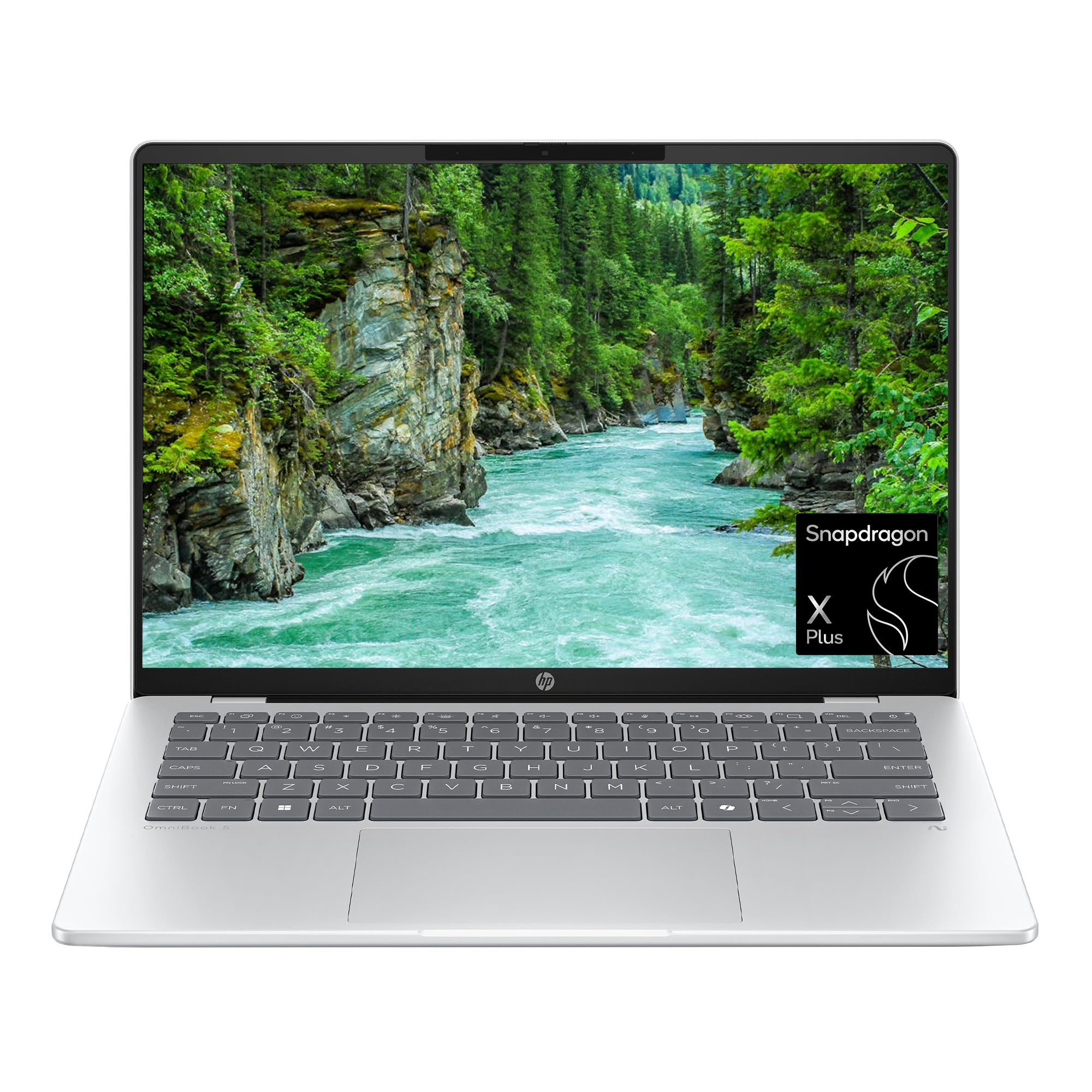
The unplugged champion — 34 hours and an OLED panel that punches up.
The number here is 34 hours, which is the longest battery rating on the whole list and more than double the 15-hour Book4 Edge Business model above. If you work on trains, in the field or simply hate hunting outlets, this 34-hour rating is the one to beat. HP Fast Charge also helps on the rare recharge: the maker says it goes from 0 to 50% in approximately 30 minutes, which is enough for a morning meeting.
The 2K OLED display shows 1920×1200 pixels with up to 300 nits of brightness and a 0.2 ms response time. In plain terms, it’s vivid, quick for video and bright enough for a bright room. The screen quality earns the highest praise on this model, followed by speed and lightweight portability. The 1TB PCIe Gen4 SSD is the largest single-drive storage on the list, and 16GB of LPDDR5x RAM keeps multitasking smooth.
Now the honest part. This model carries the thinnest overall rating of the group, which tells you owners hit real friction, not just nitpicks. If the polished all-round experience matters as much as endurance, the Surface laptops above are steadier bets. But if endurance is the reason you want this chip at all, nothing else here touches 34 hours.
What Makes It Stand Out
- 34 hours of rated battery — more than double the 15-hour Samsung business model.
- 2K OLED screen at 300 nits with a 0.2 ms response — rich colour and smooth motion.
- 1TB PCIe Gen4 SSD is the biggest single drive here.
- Wi-Fi 6E and HP Fast Charge keep connectivity and top-ups quick.
What to Accept
- The lowest-rated pick in this group — owners mention more friction than the Surface options.
- OLED at high brightness eats into those hours, so the 34-hour figure is a best case.
This wins on: sheer unplugged endurance and a 1TB drive — the right tool for travel-heavy work.
Second-guess it if: you want the highest-rated machine on the list rather than the longest-lasting.
6. HP OmniBook X 16″
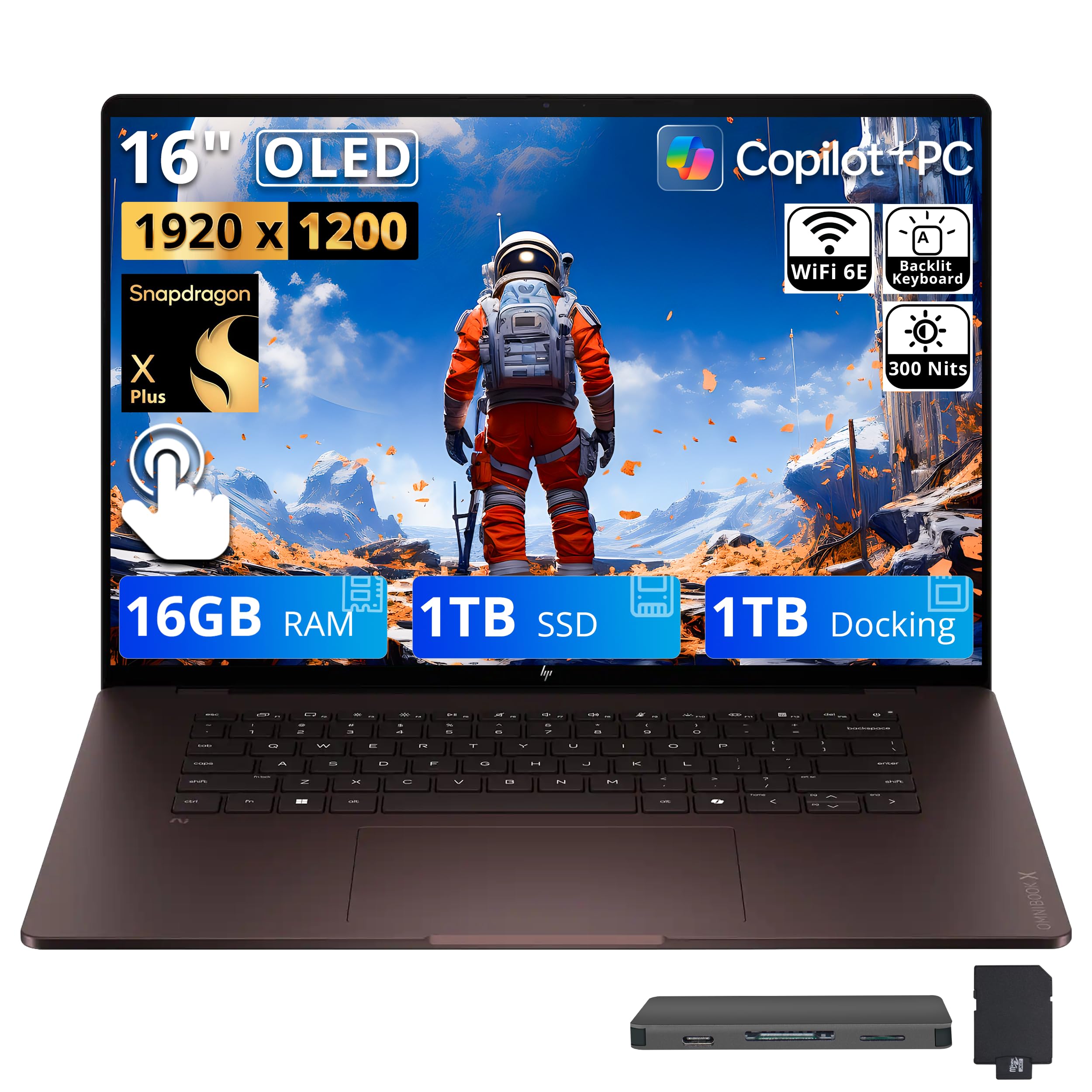
A 16-inch OLED touchscreen with a docking station that doubles your storage.
This is the biggest screen and the biggest storage number here. The 16-inch OLED touchscreen gives you a roomy canvas, and the package bundles a 1TB SSD with an extra 1TB in the included 7-in-1 docking station — the 2TB figure is that combined total, not a single drive. The 3.2 GHz top speed is the slowest clock in this group, though on a machine this comfortable to look at, that’s a fair trade for everyday work rather than heavy editing.
The extras are where it earns its place. You get a 32GB MicroSD card with adapter, a Type-C data cable, a 3-in-1 charging cable and a suede cleaning cloth in the box, plus the dock for your desk setup. The FHD IR camera with a Backlit label supports video calls, and the chassis carries Wi-Fi 6E and Bluetooth 5.3. Ports run to two USB Type-C, one USB Type-A and a headphone/mic combo jack — enough for a mouse, a monitor and wired headphones at once.
The compromise is timing: this is the newest listing of the group, so there’s not much owner feedback to lean on. Treat the bundle value as the draw and the long-term reliability as unproven. The 3.2 GHz clock also means it’s the least brisk option for demanding apps. If you want a roomy OLED and a desk dock in one purchase, though, it’s a tidy package.
Where the value sits: a 16-inch OLED touch panel plus 2TB of combined storage and a 7-in-1 dock — a lot of desk setup in a single buy.
Worth knowing: the 3.2 GHz clock is the lowest here and the listing is the least-proven of the seven.
Made for: desk-based users who want a large OLED touch screen and lots of storage without buying a dock separately.
Pass on it if: you need the fastest clock or a long track record of owner experience.
Know the Specs
Battery life (hours, rated)
This is the maker’s lab-test figure for how long the machine runs on a charge, and it’s the single biggest reason people pick the Snapdragon X Plus. Ratings here run from 15 hours on the Samsung Business model all the way to 34 hours on the HP OmniBook 5. Treat those as best case: an OLED screen at high brightness or a heavy video call will drain faster. For unplugged work, weight this number harder than any other spec.
The Snapdragon X Plus chip and NPU
The X Plus is an ARM-architecture processor, and its model number (like X1P-42-100) tells you which bin and core count you’re getting. The NPU inside is a dedicated AI chip that runs Copilot+ features such as Live Captions. It speeds up those specific tasks, not ordinary office apps — those rely on the CPU clock speed and RAM. So a higher NPU figure is a bonus for AI features, not a general benchmark.
OLED vs IPS vs LED panels
OLED screens (like the 2K panel on the HP OmniBook 5) light each pixel individually, so colours and contrast look richer. IPS screens (like the 2304×1536 PixelSense on the 13.8-inch Surface) give even viewing angles and steady colour. Plain LED panels with an anti-glare coat, as on the Samsung models, fight reflections best in bright rooms. Resolution matters for sharpness — 2304×1536 is crisper than 1920×1200 at the same size.
RAM, storage and ports
16GB of RAM is the comfortable standard across this whole list — enough for many browser tabs plus a video call. Storage splits between 256GB, 512GB and the 2TB combined setup on the HP OmniBook X. Ports decide how you plug in: look for USB Type-C for docks, USB Type-A for older mice and drives, and a headphone jack if you use wired audio. Bluetooth 5.4 on the newer Surface edges out the 5.3 on earlier models for wireless stability.
Common Questions
Will my old Windows software run on a Snapdragon X Plus laptop?
Do I really get 34 hours of battery from the HP OmniBook 5?
Is OLED better than the anti-glare LED panels here?
How much RAM do I need on a Snapdragon X Plus laptop?
Can I connect a Snapdragon X Plus laptop to multiple monitors?
Is the extra 1TB on the HP OmniBook X a second internal drive?
Will a Snapdragon X Plus laptop play PC games?
Does 256GB of storage fill up quickly on these laptops?
What does the Copilot+ PC label actually give me?
The Bottom Line
The strongest all-rounder among these snapdragon x plus laptops is the Microsoft Surface Laptop (2024) 13.8-inch, because it pairs 20 hours of rated battery and a 512GB SSD with the build quality its owners trust most. If you want the longest unplugged run, the HP OmniBook 5 14-inch pushes the rating to 34 hours and adds a 2K OLED panel. And for a big screen with a dock and 2TB of combined storage, the HP OmniBook X 16-inch bundles it all in one buy. Start with the battery rating you can’t live without, then match screen and storage to it.
How we choose
We do not accept paid placement. Every pick is matched to a real buyer and a real use-case; we do not hands-on test units.
Sources
Specifications: manufacturer listings and product documentation. Review insights: verified customer reviews, as of November 2026. Pricing: not shown on this page (it changes often); check the current price via the retailer link.
As an Amazon Associate, Tactical Gear Guy earns from qualifying purchases. This does not affect which products we feature.