Specs are compiled from manufacturer listings and verified buyer reviews and can change over time — please confirm the key details on the product page before buying.
If your hybrid meetings still mean someone in the room leaning sideways to stay in frame, one device can fix that: a camera that captures the whole table in 360 degrees and picks out whoever is talking. Below are nine conference room setups, from all-in-one bars that plug straight into a laptop to big-room systems with AI tracking and long zoom lenses. Each one is matched to a room size, a headcount, and the platform your team already uses.
This guide is built by comparing the manufacturers’ published specifications and the patterns across verified customer reviews, so you get each pick’s real strengths and trade-offs instead of marketing spin.
You do not need a dedicated IT team to run a good hybrid room. You need a clear view of what each device actually does, and that is exactly what this breakdown of the best video conference room equipment gives you in plain terms.
Top Picks

How To Choose The Best Video Conference Room Equipment
The first thing to work out is what your room actually struggles with. A team crammed around a long table gets more out of a 360-degree device that shows everyone at once, while a big room where the presenter roams needs a pan-tilt-zoom camera that follows them. Decide that before you look at resolution or zoom numbers.
Match the camera shape to the room shape
A 360-degree camera sits on the table and shows the whole room in one shot, which keeps side conversations visible to whoever is remote. A PTZ camera (pan, tilt, and zoom) sits at the front or back and moves to frame a speaker, so it delivers a tighter, more TV-like close-up. Small huddle rooms usually want the first; church sanctuaries and lecture halls want the second.
Check mic pickup distance against your table length
Mic range is quoted as a distance, and it tells you how far a normal speaking voice will still land clearly. An 18-foot pickup covers a long boardroom table, while a 5-meter range suits a mid-size meeting room with 8 to 12 people. Buy more reach than you think you need, because a mic that barely covers the far end of the table is the most common hybrid-meeting complaint.
Know whether you are buying a camera or a whole system
Some units are cameras alone and rely on your laptop for audio. Others bundle a speakerphone with microphones built in, so one box handles both sight and sound. Bundled systems cut down on cable clutter and mismatched gear, but a bare camera can be the smarter buy if your room already has a good speakerphone.
Side-by-Side Comparison
| Model | Best For | Top Resolution | Zoom | Mic Pickup | Amazon |
|---|---|---|---|---|---|
| Meeting Owl Pro★ Best Overall | Mid-size rooms wanting whole-room view | 1080p HD | Auto focus on speaker | 18 ft (5.5m) | Amazon |
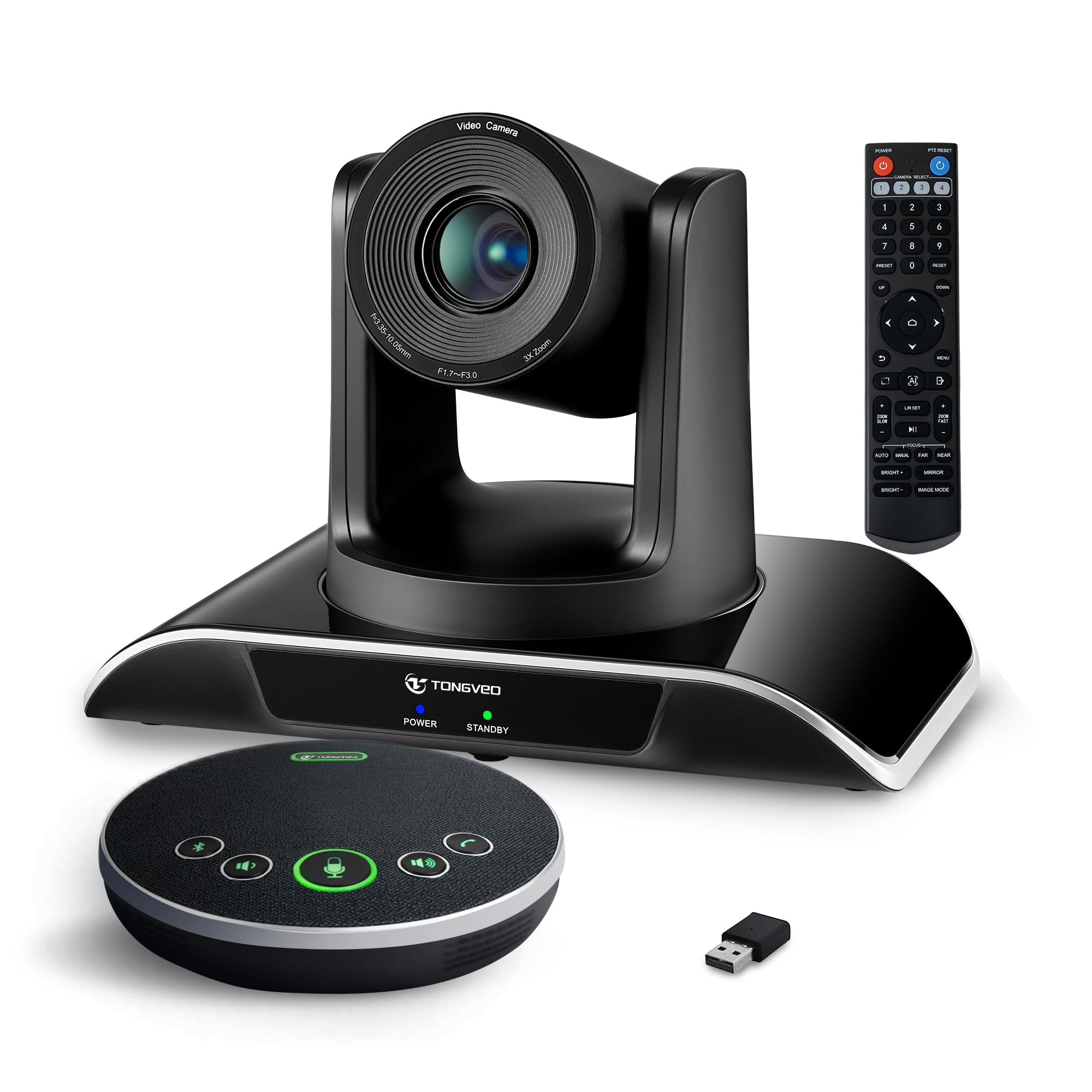
| TONGVEO All-in-One 1080P SystemBest Value | Budgets needing camera plus speakerphone | 1080p at 60fps | 3X optical | 5M (16.4ft) | Amazon |
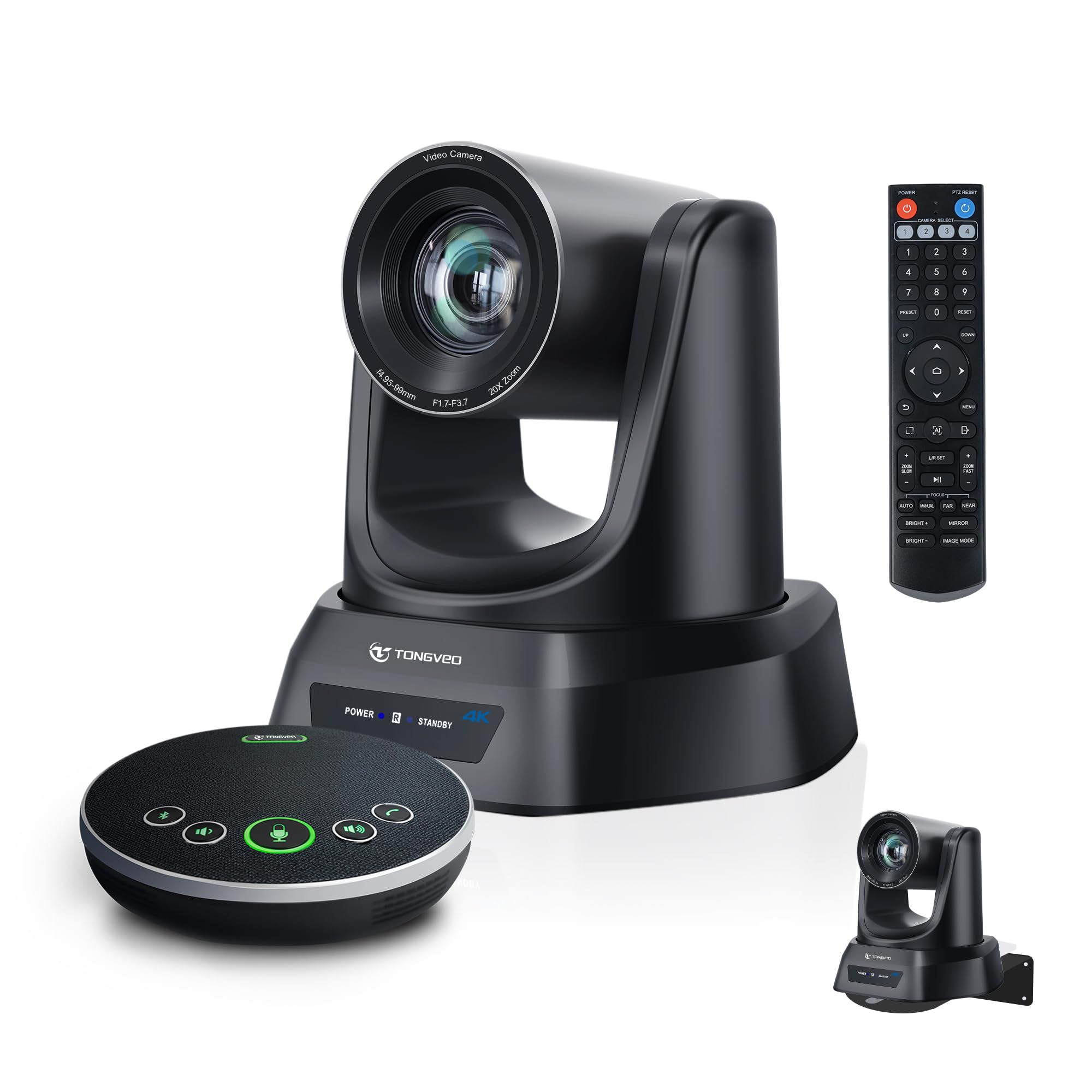
| TONGVEO 4K AI 20X PTZ SystemTop Performer | Churches and large rooms with a roving speaker | 4K UHD | 20X optical | 16.4ft (5m) | Amazon |
| Yealink 4K System | Huddle rooms needing privacy shutter | 4K UHD | 5x digital | 5m (16.4 ft) | Amazon |
| TOUCAN 360-Degree Camera | Teams wanting omnidirectional table view | 1080p HD | AI tracking | — | Amazon |
| Logitech MeetUp | Huddle rooms with wall or credenza mounting | 4K UHD | 5x HD zoom | up to 4m (5m with Expansion Mic) | Amazon |
| Jabra PanaCast 50 | Rooms wanting adjustable panoramic field of view | 3840 x 1080 | 6 x digital | 8 mics | Amazon |
| Meeting Owl 3 | Fast plug-and-play rollout across many rooms | 1080p HD | Auto focus on speaker | 18 ft (5.5m) | Amazon |
| Meeting Owl 4+ | Premium 4K hybrid rooms with enterprise networking | 4K UHD | Auto focus on speaker | 18 ft (5.5m) | Amazon |
Detailed Reviews
1. Meeting Owl Pro
Our pick — 4.0+★ from 850+ verified ratings; the strongest balance of quality and price.
The table-center device that shows the whole room, then swings the spotlight to whoever speaks.
For a normal meeting room where people sit around a table and take turns talking, this is the pick that solves the most problems at once. It shoots 360 degrees in 1080p HD and listens for voices up to 18 feet (5.5 meters) away, then tells the software to focus on whoever is speaking. Remote colleagues see faces, not the back of a laptop lid.
The spec that separates it from almost everything else here is camera detail: it captures 16 megapixels of still image, against 2.38 megapixels on the TONGVEO all-in-one 1080p system. That gap is why faces stay recognizable instead of turning into soft smudges when the frame widens to include the whole table. It also plays nice with Zoom, Google Meet, Teams and Webex, and Zoom lists it as a recommended device.
Setup is the part that wins people over most. Plug in power and the USB cable, open your meeting app, and you are live — no driver install, no setup wizard. The Owl mobile app lets anyone in the room nudge the view during the call, so you are not hunting for the one person who knows the controls. Weighing 1.2 kg and standing 10.75 inches tall, it holds its place on the table without tipping.
The honest catch is on the picture itself. Buying confidence centres on the camera, and it holds a strong 4.0+ rating across hundreds of owners, but a subset of buyers find the image less sharp than a dedicated 4K bar delivers. Expect excellent room coverage, not cinema-grade close-ups of one face.
What earns it the top slot
- 360° 1080p view plus automatic focus on the active speaker
- 18 ft (5.5m) audio pickup covers a full boardroom table
- Plug-and-play over USB with no software to install
- Controllable mid-meeting from the Owl app on iOS or Android
- Owl Connect lets you pair two units for bigger rooms
Where it gives ground
- 1080p only — no 4K option on this model
- Single-face close-ups look softer than a PTZ camera’s tight zoom
- The wide circular view takes some getting used to on screen
Land it here: rooms of roughly 8 to 12 people who want everyone visible and one cable to plug in.
Hold off if: you need sharp 4K close-ups of a single speaker, in which case a PTZ system serves you better.
2. TONGVEO All-in-One Conference Room Video Camera System
Camera and speakerphone in one box, at a price that leaves room in the budget.
If your meeting room has a wall display, a table, and no gear at all, this system is the shortest path to being live. You get a 1080p camera shooting at 60 frames per second — smooth motion rather than the stutter you get at 30 — plus a separate Bluetooth speakerphone with microphones built in. Both run at once, so the room can be seen and heard at the same time.
Optical zoom means the glass itself magnifies, so a presenter three rows back stays sharp instead of turning blocky the way digital zoom makes them. The TONGVEO 4K system further down goes much further with 20X optical zoom, which is built for pulling a tight face shot from the back of a sanctuary. For a normal-sized meeting room, 3X is plenty.
The speakerphone picks up voices up to 5M (16.4ft) and carries a built-in 2400mAh battery rated for 6-8 hours of continuous work. That battery is the quiet advantage — you can move the speaker to the far end of the table without dragging a cable, or leave it on a credenza. It connects by USB, Bluetooth 5.0, or a wireless dongle, and the maker positions it for a meeting room of 40 square meters and 8 to 12 people.
One wiring detail to know before you buy: the PTZ camera is wired and the speaker is wireless. That is not a flaw, but it does mean the camera wants to sit near the laptop or display. Some units stop working over time, so treat the warranty and the 24-hour support line as part of the value. What buyers praise most is straight-up build and picture quality for the money.
The clever bit: a dongle, Bluetooth, and USB input on the speaker means almost any laptop in the office can drive it without hunting for the right adapter.
Budget reality check: this is a mid-tier system, not a 4K one — the 2.38 megapixel sensor trades ultimate detail for cost, and the mixed reliability notes mean you should keep the support contact handy.
Reach for this if: you are outfitting a small-to-medium room on a tight budget and want audio and video from one purchase.
Look elsewhere if: you need to frame a speaker from 60 feet back — that is a job for the 20X PTZ system below.
3. TONGVEO 4K AI Auto Tracking PTZ Conference Camera System
A 20X lens that reaches the back pew and holds a tight face shot while the speaker moves.
Twenty times optical zoom is the headline and it earns the billing. Point this camera down a long room and the glass pulls a close, clean frame from way out, then the AI pans, tilts, and follows the presenter without anyone touching a remote. For a church livestream or a lecture hall, that is the difference between a dot at the front and a face people can read.
Tracking is the other half of the job. It combines face recognition with whole-body recognition, so it does not lose someone the moment they turn their head. Video leaves the camera over USB 3.0 or HDMI 2.0 at 60 frames per second (fps, the number of images drawn each second, so motion looks smooth). Resolution tops out at 4K UHD (3840 x 2160 pixels) from an 8.29 megapixel sensor — a clear step above the 1080p camera on the all-in-one TONGVEO system above.
The paired speakerphone carries 4 ultra-sensitive microphones with full-duplex audio, so both ends can talk at once without one voice chopping the other off. Pickup reaches 16.4ft/5m, noise reduction cleans up the room tone, and the built-in battery runs 6-8 hours between charges. It connects by Bluetooth or USB cable, so you can go wireless for a clean table or wired when you want zero doubt.
The gripe that shows up is the remote control — it wants a clear line of sight to the camera, so people who try to drive it from across the room end up frustrated. Set your presets from a sensible spot and it is a non-issue. The 16:9 aspect ratio and compact form factor make it easy to mount on a wall or ceiling bracket, both of which come in the box.
Why it wins the big-room job: 20X optical zoom plus hands-free AI tracking means the camera operator can go do something else during the service.
Set expectations: this is a fixed-installation camera, not a table device — budget a few minutes for mounting and preset setup before your first live stream.
It suits: churches, auditoriums, and hybrid event spaces where a presenter walks around and the camera has to keep up.
Not your pick if: you want a table-top unit you can pass around — this one is built to stay put.
4. Yealink 4K Video Conference Camera System

A shutter that closes itself the second the call ends, so nobody has to think about privacy.
Most webcams make you remember to slide a cover over the lens. This one handles it for you: an electric privacy shutter opens when a video call starts and closes the moment it ends. In a shared huddle room where different teams cycle through all day, that automatic close is a real relief — the camera is never left watching an empty room.
Behind the shutter sits an 8MP 4K sensor on a 1/2.8-inch CMOS chip, paired with a 120° super-wide field of view. That combination pulls every person at the table into frame without the stretched, fish-eye look you get from cheaper wide lenses. The camera is officially certified for Microsoft Teams and Zoom, so it drops into either platform without fiddling.
Audio is handled by an 8-microphone array with a 5-meter (16.4 ft) pickup range and intelligent processing to keep voices clear rather than muddy. AI auto framing and speaker tracking adjust the shot as people talk, and AI face enhancement brightens whoever is speaking. A 7m USB-B to USB-A cable ships in the box, which is unusually long — enough to reach a PC tucked under a conference table.
Where it asks patience is the instructions. Setup itself is straightforward once you are past the initial steps, but the written guidance leaves some buyers guessing at first. There is no optical zoom here either — the 5x is digital, unlike the 20X optical glass on the TONGVEO 4K PTZ above. That is fine for a huddle room where the camera is close to the table, less so for a long hall.
The room it belongs in: small huddle spaces and shared meeting rooms where Teams or Zoom is the standard and privacy matters to the business.
Pass if: you need to zoom deep into a distant stage — digital zoom softens the image fast.
5. TOUCAN 360-Degree Video Conference Camera

A round-table camera that shows your face and your hand gestures, wherever you happen to sit.
Gestures carry a lot of a meeting, and a standard webcam kills them the second you lean from the start. This camera shoots 360 degrees in 1080p, so anyone in the office can show expressions and hand movements no matter where they sit around the table. Plug it in and it runs — no setup gauntlet.
Four noise-reduction microphones do the listening, and the AI tracking highlights or zooms in on whoever is speaking. The omnidirectional pickup (a mic pattern that hears equally in all directions) catches voices from every side of the table, not just the balance in front. Buyers comment most on picture and sound quality together, which tells you this is an audio-video package rather than a bare lens.
Compatibility is broad: it works with Zoom, Microsoft Teams, and other conferencing platforms over a plain USB connection. It is built as a compact, fixed-form device, so it sits on the table or on top of a display without a bracket. For a small room or a large hall, the maker positions it as adaptable to either.
The limit to know is resolution. At 1080p it matches the Meeting Owl Pro above but trails the 4K systems here, so if you routinely present detailed slides or fine print, a 4K camera shows more. The fixed-focus-plus-autofocus setup also means very close objects can hunt before it settles. Neither is a dealbreaker for face-to-face talking.
The case for it: pure 360-degree presence with gesture-friendly framing, in a device that asks nothing of your IT setup.
Where it tops out: 1080p detail and a compact body mean it is happiest in a normal meeting room rather than a sprawling auditorium needing long zoom.
Choose it when: your team sits in a circle and wants remote folks to see everyone’s reactions, not just a forward-facing shot.
Skip it when: your priority is reading a whiteboard’s small print from across the room.
6. Logitech MeetUp Video Conferencing System

An all-in-one bar for the small room, with a motorized head that swings to the whiteboard.
Huddle rooms have a specific problem: the table is close, the camera is close, and a fixed lens can only see so much. MeetUp answers with a motorized pan and tilt that extends the view up to 170°, so you can point it at the whiteboard mid-call and bring it back without standing up. The 120° field of view and 5x HD zoom cover the rest.
Picture quality leans on an Ultra HD 4K sensor pushing a 3840×2160 image from an 8MP chip. In a compact room that reads as a clean, natural view of the table rather than a wide, warped one. Beamforming microphones capture voices up to 4 m away, and you can stretch pickup to 5m with the optional Expansion Mic if your table runs long.
Mounting is where it beats the table-top units. You can wall-mount it, set it on a credenza, or add the separate TV Mount to hang it above or below the in-room display — a tidy install that keeps cables off the table. An RF remote comes in the box, and it talks to most major meeting services including Teams, Zoom, and Webex.
The trade-off shows up on the video side as the room ages. Buyers trust the audio and the overall build — sound pickup from the far side of the room is a common point of praise — but picture quality and long-term reliability draw a split reaction, with some units failing within the first year. Treat it as a small-room workhorse, not a lifelong fixture, and keep support within reach.
Why small rooms like it
- Motorized pan and tilt reaches 170° for whiteboard views
- 4K sensor with 120° field of view and 5x HD zoom
- Beamforming mics hear up to 4 m, extendable to 5m
- Wall, credenza, and optional TV mounting options
What to weigh
- Picture quality feedback leans mixed rather than glowing
- Some units stop working after about 10 months of use
- Optional Expansion Mic costs extra for long tables
Best fit: a huddle room or small meeting space that needs a mounted, tidy, whiteboard-friendly camera.
Think twice if: you need a camera to survive years of daily use without a hiccup — watch the reliability notes.
7. Jabra PanaCast 50 180° Panoramic-4K Meeting Room Webcam

Three cameras stitched into one panoramic bar, with a field of view you actually choose.
Most conference cameras give you one wide angle and leave it there. PanaCast 50 runs three 13 MP cameras that stitch their images together in real time, and lets you pick between 90-, 120-, 140- and 180-degree views. In a room where the table shape changes week to week, that choice lets you frame exactly the people who are there.
The panoramic 4K output means the wide shot does not fall apart into mush at the edges — a common weakness when a single lens is asked to cover half a room. Eight microphones handle the audio, and the zoom adjusts automatically to include everyone, so nobody gets cropped out when a latecomer pulls up a chair. An optional remote adds manual control if you want it.
Two features stand out for a business that runs many rooms. First, Room Usage Insights generate anonymous occupancy data and flag it in real time when your pre-defined capacity guidelines are breached — useful when space is tight and you need to know which rooms are overfull. Second, it sets up plug-and-play: one USB-C to USB-A cable into a laptop, and you are in. It is certified for Microsoft Teams and works with Zoom.
Ask if you need the panoramic flexibility at all. A huddle room with four seats framed fine before you added this depth of feature. The 180-degree view and the room-usage data pay off in a mid-size boardroom or a space you reconfigure often — not in a closet with a screen.
What you are buying: three lenses working together for a genuinely adjustable wide view, plus occupancy data that helps you manage shared rooms.
Be honest about need: for a fixed small room, a single-lens 4K bar does the job with less to configure.
It fits: boardrooms and flexible meeting spaces where room shape and headcount shift, and you want the frame to adapt.
Overkill for: a closet-sized huddle spot that never holds more than a few people.
8. Owl Labs Meeting Owl 3

Unbox to first meeting in six minutes, then let IT manage the whole fleet from one screen.
If you are equipping more than one room, the setup time is the spec that matters, and this one quotes six minutes from unboxing to first meeting. It is a plug-and-play USB device that shoots 360 degrees in 1080p and listens up to 18 feet (5.5 meters) away. The Owl Intelligence System uses visual and audio cues to swing the focus onto whoever is speaking in the room.
What makes it scale is The Nest, the browser-based management tool where admins handle bulk registration and default settings across a fleet of units. That changes a rollout from a room-by-room slog into a handful of clicks. It is certified for Microsoft Teams and compatible with Zoom, GoTo Meeting, Google Meet and Webex, so a mixed-platform company is covered.
The ecosystem does the heavy lifting for bigger spaces. You can pair two Meeting Owls, add an Owl Bar, or plug in an Expansion Mic to stretch the reach — and the Whiteboard Owl completes the hybrid room if you present on a board. Audio is the part that lands hardest: remote attendees hear everyone around the table, not just the person nearest the mic.
The recurring question is whether 1080p is enough next to the 4K Meeting Owl 4+ below. For most meetings the answer is yes — people read faces and follow conversation, and 1080p does both well across a 360-degree view. Where 4K pulls ahead is detailed material and jumbo screens. The video quality feedback is mixed on this model, so buy it for coverage and easy deployment, not for pixel-count bragging rights.
Pick it for: IT teams rolling the same camera across many rooms who value fast setup and central management.
Not for: a single premium boardroom chasing the sharpest possible 4K picture.
9. Meeting Owl 4+

The whole-room Owl view, now at 4K, with the networking an enterprise wants built in.
Everything the Owl 3 does, the 4+ does at higher detail. It captures 360-degree video in 4K and 360-degree audio up to 18 feet (5.5 meters), then auto-focuses on whoever speaks. The leap from 1080p to a 3840-pixel-wide frame is what lets a remote viewer read a face across the table without the image breaking into soft blocks.
It is still a six-minute plug-and-play device, and The Nest still lets admins bulk-register and set defaults across a fleet. What is new on this model is the enterprise plumbing: an enterprise Wi-Fi connection, a built-in Kensington lock to physically secure the unit, and power over ethernet via an adapter. In a managed building, that combination means one cable for data and power and a device that does not walk off.
It still works as a hub for a bigger room. Pair two Meeting Owls, add an Owl Bar, or plug in an Expansion Mic to extend coverage, and add the Whiteboard Owl if you present on a board. It is certified for Microsoft Teams and works with Zoom, GoToMeeting, Google Meet and Webex. A USB-C to C SuperSpeed cable comes in the box.
The fair question is whether 4K is worth it over the Owl 3 for your rooms. The answer depends on what you show. A hybrid room that shares screens, fine diagrams, or a room-wide whiteboard view gets real value from the sharper sensor; a team that mostly sees talking faces may not notice the difference. That makes this the premium pick, not the automatic one.
The enterprise case: 4K 360-degree capture plus PoE and a Kensington lock is a package aimed squarely at managed conference rooms.
Weigh the upgrade: if your meetings are mostly talking heads, the 1080p Owl 3 does the same job for a lot less.
It is built for: enterprises already running Owl devices that want the sharpest 360-degree picture and managed networking.
Hard to justify for: a single room where a 1080p Owl or a 4K PTZ camera already meets the need.
Know the Specs
360-degree capture vs. PTZ zoom
A 360-degree camera, like the Meeting Owl Pro or the TOUCAN, sits in the middle of the room and shows everyone at once in a single frame. A PTZ camera (pan, tilt, zoom) sits at one end and physically moves and magnifies to frame a speaker, like the TONGVEO 4K with its 20X optical zoom. The first keeps the whole table visible; the second delivers a tight close-up of one person. Pick based on whether your meetings are round-table discussions or a single presenter on stage.
Optical vs. digital zoom
Optical zoom means the lens glass genuinely magnifies the scene, so detail holds up — the TONGVEO 4K system’s 20X optical zoom is built to pull a sharp face shot from the back of a big room. Digital zoom enlarges the existing pixels, so the image softens as you push in — the Yealink’s 5x digital zoom is fine in a huddle room where the camera is close. If you need to reach across a long space, optical zoom is what preserves clarity.
Mic pickup range
Pickup range is quoted as a distance, and it tells you how far a normal speaking voice is still captured clearly: 18 ft (5.5m) on the Owl devices, 5M (16.4ft) on the TONGVEO speakerphones, and 5 meters on the Yealink. Match that range to your table length plus room to spare. A mic that only just reaches the far end of the table is a common cause of muffled remote listeners.
Resolution and frame rate
1080p HD is the baseline that keeps faces recognizable across a wide room shot, while 4K UHD adds the detail needed for fine material and large displays. Frame rate matters just as much: the TONGVEO all-in-one shoots at 60fps for smoother motion than 30fps, and the TONGVEO 4K PTZ outputs 60 frames per second over USB 3.0 and HDMI 2.0. Higher frame rates make hand gestures and movement look natural rather than jerky.
Common Questions
Will a conference room camera work with both Zoom and Microsoft Teams?
Is 1080p good enough for a conference room, or do I need 4K?
How far can the microphone pick up a voice in a meeting room?
What is the difference between a 360-degree camera and a PTZ camera?
Does AI auto-tracking really follow the person speaking?
Can I connect the camera directly to a TV instead of a laptop?
Do these systems include a speakerphone or just a camera?
How long does it take to set up a conference room camera?
Can I expand one camera to cover a larger room or several rooms?
How do I keep a meeting room camera private when it is not in use?
The Bottom Line
For most rooms, the video conference room equipment that earns the top spot is the Meeting Owl Pro. It shows the whole table in 360 degrees, picks up voices across 18 feet, and plugs in with one USB cable — the strongest balance of coverage and simplicity on this list. If a presenter roams a large room or sanctuary, grab the 20X optical zoom TONGVEO 4K PTZ, which follows the speaker hands-free. For a huddle room that needs a mounted, whiteboard-friendly camera, reach for the Logitech MeetUp. Whichever room you are fitting, start with the camera shape your meetings actually use — whole-room or single-speaker — and the rest of the choice falls into place.
How we choose
We do not accept paid placement. Every pick is matched to a real buyer and a real use-case; we do not hands-on test units.
Sources
Specifications: manufacturer listings and product documentation. Review insights: verified customer reviews, as of November 2026. Pricing: not shown on this page (it changes often); check the current price via the retailer link.
As an Amazon Associate, Tactical Gear Guy earns from qualifying purchases. This does not affect which products we feature.