Specs are compiled from manufacturer listings and verified buyer reviews and can change over time — please confirm the key details on the product page before buying.
You know the annoyance: a normal flash drive juts out of your laptop like a stubby antenna, ready to catch on a sleeve or snap off in a bag. Low-profile USB-C drives solve that by sitting almost flush against the port, so you can plug one in and forget it. The catch is that “low-profile” means different things to different makers, and a drive that looks flush in a product photo can still block the port beside it. Below are nine real USB-C drives ranked by what actually matters: how little they stick out, how fast they move files, and how much they hold.
This guide is built by comparing the manufacturers’ published specifications and the patterns across verified customer reviews, so you get each pick’s real strengths and trade-offs instead of marketing spin.
A low-profile drive is only useful if it survives being left plugged in, so fit, heat, and read speed matter more than raw capacity. The picks below sort the genuinely flush from the merely small, so you finish with a shortlist of drives that sit close to the chassis and still move files fast.
Top Picks


How To Choose The Best USB-C Low Profile Flash Drive
Start with the one question that decides everything else: will this drive stay in a port, or will it live in your pocket? A drive that stays plugged in needs to be short enough not to catch things and tough enough to survive the heat of sitting there. A drive you carry needs a keyring hole and a body that shrugs off a drop. Pick your lane first, then read the specs.
Flush fit comes before capacity
A low-profile drive should barely protrude past the edge of your laptop or phone. Check the listed body dimensions against your own gear. A drive that measures around 20 mm across and 13.5 mm deep will sit close to the chassis, while a longer thumb drive leaves a lever arm that nabs on whatever passes it. On a slim laptop, a drive that pokes out can also foul the port next door, so buy one with a narrow nose or a sliding, retractable connector.
Read speed versus write speed
These two numbers are not the same, and the listing often leads with the bigger one. Read speed is how fast you pull a file off the drive; write speed is how fast you push one onto it, and write speed is usually far lower. For moving photos off a phone or watching video files, read speed does most of the work — a drive rated up to 400MB/s moves files briskly. For copying a big folder onto the drive, judge it by the write rating, and expect real-world results to vary with the host device and the size of the files.
Connector and device support
A single USB-C plug works with modern laptops, tablets, phones, and the USB-C iPhone models. A dual drive adds a USB-A plug on the other end, so the same stick bridges old and new hardware. If you want to move files between an older Windows PC and a phone, the dual connector saves you hunting for an adapter. Note that Lightning iPhones and iPads are not supported by these Type-C drives — check your device’s port before you buy.
Heat and durability in a flush body
A drive that sits in a port during a long file transfer will warm up; metal bodies dissipate that heat better than plastic. Look for a metal shell, an encapsulated chip, and rated resistance to dust and water if the drive travels with you. Those traits keep the internal parts protected from drops and grime, which is what actually ends a flash drive’s life.
Side-by-Side Comparison
Every row lists read speed, capacity, and weight in the same units, so you can scan fit, speed, and capacity side by side.
| Model | Best For | Read Speed | Capacity | Weight | Amazon |
|---|---|---|---|---|---|
| SANDISK 128GB Extreme Fit USB-C★ Best Overall | Plug-and-stay laptop storage | Up to 400MB/s | 128 GB | 4.54 g | Amazon |
| KEXIN 64G USB C Metal Dual DriveBudget Dual-Port | Phone-to-PC photo swaps | USB 3.0 (speed not listed) | 64 GB | 6 g | Amazon |
| SSK 64GB Dual USB Flash DriveToughest Build | Tough metal dual-port carry | Up to 240MB/s | 64 GB | — | Amazon |
| JOIOT 128GB Dual USB 3.0 | All-port compatibility on a budget | Up to 130MB/s | 128 GB | 8 g | Amazon |
| Lexar C40E Type-C 64GB | Speed plus file encryption | Up to 400MB/s | 64 GB | 17.68 g | Amazon |
| SANKESU 2-Pack 128GB USB C | Two drives, one purchase | 20 MB/s | 128 GB (2-pack) | — | Amazon |
| Samsung Type-C 128GB | Long-term reliability and speed | Up to 400MB/s | 128 GB | — | Amazon |
| SUNEAST Nano 128GB | Weightless payload for phones | Up to 450 MB/s | 128 GB | 2.8 g | Amazon |
| PNY 256GB Elite-X Fit | Maximum capacity, sliding body | Up to 200MB/s | 256 GB | — | Amazon |
Detailed Reviews
1. SANDISK 128GB Extreme Fit USB-C Flash Drive
Our pick — 4.5+★ from 950+ verified ratings; the strongest balance of quality and price.
The drive built to vanish into a USB-C port and stay there without a snag.
The Extreme Fit earns its place at the top by weighing just 4.54 g and holding 128 GB inside a body that reads up to 400MB/s over USB 3.2 Gen 1. That combination is the whole point of a low-profile drive: it plugs into a USB-C laptop, tablet, or phone and sits close to the edge, so it no longer swings out waiting to be knocked. SanDisk explicitly pitches it as “plug-and-stay storage,” and owners confirm the idea works — for a lot of people it lives in the machine, filling the slot that would otherwise sit empty. At 4.5+ stars across 900+ owners, it is also the strongest-reviewed pick here by consensus.
What wins people over is the fit. Owners describe sliding it between a wired hub and a charger without fouling either, and it is a favorite for slim laptops where every millimeter counts. Reliability runs right alongside size in the feedback — these drives are being left in dashcams and in cars, staying put through daily use. Transfer speed draws consistent praise too, and at 400MB/s read it is the joint-fastest drive in this shortlist alongside the Lexar and Samsung picks. It is faster than the 130MB/s JOIOT and the 200MB/s PNY on paper, which matters if you move photo or video files rather than text documents.
The catch is the one that comes with any metal drive sitting in a port during a long transfer: it warms up, and you should not yank it mid-write. The SanDisk Memory Zone app is listed for Windows and Mac only, so phone-first users get less out of it. And at 128 GB with 400MB/s speed, this is more drive than a person who just shuffles a few Word files needs — a dual-connector 64 GB stick lower down will do that job for less.
What it does best
- 4.54 g body sits close to flush in a USB-C port
- Up to 400MB/s read over USB 3.2 Gen 1 for fast photo and video pulls
- 128 GB of plug-and-stay storage for laptops, tablets, and phones
- Reliability is a consistent theme — these live in dashcams and cars
Where it asks for care
- Warms during long transfers; never pull it mid-write
- SanDisk Memory Zone app is listed for Windows and Mac, not mobile
- More capacity and speed than a casual user needs
Worth it for: anyone who wants one drive to live in a slim laptop or tablet port all day and still move files at up to 400MB/s.
Think twice if: you mostly swap a handful of files between an older USB-A PC and a phone — a cheaper dual-connector stick covers that.
2. KEXIN 64G USB C Flash Drive USB 3.0 Metal Dual Drive
A 64 GB stick with a plug on each end, small enough to vanish in a wallet.
The KEXIN wins on portability first: it weighs 6 g and its body runs 0.6 inches deep by 1.28 inches wide, so it drops into a coin pocket and disappears. One end is a USB-C plug for modern phones and laptops; the other is a USB 3.0 plug for older computers. That makes it the classic “photos off my phone, onto my PC” tool. The maker even advises keeping it in a wallet or on a lanyard rather than a keyring, which tells you it is built for carrying, not for staying in a port.
Owners value the size and the cross-device compatibility more than anything else — moving pictures between a phone, a tablet, and a computer is exactly the task this does well. It is plug-and-play with no software, and the reversible Type-C end means you cannot stab it in the wrong way. The 64 GB capacity is modest but real; it holds a solid pile of photos and documents. Speed is on the USB 3.0 standard, and while no read figure is published, the drive does fast routine transfers fine.
Here is the honest part: reliability, durability, and transfer speed all come in mixed across the review base, and heat is the recurring complaint — the body can get warm. One buyer also flagged the drive as stopping after a long while of use, which is the kind of failure that happens to any budget stick over time. Keep a second copy of anything you cannot lose. And default format is exFAT, so most devices read it, but check your phone’s OTG support before counting on it.
Best for pocket swaps: a dual-ended 64 GB stick that bridges a USB-C phone and an older USB-A computer without an adapter.
Keep it backed up: mixed durability and a warm body mean you should treat it as a convenience, not a vault.
Reach for this if: you want an inexpensive two-plug stick to move photos between a phone and a PC.
Look elsewhere if: you need a drive to sit in a laptop port full-time or you need high-capacity storage for large files.
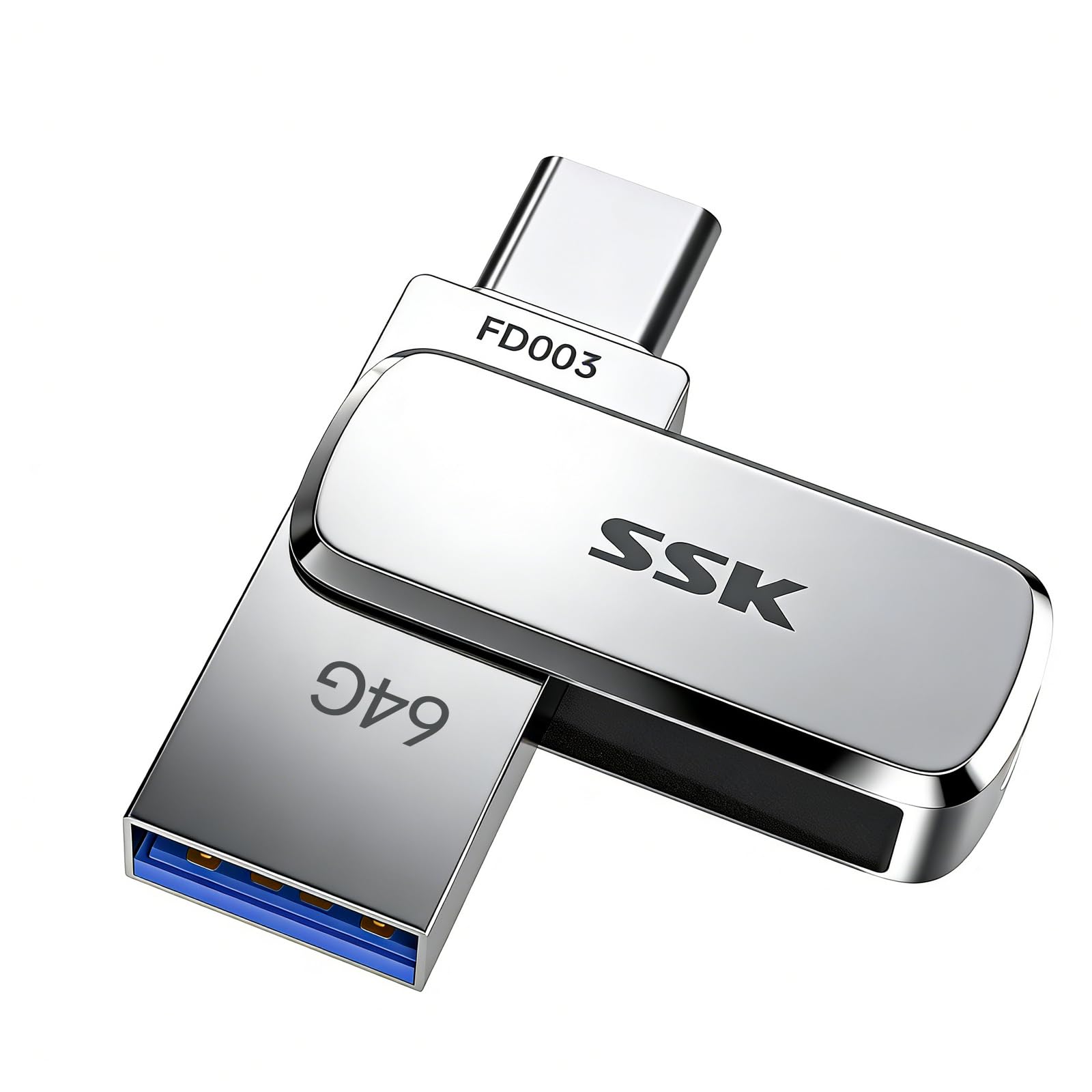
3. SSK 64GB Dual USB Flash Drive USB-C
The zinc-alloy survivor that reads at 240MB/s and shrugs off water and drops.
SSK’s selling point is a body, not a gimmick. The 64 GB drive is wrapped in a zinc alloy shell and built with UDP encapsulation, which seals the chip and circuits away from water, dust, and impact. That packaging plus a stated 240MB/s read makes it the drive you grab for a field trip or a factory floor. It has a USB-C head and a USB-A head, with a built-in keyring hole, so it works across phones, computers, and printers. Owners count the overall quality as its standout trait, and the dual-port layout as its most useful feature.
On speed, 240MB/s read beats the JOIOT’s 130MB/s but falls well short of the 400MB/s drives at the top of this list — enough for fast routine copies, not for dumping huge files at maximum pace. The maker notes write speed runs lower and varies with capacity, file size, and usage, averaging about 54-83MB/s in good conditions. Heat dissipation is helped by the alloy shell, and performance reportedly holds steady even when the drive is nearly full. In practice, that means the metal body keeps working when a plastic stick starts to throttle.
For a laptop port that never matters much, but on a phone it is a visible stub. And 64 GB fills faster than you think once photos and video come into play. If you prize a rugged shell over the flushest possible fit, this is the one to carry.
Rugged pick: zinc alloy and UDP encapsulation for a drive that travels hard and keeps working.
Choose this for: a durable dual-port drive you will carry on trips, to job sites, or anywhere a plastic stick would crack.
Look past it if: you need the flushest possible fit in a laptop port or 400MB/s-class read for huge files.
4. JOIOT 128GB USB C Flash Drive Dual USB 3.0
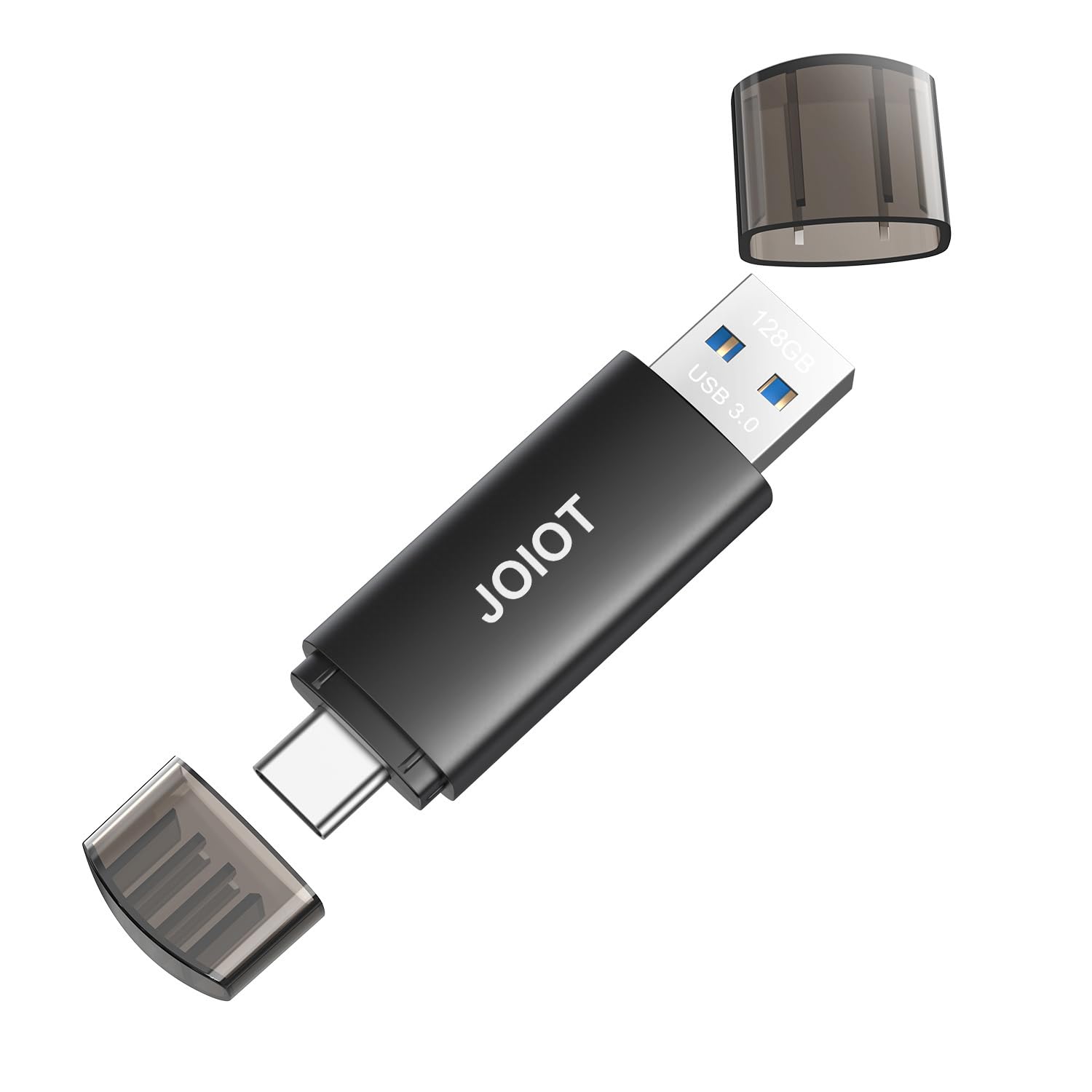
A 128 GB two-plug stick that treats USB-C and USB-A as equals.
Need the most device coverage from one stick? The JOIOT carries a Type-C plug on one end and a USB-A plug on the other, and the maker lists support across iPhone 15 and 16 models, iPad Pro, Type-C Android phones, Macs, game consoles, and car stereos. It is 128 GB, reads up to 130MB/s, and writes up to 35MB/s over USB 3.0 — the maker calls that 10X faster than USB 2.0 drives. At 8 g inside a cap-protected plastic body, it slips into a pocket. The sheer list of devices it works with is why it belongs high on this list.
Compare its 130MB/s read with the 400MB/s of the SanDisk and Lexar drives and the gap is clear: the JOIOT is built for convenience, not for speed. It is happy moving photos, music, and documents, but a large video folder will take longer. The value read here is double-slot flexibility at a modest capacity — owners value the dual connectors and the plug-and-play ease for tasks like clearing space on a phone. If that is your job, the slower speed rarely bites.
But the mixed feedback is real: functionality and quality both draw mixed notes, including a report of one unit failing on its first day. That is a rare turn, not a pattern, and many of these drives work for years — still, a fresh file set on another drive is a sane habit. The cap protects the plugs from dust and damage, which helps the durability story. For anyone who needs one stick that fits nearly anything and does not mind a slower top speed, it is easy to live with.
Compatibility is the draw: Type-C and USB-A at each end, with support for a long list of phones, tablets, computers, and consoles.
The honest caveat: mixed quality feedback and a 130MB/s ceiling mean it is a convenience tool, not a high-speed workhorse.
Pick this when: one stick needs to talk to nearly any device in the house and you value that over top speed.
skip it if: you need 400MB/s-class read for large files or have had failures with budget drives before.
5. Lexar C40E Type-C USB Drive 64GB
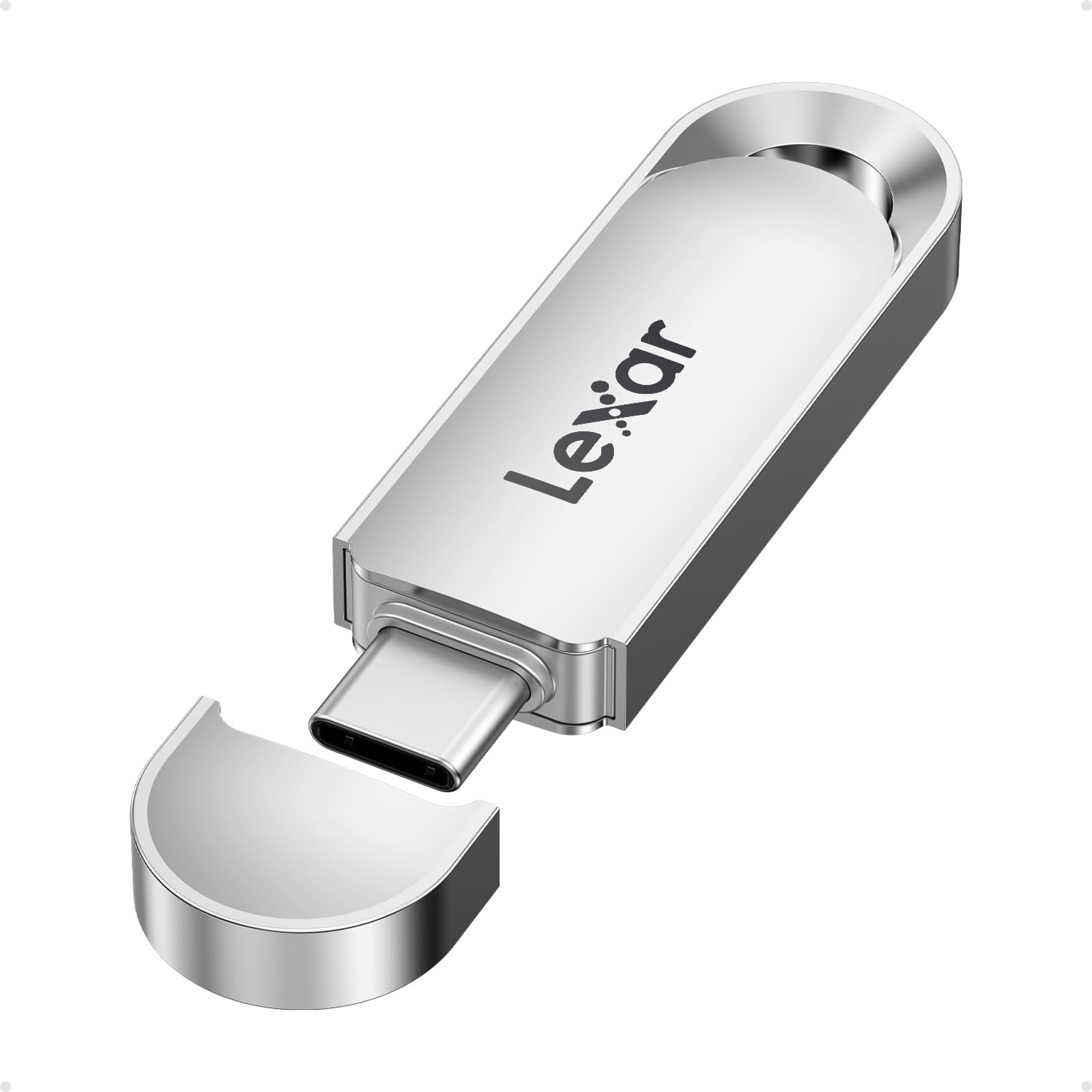
The metal Type-C drive that pairs 400MB/s read with real file encryption.
If you carry sensitive files, the Lexar C40E is the only drive here that lists security on the spec sheet. It reads up to 400MB/s over USB 3.2 Gen 1 (a common USB standard) — matching the SanDisk and Samsung top speeds — so large files move quickly. Its security software supports 256-bit AES encryption (a strong scrambling method), so a lost drive is not a lost file set. The 64 GB capacity holds a work project or a photo library. The metal body with an integrated loop clips neatly to a keychain. A free Lexar App photo backup is listed for both iOS and Android.
It is not the flushest pick. Put it against the SanDisk and you can see the trade — a loop for hanging, metal for durability, and almost four times the heft. It is the drive you snap to a work bag or keyring, not one you leave buried in a laptop port all day. On speed and security, though, it holds its ground against anything here.
One honest gap: the drive lists few reviews, so the real-world picture is thinner than for the more-reviewed picks above. The iCloud backup feature is also not supported yet, so an iPhone owner relying on iCloud should expect to manage files the manual way. If you need encryption and 400MB/s read in a metal body and can live without flush fit, this is the security-focused choice.
Security-first speed: 400MB/s read in a metal Type-C body, with 256-bit AES encryption for files that should stay private.
Not a flush fit: the heaviest and longest drive here at 17.68 g and 2.17 inches — better on a keyring than in a laptop port.
Reach for this if: you want a fast, encrypted drive you carry on a keychain rather than one that lives in a port.
Pick a different drive if: flush fit in a slim laptop is the whole reason you are shopping.
6. SANKESU 2-Pack 128GB USB C Flash Drive

Two dual-ended 128 GB sticks — one for the bag, one for a drawer.
The SANKESU set is the only pick here that lands two drives in your hands. You get a pair of 128 GB sticks, each with USB-A on one end and Type-C on the other, which together total 512 GB across three and a half devices if you count them that way. The maker pitches the capacity in plain terms: about 320 minutes of 1080p video, 7,200 photos, or 4,000 MP3 songs per drive. It is pre-formatted to exFAT, so it reads on Android, Windows, Mac, and the USB-C iPhones and iPads.
But the speed is the honest limit. The hardware interface is USB 2.0, and the listed read speed is 20 MB/s — slow for large files and video. That is not a dealbreaker for its real job, which is clearing space on a phone or shuffling documents between a phone and a PC, and owners value the performance and the convenience for exactly that. The practical caution is capacity math: the maker notes actual usable space runs about 92% of the stated capacity because of how computers and drives count bytes.
Reliability and speed both draw mixed notes in the feedback, so treat each stick as a convenience rather than a vault. The dual connectors and plug-and-play design are what owners like most, and getting two full sticks at this tier is the clear appeal. For the household that wants a couple of low-profile drives to leave in different rooms, this two-pack covers bases a single expensive stick cannot.
Why two helps
- Two 128 GB dual-connector drives in one purchase
- USB-A and USB-C ends work across phones, PCs, and Macs
- Pre-formatted exFAT for cross-platform reading
- Plug-and-play with no drivers or apps
The slower truth
- USB 2.0 interface; listed read speed of 20 MB/s is slow for large files
- Reliability and speed draw mixed feedback — keep backups
- Usable capacity runs about 92% of the stated number
Suits a household: two easy dual-plug drives for phone cleanups and everyday file shuffling.
Not for speed work: pass on it if you routinely copy big video files and want fast transfers.
7. Samsung Type-C USB Flash Drive 128GB

The near-flush drive with the biggest track record and a five-year warranty.
Here is the drive with the longest paper trail: at 4.5+ stars across 18,000+ ratings, the Samsung Type-C has more owner experience behind it than everything else on this list combined. That is not a reason to buy on its own, but it is a real signal that the design holds up. It carries 128 GB, reads up to 400MB/s over USB 3.2 Gen 1, and transfers a 4GB file in a claimed 11 seconds. The body measures 0.32 inches deep by 1.33 inches wide, so it sits close to flush. Backed by a 5-year limited warranty.
What owners talk about most is performance and speed. One reviewer timed file transfers of 300MB/s, and the drive earns praise for moving years of photos in seconds. The size draws positive notes too — many describe it as tiny, half the length of the early USB drives — and it works across laptops, tablets, phones, and cameras. The maker also calls it waterproof, shock-proof, magnet-proof, temperature-proof, and X-ray-proof, which is a tougher set of claims than most here. It supports the iPhone 15, with ProRes 1080p at 30fps video listed.
There are two things to plan for. Compatibility and durability both draw mixed notes — the reversible plug sometimes needs a deliberate push to seat, and a small share of drives stop reading over time, as any flash memory can. Also note that the drive uses Samsung’s own crafted flash, so follow the maker’s handling advice and avoid pulling it mid-write. The 4GB-in-11-seconds figure is a strong opener, and if you want the drive with the most proven track record, this is where to aim.
Longest track record: 18,000+ owners and a 5-year warranty back a compact 400MB/s drive.
The small caveats: the plug needs a firm seat, and a rare drive can fail to read — both worth watching, neither a reason to pass it up.
A safe shortlist finisher: pick it if you want proven reliability and 400MB/s read in a body that sits close to flush.
Check your fit if: you need the flushest possible profile — the SanDisk still edges it on weight and depth.
8. SUNEAST Nano USB-C Flash Drive, 128GB

A 2.8-gram speck that reads up to 450 MB/s and vanishes on a phone.
The Nano takes the flush-fit idea to its limit: at 2.8 grams and roughly 10.6 × 20 × 13.5 mm, it barely registers once plugged in. That is the lightest drive in this group by far — the SanDisk’s 4.54 g looks stout next to it. And it is not slow to compensate, reading up to 450 MB/s and writing up to 400 MB/s over USB 3.2 Gen 1, which tops every other drive on this list on paper. It ships pre-formatted exFAT for Windows, macOS, Linux, Android 14+, and USB-C iOS devices.
The practical use case is video and photo capture. It supports 4K 30fps ProRes recording (though not 4K 60fps ProRes), which turns a phone into a recorder for HD footage without filling internal storage. Owners find it reliable for that job, with a mention of using it for car recording. Compatibility as plug-and-play expanded memory is a recurring plus, and the tiny body means it does not disturb a phone in the hand. For anyone who wants a low-profile drive that disappears against a phone or a camera, this is the lightest way to add 128 GB.
The catch with any nano-sized drive is handling: there is little to grab when you pull it out, and a body this small is easy to misplace. There are also very few long-term owners behind it — the review base is small — so the mixed early picture is thinner than for the more-reviewed picks. If you mainly want a drive to add storage to a phone or camera and leave in, this is the closest thing to invisible.
Smallest of the lot: 2.8 g and roughly 20 mm across, the least obtrusive drive here, with the highest stated read of 450 MB/s.
Minor handling cost: a drive this tiny is easy to misplace and has a small early review base to draw on.
Ideal for phones and cameras: a nano drive that adds 128 GB without changing how a device feels in the hand.
Not for keychain life: this one lives in a port, not jangling in a pocket.
9. PNY 256GB Elite-X Fit Type-C USB 3.2 Flash Drive

The one drive here that doubles everyone else’s capacity with a sliding body.
When 128 GB is simply not enough, the PNY Elite-X Fit offers 256 GB — double the capacity of the SanDisk, Samsung, and JOIOT drives, and four times the 64 GB sticks. Its low-profile housing uses a sliding design, so the connector retracts and the body keeps other ports clear. It reads up to 200MB/s and writes up to 100MB/s, which is a noticeable step down from the 400MB/s cars at the top but fine for photos, music, and documents. It is backward compatible with USB 2.0 and 3.0 ports, so it travels across old and new machines.
The capacity is what people prize most, and owners describe it as an ideal fit for freeing space on a phone and for moving music and photos between devices. The portability and small size are the next most-liked traits. Against the slower SANKESU two-pack it is the faster drive, and against the Samsung it is the bigger one — a fair trade of one strength for another. For someone who wants one reliable place to park a large photo or video library, the extra room is the argument.
Before you plug it into a cased phone, know this fit caveat: PNY advises that the device case must allow unobstructed access to the Type-C port, because a thick case can block the drive from seating fully. Reliability, transfer speed, and fit all draw mixed notes, so test it early and keep anything irreplaceable backed up. If you need max capacity in a compact sliding body and can handle a slower write, this is the one.
What it brings
- 256 GB — double the 128 GB drives and four times the 64 GB sticks
- Sliding low-profile body leaves other ports usable
- Up to 200MB/s read and 100MB/s write
- Backward compatible with USB 2.0 and 3.0
What to watch
- A thick phone case can stop the drive seating fully
- 200MB/s read trails the 400MB/s drives above
- Reliability, speed, and fit draw mixed notes — keep backups
Biggest bag for the buck: 256 GB in a compact sliding body for large photo and music libraries.
Mind the case: check your phone case clears the Type-C port before relying on it.
Know the Specs
Read Speed vs Write Speed
Read speed is how fast the drive sends a file to your device; write speed is how fast it takes one in. Which one matters depends on the job. Pulling photos off a phone or watching video from the drive leans on read speed, where a 400MB/s drive shines. Copying a big folder onto the drive leans on write speed, which is almost always lower — the SSK, for example, reads up to 240MB/s but writes around 54-83MB/s in good conditions. So a listing’s big number is usually the read figure, and judged task by task, not as one speed.
USB generations explained
USB 3.2 Gen 1 is the current common standard and has the same bandwidth as the older USB 3.0 label — so a drive marked USB 3.0 and one marked USB 3.2 Gen 1 are broadly comparable. USB 2.0 is the slow generation and caps those drives at low speed, which is why the SANKESU two-pack lists only 20 MB/s. A drive with a USB 3.2 or 3.0 interface will feel much quicker than a 2.0 one when you move large files. Match the drive to the port on your device; a fast drive in a slow port runs at the port’s pace.
Flush fit and port clearance
A low-profile drive sits close to the body of your laptop, tablet, or phone. The shorter the nose, the less it snags, and the less it blocks the port beside it. A body around 13-20 mm deep tends to sit close to flush, while a longer drive like the 2.17-inch Lexar sticks out more. On a phone with a thick case, the case itself can block a drive from seating, which is why PNY advises checking port clearance. Measure against your own gear before committing.
Heat and ruggedness
Flash drives warm during transfers, and a body that stays plugged in has less airflow to shed it. Metal shells help here because they dissipate heat better than plastic, which is why the SSK zinc alloy and Lexar metal bodies are built the way they are. Encapsulated chips add resistance to dust, water, and drops. None of these drives is meant to be pulled mid-write, so eject the drive on your device before you remove it.
Common Questions
Will a low-profile USB-C drive work with my iPhone?
How much smaller is a low-profile drive than a normal flash drive?
Do I need USB 3.2 or is USB 3.0 enough?
Why does my 128GB drive show less than 128GB of space?
Is a metal body better than plastic for a drive that stays plugged in?
Can I leave a low-profile drive plugged into my laptop all the time?
What is the difference between a dual-connector drive and a Type-C-only drive?
Will a Type-C flash drive fit through a phone case?
Can I record 4K video directly to a USB-C flash drive?
Why do some low-profile drives get warm during a transfer?
The Bottom Line
For most people shopping for a usb-c low profile flash drive, the winner is the SANDISK 128GB Extreme Fit because it does the one thing this category asks for — a 4.54 g body that sits close to flush with up to 400MB/s read and 128 GB inside, backed by the strongest owner consensus here at 4.5+ stars and 900+ ratings. If proven reliability and a five-year warranty matter more than the flushest fit, grab the Samsung Type-C 128GB with its 18,000-plus owner track record. And for the person who needs to squeeze the most capacity into a compact body, the PNY 256GB Elite-X Fit is the one to reach for.
One honest nudge: the SanDisk and Samsung both sit at 4.5+ stars or better with hundreds to thousands of owners behind them, so if you are torn, the drive with the widest real-world feedback is the safer bet — and the SanDisk edges it on weight and flush fit.
How we choose
We do not accept paid placement. Every pick is matched to a real buyer and a real use-case; we do not hands-on test units.
Sources
Specifications: manufacturer listings and product documentation. Review insights: verified customer reviews, as of November 2026. Pricing: not shown on this page (it changes often); check the current price via the retailer link.
As an Amazon Associate, Tactical Gear Guy earns from qualifying purchases. This does not affect which products we feature.