Specs are compiled from manufacturer listings and verified buyer reviews and can change over time — please confirm the key details on the product page before buying.
If your desktop stutters on 4K streams or your ping spikes mid-match, the fix is usually a small card, not a new PC. A network card swaps your motherboard’s tired wireless or wired chip for a faster one — and it takes minutes to fit. This guide covers adapters that actually work on Windows, so you can pick the right one without guessing.
This guide is built by comparing the manufacturers’ published specifications and the patterns across verified customer reviews, so you get each pick’s real strengths and trade-offs instead of marketing spin.
A card only delivers its rated speed if your router, switch and cable can match it. Below are nine verified picks, each with a plain reason it earns its spot on the list of the windows network card options worth your PCIe slot today.
Top Picks


How To Choose The Best Windows Network Card
The first decision is wired or wireless, and it matters more than any speed number on the box. A wired card needs a cable run to your router or switch. A wireless card needs a clear path to your router’s antenna and a router that speaks the same WiFi generation.
Match the card to your router, not to the box
A WiFi 7 card gives you nothing on a WiFi 5 router. The 6GHz band that WiFi 6E and WiFi 7 cards open up only works if your router broadcasts there. For wired cards, a 5Gbps adapter needs a switch or router port rated for it.
Check your PCIe slot before you buy
Most of these cards fit any PCIe slot from x1 upward, which is the small slot near the bottom of the board. The 10G SFP+ card needs an x8 or x16 slot. Measure your case clearance if you have a slim or mini-tower build — low-profile brackets come included on nearly every pick here.
Windows version is the quiet dealbreaker
Newer WiFi 7 cards list Windows 11 only. WiFi 6E cards on this list support Windows 10 and 11. Wired cards from Realtek and Broadcom controllers are usually plug-and-play on modern Linux kernels too, though the bundled driver discs assume Windows.
Side-by-Side Comparison
| Model | Best For | Connection | Max Speed | OS Support | Amazon |
|---|---|---|---|---|---|
| OKN WiFi 6E AX210 PCIe Card★ Best Overall | Wireless gaming upgrades | WiFi 6E + Bluetooth 5.3 | 2974 Mbps | Windows 10/11 | Amazon |
| ULANSeN 5Gbps PCIe NICBest Value Wired | Budget multi-gig wired | PCIe 3.1 x1 Ethernet | 5000 Mbps | Windows 7–11, Linux | Amazon |
| FENVI FV-AXE3000Tri-Band Speed Pick | Tri-band wireless value | WiFi 6E + Bluetooth 5.3 | 5400 Mbps | Windows 10/11 | Amazon |
| BrosTrend 5Gb PCIe NIC | Reliable wired workhorse | PCIe x1 Ethernet | 5 Gbps | Windows 10/11, Server 2022 | Amazon |
| UGREEN WiFi 7 BE6500 | Next-gen wireless on Windows 11 | WiFi 7 + Bluetooth 5.4 | 2882 Mbps (6GHz) | Windows 11 only | Amazon |
| TP-Link Archer TXE73E | Clean WiFi 6E setup | WiFi 6E + Bluetooth 5.3 | 5400 Mbps | Windows 10/11 (64-bit) | Amazon |
| H!Fiber BCM57810S Dual SFP+ | 10G fiber and NAS builds | Dual SFP+ / PCIe x8 | 10 Gbps | Windows, Server, Linux, ESXi | Amazon |
| NICGIGA 10Gb PCIe 4.0 x1 | Compact 10G RJ45 builds | PCIe 4.0 x1 Ethernet | 10000 Mbps | Windows 10/11, Server, Linux | Amazon |
| TP-Link Archer TBE550E | Top-end WiFi 7 on desktop | WiFi 7 + Bluetooth 5.4 | 9300 Mbps | Windows 11 only | Amazon |
Detailed Reviews
1. OKN WiFi 6E AX210 PCIe Card
Our pick — 4.5+★ from 850+ verified ratings; the strongest balance of quality and price.
A budget WiFi 6E card that adds the 6GHz band to your gaming PC for less than most 6E adapters.
The reason this is the top pick: the AX210 chip open up the 6GHz band (5.925–7.125GHz, a newer radio range with more room and less crowding than the 2.4GHz and 5GHz bands everyone else uses). That gives you 7 × 160MHz channels to choose from, so your PC stops fighting the neighbors’ routers for airtime. The 6GHz band only works if your router broadcasts there, which is worth checking before you buy.
Speeds reach 2974 megabits per second, the throughput figure split across the three bands. Bluetooth 5.3 rides along on a separate header cable, which connects to your motherboard’s Bluetooth port — that’s how you pair a wireless headset, keyboard or controller directly to the desktop. It’s the same generation of connectivity you’ll find in the FENVI card below, both running on the Intel AX210 chipset.
The 110-gram package includes high-gain dual antennas, a low-profile bracket for slim cases, and a resource CD with the driver — though the drivers download from Intel’s website faster. WPA3 encryption (the current security protocol for home routers) is supported, and the 3.15″ × 2.76″ × 0.79″ card fits an x1, x4, x8 or x16 slot. For a machine that streams 8K or runs VR, this is the cheapest reliable route into the 6GHz band. It carries 4.5+ stars across 800+ ratings, and what wins people over is the sheer reach of the signal — owners describe picking up networks from across the street.
Where it wins the day
- 6GHz band with 7 × 160MHz channels for interference-free gaming
- Bluetooth 5.3 via header cable for direct peripheral pairing
- 2974 Mbps rated speed at a value-tier price
- Low-profile bracket included for small-form-factor builds
What to keep in mind
- 6GHz speed requires a WiFi 6E router to see any benefit
- Driver download is faster from Intel’s site than the bundled CD
Best for: Gamers and streamers who want a 6GHz upgrade without paying premium-tier money.
Look elsewhere if: your router is still WiFi 5 — you’d be paying for a band you can’t reach.
2. ULANSeN 5Gbps PCIe Network Adapter NIC
A budget 5Gbps wired card that turns an empty x1 slot into a multi-gig Ethernet port.
For anyone moving a NAS or home server onto faster wired speeds, this is the least expensive way in. The RTL8126-CG chip (Realtek’s PCIe 3.1 controller, rated at 8 GT/s transfer speed) drives five selectable link speeds: 5Gbps, 2.5Gbps, 1Gbps, 100Mbps and 10Mbps. It works with existing CAT5e and CAT6a cabling, so you don’t have to rewire the house to get started. It’s a smaller physical footprint than the BrosTrend card below, sitting at 2.91″ × 1.97″ × 0.71″ — useful when clearance is tight.
Installation is described as easy to set up on some systems, but there is one thing to know before you order. It’s not plug-and-play for Linux servers, and the driver disc assumes Windows. For Windows 7 through 11 the setup is simple. RealWoW technology is included too, which is a remote wake-up and diagnostics feature — handy if you manage the machine from another room or city. Wake-on-LAN, VLAN tagging, jumbo frames up to 16KB and UEFI PXE boot (a network-based system install method) are also on board.
The functionality aspect is what gets the most attention in the review pages, with 12 mentions, and it’s the strongest thing about the card. The installation aspect draws 11 mentions, marked mixed — some buyers get it running immediately, others hit a snag on Linux. Treat it as a Windows-first card that also works on modern Linux if you’re comfortable with drivers. For a home NAS or a secondary wired connection, it’s a budget-friendly multi-gig adapter that behaves.
Reach for this if: you want 5Gbps wired speed on a Windows desktop or server without paying top-tier prices.
Think twice if: you’re running a Linux server and want zero driver setup — this one needs a manual hand.
3. FENVI FV-AXE3000 WiFi 6E AX210 PCIe Card
The same Intel AX210 engine as the top pick, tuned for faster headline speeds and dual antennas reaching across the house.
The FENVI card and the OKN card above both run the Intel WiFi 6E AX210 chipset, so the real difference is what each manufacturer does with it. Here, speeds are rated up to 5400 Mbps across three bands (2400 Mbps on 6GHz, 2400 on 5GHz, 574 on 2.4GHz), which is the higher stated figure of the two. The 5400-megabits-per-second number sits 82% above the 2974 figure on the OKN listing, so if raw stated bandwidth is your metric, this is the one.
Two external high-gain antennas are included, and both are adjustable — you angle them toward wherever your router lives. WiFi 6E widens the channel from 80MHz to 160MHz, which helps in houses where the router is several walls away. Compatibility covers Windows 11 and 10 on both Intel and AMD desktop boards via an x1, x4, x8 or x16 slot, and a low-profile bracket is in the box. Bluetooth 5.3 runs via a USB cable header cable rather than the standard header pin, so it’s a slightly different install path than the OKN.
Owner feedback narrows to speed and reach. The card improves connection speeds noticeably, and one report puts download at 955 MB with upload at 50 MB — that’s the kind of jump from a tired old wireless adapter. It’s a solid tri-band option, but at 900+ ratings it has a slightly lower average than the OKN pick. It’s 1.6 ounces, so there’s essentially nothing in the weight. This is the one to grab if you want the AX210 chip with more stated top-end bandwidth in the listing.
The head-line grabber: 5400 Mbps rated versus 2974 on the OKN listing — the FENVI leads on the number, and both share the AX210 chip.
The honest caveat: that speed only shows up if your WiFi 6E router is close enough and your ISP plan is fast enough to feed it. A 6GHz router across the house won’t get there.
Pick it for: the higher stated 5400Mbps figure with dual adjustable antennas for long-range reception.
Skip it for: if you already own the OKN and need nothing more — the chip is the same and the premium price buys bandwidth, not a better radio.
4. BrosTrend 5Gb PCIe Network Card

A 5Gbps wired card with a finned aluminum heatsink, Windows drivers on disc, and Linux support only on kernel 6.9 or newer.
If your machine handles large local file transfers or you’re running a server for media or backups, this is the wired pick with the most pedigree on the list. It’s 5 times faster than a typical Gigabit Ethernet card, according to the maker — a 5Gbps link over your existing CAT cabling via 5GBASE-T, the newer Ethernet standard for 5Gbps over copper. The aluminum heatsink with dense fins keeps the card cool under sustained data transfer, which matters when the machine is transferring for hours. It measures 6.9″ × 3.9″ × 1.2″, making it the largest card here compared with the ULANSeN at 2.91″ × 1.97″ × 0.71″.
Windows 11, 10, and Windows Server 2022 are supported, and drivers install from the included disc or a download. Wake on LAN and QoS are on board, so you can wake the PC remotely and prioritise traffic. The Linux note deserves attention: it works from the start only on kernel 6.9 (a specific version of the Linux operating system core) or newer, and the manufacturer states plainly that Linux expertise support isn’t provided. For Windows users this is a non-issue.
This card carries 4.0+ stars across 800+ ratings, and the volume of owner feedback tells a clear story. Functionality is the thing owners talk about most, and speed is close behind. Most report it runs close to 5gig at home and installs smoothly, with some calling out no connection drops. But the connectivity picture is mixed — a few note slow web browsing speeds, and driver compatibility splits both ways. It’s a dependable card for a Windows tower or server; it just wants a modern Linux kernel if you’re dual-booting.
What it gets right
- 5Gbps wired speed with 5GBASE-T over standard copper cabling
- Aluminum heatsink keeps it cool under long transfers
- Windows 11, 10 and Server 2022 supported
- Wake on LAN and QoS included
Buyer be aware
- Linux support requires kernel 6.9 or newer, with no vendor expertise support
- Driver-disc install isn’t as simple as the plug-and-play Linux options
The solid choice for: a Windows desktop or home server that needs steady 5Gbps wired throughput.
The catch: if you’re running an old Linux kernel, look at the NICGIGA or the H!Fiber instead.
5. UGREEN WiFi 7 BE6500 PCIe WiFi Card
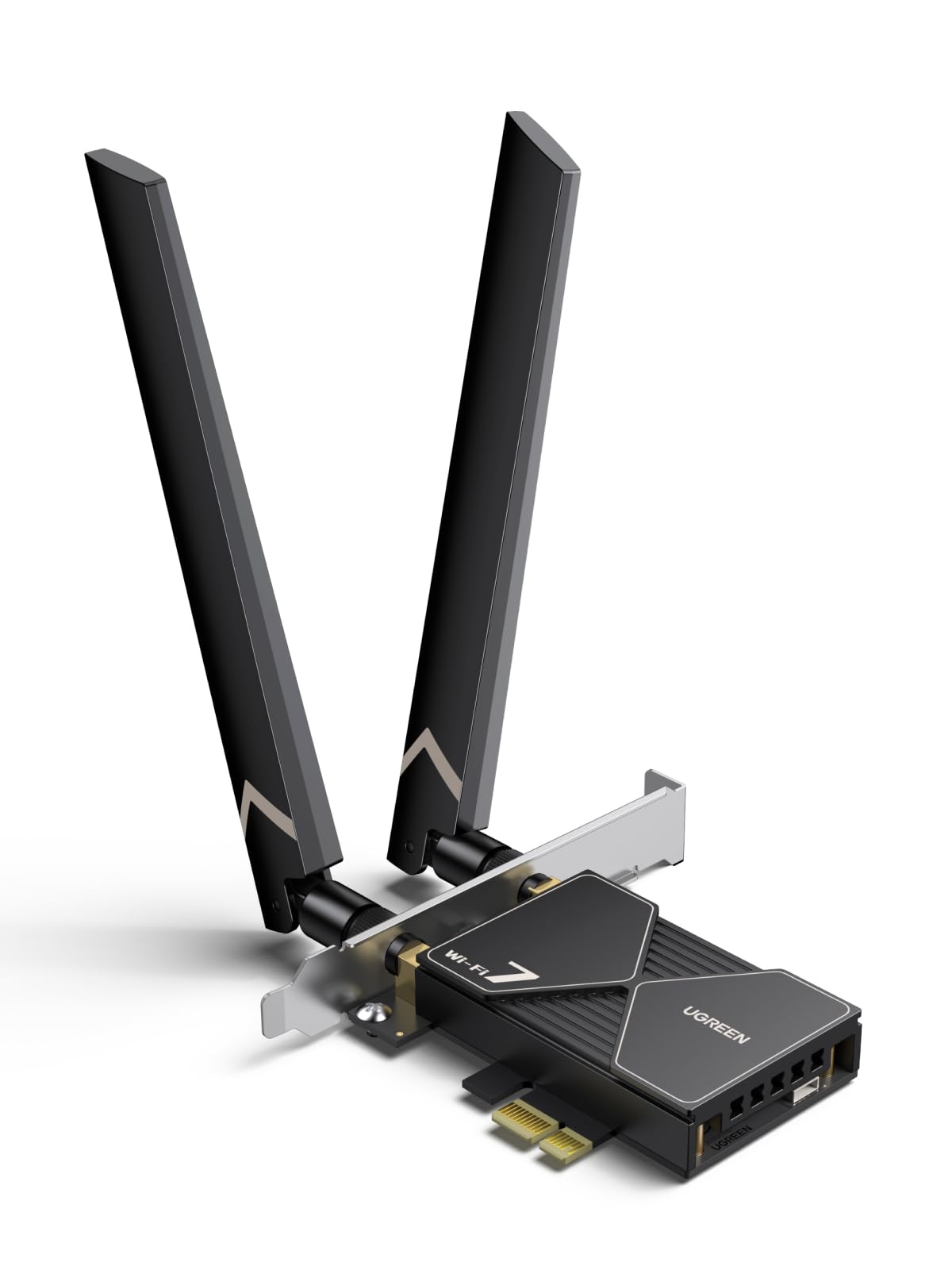
A WiFi 7 card that uses MLO to spread traffic across bands, with Windows 11 as its only supported OS.
MLO is the headline here. Multi-Link Operation lets the card juggle data across several WiFi bands at once rather than picking one — the effect is a steadier connection when a single band is congested. The BE6500 tri-band design peaks at 2882 Mbps on 6GHz with 160MHz bandwidth, alongside 2882 Mbps on 5GHz and 688 Mbps on 2.4GHz. To reach BE6500 speed you need a WiFi 7 router; older routers will step the connection down.
Bluetooth 5.4 is on the card, so headphones, keyboards and mice connect alongside the WiFi. One setup note: disable your PC’s built-in Bluetooth before use, or the two will collide. The dual 6dBi high-gain antennas can be angled individually for stronger signal, which helps if the PC sits in a corner. WPA3 security is standard. And the Windows 11 limitation is absolute — the card is not built for Windows 10 or Linux.
Installation is where this card earns most of its positive attention, and buyers find it simple to fit. The driver arrives on a USB stick, so you plug that in before fitting the card and follow the prompts. The mixed part is reliability: some devices work flawlessly, and a few have arrived dead or failed early. That handful of failures should be weighed against the majority who got a working card — but it’s the risk you accept with any newer board. If you have a WiFi 7 router and a Windows 11 desktop, this is the cheapest path to MLO.
The MLO edge: multi-band data delivery cuts jitter on busy networks, which matters most for competitive gaming and video calls.
The Windows 11 lockout: this card won’t serve a Windows 10 build or a Linux desktop — the manual is clear on that.
Great match for: a Windows 11 desktop with a WiFi 7 router that wants MLO and Bluetooth 5.4.
Not the pick for: older Windows 10 machines — check the TP-Link TXE73E below instead.
6. TP-Link Archer TXE73E WiFi 6E PCIe Card

One magnetized antenna on a 0.8m RF cable, so you can set it on the desk instead of behind the tower.
The TXE73E takes a different physical approach. Instead of dual antennas bolted to the back of the card, it uses one high-gain antenna on a magnetized base connected by a 0.8m RF cable (an extension lead for the radio signal). You set the base on top of the desk or on the PC case, wherever the reception is strongest. For a crowded desk or a PC tucked under a table, that’s a meaningful advantage over cards that hide their antennas behind the tower.
Speeds reach up to 2402 Mbps on both 6GHz and 5GHz, and 574 Mbps on 2.4GHz when paired with a tri-band router — a 5.4Gbps total the listing cites. 6GHz requires Windows 11, while the card itself runs on Windows 11 and 10 (both 64-bit). OFDMA and MU-MIMO reduce lag on busy networks, and WPA3 encryption is on board. TP-Link also signs the U.S. CISA Secure-by-Design pledge, which is a commitment to security in design and maintenance rather than a test result.
The card boots straight into Windows with no complaint, and both Windows 11 and 10 buyers report success. Ping times improve for online games, and one report records 1,000 Mbps immediately after setup. It’s the highest-rated card on this list and the one most owners describe as worth the spend. At 1.76 ounces and 2400 Mbps per band on dual bands, it’s an efficient choice for a clean, clutter-free install.
Choose this if: you want a WiFi 6E card with a repositionable antenna and top-tier reliability.
Pass if: you need WiFi 7 speeds or a Linux-compatible wireless card — this one is Windows-only.
7. H!Fiber 10Gb SFP+ PCIe Network Card

A dual SFP+ card on Broadcom’s BCM57810S controller, built for NAS boxes and servers running 10G over fiber or DAC.
This one is not for a normal home desktop. It’s a dual-port SFP+ card (SFP+ being the slot format for fiber-optic transceivers and direct-attach copper cables), running Broadcom’s BCM57810S controller at up to 10 Gbps per port. That’s a 10x jump over a standard Gigabit adapter, according to the maker, and it’s also backward compatible with 1Gbps modules. It needs a PCIe x8 or x16 slot — an x1 slot won’t fit — so check your board’s layout before ordering.
The compatibility list reads like a server room inventory: Windows 7 through 10, Windows Server 2008 through 2019, CentOS and RHEL 6/7/8, Ubuntu 16/18/19/20, Debian 9/10/11, FreeBSD 10/11/12, VMware ESXi 6/7, and SLES 11/12. Apple macOS and Bypass Mode are explicitly not supported. A QR code on the card links straight to the driver download, saving you a search. This is a card for a NAS, a virtualization host or a lab switch environment — not a gaming PC.
Performance is the thing owners praise most, and speed follows close behind. Reports cite 9+ Gbps throughput on a range of operating systems, mostly with no driver install needed. The mixed spots are compatibility and stability. One specific NAS, the QNAP TVS-672N, is named as a source of trouble for some. For the right hardware, it’s a budget-friendly route to enterprise-grade 10G, and with 500+ ratings behind it, it’s well-vetted.
The spec that makes it sing: a true 10Gbps link on dual SFP+ ports with a Broadcom controller — the same class of silicon used in business networking.
The one for: NAS builders, home-lab servers and anyone running fiber or DAC cable to a 10G switch.
The wrong tool for: a gaming desktop with an x1 slot — you need an x8 or x16 slot, and an RJ45 card suits you better.
8. NICGIGA 10Gb PCIe 4.0 x1 Network Card

A 10Gbps RJ45 card on PCIe 4.0 x1, so an ITX build gets 10-gig wired without giving up GPU lanes.
Slot space is precious in a small-form-factor PC. This card uses PCIe 4.0 x1 — the smallest slot on the motherboard — and still delivers up to 10Gbps through Realtek’s RTL8127 controller. That means you get 10-gig wired networking on a Mini PC or ITX build without stealing lanes from your GPU. The card auto-negotiates across 10Gbps, 5Gbps, 2.5Gbps, 1Gbps and 100Mbps to match whatever your switch or router supports. Standard Cat6a, Cat7 or high-quality Cat6 cabling handles the run.
Windows 11 and 10, plus Windows Server 2019 and 2022, are supported. Linux coverage is native for kernel 6.x and above — Ubuntu, Debian and Fedora pick it up without drivers. Older 5.x kernels need Realtek’s official source code, which is a manual step for the tinkerer. The RTL8127 chip is power-efficient and runs cooler than older 10G silicon, and the package includes full-height and low-profile brackets for slim or full-size towers. Wake-on-LAN is supported.
The reliability story is the standout. This card carries 4.0+ stars across 600+ ratings, and it’s the reliability aspect that buyers discuss most, with quality and speed close behind. Linux Mint users report clean recognition, and one notes internet downloads moving past 2GB. Some compatibility cases go either way on first boot, which is the normal variance with any newer NIC — but for a compact build that needs 10G, this is a good fit.
Strengths worth paying for
- 10Gbps throughput on a single PCIe 4.0 x1 slot
- Auto-negotiates 10G/5G/2.5G/1G/100Mbps to any switch
- Native Linux support on kernel 6.x and above
- Low heat thanks to the efficient Realtek RTL8127 chip
What’s less ideal
- Older Linux 5.x kernels require manual Realtek source-code install
- Some units have needed a restart before the OS recognises them
Ideal for: ITX builds and Mini PCs that need 10G wired speed without stealing GPU lanes.
Look elsewhere if: your motherboard only has an x8 or x16 slot free and you’d rather not leave it empty — the H!Fiber card is the fit.
9. TP-Link Archer TBE550E WiFi 7 PCIe Card
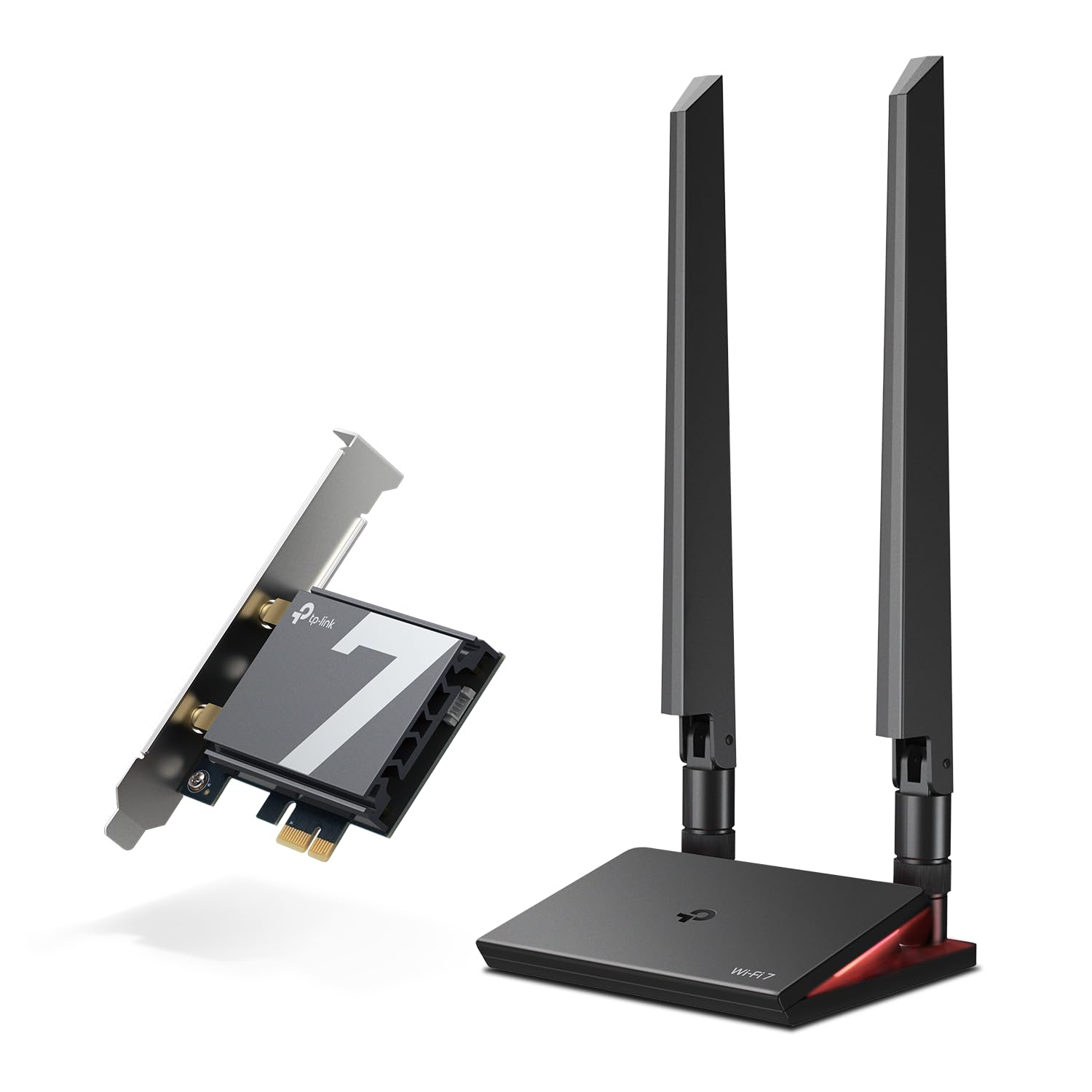
A WiFi 7 desktop card with 320MHz channels, a magnetized LED antenna base, and Windows 11 as the only supported OS.
The TBE550E is the top of the wireless stack here. WiFi 7 brings 320MHz channel width and 4096-QAM (a modulation scheme that packs more data into the same signal), rated up to 5760 Mbps on 6GHz, 2880 Mbps on 5GHz and 688 Mbps on 2.4GHz. That’s a 9300 Mbps total in TP-Link’s listing — the highest bandwidth figure in the list. This card also works on AMD and Intel boards, so it’s not locked to one CPU platform. Windows 11 is required, and the manual lists Windows 10 and Linux as not compatible.
Two high-performance antennas sit on a magnetized base connected by a 1m braided RF cable, and you can place the base anywhere on the desk for the best reception. The base also has a multicolor status LED with a touch switch, which shows network status at a glance. MLO is supported here as well, routing data across multiple bands to cut lag. Driver setup runs from a USB stick in the box — plug it in and follow the prompts.
Owners mention speeds settling in the 700–900 Mbps range on a working connection, and easy installation with a compatible router. The connectivity side is where the honest caveat sits: some units work flawlessly, and a few stop working within the first month. That’s not the majority, but it’s a known failure mode with early WiFi 7 silicon, and worth weighing against the speed. If you’re building a WiFi 7 desktop and want the fastest card on this list, it’s the top-end pick.
The 320MHz advantage: the widest 6GHz channel width available pairs with MLO to keep throughput stable when your house is full of other devices.
The honest trade-off: the LED base and magnetized antenna add room, and Windows 11 is the only supported OS.
If you want the fastest: a WiFi 7 desktop build with a router to match, this is the top wireless pick on the list.
If you’re not ready: older routers and Windows 10 machines would be better served by the TXE73E above.
Know the Specs
PCIe slot and lanes
PCIe x1 is the smallest slot on a desktop board, while x8 and x16 slots fit physically larger cards. Most cards here fit an x1 slot, but the H!Fiber and the two 10G cards need more. Always check which slot is free before ordering. On compact or ITX builds, x1 is often the only slot left once the GPU is installed.
WiFi generation vs router
WiFi 6E and WiFi 7 both use the 6GHz band, which needs a router that broadcasts there. WiFi 7 also adds 320MHz channels and MLO, but only a WiFi 7 router open up those features. A WiFi 6E card on a WiFi 5 router will still work, but it drops back to whatever the router supports. Match the card to the router you actually own, not the router you plan to buy.
Bluetooth headers vs USB cable
Some cards connect Bluetooth through a standard motherboard header, and others route Bluetooth over a USB cable to a rear port. Both work, but the header version keeps cables inside the case while the USB version needs a spare port. Check which method your card uses and whether your board has a header free.
Windows 11 vs Windows 10 support
WiFi 7 cards on this list list Windows 11 only. WiFi 6E cards generally support Windows 10 and 11. Windows 7 only appears on some wired cards. The OS requirement is printed in each card’s manual and listing — read it before you buy, because a driver that won’t run is the most common reason a card gets returned.
Common Questions
Will a WiFi 6E card work on my WiFi 5 router?
Do I need a specific PCIe slot for these cards?
Will a 10Gbps card make my internet faster?
What is the difference between WiFi 6E and WiFi 7 cards?
Do these network cards need a driver installation?
Can I use an SFP+ card in a normal desktop PC?
Is Bluetooth built into these WiFi cards, or separate?
Will these cards work on AMD motherboards as well as Intel?
Do I need a low-profile bracket for a slim PC case?
What happens to my connection speed if I put a WiFi 7 card on a WiFi 6 router?
The Bottom Line
For most desktop builds, the windows network card winner is the OKN WiFi 6E AX210 PCIe Card because it delivers a 6GHz wireless upgrade at a value-tier price. If you want more stated top-end bandwidth in a wireless card, grab the FENVI FV-AXE3000 at 5400 Mbps. And for a wired-only upgrade, the NICGIGA 10Gb PCIe 4.0 x1 turns a single x1 slot into 10Gbps. The highest-rated card on the page is the TP-Link Archer TXE73E — if reliability is your top priority, put it at the top of your shortlist.
How we choose
We do not accept paid placement. Every pick is matched to a real buyer and a real use-case; we do not hands-on test units.
Sources
Specifications: manufacturer listings and product documentation. Review insights: verified customer reviews, as of November 2026. Pricing: not shown on this page (it changes often); check the current price via the retailer link.
As an Amazon Associate, Tactical Gear Guy earns from qualifying purchases. This does not affect which products we feature.