Specs are compiled from manufacturer listings and verified buyer reviews and can change over time — please confirm the key details on the product page before buying.
A compact mechanical keyboard fixes two problems at once: it frees up the desk space your mouse keeps stealing, and it gets the cable off your desktop entirely. The hard part is that “compact” and “mechanical” now cover everything from a 65% board (a layout that drops the function row and number pad) with no wires to a 75% aluminum slab (a layout that keeps the function row and arrow keys but trims the number pad) heavy enough to anchor a boat. Three things decide whether you love one: how the keys feel and sound when they bottom out (press all the way down), how long the battery runs with the backlight off, and how the wireless link holds up when your phone and laptop sit on the same desk.
This guide is built by comparing the manufacturers’ published specifications and the patterns across verified customer reviews, so you get each pick’s real strengths and trade-offs instead of marketing spin.
Here you’ll find 65%, 75%, and low-profile boards sorted by who they actually suit, plus the plain-English version of gasket mounts, hot-swap sockets, and polling rates. The end goal: you close this page knowing exactly which wireless compact mechanical keyboard belongs under your fingers.
Top Picks

How To Choose The Best Wireless Compact Mechanical Keyboard
Pick your layout first, because you cannot change it later. A 65% board drops the function row, so every F-key and media shortcut moves onto a Function key combination you have to learn. A 75% board keeps the function row and the arrow keys but trims the number pad, so you keep desk room for a mouse while you type all day.
The layout is the decision you can’t undo
Count the buttons before you buy. This group runs from 66 keys on the smallest 65% boards up to 84 keys on a 75% with a full column of extras. Fewer keys means smaller footprint and a fatter instruction manual for the layer you have to memorize. If your work depends on one-handed F5 refreshes or a dedicated Delete, a 75% saves you that relearning curve.
Switch feel: linear, tactile, or optical
Most boards here ship with pre-lubed linear switches — smooth all the way down with no bump and no click, which is why the sound lands as a low, rounded “thock” rather than a sharp clack. Tactile switches add a bump you feel at the moment of actuation. Optical switches, like the ones on the ROG, use a beam of light instead of metal contacts, giving a shorter travel distance and near-zero debounce delay. Pick the feel you want first; every board in this list lets you swap switches later through hot-swap sockets, aside from the soldered exception we flag where it applies.
Wireless mode: 2.4GHz versus Bluetooth
2.4GHz is the low-latency mode — you plug a small receiver into your computer and the board behaves like a wired keyboard. Bluetooth is the room-to-room mode: it pairs with a laptop, a tablet, or a phone, and most of these boards memorize several devices so you can hop between them with a key press. A USB-C cable rounds out the trio, and it charges the battery while you use it. If the board you pick matters for competitive play, run it in 2.4GHz and save Bluetooth for the devices you are not gaming on.
Battery: read the fine print on lighting
Every battery number you see is a best case with RGB switched off. Turn the lights on and the runtime drops hard — the top pick here claims up to 470 hours with lighting off but only up to 40 hours with it on. Decide up front whether glowing keys matter to you, because that answer changes the real battery gap between boards far more than the headline number does.
Side-by-Side Comparison
| Model | Best For | Layout / Keys | Battery (RGB off) | Connection Modes | Amazon |
|---|---|---|---|---|---|
| GravaStar Mercury K1 Pro★ Best Overall | Desk centerpiece that types all day | 75% / 79 keys | 470 hours | 2.4GHz, Bluetooth, USB-C | Amazon |
| RK ROYAL KLUDGE M65Budget Champion | First mechanical board on a small desk | 65% / 66 keys | 240 hours | 2.4GHz, Bluetooth, USB-C | Amazon |
| CORSAIR K65 PLUSTop Performer | Quiet gaming board with a media dial | 75% / 84 keys | 266 hours | 2.4GHz, Bluetooth, USB | Amazon |
| RK ROYAL KLUDGE R75 | Typing sound on a tight budget | 75% / 68 keys | 4000mAh (about a week) | 2.4GHz, Bluetooth, USB-C | Amazon |
| SOLAKAKA A75 | Switching between PC, Mac, and phone | 75% / 81 keys | 4000mAh | 2.4GHz, BT5.0, USB-C | Amazon |
| EPOMAKER x Aula F65 | Deep thocky sound, no knob clutter | 65% / 67 keys | 4000mAh | 2.4GHz, Bluetooth, USB-C | Amazon |
| AULA S75 Pro | Seeing battery and mode on a screen | 75% / 80 keys | Not stated | BT5.0, 2.4GHz, USB-C | Amazon |
| YUNZII AL80 | QMK/VIA remapping in aluminum | 75% / 80 keys | 6000mAh | Bluetooth, 2.4GHz, USB-C | Amazon |
| ASUS ROG Falchion RX Low Profile | Low-profile travel and touch controls | 65% / 68 keys | 430+ hours | Bluetooth, 2.4GHz RF, USB | Amazon |
Detailed Reviews
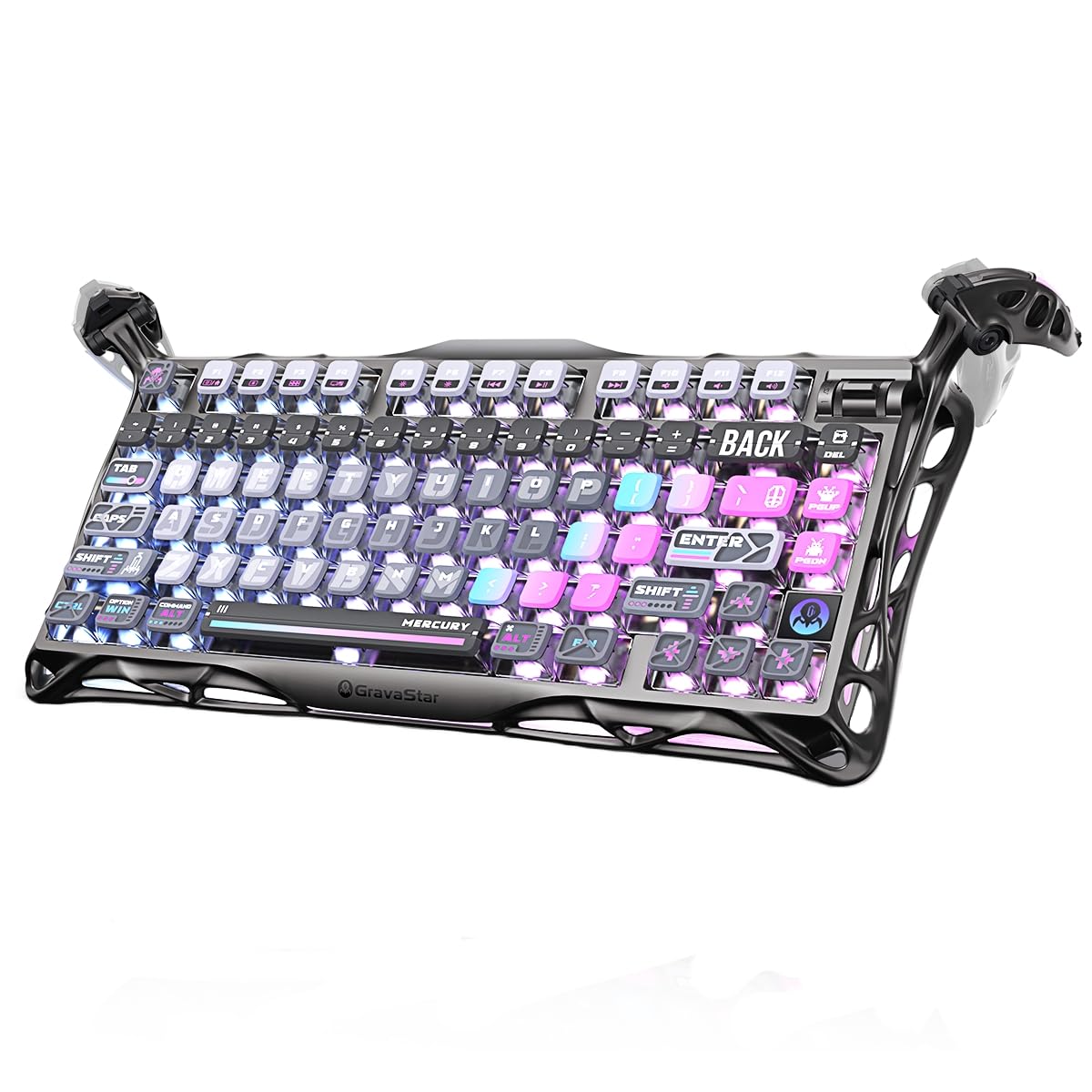
1. GravaStar Mercury K1 Pro Keyboard
Our pick — 4.5+★ from 900+ verified ratings; the strongest balance of quality and price.
A skeletal aluminum frame that turns the battery game into a run-away win.
The Mercury K1 Pro is for the person who wants one keyboard to do the whole job — long workdays, late-night gaming, and a desk that looks like it belongs in a science-fiction film. It runs 79 keys in a 75% layout, keeps a dedicated control knob for volume and mute, and wraps everything in an aluminum alloy exoskeleton. The open-frame look is the first thing guests comment on; the 16.34″L x 7.38″W footprint is the first thing you notice when you are deciding where your mouse goes.
The number that sets this board apart is runtime. With the lighting off it is rated for up to 470 hours — versus 240 hours on the RK M65. Switch on the dual RGB system and that figure falls to up to 40 hours, which tells you exactly how much of the headline battery is spent on glowing. The switches themselves are GravaStar x Kailh Speedy Mint linears with a 45gf actuation force and 1.2mm pre-travel, rated for 70,000,000 keystrokes. In plain terms, they are light under the finger and travel a short distance before registering, so fast typing feels easy and the rated lifespan is long enough to outlive your current desktop. The gasket-mounted FR4 plate and five-layer foam structure are what shape the sound: a deeper, rounded “thock” at moderate volume instead of a high, hollow clack.
The build is what wins people over. It feels planted rather than plastic-light, and the aluminum carries that impression into how the keys sound when they bottom out. The trade-off is heft — this is a dense board you will notice when you toss it into a bag for a café afternoon. One more practical catch: it is hot-swappable (you can pull the switches and swap in new ones later), but the same 5-pin sockets and pre-lubed stabilizers (factory-greased bars under the long keys) are what make the stock sound so good, so most buyers never bother. The crowd verdict is decisive — 4.5+ stars across 900+ ratings.
Where it earns its keep
- Up to 470 hours with the lighting off, which stretches across weeks of daily use.
- Kailh Speedy Mint linear switches at 45gf and 1.2mm pre-travel, rated to 70,000,000 keystrokes.
- Dual RGB systems with 13 lighting modes and 16.8 million colors, tunable through a web-based driver.
- Triple-mode 2.4GHz, Bluetooth, and USB-C lets one board serve a tower, a tablet, and a laptop.
- Aluminum alloy exoskeleton gives the keys a firm, planted platform.
The honest caveats
- Hefty enough that it stays on the desk rather than traveling with you.
- RGB drags the rated runtime from up to 470 hours down to up to 40 hours.
- Larger desk footprint than a 65% board, so plan around your mouse space.
Worth it if: you want a single board that carries work and gaming and you have desk room for it to sit.
Think twice if: you need something to carry between locations or you plan to run the RGB constantly on battery.
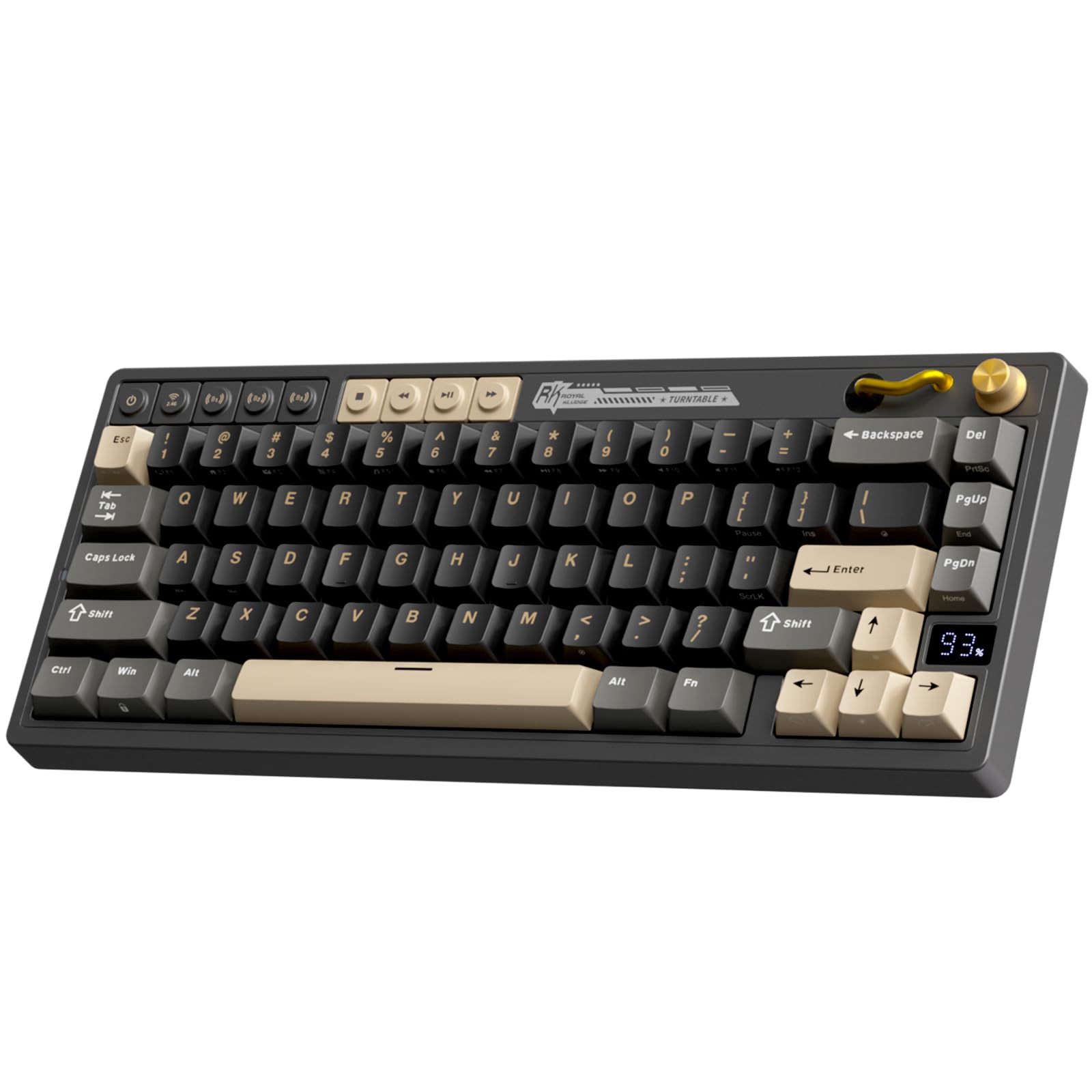
2. RK ROYAL KLUDGE M65 Wireless Gaming Keyboard with Knob
The smallest footprint here, and the cheapest way onto a real mechanical deck.
Picture a dorm desk with a laptop, a monitor, and barely any room left for a mouse. That is exactly where the M65 makes its case. It crams 66 keys into a 65% layout that saves real width, keeps the arrow keys and a premium aluminum volume knob, and tops out at 1.7 pounds so you can drop it in a backpack without thinking twice. The vintage turntable styling on the knob makes the whole thing look less “gaming rig” and more “desk object.”
The M65 pairs a rotary dial for volume with dedicated video and wireless buttons, so switching between three devices and a 2.4G receiver is one press rather than a menu dive. Under the keys sits a gasket mount with sound-damping layers, which is the reason those pre-lubed 2.0 Cream switches come across quiet and creamy instead of sharp. Battery is rated at up to 240 hours with the RGB off — versus 470 hours on the top pick, but it is still measured in weeks of ordinary use. The 18 RGB backlight modes, 8 monochrome options, five brightness levels, and five speed levels cover a lot of tuning range for a board at this price.
Owners treat it as a great first mechanical keyboard, and the consensus is that the sound is far better than the price suggests — buttery keys, satisfying clicks, and easy Bluetooth pairing across several PCs. The catch is the learning curve: going down to 65% means the function row lives behind a Function key combination, and if you use F-keys constantly you will feel that. There is also no way around it being the more plastic-feeling board of the bunch. Expect a solid starter that you may eventually want to upgrade, not a forever board.
Why it lands: the value here is genuinely hard to argue with — triple-mode connectivity, hot-swap Cream switches, PBT keycaps, and a gasket mount all show up at beginner pricing.
What to accept: you trade the function row and some upscale feel for that small footprint and small outlay.
Sits right for: a first mechanical board, a tight desk, or a second keyboard you don’t have to baby.
Not the fit if: you cannot live without dedicated F-keys or you want aluminum in the hand.
3. CORSAIR K65 PLUS WIRELESS RGB 75% Mechanical Gaming Keyboard
Quiet enough for a shared room, with a media dial that earns its place.
If the person next to you is on a call while you game, the K65 PLUS is built for that tension. It is a 75% board with 84 keys — the most button count in this group — built around pre-lubricated CORSAIR MLX Red linear switches that keep the keypress quiet and smooth. The multi-function rotary dial plus FN shortcuts handle media and apps without leaving the keyboard, and the dye-sublimated PBT keycaps are made to resist fading, wear, and shine over daily use. At 12.59″L x 5.35″W x 1.37″H it stays trim, and it is one of the few boards here that formally lists MacOS in its supported systems alongside Windows.
Battery is rated at up to 266 hours per charge with the RGB off. Add the AES encryption on the wireless link and the 2.4GHz mode feels as locked-down as a desktop peripheral gets. What people respond to is the quiet — the sound signature stays low and unobtrusive, which is exactly the point of a low-noise linear deck. The thing to understand honestly is that wireless reliability is the split point in feedback. Some owners describe a rock-solid connection; others run into disconnections. If you are buying this for competitive play, run it wired or in 2.4GHz and keep a cable within reach rather than betting the whole setup on Bluetooth.
The verdict in a line: a genuinely quiet 75% board with the largest key count in the list and a media dial you will actually touch daily.
The one honest caveat: wireless steadiness is what to test first, since the stability of the connection is the most debated part of owning one.
Reach for this if: you share space and want quiet keys, a dial, and Mac support in one board.
Look elsewhere if: your priority is the longest battery or the most reliable wireless link.
4. ASUS ROG Falchion RX Low Profile Wireless Gaming Keyboard

Slim, covered, and quiet — a laptop bag keyboard that still types like a weapon.
Here is the board for the person who splits the week between a home desk and a hotel room. The Falchion RX packs a 65% layout into a 60% frame, so it is physically smaller than its key count implies, and it comes with a protective cover that doubles as a tray. That cover is the detail most keyboards skip, and it is the reason this one survives being thrown in a bag. Under the hood sits a two-layer silicone dampening setup that removes the hollow echo and switch pinging you hear on cheaper boards.
The switches are where it gets interesting. ROG RX Low-Profile Optical switches use light rather than metal contacts, so the key registers the moment you press it rather than after a physical contact closes. That gives a shorter actuation point (the distance you press before the key fires) and travel distance, plus near-zero debounce delay (the tiny wait before a press counts). Pick the RX Red version for a smooth, swift linear feel, or RX Blue for a tactile, clicky feel. Battery is rated at up to 430+ hours with the RGB off, and the board connects over Bluetooth to up to three devices, 2.4GHz RF (a dedicated wireless dongle link) with ROG SpeedNova wireless, or a standard USB cable. The multi-function button and touch panel handle play/pause, volume, and lighting without reaching for software.
The low profile is a genuine taste call. People who love it describe typing that is quick and quiet; people who do not often find a laptop-style travel after coming from full-height switches. The touch panel adds a second learning curve on top of the 65% layout. What seals it is the quiet: the red-switch version is frequently described as one of the better-sounding gaming keyboards out there, and the white finish doesn’t scream “gamer” in a meeting.
What pushes it ahead
- Up to 430+ hours of battery with RGB off, so it goes a long time between charges.
- Low-profile optical switches with a shorter travel distance and near-zero debounce delay.
- Protective cover doubles as a tray, which is real travel insurance.
- Three-device Bluetooth, SpeedNova 2.4GHz, and USB wired in one deck.
Before you commit
- Low-profile travel feels different from full-height switches and won’t suit everyone.
- The touch panel and 65% layout both ask for adjustment time.
Pick this one for: travel and shared workspaces where slim and quiet beat chunky and loud.
Second-guess it if: you have only ever typed on tall keycaps and want the same deep travel.
5. EPOMAKER x Aula F65 Keyboard

Engineered around the sound — the deepest thock on this list by design.
Most compact boards treat sound as a by-product. The F65 treats it as the whole product. That starts with the plate (the sheet the switches sit in): a flex-cut polycarbonate sheet, which EPOMAKER describes as the most flexible material compared to steel or FR4 (a stiff fiberglass-type board material), chosen because it produces a deeper sound signature and a softer bottom-out. Stack on five layers of sound and shock-absorbing material — two layers of Poron foam, an IXPE switch pad, a PET sound enhancement pad, and a bottom silicone pad — and you have a board built to kill the hollow cavity noise that makes compact keyboards sound cheap.
The 67-key 65% layout drops the function row and the knob entirely, which is the trade-off you pay for a clean-looking desk. The pre-lubed stabilizers take out the rattle from metal-on-plastic collisions, and the whole thing puts out 16.8 million colors of south-facing RGB, with a light bar on the sides for desk glow. A 1000Hz polling rate keeps input tight in games, and the 4000mAh battery covers long sessions. Every key socket is hot-swappable, so the switch feel can change without soldering if you decide the stock tuning is not your tone.
Owner feedback keeps circling build quality and sound — the top-quality Cherry profile keycaps get named, along with a “clackity click click” that is taken as a compliment rather than a complaint. If you want a rotary dial for volume or a number pad shortcut layer, this one asks you to give those up for its sound-first design. Weight feels right for a desk; the plastic enclosure is the honest limitation, not the acoustics.
Why it stands out: if the sound of your keyboard matters as much as how it plays, the five-layer dampening and flex-cut PC plate are tuned for exactly that.
What you trade: no knob, no function row, and a plastic enclosure — this board spends its budget on acoustics.
Built for: typists and gamers who judge a keyboard by its sound.
Keep looking if: you need a volume knob or use dedicated F-keys every day.
6. YUNZII AL80 75% Wireless Aluminum Mechanical Keyboard

Aluminum, programmable to the last key, and built to hop between five devices.
For the tinkerer who wants a keyboard that becomes whatever they program it to be, the AL80 is the standout. Its 80-key 75% layout sits in an anodized aluminum frame, and QMK/VIA support means every key — including the metal knob — can be remapped and macro-programmed, with RGB control folded in. That is a step beyond the canned driver software most boards ship with, and it is the reason someone who codes or runs macros will care about this pick over any other.
The battery is the biggest here at 6000mAh, and the connection list is the widest: Bluetooth, 2.4GHz, and USB Type-C, with up to five devices remembered across Windows, Mac, Linux, Android, and iOS. A 1000Hz polling rate keeps the wireless link tight. Hot-swap sockets accept 3-pin and 5-pin switches, so swapping in Gateron or Cherry options later is possible without soldering. Add over 20 backlight modes and 1.68 million RGB colors with south-facing LEDs and the AL80 covers the lighting side, too. The aluminum shell with a gasket mount is what fills the sound out — several layers of sound-absorbing material push the sound toward a round, creamy thock rather than a hollow one.
The weight is the honest cost of the aluminum, and it is described as quite heavy — that is a desk-bound keyboard, not a commuter one. The LCD screen is the other spot with a mixed reputation: some owners love the battery readout and GIFs, others find it less useful than expected. Build quality and the typing feel are what carry this one, and they justify keeping it desk-bound rather than portable.
The read: QMK/VIA plus a 6000mAh battery plus aluminum puts the AL80 in custom-keyboard territory, not plug-and-play territory.
Worth knowing: the LCD screen divides opinion and the aluminum makes this board heavy — treat those as personality, not flaws.
Matches: the owner who wants to program every key and run a keyboard across five devices from a desk.
Not for: anyone packing a keyboard into a laptop bag daily.
7. SOLAKAKA A75 75% Wireless Mechanical Keyboard

One board for your PC, Mac, phone, and PlayStation — wired by a metal knob.
Picture a desk where a desktop, a MacBook, a phone on a stand, and a console all live within arm’s reach of the same keyboard. That is the A75’s show. It connects over 2.4GHz wireless, BT5.0, and USB-C wired, and it can hold up to five devices at once, with dedicated shortcuts to flip between Windows (Fn + W), Mac (Fn + E), and Android (Fn + Q). It also locks the WIN key and runs full N-key rollover, which means no accidental presses and every simultaneous keypress registering in a game.
The acoustic story is all about elimination: a PCB single-key slotting process (cuts in the circuit board under each key), an IXPE shaft bottom pad, a PET voice actor pad, a silicone base mat, and two layers of sound-absorbing cotton. The idea is to cancel out cavity noise so the keys land creamy and soft instead of hollow. The 81-key layout keeps arrow keys while trimming the rest, and the multifunction metal knob does double duty — in gaming mode it cycles lighting patterns and adjusts brightness; in office mode a short press mutes and rotating adjusts volume. The 4000mAh battery handles daily use, and the PBT keycaps (a dense, wear-resistant plastic) are double-shot molded, sweat-resistant, and fade-proof.
One thing to plan for: the A75’s programming software runs only on Windows and requires a wired connection to use it. Mac and Android owners still get the keyboard and the shortcuts, but the deep customization lives on a Windows machine. Buyers keep praising the creamy, poppy typing sound, and the south-facing LEDs keep the legends readable in a dark room.
Good fit for: households running several devices and systems from one workspace.
Less of a fit if: you want to program macros from a Mac — the driver is Windows-only.
8. AULA S75 PRO Keyboard
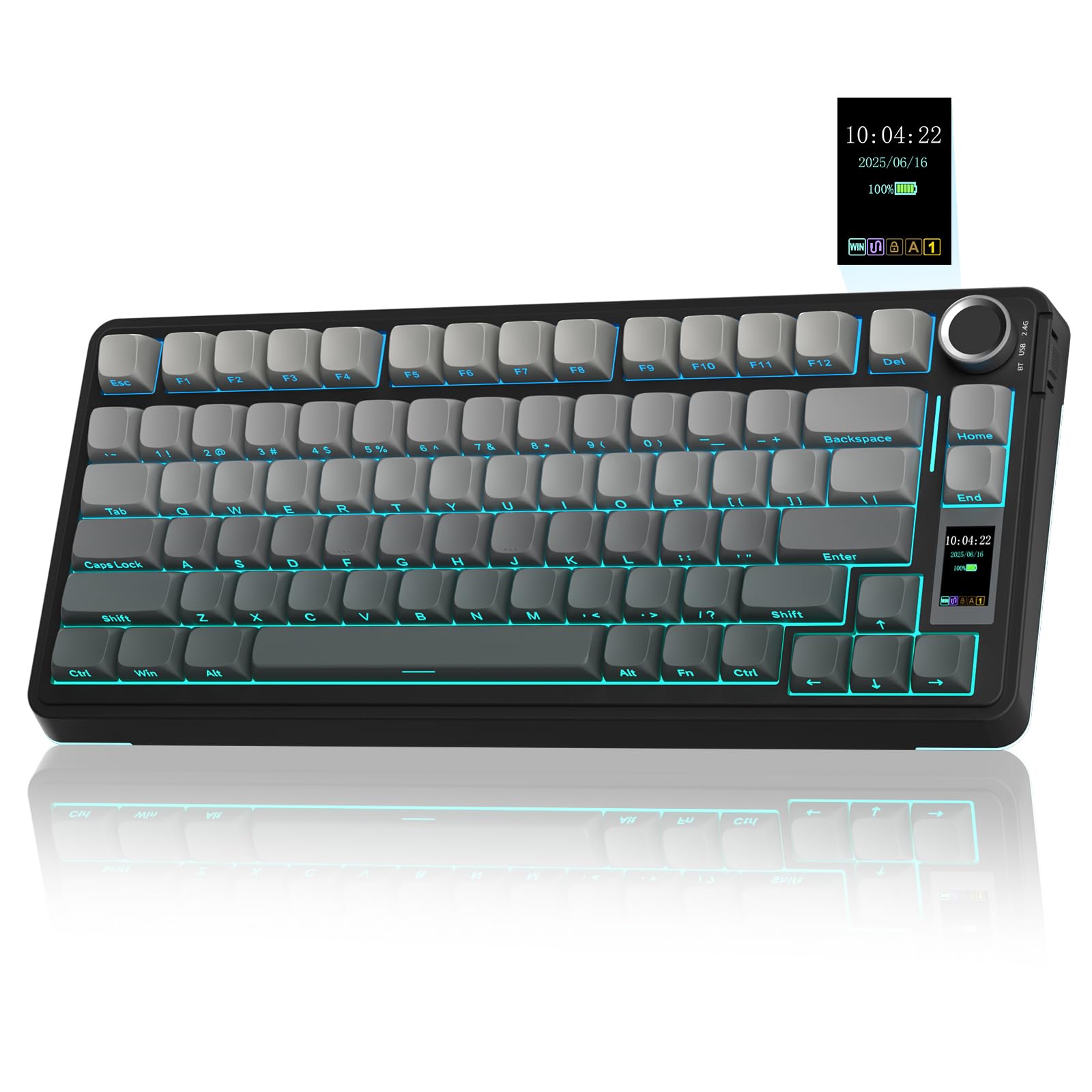
The keyboard that tells you your battery level without a single keystroke.
Some people want their keyboard to show its work. The S75 Pro does exactly that with an LCD screen that displays battery status, date and time, operating system, volume, backlight effect, and even animated GIFs. Paired with the multi-function knob, you can scan and adjust most of the board’s settings without opening a single menu. You have to set the screen image or GIF through Windows software in wired mode, which is the kind of one-time setup that is a real chore if you only use a Mac.
The 80-key 75% layout keeps the arrow keys and saves desk room, and the triple-mode connectivity — BT5.0, 2.4GHz, and USB-C — can hold up to five devices with a side button to switch. Hot-swap sockets accept 3-pin or 5-pin switches, so you can change the pre-lubed switches out later, and the 19 RGB effects with 16.8 million colors are settable from the knob, the software, or shortcut keys. Five layers of filler silencer firm up the sound, and the extended integrated silicone pad makes the whole thing feel more elastic. PBT keycaps go through double-injection molding and heat sublimation, so the legends resist fading and sweat, and the south-facing LEDs light the letters cleanly in the dark.
What owners like most is the sound — keys that are audible enough to enjoy but still creamy. It reads clearly as a budget-friendly route into a custom-feeling keyboard, and it is dependable across devices. The screen is the part that divides: some love the glanceable status, others find it more novelty than tool. Both camps agree on the typing, which is what matters day to day.
what separates it: that screen is the one feature here nothing else in this list offers, and it turns battery anxiety into a glance.
What to weigh: the screen setup is on Windows only, and the screen itself is a matter of taste.
Consider this if: seeing battery, mode, and time at a glance appeals to you, and you run Windows for setup.
skip it if: you’ll never touch the software or you want a keyboard without a screen to look after.
9. RK ROYAL KLUDGE R75 Wireless Mechanical Keyboard

The quiet overachiever — a 75% board where the sound punches above the price.
The R75 is the answer for someone who wants the 75% layout, a real 4000mAh battery, and a creamy typing feel without paying premium prices. It runs 68 keys with the function row and arrow keys intact, adds a CNC metal knob (cut from a solid block) that is itself hot-swappable and programmable, so you can swap it for the included cream switch if you want a custom key. It sits on a gasket mount (the plate floats on soft pads instead of screwing down hard) with five layers of sound-absorbing material, including poron cotton cushioning between the PCB and the case. A 1.2mm single-key slotted PCB is there to make each keystroke register with accuracy and stability.
The battery is listed at 4000mAh with at least 7 days of use, extendable if you turn the RGB off — a concrete number that tells you to budget your light use. The triple-mode connectivity covers Bluetooth, 2.4GHz, and wired USB, with up to three devices saved. Over 20 RGB modes with south-facing LEDs give you the glow, and N-key rollover plus a WIN key lock handle the accidental-press problem in intense sessions. The pre-lubed linear Cream switches do the heavy lifting on sound: smooth, creamy, and quiet enough that a late-night session shouldn’t wake the house.
The honest trade-off is repetition of a theme: going with a 75% at this tier means the enclosure is recycled ABS rather than aluminum, so it will never feel like the metal boards here. The knob is also the thing to be gentle with — it is functional and programmable, not armored. If creamy sound and a 4000mAh battery matter more than an aluminum case, the R75 delivers both at a budget price.
Where it wins: a 4000mAh battery, triple-mode connectivity, and a hot-swappable CNC knob at a budget price.
The honest limit: the ABS enclosure will not match the aluminum decks on feel — this is about sound and value, not material luxury.
Pick it for: a budget 75% board with creamy switches and real battery capacity.
pass on it if: aluminum feel is the thing you actually want.
Know the Specs
Gasket mount and layers of foam
A gasket mount means the plate that holds your switches floats on soft material instead of screwing directly into the case. The benefit is that the whole assembly has a little give, so the keypress feels softer and the sound gets fuller. Add layers of sound-absorbing foam — you will see counts like five layers on the GravaStar and the F65, and a poron cotton cushion on the R75 — and the hollow echo inside the case is reduced. This is why two boards with the same switches can sound completely different.
Hot-swap sockets
Hot-swap means the switches pull straight out of the PCB without soldering, so you can change from linear to tactile to optical-style feel whenever you want. Check whether the board supports both 3-pin and 5-pin switches if you plan to shop for aftermarket switches. Every board here with a hot-swap socket also includes a keycap and switch puller in the box, which you need to make the swap.
Battery rating and RGB tax
Battery numbers are quoted with the backlight off — that is the fine print. The top pick here says up to 470 hours with lighting off and up to 40 hours with it on; the R75 says at least 7 days of use and can be extended if the RGB is off. Treat the “off” number as your baseline for weeks of ordinary typing, and the “on” number as what you get if you leave the glow running.
Layout percentages and key count
The percentage names how much of a full-size keyboard’s width remains. A 60% board strips out the function row and arrow cluster; a 65% adds back arrows and a few essentials; a 75% keeps the function row and arrows but drops the number pad. The key counts here run from 66 on the smallest to 84 on the largest. Fewer keys means a smaller desk footprint but more function-key combinations to learn.
Common Questions
Will a 65% keyboard work with my Windows and Mac setup?
How long does the battery really last with the RGB on?
Can I replace the switches inside a hot-swap keyboard myself?
Is a 75% keyboard better than a 65% for gaming?
Do these keyboards work with a PlayStation or an Xbox?
What is the difference between 2.4GHz and Bluetooth on a keyboard?
Do I need the manufacturer software to use the keyboard?
How loud is a mechanical keyboard with linear switches?
What does QMK or VIA support get me that other software doesn’t?
Can I use a 75% mechanical keyboard with an iPad or tablet?
The Bottom Line
For most people hunting the best wireless compact mechanical keyboard, the winner is the GravaStar Mercury K1 Pro — it backs up its skeleton-frame looks with an aluminum build, a gasket-mounted feel that sounds like a real thock (a deep, satisfying clack), and up to 470 hours of battery with the lighting off. That runtime is the number to beat, and nothing else here matches it. The one thing to know: the Mercury K1 Pro is rated 4.5+ stars across 900+ ratings.
Want the smallest footprint or a first mechanical board on a tight budget? The RK Royal Kludge M65 gives you a 65% layout with an aluminum volume knob and up to 240 hours of battery for beginner money. If you care most about how the keys sound, the EPOMAKER x Aula F65 is tuned around a five-layer dampening stack for the deepest thock in the list.
And if you split your time between a desk and a bag, the ASUS ROG Falchion RX is the one to reach for — slim low-profile optical switches (shorter keys that fire on light), a touch panel, a protective cover, and up to 430+ hours with the lights off. That is the decision tree: pick the layout, then the switch feel, then the battery life you can live with.
How we choose
We do not accept paid placement. Every pick is matched to a real buyer and a real use-case; we do not hands-on test units.
Sources
Specifications: manufacturer listings and product documentation. Review insights: verified customer reviews, as of November 2026. Pricing: not shown on this page (it changes often); check the current price via the retailer link.
As an Amazon Associate, Tactical Gear Guy earns from qualifying purchases. This does not affect which products we feature.