Specs are compiled from manufacturer listings and verified buyer reviews and can change over time — please confirm the key details on the product page before buying.
Heat transfer vinyl is unforgiving — a blade set a hair too deep slices through the carrier sheet, and a cut a hair too shallow leaves you picking at a design that will not weed. The right cutter for a 24-inch back-print shop is not the one for a kitchen-table crafter, and cutting-bed width is the spec that separates them. Below you will find nine machines sorted by what they actually do well on HTV, from a 15-inch Silhouette with a 400mm/s head to a 24-inch Siser built for volume work, so you can match the bed size and blade system to the shirts you plan to make.
This guide is built by comparing the manufacturers’ published specifications and the patterns across verified customer reviews, so you get each pick’s real strengths and trade-offs instead of marketing spin.
Cutting width, blade automation and material thickness decide whether a machine suits HTV work far more than the brand badge, so every pick below is judged on those three specs.
Top Picks

How To Choose The Best Vinyl Cutter for Heat Transfer
Settle bed width first, because it is the one spec no firmware update or add-on can widen later. A narrow machine can only cut designs up to its maximum width, so a full chest print on an adult shirt may need splitting into pieces. Wide machines take the whole design in one pass and also let you nest several smaller cuts side by side to save material.
Cutting width and the shirt you plan to press
A 24-inch bed such as the Siser Romeo handles oversized back prints and multi-piece jobs in a single run. An 8.5-inch bed like the Likcut S41 is built around US Letter material, so it suits names, numbers, decals and sticker sheets rather than full fronts. Between those two you will find 12-inch, 14-inch and 15-inch beds, and the 15-inch Silhouette Cameo 5 Alpha Plus covers most standard shirt fronts comfortably.
Blade systems and why HTV punishes a wrong depth
Heat transfer vinyl has a carrier sheet on the back, so the blade has to cut the vinyl film without cutting through that backing. An AutoBlade sets depth automatically, which removes most of the guesswork and the test-cut ritual. Machines without automatic depth control rely on you dialing in pressure and blade exposure yourself, which is workable but asks more of you on a thin or stretchy HTV.
Registration marks and printed heat transfers
If you print a design on an inkjet printer and then want the cutter to trace around it, the machine reads registration marks printed at the corners of the sheet. A 4-point registration system corrects alignment both vertically and horizontally, which keeps printed stickers and printed transfers lining up. Without registration, you are limited to cutting shapes you designed yourself rather than artwork you printed.
Mat-based versus matless loading
A cutting mat holds the material flat with a tacky surface, which is ideal for small pieces, cardstock and anything that would otherwise shift. Matless loading feeds the material straight through the machine using pinch rollers, which is what you want for a long roll of HTV where a mat would run out after a single foot. Many machines do both, and that flexibility matters more as your order sizes grow.
Side-by-Side Comparison
| Model | Best For | Max Cutting Width | Max Cut Speed | Max Material Thickness | Amazon |
|---|---|---|---|---|---|
| Silhouette Cameo 5 Alpha Plus★ Best Overall | Wide, fast HTV production at home | 15 in | 400 mm/s | 0.5 mm | Amazon |
| Likcut S501 Creator BundleBest Starter Bundle | First-time HTV crafters | 114.3 mm | 81 mm/s | 0.5 mm | Amazon |
| Cricut Joy XtraSmallest Footprint | Small-space, portable cutting | — | — | — | Amazon |
| Likcut S41 | AI-generated sticker and HTV designs | 8.5 in | — | — | Amazon |
| Silhouette Cameo 5 Alpha | Quiet home and shared-space cutting | — | 400 mm/s | 3 mm | Amazon |
| USCutter MH Craft 14″ | Starting a home signage business | 10 in | — | — | Amazon |
| Cricut Maker 4 Beginner Bundle | A complete first-timer starter kit | — | — | — | Amazon |
| Brother SDX125EGY ScanNCut | Scanning hand-drawn designs | — | — | 3 mm | Amazon |
| Siser Romeo | Professional volume HTV work | 24 in | — | — | Amazon |
Detailed Reviews
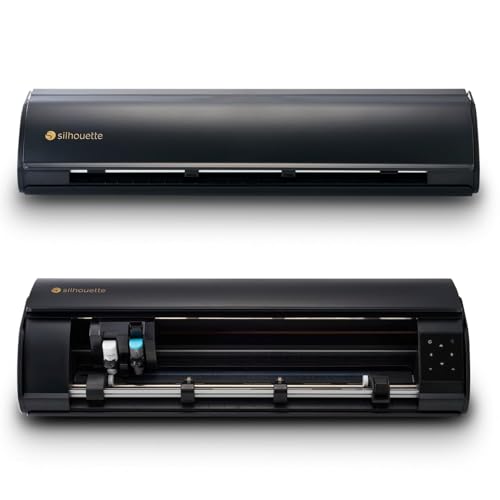
1. Silhouette Cameo 5 Alpha Plus 15″
Our pick — 4.5+★ from 950+ verified ratings; the strongest balance of quality and price.
A 15-inch bed that swallows a full shirt front without splitting the design
Fifteen inches of cutting width is the number to focus on here, because it means an adult chest print goes through in one pass rather than two stitched-together halves. Compare that with the Likcut S41 at 8.5 inches, and the Cameo 5 Alpha Plus gives you 15 inches versus 8.5 inches of bed — a difference you feel the moment you load a full-size HTV design.
Speed is the other headline. The head moves at up to 400 mm/s, which is the same figure the standard Cameo 5 Alpha posts and far ahead of the 81 mm/s of the Likcut S501 creator bundle. The AutoBlade sets its own depth, so you are not dialing in blade exposure by hand every time you switch from a thin stretch HTV to a thicker one. The electrostatic mat holds material up to 0.5mm thick flat without curling or tearing, and an active surface area of 15 in. x 16 ft. means long rolls are handled without reloading.
Reviewers single out the quiet motor and the Power Slide Lid, which opens and closes on its own so you can stow the machine without unclamping the material. It is 12.7 pounds, so it stays put on a bench rather than traveling. The catch is the software: Silhouette Studio is genuinely capable but has more of a learning curve than the app-driven competitors here, so budget an evening for your first cut. The one-touch job repeat helps once you are past that.
What earns it the top slot
- 15 in cutting width takes a full shirt front in one pass
- 400 mm/s cutting speed for fast repeat runs
- AutoBlade adjusts depth without manual setup
- Electrostatic mat holds up to 0.5mm material flat
- Power Slide Lid and one-touch job repeat
Where it asks more of you
- Silhouette Studio takes longer to learn than app-based rivals
- 12.7 pounds means it lives on a bench, not in a bag
Settle here if: you cut shirt fronts regularly and want the design to go through whole, fast, and without blade fiddling.
Think twice if: you want to be cutting within ten minutes of unboxing — the software needs a real sit-down first.
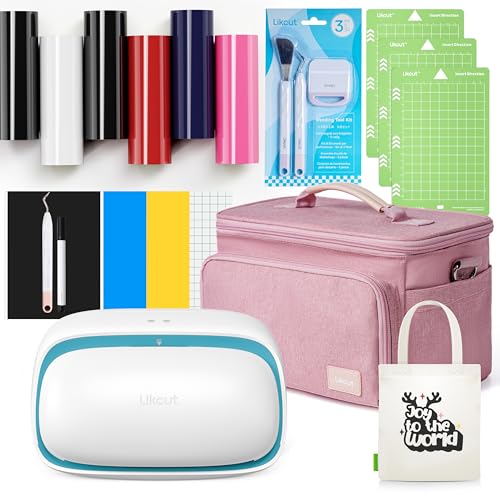
2. Likcut S501 Vinyl Cutter
The bundle that hands you vinyl, a weeder and a case before your first cut
Buying a cutter and then discovering you still need vinyl, a weeding tool and somewhere to store it all is the classic first-timer tax. This S501 bundle closes that gap: six rolls of iron-on vinyl, adhesive vinyl sheets, a watercolor pen, a weeding tool and a carrying case all arrive together. The machine itself cuts at 81 mm/s with a 0.5mm thickness capacity, which is honest for intricate T-shirt lettering and delicate wedding decorations rather than bulk production.
The size story is where it fits or does not. It loads material up to 140mm and cuts up to a 114.3mm width, so think names, numbers, small logos and party décor rather than a full back print. It handles vinyl, HTV, cardstock and paper, so you are not locked to one material as you learn. Across the review pages, buyers report it holds its own against the big-name cutters and that beginners get cutting quickly, with the recurring line that it performs like a machine costing considerably more.
Portability is the quiet advantage. With the case included, this is one of the few units here you can genuinely carry to a craft fair or a friend’s kitchen and set up on a table. The honest limit is blade control: there is no auto-depth system, so thin HTV asks you to test-cut and dial pressure yourself. That is a normal entry-level trade rather than a fault, but skip the test cut on thin HTV and you will slice through the carrier sheet on your first try.
Why it lands here: a complete HTV kit plus a carry case at the entry tier is the shortest path from box to first pressed shirt, and the 81 mm/s head is quick enough for small designs.
The honest catch: the 114.3mm cutting width rules out large single-piece transfers, and depth is set by hand rather than automatically.
Reach for this if: you are making your first batch of shirts and want everything in one box plus something you can pack away.
Look elsewhere if: your designs routinely run wider than a sheet of letter paper.
3. Cricut Joy Xtra
Under a pound, and it still cuts iron-on, cardstock and stickers
At 250 g this is the machine that disappears into a drawer and comes out on a kitchen table. That is the whole pitch for anyone short on bench space: a cutting area of 95.94 sq in and a build that works with 50+ materials, iron-on HTV included. It does not just cut, either — it draws and foils, so a single unit covers labels, decals and heat transfers.
For heat transfer specifically, the Print-Then-Cut route is the reason to consider it. It pairs with most inkjet printers so you can print full-color artwork and then have the Joy Xtra trace around it for stickers and transfers. Design Space carries a free library of 3,000+ images and 100+ fonts, and the bundle throws in 30 extra images plus a Cricut Access trial. Design Space’s ready-made images and fonts mean you can cut your first HTV design without any vector-drawing experience.
The recurring gripe is Bluetooth — wireless pairing is the most-discussed sticking point in the feedback, and a stable connection matters because a mid-cut dropout wastes the sheet. Quality is what buyers praise most by a clear margin, so the cuts themselves are not the worry. The other limit is simply physical: a 95.94 sq in area will not take a large back print, so treat this as a detail and small-format machine rather than a production unit.
The trade you are making: you trade capacity for portability and app simplicity — 250 g of machine that goes anywhere and needs no design skill.
Set-up advice: pair over a reliable connection before you load material, since drops mid-cut are the described headache.
Best served: small-space crafters and sticker makers who want HTV capability without giving up a countertop.
Not the one for: anyone cutting large-format transfers or working from a long roll.
4. Likcut S41 Vinyl Cutter Machine with Print Then Cut
Type a sentence, get a cut-ready design — no vector software required
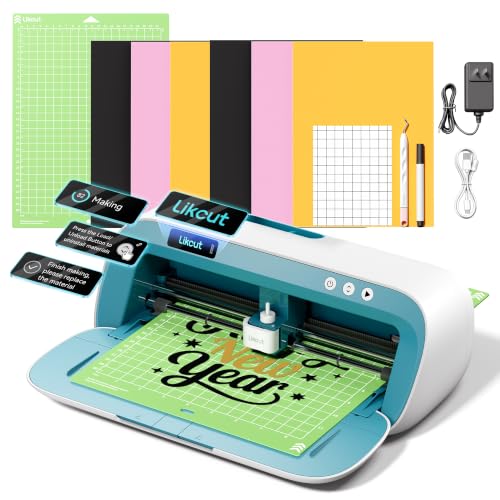
The feature nobody else here has is the AI design engine. You speak or type a prompt — the listing’s own example is a retro cat eating ice cream — and the machine turns it into a ready-to-cut design. For heat transfer, that means you can go from idea to a shirt graphic without ever opening a tracing program. It pairs with that with a 0.2mm accuracy tolerance, so fine detail in a small logo survives the cut.
Bed width is 8.5 inches, sized deliberately around US Letter material so a full sheet loads and cuts in one process without manual partitioning. That is the same 8.5 inches the Silhouette Cameo 5 Alpha Plus beats with its 15-inch bed — so this is a sheet-fed machine, not a roll-fed one. It runs wired over USB Type-C or wireless over Bluetooth 5.0, and an on-machine screen with one-touch Start/Stop and Load/Unload means you are not forever returning to a laptop.
The feedback pattern is straightforward: it performs well, it works right from the start, and it is small enough to sit on a desk — performance is the thing people praise most, with ease of use close behind. It weighs 3.9 kg, so desk-resident rather than portable. The honest question is the cutting width: 8.5 inches covers logos, names and sticker sheets but not a full adult back print.
Choose it when: design software is the thing stopping you, and you want prompts to do the drawing.
Pass if: your work needs a bed wider than a letter sheet.
5. Silhouette Cameo 5 Alpha
Three millimeters of material thickness with a motor you can work beside
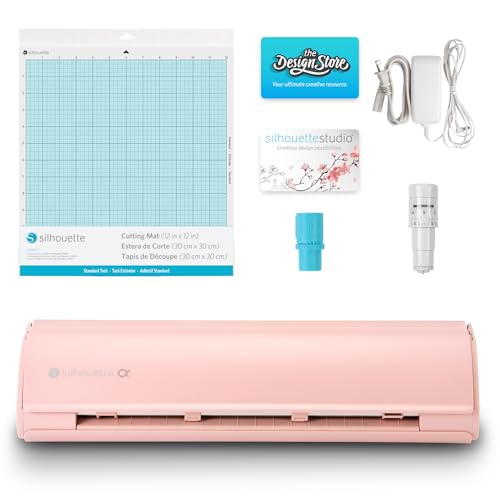
Where the Alpha Plus stops at 0.5mm of material, this Cameo 5 Alpha cuts up to 3mm thick, which opens up felt, thicker vinyl and heavier craft stock alongside standard HTV. The 4-point registration system corrects alignment vertically and horizontally, so printed heat transfers and stickers land where you drew them. The head still runs at up to 400mm/s, and Intelligent Path Technology reorders the cut sequence to reduce material stress and waste.
Noise is the practical reason people pick this one. The motor is built to cut quietly, which matters if the machine lives in a shared room or you cut in the evening. It works across vinyl, fabric and paper with a 12 in. x 24 in. active surface area, and at 11.5 pounds it is manageable to shift between benches. Fast Sketch Mode speeds up drawing and sketching without losing detail for anyone doing mixed projects.
Here is the fair warning the feedback makes clear: cutting performance and ease of use draw genuinely split reactions — plenty find it trouble-free, and a real share find the software frustrating to get along with. Performance is still what buyers praise most by a wide margin. If you will put in the time on Silhouette Studio, this cuts 3mm material quietly at 400mm/s; if you want zero learning curve, the app-driven Cricut and Likcut machines above suit you better.
What it does that others here cannot: cuts material up to 3mm thick at 400mm/s while staying quiet enough for a shared room.
Where the friction lives: the software is the stumbling block for a portion of buyers — plan to learn it rather than fight it.
Fits you if: you cut thicker materials, work in a shared space, and will invest the time in Studio.
skip it if: you expect to open the box and cut without reading anything.
6. USCutter 14 inch MH

A pinch-roller plotter with real pressure control, built for signage work
This is a different animal from the craft machines. It is a plotter with two fully adjustable pinch-rollers, adjustable speed and pressure up to a 350g maximum, and a 10-inch maximum cut width across a maximum cut length of 8ft. It comes with three 45-degree blades and a pen adapter, and it is aimed squarely at signs, banners, decals and heat transfer for apparel. If you are producing for customers rather than your own wardrobe, the adjustable pressure is what lets you dial in a carrier-sheet-safe cut on thicker HTV.
VinylMaster Cut comes bundled, so you can create original artwork or vectorize existing images without a separate software purchase. Lifetime phone support and web-based resources are part of the package, which matters for a plotter where pressure settings can puzzle a newcomer. It connects over USB and runs on a personal computer or desktop, so it is a workstation machine, not an app-controlled one.
The feedback is that it is a machine people rate highly for quality, with functionality drawing mixed notes — some find it works really well and others run into issues, which is the normal shape of a plotter that rewards setup. It has been around a long time under the MH Series name. The real limitation is the 10-inch cut width: it is narrower than the 14-inch frame suggests, so check any design against that number before you commit.
Built for: crafters turning a hobby into local signage and apparel work who want pressure control and desktop software.
Check first: the 10-inch maximum cut width, which is narrower than the 14-inch machine frame implies.
7. Cricut Maker 4
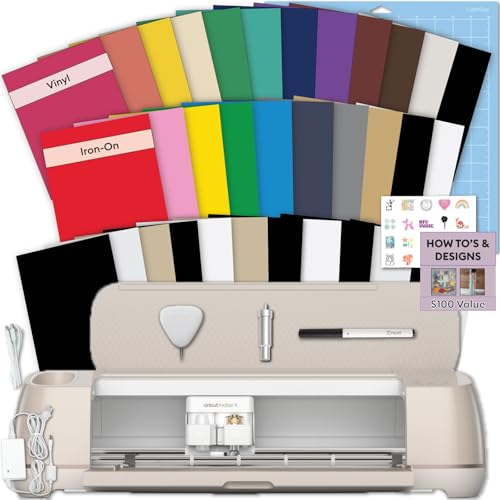
The box that already contains the vinyl, the mat, the blade and the tools
For someone who has never cut HTV, the appeal here is that nothing is left to buy separately. The bundle ships with the Maker 4 machine, a cutting mat, a blade, tools, vinyl and iron-on sampler sheets, and project inspiration — a 144 square inches working area to start on. Both adhesive vinyl and heat transfer vinyl are in the box, so you can try decals, stickers and a first custom shirt without a second order.
Cricut Design Space is the software, and the beginner setup is designed around instructional guides so the first project is guided rather than guessed. The machine runs on both Mac and laptop computers, and the feedback pattern is strong on quality and functionality with value close behind. It handles simple and detailed projects across stickers, shirts, cards and personalized gifts, so it grows with you past the first sampler sheet.
Two honest notes. Bluetooth connectivity draws mixed reactions, so a stable pairing at the start saves a mid-job dropout. And the bundle quality itself gets a mixed read — the included materials are a sampler, enough to learn on rather than to run a batch of shirts. Buy it as a learning kit that happens to be a capable machine, not as a material stockpile.
Who this is for: a first-timer who wants machine, mat, blade, tools and both vinyl types in a single box.
Set expectations on: the sampler materials are for practice, and Bluetooth pairing wants a steady connection before you cut.
Start here if: you have never cut a heat transfer and want a guided first project with nothing missing from the box.
Go bigger if: you already know your way around HTV and just want the machine.
8. Brother SDX125EGY ScanNCut Electronic Cutting Machine Grey
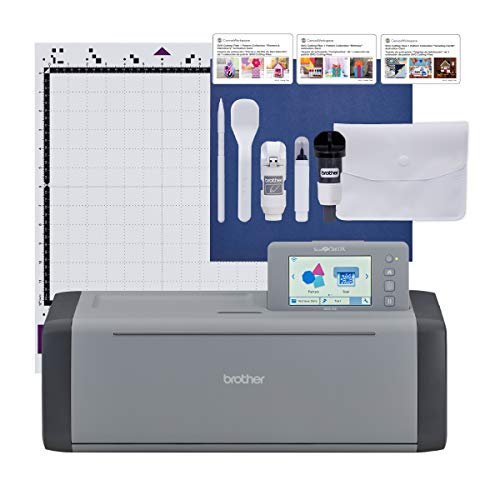
Scan a sketch on paper and cut it, with no computer in the chain
No other machine in this list scans. The ScanNCut series carries a built-in scanner that reads hand-drawn designs, printed stickers and materials and converts them into cut files, so a sketch on paper becomes a heat transfer without redrawing it in software. It ships with 682 built-in designs, 100 quilting patterns and 9 fonts, and a 5-inch touchscreen LCD for combining and customizing projects directly on the machine.
The auto blade and auto blade holder use a material sensor to detect thickness, so there is no blade adjustment or material selection — the machine sets itself, with a trial cut advised to confirm. It cuts up to 3 millimeter thick, covering paper, vinyl, fabric, balsa wood, chipboard, foam and felt. An 11.7 inch active surface area and a 12″ x 12″ standard tack mat are included, plus a pattern collection with 76 additional patterns and USB and wireless options for adding designs.
Quality and ease of use are the strengths people consistently land on, and the machine is quiet enough to cut without disturbing the room. But be straight about the split: functionality, value and cutting performance all get genuinely mixed feedback, and there are buyers who were unhappy with their purchase. The honest read is that it rewards learning — the scanner and on-machine screen are the differentiator, and if you will not use those, this is an expensive way to cut plain HTV at 18.2 pounds. It is sold for US use at 120 volts.
The one-of-a-kind part: a built-in scanner turns hand-drawn or printed artwork into cut files with no computer involved.
The fair caveat: cutting results draw split feedback, so this earns its place on the scanner and touchscreen rather than on being the simplest cutter.
Worth it when: your designs start on paper or arrive printed, and the built-in scanner is the reason you are buying.
Overkill if: you only cut clean digital files and never need to scan anything.
9. Siser Romeo 24″
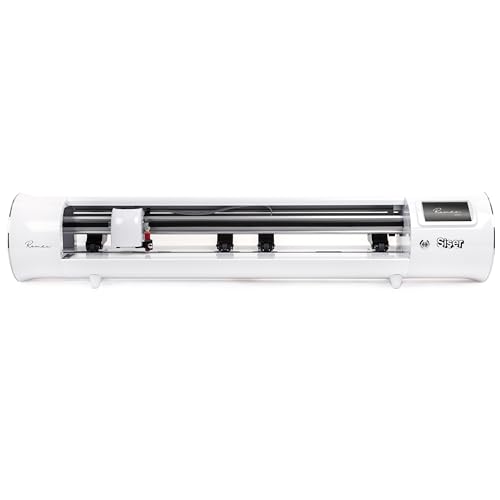
Twenty-four inches of open bed for people cutting for a living
The Romeo’s 24-inch cutting area is the largest here, double the 12-inch bed of its smaller sibling, and it takes a full back print with room to nest smaller pieces alongside it. A 285.5 square inch active surface area plus an open workspace design is why this reads as business equipment rather than hobby gear. Siser HTV and EasyPSV cuts run on preinstalled settings, and it handles cardstock and stickers too.
Matless cutting is the feature that changes daily work: you can load material straight into the machine and use the entire cutting area, with a 12″ x 12″ Light Tack mat included for the jobs that need one. Adjustable pinch rollers, variable grit rollers and commercial-level blades are the professional touches, and the touch-screen interface is designed to be simple enough for a first-timer to set up. It connects to Windows and Mac over WiFi.
Performance is what people praise most here by a wide margin, and the machine is notably quiet and precise for its size. Reliability and ease of use draw more mixed reactions, so expect to learn its loading and alignment habits rather than assume it is plug-and-play. At 10 kg, it owns its bench permanently. For anyone running shirts and transfers at volume, the 24-inch bed and matless feeding are what justify the space it takes.
The right tool for: small businesses cutting large designs or running batches, where the 24-inch bed and matless loading pay off daily.
Not for a kitchen table: it is 10 kg with a 36.5-inch width, and it wants a dedicated work surface.
Know the Specs
Cutting width in inches
Cutting width is the widest design the machine can take in one pass, and it is the spec that decides whether you cut a full shirt front or piece it. A 24-inch bed like the Siser Romeo handles oversized back prints; an 8.5-inch bed like the Likcut S41 is built around US Letter material for names, numbers and stickers. Note that the maximum cut width is often narrower than the machine frame — the USCutter MH is a 14-inch plotter with a 10-inch maximum cut width. Check the cut width, not the frame, against your largest design.
Blade depth and automatic blade systems
Heat transfer vinyl has a carrier sheet behind the film, so the blade must cut the vinyl without slicing through the backing. An AutoBlade, as on the Silhouette models, sets that depth for you. The Brother ScanNCut goes further with a material sensor that detects thickness so no blade adjustment or selection is needed, though a trial cut is still advised. Machines without auto depth rely on you setting pressure and blade exposure by hand — the USCutter MH offers adjustable pressure up to 350g for exactly this, and entry units like the Likcut S501 ask you to test-cut before a run.
Cutting speed in mm/s
Speed is quoted in mm/s, the distance the head travels each second. The Silhouette Cameo 5 Alpha Plus and Cameo 5 Alpha both run up to 400 mm/s, while the Likcut S501 runs at 81 mm/s. Faster matters on repeat jobs and large designs where the head travels a long path, and it also reduces the chance of the vinyl shifting on the mat during a long cut. For small lettering on a single shirt, 81 mm/s is entirely workable; for batches, the faster head saves real time.
Registration marks and Print-Then-Cut
Registration marks are printed alignment marks the machine’s sensor reads so it can cut around printed artwork. The Silhouette 4-point registration system corrects vertically and horizontally for printed stickers and heat transfers. The Cricut Joy Xtra and Likcut S41 both support print-then-cut workflows with a compatible inkjet printer, and the Likcut S41 pairs this with a 0.2mm accuracy tolerance. Without registration, you are limited to cutting shapes you designed yourself rather than tracing a printed design.
Common Questions
Can these machines cut heat transfer vinyl as well as adhesive vinyl?
What cutting width do I need for a full shirt front?
Do I need a separate heat press to apply HTV after cutting?
Is an AutoBlade better than setting blade depth by hand for HTV?
Can I cut a printed design rather than just a shape I drew?
How thick a material can a vinyl cutter handle?
Can I load a long roll of HTV instead of a cut sheet?
Do I need design software experience to use these cutters?
Is a wider machine better if I only cut small logos?
The Bottom Line
If heat transfer is the core of what you do, the Silhouette Cameo 5 Alpha Plus is the pick that covers the widest range of jobs: 15 inches of bed takes a full shirt front, the 400 mm/s head handles repeat runs, and the AutoBlade removes the depth guesswork. It is the crowd favorite here too, and the quiet operation and self-opening lid make it easy to live with on a bench.
For a first batch of shirts with everything in one box, the Likcut S501 Creator Bundle gets you cutting with vinyl, a weeder and a case included. And if you are cutting for customers at 24 inches wide, the Siser Romeo is the one that takes full back prints and matless rolls without splitting the design — buy the bed width that matches your largest single design and you will not outgrow it.
How we choose
We do not accept paid placement. Every pick is matched to a real buyer and a real use-case; we do not hands-on test units.
Sources
Specifications: manufacturer listings and product documentation. Review insights: verified customer reviews, as of November 2026. Pricing: not shown on this page (it changes often); check the current price via the retailer link.
As an Amazon Associate, Tactical Gear Guy earns from qualifying purchases. This does not affect which products we feature.