Specs are compiled from manufacturer listings and verified buyer reviews and can change over time — please confirm the key details on the product page before buying.
Pairing a gamepad to a MacBook is the easy part; living with it for a year is not. The part that actually decides whether you keep it is whether the sticks still track straight after a few months, and whether macOS really recognizes it without a dongle dance. The DualSense is the safest shortcut because macOS handles it natively, but it is far from the only sensible answer. Below you get nine wireless pads that pair with a MacBook, sorted by what they are honestly best at, with the drift-prone ones flagged.
This guide is built by comparing the manufacturers’ published specifications and the patterns across verified customer reviews, so you get each pick’s real strengths and trade-offs instead of marketing spin.
You’ll see which layouts suit long sessions, which sticks use magnetic sensing so drift never starts, and which battery numbers actually mean a weekend of play before a recharge. Here is the honest shortlist for a wireless controller for MacBook.
Top Picks


How To Choose The Best Wireless Controller for MacBook
The MacBook is the picky one in this lineup. Windows happily installs a driver for almost anything; macOS gives you a clean, native link to certain pads and mostly nothing for others. So the first question is not “which pad is best” but “does this pad speak Mac without help”.
Native macOS support versus Bluetooth workarounds
A DualSense pairs to a MacBook over Bluetooth and macOS recognizes it as a gamepad with no extra software. Third-party pads usually connect, but some rely on a mode-switch button or a specific button combo to land in the right profile. The 8Bitdo Pro 2, for example, has a 4-way mode switch that lets you jump straight to macOS so the Mac sees a proper controller rather than a generic keyboard.
Stick technology matters more than button count
Traditional thumbsticks use potentiometers — physical wipers that wear as you move the stick. That wear is what people call drift. Hall-effect sticks read the stick’s position with magnets instead, so there is no wiping surface to wear down. If you plan to use the same controller for years, this is the spec worth paying attention to.
Battery, charging, and the cable you already own
Battery figures vary wildly: a 400mAh pad and a 1500mAh pad are not the same purchase. Look at both capacity and advertised play time, and check whether the pad charges over USB-C (which your MacBook charger likely already handles) or asks for something more specific.
Side-by-Side Comparison
| Model | Best For | Connectivity | Battery | Sticks | Amazon |
|---|---|---|---|---|---|
| PlayStation DualSense (Midnight Black)★ Best Overall | Plug-and-play Mac plus PS5 | Bluetooth, USB-C | — | Standard | Amazon |
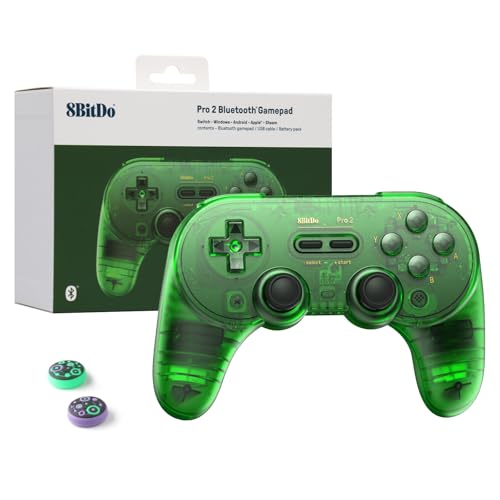
| 8Bitdo Pro 2 (Transparent Green)Best All-Rounder | Best all-rounder for Mac | Bluetooth, USB | 1000mAh | Hall-effect | Amazon |
| EasySMX X05ProBest Value | PC-first with charging dock | 2.4G, Bluetooth, USB-C | 1000mAh | Hall-effect | Amazon |
| SFGSUP Wireless Pro Controller | Long-session value | Bluetooth | 1500mAh | Hall-effect | Amazon |
| VidPPluing Wireless Controller | PS5 look and feel | Bluetooth | 1500mAh | Hall-effect trigger | Amazon |
| QRD Spark N5 | Multi-console tinkerer | Bluetooth 5.3 | 800mAh | Hall-effect | Amazon |
| AFMVV Wireless Controller | Cheap PS5/PC crossover | Bluetooth | — | Standard | Amazon |
| 8Bitdo Sn30 Pro+ | Retro and 2D comfort | Bluetooth, USB-C | — | Adjustable | Amazon |
| arVin Mobile Game Controller | Phone-first, Mac as backup | Bluetooth | 400mAh | Standard | Amazon |
Detailed Reviews
1. PlayStation DualSense Wireless Controller — Midnight Black
Our pick — 4.5+★ from 51,500+ verified ratings; the strongest balance of quality and price.
The fastest route from a MacBook to a working gamepad — Bluetooth, no driver, no mode switch.
Why it wins is boring and useful at once: the Mac sees it as a PlayStation controller over Bluetooth and just works, with no mode button and no pairing trick. Sony states support for Mac computers directly alongside Windows PC, Android, iOS, and PS5, so the same pad travels across your whole device pile.
The hardware itself is 14 buttons with a built-in microphone and a 3.5mm headset jack on the pad. Haptic feedback makes the body react physically to what happens on screen, and adaptive triggers shift tension at your fingertips — a racing title feels different from a shooter without you touching a settings menu. A dedicated mute button cuts voice capture instantly, which is a nicer detail than it sounds when a call comes in mid-match.
It’s heavy in the hand relative to a compact travel pad, at 280 g, and the shape is clearly sculpted for full-size hands. What keeps it at the top is consistency — the quality of the build and the way the functions behave together are the two things owners single out most, and neither has a real rival here on unboxing reliability.
What earns the top spot
- Native Bluetooth pairing to a MacBook with no extra software
- Haptic feedback and adaptive triggers that shift resistance in-game
- Microphone, 3.5mm headset jack, and dedicated mute button built in
- 14 buttons covering every PS5 and PC layout you’ll meet
Where it asks more of you
- 280 g — noticeably heavier than the compact picks further down
- Full-size shell is roomy for smaller hands
- Costs more than the mid-tier alternatives without Hall-effect sticks
Reach for this if: you want the shortest possible route from MacBook to playing, and you might also use it on a PS5.
Consider a step down if: Hall-effect sticks and a lighter shell matter more to you than brand-native pairing.
2. 8Bitdo Pro 2 Bluetooth Controller
Hall-effect sticks that rule out drift, plus a dedicated macOS position on the mode switch.
The 4-way mode switch is the star here for MacBook buyers: flick it to macOS and the pad presents itself correctly, no software dance required. Switch, D-input, and X-input sit on the same switch, so the same controller moves between an iPad, a PC, and a retro emulator without a second purchase.
Hall-effect sticks mean the position is read magnetically rather than by a wiper, so the drift that kills ordinary pads years in doesn’t start. The 1000mAh lithium battery is rated for 20 play hours with a 4-hour charge — enough for several evenings off one top-up. Two pro-level back buttons sit under your ring fingers, and the 8BitDo Ultimate Software lets you remap any button or build a macro.
The shell is sized more like a classic console pad than a modern ergonomic brick, which some hands love and others find small. Connectivity is the recurring gripe — it links cleanly to an iPad, but Bluetooth pairing can be fussy depending on the device, and macOS is exactly the kind of device where that shows up. When it connects, it stays connected.
Build and battery carry it: quality and battery life are the two things that consistently earn praise here, and a 20-hour rating backs up the second one.
Pairing is the gamble: expect the first Bluetooth handshake with a new device to take a couple of tries before it settles.
Suits you best when: you want one pad that covers Mac, iPad, and Steam without drifting out of calibration.
Heads up: you’ll need to be patient on the initial Bluetooth pairing with your MacBook.
3. EasySMX X05Pro Wireless PC Gaming Controller
A magnetic charging dock and 1000Hz polling — a PC-first pad that quietly handles the Mac too.
The dock is the hook. Drop the controller onto the magnetic base and it starts charging and reconnects on its own, so grab-and-play is the normal state of affairs rather than a ritual. The dock also stores the 2.4G receiver, which is one less tiny USB stick to lose in a bag.
Inside sits a 1000mAh battery — the same capacity as the 8Bitdo above versus the 400mAh cell in the arVin phone pad. You also get Xbox-style asymmetric sticks, dual-stage triggers that lock between 3mm for fast shooting and 9mm for precise racing, and 2+2 rumble motors. The sticks themselves are 11-bit Hall-effect sensors running 1000Hz polling on 2.4G and wired, so aiming stays consistent rather than wandering.
It does get loud in a good way — over 10 noise-reduction points keep late-night sessions quiet, and the silicone-dampened sticks stay smooth rather than clacky. On the Mac side it pairs over Bluetooth, and it’s the pad owners actually mention works well with both a MacBook and an iPhone. The honest caveat: this is a PC-first design, so if you want a Mac-native feel from the start, the DualSense is the safer call.
What it does well: the charging dock and the 1000Hz polling together make it feel like a desk accessory that happens to be a controller.
The trade-off: no native macOS support from the start, so plan on a Bluetooth pairing step.
Pick this one if: your MacBook shares a desk with a PC and you want one dock to rule both.
Skip if: you want the pad to behave perfectly the first time you flip open the lid.
4. SFGSUP Wireless Pro Controller for PS5, PC, Mac, Steam Deck
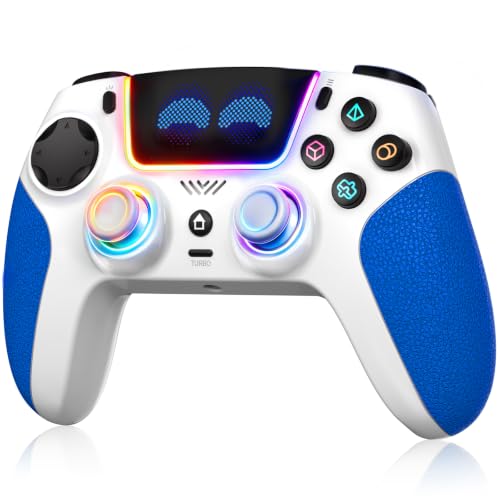
A 1500mAh pad built for long sessions, with eight RGB colours you can dim or switch off.
Battery is where this one leads. It’s the right choice if you game in long stretches and hate stopping to charge more than you hate a slightly heavier controller.
Hall-effect joysticks and triggers kill drift at the source — no contact points to wear — which is why the build is pitched as longer-lived than a standard potentiometer pad. Dual-motor vibration and a 6-axis motion system (a 3D-sensor plus a G-sensor working together) give you tilt-steering in racing games and motion aiming without touching the stick. Turbo handles auto-fire, and the back buttons can be remapped to macros.
Eight RGB colours with four lighting modes is the kind of thing buyers either love or leave on default. Where it gets critical is durability: it’s the aspect owners are most divided on, with button responsiveness splitting the same way. That’s normal for a value-priced PS5-style pad, but if you want zero uncertainty on longevity, you’d be better served by a premium brand.
The case for a long session
- 1500mAh battery rated for up to 10 hours per charge
- Hall-effect sticks and triggers with no wearing contact points
- 6-axis motion plus dual-motor vibration for racing and shooters
- Programmable macros and turbo on the back buttons
Where it asks you to be careful
- Durability and button responsiveness are the mixed points in owner feedback
- PS5-centric — Mac support is there but not the main pitch
Worth grabbing if: you play for hours at a time and want the pad still alive when you’re done.
Check yourself first: you need guaranteed long-term reliability and can’t tolerate a mixed record on durability.
5. VidPPluing Wireless Controller with LED/Hall Trigger/1500mAh
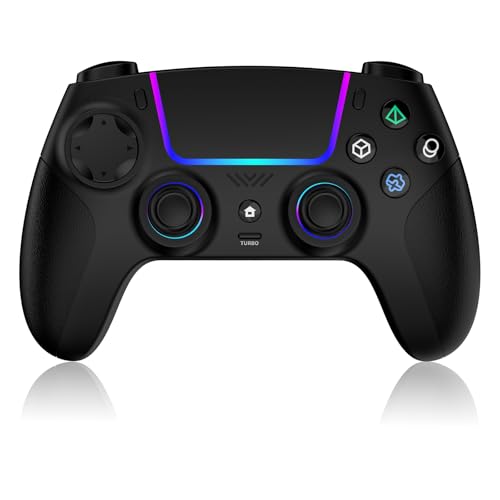
A PS5-shaped pad with a 1500mAh battery and a soft-touch, non-slip shell.
Compatibility is the sales pitch: PS5, PS5 Pro, Slim, PC, and Steam Deck, with the maker saying your PS5 games load without extra setup. Mac isn’t in the headline list here, so treat this as a PS5-first pad you can also pair to your MacBook — check that your specific Mac setup behaves before committing.
The hardware is a PS5-style body with 7-colour RGB that runs in four modes (steady, breathing, colour cycle, reactive), programmable M1 and M2 back buttons for macros, and a 3-speed turbo for auto-fire in shooters. A 3.5mm headset jack is there if you want wired audio. The 1500mAh battery matches the SFGSUP’s capacity, so you’re not sacrificing runtime for the PS5 silhouette.
The two honest caveats are battery life and durability — both are points where owners disagree — and vibration comes in for the most criticism of anything on this pad. The shell itself is ergonomically sound, comfortable in both small and large hands, so the complaints are about internals rather than shape.
What’s solid: soft-touch, non-slip grip, 1500mAh capacity, and a familiar PS5 control layout.
What to watch: vibration and battery longevity are the split points; you may get a great unit or a merely okay one.
Best for you if: you want a PS5-style pad you can plug into a PC or Steam Deck and treat as a spare.
Look elsewhere if: the Mac is your main platform.
6. QRD Spark N5 Wireless Controller
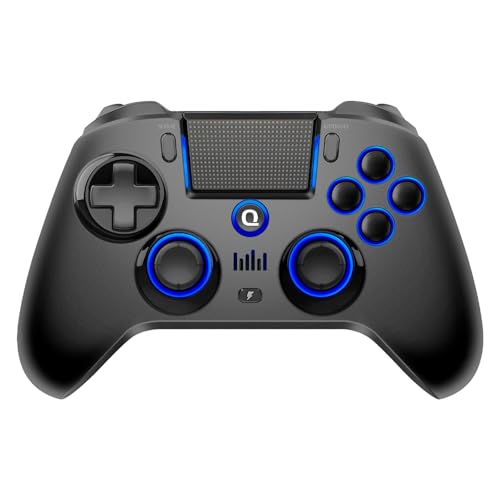
The multi-console pad — 22 buttons, Hall-effect sticks, and a firmware update you must run first.
This is the widest compatibility list here: PS4, PS4 Slim, PS4 Pro, PS3, Steam Deck, PC, Windows, macOS, iOS, and Android over Bluetooth 5.3. That makes it the pad for a MacBook owner who also owns an old PS3. For PS5 games it needs the separate QRD BlackPill converter, so treat PS5 as a bonus rather than the core use.
The standout is the control density: 22 buttons versus the arVin’s 12 and 22 versus the DualSense’s 14. That includes N1 and N2 rear buttons for on-controller macro recording plus turbo on face buttons, shoulders, and triggers at multiple speed levels. Hall-effect sticks add adjustable sensitivity and a manual calibration mode that corrects centre offset and drift — a spec that rewards fiddlers.
The honest side: it’s heavier than the phone-focused pads at 0.39 kg versus the arVin’s 0.22 kg, and it demands work. The maker requires a firmware update before pairing is reliable, and it warns against fast chargers for the 800mAh battery — stick to a 5V USB source. The ergonomics are widely appreciated and quality is the aspect owners speak to most, but compatibility is the one buyers find mixed, so budget an evening for the setup.
The stand-out detail: 22 buttons with rear macro recording and turbo give you control options most pads here can’t match.
The catch: you have to update the firmware first, and the 800mAh battery wants a plain 5V source, not a fast charger.
This one is for: the owner with a mixed console shelf who doesn’t mind a firmware update to get there.
Look past it if: you can’t bother with setup and want a pad that works straight from the start.
7. AFMVV Wireless Controller
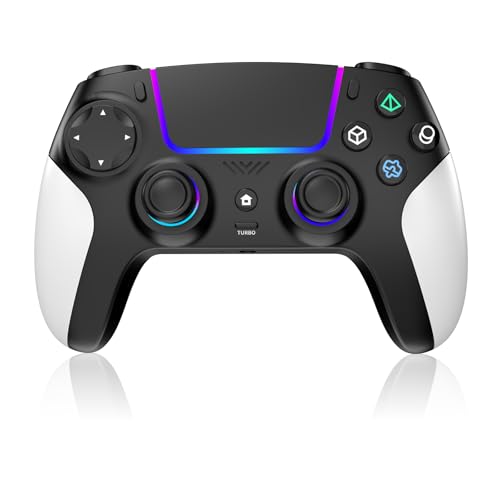
A black-and-white anti-slip pad built around customisable LED lighting and precision triggers.
The important disclosure sits right on the listing: due to a recent PS5 system update, vibration and controller speaker functions may be temporarily unavailable. That’s a compatibility issue, and the maker says a future PS5 update may restore it — but if either feature is a dealbreaker, read that note before buying.
For a MacBook, the spec sheet lists both PC and Mac alongside the PS5, so it can serve as a secondary pad on your Mac. The pad itself has sensitive analog sticks and precision triggers tuned for low-latency response, plus an ergonomic balanced shell and a built-in LED lighting system with customisable effects. There’s a touchpad, 6-axis motion, and a rechargeable battery sized for “hours” rather than a precise figure.
Owner feedback is warm on the grip and lighting but split on runtime — battery life is the noted weak point, with some saying it’s fine and others saying it drains faster than they’d like. Light effects are a genuine highlight if you’re showcasing a desk setup; they’re not why you’d buy it as a serious competitive controller.
What you’ll like about it
- Balanced ergonomic grip with anti-slip surface
- Customisable LED lighting for a desk display
- Sensitive analog sticks and precision triggers
- Mac and PC both listed as compatible
Where you should be warned
- Vibration and speaker may be unavailable on newer PS5 firmware
- Battery life is the split point in owner feedback
Great for a display shelf: you want a gamepad that looks good sitting next to your laptop.
Not the one if: you need reliable haptic feedback on a modern PS5 today.
8. 8Bitdo Sn30 Pro+ Bluetooth Controller — G Classic Edition

The old-school silhouette with modern innards — built for 2D games and long retro sessions.
This is a different beast from the rest. It’s a Super Nintendo-style pad with modern internals: 16 buttons, rumble, motion controls, USB-C charging, and an adjustable hair-trigger setup plus modifiable joystick sensitivity. For emulators and 2D titles, the layout beats a PS5-style shell.
The back catalogue of Switch, PC, macOS, Android, Steam, and Raspberry Pi is covered, and the Ultimate Software lets you remap button functions and tweak vibration. The manufacturer note is worth repeating: charge it only with the USB cable in the box, not a stray cable on your desk.
The owner consensus is nostalgia done right — the shell feels like a PS4 controller in the hand, and compatibility across devices is broad. That said, functionality and connectivity are the mixed points, with some reporting it drops off a Switch mid-game and doesn’t always re-connect cleanly. On a Mac the pairing is more forgiving, but expect the same Bluetooth temperament.
A niche done well: quality and compatibility are the things this pad is praised for most, and for retro gaming there’s little to beat it.
The honest catch: Bluetooth reliability is the recurring weak point, and it expects its own charge cable.
Buy it if: your library is heavy on emulation, 2D platformers, and Steam indie titles.
Hold off if: you want a single pad that pairs blind every time on macOS.
9. arVin Mobile Game Controller
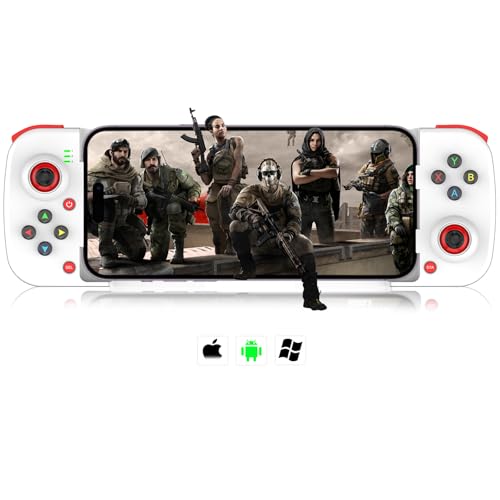
A telescopic phone-first pad that squeezes into a backpack and covers Mac as a bonus.
The telescopic form is the point: it clamps an iPhone or Android phone into a gamepad shape, and the same Bluetooth link handles a MacBook when you want it. That makes it the cheapest way to get a physical stick in your hand for phone games and desktop play from one device.
Macro buttons M1 and M2 sit on the back and can be mapped to A/B/X/Y, LB/RB, or the D-pad, which helps with rapid-fire in games like Call of Duty Mobile and Apex Legends Mobile. The 400mAh battery and 18-hour play rating are modest numbers, and a 2-3 hour charge gets it full. It’s a light, 0.22 kg pad with 12 buttons versus the QRD’s 22 — a real difference in what you can bind.
The compatibility list has honest edges: it works with iPhone, iPad, and Android, and pairs to Mac over Bluetooth (press RB+Home to connect to a PC). But it’s not built for Apple TV, iPod, Fire TV, or TV boxes, and it explicitly won’t work for PUBG Mobile, Fortnite, or Free Fire on those platforms. If Mac is your main platform, this is a backup controller — good for occasional office breaks, not a daily driver.
Why buy this one
- Telescopic grip clamps a phone for true mobile play
- Pairs over Bluetooth to Mac as a secondary controller
- M1 and M2 macro buttons reduce button-mashing fatigue
- 18-hour rated play time from a 400mAh cell
Where it stops short
- 400mAh battery versus the 1500mAh cells in the larger pads
- Not for PUBG Mobile, Fortnite, or Free Fire
- 12 buttons limits your macro and mapping options
Perfect for a commuter: you want a phone gaming pad that also pairs to a MacBook now and then.
Not for a desk: you’re buying for a Mac primarily, where a native-first pad beats this every time.
Know the Specs
Hall-Effect Sticks
A Hall-effect stick reads its position with a magnetic field rather than a physical wiper rubbing on a track. The practical consequence: no wearing surface, so the slow drift that plagues ordinary pads over years never starts. The 8Bitdo Pro 2, EasySMX X05Pro, SFGSUP, and QRD Spark N5 all list Hall-effect sticks; the DualSense and arVin do not.
Battery Capacity in mAh
mAh is a measure of how much charge a battery holds. A 400mAh cell and a 1500mAh cell are not the same device — expect more runtime from the larger cell if the chips draw the same. Also check the charge time: the QRD’s 800mAh and the arVin’s 400mAh need different handling, and some pads restrict you to a plain 5V charger.
Polling Rate in Hz
The EasySMX X05Pro runs 1000Hz polling on 2.4G and wired, which means it checks the stick position 1000 times a second. Higher polling means less input lag and smoother aim in fast titles. Most pads on this list don’t publish a polling number, so if you’re buying for competitive shooters, that spec is worth hunting for.
Mac Compatibility Labels
A “Mac” label on the box doesn’t mean native support. The DualSense pairs through macOS itself, the 8Bitdo Pro 2 has a dedicated macOS switch position, and the arVin needs the RB+Home combo for PC/Mac. Read the pairing instructions before you buy, because that’s where most complaints come from.
Common Questions
Will a PlayStation DualSense controller pair to my MacBook without extra software?
Do Hall-effect sticks really prevent stick drift?
How many hours of play can I expect from a 1000mAh or 1500mAh controller?
What’s the difference between 2.4G and Bluetooth for Mac gaming?
Can I use these controllers with Steam on macOS?
Why does the QRD Spark N5 need a firmware update before first use?
Which controllers have programmable back buttons?
Is the 8Bitdo Pro 2 better than the DualSense for Mac gaming?
Why do some controllers say they won’t work with PUBG Mobile or Fortnite?
Should I avoid fast chargers with these controllers?
The Bottom Line
For most MacBook owners, the wireless controller for macbook winner is the DualSense because it pairs to a Mac without software and covers a PS5 at the same time — the fastest route from MacBook to playing. If you want Hall-effect sticks and a dedicated macOS mode switch, the 8Bitdo Pro 2 is the smarter long-term buy. And for a dock that keeps a PC-first pad topped up, the EasySMX X05Pro is the one to reach for. One practical nudge: with drift being the most common reason a controller gets replaced, spending the few extra dollars for a Hall-effect pad is worth a serious look.
How we choose
We do not accept paid placement. Every pick is matched to a real buyer and a real use-case; we do not hands-on test units.
Sources
Specifications: manufacturer listings and product documentation. Review insights: verified customer reviews, as of November 2026. Pricing: not shown on this page (it changes often); check the current price via the retailer link.
As an Amazon Associate, Tactical Gear Guy earns from qualifying purchases. This does not affect which products we feature.