Specs are compiled from manufacturer listings and verified buyer reviews and can change over time — please confirm the key details on the product page before buying.
Rear paddles are the single upgrade that changes how you play — they let you jump, crouch, and reload without ever pulling your right thumb off the aim stick. The catch is that a lot of so-called “pro” controllers sell you four paddles and then give you mushy buttons, drifting sticks, or a wireless link that drops mid-match. This guide separates the controllers that genuinely hold up from the ones that only look the part.
This guide is built by comparing the manufacturers’ published specifications and the patterns across verified customer reviews, so you get each pick’s real strengths and trade-offs instead of marketing spin.
You will see exactly how many paddles each one carries, whether those paddles can be remapped, and which connection type keeps latency low. Every pick below is a wireless pad with real back buttons, so you are never trading away the thing you came for — and this breakdown of the wireless xbox controller with paddles covers what actually matters.
Top Picks

How To Choose The Best Wireless Xbox Controller with Paddles
Most buyers walk in asking “how many paddles?” and walk out with the wrong pad. Paddle count is easy to print on a box; what actually decides whether you play better is where those paddles sit under your fingers, whether the software lets you rebind them per game, and whether the sticks stay accurate after months of use.
Paddle count versus paddle placement
Two rear buttons and four rear paddles are different tools. A two-button layout suits players who mainly want a jump or crouch shortcut without retraining their grip. A four-paddle layout is for players who want jump, crouch, reload, and swap all mapped to fingers that never leave the sticks. The number on the spec sheet is only half the story — check that the paddles fall naturally under your middle and ring fingers rather than forcing your grip open.
Stick technology: Hall Effect versus TMR versus standard
Stick drift — where the cursor creeps even when you are not touching the stick — is the number one reason pro pads get retired. Hall Effect sticks use a magnetic sensor instead of physical contact, so there is no wear surface to grind down. TMR (tunnel magnetoresistance) sticks are a newer magnetic design that several makers now pair with a high-resolution sampling chip for finer, more stable aiming. Either magnetic type is a meaningful long-term upgrade over a conventional carbon-film stick.
Wireless, Bluetooth, or wired — what each costs you
A 2.4GHz wireless dongle usually gives you the lowest latency and the most stable link, and it is the mode most competitive players leave the controller in. Bluetooth is the easiest for pairing to a phone or tablet but is the slowest of the three for twitch reactions. Wired USB-C is the fallback when you want zero dropouts or you are out of charge — many pads let you play and charge over the same cable.
Trigger stops and remapping: the features you will actually feel
A trigger stop shortens the travel of the trigger so it fires earlier — handy in shooters, less so in racing games where you want full analog range. Look for pads that let you switch between a short and full travel rather than locking you into one. On the software side, confirm the paddles can be remapped per game and saved to onboard profiles, so your settings travel with the controller instead of living on one console.
Side-by-Side Comparison
| Model | Best For | Rear Paddles / Back Buttons | Total Buttons | Connectivity | Amazon |
|---|---|---|---|---|---|
| DreamController Gokku Ultra Elite Series 2★ Best Overall | Collectors who want a one-off finish | 4 paddles (Elite Series 2 base) | 10 | Wireless | Amazon |
| 8BitDo Ultimate 3-mode (Rare 40th)Top Performer | Best all-round value | 2 Pro back paddle buttons | 16 | 2.4G, Bluetooth, USB | Amazon |
| Turtle Beach Rematch Wireless RGBBest for Collectors | Minecraft fans wanting RGB | 2 mappable quick-action back buttons | 14 | USB transmitter, Bluetooth | Amazon |
| ASUS ROG Raikiri II | PC-first play with a case | 4 programmable rear buttons | 10 | 2.4GHz RF, Bluetooth, USB-C | Amazon |
| SCUF Valor Pro | Competitive four-paddle speed | 4 rear paddles | 24 | Wireless, Bluetooth, wired | Amazon |
| 8BitDo Ultimate 3E | Swappable-parts tinkerers | 2 back buttons + 2 fast bumpers | 19 | 2.4G via dock, Bluetooth | Amazon |
| Razer Wolverine V4 Pro | High-polling PC shooters | 4 removable back buttons + 2 claw bumpers | 18 | 2.4GHz, Bluetooth, USB-C | Amazon |
| Stealth Controllers Elite Series 2 | Full Elite kit, custom finish | Set of 4 paddles (Medium 2, Mini 2) | 22 | Wireless | Amazon |
| Crazy Controllerz Lonestar Elite Series 2 | Showpiece Elite with gold trim | Retains Elite Series 2 paddles | 19 | Bluetooth | Amazon |
Detailed Reviews
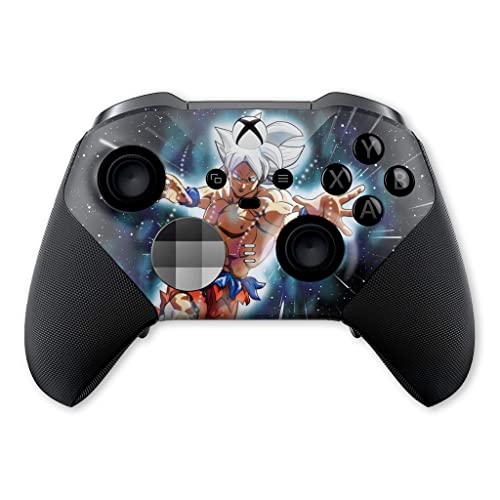
1. DreamController Gokku Ultra X-box Elite Controller Series 2
Our pick — 4.5+★ from 150+ verified ratings; the strongest balance of quality and price.
A genuine Elite Series 2 underneath, wrapped in a finish you will not see on anyone else’s shelf.
If the reason you are shopping is that you want four rear paddles and you also want your controller to look like nothing else in the room, this is the pick. DreamController starts with an original Microsoft Xbox Elite Series 2 — which means the four-paddle rear layout, the swappable thumbsticks, and the trigger locks all come from the real Elite platform — and then coats the shell with a hydro-dip finish rather than a vinyl skin. Hydro-dipping prints the pattern into the shell itself, so the design will not peel, bubble, or wrinkle the way a stick-on wrap does over months of sweaty sessions.
The finish is where the money goes, and it is done well. What wins people over most is outright build quality — the coating has a soft-touch feel in the hand, there is an anti-slip texture on both sides, and the pattern stays vivid through long play sessions rather than rubbing away at the grips. It pairs wirelessly with Xbox One, Xbox One S/X, Xbox Series S/X, and Windows 10 PCs, and every controller is hand-checked and tested in the USA before it ships.
Here is the honest part: the customization is cosmetic, not internal. You are getting standard Elite Series 2 electronics and standard Elite paddles — no Hall Effect sticks, no higher polling rate, no extra remap profiles beyond what the stock Elite gives you. There is also a mixed record on button longevity over the long haul, which is worth knowing if you play competitively every single day. You are paying a real premium for the paint job and the one-off looks, and if you care more about stick technology than aesthetics, the Razer or SCUF picks further down deliver more hardware for less.
Why collectors gravitate to it
- Built on an original Microsoft Elite Series 2, so you get the real four-paddle rear layout and swappable sticks
- Hydro-dip paint is baked into the shell — no peeling, wrinkles, or bubbles like a stick-on skin
- Soft-touch, anti-slip coating on both sides keeps grip secure during long sessions
- Hand-checked and tested in the USA before shipping, with full Xbox One and Series X/S plus Windows 10 compatibility
What the finish does not fix
- The customization is purely cosmetic — stock Elite electronics, no Hall Effect or TMR sticks
- No extra remap profiles or polling-rate boost over a standard Elite Series 2
- Long-term button durability is a mixed picture in owner reports
Reach for this if: you want a genuine Elite Series 2 with four paddles and a finish no one else owns, and you value looks as much as raw hardware.
Think twice if: you compete daily and want drift-resistant stick technology baked in — the paint is the upgrade here, not the internals.
2. 8BitDo Ultimate 3-mode Wireless Controller
Drift-proof magnetic sticks, two back paddles, and a charging dock that keeps it topped up between rounds.
The spec that earns this controller its spot is the pair of Hall Effect joysticks — magnetic sensors with no physical contact, so the drift that slowly kills ordinary sticks has no wear surface to grind down. The same Hall Effect tech carries over to the triggers. Add two Pro back paddle buttons, a golden metal tactile D-pad, and three custom profiles you can flip between, and you have a pad that plays far above a mid-range habit.
Compared with the DreamController above, the difference is where the money goes. The 8BitDo gives you 16 buttons to the DreamController’s 10, and it trades the cosmetic finish for functional hardware — the exact trade-off that makes this the better pick for anyone who plays to win rather than to display. And the side-by-side dimensions tell you it is the chunkier pad of the two, at 7.48 x 5.51 x 0.79 inches against the Turtle Beach Rematch’s more compact 6.1 x 2.56 x 4.09-inch body — so if you have small hands or a tight controller tray, the Turtle Beach sits easier.
Connectivity is the quiet strength: officially licensed for Xbox and Rare, it speaks 2.4G wireless to your Xbox or Windows PC, wired USB as a fallback, and Bluetooth to Apple or Android devices — genuinely one pad for every screen you own. The integrated charging dock reconnects the controller automatically the moment you lift it out. The recurring caveat is battery life, which draws a split verdict from owners — heavy players will want to drop it on the dock after each session rather than trust a multi-day standby.
Sweetener you barely notice: the dock does double duty as storage and charger, so the controller is always near-full and never lost under a couch cushion.
One thing to plan around: extended sessions drain it faster than some expect, so keep the dock within arm’s reach of your console.
The value play: magnetic anti-drift sticks, three-mode connectivity, and a charging dock at a mid-range tier — the smartest all-rounder on this list for most players.
Not the pick if: you insist on four rear paddles rather than two, or you need all-day battery without docking between sessions.
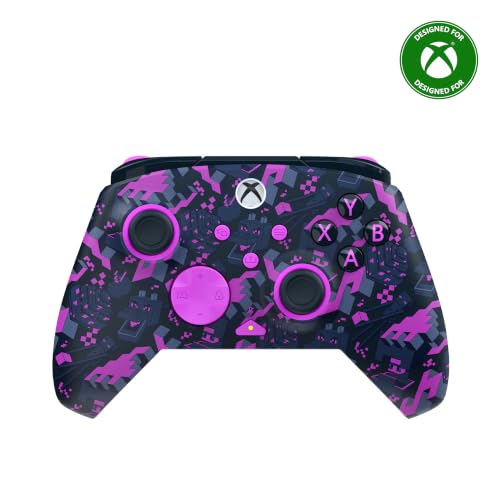
3. Turtle Beach Rematch Wireless RGB Gaming Controller
Ultra-sensitive TMR sticks and hair triggers, dressed in an officially licensed Minecraft shell that lights up.
Start with the sticks: ultra-sensitive TMR thumbsticks give this pad its precision, and the Hall-Effect hair triggers carry three trigger-stop positions so you can switch between a short, fast pull for shooters and a longer analog squeeze for racing. Two mappable quick-action back buttons handle your jump-crouch-reload clutter without lifting your thumbs off the sticks.
That three-way trigger stop is the detail that separates it from the 8BitDo above, which relies on plain Hall Effect triggers without selectable stops. The Rematch also runs dual rumble motors and impulse triggers for feedback you can feel through the grips. Its 8.48-ounce body is noticeably lighter than the ASUS ROG Raikiri II at 9.6 ounces — a real difference on long sessions if hand fatigue creeps in.
The wireless situation needs a moment of your attention. On Xbox and Windows 10/11 it connects through a USB transmitter for a stable low-latency link, and Bluetooth BLE handles compatible Android and streaming devices. A built-in rechargeable battery pairs with a 10ft USB-C play-and-charge cable, so you can keep playing while it tops up. The RGB lighting that illuminates the Minecraft design is a love-it-or-skip-it flourish — if you want a plain black pad, this is the wrong pick and the 8BitDo is a cleaner route. If the pixel-block look makes you smile every time you pick it up, nothing else here delivers it.
The honest read: the TMR sticks and three-stop triggers deliver real competitive control, and the officially licensed Minecraft shell is pure joy if that is your fandom — but the RGB-and-Minecraft styling is a hard sell for anyone who wants a discreet controller.
For the fan and the tinkerer: two back buttons, three trigger stops, and TMR sticks in an officially licensed Minecraft body.
Shop elsewhere if: the loud RGB design clashes with your setup or you need four rear paddles instead of two.
4. ASUS ROG Raikiri II Xbox Wireless Gaming Controller
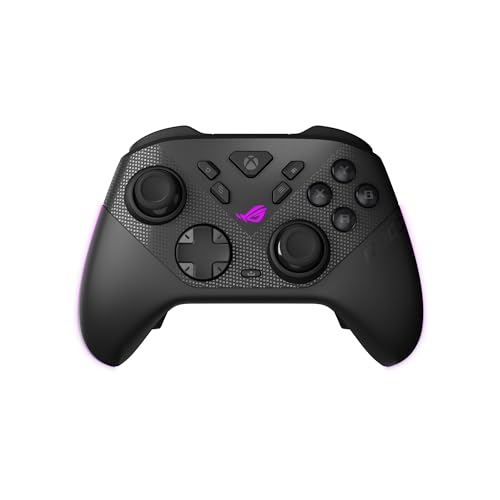
A 1000Hz polling rate, four programmable rear buttons, and anti-drift TMR sticks aimed straight at PC players.
Four fully programmable rear buttons are the headline for paddle hunters, and ASUS pairs them with anti-drift TMR joysticks — magnetic sensors the maker says are more accurate while drawing less power than Hall Effect sticks. The 1000Hz polling rate keeps input latency low in both wired and 2.4GHz wireless modes on PC, with the wireless side backed by ROG SpeedNova technology for a more stable link.
Buyers who want to feel every press will like the micro-switch build: the D-pad, ABXY buttons, rear buttons, and bumpers all use micro-switches for instant actuation and a crisp tactile click. Dual-mode triggers let you switch between short-travel micro-switch triggers and full-travel TMR sensor triggers on the fly. At 9.6 ounces the pad is the heaviest here against the Turtle Beach’s 8.48 ounces — the anti-slip grip and skin-friendly coating help, but it is a substantial handful, and ergonomics split opinions among players with smaller hands.
The package is unusually complete: a portable protective case that lets the controller charge while inside it, a charging stand, and two detachable joystick caps. ASUS rates it for at least 30 hours of 2.4GHz wireless play on a single charge, though that figure assumes RGB lighting, audio, and vibration are all off. The connectivity is the spot to watch — owner reports split on occasional dropouts in wireless mode, so if you are on PC, a wired USB-C session is the safest competitive setup. It is certified for Xbox over USB-C and 2.4GHz RF, so console duty works too.
Hardware worth the heft
- Four programmable rear buttons with micro-switch actuation for instant presses
- 1000Hz polling rate plus SpeedNova wireless for low-latency PC play
- Dual-mode triggers switch between short and full travel in an instant
- Charging case, stand, and two joystick caps all in the box
Where it asks you to adapt
- Heaviest controller on this list at 9.6 ounces
- Split ergonomics feedback — smaller hands may find the grip bulky
- Some owners hit periodic wireless dropouts; wired is the safe mode
Built for the desk: this is the controller for a PC player who wants four paddles, a fast polling link, and a case that charges the pad on the go.
You may prefer something lighter: if the 9.6-ounce weight and occasional wireless dropouts undercut your control, a lighter two-paddle pad suits more relaxed play.
5. SCUF VALOR PRO Wireless Xbox Controller

Four rear paddles and instant triggers built for the player who wants every millisecond shaved off.
SCUF built this one around reaction time. Four rear paddles let you fire commands without moving your thumbs, and instant triggers eliminate most of the trigger pull so a shot registers the moment you squeeze. On PC you can flip the 1k Hz polling rate on for snappier inputs, and the wraparound bumpers offer more surface area for faster movement — a small shape change that matters when your fingers are dancing between inputs.
What wins players over here is overall controller quality, and the ergonomics carry it. A performance grip, refined across a decade of SCUF designs, gives a non-slip hold, and the audio control system lets you change volume on the fly while you save up to three remapping configurations you can switch with a quick toggle. With 24 buttons total it is the most heavily buttoned pad on the list, well above the 10 on the DreamController — a real difference if you map several actions per paddle.
The Smoke finish also supports a wide range of designs and swappable faceplates and thumbsticks, so you can re-skin the look over time without replacing the controller. The honest trade-off is connection stability — wireless, Bluetooth, and wired are all on offer, but dropouts are the complaint that surfaces most, and some players report double-clicking or drifting sticks. If you are chasing pure competitive consistency, plan to keep a wired session in reserve.
Speed in every button: four paddles, instant triggers, and 1k Hz polling on PC make it a reflex-first controller.
Where it can stumble: random disconnects and the occasional double-click or stick drift are the patterns to weigh before you commit to it as your only pad.
The competitive choice: four-paddle speed, instant triggers, and a deep button count for players who map every finger.
Keep a backup plan: if stable wireless matters more than speed, the 8BitDo’s docked 2.4G link is the steadier pick.
6. 8Bitdo Ultimate 3E Wireless Controller

Swappable ABXY modules, two back buttons, two fast bumpers, and a wireless charging dock that reconnects on lift.
What sets this 8BitDo apart is how much you can reshape it. Swappable ABXY modules let you rearrange the face buttons, and you choose between a standard or circular D-pad plus multiple joystick styles to match how you play. That level of physical customization is something even the fancier Razer below does not match — the Razer swaps stick caps and faceplates, but the 8BitDo swaps the core button layout itself.
Under the shell, TMR joysticks pair with a 12-bit ADC sampling chip for precise, stable aiming, and interactive RGB Fire Rings give real-time visual feedback. Pro features stack up: two back buttons, two fast bumpers, three custom profiles, a 3.5mm audio jack, 6-axis motion control on PC, and up to 1000Hz polling rate on PC. Hall-effect impulse triggers with two trigger-stop levels let you shift between shooter-quick and racing-smooth pulls.
The integrated wireless charging dock is the quiet gem — wireless charging with zero contact points, magnetic alignment to seat the controller precisely, and auto-reconnect the moment you lift it off. The dock keeps the 2.4G adapter inside and connects to your console or PC over USB to extend the wireless signal. Quality control is the standout strength, with owners drawing favorable comparisons to the Xbox Elite, though connectivity splits review opinion — some players hit wireless connection issues — so wired-via-dock is worth keeping in your back pocket if the link gets fussy.
The customization menu
- Swappable ABXY modules, two D-pad styles, and multiple joystick options
- TMR sticks with a 12-bit ADC sampling chip for stable precision
- Magnetic zero-contact charging dock with auto-reconnect on lift
- Two back buttons, two fast bumpers, and three custom profiles
Points to weigh
- Wireless connection issues reported by some players
- Only two back buttons rather than the four some competitive players want
- Trigger quality draws mixed feedback from owners
For the hands-on tweaker: if you like swapping modules, D-pads, and stick styles to dial in your own feel, this is the most adjustable pad here.
Prefer plug-and-stay: if you never want to fiddle with a connection, the dock-and-wire route keeps it running smoothly.
7. Razer Wolverine V4 Pro Wireless Xbox Controller

A staggering 8000 Hz polling rate on PC, four mouse-click back buttons, and contactless anti-drift sticks.
Eight thousand hertz — that is the number that makes this the most responsive pad here. Up to 8000 Hz HyperPolling on PC pushes input reports far faster than a typical controller, and Razer HyperSpeed Wireless backs the 2.4GHz link for competitive play. The thumbsticks are capacitive anti-drift units with contactless sensors, built to hold steady aim in FPS, sports, and multiplayer matches without the creep that conventional sticks develop.
The paddle crowd gets real options: four removable mouse-click back buttons plus two claw-grip bumpers, all mappable so you can fire commands without lifting your thumbs. Adjustable Razer Pro HyperTriggers switch between instant mouse-click activation and full-range analog control, so one pad covers FPS twitch and racing feel.
The personalization suite is deep: interchangeable thumbstick caps, a magnetic faceplate, four onboard profiles, and tuning through Razer Synapse 4 and the Razer Controller app. It connects via 2.4GHz, Bluetooth, or wired USB-C. The trade-off is simple physics — a controller this loaded and this heavy rewards players who want maximum input speed and customization, but the weight and the 24-button density (its 18 listed buttons cover that battery of inputs) take getting used to.
For the spec-chaser: 8000 Hz polling, contactless anti-drift sticks, and four mappable back buttons make this the fastest-input controller for competitive PC play — as long as you are willing to carry the 14.72-ounce weight.
Peak PC performance: choose the Wolverine if raw polling speed and deep button mapping are what you are after.
The weight is the tax: if 14.72 ounces feels too heavy for marathon sessions, a lighter pad with two back buttons will sit better.
8. Stealth Controllers Elite Series 2 Custom Controller

A custom Elite Series 2 with four paddles, six thumbsticks, and a full travel case in the box.
If you want to open the box and have everything ready on day one, this Stealth build is the one. It ships with the custom Elite Series 2 controller, a carrying case, a set of six thumbsticks (two standard, two classic, one tall, one wide dome), a set of four paddles (two medium, two mini), two D-pads (standard and faceted), a thumbstick-adjustment tool, a charging dock, and a USB-C cable — all back in the original box. That is the deepest accessory kit on this list, and it means you can swap paddle sizes to find the feel that matches your grip.
The finish is the other draw. The matte red shell with its semi-rubberized coating gets praised for its carbon-fiber look and the high-end metal construction of the attachments, so it feels as custom as it looks. Button mapping runs through the accessories app, letting you rebind the four paddles to your own commands. It is compatible with Xbox Series X, Series S, all Xbox One consoles, and Windows PC, and it runs on battery power wirelessly.
The real comfort here is the one-year, 365-day warranty — a genuine point of trust for a custom-built controller, since these are modified units rather than plain retail stock. The flip side is that this is a cosmetic custom build on Elite Series 2 electronics, so stick technology and polling are stock rather than upgraded. Buttons total 22, the second-highest count here, though you will spend a little time learning where everything sits before it becomes muscle memory.
Where it earns its keep
- Full kit in the box — four paddles, six thumbsticks, two D-pads, dock, and cable
- Full one-year warranty backs the custom build
- Striking matte red finish with a semi-rubberized, carbon-fiber look
- Custom button mapping via the accessories app
What to keep in mind
- Electronics are stock Elite Series 2 — no upgraded sticks or polling rate
- 22 buttons means a real learning curve before everything feels natural
- The paddles and sticks are swappable, so budget time to find your configuration
Open-box ready: the pick for a player who wants a turnkey custom Elite with every accessory included and a warranty behind it.
Not for spec-maximalists: if you are chasing the newest magnetic sticks or a boosted polling rate, look to the Razer.
9. Crazy Controllerz Customz Series Lonestar Controller
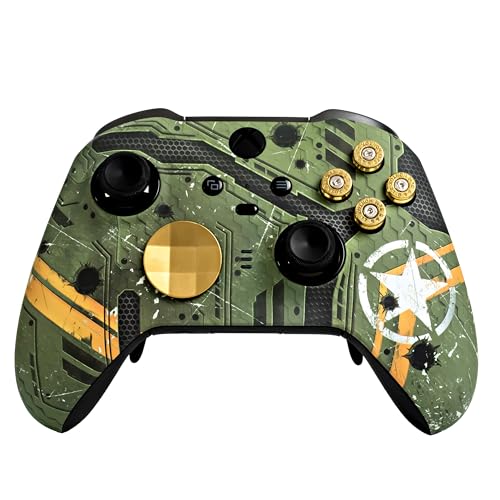
A brand-new official Elite Series 2 rebuilt with a Lonestar shell, bullet buttons, and gold stick and D-pad sets.
Crazy Controllerz starts with a brand-new official Microsoft Xbox Elite Series 2 controller straight from its original packaging, then rebuilds it with a Lonestar front shell, a set of bullet buttons, a gold joystick set, and a gold D-pad set. The result is a full top-to-bottom custom you will not find anywhere else. Because the base is a genuine Elite Series 2, the controller retains all the original features and functions — including the Elite’s rear paddles — and stays fully compatible with the Xbox software update.
Quality is the strength the brand leans on hardest, and the soft-touch plastic of the shell earns praise for how it feels in the hand alongside the gold-and-Lonestar color scheme. It runs Bluetooth and works across Xbox Series X/S, Xbox One consoles, and PC/Mac. The customization process includes a rigorous testing pass before the controller goes back in its original packaging, so it arrives as a finished, checked product rather than a parts-bin build.
Where the Lonestar gives you pause is long-term reliability and the money you put into the cosmetics. Button responsiveness and stick performance draw the roughest feedback of any aspect, and the value question splits — some players say it works well and is worth the spend, while others run into trouble down the line. If you are buying a display-worthy Elite and you are okay pairing it with a backup pad for competitive days, it fits. If you need a workhorse that never misses, the 8BitDo above is the safer spend.
The showpiece angle: a genuine Elite Series 2 with a Lonestar shell and gold hardware — unique, well-finished, and true to the original Elite feature set.
What you accept: custom cosmetics buy you personality, not upgraded internals, and reliability feedback is uneven enough to keep a backup pad handy.
Pick it as a display-and-play build: for the player who wants a one-of-a-kind Elite and treats the gold trim as the whole point.
Weigh it as a daily driver: if your priority is bulletproof reliability over looks, the standard Elite-based picks are the sturdier route.
Know the Specs
Rear paddles and back buttons
These are the extra inputs on the underside of the grip, pressed by your middle or ring fingers so your thumbs stay on the sticks. Mapping a jump or crouch to a paddle removes the thumb-travel time that costs you aim. Two buttons cover the most common actions; four paddles let you stack several actions without ever leaving the analog sticks. Look for per-game remapping and onboard profiles so your layout travels with the controller.
Hall Effect and TMR thumbsticks
Conventional analog sticks use a physical contact pad that wears down over time and produces drift — the cursor creeping when you are not touching it. Hall Effect sticks sense movement magnetically with no contact, and TMR (tunnel magnetoresistance) sticks are a related magnetic design that several makers pair with a high-resolution sampling chip. Both remove the main wear surface, which is why they are the upgrade to prioritize if you play long sessions every week.
Polling rate and wireless latency
Polling rate measures how many times per second the controller reports its position to your device — a higher rate means fresh input is delivered more often. A 1000Hz rate is common on premium pads, and Razer pushes up to 8000Hz on PC for the fastest reporting. Wireless link quality matters just as much as raw rate, which is why 2.4GHz dongles tend to feel more consistent than Bluetooth and wired USB-C is the zero-dropout fallback when a match really counts.
Trigger stops and trigger modes
A trigger stop caps how far the trigger travels before it registers, so the action fires earlier and faster in shooters. Some pads give you two or three stop positions to switch between, and a few offer dual-mode triggers that toggle between a short micro-switch pull and a full-travel analog squeeze. Racing games usually want the full analog range; competitive shooters usually want the shortest. Adjustable stops let one controller serve both.
Common Questions
Will a wireless Xbox controller with paddles work on both my Xbox Series X and my PC?
Are two rear paddles enough, or do I need four?
What is stick drift and will Hall Effect or TMR sticks prevent it?
Do the rear paddles need software to remap them?
Is a 2.4GHz dongle or Bluetooth better for low-latency play?
How long does the battery last on these controllers?
Can I swap the thumbsticks and paddles on a custom Elite build?
Can I use these paddles controllers on an Android phone or tablet?Some can. The Turtle Beach Rematch includes Bluetooth BLE for compatible Android mobile and streaming devices, and the 8BitDo Ultimate 3-mode connects to Apple or Android devices over Bluetooth while using 2.4G or USB for Xbox and PC. Most dedicated Elite-style builds list Xbox and Windows PC only, so if phone gaming is part of your plan, confirm Bluetooth support on the exact model first.?
What do trigger stops actually change during play?
Which of these is the most reliable for competitive play?
How heavy are these controllers, and does weight matter?
Do I need a charging dock or case with my controller?
The Bottom Line
The strongest overall pick is the 8BitDo Ultimate 3-mode. It pairs Hall Effect joysticks and triggers — the magnetic design that keeps sticks from drifting — with two Pro back paddles, three custom profiles, and a charging dock that reconnects automatically when you lift it off. Add 2.4G wireless for Xbox and PC plus Bluetooth for Apple and Android, and it does the job across every device you own. It is the most genuinely useful controller here for the widest range of players.
If you want a one-of-a-kind Elite Series 2 with the full four-paddle rear layout and a finish nobody else owns, the DreamController Gokku Ultra is the showpiece — just know the money goes to the hydro-dip paint, not upgraded internals.
Chasing maximum input speed on PC? The Razer Wolverine V4 Pro delivers up to 8000 Hz polling and four removable mouse-click back buttons, but you pay for it in weight at 14.72 ounces. And if you want a turnkey custom Elite with every accessory in the box and a full one-year warranty behind it, the Stealth Controllers Elite Series 2 is the easiest place to start.
My honest advice: decide first how many rear paddles you actually need — two for casual play, four for competitive — then pick the stick technology you can live with. Do that, and any of these nine will keep you off the thumbs-off-the-stick scramble that sent you shopping in the first place.
How we choose
We do not accept paid placement. Every pick is matched to a real buyer and a real use-case; we do not hands-on test units.
Sources
Specifications: manufacturer listings and product documentation. Review insights: verified customer reviews, as of November 2026. Pricing: not shown on this page (it changes often); check the current price via the retailer link.
As an Amazon Associate, Tactical Gear Guy earns from qualifying purchases. This does not affect which products we feature.