Specs are compiled from manufacturer listings and verified buyer reviews and can change over time — please confirm the key details on the product page before buying.
One small box between your modem and your devices can encrypt everything on its own — no app per phone, no monthly VPN subscription, no remembering to switch it on. That is what a VPN hardware device does: it is a networking appliance that runs the VPN as firmware (built-in software), so every laptop, console and smart plug behind it gets the encrypted tunnel automatically. The hard part is that “VPN hardware” covers three very different machines — a travel router with Wi-Fi built in, a wired-only security gateway, and a full firewall appliance you install software onto — and picking the wrong shape wastes money.
This guide is built by comparing the manufacturers’ published specifications and the patterns across verified customer reviews, so you get each pick’s real strengths and trade-offs instead of marketing spin.
Some run OpenVPN and WireGuard on a sealed appliance in minutes; others ship with no operating system at all and expect you to flash pfSense yourself. Below you get the plain-English version of each spec, the honest trade-off on every box, and a clear read on which one fits your network. This breakdown of the best VPN hardware device separates the ones you configure once from the ones you keep tinkering with.
Top Picks


How To Choose The Best VPN Hardware Device
Your first decision is not brand or speed — it is if you want a box that also broadcasts Wi-Fi, or a box that only handles wired traffic. A Wi-Fi router with VPN built in replaces your current router entirely. A wired-only gateway slots in behind the router you already own and encrypts the traffic for it. Pick the wired gateway and you keep your existing Wi-Fi coverage; pick the Wi-Fi router and you start over on coverage but carry one device.
Check the VPN protocol speeds before anything else
The number that matters is encrypted throughput, not raw port speed — the tunnel caps everything behind it. WireGuard is the lighter protocol and usually runs faster than OpenVPN on the same chip. One model here lists OpenVPN up to 150 Mbps and WireGuard up to 355 Mbps, which tells you a gigabit fiber line will get throttled hard under OpenVPN but fare better on WireGuard. If you mostly browse and stream, either protocol is fine. If you move large files through the tunnel, the WireGuard figure is your buying number.
Count your WAN ports and your devices
WAN ports are the sockets that connect out to the internet; LAN ports feed your own devices. A gateway with one WAN port handles one internet line. A multi-WAN unit lets you plug in a second ISP or an LTE dongle and fail over automatically when the primary drops. On the device side, look at the maximum concurrent clients and sessions — one multi-gigabit model lists 500,000 concurrent sessions and 1000+ clients, while a smaller travel unit supports up to 512 clients with 70 recommended. Match that ceiling to how many phones, cameras and computers actually live on your network.
Decide if you want an OS pre-installed
Some appliances arrive booting straight into their own app with WireGuard and OpenVPN ready to go. Others ship as bare hardware and explicitly state no OS is pre-installed — you supply pfSense, OPNsense or similar yourself. Bare hardware gives you total control and a firewall you configure line by line. Pre-installed firmware gets you a working tunnel in minutes. Pick the one you will actually finish setting up.
Side-by-Side Comparison
| Model | Best For | VPN Protocols | Ports | Wi-Fi Built In | Amazon |
|---|---|---|---|---|---|
| Protectli Vault FW4B★ Best Overall | Building a pfSense firewall | OS-dependent | 4x Gigabit Ethernet | No (optional 802.11b/g/n) | Amazon |
| Cudy AX3000 TR3000Best for Travel | Travel and hotel Wi-Fi | WireGuard, OpenVPN, IPsec, ZeroTier, PPTP, L2TP | 1x 2.5G WAN, 1x 1G LAN, USB 3.0 | Yes (dual-band Wi-Fi 6) | Amazon |
| GL.iNet Brume 2WireGuard Stronghold | WireGuard at home or office | OpenVPN, WireGuard | 1x 2.5G WAN, 1x 1G LAN, USB 3.0 | No | Amazon |
| Omada ER707-M2 | Multi-gig business networks | IPsec, OpenVPN, L2TP, PPTP | 2x 2.5G WAN, 4x Gigabit, 1x SFP | No | Amazon |
| GL.iNet Brume 3 | Fastest encrypted throughput | WireGuard, OpenVPN-DCO | 3x 2.5GbE | No | Amazon |
| Omada ER706W | Wi-Fi 6 plus VPN routing | SSL, IPSec, GRE, WireGuard, PPTP, L2TP, OpenVPN | 5x Gigabit RJ45, 1x SFP | Yes (AX3000 Wi-Fi 6) | Amazon |
| TP-Link ER7206 | Four-WAN wired routing | IPsec, OpenVPN, L2TP, PPTP | 1x SFP WAN, 3x Gigabit WAN/LAN | No | Amazon |
| ASUS RT-BE58U | Whole-home Wi-Fi 7 with VPN | VPN via Smart Home Master SSID | USB for 4G/5G tethering | Yes (Wi-Fi 7, 3600 Mbps) | Amazon |
| Firewalla Purple SE | App-managed family protection | OpenVPN server | Gigabit Ethernet, USB | No | Amazon |
Detailed Reviews
1. Protectli Vault FW4B
Our pick — 4.5+★ from 450+ verified ratings; the strongest balance of quality and price.
A silent, fanless slab of a machine that becomes whatever firewall you install on it.
The Vault FW4B wins here if you want a real firewall you control, not a sealed appliance locked to someone else’s interface. Its engine is an Intel Quad Core Celeron J3160 (a 64-bit processor) running up to 2.2GHz, paired with AES-NI hardware support — a dedicated instruction set that speeds up encryption math, so the chip handles VPN traffic instead of bogging down the CPU. You get 8GB DDR3L RAM and a 120GB mSATA SSD, so the box has room for a full routing OS and logs.
What makes it the top pick is the port count: four Intel Gigabit Ethernet ports, plus 2x USB 3.0, 1x RJ-45 COM and 2x HDMI. Four Ethernet sockets means you can run a WAN line in, a LAN out, and still have two ports for a separate guest network or a second segment — a distinction the travel routers here cannot make. It is tested with pfSense, untangle, OPNsense and other popular open-source software solutions, and it ships with no OS pre-installed. That last point is the whole deal: you are buying the hardware and supplying the brain.
Performance is the reason this box has a following — the consensus across the review pages is that pfSense runs beautifully on it, and buyers report the device runs noticeably faster with throughput of 825Mbps. Quiet operation draws steady praise too, which makes sense for a fanless design cooled by convection alone. The honest trade-off: heat dissipation is the most-discussed aspect, and a fanless chassis has no fan to move air, so give it open space rather than stacking it in a cabinet. A user-installed coreboot BIOS is optional and must be installed by the user, so leave that alone unless you know why you want it.
Where the Vault earns its keep
- Four Intel Gigabit Ethernet ports give you real network segmentation
- Fanless and silent — no spinning fan to hear or fail
- 8GB RAM plus a 120GB SSD is generous for a router OS
- Tested with pfSense, OPNsense and untangle
What you are signing up for
- No OS pre-installed — you supply and configure everything
- Fanless cooling means it needs airflow around it
- Optional WiFi is 802.11b/g/n only, via an adapter
Reach for this if: you want a pfSense or OPNsense firewall you configure yourself and have four wired segments to feed.
Look elsewhere if: you want to plug in and have a tunnel running with zero software installation.
2. Cudy AX3000 Wi-Fi 6 2.5G VPN Travel Router (TR3000)
A 5.64 oz travel router that puts hotel Wi-Fi behind your own encrypted tunnel.
Hotel and airport Wi-Fi is the use case this device was built for. You point it at the public network, it broadcasts your own private one, and every device you own joins that instead. It does that on dual-band Wi-Fi 6 with 4-stream delivery — 2402 Mbps on 5 GHz and 574 Mbps on 2.4 GHz — and Beamforming pushes the signal up to 591 ft in open areas. OFDMA and MU-MIMO (two traffic-sharing techniques that keep many devices from queuing) keep a room full of phones and laptops from fighting each other.
The ports are better than most travel routers: one 2.5Gbps WAN port and one 1Gbps LAN port, and Cudy makes a point of saying these are not 100Mbps ports. That matters at the edge — a 2.5 gigabit WAN socket is a 2,500 Mbps connection out to the internet, so the router is not the bottleneck on a fast line. On the VPN side it handles WireGuard, OpenVPN, IPsec, ZeroTier, PPTP and L2TP as both a server and a client. Six selectable modes (Router, Access Point, Range Extender, WISP and Client, plus Cudy Mesh) let one box cover scenarios that normally need three. It runs a 1.3 GHz dual-core CPU, supports up to 512 clients with 70 recommended, and takes USB-C 5V/3A power.
Reliability is the thing that wins people over — the review pages consistently land on it being dependable as a travel device. Connectivity is the honest sticking point: it is the one aspect split down the middle, with some units reported failing to hold their internet connection. Setup divides opinion the same way — quick for some, a fight for others — and firmware updates are the recurring sore spot. Go in expecting to spend an evening on the configuration menu, and the payoff is a pocket-sized private network wherever you land.
The real-world payoff: one USB-C cable off a power bank, one hotel login captured, and suddenly every device in your bag is behind WireGuard without touching a settings screen on any of them.
What to expect going in: this is a tinkerer’s travel router — the hardware is willing, but the software wants attention before it behaves.
Suits the frequent flyer: anyone who works from hotel rooms and wants their own encrypted SSID in a bag pocket.
The cost of that: plan on a firmware and setup session, because connectivity and configuration consistency are where this one gets uneven.
3. GL.iNet GL-MT2500A Brume 2
No Wi-Fi radio, no screen, no fuss — just a wired gateway that speaks 30+ VPN providers.
Strip a router of its Wi-Fi and what is left is remarkably focused. That is the Brume 2: a wired-only security gateway (the listing says it plainly — no Wi-Fi function) that sits between your modem and your existing router and handles the tunnel for the whole network. OpenVPN and WireGuard come pre-installed, so the software problem is already solved for you. It works with 30+ VPN service providers, which is the widest provider compatibility on this list.
Read the throughput split carefully: OpenVPN up to 150 Mbps, WireGuard up to 355 Mbps. WireGuard is the faster protocol here by a wide margin, and reviewers on the review pages agree — it is regarded as one of the best boxes around for WireGuard. VPN Cascading earns it a place in an office: it lets a VPN server and a VPN client run at the same time on one device, so you can reach local network servers while still exiting to the public internet through a client. Hardware is a 2.5 gigabit WAN port, a 1 gigabit LAN port with USB 3.0, and 8 GByte EMMC storage. Cloudflare encryption and IPv6 support are on board, and IPv6 lives under Admin Panel → NETWORK → IPv6.
Device quality and performance are what the pages keep coming back to, and the compact aluminium shell is noted far more often than a box this plain has any right to be. The friction is setup — it splits the room between quick and tricky — and heat comes in as the one negative thread. It is a genuinely small metal block with no fan, so tuck it somewhere with air around it rather than under a stack of paper.
Pick this when: you already have good Wi-Fi and just want the VPN handled by a small wired box behind your router.
Think about it first if: you need wireless out of the device itself — this one produces none, and it runs warm in a closed space.
4. Omada ER707-M2 Multi-Gigabit VPN Router
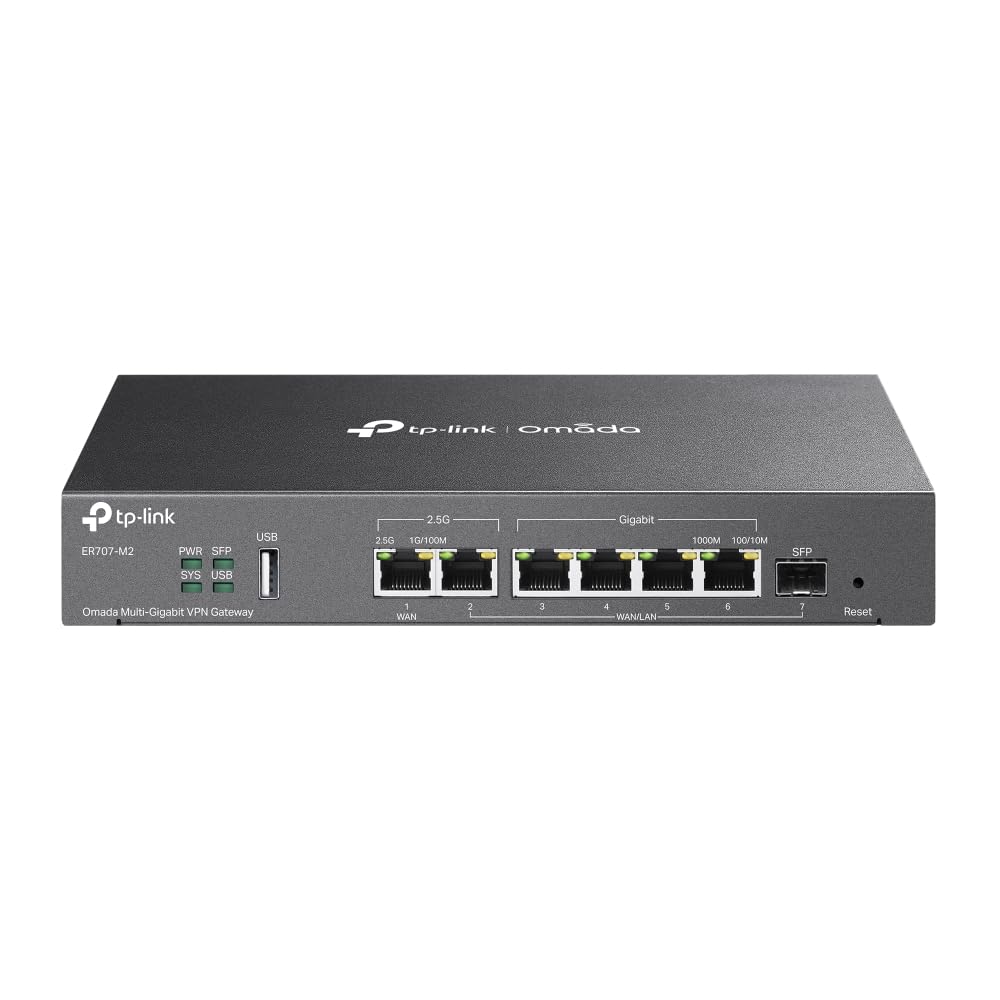
When one internet line is not enough, this box gives you two multi-gig sockets to fill.
Port flexibility is the entire argument for the ER707-M2. You get 1x 2.5Gigabit WAN port, 1x 2.5Gigabit WAN/LAN port, 4x Gigabit WAN/LAN ports, 1x Gigabit SFP WAN/LAN port and 1x USB 2.0 port that supports storage or LTE backup with a dongle. The WAN/LAN labelling means those sockets re-task to whatever direction you need, so the same hardware covers a dual-ISP home office and a small branch rack. Network capacity is rated at 500,000 concurrent sessions and 1000+ clients.
The VPN side is built for a shared office rather than one person: up to 100× LAN-to-LAN IPsec, 66× OpenVPN, 60× L2TP and 60× PPTP connections. Those are the tunnel counts, not just the protocol names — 100 LAN-to-LAN IPsec tunnels is a site-to-site setup that smaller gateways here cannot match. It ties into Omada’s cloud access and app for management across sites from one interface, and it ships with a 5-years warranty plus free technical support from 6am to 6pm PST Monday to Fridays.
The box is well regarded as professional-grade hardware with network management that punches above its tier, and what it costs for what it does reads as fair. Setup is where experience divides — configuring it lands somewhere between easy and complicated depending on how much routing you already know. It has no Wi-Fi radio and no built-in wireless, so this is a wired core with a controller in front of it.
Why it stands out: a 2.5 gigabit WAN port is a 2,500 Mbps link out to your modem, and having two of them plus four more Gigabit sockets means this gateway will not run out of places to plug things in.
Fair warning: the interface assumes some routing vocabulary, so budget time with the manual if this is your first managed gateway.
Built for: a home lab or small office running multiple internet lines and a pile of VPN tunnels.
Not for: the buyer who wants wireless coverage included — there is no Wi-Fi here at all.
5. GL.iNet GL-MT5000 Brume 3
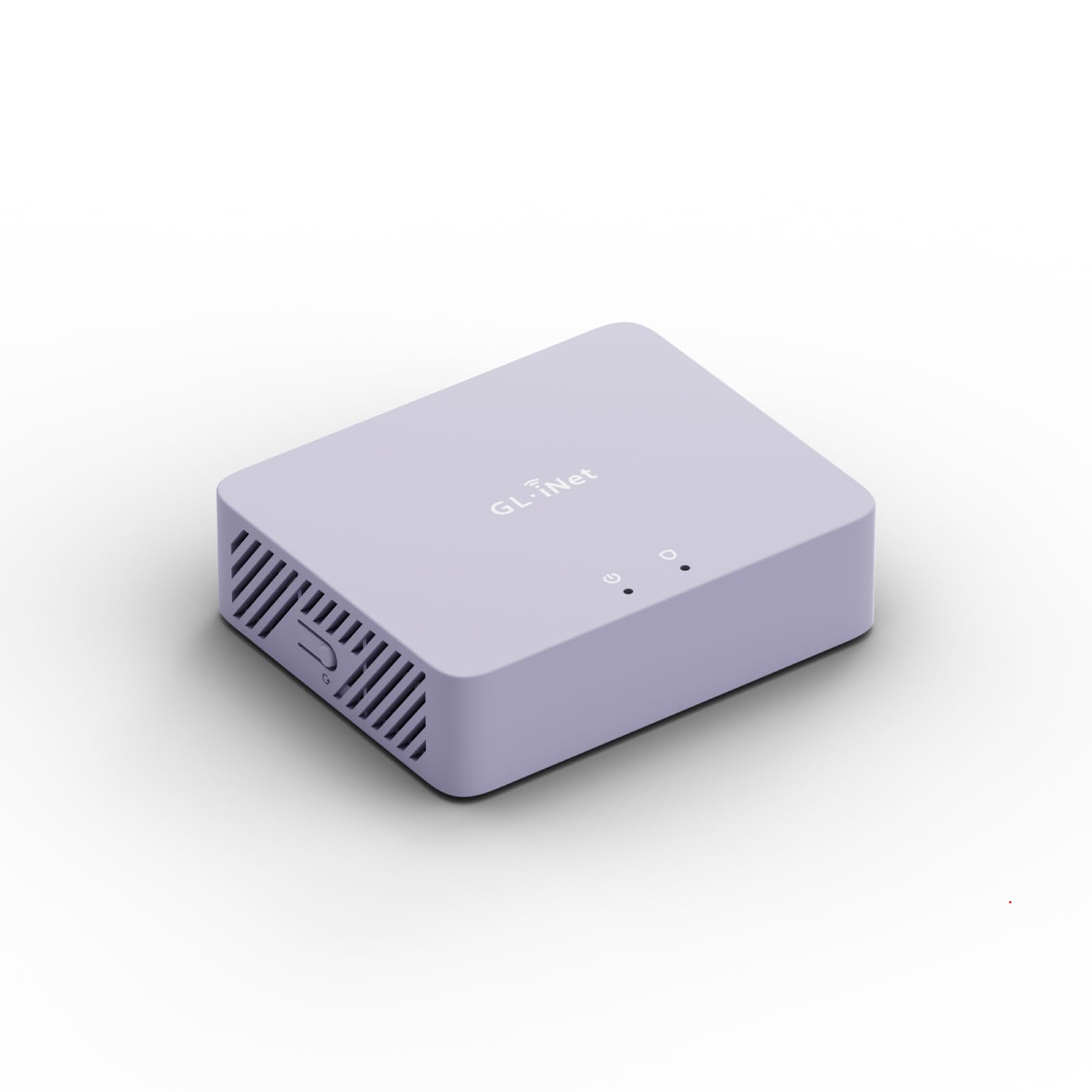
Up to 1100 Mbps through the tunnel — this is the one that keeps up with fiber.
Sheer encrypted throughput is what sets the Brume 3 apart from everything else on this page. Hardware-accelerated WireGuard and OpenVPN-DCO (a version of OpenVPN that hands the encryption math to dedicated hardware) deliver up to 1100 Mbps VPN throughput. Put that beside the Cudy travel router’s 3000 megabits_per_second data transfer rate and the trade-off is clear: the Cudy is faster on raw Wi-Fi specs, while the Brume 3 is built to keep speed once the tunnel is on.
Against its own predecessor the gap is stark. GL.iNet rates it over 3× faster than Brume 2, and the numbers back the direction — 1100 Mbps against the Brume 2’s 355 Mbps on WireGuard. Three 2.5GbE ports with flexible WAN/LAN configuration let you build a multi-gigabit wired setup, while dual-ISP Multi-WAN and failover keep the network online if the primary line dies. VPN obfuscation disguises tunnel traffic as ordinary HTTPS, which is what you want on a network that throttles or blocks VPN protocols outright. Deep Packet Inspection with visual dashboards blocks adult, gambling and malicious sites, and SQM and QoS prioritize gaming, calls and video when bandwidth runs thin. Underneath is OpenWrt with 1GB DDR4 and 8GB eMMC for plugins, plus USB 3.0 Type-C for high-speed storage or 4G/5G dongles.
Functionality is what wins people over — setup and speed both come in as consistent positives, and running both a WireGuard and an OpenVPN server at once is a specific capability buyers call out. It weighs 148 g, so it disappears behind a monitor. The one thing to plan around: there is no Wi-Fi radio, so it needs a separate access point if your devices connect wirelessly.
The single number that carries it: 1100 Mbps of VPN throughput means a multi-gigabit home connection stays multi-gigabit even inside the tunnel.
The honest caveat: a wired-only box is only as useful as the access point you pair it with, so factor that into the setup.
Best matched to: fast-fiber homes and small offices that refuse to let the VPN cap their download speed.
Pair it with: an existing Wi-Fi router or access point, since this unit broadcasts nothing on its own.
6. Omada ER706W Gigabit AX3000 WiFi 6 VPN Router

One box that does the routing, the VPN and the Wi-Fi 6 broadcast without extra gear.
Most of the gateways here assume you already have wireless sorted. The ER706W does not. It carries AX3000 Wi-Fi 6 with 2402 Mbps on 5 GHz and 574 Mbps on 2.4 GHz, plus 1x Gigabit SFP slot and 5 Gigabit RJ45 ports. That SFP slot is the notable extra — it takes a fiber module directly, so you can feed the router with fiber without a separate media converter. Omada Mesh lets you add access points to extend coverage without extra cabling and a switch.
The VPN menu is the longest on this list: SSL, IPSec, GRE, WireGuard, PPTP, L2TP and OpenVPN. Seven protocol options covers almost any corporate tunnel you will be asked to match, and support for three separate SSIDs means you can dedicate one wireless network to VPN traffic and leave the rest local. There is also a USB 3.0 port for storage or LTE backup with an LTE dongle — the same failover idea the wired Omada models use, but on a Wi-Fi router.
Speed and functionality land as the positives. Reliability and connectivity are the split-down-the-middle aspects, and value for money is genuinely contested rather than settled. Read that as a fit note: this is a router that rewards someone comfortable in the Omada interface and frustrates someone hoping for a plug-and-play wireless upgrade. If you want the wireless and the tunnels in one chassis with fiber on the input, it earns a look. If you want set-and-forget, this is a management project.
Choose it for: a small office that needs VPN routing, fiber input and Wi-Fi 6 broadcast from one managed device.
Choose something simpler if: you want the wireless to just work — reliability and connectivity are the uneven parts of this unit’s story.
7. TP-Link ER7206 Router

Four WAN ports on one wired chassis — redundancy without a rack of separate boxes.
Redundancy is the reason to buy the ER7206. It carries 1 Gigabit SFP WAN port, 1 Gigabit WAN port, 2 Gigabit WAN/LAN ports and 1 Gigabit LAN port, and TP-Link notes that up to four WAN ports tune bandwidth usage through one device. If you run two ISPs, or an ISP plus an LTE backup, this is the unit that blends them without extra hardware. Capacity is rated at a maximum of 150,000 associated client devices and up to 700 clients.
The tunnel count suits a small branch: up to 100× LAN-to-LAN IPsec, 50× OpenVPN, 50× L2TP and 50× PPTP VPN connections. It integrates into Omada’s Software Defined Networking platform, where gateways, access points and switches share one control plane — via a hardware controller, software controller or cloud controller, with standalone mode also available. Security features include advanced firewall policies, DoS defense, IP/MAC/URL filtering and speed test. One compatibility note worth reading twice: SDN controllers work only with SDN gateways, access points and switches.
Quality reads as excellent across the pages, and the features are adequate for the job with fair value attached. Setup is the familiar split — extremely easy to configure for some, an interface that could be friendlier for others. This is a wired router with no Wi-Fi radio, so it is the core of a network rather than the edge of one.
The redundancy case: four WAN ports is what you buy here — a second ISP or an LTE line can take over without you swapping cables at the modem.
One small print item: if you plan to use SDN mode, confirm your access points and switches are on SDN firmware before you build around this gateway.
Made for: a branch or home office that needs multi-WAN failover and site-to-site tunnels on a wired backbone.
Keep walking if: you are not building an Omada network or you need this box to broadcast Wi-Fi.
8. ASUS RT-BE58U WiFi 7 Router

A whole-home Wi-Fi 7 router where one dedicated SSID becomes your VPN lane.
This is the pick if your VPN needs are secondary to blanket wireless coverage. The RT-BE58U is a Wi-Fi 7 (802.11be) dual-band extendable router rated to boost speeds up to 3600 Mbps, with 4096-QAM — a modulation scheme that increases a single frequency band’s transmission speed by 1.2 times. Multi-link operation (MLO) lets a device link to multiple bands at once for steadier connections, and coverage is listed at 2000 square feet, which suits a single-floor apartment or a compact house.
The VPN trick here is Smart Home Master. You can set up up to three SSIDs (separate Wi-Fi network names), and one is dedicated to instant VPN connections — so your work laptop joins the VPN network and the smart TV stays on the local one, with no separate gateway box in between. That same panel handles IoT (smart home device) setup and parental controls. WAN configuration is unusually flexible too, with AI WAN detection and a USB port ready for 4G LTE and 5G mobile tethering. Security comes from commercial-grade AiProtection Pro powered by Trend Micro, with a one-tap security scan and Safe Browsing.
Setup is the standout strength — configuration takes minutes, and the wireless signal holds over 800 Mbps in real use. Practical guidance: Wi-Fi 7 speed depends on having Wi-Fi 7 clients, so older phones will connect on the older standards and see normal speeds. Buy this for the coverage and the three-SSID VPN lane, not for a tunnel that outruns the dedicated gateways above.
Right for: a household that wants modern Wi-Fi 7 coverage with one SSID reserved for VPN traffic.
Hold off if: encrypted tunnel throughput is your main goal — the wired gateways on this page are the specialists for that.
9. Firewalla Purple SE Cyber Security Firewall

The firewall you run from your phone — VPN server, ad blocking and parental controls in one app.
Firewalla sells a different idea: the box does the security, and your phone does the thinking. Setup runs through the Firewalla app, which walks you through configuration step by step. There is no monthly fee, and the feature set spans an intrusion prevention system (IDS and IPS — that is intrusion detection and prevention, the software that watches traffic and blocks threats), a built-in OpenVPN server, ad blocking, parental controls and network health monitoring. Deep insight and cloud-based behavior analytics actively detect and block problems as they arise, and you get full visibility into network flows and bandwidth per device.
Two specs decide whether it fits your line. First, IPS functionality is limited to 500 Mbits, and the listed data transfer rate is 500 megabits_per_second — so this is the right box for a connection in that range and a mismatch for a multi-gigabit fiber plan. Second, the Purple SE can act as your router or as a bridge behind your existing one. In Simple Mode it may not be compatible with all routers, and setup may require a login to your router for basic configuration, so check the compatibility guide before you buy.
Router Mode is where the advanced control lives: policy-based routing to send traffic wherever you want, smart queue to decongest the network and prioritize important traffic, plus network health monitoring. Family Protect filters and blocks adult and malicious content, and cutting a child’s internet or just their gaming and social access takes a few taps. Effective protection with easy management is the general read across the review pages, though some buyers hit friction getting it configured around an existing router. That friction is the thing to plan for — check the compatibility list first, and the rest of it is genuinely intuitive.
Why families like it: the intrusion prevention system and the parental controls live in the same app, so you block malware and a teenager’s gaming access from one screen with no monthly fee attached.
The ceiling to know about: IPS tops out at 500 Mbits, so a gigabit-plus fiber plan will be held back by this box.
Fits best in: a family network on a sub-gigabit connection where everyone wants app-based controls and no subscription.
Check before you commit: confirm your router is on Firewalla’s compatibility guide, because Simple Mode does not play with every model.
Know the Specs
VPN Throughput (Mbps)
This is how fast data moves once it is inside the encrypted tunnel — not how fast your port or Wi-Fi is. It is usually split by protocol because WireGuard is lighter than OpenVPN and runs faster on the same chip. One gateway here lists OpenVPN up to 150 Mbps and WireGuard up to 355 Mbps; another lists up to 1100 Mbps with hardware acceleration. Compare the tunnel number against your internet plan, since a slow tunnel caps everything behind it regardless of port speed.
WAN and LAN Ports
WAN ports connect out to your internet source; LAN ports feed your own devices. A 2.5 gigabit port moves 2,500 Mbps, which is more headroom than a Gigabit port at 1,000 Mbps. Ports labelled WAN/LAN can be re-tasked in either direction. Multi-WAN support lets you plug in a second ISP or an LTE dongle and fail over when the primary line drops. Count the ports you need for your internet lines and your network segments before choosing.
Pre-installed OS vs Bare Hardware
Some units arrive with OpenVPN and WireGuard ready and an app to manage them. Others are bare hardware with no OS installed, where you supply pfSense, OPNsense or similar. Bare hardware gives you a fully custom firewall and four configurable Ethernet ports; pre-installed firmware gets a tunnel running in minutes. Choose bare hardware only if you enjoy configuring a routing OS; otherwise take pre-installed firmware.
Wi-Fi Radio or Wired Only
A router with Wi-Fi built in replaces your existing wireless. A wired-only gateway sits behind your current router and handles the tunnel for the network without broadcasting anything. Wired-only models often deliver higher VPN throughput because the hardware is dedicated to routing, while Wi-Fi models trade some of that for the convenience of one box. Pick wired-only if you already have Wi-Fi you like; pick a Wi-Fi router if you want one box.
Common Questions
Does a VPN hardware device replace my VPN subscription?
What is the difference between WireGuard and OpenVPN on these boxes?
Will a wired-only VPN gateway work with my existing router?
Do I need technical skills to set up a VPN router?
How many devices can a VPN router handle at once?
Can I use a VPN router with hotel Wi-Fi when I travel?
Does a VPN router slow down my internet speed?
Do these devices have Wi-Fi built in?
Can I run a VPN server and a VPN client at the same time?
What is multi-WAN and why does it matter?
The Bottom Line
For most buyers, the winner among these vpn hardware device picks is the Protectli Vault FW4B, because four Intel Gigabit Ethernet ports and 8GB of RAM give you a firewall you can shape exactly how you want it — provided you are willing to install the OS yourself. If you want speed without the setup project, the GL.iNet Brume 3 carries up to 1100 Mbps of VPN throughput from the start. And if your whole network rides on hotel Wi-Fi, the Cudy TR3000 packs six modes and a 2.5GWAN port into 5.64 oz of carry-on kit. Whatever you pick, check the tunnel throughput against your internet plan first — buy a box that outruns your line and you will not outgrow it.
How we choose
We do not accept paid placement. Every pick is matched to a real buyer and a real use-case; we do not hands-on test units.
Sources
Specifications: manufacturer listings and product documentation. Review insights: verified customer reviews, as of November 2026. Pricing: not shown on this page (it changes often); check the current price via the retailer link.
As an Amazon Associate, Tactical Gear Guy earns from qualifying purchases. This does not affect which products we feature.