Specs are compiled from manufacturer listings and verified buyer reviews and can change over time — please confirm the key details on the product page before buying.
If your desktop is stuck on a USB dongle that drops mid-match or overheats during a big download, the fix is a card that slots straight into your motherboard. A PCIe Wi-Fi card (a small add-in board that plugs into a slot inside your case) gives your PC a proper antenna and a real chip instead of a thumb-sized stick. The quick answer: most people should buy the Cudy WE4000, because it pairs the Intel AX210 chip with Wi-Fi 6E and Bluetooth 5.3 and does it without drama. Below are nine cards that all fit a desktop slot, sorted so you can pick in minutes.
This guide is built by comparing the manufacturers’ published specifications and the patterns across verified customer reviews, so you get each pick’s real strengths and trade-offs instead of marketing spin.
You will see which cards need Windows 11 and which still work on Windows 10, so the wrong pick is easy to spot before you order. Everything here is aimed at the same goal: helping you land the right pcie wi-fi card on the first try.
Top Picks


How To Choose The Best PCIe Wi-Fi Card
Start with your operating system, not the speed number. That single check rules out half the list before you spend anything. Several of the newest Wi-Fi 7 cards here run on Windows 11 only, while the Wi-Fi 6E cards generally support Windows 10 too.
Check your Windows version first
A card rated for Windows 11 only will not install properly on a Windows 10 machine. The TP-Link Archer TBE400E and TBE552E both list Windows 11 (64-bit) and state they are not compatible with Windows 10 and below. The UGREEN BE6500 is the same story — Windows 11 only. If you are still on Windows 10, stay with a Wi-Fi 6E card like the Cudy WE4000 or the FENVI, which list Windows 10 as their baseline.
Match the card to your router, not to the box
A Wi-Fi 7 card only reaches its top numbers when it talks to a Wi-Fi 7 router. The Gigabyte GC-WIFI7 supports up to 5800Mbps and the TP-Link TBE552E up to 9300Mbps, but both need a matching router to get there. If your router is a Wi-Fi 6 or 6E unit, a 6E card is the honest match and costs you nothing in real speed.
Look at the slot and the bracket
Every card here fits a standard PCIe x1 slot, and several cover x1/x4/x8/x16 so you can drop one in wherever you have space. If you have a small-form-factor case, check that a low-profile bracket is in the box — the Cudy, BZIZU, OKN, FENVI, TP-Link and Gigabyte cards all account for this in their listings.
Bluetooth is not an afterthought
Your controllers, headset and keyboard all ride on the same card’s Bluetooth radio. Bluetooth 5.3 shows up across most of this list, and Bluetooth 5.4 on the newest Wi-Fi 7 cards. Some cards need a small header cable run to a USB pin on your motherboard — if you skip that step, Bluetooth will not appear at all.
Side-by-Side Comparison
| Model | Best For | Top Speed | Wireless Standard | Bluetooth | Amazon |
|---|---|---|---|---|---|
| Cudy WE4000★ Best Overall | Most desktops | 5400 Mbps | Wi-Fi 6E | 5.3 | Amazon |
| BZIZU TXA116-1Budget Smart | Budget 6E builds | 5400 Mbps | Wi-Fi 6E | 5.3 | Amazon |
| OKN PCE-AX210Linux Friendly | Linux desktops | 2974 Mbps | Wi-Fi 6E | 5.3 | Amazon |
| FENVI FV-AXE3000 | Long-range signal | 5400 Mbps | Wi-Fi 6E | 5.3 | Amazon |
| ASUS PCE-AX1800 | Brand-name reliability | 1800 Mbps | Wi-Fi 6 | 5.2 | Amazon |
| UGREEN BE6500 | Windows 11 Wi-Fi 7 | 2882 Mbps (6GHz) | Wi-Fi 7 | 5.4 | Amazon |
| Gigabyte GC-WIFI7 | MLO gaming rigs | 5800 Mbps | Wi-Fi 7 | 5.3 | Amazon |
| TP-Link Archer TBE400E | Reliable Wi-Fi 7 | 6500 Mbps | Wi-Fi 7 | 5.4 | Amazon |
| TP-Link Archer TBE552E | Top tri-band speed | 9300 Mbps | Wi-Fi 7 | 5.4 | Amazon |
Detailed Reviews
1. Cudy WE4000 PCIe Adapter
Our pick — 4.5+★ from 900+ verified ratings; the strongest balance of quality and price.
The one that just works: a 5400Mbps Wi-Fi 6E card with a heatsink and near-silent setup.
The Cudy WE4000 slots into a PCIe x1 slot and taps the Intel AX210 chip, which is the same silicon half this list uses — so why does it win? Because the whole package is tuned to remove friction. It runs Wi-Fi 6E at 5400 megabits per second (the total across 6GHz, 5GHz and 2.4GHz) and adds Bluetooth 5.3 for your controller and headset. A heatsink sits on the card to keep the chip cool during long sessions, which is the quiet detail that separates it from bare boards. And it lists Windows 10 as its baseline, so older builds are not locked out.
What wins people over is how little they have to do. It installs through the Windows 10 driver stack without manual files, then holds speeds above 400Mbps with low ping. That is a real jump for anyone stepping up from a USB stick that kept overheating. It is rated 4.5+ stars across 900+ ratings, the highest owner score on this list.
What earns it the top spot
- 5400Mbps tri-band Wi-Fi 6E with the Intel AX210 chip — real headroom for 4K streaming and big downloads
- Automatic Windows 10 driver install, so you are not hunting for files
- Bluetooth 5.3 in the same card for controllers, headsets and keyboards
- Heatsink keeps the chip cool during long gaming or transfer sessions
Where it asks a little of you
- Full 6GHz speed needs a Wi-Fi 6E router to talk to
- The Bluetooth header cable must be routed to your motherboard’s USB pin, or Bluetooth stays dark
Best fit: anyone building or upgrading a standard desktop who wants stable Wi-Fi 6E without a research project.
Worth noting: if your router is still 5GHz-only, the 6GHz part of this card sits idle until you upgrade the router.
2. Intel AX210 PCIe Card
Full Wi-Fi 6E speed and a slim footprint, with the box already including the low-profile bracket.
The BZIZU TXA116-1 does not add features so much as trim the fat. It uses the Intel AX210 chipset for 5400Mbps tri-band Wi-Fi 6E (6GHz, 5GHz and 2.4GHz) and Bluetooth 5.3, and it fits a standard PCIe x1 slot while also covering x4, x8 and x16. The card itself measures 3.14″L x 2.75″W x 0.78″H — noticeably more compact than the FENVI unit at 4.72″L x 3″W x 0.78″H, which matters if you have a tight case with little clearance near the GPU.
What the package gives you is unusual for the price tier: a Bluetooth header cable, a low-profile bracket and two high-gain antennas are all in the box. Buyers report it installs on Windows drivers with no manual work, and Bluetooth pairs cleanly with controllers and headsets. Speeds land close to a wired Ethernet cable.
The honest read
You do need a Wi-Fi 6E router and Windows 11 to open up the 6GHz band fully — on Windows 10 you drop back to Wi-Fi 6 behavior. The card also runs on the platform’s baseline Wi-Fi 6E driver, so there is no fancy tuning software to coax extra signal out of it. For a clean, no-fuss install on a small case, it is a smart call. The minor trade-off is that the card is a simple board with no heatsink, so it is a fit for normal use rather than long, hammering transfer sessions.
Plain summary: a compact, well-stocked AX210 card at the value end of the list. The included low-profile bracket and header cable mean a small-form-factor build needs no extra shopping, and the 4.5+ star satisfaction from 300+ owners backs that up.
Reach for this if: your case is snug and you want everything in the box at the budget end.
Look elsewhere if: you are still on Windows 10 and want the 6GHz band fully switched on — you will need an upgrade first.
3. OKN WiFi 6E AX210 PCIe Card with Bluetooth 5.3
Plays nicely with Linux and picks up Wi-Fi from down the street, according to owners.
The OKN PCE-AX210 is one of the few cards on this list where the reviews talk about Linux without wincing. It runs the Intel AX210 chipset with Wi-Fi 6E support across 6GHz, 5GHz and 2.4GHz, and it lists a 2974 megabits-per-second data transfer rate — below the 5400Mbps headline of the Cudy and BZIZU cards, which is a fair trade if you want the widest OS tolerance rather than the top number. Bluetooth 5.3 comes along for headsets and controllers, and WPA3 encryption covers the security side.
Where it shines is reach. Owners mention it pulls in a usable signal from blocks away, reviving desktops in weak-signal rooms. The wider 6GHz band gives you more channel choices (the card lists 7×160MHz, 14×80MHz, 29×40MHz and 60×20MHz channels) so you can move away from a congested neighborhood channel. It installs easily and holds up from the start.
Before you order
The catch on this one is the ceiling: 2974Mbps means you will not hit the same peak as the 5400Mbps cards, though real-world Wi-Fi rarely maxes either figure. It also expects Windows 10 as its baseline, so a modern Windows 11 build is fine but do not count on Wi-Fi 7 router tricks here — this is a solid 6E card, not a cutting-edge one. If your priority is squeezing every last megabit, look higher up this list.
Who this rewards: Linux users and anyone in a tricky signal spot. Ratings sit at 4.5+ stars over 800+ owners, and the signal-quality feedback is the consistent theme.
Best for: a Linux desktop or a machine far from the router that needs reach over headline speed.
Think twice if: you are chasing the absolute top throughput — the 5400Mbps cards above will outrun it on paper.
4. FENVI FV-AXE3000 PCIe Card

Two chunky external antennas that push a signal through walls the rest of your gear gives up on.
If your router lives in another room with two walls in between, the FENVI FV-AXE3000 is built for that exact problem. It runs the Intel AX210 chip with 5400Mbps across 6GHz, 5GHz and 2.4GHz, and it pairs that with dual high-gain external antennas for extended range. At 4.72″L x 3″W x 0.78″H it is the largest board here — that extra size buys you room for the antenna connections and the full-height bracket alongside a low-profile one. Both are in the box, so it fits a full tower or a small case.
Customers note a 200Mbps gain over their previous adapter, with 955MB down and 50MB up in one session. Bluetooth 5.3 handles multiple peripherals at once, so your headset, mouse and controller all stay connected. The OFDMA and MU-MIMO technology keeps latency low during gaming and 4K streaming. It is a 4.0+ star product over 900+ ratings, which is solid for a board this size.
The trade-off to know: those long antennas and the larger PCB want elbow room, so check clearance near your GPU and rear I/O before it goes in. It is also the heaviest card here at 1.6 ounces — not a lifting problem, but a hint at the metal and antenna hardware.
One more thing: it supports Windows 11 and 10 (64-bit) and lists Windows 10 as its minimum, so older towers are not left out. The brand is less of a household name than ASUS or TP-Link, but the install and speed feedback says it does the job.
Pick this when: distance or walls are your real enemy and you want antennas that reach.
Check first: whether your case has the clearance for a 4.72-inch board with twin external antenna mounts.
5. ASUS PCE-AX1800 PCIe Adapter

The one you can explain to your parents: an ASUS badge, Wi-Fi 6, and a boringly straightforward install.
Not every desk needs Wi-Fi 7. The ASUS PCE-AX1800 is Wi-Fi 6 (802.11ax) at 1800Mbps total, with Bluetooth 5.2 and two external antennas. That is the lowest headline speed on this list by a clear margin — the Cudy WE4000 runs at 5400Mbps by comparison — but it carries the ASUS name, the polish and the compatibility record that goes with it. It fits a standard PCIe slot and lists Windows 10 as its baseline, so it drops into an older tower without complaint.
What the reviews keep circling back to is how little fuss it makes. It works right from the start, connects to both Bluetooth and Wi-Fi 6, and matches the speed of the other devices in the house. Functionality and compatibility are the two things owners talk about most, which tells you the card is judged on whether it simply works — and it does. WPA3, OFDMA and MU-MIMO are all here, so the security and multi-device efficiency are not short-changed.
The realistic view
If you have a Wi-Fi 6E or 7 router sitting in the room, this card leaves performance on the table because it cannot join the 6GHz band at all. It is also the most expensive card here relative to what it delivers in raw speed. What you are paying for is the brand and the simplicity. That is a fair deal for a family PC or a work-from-home machine where stability beats a bigger number on a spec sheet.
Plain summary: a 4.0+ star card over 200+ ratings, well-regarded for functionality and compatibility. It is the safe, explain-it-in-one-line option for a normal desktop.
Right for: a family or office desktop that needs reliable Wi-Fi 6 and a brand you recognise.
Not for: a 6E or 7 router owner chasing the faster bands — this card tops out at Wi-Fi 6.
6. UGREEN BE6500 PCIe WiFi Card
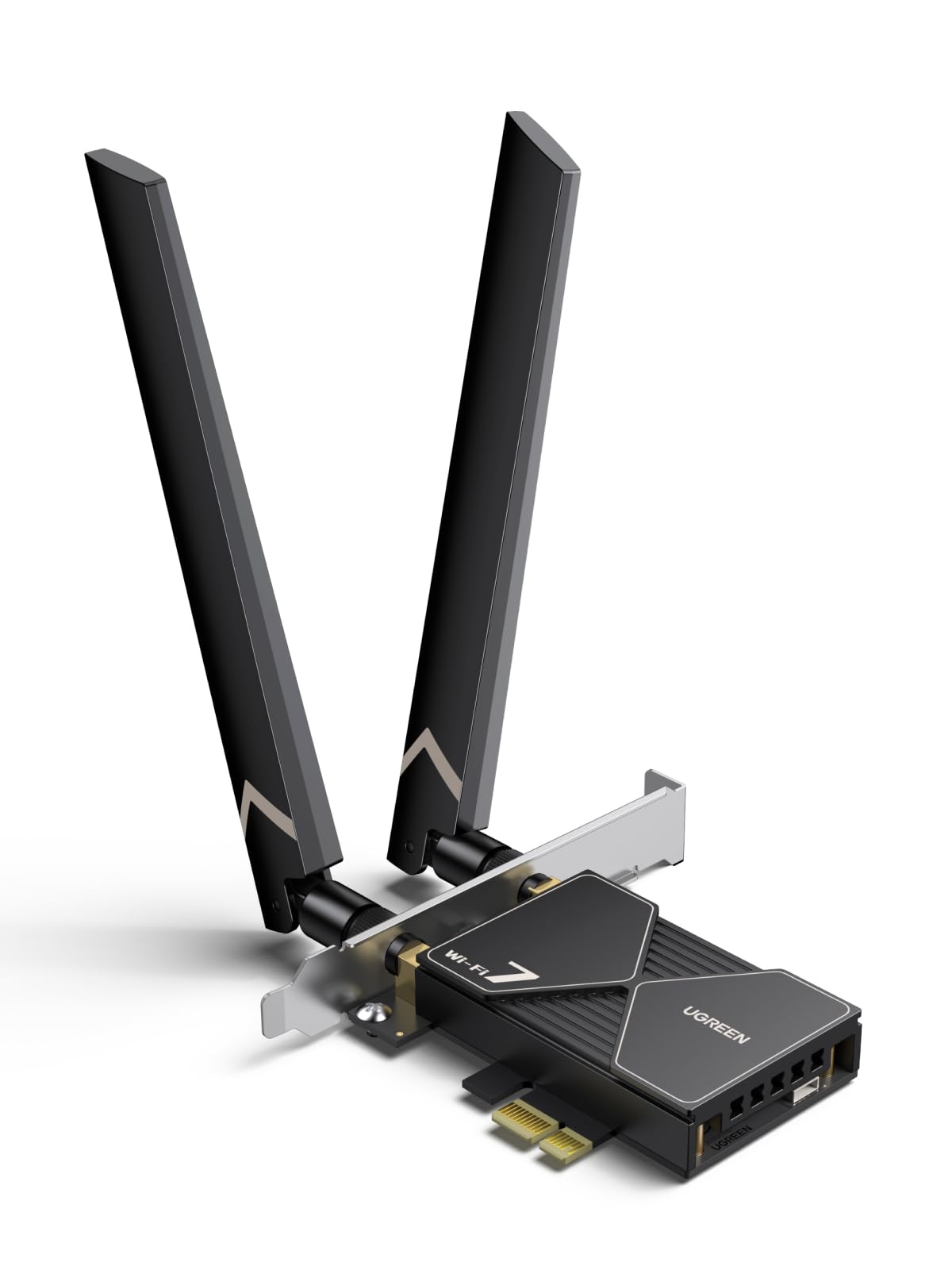
Your cheapest on-ramp to Wi-Fi 7 — if your PC already runs Windows 11 and your router plays along.
The UGREEN BE6500 is the entry point to the Wi-Fi 7 club on this list. It runs 2882Mbps on the 6GHz band, 2882Mbps on 5GHz and 688Mbps on 2.4GHz, with 160MHz bandwidth in the 6GHz band for less interference. Two things put it ahead of the older 6E cards: MLO (Multi-Link Operation, which uses two bands at once for a steadier connection) and Bluetooth 5.4. A flexible 6dBi antenna lets you point the signal where you need it, and the driver ships pre-loaded on a USB stick so you can install without hunting for downloads.
Two catches define this card. First, the whole package is Windows 11 only — no Windows 10, no exceptions except Windows 11 21H2. Second, reliability feedback is the most common theme in the reviews, and it splits: some owners say it works spectacularly, others report it never worked at all. That is the honest shape of this pick — a cutting-edge card with a real installation-risk profile, not a safe bet. At 4.0+ stars, it is the lowest-rated card here, and that score reflects the mixed reliability reports.
Why it earns a spot
- Wi-Fi 7 with MLO at 2882Mbps on 6GHz — the fastest wireless standard here for the money tier
- Bluetooth 5.4 for newer controllers and headsets
- Driver on a USB stick in the box, so no file hunting
What you should know before clicking
- Windows 11 only — Windows 10 builds are shut out entirely
- Reliability is the most-discussed theme and the feedback is split, so budget time for troubleshooting
- Only reaches its full speed with a Wi-Fi 7 router, and needs the PC’s built-in Bluetooth disabled first
Choose it if: you are on Windows 11, have or plan a Wi-Fi 7 router, and want the newest standard at the lowest rung of the price ladder.
Hold off if: you want a no-drama install — the split reliability reports make the Cudy WE4000 the calmer choice.
7. GIGABYTE WiFi 7 GC-WIFI7 PCIe Expansion Card

Wi-Fi 7 built for gaming frames: MLO, 4K-QAM and up to 5800Mbps.
Gamers, this is the pick tuned for you. The Gigabyte GC-WIFI7 is a Wi-Fi 7 card rated to 5800Mbps and built around MLO (Multi-Link Operation, connecting on two bands at once to keep a session from stalling) and 4K-QAM (a denser signal encoding that pushes more data through the same air). It also supports up to 320MHz bandwidth across 2.4GHz, 5GHz and 6GHz — the widest channel width a Wi-Fi 7 router can offer. PCIe x1 is the slot it needs, and it pairs with Bluetooth 5.3 for your controller and headset.
What the owner feedback shows is that the speed claims are not just on paper. Reviewers point out gigabit peaks and 300-320Mbps in real use, with a straightforward install. It is rated 4.0+ stars across 150+ ratings. The card is the heaviest on this list at 0.24 kg, which is a hint at the antenna hardware and the metal it ships with.
The fine print
Its 320MHz bandwidth and 4K-QAM need a Wi-Fi 7 router to matter — pair it with a Wi-Fi 6 router and you get a good card running below its ceiling. Windows 10 is listed as its minimum, so older builds are supported, unlike the TP-Link and UGREEN Wi-Fi 7 cards. If you are building a game rig and want one card that grows with your router, this is a solid fit.
Straight answer: fast, well-built, and ready for a Wi-Fi 7 router. The trade-off is the weight and the router dependency — neither is a flaw, just a fact of the standard.
Suits: a gaming PC on a Wi-Fi 7 router where low latency matters more than brand recognition.
Skip if: your router is older than Wi-Fi 7 and you will not upgrade soon — the extra capabilities stay dormant.
8. TP-Link WiFi 7 BE6500 PCIe WiFi Card (Archer TBE400E)

The Wi-Fi 7 card with the fewest horror stories — 6500Mbps and Bluetooth 5.4 in one board.
Here is the sharpest contrast on the list: the TP-Link Archer TBE400E and the UGREEN BE6500 are both Wi-Fi 7 cards with Bluetooth 5.4, but the TP-Link carries a 4.5+ star rating over 100+ owners while the UGREEN sits at 4.0+. Reliability is the most-praised theme in the TP-Link’s feedback, and that is the number a buyer should care about more than any spec. It is rated to 6500Mbps tri-band (2882Mbps on 6GHz, 2882Mbps on 5GHz, 688Mbps on 2.4GHz), and it brings MLO, Multi-RUs and 4K-QAM to the party.
Two high-gain antennas boost the signal, WPA3 secures the network, and a low-profile bracket ships alongside the standard one for small cases. Shoppers say better connectivity and speed than their PC’s onboard module, with 600Mbps sustained in one case. Bluetooth 5.4 keeps controllers and headsets synced. The install is simple, and the card is designed exclusively for Windows 11 (64-bit) — not compatible with Windows 10 and below.
The case for it
- 6500Mbps Wi-Fi 7 tri-band with MLO, Multi-RUs and 4K-QAM
- Bluetooth 5.4 in the same card
- Reliability is what owners praise most, which is the hardest thing to guarantee on a Wi-Fi card
- Both standard and low-profile brackets in the box
The other side of the coin
- Windows 11 only — Windows 10 machines cannot use it
- Value-for-money feedback is mixed, so it is not the cheapest route to Wi-Fi 7
The verdict: if you are on Windows 11 and want a Wi-Fi 7 card that does not keep you troubleshooting, this is the one to beat.
Skip if: you are running Windows 10 — the card will not install.
9. TP-Link BE9300 PCIe WiFi 7 Card (Archer TBE552E)

The biggest number on the list: 9300Mbps across three Wi-Fi 7 bands.
If you want the highest top speed here, the TP-Link Archer TBE552E is the one to beat — 9300Mbps total, split as 5764Mbps on 6GHz, 2882Mbps on 5GHz and 688Mbps on 2.4GHz. That is 320MHz channels on the 6GHz band when paired with a Wi-Fi 7 router, doubling the channel width of the previous generation. MLO, Multi-RUs and 4K-QAM are all onboard, along with Bluetooth 5.4. Two high-gain antennas handle range, and a low-profile bracket is included for mini towers.
Performance is the most consistently praised thing about this card after functionality, and owners note the build quality holds up. Speeds are stable and the install is straightforward. Functionality is what owners talk about most, and that fits: this is a card that delivers when it is set up right. It is a 4.0+ star card over 200+ owners. The caveats, though, are sharper here: compatibility and driver compatibility are both recurring complaints, some report Bluetooth hiccups, and the whole package is Windows 11 only — not compatible with Windows 10 or Linux.
Who this is for: a Windows 11 machine on a Wi-Fi 7 router where the top speed is the point. If your PC build is modern and you can follow a driver install, it is the most capable card here.
The honest trade-off: the fastest card comes with the most setup friction in the reports. Compatibility issues are the thing you have to be ready to troubleshoot, and the lack of Linux support rules it out for open-source rigs.
Reach for this if: you have a Wi-Fi 7 router and a modern Windows 11 build and want every last megabit.
Look elsewhere if: you are on Linux, Windows 10, or want a card that installs without a fuss — the Archer TBE400E trades speed for stability.
Know the Specs
Top speed (Mbps)
This is the total across all three bands, so 5400Mbps does not mean 5400Mbps on any one band. The Cudy WE4000’s 5400Mbps splits into 2400Mbps on 6GHz, 2400Mbps on 5GHz and 574Mbps on 2.4GHz. The Archer TBE552E’s 9300Mbps splits into 5764Mbps, 2882Mbps and 688Mbps. Real-world throughput depends on your router and your distance from it — treat the headline as a ceiling, not a promise.
Wi-Fi standard (6E vs 7)
Wi-Fi 6E adds the 6GHz band to Wi-Fi 6, giving you more channels and less congestion. Wi-Fi 7 adds MLO (using two bands at once for a steadier link) and 4K-QAM (a denser encoding that crams more data into the same signal). A Wi-Fi 7 card only reaches its full potential with a Wi-Fi 7 router — pair it with an older router and you fall back to the slower standard.
Bluetooth version
The number here (5.2, 5.3, 5.4) tracks improvements in speed, range and device capacity. Most cards on this list use 5.3, the newer Wi-Fi 7 cards use 5.4, and the ASUS PCE-AX1800 uses 5.2. Higher is better for keeping a controller, headset and keyboard all connected, but 5.3 is perfectly capable for a normal desk.
Slot and bracket fit
All nine cards fit a PCIe x1 slot. Several also cover x4, x8 and x16, which gives you more freedom about where the card goes. If you have a small-form-factor case, look for a low-profile bracket in the box — the Cudy, BZIZU, OKN, FENVI and both TP-Link cards all ship with the option. It is the difference between a card that goes in and one that sits in a drawer.
Common Questions
Will a PCIe Wi-Fi card work with my Windows 10 desktop?
Do I need a Wi-Fi 6E or Wi-Fi 7 router to use these cards?
Why does my new card not show Bluetooth after installation?
Can I use a PCIe Wi-Fi card in a small-form-factor PC?
Is Wi-Fi 7 worth it over Wi-Fi 6E on a desktop?
What is MLO and does it help gaming?
How much speed should I expect in real life?
Does a PCIe Wi-Fi card need a free PCIe slot?
Will a Wi-Fi 7 card work if I have an Intel or AMD CPU?
The Bottom Line
For most people building or upgrading a desktop, the pcie wi-fi card winner is the Cudy WE4000 because it pairs the Intel AX210 chip with Wi-Fi 6E, Bluetooth 5.3 and automatic Windows 10 drivers — and it holds the highest owner satisfaction on this list. If you want the newest standard and your PC runs Windows 11, the TP-Link Archer TBEE is the more reliable Wi-Fi 7 route. And if raw speed is what you are chasing, the TP-Link Archer TBE552E tops the list at 9300Mbps — just be ready to troubleshoot drivers on a Windows 11 machine. Buy for the router you own today, and you will be happy with any of these nine.
How we choose
We do not accept paid placement. Every pick is matched to a real buyer and a real use-case; we do not hands-on test units.
Sources
Specifications: manufacturer listings and product documentation. Review insights: verified customer reviews, as of November 2026. Pricing: not shown on this page (it changes often); check the current price via the retailer link.
As an Amazon Associate, Tactical Gear Guy earns from qualifying purchases. This does not affect which products we feature.