Specs are compiled from manufacturer listings and verified buyer reviews and can change over time — please confirm the key details on the product page before buying.
You want a pad that wakes your Series S instantly, holds its sticks straight after months of play, and does not die mid-match. The short answer: the Ice Breaker Special Edition is the safest buy on this list — durability and reliability are what carry it, and it does the boring things right. Below, nine wireless pads for the Xbox Series S are sorted by what they actually do for you, from battery hours and Hall Effect sticks to trigger locks and rear buttons.
This guide is built by comparing the manufacturers’ published specifications and the patterns across verified customer reviews, so you get each pick’s real strengths and trade-offs instead of marketing spin.
Some pads here lean on style, others on precision parts that fight stick drift. I flag the trade-offs in plain words so you can buy once and stop swapping pads every season. Read on for the full breakdown of every wireless Xbox Series S controller worth your money.
Top Picks


How To Choose The Best Wireless Xbox Series S Controller
The Series S has no disc drive and no wired controller in the box, so the pad you buy becomes the whole interface between you and the game. That makes three things matter more than anything on the box art: how long it runs, how it connects, and whether the sticks stay accurate. Get those right and the special-edition paint job is just a bonus.
Start with the sticks, not the shell
Standard analog sticks use physical contact parts that wear down, which is how drift starts — the cursor creeps when you are not touching it. Hall Effect and TMR sticks use contact-free magnetic sensing instead, which is why pads like the GameSir and the Victrix advertise anti-drift performance. If you play shooters or racing games for hours, paying for that tech is the single best use of your budget.
Match the connection to where you play
Xbox Wireless pairs straight to the console with no dongle, and Bluetooth covers PC and phones. A 2.4GHz dongle is a separate small USB receiver that some pads require — and those pads usually will not talk to a TV or a phone at all. Check that before you buy, because a pad that needs a receiver is a desk-and-console tool, not a couch-and-mobile one.
Battery hours decide your rhythm
Rechargeable pads here range from short single-charge runs to multi-day ones, and the gap is real. A pad that needs a cable every session changes how you sit; a pad that runs for days lets you leave it on the shelf. Also look at whether it charges through USB-C, a dock, or a case, because that is the routine you will repeat for years.
Side-by-Side Comparison
| Model | Best For | Sticks | Battery | Connection | Amazon |
|---|---|---|---|---|---|
| XBOX Ice Breaker Special Edition★ Best Overall | All-round daily play | Textured triggers, hybrid D-pad | Up to 40 hours | Xbox Wireless, Bluetooth, USB-C | Amazon |
| SZDILONG 2.4GHz ControllerBudget Pick | Budget RGB fun | 360° omnidirectional joystick | 1000mAh, 10-14 hours | 2.4GHz dongle only | Amazon |
| 8BitDo Lite SE 2.4GEasiest Grip | Low-effort, accessible play | Hall Effect joysticks | — | 2.4G wireless | Amazon |
| XBOX Forza Horizon 6 Limited Edition | Racing fans and collectors | Textured triggers, hybrid D-pad | — | Xbox Wireless, Bluetooth, USB-C | Amazon |
| PowerA Advantage Regen Slate | Competitive FPS play | Hall Effect thumbsticks and triggers | Up to 30 hours | 2.4GHz dongle, USB-C | Amazon |
| PowerA FUSION Pro with Lumectra | Custom looks and feel | Hall Effect modules, quick-twist height | — | 2.4GHz USB adapter | Amazon |
| GameSir G7 Pro Wuchang Edition | Serious competitive play | Mag-Res TMR sticks, Hall Effect triggers | 1200mAh with charging stand | 2.4G dongle, Bluetooth 5.3, USB-C | Amazon |
| Turtle Beach Victrix Pro BFG Reloaded | Modular, swappable layout | Hall-Effect modules, 11 interchangeable parts | Up to 20 hours | Wireless and wired | Amazon |
| ASUS ROG Raikiri II | PC-first players | Anti-drift TMR joysticks | At least 30 hours | 2.4GHz RF, Bluetooth, USB-C | Amazon |
Detailed Reviews
1. XBOX Wireless Gaming Controller Ice Breaker
Our pick — 4.5+★ from 750+ verified ratings; the strongest balance of quality and price.
The pad that gets out of your way for days at a time, then just works
Battery is the headline for anyone who has ever lost a match to a dead pad. This one is rated for up to 40 hours of play on a charge — enough that most players top it up weekly rather than nightly. Compare that with the SZDILONG below at 10-14 hours and you are looking at a very different charging routine, not a small edge.
Xbox Wireless pairs straight to your Series S with no dongle to lose, and Bluetooth covers your PC, phone or handheld. The rubberized grips on the back cases keep the pad planted through long sessions, and the textured triggers give your fingertips something to find without looking. There is a 3.5mm jack for any wired headset and USB-C for direct plug-and-play when you want zero wireless risk.
The honest catch is the styling — iced and frosted blues are a statement, and a buyer who wanted something understated is the one person this is not for. The other adjustment is that button remapping lives in the Xbox Accessories app rather than on the pad itself, so you set profiles at a desk, not mid-game. Owners mostly report it as reliable; the mixed durability notes are a reason to keep it in a case, not to skip it.
Where this pad earns its keep
- Up to 40 hours on a charge so charging stops being a ritual
- Xbox Wireless and Bluetooth in one pad — console, PC and cloud without a dongle
- Rubberized rear grips and textured triggers for steadier long sessions
- USB-C direct connection plus a 3.5mm jack for wired headsets
What you are trading away
- Loud blue colorway is a look, not a neutral finish
- Button mapping lives in an app, not on the controller
- No Hall Effect sticks at this tier
Buy this one if: you want one pad that handles console, PC and cloud without thinking about a receiver.
Look past it if: you want stealth looks or magnetic anti-drift sticks.
2. SZDILONG Wireless 2.4GHz Controller
Seven colors of light, a 1000mAh battery and a dongle you must not lose
Know the catch before you buy: this pad has no Bluetooth and needs its 2.4G receiver (a small USB dongle that carries the wireless signal) plugged into the console or a Windows PC. So you cannot pair it to your TV or your phone, and nothing works if that little receiver goes missing. Within that limit you get a lot of pad for the money, and it is clearly more compact than the official Xbox pads — 3.94 x 3.15 x 1.97 inches against 6.91 x 5.61 x 2.76 on the Forza edition — so it fits smaller hands and slim bags.
The light show runs four modes across seven colors, stepping through blue, ice blue, green, orange, yellow, red and pink. The rear ML and MR buttons can be mapped to A/B/X/Y/LB/RB/L3/R3/D-Pad functions, and the turbo function layers onto any of the main buttons without software. A 3.5mm stereo jack lets you take audio and chat at the same time.
The internal 1000mAh battery charges over Type-C in 2-3 hours and runs 10-14 hours — a third of what the Ice Breaker manages, and you will notice it on long weekends. Owner feedback centers on reliability: many units work fine day after day, while some buyers get one that stops behaving. Buy it for a second setup or a kid’s pad and the value makes sense; make it your only competitive controller and the dongle reliance is the thing to weigh first.
The light show is the point: four lighting modes and seven colors make this the pad you actually enjoy looking at, and the turbo plus rear-button mapping adds genuine function at the entry tier.
Plan for the dongle: it is the whole connection, so keep it with the console and treat the pad as a home setup rather than a travel one.
Reach for it if: you want RGB flair and programmable rear buttons on a tight budget for a desk setup.
Not your pad if: you play on a TV or phone, since it needs the receiver and skips Bluetooth entirely.
3. 8BitDo Lite SE 2.4G Wireless Controller
Built for hands that tire fast, with buttons that press like they weigh nothing
Most pads assume you can grip hard and press firmly for hours. This one is designed the other way round: a unified face-button layout with lower-resistance buttons and highly sensitive joysticks, so a long session costs your hands less. Owners say it plays without wrist ache, which is the whole reason to pick it over a standard shell.
It is officially licensed by Xbox and runs 2.4G wireless on Series X|S, Xbox One and Windows 10 and above. Behind the shell sit Hall Effect joysticks, the magnetic sensing type that avoids the physical wear that leads to drift. Two large Super Buttons are programmable instantly with no software, and three profiles let you switch setups on the fly. There is a 3.5mm audio jack and a microphone mute button for voice chat.
You pay for that comfort in weight and size: at 0.67 kg it is a substantial piece of kit, not a featherweight travel pad, and the large button faces take getting used to if you are fluent on a regular layout. But if your hands ache after an hour, the reduced effort per press outweighs the extra weight and size. The 8BitDo Lite SE keeps Hall Effect joysticks (magnetic sticks that resist drift) and a low-effort layout in one officially licensed pad, so long sessions cost your hands less.
This is your pad if: standard controllers leave your hands sore and you want sensitive sticks without giving up Xbox licensing.
Worth knowing: it is a heavy desk device, not something you toss in a bag for travel.
4. XBOX Wireless Gaming Controller Forza Horizon 6

A festival-themed pad whose grip does the talking, not just the paint
The grip is the reason this holds its place. Black and pink diamond-patterned grips on the rear and textured triggers give your fingers a defined place to sit, which matters in a racing game where you are holding a line for lap after lap. Owners consistently cite the in-hand feel and finish quality as what sold them, which lands for anyone invested in the series.
One pad covers console, PC, mobile, handhelds, Smart TVs and supported VR headsets through Xbox Wireless, with Bluetooth and USB-C as backups and a 3.5mm jack for headsets. At 14.4 ounces it is the heaviest pad here — a touch heavier than the Ice Breaker’s 14.08 ounces — so if you like a weighty controller in your palms, this one feels substantial rather than hollow.
Being a limited edition, the styling is the entire pitch and the price reflects it; if you want plain black, you are paying for a theme you do not want. Button remapping goes through the Xbox Accessories app, same as the standard pad. For a Forza fan it is an easy yes; for everyone else the Ice Breaker does the same job in a color you might prefer.
Grip that earns its colors: diamond-patterned rear grips plus textured triggers mean your hands stay put during long racing stints, and the build quality holds up in the hand.
The collectible tax: limited-edition graphics are the value here, and they only pay off if you actually like the theme.
Choose it for: a themed pad with real grip and the full Xbox Wireless feature set.
Think twice if: you want the lightest pad on the shelf or a neutral look.
5. PowerA Advantage Wireless Controller Regen Slate
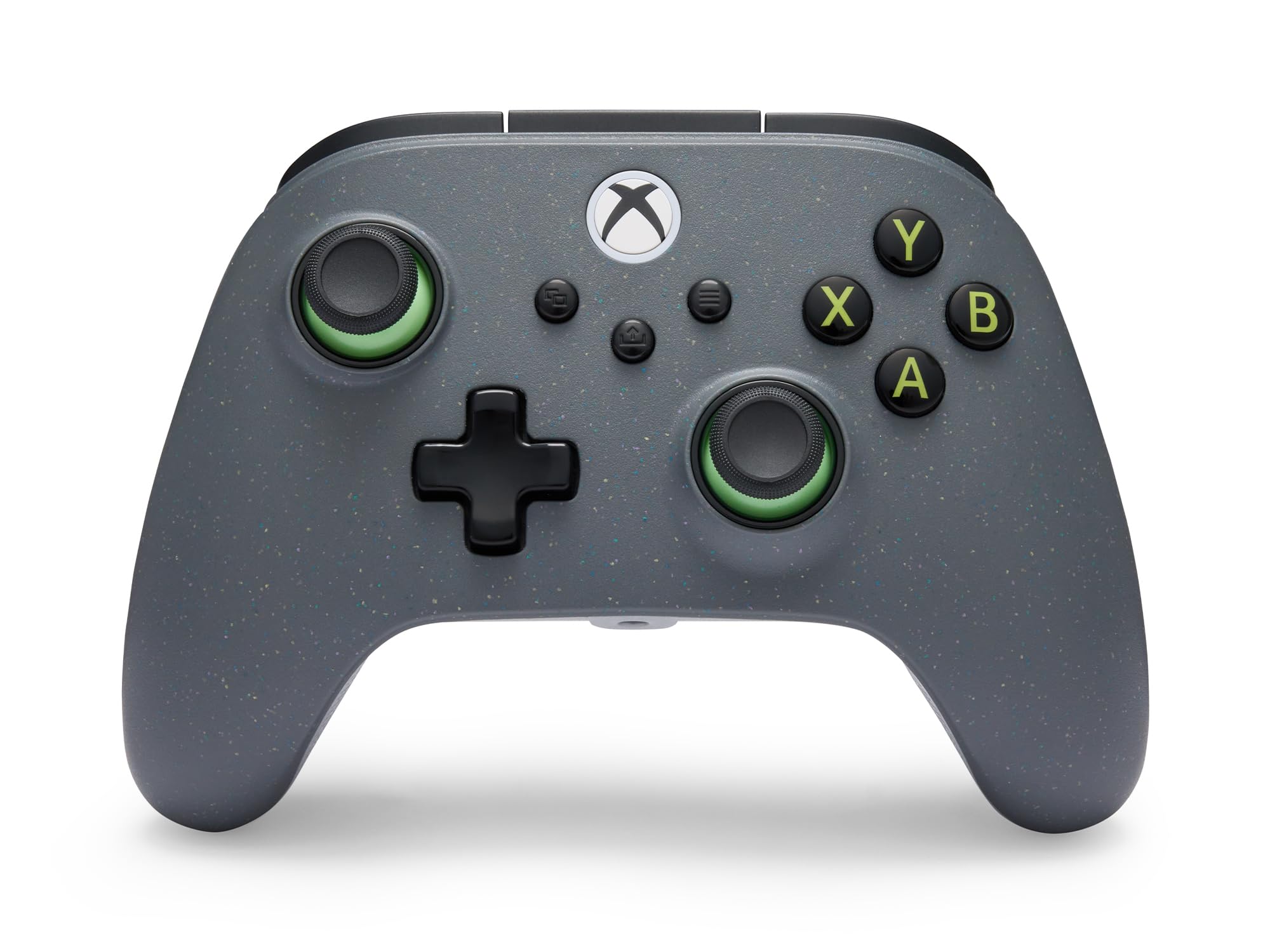
Trigger locks, anti-drift sticks and a shell partly made from reclaimed plastic
Two things separate this from the official pad. First, Hall Effect thumbsticks and triggers use contact-free magnetic sensors, so the drift that kills ordinary sticks is designed out from day one. Second, a 2-way trigger lock lets you shorten the pull for a split-second response in shooters or run the long pull when you need a full throttle in racing games.
You get a greener build here: it is partially made from 65% reclaimed materials, which is rare to see printed on a controller. The battery runs up to 30 hours on a charge, and an extra-long 10 ft USB-C cable comes in the box for wired play. A 3-mode switch flips between 2.4GHz Xbox wireless via the included adapter, plus Android and PC handhelds. Four mappable buttons can be programmed mid-game with no system settings, and the PowerA Gamer HQ app handles audio, triggers, rumble and dead zones (the stick’s neutral range).
Two limits to go in with open eyes. The 1000Hz polling rate — how often the pad reports your stick position to the machine — applies to PC wired mode only, so it will not do anything extra plugged into your Series S. Owner feedback is split on long-term quality and connection stability, so treat it as a second pad for competitive nights rather than an heirloom. The weight is the lightest here at 11.36 ounces, which keeps fast hand movements relaxed.
Why competitive players look here
- Hall Effect sticks and triggers designed to resist drift
- 2-way trigger locks for short or full pull
- Four mappable buttons set on the fly
- Up to 30 hours with a 10 ft USB-C cable included
Honest limits
- 1000Hz polling rate only works in PC wired mode
- Requires the included USB adapter for wireless
- Quality and connectivity feedback is mixed
Made for: players who want drift-free sticks and switchable trigger travel without paying premium-tier money.
Skip past if: you need a pad that works wirelessly with no adapter at all.
6. PowerA FUSION Pro Wireless Controller Lumectra

A hidden design that appears only when the RGB wakes up
Turn the lighting on and a hidden graphic reveals itself across the shell — six lighting modes spread over four customizable zones. That kind of showpiece is exactly why this pad exists, and it is the thing that stands out in the hand. Underneath it sits serious hardware: Hall Effect modules in the thumbsticks using contact-free magnetic sensors, plus 4 mappable buttons you can program mid-game without touching system settings.
The Quick-Twist thumbsticks are the feature you will actually use daily. A simple twist adjusts stick height mid-game across three settings per stick — no swapping parts, no hunting for a tool. Wireless runs on the included USB adapter with low latency across Series X|S, Xbox One and Windows 10/11, and there are 17 buttons in total.
Here is the part that matters: this is the lowest-scoring pad on the list, and the reliability stories are the reason. Random mid-match connection drops are the worst failure mode a controller can have, and that pattern shows up often enough in the feedback to say plainly. Buy it if the lighting and the twist-adjust sticks genuinely excite you and you can accept that risk; otherwise a higher-rated pick will treat you better.
The customizer’s pad: quick-twist stick height, Hall Effect modules and four on-the-fly buttons give you more tuning here than almost anything else on the list.
Go in with open eyes: connection dropouts are a recurring theme in owner experience, so keep your receipt and test it early.
Pick it for: the hidden RGB design and twist-adjustable sticks you will not find elsewhere at this tier.
Consider something else if: a stable wireless link matters more to you than looks.
7. GameSir G7 Pro Wireless Gaming Controller
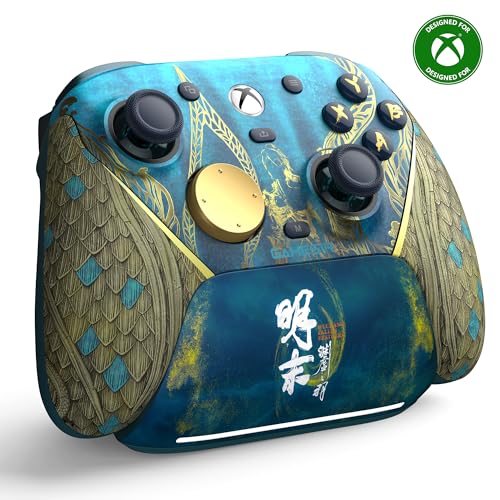
The one the reviews keep calling the best pad they have used
Start with the sticks, because that is where the money went. GameSir’s Mag-Res TMR sticks combine the precision and low power draw of traditional potentiometer sticks with the durability of Hall Effect — and the result is a higher, more stable polling rate with anti-drift behavior. Hall Effect analog triggers back that up with contact-free sensing, and a Hair Trigger Mode toggles instantly by holding M plus LT/RT.
You get the widest connection options here: a 2.4G dongle (a small USB wireless receiver) or USB-C for Xbox and PC, plus Bluetooth 5.3 for Android. One press wakes your console and it is ready. The 1200mAh battery pairs with a charging stand that tops it up the moment you set the pad down. That stand also has a built-in compartment that holds or extends the reach of the wireless receiver — a small design choice that stops the dongle getting lost.
At 9.6 ounces it is among the lightest pads on this list, which keeps long sessions comfortable, and buyers report the ergonomics feel right in the hands. The one question worth asking is if you want a licensed third-party pad over Microsoft’s own shell shape — the Wuchang artwork is bold and not for everyone. For pure spec-per-dollar, this is the strongest combination of sticks, triggers and charging dock in the group.
The spec sheet that wins people over
- Mag-Res TMR sticks with anti-drift performance
- Hall Effect analog triggers plus a Hair Trigger Mode
- 1200mAh battery and a stand that charges on contact
- 2.4G, Bluetooth 5.3 and USB-C in one pad
Before you commit
- Bold Wuchang edition artwork is a strong taste call
- Premium tier means you pay for the hardware
- Stick feel differs from the official Microsoft shell
Go here for: the best hardware stack on the list — TMR sticks, Hall Effect triggers and a dock that charges on contact.
Look elsewhere if: you want the familiar Microsoft shape or a quiet, plain finish.
8. Turtle Beach Victrix Pro BFG Reloaded Controller

A pad that changes shape for the game you are playing today
You can rebuild the layout here, and nothing else on this list lets you do that. Three customizable modules with built-in Hall-Effect technology (magnetic sticks that resist drift), a 6-button fightpad module with Kailh microswitches (fast-clicking mechanical switches), and 11 interchangeable components mean you can rotate the stick and button arrangement to suit a fighting game one night and an FPS the next. A module tool and carrying case come in the box.
The triggers are a 5-stop Hall-Effect clutch design with a hair-trigger mode, and four mappable quick-action buttons sit within reach. There is a built-in 3.5mm jack that includes a lifetime subscription to Dolby Atmos, a genuinely unusual extra. Wireless or wired play runs on a rechargeable battery rated up to 20 hours, and the Victrix Control Hub app on Xbox and PC handles profiles.
At 9.28 ounces it is the second-lightest pad on the list, so modularity does not come at the cost of heft. Buyers like the customization and finish quality most; the mixed notes land on trigger and button feel, with some finding the button layout intrudes on regular play.
Built to be rearranged: three modules, 11 swappable components and a fightpad option make this the most adaptable controller in the round-up.
The layout is the price: the extra button faces can get in the way if you stick to standard games, so this suits experimenters.
For the tinkerer: players who want one pad that becomes a fightpad, a shooter pad or a racer pad on demand.
Not for everyone: if a fixed traditional layout is what your muscle memory expects, the swappable parts are a learning curve you do not need.
9. ASUS ROG Raikiri II Xbox Wireless Controller
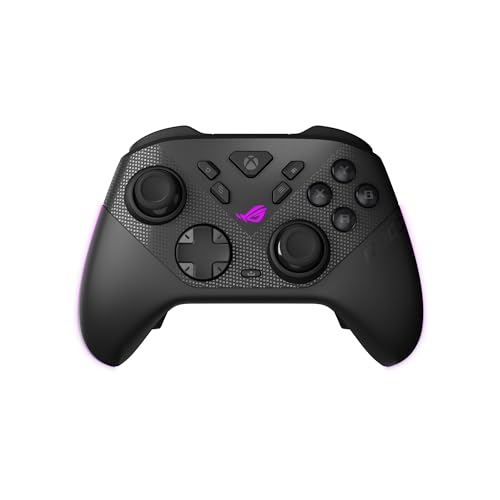
Tuned for the desk, where a 1000Hz link and swappable triggers pay off
The Raikiri II is the pad for the player whose Series S shares a desk with a gaming PC. Tri-mode connectivity covers low-latency 2.4GHz RF, Bluetooth and wired USB-C, and the 1000Hz polling rate works in both PC wired and 2.4GHz wireless modes — the wireless half helped by ROG SpeedNova. On a competitive shooter at a monitor, that fast report rate is the whole reason to spend here.
Dual-mode triggers switch between micro-switch triggers with short travel and TMR sensor triggers with full travel, so you get a clicky response for shooters and a longer pull for racing without changing pads. The TMR joysticks are anti-drift, and per ASUS they consume less power than Hall Effect sticks while staying more accurate. Four programmable rear buttons, micro-switch face buttons and an anti-slip grip round it out.
Battery is rated at least 30 hours of 2.4GHz play on a charge, though that figure assumes RGB lighting, audio and vibration are all switched off — turn those on and expect less. The box includes a charging stand and a protective case that charges the pad while it is inside, plus two detachable joystick caps. What to weigh: connectivity complaints and ergonomics split opinion, and some find the shell uncomfortable, so this is a pad to try in hand rather than buy blind.
Where it outguns the rest
- 1000Hz polling in both PC wired and 2.4GHz wireless
- Dual-mode triggers switch travel style instantly
- ROG SpeedNova wireless plus Bluetooth and USB-C
- Case that charges the pad inside it
The fine print
- At least 30 hours only with lighting, audio and vibration off
- Ergonomics divide opinion — try it in hand first
- Premium tier for a pad that works best on PC
Built for: PC-first players who split time between a monitor and the Series S and want the fastest wireless report rate.
Second-guess it if: you mostly play on the couch, where the 1000Hz benefit buys you little over the official pad.
Know the Specs
Hall Effect and TMR Sticks
Regular analog sticks use parts that physically rub together, and that wear is what eventually causes drift — the cursor creeps when you are not touching it. Hall Effect sticks replace that contact with magnetic sensing, so there is nothing to wear down. TMR sticks are a newer take that adds precision and lower power draw; ASUS says its TMR joysticks are more accurate than Hall Effect while using less power. Either way, the benefit is the same for you: sticks that stay centered over years of play.
Battery Hours and Polling Rate
Battery hours tell you how often you will reach for a cable. A pad rated at up to 40 hours lets you top up weekly; a 10-14 hour pad asks for a charge every couple of sessions. Polling rate is how often the controller reports your stick position to the machine — higher is smoother, and 1000Hz is the competitive figure. Check where it applies, though: on some pads the 1000Hz mode only works in PC wired play, so a console player gets no benefit.
Common Questions
Will a third-party wireless controller work on the Xbox Series S?
Does the SZDILONG controller have Bluetooth?
How long does the Xbox Ice Breaker controller battery last?
What is a trigger lock and do I need one?
Can I use these controllers on a PC as well as the Series S?
Why do some controllers cost more than the official Xbox pad?
Is 1000Hz polling rate worth it on a console?
Do Hall Effect sticks really stop stick drift?
Which controller is best for racing games?
Do I need a wired connection for competitive play?
The Bottom Line
For most people, the wireless xbox series s controller to buy is the XBOX Ice Breaker Special Edition — up to 40 hours of battery, Xbox Wireless and Bluetooth in one pad, and rubberized grips for long sessions, with no dongle to lose. If eliminating stick drift is your priority, grab the GameSir G7 Pro for its TMR sticks (magnetic sticks built to resist drift), Hall Effect triggers and a charging stand that tops it up on contact. And for a player whose hands tire fast, the 8BitDo Lite SE is the one to reach for.
How we choose
We do not accept paid placement. Every pick is matched to a real buyer and a real use-case; we do not hands-on test units.
Sources
Specifications: manufacturer listings and product documentation. Review insights: verified customer reviews, as of November 2026. Pricing: not shown on this page (it changes often); check the current price via the retailer link.
As an Amazon Associate, Tactical Gear Guy earns from qualifying purchases. This does not affect which products we feature.