Specs are compiled from manufacturer listings and verified buyer reviews and can change over time — please confirm the key details on the product page before buying.
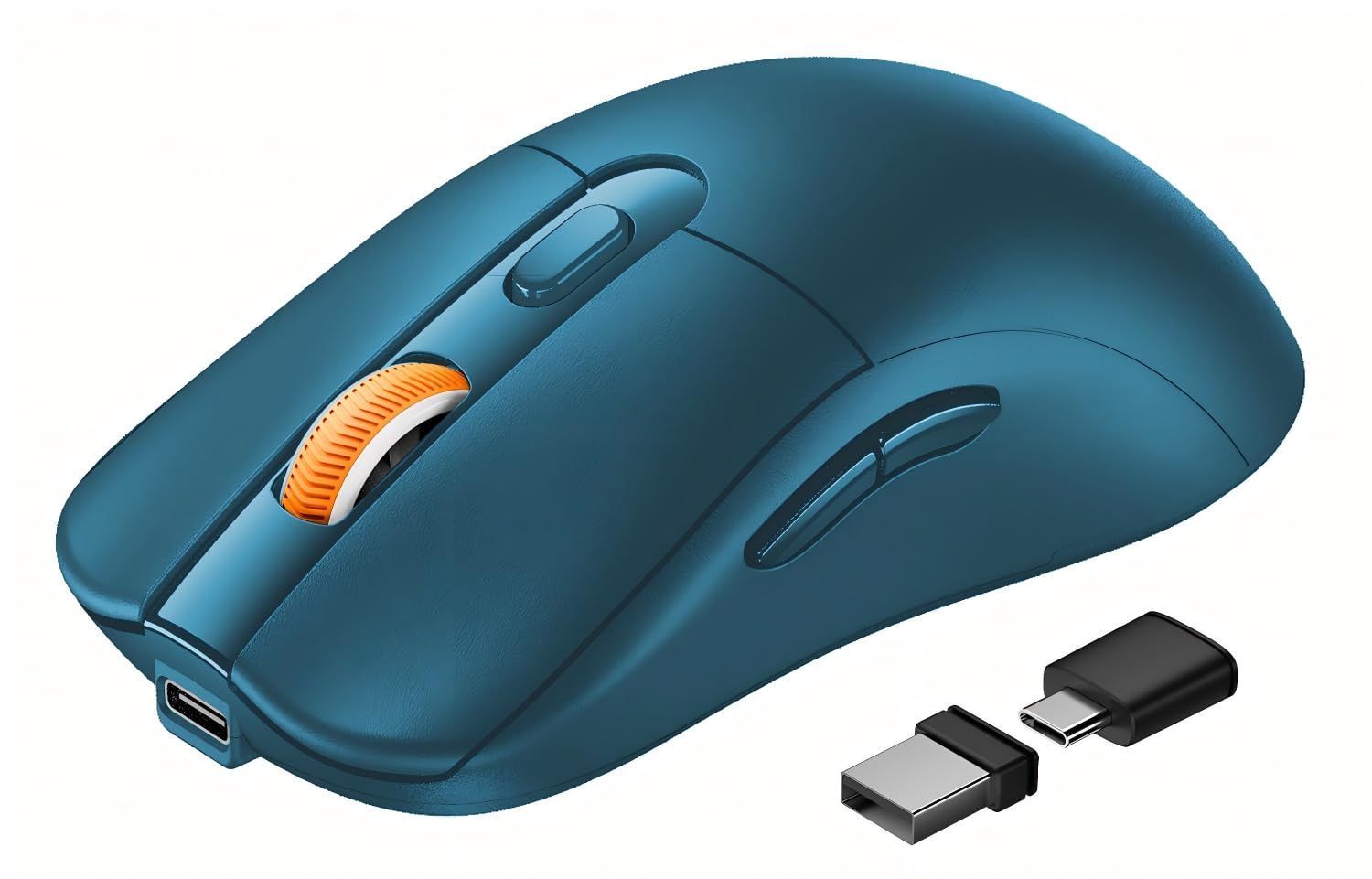
The single biggest mistake you can make shopping this category is buying a mouse with a USB-C charging port and assuming it talks to your laptop over USB-C. It doesn’t. A true USB-C receiver mouse ships with a nano dongle sized for the Type-C port itself, so you can leave your one good port occupied and still get a rock-solid 2.4GHz link. Every pick below was checked on that exact point — the receiver, not the charge cable.
This guide is built by comparing the manufacturers’ published specifications and the patterns across verified customer reviews, so you get each pick’s real strengths and trade-offs instead of marketing spin.
Some mice here pair over Bluetooth and skip the dongle entirely, which matters on a tablet with only one port. Others carry two receivers in the shell. The picks below sort out which one belongs on your desk and which belongs in your bag for the best wireless mouse with USB-C receiver setup.
Top Picks


How To Choose The Best Wireless Mouse with USB-C Receiver
Most of the confusion in this category comes from one word doing two jobs. “USB-C mouse” gets printed on boxes that only mean the charging cable is Type-C. That mouse will still need a USB-A port for its dongle — or Bluetooth, with no dongle at all. Check the included-components line of any listing before you commit, because that is where the receiver is named.
Receiver versus charging port — the read that saves you a return
A real USB-C receiver is a tiny dongle that plugs into the Type-C port and stays there. Some models here ship one receiver that covers both shapes, with a Type-C adapter that slides onto a USB-A nano dongle. Others include two separate nano receivers and store both in a compartment under the shell, which is what the ProtoArc EM15 and the Arteck MD172 both do.
Count the ports you can afford to lose. On a modern ultrabook with two Type-C ports and nothing else, a dongle costs you half your connectivity. On a desktop with six USB-A ports, it costs you nothing at all. That single fact decides if you want a dongle-first mouse or a Bluetooth-first one.
How the shell shape changes your wrist over a workday
A flat slim mouse keeps your palm close to the desk and your wrist slightly rotated. A vertical shell props your hand up at an angle so the wrist sits closer to a handshake position — the POJTK vertical model here lists 58 degrees to the desktop. Neither is wrong; they suit different hands and different desk setups, and the right answer is the one you forget you are holding by mid-afternoon.
DPI, silent clicks, and multi-device pairing in plain terms
DPI (dots per inch) is cursor sensitivity — how far the pointer travels for a given swipe of the mouse. Higher is faster, not more accurate, and on a laptop screen even the lowest settings here are plenty. Silent clicks use damped switches so the click is muffled rather than sharp; the trade-off is a slightly softer feel under your finger.
Multi-device pairing means the mouse remembers several computers and flips between them with one button, so you can drive a work laptop and a personal tablet from the same shell. It is the feature that most changes a two-machine desk, and several picks here support three pairings at once.
Side-by-Side Comparison
| Model | Best For | Receiver Included | Max DPI | Buttons | Amazon |
|---|---|---|---|---|---|
| FYBC Bluetooth LED Wireless Mouse★ Best Overall | Port-light laptops and jiggler duty | Dual-port 2-in-1 (USB-A Type-C) | 1600 DPI | 3 | Amazon |
| ProtoArc EM15Full-Size Grip | Full-size grip for medium to large hands | USB-A and Type-C receivers | 2400 DPI | 6 | Amazon |
| VssoPlor Type C Wireless MousePlug and Play | Plug-and-play Type-C simplicity | USB nano and Type-C receivers | 2400 DPI | 3 | Amazon |
| CHHI Multi-Device Wireless Mouse | All-day battery across three devices | Nano USB-A / USB-C receiver | 3200 DPI | 8 | Amazon |
| POJTK Vertical Ergonomic Mouse | Upright wrist posture | USB-A and USB-C receivers | 4800 DPI | 6 | Amazon |
| Arteck MD172 | Thumb-rest comfort and long charge gaps | Nano USB-A and USB-C receivers | — | 6 | Amazon |
| Lenovo Go USB-C Essential | Travel kit with fast top-ups | 2.4GHz Nano USB-C receiver | 2400 DPI | 5 | Amazon |
| Lenovo Go Multi-Device | Three devices plus Qi charging | 2.4GHz Nano USB-C receiver | 2400 DPI | 5 | Amazon |
| Logitech MX Master 4 for Business | Serious desktop work and glass surfaces | Logi Bolt USB-C receiver | 8000 DPI | 7 | Amazon |
Detailed Reviews
1. FYBC Bluetooth LED Wireless Mouse for MacBook Air iPad Pro
Our pick — 4.5+★ from 300+ verified ratings; the strongest balance of quality and price.
One dongle that covers both port shapes, plus a jiggler mode you switch on by hand.
This takes the top spot because one dongle fits either port: the included dual-port 2-in-1 receiver ships with a USB-A plug and a Type-C adapter, so it slots into whichever port your laptop actually has. No hunting for a second receiver, no guessing at checkout. It pairs over 2.4GHz (a wireless link that stays steady) or switches to Bluetooth when you would rather leave the port free.
What wins people over here is how reliably it just works on a MacBook — functionality is the aspect that shows up far more than any other in what people write about it, with quality close behind. Silent clicks use damped switches to muffle the click, keeping a shared desk or a late-night session quiet. The shell is built for small and medium palms and weighs 65g, so it disappears into a sleeve without adding noticeable bulk.
Step away from your desk and the screen stays awake: hold the DPI button (the one that sets cursor speed) for 3-5 seconds and jiggler mode moves the cursor on its own so your machine will not lock. That is a genuinely unusual inclusion at this price, and it saves you buying a separate mouse mover. The catch is the light show — 7-Color Breathing LED effects cycle if you want them or not, and there is no mention of an off switch. On a dark desk that glow is either the personality you wanted or the thing you notice first.
What holds up
- One receiver that covers both USB-A and Type-C, so port shape never blocks you
- Jiggler mode built in, activated by holding the DPI button for 3-5 seconds
- Three DPI steps at 800/1200/1600, switchable in about a second
- 65g shell for small and medium palms, with silent clicks rated to cut noise
Where it bends
- The 7-Color Breathing LED cycle is always on, with no off switch listed
- 1600 DPI is the ceiling, well below what higher-end mice offer
- Shell sized for small and medium hands, not large palms
Worth it for: anyone on a two-port ultrabook who wants one dongle to cover every shape, and a jiggler without buying a second gadget.
Think twice if: you keep your screen sensitivity high — this tops out at 1600 DPI, the lowest ceiling on this list.
2. ProtoArc EM15 USB C Mouse
A full-size 4.9-inch body that tips the scale at 68g — big enough to fill your palm, light enough to forget.
Your palm gets real support instead of a cramped claw, which most compact mice force on you. This one measures 4.9″ x 2.5″ and is built for medium to large hands. Somehow the scale still lands at 68g — heavier than the 65g FYBC above, but that is a difference you feel only side by side, and you get back a shell that does not leave your hand aching after a long shift.
Six buttons is the number that does the work day to day: left, right, scroll, a DPI cycle, plus backward and forward thumb keys for flipping through pages. The type-C and USB-A receivers both live in a compartment on the back of the shell, which is a small design blessing — swap machines without digging through a bag. Toggle one button and you jump between three paired devices.
Battery math is spelled out plainly: a 2-hour charge returns 15 days of use plus 200 days of standby, and the mouse sleeps after a few idle minutes. The honest note is the scroll wheel — it is not part of the quiet-click treatment, so the middle click still ticks while the main buttons stay hushed. A Bluetooth mouse that does three devices at 2400 DPI for this kind of money is the trade you are making.
The real differentiator: the 6-button layout versus the 3-button shells that dominate this list. Those two thumb keys turn back-and-forth web browsing into one-press navigation, and that is most of a workday’s clicking.
The catch worth knowing: the scroll wheel does not share the silent treatment, and the right-hand-only shape rules out left-handed desks.
Reach for this if: your hands are medium to large and cramping has already started you thinking about a bigger shell.
Look elsewhere if: you need a mouse that works equally in either hand — this one is right-hand shaped.
3. VssoPlor Type C Wireless Mouse, USB C MacBook Wireless Mouse
The no-thinking option — pull the dongle out of the battery bay, plug it in, and work.
There is no driver, no software, and no setup dance. The nano Type-C and USB-A receivers sit in the battery compartment; take one out, plug it into your port, and the mouse is live. Store it back in the shell when you travel. If you are buying for someone who does not want to troubleshoot anything, this is the shape that decision takes.
Under the hood there is a built-in 300mAh lithium rechargeable battery that tops up through the included charging cable, so you are not buying disposables. Three DPI levels — 1000, 1600 and 2400 — let you dial the cursor to your taste, and the quiet clicks plus a smooth frosted finish keep an open office calm. One button flips between the paired devices.
Battery endurance is the split verdict on this one: plenty of people report it holds its charge for a long stretch, and some run into real battery-life trouble. That reads like a unit-to-unit lottery rather than a design flaw, but it is worth taking the charging cable on trips either way. Few things at this size are this forgiving of a first-time setup.
Zero-friction setup: a mouse built for the person who plugs in and moves on, with both dongle shapes stored inside the shell for transport.
The honest split: battery endurance divides owners — some report long stretches between charges, others hit trouble, so keep a charging cable within reach.
Fits you if: you want the simplest possible path from box to working mouse, with no software installed.
Pass if: consistent, predictable battery life is the one thing you refuse to gamble on.
4. CHHI Wireless Bluetooth Mouse with USB-A, USB-C Receiver

A thumb-rest shell with eight buttons and a charge window measured in months, not days.
Here is the mouse for the desk that runs three machines at once. It carries 2.4G USB-A, USB-C and Bluetooth, so you can pair a MacBook, a desktop and a tablet and hop across them without unplugging. The built-in rechargeable lithium battery is rated for more than 60 days per charge at 2 hours of daily use, so top-ups are rare enough to forget the cable.
Sensitivity climbs higher than most here, with four steps at 1000/1600/2400/3200 DPI. That 3200 ceiling beats the FYBC’s 1600 by exactly double, and it is the figure that matters if you work across a large monitor and want the cursor to cross it in one short swipe. Eight buttons gives you room for real shortcuts, and the easy-to-grip thumb rest naturally fits your hand.
The comfort story is in the details owners keep pointing at — the textured, rubberized sides for grip and a contoured shape that sits naturally in the palm. Build quality and fit show up as the recurring positives. The caveat is scale: at 4.33″ x 1.6″ this is a smaller footprint than the ProtoArc, so a very large hand may want the fuller shell. Matte finish hides fingerprints well, which helps if it lives in a bag.
Standout numbers
- 3200 DPI max — twice the FYBC’s 1600 ceiling — across four sensitivity steps
- Battery rated beyond 60 days on a single charge at 2 hours of daily use
- Eight buttons and a grip-shaped thumb rest for shortcut-heavy work
- USB-A, USB-C and Bluetooth on one mouse, three devices paired
What to know first
- Compact footprint, so large hands may prefer a fuller body
- Right-hand orientation only
Buy this when: you juggle several devices and want a charge measured in months rather than days.
Skip if: your hand is on the large side and you know a compact shell will leave you cramped.
5. POJTK Vertical Ergonomic Mouse, Bluetooth + USB-A Type-C

A shell that stands 58 degrees off the desk and turns your hand into a handshake.
If your wrist aches by mid-afternoon on a flat mouse, this is the shape the search is really about. The POJTK props your hand up at 58 degrees to the desktop, holding the palm closer to a neutral handshake posture instead of a rotated-flat one. Ergonomics is the single most-written-about thing here, with comfort right behind it — the two words that keep coming back are natural position and less fatigue.
Sensitivity reaches 4800 DPI across five steps (800/1600/2400/3200/4800) — the highest ceiling on this list short of the Logitech, and far more headroom than a laptop screen needs. Six silent buttons keep the office calm, and the front and back shortcut keys flip pages without reaching for the keyboard. Note that those two shortcut keys do not work on macOS, so Mac users lose a chunk of the button advantage.
Connection is genuinely flexible: Bluetooth 5.3, a 2.4GHz USB-A receiver, and a USB-C receiver, so you save a port if you go Bluetooth and still get a fast link if you do not. The long-life piece quoted is unverified beyond the listing, so treat 150 hours as the maker’s number. A full charge is claimed to run 1-3 months depending on use — real enough, but you will only know once it is yours.
Where it wins: the 58-degree shell is the whole point, and it is the only way this list gives you an upright hand position. Ergonomics and comfort are what owners talk about most.
The fine print: the front and back shortcut keys do not work in macOS, so Mac hands get the shape without the shortcuts.
The right call if: a flat mouse has your wrist complaining and you want an upright grip you can actually try at entry-level money.
Not for you if: you use a Mac and bought this hoping for the full shortcut set — the front and back keys are Windows-only.
6. Arteck MD172 Multi-Device Wireless Bluetooth Mouse

Four months on one charge and a soft thumb rest that turns a long shift into a relaxed one.
The number that stands out is battery: a rechargeable lithium cell rated for 4 months per charge at 2 hours of daily use. Pair it once and the three-device switching — USB-A, USB-C and Bluetooth — keeps a laptop, a desktop and a tablet all one button away.
Quality is the thing owners bring up more than anything else, and the ergonomics sit right behind it. The soft, easy-to-grip thumb rest promotes a natural hand and wrist position, so it is built to be held rather than gripped. Silent clicks mean you can work in a library without drawing a look. Note the sizing: it fits medium-large hands and the maker is explicit that it is not for small ones.
The honest tripwire is in the button placement and size — both flag up as mixed in owner feedback, so some hands find the switches land somewhere awkward and the body runs a touch larger than expected. A mouse that fits a mid-to-large palm beautifully can feel roomy to someone with smaller hands. That is a fit question, not a fault.
What earns the spot
- 4-month battery on a single charge at 2 hours of daily use
- Three-device switching across USB-A, USB-C and Bluetooth
- Soft thumb rest and silent clicks for a full workday
- Nano USB-A and USB-C receivers both stored in the back of the shell
Where the fit wobbles
- Button placement and shell size come up mixed in owner notes — a hand-size fit question
- Right-hand only, and explicitly sized for medium to large hands
Settle on this if: your hand is medium-to-large and a soft thumb rest plus months between charges is what you want from a work mouse.
Cast wider if: your hands are small — the maker says so plainly, and the size notes confirm it.
7. Lenovo Go USB-C Essential Wireless Mouse

The 15-minute top-up that buys a week of power — made for the bag, not the desk.
Pack it for a trip and it works the same on any surface: this compact, lightweight shell fits either hand (ambidextrous) and has silent buttons plus a precision blue optical sensor that Lenovo says works on almost any surface — so a hotel desk, a coffee shop table or a train tray all behave the same. The 2.4GHz Nano USB-C receiver (a tiny plug-in dongle) handles the connection, and Lenovo’s Unified Pairing Dongle lets it share a dongle with other Lenovo accessories.
The standout is the charging math: a full charge in under 2 hours, or a 15-minute quick charge for a week of use. That is the figure that matters the morning you packed in a hurry. The battery is rated up to 3 months between charges. DPI is adjustable across 2400, 1600 and 800, and a programmable utility button can be set to whatever you use most.
Connection is the split on this one. Plenty find it reliable, others report pairing trouble with multiple devices — worth noticing if your desk runs a laptop and a tablet you expect the mouse to hop between. Ambidextrous shaping is a genuine plus for left-handed desks, which most of this list does not offer. Compact size is the trade: great in a bag, less filling for a large palm at a long desk session.
One figure to hold onto: a 15-minute quick charge for a week’s worth of power, with a full charge in under 2 hours. For a bag mouse, that is the spec that rescues a rushed morning.
The honest split: pairing with multiple devices is not universally smooth — some buyers report trouble connecting across machines, so it is the one thing to check first if multi-device is your whole reason for buying.
Made for: the commute crowd who want a compact ambidextrous mouse and a top-up that lasts a week.
Leave it if: multi-device hopping is the priority — the connectivity record here is uneven enough to check before committing.
8. Lenovo Go Multi-Device Wireless Mouse

The one on this list that charges on a Qi pad — no cable, no hunting for a port.
Drop it on a wireless charging pad and forget the cable entirely: this mouse supports Qi wireless charging alongside wired USB-C. That is the feature nobody else here offers, and it makes a clean desk setup genuinely possible. The battery is rated up to 3 months per 1.5-hour charge. Pairing covers up to 3 devices via USB-C and Swift Pair-supported Bluetooth, and the Lenovo unified pairing receiver lets one dongle handle several devices.
A quick-switch button toggles between paired machines, which is the shape a two-laptop desk wants. Adjustable DPI cycles at 800, 1600 and 2400, so sensitivity is dialed to how you like the cursor to move. Reliability is the word that shows up most in how people describe it, with quality right behind, and it handles almost any surface thanks to the blue optical sensor. Silent clicks keep a shared space calm.
The programmable utility button ships with Microsoft Teams shortcuts pre-loaded, which is either exactly what you need or the first thing you reprogram. One oddity worth knowing: the multi-device connectivity on the sibling Lenovo Go model below is known to be finicky, and this one asks more of its pairing because it drives three devices at once. Ambidextrous shaping suits either hand, which is rarer than it should be.
The reason to pick it: wireless Qi charging is not offered anywhere else on this list — drop it on a pad and skip the cable entirely, plus a 3-month battery on a 1.5-hour charge.
The catch: multi-device pairing on a three-device mouse is the one thing to test, since connectivity hassles are the recurring weak spot in the Lenovo Go line.
Pick this for: a cable-free desk and the ability to drive three paired devices from one ambidextrous shell.
Rethink it if: wireless charging is not in your setup — that is the whole reason this costs what it costs.
9. Logitech MX Master 4 for Business

A Darkfield sensor that reads glass and an 8000 DPI ceiling — the serious-work desktop tool.
If your desk has a glass top and every other mouse skids, this is the sensor that fixes it. The 8K DPI Darkfield laser tracks on glass, a surface most optical mice struggle with, and 8000 DPI is the highest ceiling in this roundup by a wide margin. For a large multi-monitor setup that is a real advantage — the cursor crosses the whole spread without lifting your wrist. The Logi Bolt USB-C receiver plus a new radio chip is quoted for stronger connectivity, with encrypted, FIPS-compliant connections for security-conscious work.
MagSpeed scrolling is the feel feature: you can glide through up to 1,000 lines per second, or switch to line-by-line precision for spreadsheets. Quiet Click switches are rated to cut click noise by 90%, so the mouse stays hushed in an open office. Seven buttons plus an Actions Ring put instant commands under your thumb, and a programmable haptic feedback layer can be set per app. Easy-Switch hops between devices, and the mouse is built to be easier to recycle — broken down into its components for proper recycling.
The honest catch is split. The grip comes up mixed in what people report — some find it planted, others find it slick under the palm. And the value math is steep for a mouse, though the sensor and scrolling footprint make that a professional-desk decision rather than a casual one. Materials are quoted as more stain-resistant and easier to clean, which matters if it sits in a busy office.
What the price buys
- 8K DPI Darkfield sensor that tracks on glass, plus MagSpeed scrolling rated to 1,000 lines per second
- Quiet Click rated to reduce click noise by 90%, with encrypted, FIPS-compliant wireless
- Seven buttons, Actions Ring and app-specific haptic feedback via Logi Options+
- Logi Bolt USB-C receiver plus Bluetooth and Easy-Switch multi-device hopping
Where it asks for trust
- Grip feedback runs mixed — some find the surface slick under the palm
- Right-hand only, and the premium positioning sits well above the rest of this list
Built for: the glass-desk multi-monitor professional who wants the highest DPI and the smoothest scroll in this roundup.
Not for: anyone who wants a light, budget-friendly secondary mouse — this is a commit-to-it desk tool.
Know the Specs
USB-C Receiver vs USB-C Charging
The receiver is the tiny dongle that carries the wireless signal — it plugs into the port and stays there. A USB-C charging port is only where the cable goes. Check the included components: if a Type-C receiver or a dual-port 2-in-1 receiver is named, the mouse talks over Type-C. If it just says Type-C charging cable, it needs Bluetooth or a USB-A dongle instead.
A dual-port receiver is the flexible choice because it covers both shapes with one dongle, usually with a Type-C adapter that slides onto a USB-A plug. That saves you juggling two receivers when you move between a MacBook and a desktop.
DPI, Silent Clicks, and Multi-Device Switching
DPI sets cursor speed — dots per inch is how far the pointer moves per swipe. Higher numbers mean a faster cursor, not a more accurate one, and on a laptop screen the lowest settings are already plenty. The deeper settings matter for large monitors where you want the cursor to cross the screen smoothly.
Silent clicks use damped switches so the click is muffled rather than sharp — useful in a shared office, though the feel can be softer. Multi-device switching means the mouse stores pairings for several computers and flips between them with one button, which is what a two-machine desk wants.
Common Questions
How do I know a mouse really has a USB-C receiver and not just a USB-C charging port?
Can I use a USB-C receiver mouse on a laptop that only has two Type-C ports?
What DPI should I set for a laptop screen?
Will a vertical ergonomic mouse feel strange at first?
How long does a rechargeable mouse battery usually last between charges?
Do the front and back buttons work on a Mac?
Can I pair one mouse to a MacBook and a Windows desktop at the same time?
Is a 2.4GHz receiver more reliable than Bluetooth?
Do I need special software to use a wireless mouse with a USB-C receiver?
Can a wireless mouse track on a glass desk?
The Bottom Line
Buy the FYBC Bluetooth LED Wireless Mouse and one dongle covers both USB-A and Type-C, thanks to its dual-port 2-in-1 receiver — the exact problem most shoppers run into when they buy the wrong “USB-C mouse”. It also throws in jiggler mode for good measure, and the crowd is largely on board: it is a 4.5+ star mouse with 300+ ratings. If you want full-size hand support, the ProtoArc EM15 at 6 buttons and 68g is the better fit. And for an upright wrist and a shell at 58 degrees, the POJTK vertical mouse is the one to reach for. Whichever you pick, check the receiver line before you check the price — that is the decision that sticks.
How we choose
We do not accept paid placement. Every pick is matched to a real buyer and a real use-case; we do not hands-on test units.
Sources
Specifications: manufacturer listings and product documentation. Review insights: verified customer reviews, as of November 2026. Pricing: not shown on this page (it changes often); check the current price via the retailer link.
As an Amazon Associate, Tactical Gear Guy earns from qualifying purchases. This does not affect which products we feature.