Specs are compiled from manufacturer listings and verified buyer reviews and can change over time — please confirm the key details on the product page before buying.
You want a pink keyboard and mouse that looks good on the desk and still types properly for hours. The quick answer: the Logitech MK270 in Rose is the safest pick for most people because it runs on a 36-month keyboard battery and a 12-month mouse battery, so you stop thinking about charging. If you want the retro typewriter look instead, there are several strong options below, and each one has a different trade-off worth knowing before you buy.
This guide is built by comparing the manufacturers’ published specifications and the patterns across verified customer reviews, so you get each pick’s real strengths and trade-offs instead of marketing spin.
Pink is the easy part. What separates these combos is keycap shape, wrist support, and how each one connects to your computer. Here is what actually matters when you shop for a pink wireless keyboard and mouse.
Top Picks


How To Choose The Best Pink Wireless Keyboard and Mouse
The pink finish is what gets you in the door, but three things decide whether you still like the set in month three: how the keys feel under your fingers, whether there is any wrist support, and which devices it will actually talk to. Get those three right and the color is a bonus rather than the whole story.
Round keycaps or flat keys
Typewriter-style round keycaps sit higher and are separated from each other, which makes it easy to find a key by feel without looking down. They also make a crisper, clickier sound. Flat low-profile keys, like the ones on the Logitech MK270, are quieter and let your fingers glide between rows. If you type fast and hate noise, flat keys usually win. If you like a tactile, vintage feel and long nails, round keycaps are easier to press cleanly.
Wrist support and typing angle
A magnetic wrist rest snaps onto the front of the keyboard and gives your palms somewhere to land, which matters on longer writing sessions. Some sets go further with a wave-shaped layout that angles the keys to match how your hands naturally sit. Both are worth having if you type for hours. If you only answer emails and browse, a flat keyboard is fine and takes less desk space.
USB receiver or Bluetooth
A 2.4GHz USB receiver is the plug-and-play option: you push the dongle into a USB-A port and both devices connect to that one receiver. It works with Windows, and often Mac, Linux and Chrome OS too. Bluetooth is the one to pick if you want to pair with an iPad, iPhone or a laptop with no USB-A port, and some Bluetooth sets can switch between several devices. Check the compatibility list before you order, because a 2.4GHz-only set will not connect to an iPad at all.
Side-by-Side Comparison
| Model | Best For | Connection | Keycap Style | Battery Setup | Amazon |
|---|---|---|---|---|---|
| Logitech MK270 (Rose)★ Best Overall | Everyday desk work | 2.4GHz USB receiver | Low-profile | 36-month keyboard / 12-month mouse | Amazon |
| Victkeyory 104 Full SizeQuietest Typing | Quiet shared spaces | 2.4GHz USB receiver | Retro round | 2 AA batteries included | Amazon |
| seenda COE202Best for Multi-Device | Switching between devices | Dual Bluetooth 5.0 + 2.4G USB | Round | 1 AA battery | Amazon |
| EDJO Magnetic Wrist Rest | Long nails, vintage feel | 2.4GHz USB receiver | Round floating | 2 AAA batteries | Amazon |
| Hamile Retro Typewriter | Phone and tablet docking | 2.4G USB receiver | Soft round | 1 AAA battery | Amazon |
| SABLUTE CK23 Plus | Soft cushioned wrists | 2.4GHz, one USB receiver | Round removable | 2 AAA keyboard / 1 AA mouse | Amazon |
| MEETION Wave | Ergonomic wave layout | 2.4GHz USB receiver | Wave membrane | 2 AAA keyboard / 1 AA mouse | Amazon |
| SABLUTE MA41 | Whisper-quiet offices | 2.4GHz, one receiver | Wave membrane | 2 AAA keyboard / 1 AA mouse | Amazon |
| Logitech Wave Keys & Lift | All-day ergonomics | Bluetooth LE + Logi Bolt USB | Plunger keys, wavy | — | Amazon |
Detailed Reviews
1. Logitech MK270 Wireless Keyboard and Mouse Combo
Our pick — 4.5+★ from 111,500+ verified ratings; the strongest balance of quality and price.
A set you plug in once and leave alone for years, thanks to 36-month keyboard and 12-month mouse batteries.
Put a number on the MK270 and it is the battery claim: 36 months on the keyboard and 12 months on the mouse, with on/off switches on both so you can park them for weeks without a drain. That is the reason this set takes the top spot. You plug the USB receiver into a USB-A port, and the connection holds up to 33 ft away, so you can type from a couch or a second desk and not lose the signal.
Typing is the plain, quiet, laptop-style kind. The full-size layout gives you a number pad, arrow keys and full-size F-keys, plus low-profile keys that stay quiet in a shared room. Eight multimedia hotkeys jump straight to the internet, email, play/pause and volume. The keyboard also has a spill-resistant design and sturdy tilt legs you can adjust for height. The mouse is compact and shaped to work in either hand, so a left-handed user gets the same fit.
Where it falls behind the retro picks is personality, not function. There is no wrist rest, no round keycaps and no phone holder, and the keycap design is flat rather than tall. It is also the pick with the most-documented gripes about drop-outs and a mouse that occasionally stops, which is a fair thing to weigh if you need rock-solid reliability above everything. Against the Victkeyory 104, it offers 8 multimedia hotkeys versus 13, so the Victkeyory gives you more shortcuts but fewer years of battery confidence.
Where it earns its keep
- 36-month keyboard and 12-month mouse battery life, so battery swaps are rare
- Full-size layout with number pad, arrow keys and F-keys
- Spill-resistant design and adjustable tilt legs
- Ambidextrous mouse works in either hand
- 33 ft wireless range from one USB receiver
Where it holds back
- No wrist rest, round keycaps or phone dock
- 8 multimedia hotkeys, fewer than the Victkeyory’s 13
- Some reports of drop-outs and an occasional dead mouse
- Plain flat keys, no vintage character
Bottom line: the best all-rounder if you want a pink set that simply works every day with almost no upkeep.
Think twice if: you want the typewriter look or a wrist rest — the round-keycap picks below deliver that.
2. Wireless Keyboard Mouse 104 Full Size
Round typewriter keycaps with silent micro-motion mouse switches, quiet enough for a shared room.
If the keyboard noise is what stops you buying a retro set, this Victkeyory is the answer. Silent micro-motion switches make the mouse clicks nearly silent, and the round floating keycaps give you the vintage look without the rattle. It is the loud-desk problem solved. The mouse runs at 1600 DPI, so the cursor moves fast and precisely across the screen, and the keyboard tilts up at an angle that keeps your hands in a comfortable position.
Shortcut count is where it stands out sharply: 13 multimedia hotkeys against the Logitech MK270’s 8. That is more one-press controls for music, volume and browsing, which matters if you live in spreadsheets and browser tabs all day. The set runs on 2 AA batteries, both included, and each device has its own power switch plus an auto-sleep mode that kicks in after 30 minutes of inactivity. Double-click any key to wake it back up.
The honest caveat is that this is the smaller of the retro picks in terms of track record, so the reliability side is not yet as settled as the Logitech. Some owners do hit a sticky key over time, which is the one thing to watch on a round-keycap board. Otherwise the complaints are thin. If you want maximum shortcuts and a soft sound, this is the one to grab.
The shortcut advantage: 13 hotkeys versus 8 on the Logitech MK270, so more of your daily controls sit one press away.
The watch-out: round keycaps can develop a sticky key over time; keep the caps clean and it holds up fine.
Reach for this if: you want the typewriter look without waking the whole house, and you like having plenty of hotkeys.
Look elsewhere if: you want a long, proven battery record — the Logitech clears this on endurance.
3. seenda COE202 Bluetooth Keyboard Mouse Combo
Pair a Mac, an iPad and a PC over dual Bluetooth 5.0 plus 2.4G USB, and switch between them without moving the receiver.
This is the set to pick if your desk has a MacBook, an iPad and a Windows laptop fighting for space. Dual Bluetooth 5.0 plus one 2.4G USB channel lets you pair up to 3 devices and hop between them, which is a feature almost none of the other round-keycap picks offer. It runs Bluetooth mode with macOS 10.12+, iPadOS/iOS 13.0+, Android 4.3+ and Windows 11/10/8/7/XP, while the 2.4G USB mode is Windows only. Bluetooth 4.0 or above is required.
The typing is soft and the mouse clicks are quiet, so it fits a library, a coffee shop or an open office. The three-zone keyboard keeps a number pad, arrow keys and a shortcut area for spreadsheets and class notes. The mouse offers 3 DPI levels — 1000, 1600 and 2400 — so you can slow it down for editing or speed it up for browsing. The retro round keycaps and creamy tones make it a looker on a dorm or vanity desk.
Hand size is the catch. The mouse is shaped for small to medium hands, so if your hands run larger, check the fit before you order. It is also the one battery in this set — 1 AA for the pair — against the Victkeyory’s 2 AA, so you get a lighter power bill but a shorter runway per charge. Weigh that against the three-device switching and it usually lands clearly in seenda’s favor for anyone juggling screens.
The switching win: up to 3 devices over dual Bluetooth 5.0 and 2.4G USB, so a Mac, an iPad and a PC share one keyboard.
The fit note: the mouse is built for small to medium hands; larger hands want a different shape.
Best for: students and remote workers who toggle between an iPad, a Mac and a Windows machine all day.
skip it if: your primary machine is a desktop PC with no Bluetooth and you want the biggest battery reserve.
4. Pink Wireless Keyboard and Mouse Combo Round Keycap
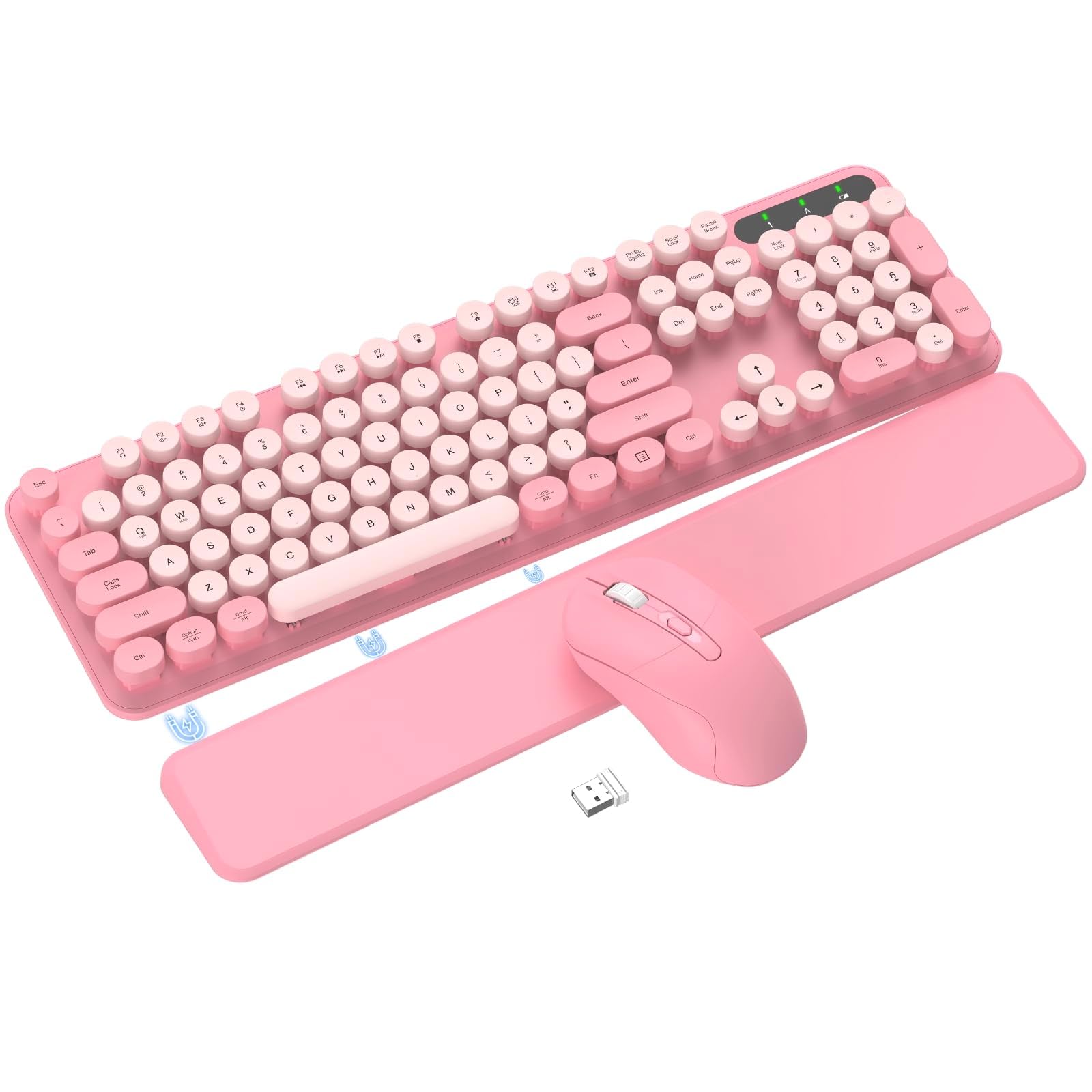
Floating round keycaps spaced wide for long nails, plus a magnetic wrist rest that slides to your preferred distance.
The floating round keycaps are the headline here, and they are spaced wide enough to press cleanly with long nails. A firm, tactile, clicky press is the trade-off: it is louder and springier than soft-touch laptop keys, so this is not the set for a silent office. The magnetic wrist rest detaches and slides to adjust its distance from the keyboard, and a folding stand with non-slip rubber pads lets you raise the typing angle while keeping it stable. Splash-proof design and removable keycaps make cleaning straightforward.
The 2.4GHz link holds up to 33 ft with no latency and both devices share one USB receiver, so your desk loses the cable clutter. Auto-sleep kicks in after 10 minutes of inactivity, and each device has a power switch so you can cut the drain entirely when idle. Twelve multimedia shortcuts handle video, music, volume and email. The set works with Windows, Linux and Chrome OS, and not with iPad, iPhone or smart TVs, since there is no Bluetooth or iOS support.
Two things worth knowing before you order. The 12 shortcuts do not work on a Mac, and if a laptop key misbehaves you have to match the mode with Fn + Q for Windows or Fn + W for Mac. The wrist rest moves rather than being fixed, so if you like a permanent, firm pad, the wave-shaped picks below may suit you better. For a pink retro set that is easy to keep clean and kind to long nails, this is a solid fit.
Ideal pick for: anyone with long or manicured nails who still wants a crisp, clicky typewriter feel and a wrist rest that moves.
Not for: iPad or iPhone users, since this is a 2.4GHz-only set with no Bluetooth.
5. Hamile Wireless Keyboard and Mouse Combo
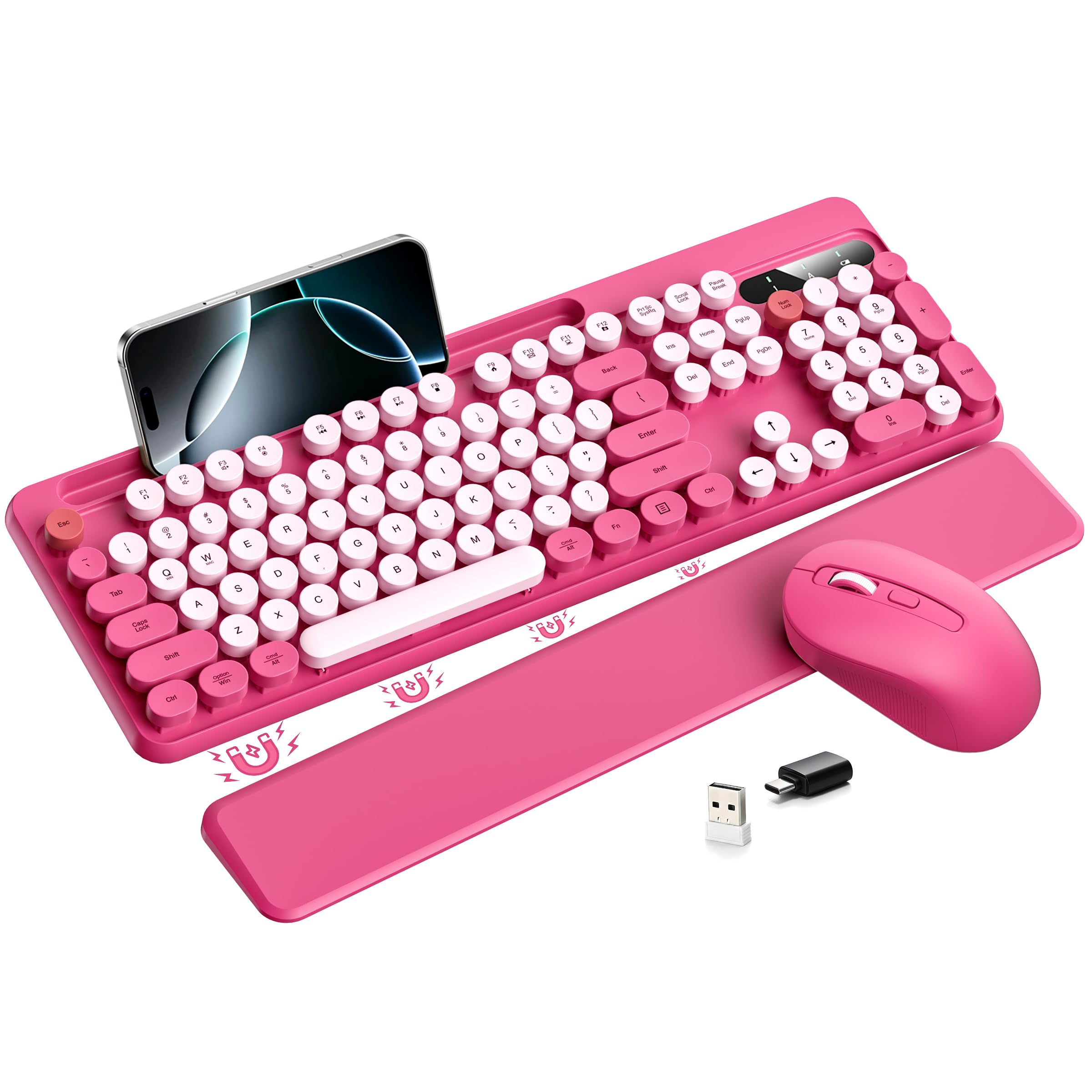
A built-in phone and tablet holder keeps your screen in view and your desk clear.
Most combos in this list leave your phone sitting loose on the desk. The Hamile docks it. A built-in phone/tablet holder sits on the keyboard so messages, alerts and updates stay in view while you work or study, and that keeps the rest of your desk neat. The detachable magnetic wrist rest attaches and releases in an instant with strong built-in magnets, and its smooth surface wipes clean easily for long typing sessions.
The keys are soft and rounded in the typewriter style, so this is the set for someone who wants a pleasant, stylish press over a loud, clicky one. Both devices have individual power switches and an auto-sleep mode that triggers after 10 minutes of inactivity, and pressing any key wakes them right back up. The set runs on 1 AAA battery; the USB receiver is stored inside the mouse, so check there first if you think it is missing.
The obvious limit is connectivity. There is no Bluetooth and no multi-device switching, so this is a single-computer set. If you switch between a laptop and a tablet through the day, the seenda above is the better match. It also needs Windows 10 or later as the minimum, which rules out very old machines. For a fixed desk, the phone dock and soft retro keys make it an easy pick.
The desk-clear trick: a built-in phone/tablet holder keeps your screen in view and your desk tidy.
The one limit: 2.4G USB only with no Bluetooth, so it pairs with one computer and nothing more.
Worth it for: a single desk setup where you want your phone docked and your workspace clear of clutter.
Pass if: you need to hop between a laptop and a tablet — this set connects to one machine only.
6. SABLUTE Wireless Keyboard and Mouse Combo
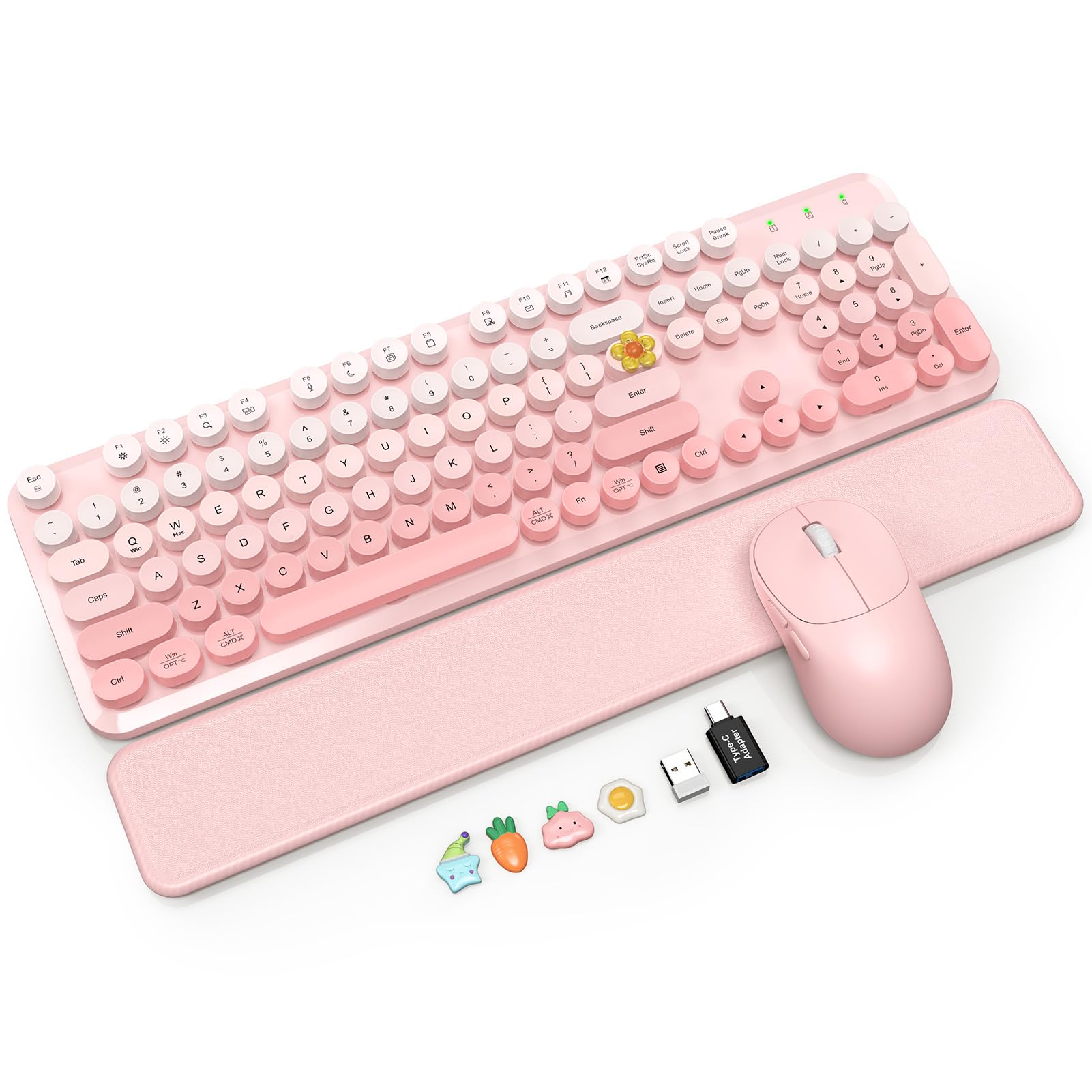
A pink-to-light ombre finish with a padded magnetic wrist rest under your palms.
The soft-touch magnetic wrist rest is the reason to pick this one. It snaps on and off in seconds, stays aligned with the keyboard, and its wipeable padded surface is easy to keep looking neat during long typing sessions. Floating round keycaps give you a crisp, responsive feel and pop off for cleaning, which helps when dust or crumbs find their way in. Two-stage tilt legs let you choose a flatter setup or a higher angle, and the full-size layout keeps a number pad for spreadsheets.
The mouse is the more usable one in this list for everyday tasks, with 800/1200/1600 DPI settings and two side buttons for quick forward and back navigation. Auto-sleep starts after 5 minutes of inactivity, and each device has its own power switch. The set runs on 2 AAA batteries for the keyboard and 1 AA for the mouse, batteries not included. One 2.4GHz USB receiver handles both, and there are no drivers to install, so you plug in and type.
The caveat is the same one that dogged the Logitech. Some units will do everything right, and a few will act up intermittently, so if rock-solid uptime is your top priority, keep the Logitech as your fallback. The counterargument is that this is the better-feeling set for wrist comfort, with real cushioning and a smoother finish. For a soft, ombre-pink desk upgrade with genuine wrist support, it earns its place.
The wrist win: a padded magnetic soft-touch rest that snaps on in seconds and wipes clean.
The mouse bonus: 800/1200/1600 DPI levels plus two side buttons for forward and back.
Choose this for: a soft, cushioned rest and an ombre pink look that suits a carefully styled desk.
pass on it if: you want the flattest, loudest-free typing sound at the lowest risk of a flaky unit.
7. MEETION Pink Ergonomic Wireless Keyboard and Mouse
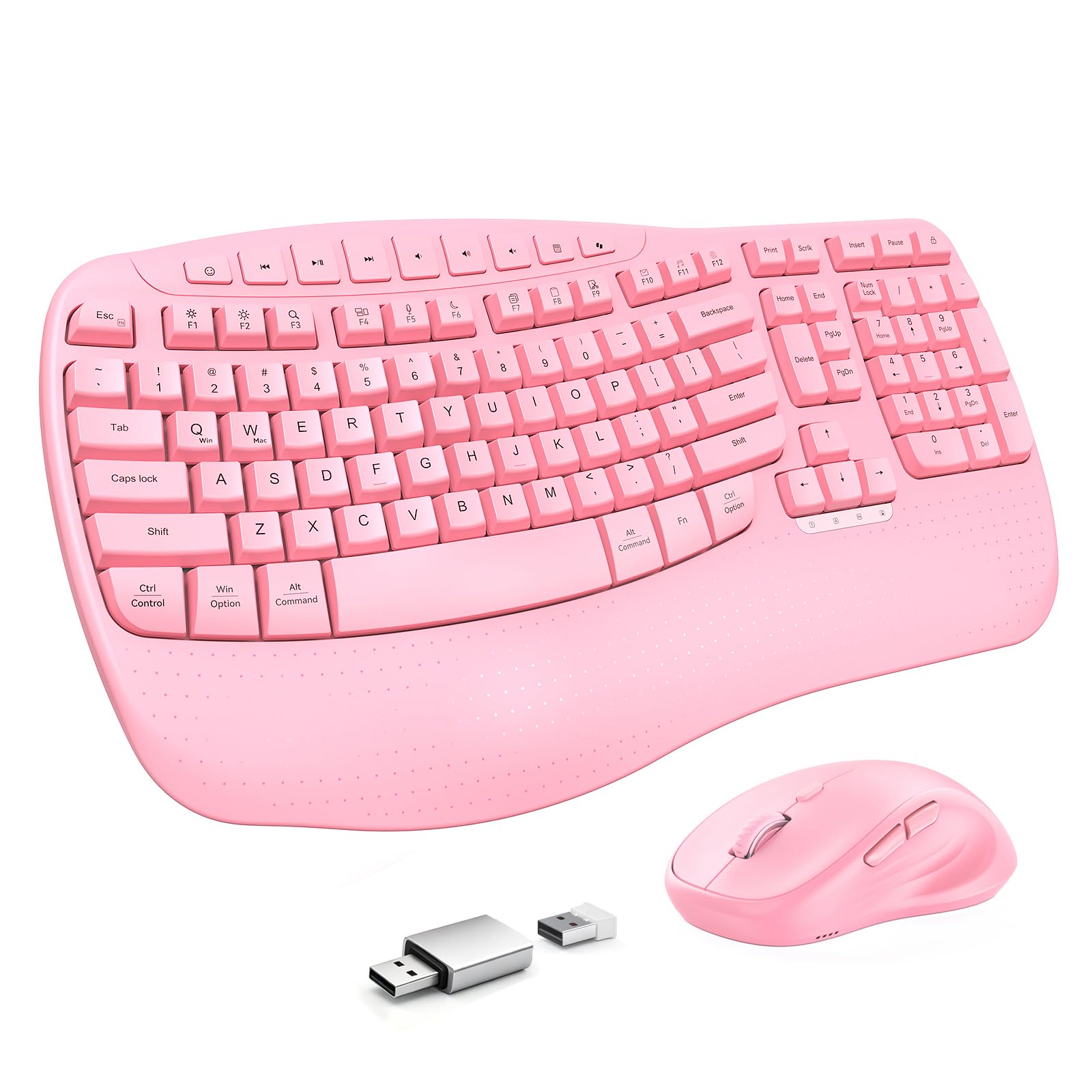
A wave-key layout that angles the keys to match how your hands naturally spread apart.
Flat keyboards force your wrists to rotate inward. This MEETION set uses a wave-key layout shaped to match how your hands naturally spread apart, which cuts the awkward inward rotation during long sessions. A built-in wrist rest fits the wave shape and supports your palms and wrists so they stay level instead of bending up or down, and you do not have to buy an extra cushion. Retractable rear feet give you 3 different tilt angles, so you can tune the height to your desk and posture.
The connection is a stable 2.4GHz link up to 33 feet, plug-and-play from the shared USB receiver. The mouse runs 4-level adjustable DPI — 1200, 1600, 2400 and 3200 — so you can go slow and precise or quick across a large screen. Auto-sleep preserves battery life. The keyboard needs 2 AAA batteries and the mouse needs 1 AA, batteries not included. It works with Windows-based PCs, desktops and laptops.
The trade-off is the mouse. The keyboard side is the dependable half, while the included mouse has more reports of quitting early than the rest of the set deserves. If you already own a mouse you like, this is a rare set where you can pair the wave keyboard with your own cursor and still get the ergonomic benefit. For heavy typing days, the wave shape is worth the swap.
The typing relief: a wave-key layout plus a built-in wrist rest that keeps wrists level for hours of reports and email.
The honest limit: the included mouse has more early-failure reports than the keyboard deserves, so keep a spare handy.
Good fit for: heavy-use office workers who want the wave support and can live with the included mouse or swap in their own.
Not for: gamers who want a high-DPI premium mouse in the box — this is an ergonomics-first pick.
8. SABLUTE MA41 Wireless Keyboard and Mouse Combo
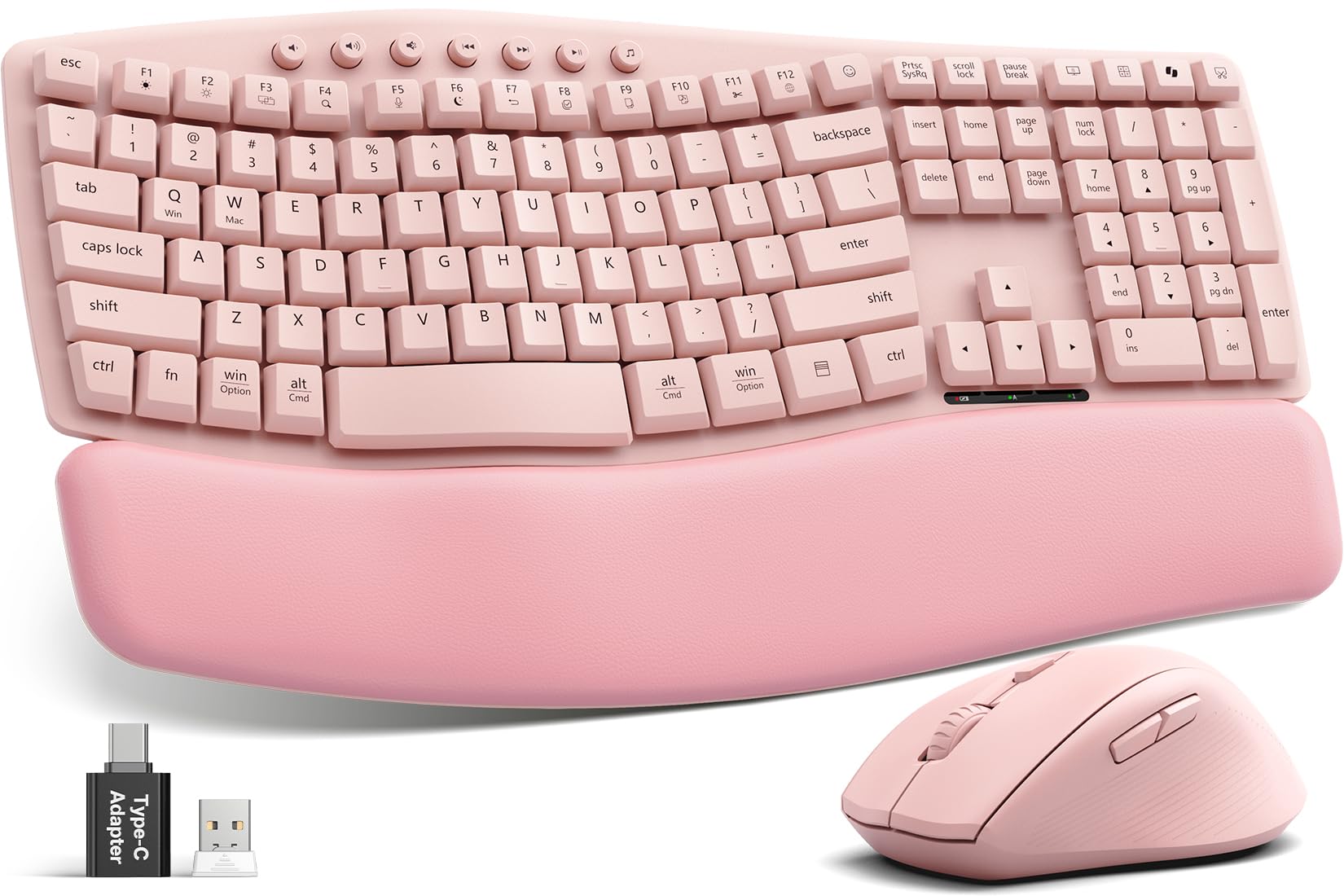
Built for the desk that has to stay silent while you work.
If you work late or share an office, the number here is 30dB quiet, with the maker claiming the typing and clicks cut noise by up to 90%. That is the case for this set. It pairs that with an ergonomic wave design and 2 adjustable tilt angles so your hands sit at a more natural angle over long sessions. Cushioned leather on the wrist rest gives you a soft, supportive pad instead of the hard plastic rests on cheaper sets, and it wipes clean.
Durability is spelled out: laser-etched keys resist fading and wear, and each key is tested for up to 10 million keystrokes. There is 2-year replacement coverage behind it. Twelve productivity shortcuts cover screenshots, media controls, calculator, AI tools and screen lock; on macOS, the Music app, Calculator and AI Assistant shortcuts are unavailable. One 2.4GHz receiver handles both devices and comes with a USB-C adapter, and the set supports Windows, macOS, ChromeOS, Linux and Android up to 33ft away.
The honest gap is connectivity. Some users report connection issues and dead batteries, so this is not the set to pick if your work depends on an uninterrupted link; the Logitech is the steadier option there. It also needs 2 AAA batteries for the keyboard and 1 AA for the mouse, batteries not included, so budget for those on day one. For a whisper-quiet, ergonomic desk in pink, it is the strongest of the big quiet options.
What makes it quiet-friendly
- 30dB quiet typing and mouse clicks, for shared or late-night workspaces
- Leather cushioned wrist rest for soft, supportive palms
- 10 million keystroke testing plus 2-year replacement coverage
- 12 productivity shortcuts with USB-C adapter included
- Wave design with 2 adjustable tilt angles
What to keep an eye on
- Some reports of connection drop-outs and dead batteries
- Batteries not included — 2 AAA plus 1 AA to buy
- Mac loses the Music, Calculator and AI Assistant shortcuts
Best suited to: late-night workers and shared offices where a loud keyboard is not an option.
Think about it if: you want uninterrupted connectivity above all — the Logitech has the steadier track record.
9. Logitech Wave Keys & Lift Vertical Mouse Combo
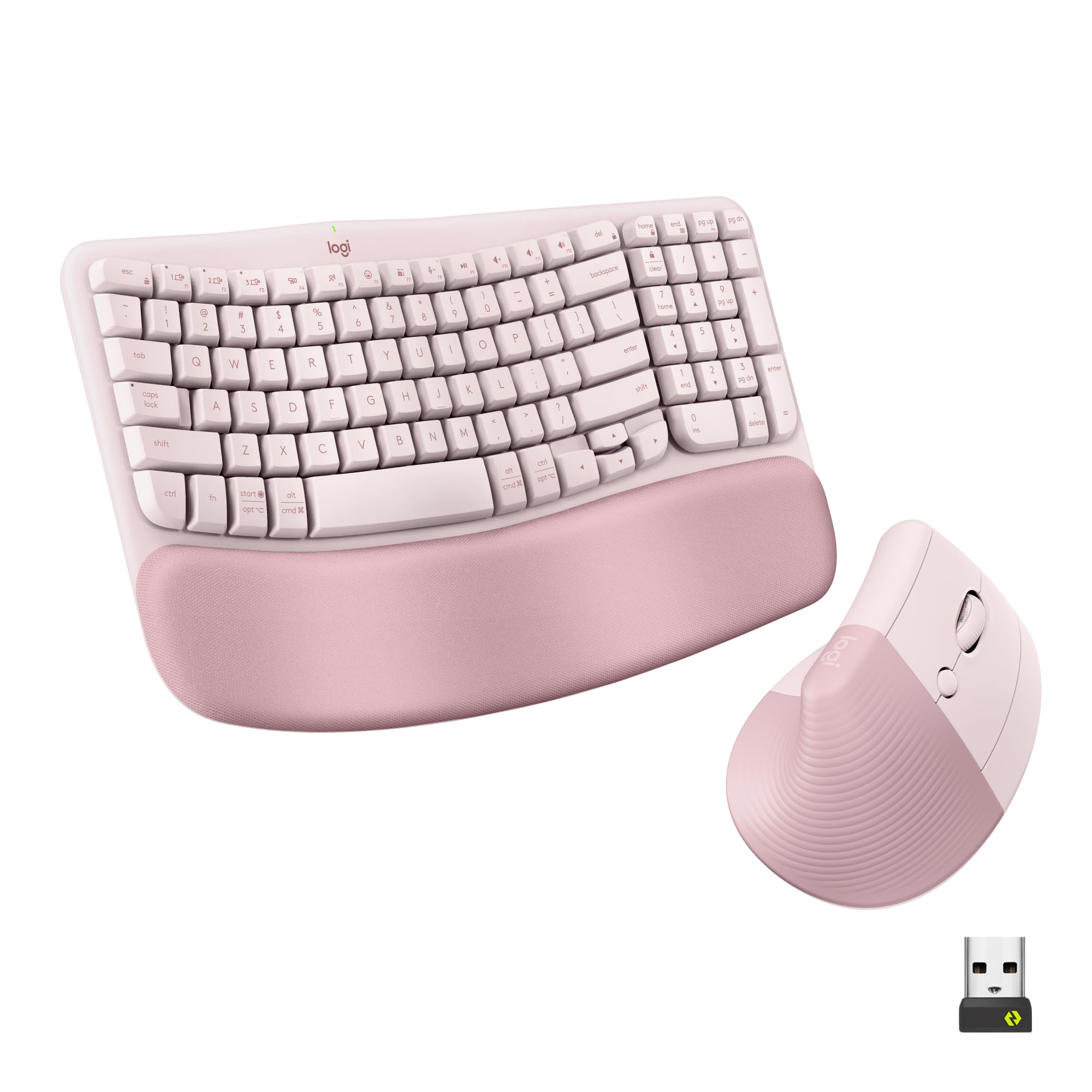
The full ergonomic desk: wavy keyboard and a mouse that stands your hand up.
This is the premium end of the list, and it shows in the shape, not just the finish. The Wave Keys keyboard uses a wavy design that supports natural hand, wrist and forearm alignment, with plunger key switches that feel tactile and discreet. A cushioned memory foam palm rest runs along the front for all-day support. The Lift mouse is the other half: a vertical mouse with a 57° vertical angle that takes pressure off your wrist and promotes a more natural forearm posture. Small to medium hands fit it best.
Connectivity is the widest of any set here. It pairs over Bluetooth Low Energy or the Logi Bolt USB receiver, so it works with a laptop that has no USB-A port. Whisper-quiet clicks and a SmartWheel that adjusts scrolling speed to match your flicks round out the daily use, and the Logi Options+ app lets you customize the workflow. Both pieces are built with certified post-consumer recycled plastic — 46% for the keyboard, 54% for the mouse — and both are designed and tested to ergonomist criteria.
The catch is the price and the learning curve. It costs more than any other set here, and the 57° vertical mouse needs a few days to feel natural if you have never used one. Reliability also draws a mixed read from some users, with a few reporting it stops working. If you want a proper ergonomic setup in rose for long days at the desk, this is the serious pick — the wave keyboard alone is worth considering.
The ergonomic lead: a wavy keyboard with memory foam palm rest paired with a 57° vertical mouse, both designed and tested to ergonomist criteria.
The real cost: the premium end of this list, and the vertical mouse needs a short adjustment period.
Best for: anyone who spends the whole day at a desk and wants the most serious ergonomic rose set here.
Hold off if: you want a simple plug-and-play set with no learning curve on the mouse.
Know the Specs
2.4GHz USB vs Bluetooth
A 2.4GHz USB receiver is the plug-and-play route: you push the dongle into a USB-A port and both devices talk to it, with range often up to 33 ft. It works with Windows and frequently Mac, Linux and Chrome OS. Bluetooth is the better choice for an iPad, iPhone or a laptop with no USB-A port, and a dual Bluetooth set like the seenda CO2 can switch between up to 3 devices. A 2.4GHz-only set will not connect to an iPad at all, so check the compatibility list before you order.
Battery life and auto-sleep
Battery life on these combos is often written as months, not hours, because both devices have power switches and an auto-sleep mode. The Logitech MK270 states 36 months for the keyboard and 12 months for the mouse, while the round-keycap sets typically run on 1 AA or 2 AAA batteries and sleep after 5 to 30 minutes of inactivity. Press any key to wake them. Buying the right batteries on day one matters, because several sets here ship without them.
Round keycaps vs wave layout
Round floating keycaps give you a vintage typewriter feel and make fingers easy to position, which helps with long nails, but the press is crisper and can be louder. A wave layout instead angles the keys and adds a built-in wrist rest so your hands sit in a more natural position over long sessions. If you type for a living, the wave shape usually wins on comfort. If you want a look you enjoy seeing every day, round keycaps win.
DPI and quiet claims
DPI is how far the cursor moves for each inch you slide the mouse. Some sets here offer 3 levels, some 4 levels up to 3200, and higher DPI is faster and less precise for tiny edits. Quiet claims are worth reading closely: the SABLUTE MA41 states 30dB quiet with the maker claiming up to 90% noise reduction, while soft-touch round-keycap sets are quieter than clicky ones but not silent. If noise is your top concern, pick a set that names a decibel figure.
Common Questions
Will a pink wireless keyboard and mouse work with my iPad or Mac?
How long do the batteries last in a pink wireless combo?
Do round typewriter keycaps feel different to type on?
What is the difference between a wrist rest and a wave layout?
Will a 2.4GHz-only combo work with a laptop that has no USB-A port?
Can I use the keyboard with a Mac and a PC at the same time?
Is quieter typing worth paying more for?
Does the mouse in these combos fit larger hands?
How far away can I use a pink wireless keyboard?
Do these combos work with Chrome OS and Linux?
The Bottom Line
For most people, the pink wireless keyboard and mouse winner is the Logitech MK270 in Rose, because it combines a 36-month keyboard battery, a 12-month mouse battery and a spill-resistant full-size layout in one quiet, reliable set. If you want the typewriter look and the most shortcuts, grab the Victkeyory 104 and its 13 hotkeys. For switching between an iPad, a Mac and a PC, the seenda CO2 is the one to reach for, while the Logitech Wave Keys & Lift is the serious ergonomic choice for long desk days.
How we choose
We do not accept paid placement. Every pick is matched to a real buyer and a real use-case; we do not hands-on test units.
Sources
Specifications: manufacturer listings and product documentation. Review insights: verified customer reviews, as of November 2026. Pricing: not shown on this page (it changes often); check the current price via the retailer link.
As an Amazon Associate, Tactical Gear Guy earns from qualifying purchases. This does not affect which products we feature.