Specs are compiled from manufacturer listings and verified buyer reviews and can change over time — please confirm the key details on the product page before buying.
Here is the short answer: if you run a small office that lives on the phone, the Grandstream GXP2135 is the safest place to start. The ring-u Hello Hub is the better fit when you want a complete routed system with extensions and a virtual receptionist. The rest of this list splits neatly between desk handsets that plug into a network and PBX servers that actually run the calls. Pick the wrong type and you will either overspend on a PBX server you never configure or buy a handset that has nothing to talk to.
This guide is built by comparing the manufacturers’ published specifications and the patterns across verified customer reviews, so you get each pick’s real strengths and trade-offs instead of marketing spin.
Most small teams do not need a call center platform — they need calls that ring the right desk, voicemail that lands in an inbox, and no per-seat bill every month. This breakdown covers both halves of the puzzle so you can build a working VoIP Business Phone System without guessing.
Top Picks


How To Choose The Best VoIP Business Phone System
Before you compare a single spec, decide which of two jobs you are hiring the equipment to do. A desk handset registers to a phone service and gives one person a great keypad, speakerphone and headset jack. A PBX server sits behind all of those handsets and decides which one rings, where voicemail goes, and how outside lines come in. Buying the wrong one is the most common expensive mistake in this category.
Lines versus SIP accounts — they are not the same number
A line is a call path; a SIP account is a registration with your provider. The Grandstream GXP2135 gives you 8 lines across 4 SIP accounts, so several calls can sit on hold at one desk. If you staff a reception position, more lines matter more than more accounts.
Count your extensions before you count your handsets
Extensions are the internal numbers staff dial to reach each other. A small team of five needs five extensions plus a main line and a couple of ring groups. The ring-u Hello Hub advertises up to 20 lines and 50 extensions on one unit, which leaves headroom for a growing office without swapping hardware.
Ask whether PoE is already on your switch
PoE (Power over Ethernet) sends electricity down the same network cable that carries the call, so the phone needs no wall adapter. Grandstream’s GXP2135, GXP2170 and GRP2616 all take power this way. If your switch does not supply PoE, budget for an injector or a power adapter.
Check what is in the box before you commit
Some business handsets ship without a power supply because the maker assumes a PoE switch. The Yealink T57W is one of those — it lists the power adapter as not included. Read the box contents line carefully, or your first install day stalls waiting on a part.
Side-by-Side Comparison
| Model | Best For | Lines / SIP Accounts | Display | Network / Power | Amazon |
|---|---|---|---|---|---|
| Grandstream GXP2135★ Best Overall | Busy front desk on a budget | 8 lines / 4 SIP | 2.8-inch color | Dual Gigabit, PoE | Amazon |
| Grandstream GXP2170Key Count King | High call volume with many BLF keys | 12 lines / 6 SIP | 4.3-inch color (480×272) | Dual Gigabit, PoE | Amazon |
| Yealink W73PWalk-And-Talk | Staff who walk the floor | 10 SIP accounts / 10 handsets | 1.8-inch color TFT | DECT base station | Amazon |
| Yealink T57W | Executives with heavy call load | 16 SIP accounts | 7-inch touch (800×480) | Dual Gigabit, PoE, Wi-Fi 802.11ac | Amazon |
| Grandstream UCM6301 | Small office building its own PBX | Up to 3000 users / 450 concurrent calls | — | Desktop or wall mount | Amazon |
| ring-u Hello Hub | Small business wanting service included | Up to 30 lines / 75 extensions | — | LAN cable, power adapter | Amazon |
| Grandstream UCM6302A | No per-seat fees at scale | Up to 1500 users / 200 concurrent calls | — | 3 Gigabit RJ45, PoE+ | Amazon |
| Grandstream UCM6302 | Largest user and call ceilings | Up to 3000 users / 450 concurrent calls | — | 3 Gigabit RJ45, PoE+ | Amazon |
Detailed Reviews
1. Grandstream GXP2135 IP Phone | 8 Lines, 4 SIP Accounts
Our pick — 4.5+★ from 250+ verified ratings; the strongest balance of quality and price.
The desk phone that gives a small office big-system call handling without the server.
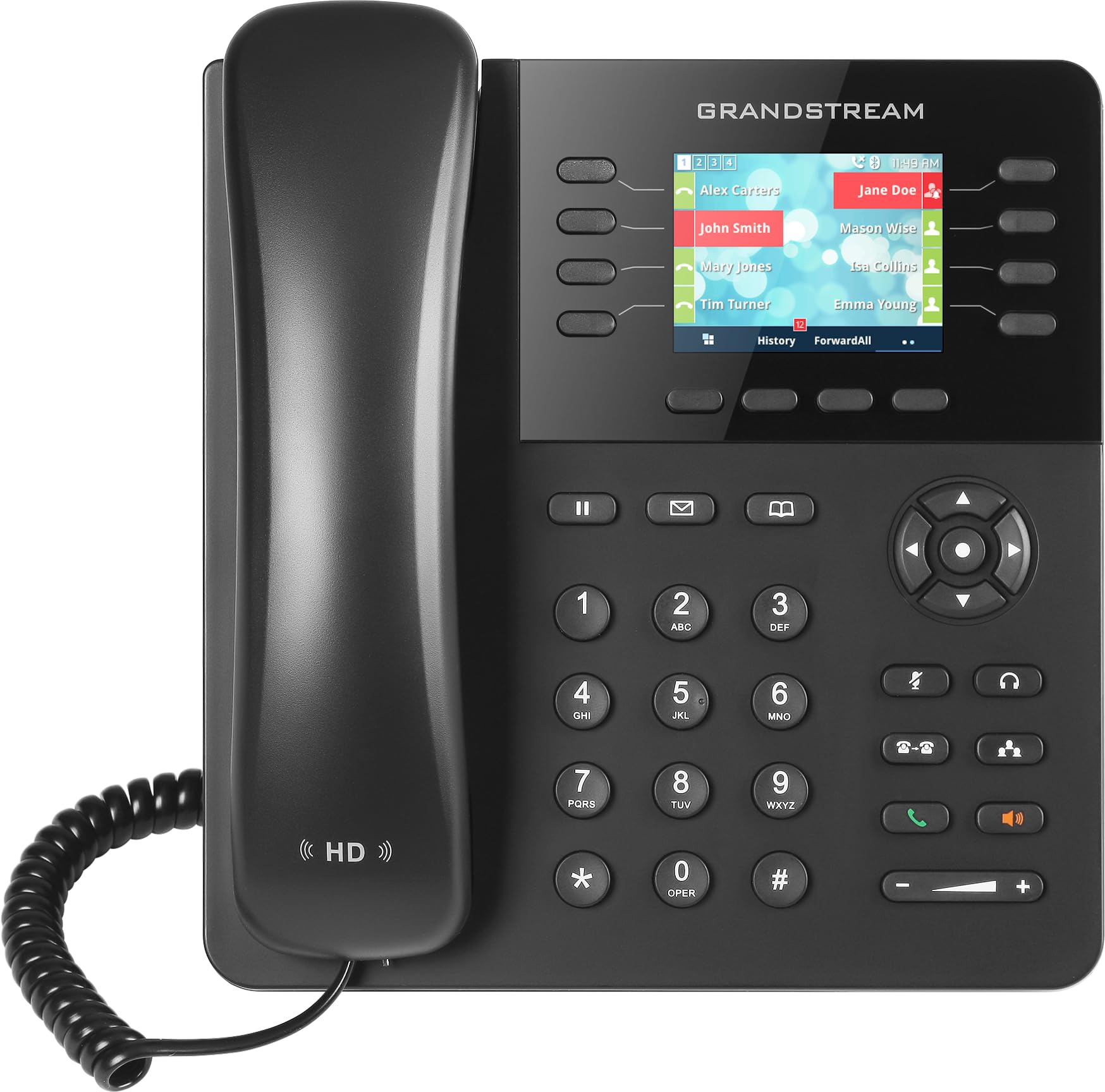
What you get for an entry-level outlay is genuine multi-line work: 8 lines across 4 SIP accounts, so a receptionist can juggle several conversations at once. Thirty-two programmable BLF keys — each one a lit button that shows whether a colleague is on a call — turn a single phone into your office switchboard. Adding the extensions is the difference between a phone and a phone system, and this one has the buttons ready on day one.
The hardware side is where it earns its keep in a busy room. Dual switched Gigabit ports mean the phone passes network traffic through to your PC on one cable run, and built-in PoE means no wall adapter at the desk. Bluetooth handles headset pairing plus contact and calendar syncing, which is the small detail that saves a receptionist from retyping numbers all morning. The HD handset and full-duplex speakerphone keep both ends audible — full duplex meaning you can talk and listen at the same time without cutting each other off.
Owners consistently describe this as a daily-driver SIP phone with sound quality and setup that punch above its tier. The recurring caution is usability: the web admin interface takes some patience, and the 2.8-inch display strikes some as small for reading at arm’s length. Neither stops calls from going through. If you want the honest head-to-head, the GXP2170 above this one steps up to 12 lines and 6 SIP accounts and a bigger screen for a mid-range jump. But for a first VoIP rollout in a small office this is the balanced choice — 4.5+ stars across 280+ owners, and the crowd favorite on this list.
What earns the desk space
- 32 programmable BLF keys put every colleague’s line at a glance and a press.
- Dual Gigabit ports with PoE mean one cable for power, data and a pass-through to your PC.
- Built-in Bluetooth pairs headsets and pulls in contacts and calendars.
- HD handset and a full-duplex speakerphone handle hands-free calls cleanly.
Where it asks for patience
- The web admin screens are the most-cited frustration — plan a slow first setup.
- The 2.8-inch color display is small next to the larger screens further up this list.
Reach for this if: you are wiring a first small-office VoIP setup and want multi-line call handling without a server purchase.
Step up instead if: your receptionist needs a bigger screen and more lines — the GXP2170 carries 12 lines and 6 SIP accounts.
2. Grandstream GXP2170 IP Phone
Forty-eight programmable buttons on one handset — an office switchboard without the switchboard.
Count the BLF keys and the point becomes obvious: 48 on-screen programmable keys versus the 32 on the GXP2135 below it. That is the largest button count on this list, and it is the reason this phone suits a front desk that answers for a dozen people all day. The 4.3-inch 480×272 color LCD gives those keys room to stay readable, and five soft keys sit under it for the menu actions you use constantly.
Call handling runs 12 lines across 6 SIP accounts with 5-way voice conferencing built in, so a quick three-person client call never needs a bridge service. Dual Gigabit ports with integrated PoE carry both the call and your desktop PC down one run. When your roster grows past what 48 keys can show, it supports up to four GXP2200EXT modules — expansion key panels — for speed-dial access to up to 160 contacts.
Owners describe good build quality, clear sound and a screen that reads easily at a glance, and the usual note is that it is feature-rich without burying you in extras you will never touch. Do set aside setup time: this is an all-steel enclosure at 1.43 kg, and it is 43% heavier than the GRP2616’s 1 kg — that weight is what keeps it planted when someone jabs a speed-dial key hard. The one thing it does not offer is the GRP2616’s Wi-Fi, so plan a cable run.
The button math: 48 BLF keys at your fingertips is the practical answer for a receptionist covering a whole floor, and the expansion modules take it well past a single panel.
Trading cables for keys: you give up wireless flexibility here — the GRP2616 handles Wi-Fi 5, this one is wired-only.
Built for: the person who answers for everyone else — a reception or dispatch desk where dozens of extensions need a lit key.
Not the fit: a one-person office that needs three buttons, not forty-eight, would be paying for capacity it never presses.
3. Yealink W73P DECT Cordless IP Phone System
One base station, ten handsets, and nobody chained to a desk to take the call.
DECT is the cordless standard built for voice rather than data, and this system leans on it hard: up to 10 cordless handsets and up to 10 SIP accounts from a single W70B base station. Up to 20 simultaneous calls can run at once. A 1.8-inch 128 x 160 TFT color screen runs an interface simple enough to hand to someone who has never used a business phone.
The number that matters for a warehouse, clinic floor or restaurant is talk time: up to 35 hours per charge with up to 400 hours on standby, both in ideal conditions. A Noise Reduction System and FNR (Flexible Noise Reduction) work on the audio so a call from a noisy back room stays intelligible. It supports the Opus audio codec, which is the same compression many softphone apps use for voice. The base is compatible with Yealink’s W60B, W70B, W80B and W90B DECT bases, so old and new handsets can share one system.
What owners talk about most is the build — it feels like a handset that survives being carried around all shift. Compatibility is the second theme, including working with Zoom Phone. Your trade-off is a small screen and a keypad built for voice, not for browsing a company directory. That is the cordless bargain, and it pays off every time someone catches a call in the aisle instead of the office.
Why the floor staff like it
- Up to 35 hours of talk time and up to 400 hours standby keeps a handset alive across shifts.
- 10 handsets and 10 SIP accounts from one base covers a small mobile team.
- Noise Reduction System and FNR keep calls usable in a loud back room.
What you accept
- 1.8-inch screen is a glance-and-dial size, not a directory browser.
- Cordless reach depends on where you place the base, so plan its spot.
Best when the job moves: retail floors, clinics and warehouses where the phone has to follow the person.
Think twice if: your team sits at fixed desks all day — a wired handset gives you more screen and keys for the same money.
4. Yealink T57W IP Phone

A 7-inch touchscreen desk phone built for the person whose calendar is the call queue.
Sixteen SIP accounts is the highest account count among the handsets here — the GXP2170 tops out at 6 SIP accounts, this runs 16. Pair that with 29 touch keys and a 7-inch 800×480 color touch display that adjusts to your viewing angle, and the keypad disappears into on-screen buttons you can rearrange. For an executive or a busy manager fielding calls from several numbers, that is a genuine workflow, not a gimmick.
Sound is handled with HD Voice and Yealink Acoustic Shield technology, which works to keep your voice clear while cutting background noise on the call. One USB port covers call recording and a wireless USB headset, so you can archive calls or go hands-free without a separate dongle. Networking is thorough: 802.11ac Wi-Fi, dual-port Gigabit Ethernet and 802.3af PoE.
The catch is written into the product name — the power adapter is not included, so you need a PoE switch or an adapter you supply yourself. That is the one recurring frustration in the feedback. Otherwise the reports pile up around clear call quality and a menu system people find straightforward. It also pairs with Yealink DECT dongles and up to 4 compatible cordless handsets if you want a cordless option at the same desk.
The screen is the point: 800×480 on a 7-inch touch panel gives touch keys labels you can actually read.
Budget for power: no adapter in the box, so confirm your PoE supply before the phone arrives.
Made for: the manager or executive juggling 16 numbers who wants a touchscreen instead of a plastic key bank.
Look at the GXP2170 if: you want lit BLF keys for other people’s lines — that is a switchboard job, not a touchscreen job.
5. Grandstream UCM6301 IP PBX

The brain of the phone system — a small box that decides which handset rings.
This is not a phone. It is the PBX (Private Branch Exchange — the private switchboard that connects your internal extensions and routes outside calls). The ceiling is what sells it: up to 3000 users and up to 450 concurrent calls from a desktop or wall-mount unit. For a growing office that wants one piece of hardware to standardise on, that headroom removes the upgrade conversation for years.
Deployment leans on zero configuration provisioning of Grandstream SIP endpoints, which means supported handsets register with minimal hand-typing. A built-in conferencing and meetings platform covers desktop, the Wave app and SIP endpoints, and Wave for Android, iOS, Chrome and Firefox lets people join from the device already in their pocket. An API opens the door to third-party integrations such as CRM and PMS platforms.
On the line side you get 1 FXO port (an outside analog line in) and 1 FXS port (an analog phone or fax out), which is enough to keep one legacy line alive during the switchover. Security is not an afterthought: secure boot, a unique certificate and a random default password protect calls and accounts, and automated NAT firewall traversal keeps remote extensions connected. It also handles full-band Opus voice and H.264/H.263/H.263+/H.265/VP8 video for conferencing. The honest trade-off is that a PBX is only useful if someone configures it — the hardware is easy, the routing plan is the work.
Ceiling worth paying for: 3000 users and 450 concurrent calls means the box outlives your headcount growth.
The setup reality: budget an afternoon for dial plans and ring groups, or bring in someone who has built one before.
Right for: a small office ready to own its switchboard and standardise on Grandstream handsets.
Not for: a two-person shop that wants phones working this afternoon with no one managing a server.
6. ring-u Hello Hub Small Business Phone System

A phone system that arrives with the service attached — and no phones in the box.
Start with the honest headline: this bundle ships with zero phones, and it requires ring-u service to work. What you get is the hub itself, a 6 x 4.25 x 1 inch box weighing 16 ounces, plus the routing brain for a whole small office. A single hello hub handles up to 20 lines (concurrent call capacity) and 50 extensions. The listing also describes the family topping out at up to 30 lines and 75 extensions, which is the envelope to plan your office around.
Compared with the Grandstream GXP2135’s 8 lines on one handset, this is a system-level purchase rather than a desk purchase. The virtual receptionist answers and routes calls to the right person or department, with an open/closed/holiday receptionist state, ring groups, and voicemail to email. Plug-and-play auto configuration covers a long list of Grandstream handsets — gxp 1620/1625/1630/2130/2135/2160/2170 and grp2614/2616 plus dp720/750 and wp820 — so you can pair this hub with the phones elsewhere on this list. Some of those handsets are Wi-Fi enabled, which means no ethernet run to the desk.
Call routing quality is what the feedback circles around, closely followed by how quickly the hub goes live. The support line earns its own praise — the company runs USA-based service and support with no contract on the phone service, and bills by the line rather than by the seat or extension. You can also use cell phones as extensions, with or without iOS and Android apps, and set up offsite land lines as remote extensions. The catch is the closed loop: no ring-u service, no dial tone.
What buyers keep coming back to
- Configures fast — plug-and-play provisioning for a long list of Grandstream handsets.
- Virtual receptionist with ring groups and voicemail to email handles the front-of-house work.
- Cell phones and offsite land lines work as extensions, so remote staff are on the same system.
Before you commit
- Requires ring-u phone service and ships with no handsets at all.
- Your phone bill moves to a per-line model with this provider.
Choose this when: you want a front desk that answers itself and staff on cell phones treated as extensions.
Look elsewhere if: you are determined to keep your existing carrier and own the server outright — the UCM models do that.
7. Grandstream UCM6302A Audio IP PBX

An all-inclusive switchboard that never sends you a per-seat bill.
The pitch is one line: no monthly per-seat fees, because this is an all-inclusive telephone system you own. Under the hood it supports up to 1500 users and up to 200 concurrent calls. That is a step under the UCM6301’s 3000-user and 450-call ceiling. The honest way to read it is simple — most small businesses will never touch either number, so pick on features and wiring rather than the maximums.
Built-in instant messaging and audio conferencing with web meetings run from computers, mobile devices and SIP endpoints, and the free Wave app covers desktop, web, Android and iOS. Three Gigabit auto-sensing RJ45 network ports with integrated PoE+ and support for NAT routing mean the box can sit in the network path without extra gear. An API opens integrations with CRM and PMS platforms.
Security matches the rest of the family — secure boot, a unique certificate and a random default password — and automated NAT firewall traversal keeps remote extensions reachable. It provisions Grandstream SIP endpoints with zero configuration. This is the pick for a business that has already decided it will not rent its phone system, and is willing to pay a premium for the self-hosted route. The 2.5 pound unit takes a desktop or wall placement, so it does not need a rack.
Ownership model: paying once for the box and skipping per-seat fees is the whole argument for choosing it over a hosted service.
Compare the ceilings: 1500 users and 200 concurrent calls versus 3000 and 450 on the UCM6301 — real headroom costs less elsewhere in this family.
Best for: an office that has ruled out monthly seat charges and wants messaging and meetings in the same box.
Check first: if you need the bigger user ceiling — if you do, the UCM6301 or UCM6302 covers it.
8. Grandstream UCM6302 IP PBX

The top of the family: every call path and user seat this PBX line offers.
When the org chart is the spec, this is the answer — up to 3000 users and up to 450 concurrent calls, the highest pairing on this list. It shares that ceiling with the UCM6301 but adds a second pair of analog ports: 2 FXO ports for outside lines and 2 FXS ports for analog phones or fax. If you are keeping two legacy lines alive through a migration, that second pair is the difference between a smooth cutover and a juggling act.
Conferencing and meetings are built in, feeding desktop, the Wave app and SIP endpoints, and Wave for Android, iOS, Chrome and Firefox lets anyone join from a browser. Three Gigabit auto-sensing RJ45 network ports with integrated PoE+ and NAT router support give you flexible placement. Full-band Opus voice and the H.264/H.263/H.263+/H.265/VP8 video codecs handle meetings, with jitter resilience up to 50% packet loss — the kind of thing that matters on a patchy office connection.
Security runs secure boot, a unique certificate and a random default password across the board, plus automated NAT firewall traversal for remote sites, and it is compatible with GDMS for cloud setup and monitoring. The trade-off is straightforward: this is a premium, longest-ceiling purchase, and the whole family of UCM boxes lives or dies on how well the routing plan is built. You are buying headroom and expansion ports, not simplicity.
Double the analog ports: 2 FXO and 2 FXS give you room to keep two outside lines and two analog devices alive during migration.
Held by the same rule: a switchboard this capable is only as good as the dial plan someone writes for it.
Built for: multi-site or high-headcount offices that need the top user ceiling and extra analog ports.
Overkill if: you run under a few dozen handsets — the UCM6301 covers that with room to spare.
Know the Specs
Lines vs SIP Accounts
A line is one active call path; a SIP account is one registration with your provider. You can have several lines riding on fewer accounts. The GXP2135 runs 8 lines on 4 SIP accounts, and the GXP2170 runs 12 lines on 6 SIP accounts. If one desk needs to hold multiple conversations, the line number is what you feel in daily use.
BLF Keys
BLF stands for Busy Lamp Field — a button that lights up to show a colleague is on a call, and one press dials or transfers to them. They matter more than raw screen size at a front desk. The GXP2135 carries 32 programmable BLF keys and the GXP2170 carries 48, which is the largest count on this list.
PoE and Power
PoE sends electricity down the same network cable that carries the call, removing the wall adapter. Grandstream’s GXP2135, GXP2170 and GRP2616 all take power over PoE. Yealink’s T57W does the same with 802.3af PoE but ships without a power adapter, so a PoE switch or your own adapter is required.
FXO and FXS Ports
An FXO port accepts an outside analog line into the PBX. An FXS port drives an analog handset or fax machine from it. The UCM6301 has one of each, and the UCM6302 doubles that to 2 FXO and 2 FXS, which helps if you keep legacy lines running during a switch.
Concurrent Call Ceiling
On a PBX box, this is how many calls can run at the same instant across the whole office. It is not the same as user count. The UCM6301 and UCM6302 both support up to 450 concurrent calls; the UCM6302A supports up to 200 with a 1500-user ceiling.
Zero Configuration Provisioning
This means a supported handset can pull its settings from the PBX with very little hand-typing at the device. Grandstream lists it across the UCM family, and ring-u offers plug-and-play auto configuration for a long list of Grandstream handsets. It is the single biggest factor in how fast an office install actually completes.
Common Questions
Do I need a PBX box or can a handset work on its own?
Will the ring-u Hello Hub work with my existing Grandstream phones?
Does the Yealink T57W come with a power adapter?
How many cordless handsets can the Yealink W73P support?
Can I keep my existing business number with the ring-u Hello Hub?
What is the difference between the UCM6301, UCM6302A and UCM6302?
Do I need a PoE switch for the Grandstream desk phones?
Can I use my cell phone as an extension on these systems?
Is the Yealink W73P suitable for a warehouse or restaurant floor?
How much setup work is a PBX compared to a desk handset?
The Bottom Line
Across this whole field, the voip business phone system that suits the most small offices is the Grandstream GXP2135, because it delivers 8 lines, 4 SIP accounts and 32 BLF keys on a desk handset without a server purchase. If your front desk answers for a whole floor, the Grandstream GXP2170 pushes that to 12 lines and 48 BLF keys. And when you want the calls routed and the service bundled in one box, the ring-u Hello Hub covers up to 20 lines and 50 extensions on a single unit. Match the hardware to the job first — handset or switchboard — and the rest of the decision gets much shorter.
How we choose
We do not accept paid placement. Every pick is matched to a real buyer and a real use-case; we do not hands-on test units.
Sources
Specifications: manufacturer listings and product documentation. Review insights: verified customer reviews, as of November 2026. Pricing: not shown on this page (it changes often); check the current price via the retailer link.
As an Amazon Associate, Tactical Gear Guy earns from qualifying purchases. This does not affect which products we feature.