Specs are compiled from manufacturer listings and verified buyer reviews and can change over time — please confirm the key details on the product page before buying.
Your lights should dim from the couch, not from a walk down the hall — and a Wi-Fi dimmer switch gets you there without a hub in the middle. The catch almost nobody mentions up front: most of these switches need a neutral wire in your wall box, so check that before you buy anything. Below you get nine switches that genuinely dim, sorted by what each one does best, ranging from budget-friendly single switches to premium multi-packs and 3-way setups.
This guide is built by comparing the manufacturers’ published specifications and the patterns across verified customer reviews, so you get each pick’s real strengths and trade-offs instead of marketing spin.
You will see which loads each switch handles, which ecosystems it speaks to, and where the honest gripes land. Every pick here dims real bulbs over Wi-Fi, and the smartest move is matching the switch to the wiring you already have — read on for the wi-fi dimmer switch picks that actually fit your wall box.
Top Picks


How To Choose The Best Wi-Fi Dimmer Switch
The first thing to settle is not brand or app — it is what is already inside your wall. Get that wrong and the nicest switch on this list will not power up. Everything else, from dimming range to voice control, is a preference you can shop around.
Check for a neutral wire before anything else
A neutral wire is the white return wire that completes the circuit — smart dimmers need it to stay powered while the lights are off. Nearly every pick here requires one, and homes wired long ago sometimes do not have it in the switch box. Switch off the breaker and look before you order, or have an electrician confirm it for you.
Match the load rating to your bulbs
Dimmers are rated by how much light they can carry, and LED bulbs draw far less than old incandescent ones. The Tapo S505D and S500D each carry 150W of dimmable LED or 300W of incandescent and halogen. The GHome SW2 carries 150W LED, 150W CFL, or 450W incandescent. Stay under the rating and check that your bulbs are actually marked dimmable.
Single-pole, 3-way, or 2-gang
Single-pole means one switch controls one light — the simple case most homes have. A 3-way circuit has two switches for the same light, like the top and bottom of a staircase, and only some dimmers support it. A 2-gang setup means two switches side by side in one wall plate, which the Kasa HS220-2 is built for.
Side-by-Side Comparison
| Model | Best For | Wiring | LED Load | Ecosystems | Amazon |
|---|---|---|---|---|---|
| Tapo Matter S505D (2-Pack)★ Best Overall | Matter buyers wanting broad platform support | Single-pole, neutral required | 150W LED | Matter, Apple Home, Alexa, Google, SmartThings | Amazon |
| Kasa HS220-BLBudget-Friendly | Budget-friendly single-switch upgrade | Single-pole, neutral required | — | Alexa, Google, SmartThings | Amazon |
| GHome SW2Highest Load | High-wattage incandescent dimming | Single-pole, neutral required | 150W LED | Alexa, Google Assistant | Amazon |
| ELEGRP DTR10 (2-Pack) | Slim profile in a crowded box | Single-pole, neutral required | 150W LED | Alexa, Google Assistant | Amazon |
| Kasa HS220-2 (2-Gang) | Two circuits in one wall plate | 2-gang, neutral required | — | Alexa, Google Assistant | Amazon |
| Amazon Basics 3-Way | Alexa-only households | 3-way, neutral required | — | Alexa only | Amazon |
| Tapo S500D (4-Pack) | Whole-house multi-pack value | Single-pole, neutral required | 150W LED | Alexa, Google Assistant | Amazon |
| Leviton D26HD-1RW | LED flicker control and fade tuning | Wired or wireless 3-way | — | Matter, Apple Home, Alexa, Google, SmartThings | Amazon |
| TREATLIFE 3-Way (2-Pack) | Stairway and hallway 3-way circuits | 3-way or single-pole | 150W LED | Alexa, Google Home | Amazon |
Detailed Reviews
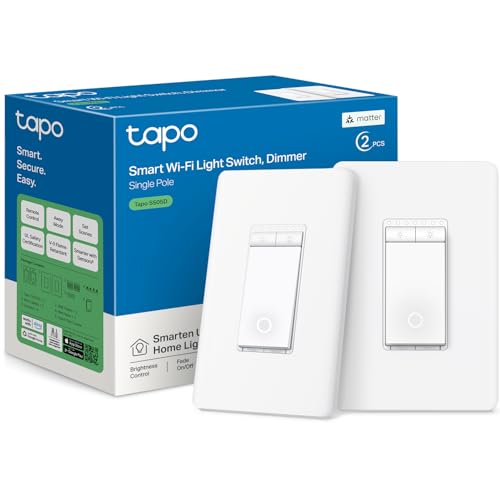
1. Tapo Matter Smart Dimmer Switch S505D (2-Pack), Single Pole
Our pick — 4.5+★ from 800+ verified ratings; the strongest balance of quality and price.
Matter certification means this dimmer talks to basically every smart platform you already own.
Nothing else on this list speaks to as many systems from the start. Matter is a shared smart-home language — a common standard that lets devices from different brands work together — so the S505D pairs with Apple Home, Amazon Alexa, Google Home, and Samsung SmartThings. You are not locked to one app, and you get two switches in the box for a two-room upgrade.
Brightness slides from 0% to 100%, and you set it three ways: the button on the wall, the Tapo app, or a voice command. Leading-edge TRIAC dimming (the circuitry that cuts power to the bulb to lower brightness) carries up to 150W of dimmable LED or 300W of incandescent and halogen lights at 120V, 60Hz. Fade on and off smooths the transitions, so bedtime dimming does not snap on like a floodlight.
Installation needs a neutral wire, 2.4 GHz Wi-Fi, and a wall box at least 2 inches deep. The Tapo app walks you through the wiring step by step, and the switch is UL certified with a 2-year warranty. One thing to know ahead of time: this is a single-pole switch, not a wired 3-way dimmer, so a two-switch staircase circuit is not its job.
Why it earns the top spot
- Matter support covers Apple Home, Alexa, Google Home, and SmartThings from one switch
- Two switches included, each handling 150W of dimmable LED
- App-guided install, UL certification, and a 2-year warranty
- Full 0%–100% range with smooth fade on and off
What to plan around
- Neutral wire and a 2-inch-deep wall box are both required
- Single-pole only — no wired 3-way support
- Bluetooth is for setup only, not day-to-day control
Best fit: anyone with a neutral wire who wants one dimmer that plays with every major smart system.
Look elsewhere: a 3-way stairwell circuit, where you need the Leviton or TREATLIFE instead.
2. Kasa Smart Dimmer Switch HS220-BL, Single Pole
One black wall switch, one app, and dimming that runs the full 1% to 100% range.
This is the pick for a single room where you want smart dimming without paying for a multi-pack. The HS220-BL dims from 1% to 100%, so the bottom of the slider is a genuine nightlight glow rather than a hard jump to dark. Fade on and off softens the change, which matters most in a bedroom or a hallway you cross at 2 a.m.
You control it through the Kasa Smart app or by voice with Alexa, Google Assistant, or Samsung SmartThings. Schedules let you set brightness by time of day, and Away Mode switches lights at random intervals to suggest someone is home. Installation is app-guided with a neutral wire and 2.4 GHz Wi-Fi, and Kasa now also logs straight into the Tapo app with no hardware swap.
What buyers praise most is how straightforward the install goes — the wiring labels and step-by-step walkthrough in the app get a lot of credit. Worth flagging honestly: connectivity is the mixed spot, with some owners reporting app connection trouble, so give it a solid 2.4 GHz signal. This comes in black, which blends into dark backsplashes where white switches stand out.
The wiring story: neutral wire required, 2.4 GHz Wi-Fi only, and the app labels each wire before you connect — that is the part that earns the praise.
The honest catch: connection drops come up in enough reviews that a weak Wi-Fi signal at the switch box is worth checking first.
Reach for this if: you want one affordable smart dimmer in a single-pole box and prefer a dark faceplate.
Think twice if: your switch box sits far from the router, or you need 3-way control.
3. GHome Smart Dimmer Light Switch SW2, Single Pole
A 4-amp switch that carries 450W of incandescent, versus the Tapo S505D at 2.5 A and 300W incandescent.
If your ceiling fixture still runs old-style bulbs, this is the one to look at. The SW2 is rated at 4 A and carries up to 450W incandescent, 150W LED, or 150W CFL. The Tapo S505D is rated 2.5 A and 300W incandescent, while the GHome is rated 4 A and 450W incandescent. That is a real difference when a chandelier full of incandescent bulbs is what you are dimming.
Dimming happens by sliding a finger across a touch panel — a sensitive touch chip reads the swipe, so you can drag brightness up or down without clicking a rocker. Prefer the app? Set a custom dimming range there. GHome also added a range value specifically to tame bulbs that flicker at the lowest brightness, and you can raise the minimum in the app for problem bulbs.
Alexa and Google Assistant handle voice control — lights on, lights off, brightness up. Schedules and timers cover sunrise and sunset scenes, and 2.4 GHz Wi-Fi means no hub. The list of limits is short but real: neutral wire required, no 5G networks, and not compatible with smart bulbs.
Where it wins: the 450W incandescent ceiling gives it the widest load headroom on this list for traditional bulbs.
Where it asks more: a touch slider is a change from a physical rocker, and some people miss the click of a real button.
Suits you if: your fixture is incandescent or CFL and you want touch-swipe dimming plus voice control.
Not for you if: you run smart bulbs in that socket — this switch is not compatible with them.
4. ELEGRP Smart Dimmer Light Switch DTR10, 2-Pack
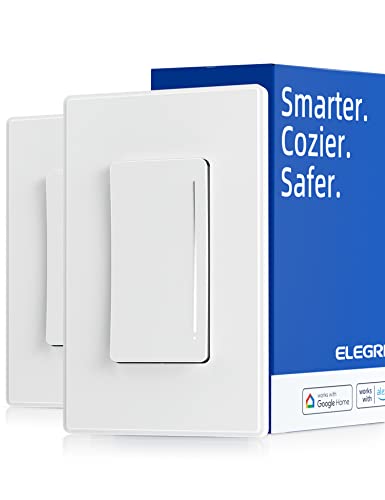
An ultra-slim body built for cramped electrical boxes where other smart dimmers barely squeeze in.
The DTR10 is the answer for an old wall box packed with wire nuts and capped grounds. Its slim profile leaves more room for the wiring, which is exactly the struggle when you are folding a smart switch into a shallow cavity. The face is a skin-like matte finish with a quiet rocker rather than a hard click, and the brightness indicator fades away so the wall looks clean when idle.
You dim by sliding a finger on the panel, and the hardware carries up to 450W incandescent or 150W dimmable LED. Video calls, books, and lights from bed all fall under its control — voice runs through Alexa or Google Assistant, and the app handles schedules, countdown timers, and sunrise-to-sunset scenes. It is UL and FCC listed, needs a neutral wire, and runs on 2.4 GHz Wi-Fi only.
The honest trade-off sits in ecosystem support. The look and the install both get strong marks, but compatibility is the most-discussed topic and it is mixed — it works well with Google Home, yet does not play with Home Assistant. Some owners also note dimming and touch response vary by bulb. Pair it with dimmable LED bulbs and a mainstream platform, and it does its job quietly.
The visual payoff: the vanishing brightness indicator and matte panel make it the cleanest-looking switch here once installed.
The fit note: this is not a Home Assistant switch — check your platform before you commit.
Pick it when: your box is tight and you want a two-pack of slim switches for Alexa or Google setups.
Pass when: you run Home Assistant or need a 3-way circuit — this is single-pole only.
5. Kasa Smart Dimmer Switch 2-Gang, HS220-2

Two separate dimmers behind one flush wall plate, so a double-gang box gets one clean face.
Most homes have at least one double-gang box — two switches side by side — and the HS220-2 is built to fill it properly. You control two different circuits with an elegant flush look, replacing what is often a mismatched pair of switches. Both dim from 1% to 100%, and both fade on and off instead of cutting abruptly.
The Kasa Smart app handles schedules, voice via Alexa or Google Assistant, and Away Mode, which randomly switches lights to suggest someone is home. Installation is app-guided with neutral wiring and 2.4 GHz Wi-Fi, and like the single HS220-BL above, it now logs into the Tapo app without a hardware change. Quality earns the strongest praise — owners describe these switches as solid and well made, with the pair feeling consistent rather than mismatched.
The recurring caution is setup: installation and connectivity are both mixed in the reviews, with some owners hitting snags pairing the switches to the app. Give yourself a quiet half hour, follow the app prompts, and keep the firmware updated through the Kasa or Tapo app. It is a two-gang switch, so it is the wrong shape for a single-switch wall.
Why it stands out: a genuine two-circuit dimmer in one plate, with both sides matching in look and dimming range.
Worth knowing: setup can take a couple of tries — the app walkthrough and a firmware check smooth it out.
Right for: a double-gang box where two lights need controlling from one location.
Wrong for: a single-gang wall, or any circuit where you need 3-way control from a second switch.
6. Amazon Basics Smart Dimmer Switch 3-Way

A three-way dimmer that speaks only to Alexa — simple if you are all-in, limiting if you are not.
This one targets homes already running Amazon devices. It is a 3-way Wi-Fi switch, meaning it fits a circuit with two switch locations, and it lives exclusively with Amazon Alexa for voice control. No hub is required, and scheduling runs through Alexa routines, so your lights follow the same automations as the rest of your Echo setup. Installation is guided by a step-by-step video and manual, and that part earns the most credit — owners consistently call setup straightforward.
Alexa exclusivity is the trade-off here. Google and Apple households are out — this switch does not talk to them. The bigger honest note is reliability: it is the most-discussed topic in the reviews and it is mixed, with dimming quirks showing up, including some lights randomly dimming. Quality and instruction complaints also surface occasionally.
Where it wins is on a plain 3-way circuit in a home full of Echo speakers, where one voice command dims the stairwell light without hunting for the wall switch.
Installation, plainly: the guided video and manual make wiring this dimmer feel manageable even for a first-timer.
The fit note: stability is the mixed spot — if your lighting must be rock-solid every night, look at the Tapo or Leviton first.
Choose it if: Alexa runs your home and you want a 3-way dimmer with routine-based scheduling.
Leave it if: you use Google or Apple Home — this switch will not connect to either.
7. Tapo Smart Dimmer Switch S500D, 4-Pack
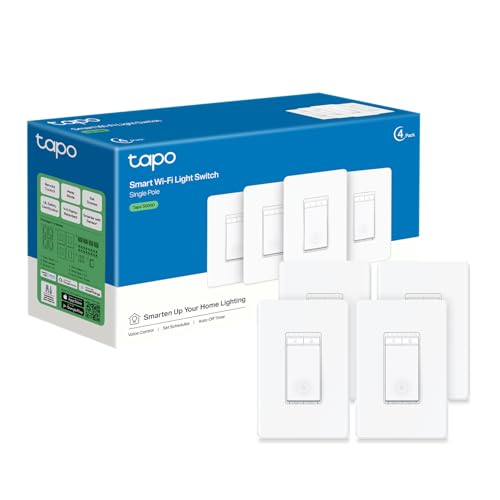
Four identical dimmers in one box — the practical way to upgrade a whole floor at once.
Where the S505D two-pack gets you started, the S500D four-pack covers a hallway, kitchen, living room, and bedroom in a single order. Each switch is a single-pole dimmer with leading-edge TRIAC dimming handling up to 150W of dimmable LED or 300W incandescent and halogen at 120V, 60Hz. Every one needs a neutral wire, 2.4 GHz Wi-Fi, and a wall box at least 2 inches deep.
Control is where this shines — the Tapo app and voice via Alexa or Google Assistant, plus schedules, countdown timers, and Away Mode for when you are traveling. Fade on and off smooths the transitions, so movie nights start with a gradual dim rather than a snap. No hub is required for standard app control, though optional Tapo sensors or smart buttons need a separate Tapo hub.
The functions and quality get the best marks from owners, and dimming runs smooth without the flicker that plagues cheaper LEDs. The mixed spot is connectivity — several owners find the Wi-Fi pairing awkward on the first try. None of these switches supports wired 3-way installation, so keep them for single-pole circuits.
Where the four-pack earns its keep
- Four single-pole dimmers in one order — consistent look across a whole floor
- 150W dimmable LED / 300W incandescent per switch
- Fade on and off plus Away Mode without a hub
- Smooth dimming with no flicker reported
Before you commit
- Wi-Fi pairing can take more than one attempt
- No wired 3-way support on any of the four
- Neutral wire and 2-inch box depth required at every location
Good match: a homeowner upgrading several single-pole rooms who wants one app for all of them.
Less good: a stairwell or hallway that already has two switches — you need the 3-way picks below.
8. Leviton Decora Smart Dimmer Switch D26HD-1RW, Wi-Fi 2nd Gen

Tunable dimming settings that fix flickering LED bulbs instead of fighting them.
Flicker is the most common gripe with smart dimmers, and the Leviton is built to kill it. You adjust bulb type, minimum dim, and maximum brightness in the My Leviton app — three dials that match the switch to the exact LED fixture on your ceiling. Customizable fade rates and preset light levels mean the lights always come on at the brightness you chose. The D26HD also carries a My Leviton Night Settings mode for a softer glow during midnight trips to the kitchen.
Wiring flexibility is its other strength. It works as a wired 3-way or a wireless 3-way, so you are not stuck with the switch already on the far wall. It connects with Alexa, Google Assistant, and Apple Siri, plus SmartThings, Sonos, and Resideo, and Matter support turns on with a firmware update through the My Leviton app. Owners describe it as well-engineered and easy to install, and the build quality earns the loudest praise.
The shorter list is Wi-Fi reliability — mixed in the reviews — plus the fact that Matter needs that firmware update rather than working from the start. Still, worth calling out: the 15 A rating gives it headroom for heavier circuits and, paired with the flicker-tuning settings, it is the answer for a fussy LED fixture.
The standout feature: bulb type, min dim, and max bright settings let you fine-tune this switch to the specific LED fixture you own.
What to expect: enable Matter with the My Leviton app before you assume Apple Home works.
Worth it for: a flickering LED fixture, a mixed-platform home, and 3-way wiring that needs flexibility.
Not the one for: a budget single-switch job where none of the tuning matters.
9. TREATLIFE 3 Way Smart Dimmer Switch, 2-Pack

Only one smart dimmer per 3-way circuit — the other switch stays dumb, which saves you money.
Stairwells and hallways are where this wins. Only one TREATLIFE 3-way dimmer is needed per circuit — you replace one of the two existing switches and keep the other as a standard dumb switch. That is a real saving over buying two smart switches for one light. The pair can also be used as single-pole switches in different rooms, so you get flexibility whichever way you wire them.
Brightness runs 1% to 100% and adjusts by sliding a finger up or down the flat panel without the click of a rocker. It remembers the last brightness setting, so the light comes back on at the level you chose. Voice control works with Alexa and Google Home but not Apple HomeKit, and the app handles remote control and schedules based on your routine.
Load rating sits at 150W LED, 150W CFL, or 400W incandescent; the GHome SW2 is rated 450W incandescent. The install requires a neutral wire, 2.4 GHz Wi-Fi only, and that the other switch on the circuit be a standard 3-way rather than smart. Owners find the installation manageable and like how the schedules make the app useful day to day.
Where it saves: one smart dimmer per 3-way circuit means you are not buying two switches for one stairwell.
The catch: your existing second switch must be a dumb 3-way — a smart switch on both ends will not work.
Nab this: if your stairway or hallway has two switches and you want the light to dim from either end.
Skip here: if you are on Apple Home — TREATLIFE does not support HomeKit.
Know the Specs
Load Rating (Watts and Amps)
The load rating is how much lighting the switch can carry safely. Watts measure power drawn by the bulbs, and a dimmer is capped by its rating — the Tapo S505D handles 150W of dimmable LED or 300W incandescent, while the GHome goes to 450W incandescent. Amps are the current side of the same picture: the Tapo units are 2.5 A and the GHome and Amazon Basics are 4 A. Add up the wattage of every bulb on the circuit and stay under the cap, or the dimmer can run hot and misbehave.
Dimmable vs Standard LED Bulbs
A dimmable bulb is built to accept reduced power smoothly; a standard LED is not, and dimming it can cause flicker, buzz, or a drop-off at low brightness. The GHome SW2 even ships with an adjustable minimum brightness range to tame bulbs that flicker at the bottom of the slider. Check the bulb packaging before you install — a smart dimmer cannot rescue a non-dimmable LED, no matter how well it is tuned.
Common Questions
Do I really need a neutral wire for a Wi-Fi dimmer switch?
What does the neutral wire requirement mean for an older home?
Can a Wi-Fi dimmer switch control a 3-way circuit?
Will these dimmers work with Apple Home, Google, and Alexa?
Why do my LED bulbs flicker when I dim them?
Does 2.4 GHz Wi-Fi matter for these switches?
What load can a Wi-Fi dimmer handle with incandescent bulbs?
Do I need a hub for these switches?
What does single-pole and 2-gang actually mean?
Can I use a dimmer switch with smart bulbs?
The Bottom Line
For most homes, the wi-fi dimmer switch winner is the Tapo Matter S505D because it dims the full 0%–100% range and speaks to every major smart platform through Matter — you are not locked to one app, and you get two switches in the box. It is UL certified with a 2-year warranty and averages 4.5+ stars across 800+ ratings.
If flickering LED fixtures are what sent you shopping, the Leviton D26HD-1RW fetches a 15 A rating and bulb tuning that sets specific brightness thresholds. For a stairwell with two switches, the TREATLIFE 3-Way asks you to replace only one switch, keeping the other dumb. And if you are upgrading several rooms at once, the Tapo S500D four-pack is the tidy path to one consistent look and one app.
Whatever you pick, check for the neutral wire before you order — it is the single decision that saves you from a return.
How we choose
We do not accept paid placement. Every pick is matched to a real buyer and a real use-case; we do not hands-on test units.
Sources
Specifications: manufacturer listings and product documentation. Review insights: verified customer reviews, as of November 2026. Pricing: not shown on this page (it changes often); check the current price via the retailer link.
As an Amazon Associate, Tactical Gear Guy earns from qualifying purchases. This does not affect which products we feature.