Specs are compiled from manufacturer listings and verified buyer reviews and can change over time — please confirm the key details on the product page before buying.
You already know the drill: a cheap corded mouse dies six months in, the cursor skips, and the click rattles your whole shared office. The fix is picking a mouse with a real optical sensor and a cable you can trust — not the cheapest thing on the shelf. Below you get the picks worth your desk space, with the specs that actually decide how they feel in your hand and how long they last.
This guide is built by comparing the manufacturers’ published specifications and the patterns across verified customer reviews, so you get each pick’s real strengths and trade-offs instead of marketing spin.
Start with how the optical sensor and cable length shape your daily work, then compare every pick side by side before you buy. My goal is simple: help you land on the best wired optical mouse without wasting a single outing to the returns desk.
Top Picks


How To Choose The Best Wired Optical Mouse
Most buyers upgrade their mouse because the old one either skipped, clicked too loud, or wore out. A wired optical mouse solves the battery question outright — it takes its power straight from the USB cable, so there is nothing to charge and nothing to swap mid-task. That leaves four things worth checking before you commit.
Match the DPI to your screen and hands
DPI (dots per inch — how many pixels the cursor crosses for every inch you slide) is the first number to read. A lower figure like 800 DPI gives you slower, more deliberate cursor travel, which suits spreadsheet work and small screens. Higher settings such as 1600 or 3200 DPI let the cursor fly across a large monitor with a small wrist movement. Adjustable DPI is the safest call if you share the mouse or switch between tasks.
Flat shape versus vertical shape
A standard flat mouse keeps your palm down. A vertical ergonomic mouse tilts the body so your hand sits more like a handshake, which many people find easier on the wrist over a long day. Vertical designs usually need a short adjustment window before the movement feels natural again. Flat ambidextrous shapes suit left- and right-handed users equally and tend to be lighter and simpler.
Cable length and connector type
The cable sets your physical reach. Shorter cables keep the mouse tied close to a laptop port, while a longer run lets you route the wire behind a desk or above a drawer. Check whether the plug is USB-A or USB-C — a USB-C-only laptop needs an adapter if the mouse ships with the older rectangular USB-A plug.
Click noise and button count
Silent switches matter in open offices, libraries, and shared bedrooms. Three-button designs cover left click, right click, and scroll wheel, which handles most everyday work. Six-button layouts add forward and back navigation for web browsing and document hopping, though those extra buttons may not work on Mac systems.
Side-by-Side Comparison
| Model | Best For | Sensor / DPI | Buttons | Connection & Cable | Amazon |
|---|---|---|---|---|---|
| COOLERPLUS FC112★ Best Overall | Everyday office and home work | Optical, 1000 DPI | 3 | USB, 1.6 m cable | Amazon |
| HP x500Budget Plug-In | Budget plug-and-go reliability | Optical, 800 DPI | 3 | USB corded | Amazon |
| Censprin Silent Click MouseQuiet Mouse | Quiet offices and shared rooms | Optical, DPI not listed | 3 | USB corded | Amazon |
| SANWA Wired Ergonomic Mouse | Small and medium hands | Optical, 1000 / 1600 DPI | 6 | USB corded | Amazon |
| Perixx PERIMICE-508II | Adjustable precision | Optical, 1000 / 1600 / 3200 / 6400 DPI | 6 | USB 2.0 corded | Amazon |
| Micropack Ergonomic Vertical Mouse | Large palms and quiet desks | Optical, up to 3200 DPI | 6 | USB corded | Amazon |
| Perixx PERIMICE-513 | Filling a deep desk | Optical, 1000 / 1600 / 3200 / 6400 DPI | 6 | USB, 5.9 ft cable | Amazon |
| Logitech Signature Wired M520 L | Multi-OS and USB-C setups | Optical, adjustable DPI button | 4 | USB-C corded | Amazon |
| Amazon Basics 3-Button USB Wired Mouse | A spare mouse that just works | Optical, 1000 dpi | 3 | USB-A, 4.9-foot cable | Amazon |
Detailed Reviews
1. COOLERPLUS FC112 USB Optical Wired Computer Mouse
Our pick — 4.5+★ from 11,000+ verified ratings; the strongest balance of quality and price.
The dependable workhorse that keeps clicking long after the desk lamp dies
Here is the crowd favorite of this whole list: 4.5+ stars across 11,000+ ratings, which tells you the FC112 keeps doing its job for a lot of desks. A 1000 DPI optical sensor (a light-based tracker that reads surface movement) moves the cursor smoothly for word processing, email, and spreadsheets. The rubber scroll wheel rolls cleanly, so scanning a long document doesn’t fight back.
The 1.6 m USB cable is the quiet win here — about five feet of reach, so you can run it around the back of a desktop tower or off the side of a laptop. Plug it in and the mouse works with no driver install, on Windows, Mac, Chromebook, or Linux. It is ambidextrous, so left- and right-handed users share the same body without a second purchase. What wins people over most is reliability in daily use, and the build is rated for 3 million keystrokes.
The rainbow light cycling through the body isn’t just decoration — it makes the mouse easy to spot in a dim room. It measures 4.4 × 2.48 × 1.58 inches, a compact shape that sits neatly beside a laptop. Three buttons cover click, scroll, and right-click, which is all most office work asks for. skip it if you want a taller ergonomic hump or a flatter, plainer look.
What earns its keep
- 1000 DPI optical sensor keeps the cursor steady for office tasks
- 1.6 m cable gives real freedom on a deep desk
- Plug and play across Windows, Mac, Chromebook, and Linux
- Rated for 3 million keystrokes of daily clicking
Before you click buy
- The rainbow LED isn’t for everyone — some desks want a plain look
- Compact 4.4 × 2.48 in body courts smaller hands better than large palms
Reach for this if: you want one affordable mouse that handles office work, school tasks, and quiet browsing without fuss.
Look elsewhere if: your wrist needs a vertical handshake shape rather than a flat body.
2. HP x500 Optical Wired USB Mouse
The plain-spoken office mouse that asks nothing of you but a free USB port
The HP x500 slows your cursor down on purpose, so you can land on small buttons and select text without overshooting. It uses an 800 DPI optical sensor (DPI means dots per inch — how far the cursor travels per inch of hand movement), and that lower figure is more precise than the 1000 DPI COOLERPLUS above. An elongated arch and contoured body give a relaxed grip whether you’re left- or right-handed.
There’s nothing to install and no software to download. You plug in the USB cord, the mouse draws its power from that cable, and you just start scrolling and clicking. That means zero batteries to replace — a genuine relief for anyone who has hunted for AA cells before a deadline. The optical tracking holds up on most surfaces, so you don’t need a mousepad on a clean desk.
Durability is a common thread in the feedback: this mouse tends to outlast other budget models in the same drawer. The three-button layout with a scroll wheel handles Windows navigation without extra clutter. A few people find the body size a compromise, so try it against your hand if you have very large palms.
The pitch in one line: an 800 DPI optical mouse with an arched ambidextrous body and no-batteries-required USB power, built for the everyday desk.
Small snag: the 800 DPI pace feels slow if you work on a wide multi-monitor setup and like the cursor to jump.
Best fit: a first wired mouse for a home office or a school machine, especially for slower, precise cursor work.
Skip if: you want adjustable DPI or higher sensitivity for a large display.
3. Censprin USB Computer Mouse Wired, Silent Click
The mouse that types along with you in a library without a single complaint
If you share a room with a sleeping partner, a study group, or a row of cubicles, the near-silent click is the whole point. The switch design keeps the click quiet enough for cafe work, library studying, and late-night sessions at home. Build quality is the loudest praise in the feedback — this is the most-mentioned positive trait for this mouse.
The body is shaped with a wide tail and flanking finger rests, and at 3.07 inches across it is the widest body in this comparison versus the 2.48-inch COOLERPLUS. That extra width gives large hands somewhere to land, and the ergonomic contour supports the palm through a long shift. A 3D non-slip rubber roller scrolls silently and wears well over time.
The honest side: reliability is mixed in the feedback, with some units reported to stop working properly after about a month. Cursor movement also draws a few complaints, and the 3.35-ounce weight is a touch heavier than a bare-bones mouse. Buy it for the silence and the wide, restful shape, and keep the option to swap if a unit disappoints.
The case for it: genuinely quiet clicks in a wide, finger-rest body, and plug-and-play USB with no driver needed.
The honest catch: a minority of units lose reliability early, so it’s a trust-but-verify pick rather than a lifetime purchase.
Who it beats for: big-handed desk workers who can’t stand loud switches and want a quiet, comfortable click.
Think twice if: you need a mouse with a spotless long-term reliability record above all else.
4. SANWA Wired Ergonomic Mouse

A handshake grip built to fit smaller palms that vertical mice usually crowd
Most vertical mice are molded for big hands, and this one is not — it’s sized for small and medium hands, with a rounded shape that settles into the palm instead of overfilling it. The vertical body holds your wrist at a handshake angle, so the mouse glides without wrist twist. Reviewers most often mention relief from wrist pain, the payoff of this vertical shape.
You get six buttons, including back and forward navigation near the thumb for fast web browsing and document hopping. The DPI (cursor speed, measured in dots per inch) switches between 1000 and 1600, so you can dial in the pace for detailed editing versus broad scrolling. The blue LED tracking works across most glass, wood, marble, and leather surfaces, so a mousepad is optional.
Weighing 104 g, it feels substantial without dragging — though this is a mouse you must adapt to before you judge it, since the vertical shape asks your hand to relearn its grip. One practical note: on Mac systems the forward and back buttons won’t function, and it isn’t fully compatible with Apple products. On Windows it’s a straight plug-and-play USB connection with no drivers.
Why small-hand buyers lean here
- Sized for small and medium hands where most vertical mice run large
- 1000 and 1600 DPI switch for slow precision or faster travel
- Six buttons with thumb-side back and forward for browsing
- Tracks on most glass, wood, marble, and leather surfaces
Where it falls short
- Forward and back buttons don’t work on Mac systems
- The vertical shape needs an adjustment period before it feels natural
Your pick if: you have small or medium hands and have struggled to find a vertical mouse that doesn’t feel oversized.
Not the one if: you work on a Mac and count on back/forward thumb buttons daily.
5. Perixx PERIMICE-508II Wired Vertical Ergonomic Mouse
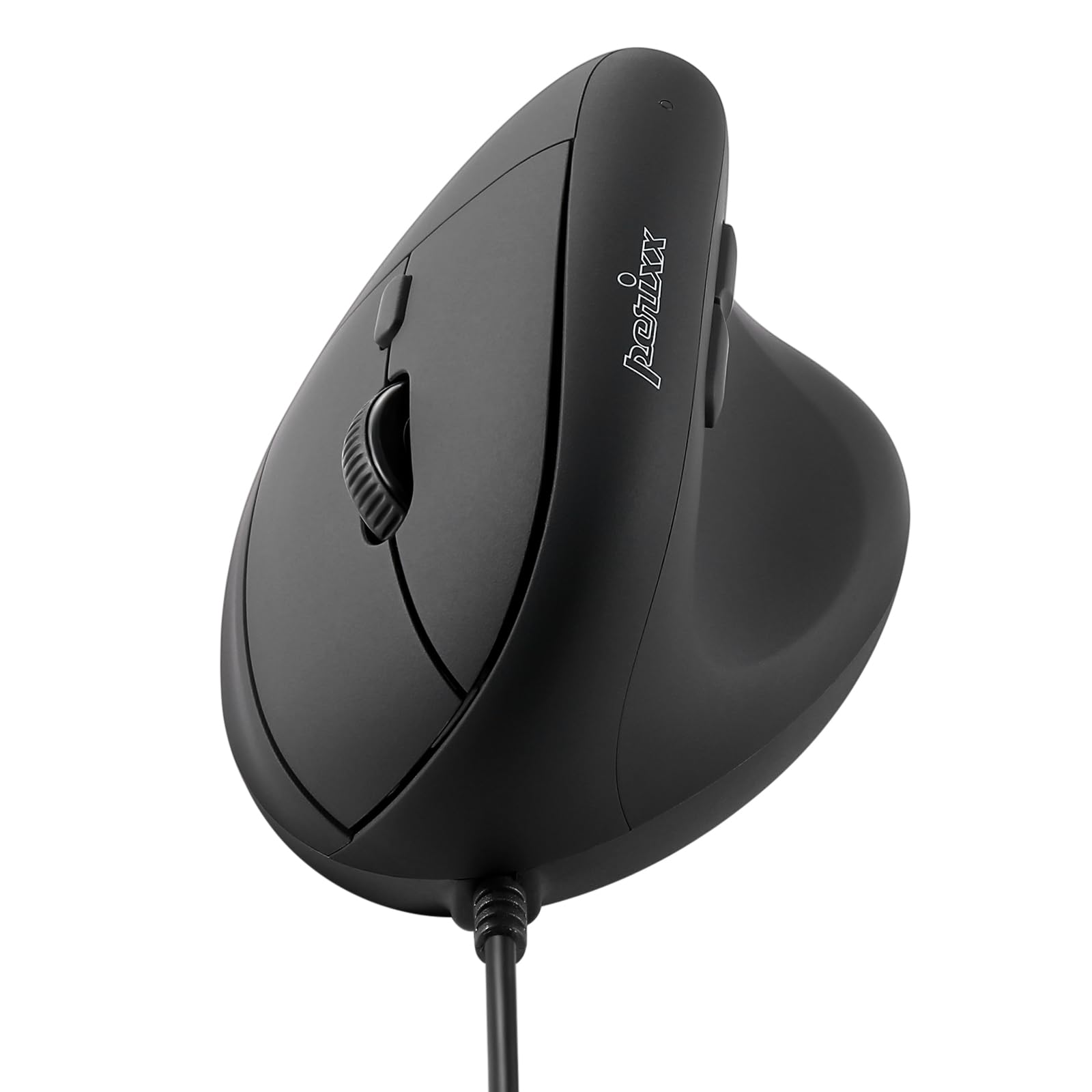
Four DPI steps and a memory chip that remembers your favorite speed
The headline here is flexibility: you click a dedicated button to switch between 1000, 1600, 3200, and 6400 DPI, and built-in memory holds that setting even after you unplug or restart. That makes the PERIMICE-508II the most adjustable mouse on this list — the 6400 DPI top end leaves the 800 DPI HP well behind for high-resolution screens. The vertical shape sets your hand at a handshake angle, cutting wrist twist on long office days.
Six buttons cover the basics plus forward and back navigation. The wired USB 2.0 connection keeps the response immediate with no lag and no drivers to install on Windows 7 and up. It’s built from ABS plastic and rated for 3 million clicks, a right-handed design suited to small and medium hands at 0.35 lb.
Ergonomics is the strongest suit in the feedback, and the quality feels solid for the money. Reliability is the honest split — many units run perfectly, while a few buyers report failure after two years. The scroll wheel and certain button feels draw mixed notes. Give yourself a couple of weeks to adapt, and this becomes a comfortable daily driver.
Standout strength: four-step DPI control with memory means you set your speed once and it stays, from 1000 all the way to 6400 DPI.
Fair warning: a minority of units develop reliability trouble after a couple of years, so treat the 3 million-click rating as a guide, not a guarantee.
Suits you if: you want to fine-tune cursor speed across different tasks and keep your chosen setting between sessions.
Downsides to weigh: some users report the wheel and buttons feel less crisp than the click switches.
6. Micropack Ergonomic Vertical Wired Mouse

Big-palm comfort in a vertical body with a thumb rest and whisper clicks
If your hand has been spilling off the sides of every compact mouse, this full-size body is the answer. It measures 4.6 × 3 inches and is built for a large palm — even one over 7.5 inches — so your whole hand rests on the mouse instead of hovering off the edge. The handshake angle keeps your wrist neutral and gives your thumb its own rest.
Sensitivity reaches up to 3200 DPI, adjustable to your preference, which comfortably outpaces the 1000 DPI entry models here. The clicks are near-silent, and the front and back thumb buttons are placed where your finger naturally lands. It’s a right-handed design that connects over USB with no driver install, working with Windows 10 and Mac OS 12 Monterey and later.
Ergonomics is what earns the most praise here, with comfort close behind — a sign the big shape lands for the intended hand size. The honest note is a mixed reliability picture: some units run smoothly while a few stop working unexpectedly, and a handful find the movement drags. At 0.14 kg it’s light for its size. Treat it as a comfortable daily mouse you want to keep an eye on.
The winning detail: a full-size 4.6 × 3-inch body built specifically for large palms, with a thumb rest and silent clicks for open workspaces.
Real-world caveat: a few units reportedly lose function over time, so this is a comfort-first pick rather than a gamble-free one.
Ideal for: large-palmed users tired of undersized mice who want silent clicking and adjustable up to 3200 DPI.
Pause if: you demand rock-solid long-term reliability over maximum hand fit.
7. Perixx PERIMICE-513 Wired Ergonomic Vertical Mouse

Five-point-nine feet of cable so your tower never dictates your arm position
That extra-long 5.9 ft USB-A cable is the reason to look here. It runs from a tower on the floor, around the back of a monitor, or above a drawer without a tug on your hand — the kind of reach the shorter-corded options can’t match. The vertical body keeps your wrist upright and neutral through a long desk session.
DPI switches across 1000, 1600, 3200, and 6400, so you can slow it down for fine work or speed it up on a big monitor. Left and right clicks are quiet, though the scroll wheel and back/forward buttons are not silent — worth knowing if a totally hushed mouse is your goal. The rubber-coated surface gives a secure, comfortable grip, and the plastic body weighs 0.35 lb at 4.92 × 2.44 × 3.03 inches.
It is plug-and-play on Windows 7, 8, 10, and 11 with no drivers, and comes with a 12-month limited warranty. Comfort and wrist ease are the strongest suits in the feedback. The honest catches: the smooth-scroll wheel has no tactile steps or adjustable resistance, responsiveness draws some mixed notes, and the vertical shape feels strange to a handful of users at first. Plan on one to two weeks to adapt.
What sets this one apart
- 5.9 ft USB-A cable for routing to a floor-level tower
- DPI steps from 1000 up to 6400 for any screen size
- Quiet left and right clicks with a soft rubber-coated grip
- 12-month limited warranty and Windows 7–11 plug-and-play
Where it gives ground
- Scroll wheel and back/forward buttons are not silent
- The wheel scrolls smoothly with no tactile steps to feel your way
Made for: a desk where the computer sits far from your hand, so you want a long, low-maintenance cable run.
Not for: anyone who needs the side buttons to be silent as well as the main clicks.
8. Logitech Signature Wired M520 L Optical Mouse for Business
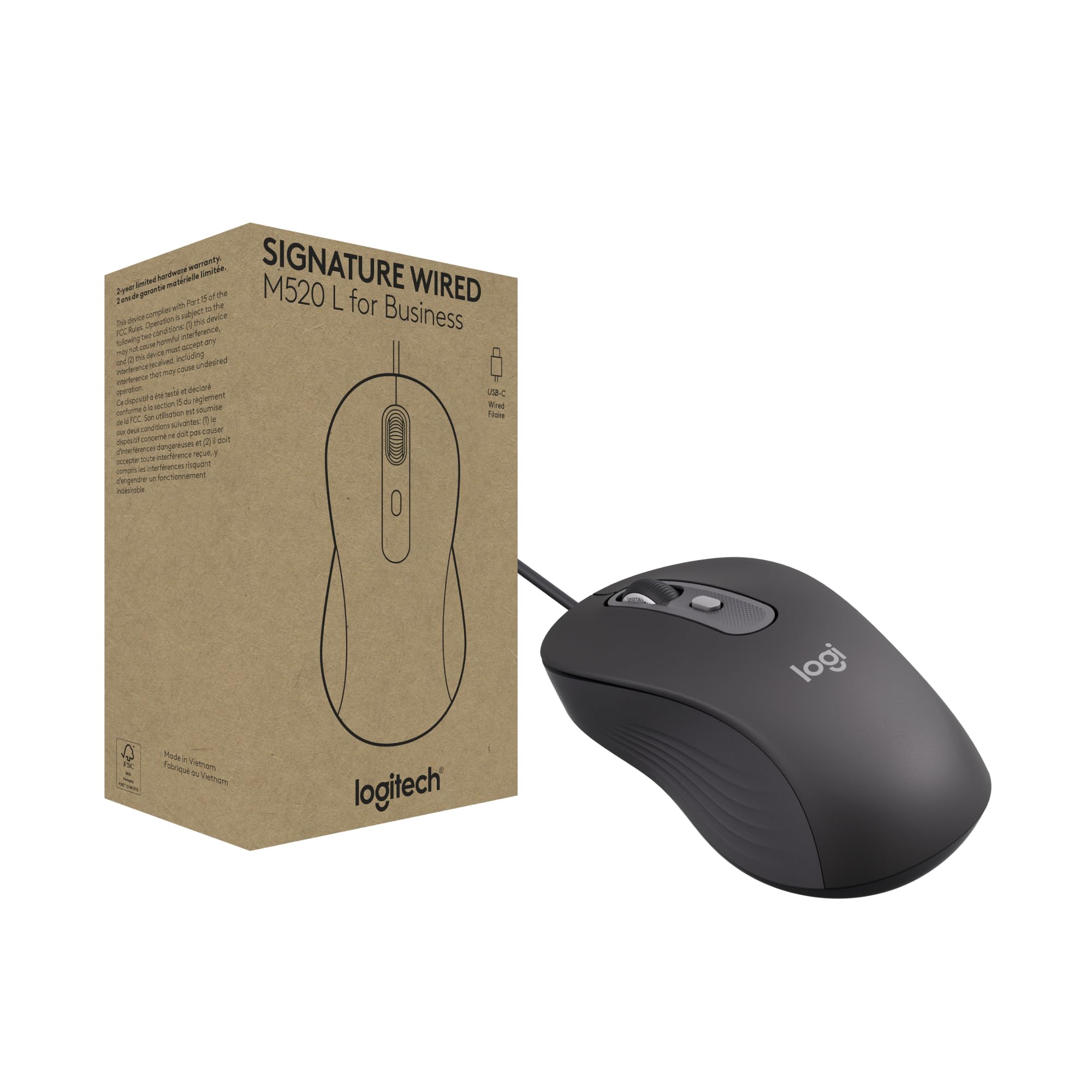
The USB-C corded mouse built for locked-down workplaces and mixed operating systems
This is the one to pick when your laptop only has USB-C ports and you’re tired of hunting for an adapter. The Signature M520 L connects over USB-C from a single cable, with a multi-OS layout built for easy deployment across Windows, macOS, ChromeOS, and Linux. It’s aimed at organizations — banking and medical settings that require a wired solution — but the everyday features suit anyone at a desk.
SmartWheel scrolling lets you flick between super-fast travel and precise, line-by-line movement, which is handy when a long spreadsheet needs slow scanning one moment and a jump to the top the next. Logitech states Silent Touch cuts click noise by 90%, which suits open-plan offices. A customizable DPI button lets you change cursor speed in one click, and you can remap it through Logi Tune or Logi Options+.
The contoured ambidextrous body fits left- and right-handed users alike, and it weighs 5.71 ounces at 5.59 × 2.09 inches. Logitech states the power-saving design uses 68% less energy, and the plastic parts contain at least 73% post-consumer recycled plastic. Ergonomics and the responsive scroll wheel come up favorably in the feedback. The one catch: four buttons rather than six means no dedicated thumb back/forward keys from the start.
Where it earns the premium: a true USB-C wired connection, SmartWheel two-speed scrolling, and 90% reduced click noise for shared workspaces.
The trade-off: at four buttons it’s leaner on shortcut keys than the six-button verticals here.
Choose this if: you run a USB-C-only machine, work across several operating systems, or need a quiet mouse in a shared office.
Look elsewhere if: you rely on dedicated thumb back/forward buttons for fast browsing.
9. Amazon Basics 3-Button USB Wired Mouse

The no-drama spare that clicks, scrolls, and gets back to work
Think of this as the mouse you keep in the drawer so a dead one never stalls your day. Its 1000 dpi optical tracking keeps the cursor responsive and makes text selection precise, matching the sensitivity of the COOLERPLUS above. The three-button layout — click, scroll, right-click — covers everything basic office work asks for, and it works with both Windows and Mac OS from the start.
The 4.9-foot cable gives you a reasonable run to a laptop or desktop port. One thing to check before you buy: the plug is USB-A, so a USB-C-only laptop will need an additional adapter. Product dimensions land at 4.3 × 2.4 × 1.4 inches, a compact ambidextrous shape that sits neatly beside a keyboard.
Quality and functionality are the two traits buyers talk about most, and the value reads as an inexpensive wired option that simply works. It isn’t a vertical ergonomic mouse, and long-term durability draws mixed notes over years of use, so pair it with a main mouse rather than expecting it to be the only one you own. For a spare or a second workstation, it does the job calmly.
Why it earns a slot: a 1000 dpi optical sensor, a 4.9-foot cable, and three-button plug-and-play simplicity for a second desk or a backup drawer.
Worth checking: the USB-A plug needs an adapter on a USB-C-only machine, and long-term durability is best treated as a spare-use expectation.
Good to have on hand: as a backup or a second-workstation mouse that won’t break your routine when the primary fails.
Not your main squeeze if: you want ergonomic wrist support or a premium long-life build.
Know the Specs
DPI and cursor speed
DPI (dots per inch) tells you how far the pointer travels for every inch you slide the mouse. An 800 DPI sensor such as the HP x500 moves more slowly and deliberately, which suits precise text selection. A higher figure like the 6400 DPI ceiling on the Perixx models lets the cursor cross a large monitor with less wrist travel. Adjustable DPI is the flexible choice when one mouse serves different tasks or people.
Optical sensor and tracking surface
An optical sensor uses light to read surface movement, so the mouse works on a desk without a pad. Some sensors, like the Sanwa’s blue LED tracking, are rated to read on glass, wood, marble, and leather. A steady sensor means the cursor stays where you put it, which is the difference between smooth selecting and skipping across a spreadsheet.
Cable length and connector
A wired mouse draws power straight from the USB cable, so there are no batteries to replace. The cable length sets your reach: the Amazon Basics runs 4.9 feet, while the Perixx PERIMICE-513 stretches 5.9 feet for a tower on the floor. Check the plug type — most here use the rectangular USB-A, while the Logitech M520 L uses USB-C.
Vertical shape and click noise
A vertical mouse tilts the body so your hand sits in a handshake-like position, which many desk workers prefer over a flat palm-down grip. Expect a short adjustment period before the movement feels natural. Silent click switches cut the noise for shared spaces, though on some vertical models only the main clicks are silent while the wheel and side buttons still make sound.
Common Questions
Will a wired optical mouse work on a Mac?
How long do the cables run on these wired mice?
Is a vertical mouse better than a flat one?
Do silent click mice make the scroll wheel quiet too?
What DPI should I choose for a large monitor?
Will these mice work if my laptop only has USB-C ports?
Do these wired mice need drivers or software?
How many buttons do I need on a wired optical mouse?
Are these mice good for large hands?
Can I use a wired mouse on a glass desk?
The Bottom Line
For most desks, the wired optical mouse to beat is the COOLERPLUS FC112 — a 1000 DPI optical sensor, a 1.6 m plug-and-play cable, and a shape that suits both hands without fuss. If your wrist wants a handshake angle and you have smaller hands, grab the Sanwa vertical. And for a USB-C business machine that needs quiet clicks, the Logitech M520 L is the one to reach for. Match the shape to your hand and the plug to your ports, and it will outlast the coffee.
How we choose
We do not accept paid placement. Every pick is matched to a real buyer and a real use-case; we do not hands-on test units.
Sources
Specifications: manufacturer listings and product documentation. Review insights: verified customer reviews, as of November 2026. Pricing: not shown on this page (it changes often); check the current price via the retailer link.
As an Amazon Associate, Tactical Gear Guy earns from qualifying purchases. This does not affect which products we feature.