Specs are compiled from manufacturer listings and verified buyer reviews and can change over time — please confirm the key details on the product page before buying.
Hotel Wi-Fi that logs you out every hour, an airport network you would not trust with a banking password, and a laptop, phone and tablet each begging for a fresh login — that is the daily reality of working on the road. A wireless gigabit travel router fixes it in one move: you log in once, and every device in your bag rides a private network you control. The picks below are the ones that actually hold that promise, with real gigabit Ethernet ports (wired jacks that carry data at up to 1,000 Mbps) and real VPN hardware inside.
This guide is built by comparing the manufacturers’ published specifications and the patterns across verified customer reviews, so you get each pick’s real strengths and trade-offs instead of marketing spin.
You will see which boxes are pocket-sized and which need a wall outlet, which run open firmware and which lock you into an app. It all adds up to a clear shortlist for a wireless gigabit travel router.
Top Picks


How To Choose The Best Wireless Gigabit Travel Router
The mistake most buyers make is shopping by the big Wi-Fi number on the box. Your hotel connection is almost never faster than a few hundred megabits, so a router advertising thousands of megabits is not buying you anything on the road. What matters is the port speed, the VPN hardware and whether the thing fits in your laptop bag.
Start with the WAN port, not the Wi-Fi number
The WAN port (the jack that connects your router to the hotel’s wall cable) sets your ceiling. A gigabit WAN port moves up to 1000 Mbps; a 2.5G WAN port moves up to 2500 Mbps. Most travelers never touch that ceiling in a hotel, but on a fast fiber line at a rented apartment it is the difference between a usable link and a crawl. Check the LAN port too — that is what feeds a wired device like a laptop or a printer.
Decide if you need a VPN client or a VPN server
These are two very different jobs. A VPN client lets the router log into a paid VPN service so everything on your private network is encrypted. A VPN server lets you dial back into your own home or office network from abroad. Some routers here do both at once — that is a capability worth paying for if you carry work files.
Check how it powers
A USB-C powered router can run off a power bank or a laptop charger you already pack. A router that ships with its own power adapter is easier to set up, but you carry one more brick. Check this before you buy — one pick here ships without a power supply at all.
Confirm it has a repeater and captive-portal mode
Repeater mode (sometimes called WISP) is what turns a hotel’s Wi-Fi signal into your own private network. Captive portal support is what lets you tap through the “agree to terms” screen once, instead of on every device. If a router cannot do those two things, it is not a travel router for hotel use.
Side-by-Side Comparison
| Model | Best For | Max Data Rate | WAN Port | Power Source | Amazon |
|---|---|---|---|---|---|
| GL.iNet GL-MT3000 Beryl AX★ Best Overall | All-round travel pick | 3000 Mbps | 2.5G | Included adapter | Amazon |
| Ubiquiti UniFi UTR (Ultra Thin)Ultra-Thin Pick | Existing UniFi owners | 1 Gbps | 2x GbE RJ45 | USB-C 5V/2A (adapter not included) | Amazon |
| GL.iNet GL-SFT1200 Opal (2-Pack) | Two-location travelers | 1200 Mbps | 1 Gigabit WAN | Included adapter | Amazon |
| Ubiquiti UniFi UTR (White) | UniFi ecosystem homes | 433 Mbps | 1000 Mbps LAN | USB-C | Amazon |
| ASUS RT-AX57 GO | 4G/5G tethering | 3000 Mbps | Gigabit | Included adapter, USB-C | Amazon |
| Roam 7 BE3600 (TP-Link) | Wi-Fi 7 on a budget | 3600 Mbps | 2.5G | Included adapter or 5V PD | Amazon |
Detailed Reviews
1. GL.iNet GL-MT3000 Beryl AX Wi-Fi 6 Travel Router
Our pick — 4.5+★ from 5,500+ verified ratings; the strongest balance of quality and price.
A 2.5G WAN port, OpenWrt firmware and a VPN client — in a case smaller than a paperback.
The Beryl AX earns the top spot because it covers the three things a travel router actually needs. It has a 2.5G WAN port (a multi-gigabit input jack moving up to 2500 Mbps) that feeds a gigabit LAN port (a standard 1000 Mbps wired output) — so a wired laptop gets a full-speed connection. And the whole box measures 4.17″L x 3.27″W x 1.3″H, which slips into a laptop sleeve without a bulge.
On the wireless side it runs Wi-Fi 6 (the newer 802.11ax standard) with 574 Mbps on the 2.4 GHz band and 2402 Mbps on 5 GHz, for a combined 3000 Mbps data transfer rate. Hotel feeds never approach that, but a rented apartment with a fast fiber line will use it. You get OpenWrt 21.02 firmware with more than 5,000 ready-made plug-ins (small add-on apps) installable from the admin panel if you want to customize the device.
VPN is where this earns its keep. OpenVPN and WireGuard come pre-installed, and you can log into 30+ VPN service providers directly. The specs put max VPN speed at 150 Mbps over OpenVPN and 300 Mbps over WireGuard — fast enough for HD streaming through an encrypted tunnel. Buyers report real-world throughput of 200 to 300 Mbit per second on the local link. It can also host a VPN server and a VPN client at once, so you can grab files from a home printer while still browsing through a paid VPN. A physical toggle on the case fires up your VPN or AdGuard Home without opening the app — set that in the admin panel first, because it ships with no function assigned.
Where the Beryl AX Delivers
- 2.5G WAN plus a gigabit LAN port handle a fast fiber line and a wired laptop in one box.
- OpenWrt 21.02 with over 5,000 plug-ins means the firmware is yours to shape.
- WireGuard tops out at 300 Mbps — the fastest VPN spec among the pocket picks here.
- VPN server and client run together, so remote access and encrypted browsing coexist.
The Limits To Know
- Physical VPN toggle is unassigned from the start and needs a manual trip through the admin panel.
- Its 100-meter coverage spec is generous for a travel device; do not expect whole-house range.
Grab it if: you work across hotel rooms and rented apartments and want one router that handles both, with OpenWrt freedom on top.
Think twice if: you only ever use a single phone on hotel Wi-Fi — a simpler repeater does that job for less fuss.
2. Ubiquiti UniFi UTR Travel Router (Ultra Thin)
Fifteen millimeters thick and light enough to forget — but bring your own USB-C charger.
If you already run UniFi gear at home, the UTR is the travel companion that drops straight into it. It is 3.78″L x 2.6″W x 0.5″H and weighs just 3.14 oz, so it goes in a shirt pocket. It expands your UniFi network to a remote site when you log in, but you are not locked in — it also runs in stand-alone device mode without a UniFi account, and it supports WireGuard VPN.
The connectivity layout is straightforward: two gigabit Ethernet RJ45 ports plus Wi-Fi for the uplink. Two RJ45 jacks let you hardwire a laptop and a printer at the same time, with no spare-port compromise. Here is what wins people over: performance and portability top the mentions by a wide margin, and setup is quick. It also carries a small 1.14-inch status display (a little screen on the case) so you can check the link at a glance rather than open an app.
The catch is power: it needs a USB-C 5V/2A supply and none is included. It uses a USB-C 5V/2A supply and the adapter is not in the box — a 5V/2A phone charger gets you running, but if you forget yours, the router is dead weight. Note also that it runs Wi-Fi 5, not the newer Wi-Fi 6 standard, so its wireless ceiling is lower than the Beryl AX above. If your home network is already UniFi, those trade-offs are easy to live with; if it is not, you are buying a router for a system you do not have.
Wired ports as the priority: You get two gigabit RJ45 ports (standard square network jacks that run at up to 1,000 Mbps) instead of the single LAN port on the other picks here. That matters if you plug in a hardwired laptop and still want a spare jack for a printer or a game console.
Buy it for: UniFi owners who want a pocket-sized extension. Bring: your own USB-C 5V/2A adapter.
Best served: a UniFi household that travels and wants the travel box to speak the same language as the home network.
Less ideal: anyone who does not own UniFi gear and does not want to buy a power adapter on day one.
3. GL.iNet GL-SFT1200 Opal Travel Router, AC1200 (Pack of 2)
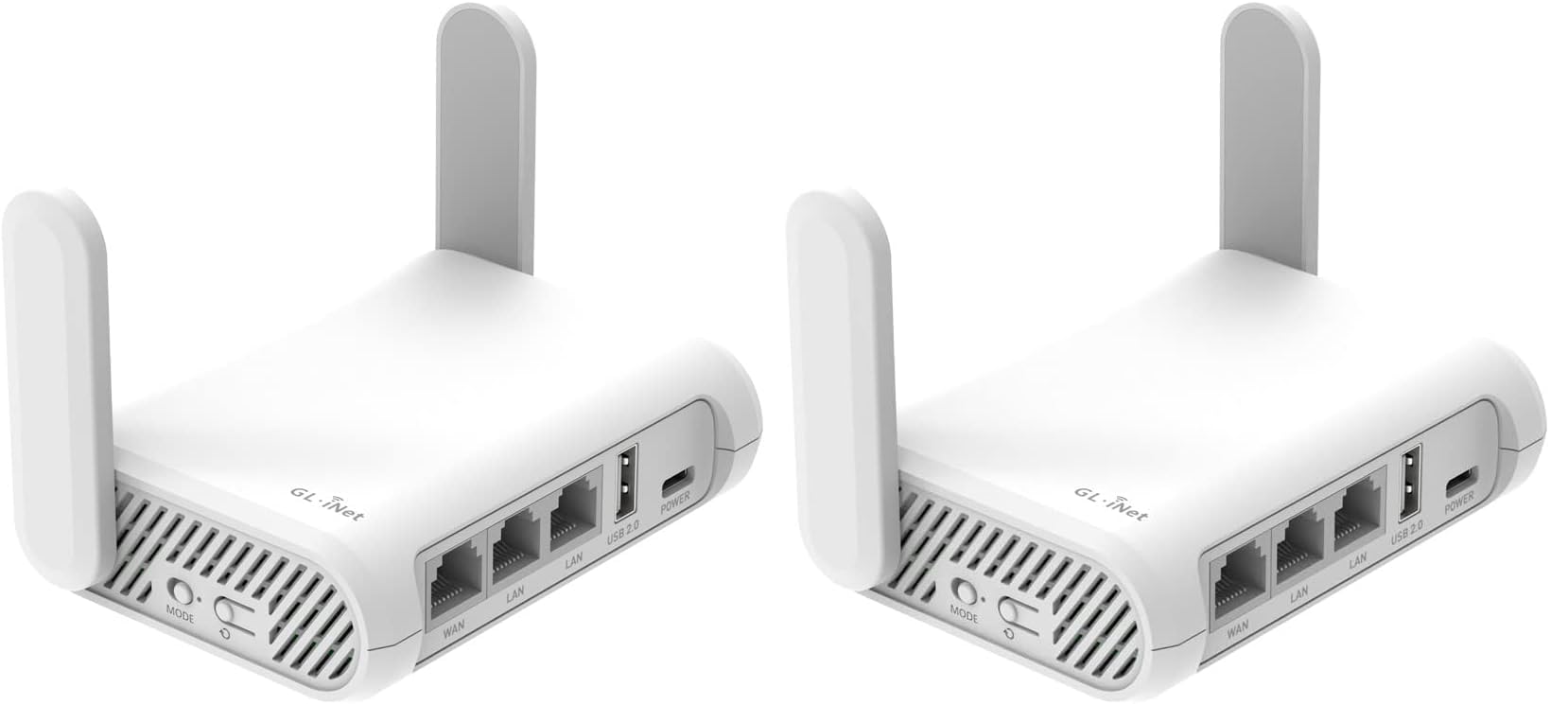
Two routers in one box — one for the suitcase, one for the desk at your site.
Some trips end where they start, and some turn into an onsite job. The Opal two-pack is the practical answer: a router for the hotel bag and a second one you can leave at a worksite, each with full gigabit ports. It carries 2 Gigabit LAN ports and 1 Gigabit WAN port, so a wired connection to a job trailer or laptop is a single cable away. Speed is AC1200 dual-band — 300 Mbps on the 2.4 GHz band and 867 Mbps on 5 GHz.
Setup is the star. It is easily the most-loved thing about this router, and the numbers back it up: it earns a large share of the positive mentions on how quickly it comes to life, and value for money and portability follow close behind. The pre-installed OpenVPN and WireGuard clients (two common VPN programs that encrypt your traffic) make encryption a switch-flip job, and the physical toggle turns them on or off without a trip to the app. At 145 g it sits lightly in a pack, and the retractable antennas (they fold away when not in use) extend for a stronger signal at range.
What you should know before buying: the connectivity and reliability notes on this model come back mixed — while many owners mention a stable link, some hit disconnections that need a router reboot. That is real, but on a 4.0+ star average with a large review base, the everyday experience is generally smooth. The other thing to plan for is public Wi-Fi time limits: when a free hotspot cuts you off, you reconnect the router to the network to restore the link.
The two-unit logic: One router buys you one location. This buys you two, which solves the classic “left it in the hotel drawer” and “two offices, one bag” problems in one purchase.
The honest note: if you only ever travel alone, the second unit is spare weight, and the Beryl AX above has the faster wired port and firmware edge.
Made for: technicians and remote workers who move between two fixed places and want both wired up and encrypted.
Not for: a one-bag traveler who wants a single box, in which case the faster single picks beat it.
4. Ubiquiti UniFi UTR Wireless Router

The same idea as the Ultra Thin, sold as the standard UniFi travel router in white.
This is the UniFi travel router in its plainer listing — dual-band with 2.4 GHz and 5 GHz bands, gigabit Ethernet, and an 89 g body that drops into a jacket pocket. The LAN port bandwidth is 1000 Mbps, so a wired laptop or smart TV runs at full gigabit speed. The data transfer rate on this listing is 433 Mbps, which tells you the wireless side is built for browsing and streaming, not for moving giant files over the air.
Where it fits is the UniFi home that wants a second location to feel like the first. If you already have UniFi gear at the office, this box lets you extend the same network to a hotel, a rental, or a relative’s house. It handles a smartphone, tablet, gaming console, smart TV or PC, and it includes the USB-C cable and quick start guide so the setup is documented from the first minute.
The trade-off is wireless speed: 433 Mbps is the lowest data rate in this round-up. The wireless data rate is the lowest in this round-up at 433 Mbps, and its companion Ultra Thin listing carries the bigger owner base. If raw throughput is your priority, the Beryl AX with its 3000 Mbps figure is the better buy. If the priority is keeping one network identity across locations, this does that job and does it neatly.
Wired speed stays high: 1000 Mbps LAN port bandwidth means plugging in a laptop does not blunt the router — it is the wireless leg, at 433 Mbps, that is the ceiling here.
What to weigh: smaller owner base and lower wireless ceiling than the Ultra Thin. Great for ecosystem continuity; not the pick for high-speed transfers.
Reach for it if: you want a second UniFi node in a travel bag and care more about the wired link and network continuity than peak wireless speed.
Look elsewhere if: your work involves big uploads over Wi-Fi or you do not run UniFi at home.
5. ASUS RT-AX57 GO — AX3000 Dual Band Wi-Fi 6 Travel Router

When the hotel Wi-Fi fails, this router can fall back to your phone’s mobile signal.
Most travel routers assume there is a usable Wi-Fi network somewhere. The RT-AX57 GO plans for the night there isn’t. Tri-mode connectivity means you can run it from a wired hotel line, repeat a public Wi-Fi signal in WISP mode, or tether a 4G LTE or 5G phone to it and go online through cellular. That last option is the real differentiator: when the accommodation’s Wi-Fi is unusable, your phone becomes the uplink and every device on your private network stays online.
The Wi-Fi 6 hardware is built to carry a crowd: a 160 MHz channel (a wider lane of radio spectrum) supports up to 70 devices, with speeds up to 3,000 Mbps. VPN handling is thorough — one-touch activation, support for multiple protocols, up to 30 service providers and site-to-site VPN. Commercial-grade triple-level security in AiProtection adds DNS over TLS for encrypted DNS lookups, plus a one-tap security scan and Safe Browsing. For small businesses, there is even a customizable guest portal.
The trade-off is a lower owner rating than the pick above it, and the extra modes can feel like a lot of switches if you want set-and-forget simplicity. But the 4G/5G fallback is a capability the rest of this round-up does not have, which makes it the pick for anyone whose Internet source changes from city to city.
Why the fallback matters: Site-to-site VPN and mobile tethering together mean you can travel with a private network that survives a dead hotel connection.
What it gives up: lower overall owner satisfaction than the leaders in this round-up, and the mode toggling takes some learning.
Go with it if: you travel with a phone plan you trust and want a router that can use it as its Internet source.
Skip if: you want the simplest possible setup with a fixed hotel line and never need cellular fallback.
6. Roam 7 BE3600 Wi-Fi 7 Portable Travel Router

Wi-Fi 7 bands and a 2.5G port on a router that will fit in a carry-on.
The Roam 7 brings the newer Wi-Fi 7 standard to travel kit, with 2882 Mbps on the 5 GHz band and 688 Mbps on 2.4 GHz, for a combined 3600 Mbps data transfer rate. It also handles up to 90 devices at once, which is a wild number for a hotel room and an entirely sensible one for a camper full of phones, tablets and a console. The 2.5 Gbps WAN port and 1 Gbps LAN port keep the wired path fast.
It is flexible about its source. Router mode takes an Ethernet cable or a USB phone tether, hotspot mode repeats a public network, and AP/RE/client mode lets you extend Wi-Fi or add wireless to a wired setup. A one-step captive portal login in the Tether app means you authenticate once in the hotel and every device rides the same private network afterwards. Power comes from a USB-C port, and it runs off the included adapter or any 5V PD power source — a power bank works.
The honest caveat is firmware: the manufacturer states this model does not support OpenWrt, so you are limited to first-party software. The reliability notes also come back mixed — some users report drops and resets, though the reviews otherwise land positive on quality and connectivity. Bundled with the higher ceiling of Wi-Fi 7 and the 2.5G port, this is the future-proof angle for the category.
What earns the mention: quality and connectivity are the recurring themes, and the 90-device capacity is the standout feature for group travel.
The catch: no OpenWrt support means no add-on plug-ins; if customization matters, the Beryl AX or Slate 7 are the OpenWrt picks.
Ideal for: families, campers and RV owners connecting many devices who want Wi-Fi 7 and a 2.5G port without the top-tier spend.
Not the one if: you want to install custom firmware or plug-ins, since this box stays on stock software.
Know the Specs
WAN Port Speed (Gigabit vs 2.5G)
The WAN port is the jack that connects your router to the source of the Internet — the wall cable in a hotel or the modem in a rental. A gigabit WAN port handles up to 1000 Mbps. A 2.5G WAN port handles up to 2500 Mbps. Choose by your source line: a typical hotel feed rarely exceeds a few hundred Mbps, so gigabit is plenty there. On a fast fiber line, the 2.5G port prevents a needless bottleneck.
VPN Throughput (OpenVPN vs WireGuard)
Two protocols appear across this lineup. OpenVPN is the older, widely supported one; WireGuard is newer and faster on the same hardware. Specs here list up to 150 Mbps on OpenVPN and 300 Mbps on WireGuard for one router, and up to 100 Mbps on OpenVPN and 540 Mbps on WireGuard for another. Higher numbers mean your encrypted connection can keep up with HD video or large file transfers.
Firmware (OpenWrt vs First-Party)
OpenWrt is open-source router software that lets you install small add-on apps, called plug-ins, from an admin panel. It is the pick if you want to tune the device or add features. First-party firmware is locked to the maker’s app and is simpler to live with. Neither is wrong; the choice depends on whether you enjoy tinkering or just want the box to work.
Power and Portability
A USB-C powered router runs from a power bank or a laptop charger you already carry — a real advantage on long trips. Models that ship with their own adapter are easier to set up from the start. Watch the weight spec: the lightest here is 3.14 oz, the heaviest is 145 g, and the difference matters if you are packing light. Confirm what the box includes before you travel, since one pick ships without a power supply.
Common Questions
Will a travel router work on hotel Wi-Fi that requires a login page?
Do I need a VPN subscription for the VPN feature to work?
How fast will the connection actually be through a travel router?
Can a travel router replace a hotel room’s Wi-Fi for a whole family?
What is the difference between WISP mode and repeater mode?
Does a travel router need its own power adapter?
Is Wi-Fi 7 worth it on a travel router?
What does OpenWrt firmware actually let me do?
Can I plug a wired device like a laptop or printer into a travel router?
Which pick has the fastest VPN connection?
The Bottom Line
The winner is the GL.iNet GL-MT3000 Beryl AX because it combines a 2.5G WAN port (an internet-in jack that accepts up to 2,500 Mbps), a gigabit LAN port, OpenWrt firmware (open-source router software you can customize) and WireGuard at 300 Mbps in a case that fits a laptop sleeve — and it carries the strongest owner base of any pick here. If you want a cellular fallback when the hotel Wi-Fi dies, take the ASUS RT-AX57 GO. For the on-device touchscreen and the fastest WireGuard spec in the round-up, the Slate 7 is the one to reach for. And if a second router at a worksite is part of your month, the two-pack Opal solves two locations at once. Whichever you take, match the router’s WAN port to your source line and the travel Wi-Fi problem is solved.
How we choose
We do not accept paid placement. Every pick is matched to a real buyer and a real use-case; we do not hands-on test units.
Sources
Specifications: manufacturer listings and product documentation. Review insights: verified customer reviews, as of November 2026. Pricing: not shown on this page (it changes often); check the current price via the retailer link.
As an Amazon Associate, Tactical Gear Guy earns from qualifying purchases. This does not affect which products we feature.