Specs are compiled from manufacturer listings and verified buyer reviews and can change over time — please confirm the key details on the product page before buying.
Dead spots in the back bedroom, a video call that freezes when you walk to the kitchen, and a router that claims “whole home” while giving up at the hallway. That is the real problem this category exists to fix. A whole-home mesh system replaces one overloaded router with several units that hand your devices off as you move around, so the signal follows you instead of fading behind a wall. The picks below cover every honest angle: Wi-Fi 7 future-proofing, Wi-Fi 6E tri-band speed, budget coverage for a large house, and the ones with a catch worth knowing before you buy.
This guide is built by comparing the manufacturers’ published specifications and the patterns across verified customer reviews, so you get each pick’s real strengths and trade-offs instead of marketing spin.
You will learn the one number that actually predicts coverage, why a dedicated backhaul matters when the kids are gaming, and where each pick genuinely fits. Below you will find a clear, honest breakdown of the best whole home mesh Wi-Fi system for every house size and budget.
Top Picks


How To Choose The Best Whole Home Mesh Wi-Fi System
Most people buy too much or too little coverage. The trick is matching the system to your real floor plan and your real internet plan, then letting the mesh units do the walking. Here is what genuinely decides whether a system earns its place in your house.
Start with your internet plan, not the box number
A Wi-Fi 7 system that supports internet plans up to 2.5 Gbps (the speed your provider delivers to the door) is only worth it if your provider actually hands you that much. If your plan is slower, a big speed rating on the box is headroom you will rarely feel. Match the system’s ceiling to your plan first, then look at coverage.
Coverage ratings are a ceiling, not a promise
Square-footage figures are measured in open lab conditions with clean air and no walls. In a real home with plaster, brick, and a microwave in the way, expect less reach than the box says. A system rated for 6,000 square feet usually covers a normal two-story house comfortably, while a 7,500-square-foot rating gives you slack for a long floor plan or a detached garage.
Dedicated backhaul keeps the far rooms fast
Backhaul is the invisible link between your mesh units — the channel they use to talk to each other. Tri-band systems give that link its own lane, so the units are not stealing bandwidth from your devices. This is the single biggest reason a tri-band system holds speed in the far bedroom while a cheaper dual-band one sags.
Count your devices before you buy
Every phone, TV, laptop, camera, and smart plug takes a slot. A system built for 120+ devices is plenty for most homes, while 160+ or 200+ gives you room to grow without the network choking during a movie night. Look at the device figure alongside the coverage, because a big house with a low device count will still strain.
Side-by-Side Comparison
| Model | Best For | Coverage | Top Speed | Band Class | Amazon |
|---|---|---|---|---|---|
| Amazon eero 7 dual-band mesh Wi-Fi 7 (3-pack)★ Best Overall | Future-proofing a large home | 6,000 sq. ft. | Up to 1.8 Gbps wireless | Dual-Band | Amazon |
| Tenda AX3000 Nova MX12 (3-pack)Budget Champion | Budget coverage for a big house | 7,000 sq. ft. | 3,000 Mbps | Dual-Band | Amazon |
| Netgear Orbi RBK763 (renewed)Dedicated Backhaul Pick | Dedicated-backhaul speed on a budget | 7,500 sq. ft. | 5.4 Gbps | Tri-Band | Amazon |
| Google Nest WiFi AC2200 (3-pack) | Smart-home homes on a budget | Up to 3,800 sq. ft. | 1,200 Mbps | Dual-Band | Amazon |
| Google Nest WiFi Router + 2 Points | Google Assistant in every room | Up to 5,400 sq. ft. | 2,200 Mbps | Dual-Band | Amazon |
| TP-Link Deco XE75 Pro (renewed) | New 6 GHz band on a tri-band mesh | Up to 7,200 sq. ft. | 2.5 Gbps port | Tri-Band | Amazon |
| NETGEAR Orbi RBE773 WiFi 7 (renewed) | Top-tier Wi-Fi 7 coverage | Up to 8,000 sq. ft. | 11 Gbps | Tri-Band | Amazon |
| TP-Link Deco BE63 (2-pack) | Wi-Fi 7 with a 10G port | 5,800 sq. ft. | 10 Gbps | Tri-Band | Amazon |
| ASUS ZenWiFi BT6 (3-pack) | Big multi-level properties | Up to 7,600 sq. ft. | 9.4 Gbps MLO | Tri-Band | Amazon |
Detailed Reviews
1. Amazon eero 7 dual-band mesh Wi-Fi 7 router (3-pack)
Our pick — 4.0+★ from 2,000+ verified ratings; the strongest balance of quality and price.
The quiet overachiever that brings Wi-Fi 7 to a 6,000-square-foot home without a new alphabet of jargon.
Here is the one to buy if you want the newest Wi-Fi standard in a large house and you value being left alone by your network. Three eero 7 units spread Wi-Fi 7 across 6,000 square feet and handle 120+ devices, which covers a full family plus every smart plug and camera. The system supports internet plans up to 2.5 Gbps with two auto-sensing 2.5 GbE ports (ports that figure out the right speed on their own), so a gigabit-plus plan actually reaches your desk.
What it does best is stay invisible. eero’s TrueMesh software (a set of rules that keeps each device on the strongest node) works with TrueRoam and TrueChannel to keep you on the optimal connection as you walk from room to room. Owners describe setup as a roughly 15-minute job, and the app is genuinely forgiving. Wi-Fi 7 features like multi-link operation (the ability to use more than one band at once) are baked in for future devices, though older phones and laptops simply get the best classic performance they support.
The catch is that eero Plus security and parental tools require a paid subscription. eero Plus, which adds Advanced Security, Ad Blocking, parental controls, Malwarebytes, 1Password, and a VPN, is optional and paid — the router works fine without it, but the security tools live behind it. Also note the wireless ceiling: up to 1.8 Gbps over the air, so a wired connection to a gaming rig is where the 2.5 GbE ports pull their weight. Coverage figures are lab-measured, so a thick-walled older house may want the units spaced closer.
Why it takes the top spot
- Wi-Fi 7 with multi-link operation gives you headroom for devices you have not bought yet.
- Three units cover 6,000 sq. ft. and 120+ devices — a real family-size load.
- Two 2.5 GbE ports mean gigabit-plus internet plans actually arrive at full speed.
- Backed by a three-year warranty and phone/email support.
What to weigh first
- Advanced security and parental tools require the paid eero Plus add-on.
- Wireless tops out at 1.8 Gbps, so wired devices get the full 2.5 Gbps benefit.
Best for: a large home that wants Wi-Fi 7 now with the simplest app on this list, at 4.0+ stars across 2,200+ ratings.
Look elsewhere if: you want every security feature included in the box with no ongoing subscription.
2. Tenda AX3000 Mesh WiFi 6 System Nova MX12 (3-pack)
Big coverage claims at the entry level — 7,000 square feet from three small white cubes.
If your house is sprawling and your budget is not, this is the pick that stretches furthest for the money. Three MX12 units claim up to 7,000 square feet of coverage and support over 160 devices, powered by dual-band Wi-Fi 6 (802.11ax) at speeds up to 2976 Mbps. A 1.7 GHz quad-core Broadcom processor sits behind the mesh to keep the network responsive. For a whole-home system at this tier, that device count is generous.
The Tenda earns its place on raw spread. Buyers report the range essentially quadruples coverage on their property, which is what most people are actually chasing when they replace a tired router. Each unit also carries three Gigabit ports, so you can wire a PC or TV without hunting for a switch. You can split separate SSIDs for the 2.4 GHz (574 Mbps) and 5 GHz (2402 Mbps) bands if you want to steer a device manually.
Now the part that keeps it out of the top spot: performance is genuinely mixed in owner feedback, with some households working flawlessly and others hitting frequent disconnections. That split is worth taking seriously — it is the single most important thing to check in the review pages before you buy. The fix for many is careful node placement rather than a hardware swap. If you need guaranteed stability first and budget second, spend more.
Where the money goes: coverage and device capacity, plus a 1.7 GHz quad-core processor that keeps the mesh responsive — you are not paying for brand polish here.
Strongest play: a wide single-story home or long property that needs coverage per dollar above all else.
The trade-off: expect to spend a little time dialing in node placement, and check recent feedback if rock-solid uptime is non-negotiable.
3. Netgear Orbi RBK763 Mesh System
A tri-band workhorse with its own dedicated wireless lane between units.
Orbi’s calling card is the dedicated wireless backhaul — a separate channel the router and satellites use to talk to each other, so your streaming never competes with the mesh’s own traffic. Its 5.4 Gbps figure also runs well clear of the Tenda Nova’s 3000 Mbps.
In daily life that backhaul is what holds speed steady in the far bedroom and the garage. You get 7 Gigabit LAN ports across the set, so wired devices go straight into the mesh rather than a separate switch. Voice control works through Amazon Alexa or the Google Assistant, and the coverage story is the one owners call out — a 3000-square-foot house is comfortably handled. Tri-band WiFi 6 from a brand that has done mesh longer than most is a reassuring combination.
The catch is that this is a renewed unit, so a refurbished router-and-satellite set arrives rather than a fresh retail box. Check the seller’s warranty terms before you commit, because the coverage and performance are excellent while the support path is the variable. A 5.4 GHz frequency figure and 6 streams of WiFi 6 mean 4K and 8K streaming and lag-free gaming are well within reach, but the box you open may show signs of a previous life.
The backhaul advantage: a dedicated tri-band lane keeps the mesh traffic invisible to your devices, which is why the far rooms hold speed instead of sagging.
Freshness caveat: renewed stock means a refurbished set — confirm the warranty and returns window, then enjoy the coverage.
Reach for this if: you want dedicated-backhaul speed and a wide coverage spread for a mid-range outlay, and you are comfortable with a renewed set.
Steer clear if: you need a sealed new-in-box system with a full manufacturer warranty.
4. Google Nest WiFi AC2200 (2nd Generation) 3-Pack

A tidy little mesh that doubles as a smart speaker in the rooms where you want one.
This is the pick for a smaller home that already runs on Google. The three-piece setup covers up to 3,800 square feet, with the router and access points using dual-band AC2200 (an older Wi-Fi 5 standard, not the newer Wi-Fi 6 or 7) at a data transfer rate of 1200 Mbps. Setup is what wins people over — the Google Home app walks you through it, and the system slots neatly into a Google Assistant household.
Where it struggles is connectivity: some owners mention trouble getting the extenders to join the mesh cleanly. The quality and value feedback is mixed, and connectivity issues come up — some customers note trouble getting the extenders to join the mesh cleanly. That does not make it a bad system; it makes it a smaller-home, lower-demand pick. On a modest floor plan with a normal internet plan, the 3800-square-foot rating is genuinely useful.
Compared with the Google Nest 5400-square-foot set below, this one trades coverage and device headroom for a simpler, more compact presence. If your house is on the larger side, the bigger Nest set covers 5,400 square feet and the extra reach matters. If you have a compact home and want the Google ecosystem feel without overspending, this AC2200 triple is the more sensible fit.
What earns it a slot
- Google Home app setup that even a first-time mesh buyer can follow.
- Compact three-piece design that fits small homes without clutter.
Where it asks you to compromise
- AC2200 Wi-Fi 5 instead of the newer standards — fine for a normal plan, limited for a gigabit one.
- Some owners hit connectivity snags joining the access points to the mesh.
Good fit for: a compact home already living inside the Google Assistant world.
Not ideal if: you are pushing gigabit speeds or need coverage across a sprawling floor plan.
5. Google Nest WiFi Mesh Router (AC2200) with 2 Points, 3-Pack

Nest points that double as Google Assistant speakers, spread across 5,400 square feet.
Think of this as the bigger, chattier sibling of the AC2200 set above. The two Nest Wifi Points also work as smart speakers with Google Assistant built in, so you get hands-free control of your home without buying separate speakers for the kitchen and bedroom.
Performance sits at 2200 Mbps over dual-band Wi-Fi 5, with WPA3 encryption (the current standard for scrambling traffic between your devices and the router) and automatic security updates. The Google Home app handles management, and you can easily add more points to stretch coverage further. It is a system that makes sense when the house is already half-smart-home and you want one app for everything.
The trade to weigh is the speed ceiling: AC2200 Wi-Fi 5 is a coverage-and-convenience pick, not a speed pick. AC2200 is older-generation Wi-Fi, so this is a coverage-and-convenience pick rather than a speed pick. It sits below the TP-Link Deco XE75 Pro’s tri-band WiFi 6E coverage of 7,200 square feet, and it sits well below the Wi-Fi 7 picks if raw throughput is your goal. For a family that wants reliable coverage plus voice assistants in every room, that is a fair exchange.
The voice angle: the Nest points speak Google Assistant, so your Wi-Fi nodes quietly become room speakers — a genuine double duty.
The speed reality: dual-band Wi-Fi 5 holds a normal plan fine, but it is not the system for a gigabit-plus household.
Pick it when: you want coverage, device headroom, and Google Assistant bundled into one three-piece setup.
Pass when: Wi-Fi 7 speed or a newer 6 GHz band is on your must-have list.
6. TP-Link Deco XE75 Pro Mesh System

A new-lane tri-band system that clears the crowded airwaves and covers 7,200 square feet.
This is the pick for a crowded neighborhood where every band feels busy. The Deco XE75 Pro opens the 6 GHz band — a newer slice of Wi-Fi spectrum free of older devices — and uses it as the dedicated backhaul between units by default.
What owners rate highest is speed and performance. The Deco app handles setup with visual guidance, and the system supports internet plans up to 2.5 Gbps through a 2.5 Gbps port plus two Gigabit ports per unit. AI-driven mesh learning adapts to your layout and device behavior over time, and TP-Link HomeShield adds security and parental controls, with the Pro tier available as an add-on. Alexa voice control can toggle guest Wi-Fi on and off.
The catch is that this is a renewed listing, and the 6 GHz band only helps Wi-Fi 6E devices. The 6 GHz band only helps devices that support Wi-Fi 6E, so older phones and laptops fall back to the standard bands. This is a renewed listing, meaning a refurbished set rather than fresh retail stock. And the 6 GHz exclusivity matters most in dense apartment or townhouse settings, where the interference it avoids is real.
The 6 GHz edge: a dedicated new band for the backhaul means less congestion between nodes — the difference you feel in a crowded building.
Check before you buy: renewed stock plus a 6 GHz band that only newer devices can use.
Worth it for: a dense neighborhood or apartment where interference is the real enemy, and you have newer Wi-Fi 6E devices.
Think twice if: you own mostly older gear or you only want sealed new-in-box stock.
7. NETGEAR Orbi Tri-Band WiFi 7 Mesh System (RBE773, Renewed)

An 8,000-square-foot Wi-Fi 7 blanket with a 2.5 Gig internet port and 11 Gbps on tap.
For a house that keeps going — a long floor plan, a back yard, a garage office — this is the coverage leader. The RBE773 set (router plus two satellites) covers up to 8,000 square feet and pushes speeds up to 11 Gbps with WiFi 7. A 2.5 Gig internet port and 2500 Mbps LAN bandwidth mean a multi-gig plan actually lands at the router instead of bottlenecking at the wall.
Tri-band technology with Enhanced Backhaul keeps the mesh’s own traffic separate, so every device stays fast at the same time. Performance is the headline in owner feedback — it holds up for both home and business use, and setup stays straightforward. WiFi 7 is backward compatible with older devices too, so nothing in the house gets left behind. If your current router gives up at the back door, this is the system that reaches the back yard.
The caveat is that this is renewed kit, so a refurbished router-and-two-satellite set arrives and the warranty path is worth checking. It is also made for use in the U.S. only, which matters if you travel with gear or live elsewhere. And at this coverage level, the cost puts it firmly in the premium tier alongside the ASUS below.
What the coverage numbers buy
- Up to 8,000 sq. ft. with router plus two satellites — the widest on this list.
- 11 Gbps WiFi 7 speeds and a 2.5 Gig internet port for multi-gig plans.
- Tri-band Enhanced Backhaul keeps every device fast at once.
What to double-check
- Renewed stock means a refurbished set, so confirm the warranty terms.
- Made for use in the U.S. only.
Built for: a large or long-layout home that needs the widest coverage and a multi-gig internet port to match.
Consider the alternative if: renewed stock or U.S.-only use is a problem for your setup.
8. TP-Link Deco 7 Pro BE63 Mesh System
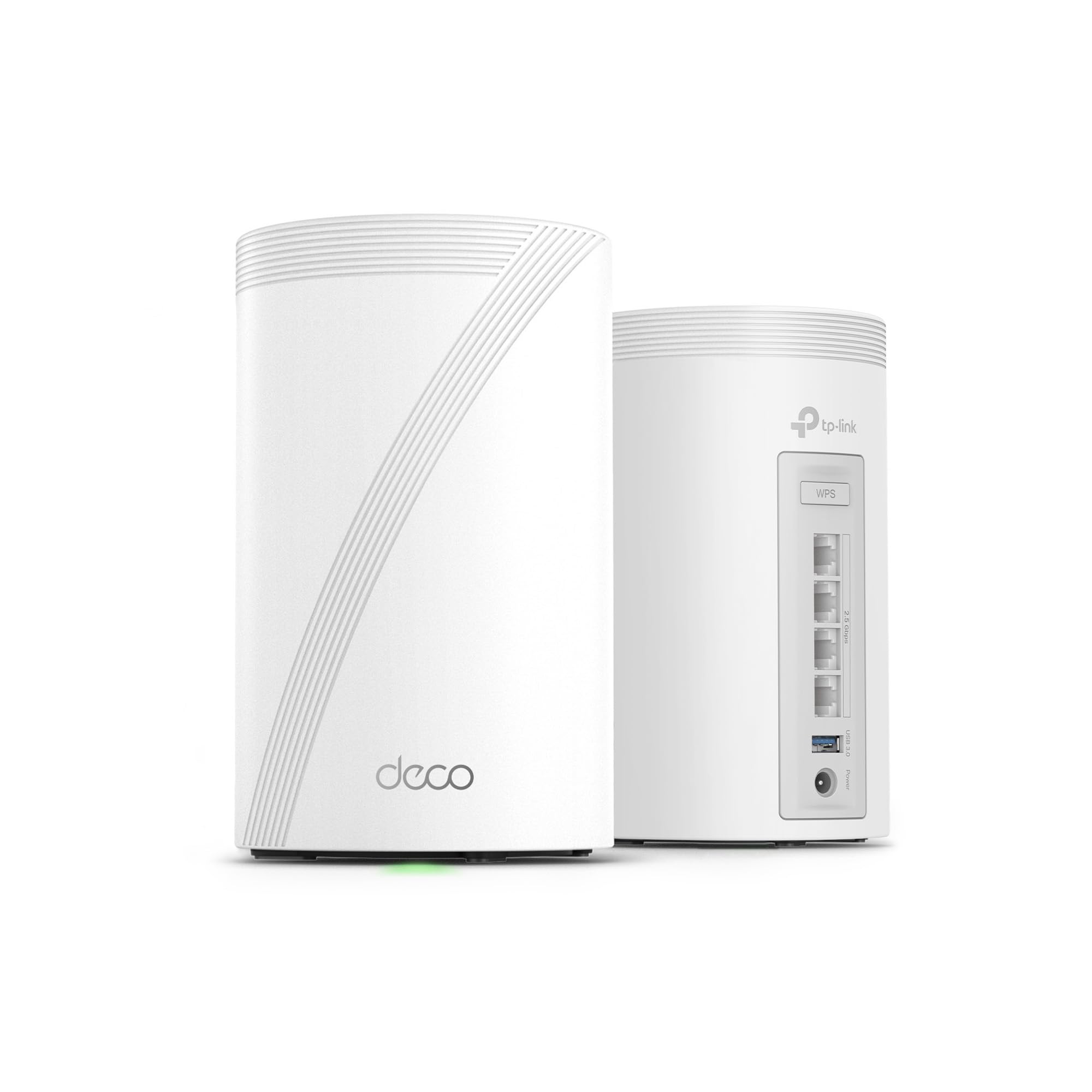
A two-piece Wi-Fi 7 set with a 10G WAN/LAN port for a network built to grow.
Fewer boxes, more headroom. The BE63 is a two-pack covering 5,800 square feet and supporting over 200 devices, with a 10G WAN/LAN port that keeps pace as your internet plan grows. Its tri-band Wi-Fi 7 speeds split into 5,188 Mbps on the 6 GHz band, 4,324 Mbps on 5 GHz, and 574 Mbps on 2.4 GHz, which is serious throughput for 4K and 8K streaming or VR gaming. It is the pick if future-proofing is the whole point.
The wired side is where it flexes. Four 2.5G WAN/LAN ports and a USB 3.0 port let you hardwire a gaming PC, a NAS, or a console without adding a switch. Simultaneous wired and wireless backhaul balances traffic between the two Deco units, and AI-driven roaming hands your devices off smoothly as you move. HomeShield handles network protection and parental controls, and VPN client and server support lets home devices reach a remote network without extra software.
The trade is the two-unit design: a single Deco pair covers less ground than a three-piece set. A single Deco pair covers less ground than a three-piece set, so a sprawling home will want to add a unit. The 2.5G port count is generous, but the 10G port is a single lane — you get one ultra-fast wired device, not a whole rack. For most households the sheer speed is more than enough for years.
The speed case: Wi-Fi 7 tri-band with a 10G port puts this among the fastest options here — built for gigabit-plus plans and 8K streaming.
The unit count: two pieces cover 5,800 sq. ft., so a very large home will want an extra node.
Matches well with: a performance-focused home that wants a future-ready 10G port and heavy-device headroom.
Know going in: two units cover less area than the 3-packs here, so budget for an extra node on a big floor plan.
9. ASUS ZenWiFi BT6 WiFi 7 Mesh Router (3-pack)

Seven internal antennas and eight amplifier modules aimed at killing dead zones for good.
If your house has thick walls or several floors, the antenna design is the reason to look here. Seven internal antennas and eight high-power front-end modules give the BT6 serious reach, and AiMesh boosts coverage up to 7,600 square feet across the three-pack. Tri-band WiFi 7 speeds reach up to 9.4 Gbps with MLO and 4K-QAM (a denser signal scheme that packs more data into each transmission).
Reliability is what stands out in owner experience. The system stays stable across the home and into the surrounding yard, which is exactly what a mesh should do. Setup is easy, and wireless backhaul keeps remote nodes fast. You also get commercial-grade AiProtection Pro security, advanced VPNs, and a Smart Home Master that lets you spin up separate SSIDs for IoT devices, parental controls, and guest access without cross-talk.
The caveats are premium-tier pricing and mixed build-quality feedback. Value for money sits among the more divisive aspects here, and build-quality feedback is mixed, so inspect the units on arrival. Compared with the TP-Link BE63’s 5,800-square-foot two-pack, the ASUS three-pack simply covers more ground and features the extra antennas for difficult layouts. For a sprawling multi-level home, that reach is the whole argument.
Why the reach stands out
- Seven internal antennas and eight high-power modules target the hardest dead zones.
- AiMesh coverage up to 7,600 sq. ft. across three units — room for a big property.
- Commercial-grade AiProtection Pro, advanced VPNs, and Smart Home Master SSIDs.
What keeps it in check
- Premium-tier pricing that leaves value a talking point.
- Build-quality feedback is mixed, so check the units when they arrive.
Choosing this makes sense for: a big multi-level home with stubborn walls and a yard that needs coverage too.
Less compelling if: you want the lowest-cost path to Wi-Fi 7, since the reach here is what you pay for.
Know the Specs
Coverage in square feet
This is the floor area the maker says the system can blanket — a ceiling, not a promise, because walls, floors, and appliances eat into it. A 6,000-square-foot rating usually suits a normal two-story home, while 7,500 or 8,000 square feet gives slack for long layouts or a detached garage. Use the figure as a starting point and plan node placement around your real rooms.
Band class: dual vs tri
Dual-band systems use 2.4 GHz and 5 GHz, while tri-band adds a third lane that often serves as the dedicated backhaul (the link between units). A tri-band system can keep mesh traffic off your device channels, so speed holds up in the far rooms. It is the biggest single upgrade step between a budget set and a performance one.
Wi-Fi standard: 6, 6E, or 7
The standard number tells you which generation of Wi-Fi the system speaks. Wi-Fi 6 is the mature workhorse, Wi-Fi 6E adds the newer 6 GHz band to avoid congestion, and Wi-Fi 7 brings features like multi-link operation for future devices. Newer standards cost more and pay off with headroom — but only if your devices and internet plan can use them.
Device capacity
This counts how many phones, TVs, laptops, cameras, and smart plugs the mesh can juggle at once. A house busy with smart-home gear and streaming screens benefits from 160+ or 200+ device support, while a smaller household gets by on less. Check it alongside coverage, since a huge house with a low device count will still strain during movie night.
Common Questions
Will a mesh Wi-Fi system work with my existing internet provider?
Do I need Wi-Fi 7 or is Wi-Fi 6 enough?
What does a dedicated backhaul actually do?
How many mesh units do I need for my house size?
Can I add more units later to expand coverage?
Does a mesh system replace my router entirely?
Is the 6 GHz band worth paying for?
Are renewed mesh systems a safe buy?
Why does my speed drop in the far bedroom?
What does device capacity mean for a busy household?
The Bottom Line
The strongest case for a whole home mesh Wi-Fi system this year is the Amazon eero 7, because it pairs Wi-Fi 7 headroom, 6,000 square feet of coverage, and the simplest setup on this list — and it holds 4.0+ stars across 2,200+ ratings, the crowd favorite among the Wi-Fi 7 picks. If your house sits in a crowded neighborhood and you want the new 6 GHz band, the TP-Link Deco XE75 Pro is the reach-for pick. And for a sprawling multi-level property that needs the widest possible blanket, the NETGEAR Orbi RBE773 reaches up to 8,000 square feet — the coverage leader here.
How we choose
We do not accept paid placement. Every pick is matched to a real buyer and a real use-case; we do not hands-on test units.
Sources
Specifications: manufacturer listings and product documentation. Review insights: verified customer reviews, as of November 2026. Pricing: not shown on this page (it changes often); check the current price via the retailer link.
As an Amazon Associate, Tactical Gear Guy earns from qualifying purchases. This does not affect which products we feature.