Specs are compiled from manufacturer listings and verified buyer reviews and can change over time — please confirm the key details on the product page before buying.
If your Wi-Fi 6E router has the fast 6 GHz band but your desktop still drops out, the antenna is usually the weak link. The fix is a tri-band external antenna that also tunes 5900-7125MHz, and the Eightwood WiFi 6E Tri-Band Antenna is the one to buy first. It covers all three bands, gives you a 6.5ft cord to move the signal away from the metal case, and sticks to any steel surface with a built-in magnet.
This guide is built by comparing the manufacturers’ published specifications and the patterns across verified customer reviews, so you get each pick’s real strengths and trade-offs instead of marketing spin.
But the connector is the one thing that decides whether any of these will even screw onto your card. Most of these stubs use RP-SMA (reverse-polarity threads with no center pin), while a few use SMA (a center pin inside), and mixing them up is the most common reason a new antenna arrives and does nothing. Below you get each pick’s band coverage, cable reach and connector type spelled out, so you can match one to your exact card before you order. It covers what you need to know about a wi-fi 6e antenna.
Top Picks


How To Choose The Best Wi-Fi 6E Antenna
The 6 GHz band is what makes Wi-Fi 6E worth having, and it is also what makes a plain dual-band antenna fail you. A stub that only tunes 2.4 and 5 GHz leaves that whole slice of spectrum unused, so your card cannot reach it. Every pick on this list supports the 6 GHz range of 5900-7125MHz, and that is the floor for anything you buy.
Check the connector before anything else
RP-SMA is a threaded connector with the pin hidden inside the device port, and the antenna side has no pin. SMA is the opposite: the pin sits in the antenna. They look similar in a listing photo and neither will thread onto the other’s port. Measure or look up your card’s port type first, because this is the single mistake that turns a working antenna into a return.
Match the band plan to how you use the machine
Most of these units run 2.4GHz at 2400-2500MHz, 5GHz at 5150-5850MHz and 6GHz at 5900-7125MHz, with gain rated in dBi (a measure of how much the antenna focuses signal in one direction). Higher gain pushes farther in the direction it faces, which is why placement on a magnetic base close to open air matters as much as the rating on the box.
Side-by-Side Comparison
| Model | Best For | Bands | Connector | Cable | Amazon |
|---|---|---|---|---|---|
| Eightwood WiFi 6E Tri-Band Antenna★ Best Overall | Most people making the switch | 2.0+ / 5 / 6 GHz | RP-SMA Male | 6.5 ft | Amazon |
| ZAHARA WiFi6e 2T2R Dual BandBest for ASUS Boards | ASUS ROG and Creator boards | 2.0+ / 5 / 6 GHz | Double RP-SMA | 80cm | Amazon |
| Slinkdsco External WiFi 6/6E Tri-BandBest Gain | Gamers who want a 9dBi pull | 2.4 / 5.8 / 6 GHz | RP-SMA Male | 6.5 ft | Amazon |
| Superbat WiFi 6E Tri-Band | Cameras and long cable runs | 2.0+ / 5 / 6 GHz | RP-SMA Male | 6 ft | Amazon |
| eifagur WiFi 6/6E Tri-Band | Filling in dead zones at home | 2.0+ / 5 / 6 GHz | RP-SMA Male | 6.5 ft | Amazon |
| ZAHARA RP-SMA Tri Band (White) | White ROG Strix builds | 2.4 / 5.8 / 6 GHz | RP-SMA | 80cm | Amazon |
| eifagur High Gain WiFi 7 | Future-proofing for Wi-Fi 7 | 2.0+ / 5 / 6 GHz | RP-SMA | 6.5 ft | Amazon |
| Slinkdsco MSI Magnetic Base | MSI MAG and PRO boards | 2.0+ / 5 / 6 GHz | RP-SMA | 4 ft | Amazon |
| WAVLINK Tri-Band 5dBi | SMA-pin PCIe cards | 2.0+ / 5 / 6 GHz | SMA Male | 6.6 ft | Amazon |
Detailed Reviews
1. Eightwood WiFi 6E Tri-Band Antenna
Our pick — 4.5+★ from 950+ verified ratings; the strongest balance of quality and price.
The tri-band stub that hits full strength without you rebuilding the case.
Eightwood tunes all three bands — 2.4GHz at 2400-2500MHz, 5GHz at 5150-5850MHz and 6GHz at 5900-7125MHz — and supports 802.11 b/g/n/ac/ax including Wi-Fi 6 and 6E. In plain terms, your card finally gets to use the fresh 6 GHz spectrum your router is broadcasting. Its stated 200-foot maximum range is enough to carry a workroom signal to a desk in the far corner.
The setup is the real win. The 6.5ft cord lets you lift the antenna off the case and aim it into open air, and the built-in magnet grabs any steel surface — a shelf edge, a PC panel, a filing cabinet. Both stubs rotate so you can point them at the router without moving the tower. Drop it on a shelf and tweak the angle; there is no software and no driver.
The catch is the connector. It uses two RP-SMA Male ends (internal threads, no center pin) and only threads onto RP-SMA Female ports — external threads with the center pin. If your card has SMA ports with a pin inside, this will not fit, so check before ordering. It is the top seller on this list by a wide margin, and the 4.5+ star rating across 900+ ratings backs that up. The crowd number is the strongest signal here.
What buyers get right
- Full tri-band coverage including 6 GHz at 5900-7125MHz
- 6.5ft cord with a strong magnet for flexible placement
- Works on PCIe cards, routers, USB adapters and IP cameras
- Dual rotating stubs let you aim without moving the PC
Where it bites
- RP-SMA Male only — will not thread on SMA ports
- One antenna per pack, so a dual-port card needs two
Grab this if: you have RP-SMA Female ports and a card that deserves the 6 GHz band.
Pass if: your board uses SMA with a center pin — the WAVLINK lower down is the one built for that.
2. ZAHARA WiFi6e Antenna 2T2R
A near-perfect score for owners of ASUS ROG and Creator boards.
ZAHARA built this one with a long compatibility list rather than a long spec sheet. It fits ASUS, Gigabyte, MSI, ASRock and Biostar boards that carry two SMA inner-pin ports, and it names Intel modules from AX200 and AX201 up through AX210, AX211 and the 9260 series by model. It runs 2.4G, 5G and 6G, and it carries Bluetooth too, so a single pair of stubs covers both radios on your card. Cable length is 80cm, which is enough to get the stubs out from behind the tower.
Its 4.5+ star rating is the highest here, though it rests on just 40+ ratings. The magnetic base and the RP-SMA connection match the Eightwood on function, but this one costs slightly less and leans hard into board-specific fit. If you are running a ROG Strix B560, B660, Z490 or Z590, the model list was written with your board in mind.
The honest trade-off is that an 80cm cord is roughly 2.6ft — shorter than the 6.5ft runs on several picks here, so placement is more limited. It also has just 40+ ratings behind it, which means you are trusting the compatibility chart. For a board on the list, that chart is precise enough to act on.
Connector fit: double RP-SMA with a magnetic base, sized for motherboard WiFi ports rather than routers alone.
Reality check: the shorter 80cm cable keeps it close to the case, so a far-corner desk may want the longer Superbat or Eightwood run instead.
Right call for: a ROG Strix or Creator build listed in the fit chart, where board-specific molding beats a generic stub.
Think twice if: you need the antenna across the room — 80cm will not reach.
3. Slinkdsco WiFi 6 6E Tri-Band Antenna
Nine dBi of pull, dual 6.5ft cables, and a base that sticks where you put it.
Slinkdsco rates this at 9dBi gain, which is the antenna’s way of focusing more signal in the direction it faces. Combined with an omni-directional design, it spreads coverage around the stub so you do not have to aim it like a dish. It covers 2.4GHz at 2400-2500MHz, 5.8GHz at 5150-5850MHz and 6GHz at 5900-7125MHz, and it supports 802.11 ax/b/a/ac/g along with Wi-Fi 6 and 6E.
The dual 6.5ft cables are the practical part. You get two runs to the RP-SMA Male connectors, so both ports on a gaming motherboard card can be extended away from the case at once. The 180° rotatable design means you can angle each stub separately. Slinkdsco lists it for ASUS ROG Strix, ROG Maximus and Gigabyte Aorus WiFi boards, and the magnetic base sticks to a steel panel or the front of the PC.
The recurring note from buyers is that the higher you place it and the farther from the case, the better the coverage — the 9dBi pull is directional enough that trapped behind a metal box it will not shine. Its 4.0+ star rating across 300+ ratings is solid, and the direction note is a placement hint rather than a flaw. Give it clear air and it earns its spot.
The 9dBi story: higher gain than most picks here, and the dual 6.5ft cords make it a natural fit for a two-port gaming card.
Suits: an Aorus or ROG build with a two-port card and room to mount the base up high.
Less suited to: a closed cabinet or a case with no steel surface nearby.
4. Superbat WiFi 6E Tri-Band Antenna

The one that pushes signal outside — cameras, sheds and far-corner desks.
Superbat’s stated 300-foot maximum range ties the Slinkdsco MSI for the longest reach here. It covers 2.4G at 2400-2500MHz, 5G at 5150-5850MHz and 6G at 5900-7125MHz, and it supports 802.11 b/g/n/ac/ax with Wi-Fi 6 and 6E. The omni-directional design means it feeds signal out in all directions around the stub, so you do not have to point it. For an IP camera on the edge of the property or a desktop in a back room, that reach is the whole point.
The 6ft RP-SMA extension cable and magnetic base give you the room to move. Stick the base on a metal fence bracket, a cabinet side or a desk frame, then run the cable back to the card. Superbat lists it for routers, hotspots, PCIe WiFi cards, USB adapters, motherboards and FPV gear, so it crosses from the office to the yard.
The day-to-day experience here is plug-in-and-go: buyers describe it as simple to set up and connect, and the function-focused notes center on it just working. The 4.0+ star rating across a modest pool reflects a quiet, dependable tool rather than a flashy one. The trade-off of a long-range omni antenna is that it does not focus on a single direction, so a specific far point may want the 9dBi Slinkdsco instead.
Why it earns a slot
- 300ft stated range, the longest here
- 6ft RP-SMA cable for placement away from the gear
- Works across cards, routers, cameras and FPV
- Magnetic base mounts to any steel surface
Where it will not shine
- Omni-directional, so no concentrated beam for one spot
- RP-SMA Male only — check your port threads
Made for: a security camera, a shed router or a desk that sits well away from the tower.
Skip if: you need a focused beam pointed at one exact location.
5. eifagur WiFi 6 6E Tri-Band Antenna

Built to kill a dead zone — 9dBi pull on a low-loss RG174 run.
eifagur specifies 9dBi gain on an omni-directional stub, with a 6.5FT RG174 cable. RG174 is a thin, low-loss coax, so the run to your card does not chew up the signal the way a cheap wire can. It tunes 2.4GHz at 2400-2485MHz, 5GHz and 5.8GHz at 5150-5850MHz and 6GHz at 5900-7125MHz, and it supports 802.11 ax/b/a/ac/g along with Wi-Fi 6 and 6E.
The intent on this one is clear: outrun a weak signal. The high-gain omni design improves both receive and transmit, which matters when your PC is the thing that keeps dropping. The magnetic base lets you lift it off the case and the dual 6.5ft cable gives you slack to place it. It is built for routers, network devices, PCI cards and gaming motherboards on all three bands.
What sells it is the signal work — the gain and range are what people notice most, and the quality of the connectors gets a nod too. Speed is the fair caveat: some buyers see dramatic gains while others report it coming in 20% slower, so the antenna is not a guarantee of faster throughput on every card. Across 200+ ratings at 4.5+ stars, that variance reads as a card-fit issue rather than a dud. If your goal is coverage rather than a speed measurement, it lines up.
Placement magic: the RG174 cable and strong magnet are the reason this one clears a dead zone where a stock stub gives up.
The fair caveat: speed results vary by card — treat it as a coverage fix and let the faster bands do the rest.
Reach for this if: you have a room or corner that keeps dropping and you want reach over raw speed.
Look elsewhere if: you are chasing a measured throughput bump on every band.
6. ZAHARA RP-SMA Tri Band WiFi6E Antenna

The same ROG-ready fit as the black Zahara, finished in white.
ZAHARA ships this version in white, which is the detail that matters if your case, board and fans are already white. Functionally it runs 2.4GHz at 2400-2500MHz, 5.8GHz at 5150-5850MHz and 6GHz at 5900-7125MHz, with support for 802.11 b/g/n/ac/ax plus Wi-Fi 6 and 6E. It carries Bluetooth too, and the 80cm cable reaches from a rear port to a nearby shelf or panel.
The compatibility list is long and specific. It names ASUS ROG Strix Z590, Z690, Z790, X570 and X670E boards, plus Maximus, Crosshair and ProArt Creator models, and it extends to MSI, Gigabyte and Intel NUC13 machines. It uses RP-SMA connectors on a dual magnetic base, so both stubs can be angled independently. For a B550-A or B450-F build, the fit is dialed in.
Its 4.5+ star rating is strong but rests on only 40+ ratings, carried by quality and function notes. One honest limit: ZAHARA lists no warranty on this model, so you are relying on the connector type being right the first time. If your board is on the list and you want the white look, that is a fair trade.
Why it stands out: a white finish on a board-specific RP-SMA antenna is rare in this niche, and the fit list covers ROG Strix, Maximus, Crosshair and ProArt.
For the build: a white ASUS ROG setup where the antenna is part of the look, not hidden behind the tower.
Know first: no warranty is listed, so verify the port type before you order.
7. WiFi 7 Antenna Tri-Band

Forward-looking coverage that already speaks Wi-Fi 7 and 6E.
eifagur lists support for Wi-Fi 7, Wi-Fi 6 and Wi-Fi 6E plus 802.11n, ax, ac and.be, across 2.4GHz at 2400-2500MHz, 5GHz at 5150-5850MHz and 6GHz at 5900-7125MHz. That means the antenna is not the part that becomes outdated when you move to a newer router. It uses an RP-SMA interface with a strong magnetic base and dual 6.5ft low-loss cables, letting you space placement out for better reception.
The high-gain omni design improves both receive and transmit, and the plug-and-play setup threads onto compatible routers, PCIe cards and gaming motherboards without tools. The base sticks to a steel panel or shelf. It is designed for 4K and 8K video plus gaming on the faster bands, so a main desktop that streams and plays is a natural home.
The 4.0+ star rating across 30+ ratings is the lowest on this list, and a common frustration is that RP-SMA does not fit boards with an EZ-Plug connector — a fit issue, not a performance one. If your port matches RP-SMA, the plug-and-play install is the appeal. If not, no amount of gain saves you, so check your interface first.
Forward-looking strengths
- Wi-Fi 7, 6E and 6 support in one antenna
- Dual 6.5ft low-loss cables
- Magnetic base and omni-directional reception
- Plug-and-play with standard connectors
Where buyers stumble
- Will not fit EZ-Plug motherboard connectors
- RP-SMA only — verify your ports
Best if: you are planning a Wi-Fi 7 router and want the antenna not to lag behind.
Not for: a board with EZ-Plug ports, which RP-SMA cannot join.
8. WiFi 6E WiFi 7 Tri-Band RP-SMA Antenna

A magnetic 300-footer built to follow an MSI MAG board home.
Slinkdsco names the MSI boards this fits right in the title: MAG B550, B550M-VC, B550M PRO-VDH, MAG B650, PRO B650M-A, B760, PRO B760-P, MAG B760M and Z790 PRO Z790-A MAX. It uses an RP-SMA connector and runs the full tri-band spread for 802.11BE performance, supporting Wi-Fi 7, 6E and 6. Its stated 300-foot maximum range matches the Superbat for the longest reach here.
This one is about placement. The 4ft cord is shorter than the 6.5ft runs on several picks, so you have less slack, but the magnetic base and omni-directional design mean you do not have to aim it. The maker’s own advice is to mount it as far from and as high above the PC or router as the cord allows, which is a real placement tip rather than marketing. For a small desk or a case sitting near a steel panel, 4ft is workable.
The 4.0+ star rating across a small pool lines up with a tool that works when the board matches. The honest limit is that 4ft cord: on a large desk it may not reach the spot with the best signal, and unlike the Eightwood above you cannot buy extra slack in the box. If your MSI board is on the list and the case sits near metal, it does the job cleanly.
The board match: an MSI-specific fit chart running from B550 through Z790, with a 300ft range rating.
Watch the slack: at 4ft it is the shortest cable among the reach-focused picks, so plan the mount before you commit.
Fits best: an MSI MAG or PRO build where the case sits within 4ft of a steel mount.
Elsewhere: a big desk that needs a longer cable should look at the Eightwood or Superbat.
9. WAVLINK Tri-Band WiFi Antenna 5dBi
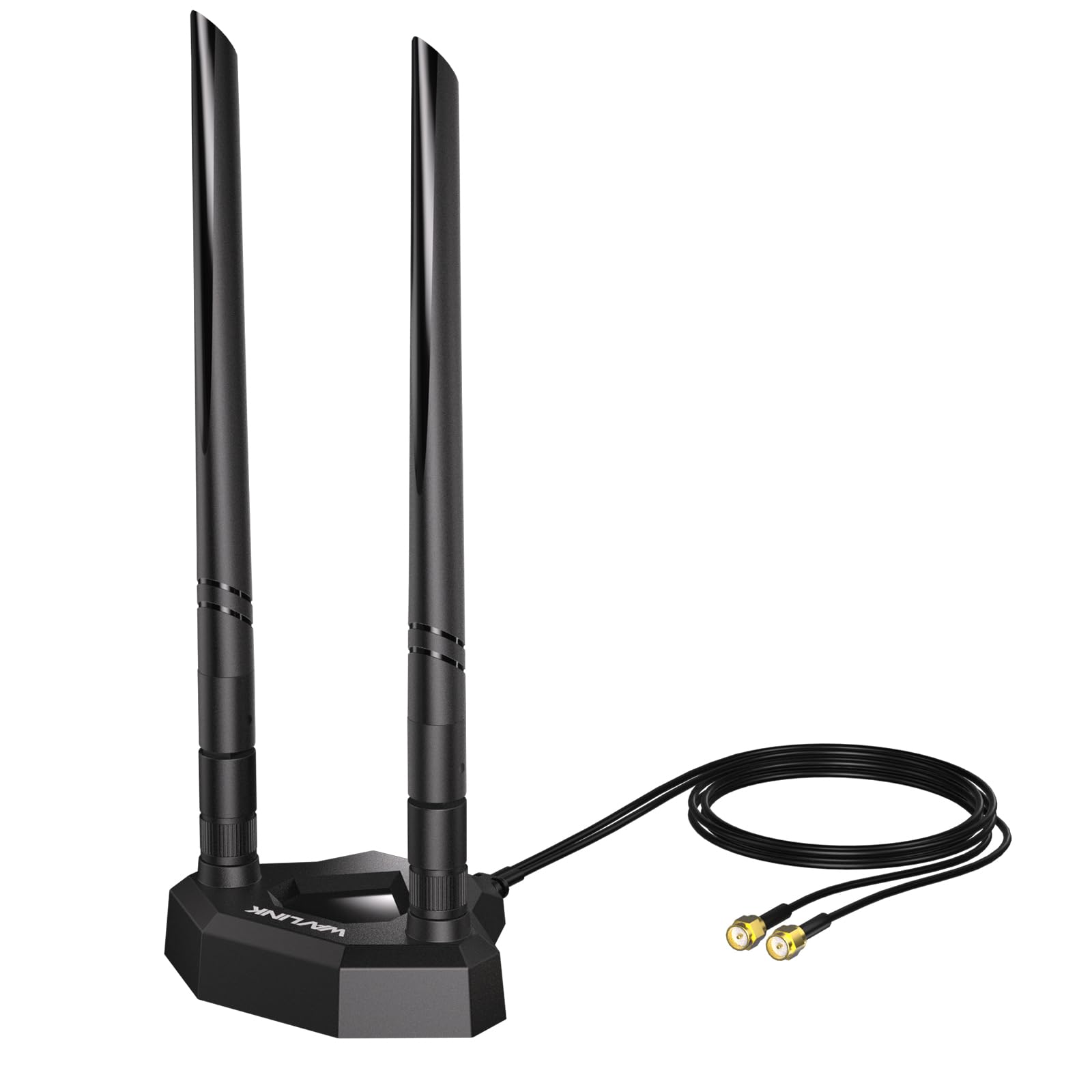
The rare SMA-pin option, for cards the RP-SMA crowd simply cannot reach.
WAVLINK is the outlier here in the way that matters: it uses SMA Male with a center pin, not RP-SMA. If your card or router has SMA ports, this is the antenna that threads on when the others will not. It still covers the full spread — 2.4GHz, 5GHz and 6GHz — and supports 802.11 b/g/n/ac/ax for Wi-Fi 6E tri-band devices, with backwards compatibility for older standards.
The dual 5dBi omni-directional stubs rotate 360° horizontally and 90° vertically, so you can tune reception without moving the case. The 2m / 6.6ft extension cable is the longest cord on this list, and the magnetic base includes an anti-slip rubber pad for stability. WAVLINK lists an ABS shell and compatibility with Intel AX210, AX200 and BE200 cards, so the fit extends to newer PCIe gear as well.
At 4.0+ stars across 30+ ratings, this one is a niche pick rather than a crowd favorite — and that is fine, because SMA compatibility is a niche need. The 5dBi gain is lower than the 9dBi stubs above, so raw pull is not the draw; getting the right connector and the longest cable is. Verify your interface first, because the pin lives on the wrong side for many boards.
Connector advantage: SMA Male with a pin, paired with a 6.6ft cable — the longest reach of any cable here.
Gain trade-off: at 5dBi it pulls less than the 9dBi picks, so pick it for fit and cable length, not for maximum range.
Pick it when: your card runs SMA ports with a pin and the other picks will not thread on.
Hold back if: you need 9dBi-class gain or RP-SMA threading.
Know the Specs
Tri-Band Coverage and the 6 GHz Slice
Tri-band means the antenna tunes 2.4GHz around 2400-2500MHz, 5GHz around 5150-5850MHz and 6GHz around 5900-7125MHz. The 6 GHz slice is the new one Wi-Fi 6E and 7 open up, and it carries more bandwidth with less interference. A stub that only covers two bands leaves that slice unused, so your card never gets the clean channel it was built for.
Gain in dBi and What It Does
Gain is measured in dBi and describes how much the antenna focuses signal in the direction it faces. The 9dBi stubs here push farther than the 5dBi model, but a higher number is not a free win — it works best when the antenna has clear air and can be placed high and away from the case. An omni-directional design spreads coverage around the stub so aiming is not required.
Common Questions
Will an RP-SMA antenna fit my motherboard’s WiFi ports?
Do I need a Wi-Fi 6E antenna if my router is only Wi-Fi 6?
What is the difference between SMA and RP-SMA connectors?
Does a higher dBi antenna always mean a better signal?
How long a cable do I need for my setup?
Will a tri-band antenna work with an IP security camera?
Can I use two of these antennas on a two-port gaming card?
Do I need a different antenna for Wi-Fi 7 than for Wi-Fi 6E?
Will a new antenna fix a slow connection on its own?
Where should I mount a magnetic base antenna for the best result?
The Bottom Line
For most people, the best wi-fi 6e antenna is the Eightwood WiFi 6E Tri-Band Antenna because it covers all three bands, gives you a 6.5ft cord and a magnetic base, and has the deepest track record on this list. If you want a white finish on an ASUS ROG board, grab the ZAHARA RP-SMA Tri Band. And for an MSI MAG build or a far-corner camera, the Slinkdsco MSI Magnetic Base and the Superbat WiFi 6E are the ones to reach for. The one thing worth acting on before the rest: confirm your connector type, because the right antenna on the wrong port does nothing.
How we choose
We do not accept paid placement. Every pick is matched to a real buyer and a real use-case; we do not hands-on test units.
Sources
Specifications: manufacturer listings and product documentation. Review insights: verified customer reviews, as of November 2026. Pricing: not shown on this page (it changes often); check the current price via the retailer link.
As an Amazon Associate, Tactical Gear Guy earns from qualifying purchases. This does not affect which products we feature.