Specs are compiled from manufacturer listings and verified buyer reviews and can change over time — please confirm the key details on the product page before buying.
Your processor is throttling under a load it should shrug off, and the block sitting on top of it is the reason. A water block for processor builds is not a decoration for your loop — it is the one part that decides how much heat actually leaves the chip before your clocks start dropping. The short answer for most builders: pick a block that lists your exact socket, uses a copper cold plate, and has a mounting kit in the box, then worry about lighting. Everything below is sorted by how well it does that job.
This guide is built by comparing the manufacturers’ published specifications and the patterns across verified customer reviews, so you get each pick’s real strengths and trade-offs instead of marketing spin.
Socket coverage, cold-plate metal and fin density are the three things that separate a block that holds your boost clocks from one that just looks good through a tempered-glass panel. Here is how to read a water block for processor listing without getting fooled by the photos.
Top Picks
How To Choose The Best Water Block for Processor
A CPU water block is a metal plate with channels cut into it, clamped onto your processor so coolant can carry heat away to a radiator. Get the socket fit and the cold-plate metal right and the rest is detail. Get them wrong and you are draining the loop and starting over.
Start with the socket, not the looks
Every block here is a custom-loop part, so it only works if the manufacturer lists your board’s socket by name. Intel LGA 1700, LGA 1851 and the older LGA 1200 and 115X sockets are not interchangeable with AMD’s AM4 and AM5. A block that names both families covers you if you plan to switch platforms later. One that names only one family locks you to it.
Cold plate metal and fin density
The cold plate is the flat surface touching your CPU. Nickel-plated copper and pure copper both conduct heat well and resist corrosion inside a loop. Beneath that plate sit the micro-fins — tiny ridges that multiply the surface area the coolant passes over. Fin counts and fin spacing tell you how aggressively a block is built. A high-flow design with wide channels tends to suit weaker pumps, while a tight jet-plate design pushes coolant hard at the hottest part of the die.
Mounting hardware and ports
Check what ships in the box. Some blocks include both AMD and Intel bracket sets, so you never hunt for a separate kit. Others come with the bracket for one platform only. All the blocks here use G1/4 threaded ports — the standard thread size for custom-loop fittings — but confirm how many ports you get and where they sit before you plan your tubing runs.
Lighting and extra features
Addressable RGB (aRGB) is decorative lighting you control through your motherboard or a separate controller. It does not cool anything, but it adds a cable and sometimes a separate controller purchase. Decide if you want that before you pay for it.
Side-by-Side Comparison
| Model | Best For | Cold Plate | Socket Support | Stated Weight | Amazon |
|---|---|---|---|---|---|
| Corsair Hydro X Series XC7 RGB White★ Best Overall | First custom loop with lighting | Nickel-plated copper | LGA 1200, LGA 115X, AM4 | 0.19 kg | Amazon |
| Bykski CPU-XPR-C-MTop Performer | AMD Ryzen builds | Nickel-plated copper | AM4, AM5 | 4 pounds | Amazon |
| Alphacool Core 1 Black | All-metal build quality | Nickel-plated copper | AM4, AM5, LGA 1700, LGA 1851 | 2.1 pounds | Amazon |
| Watercool HEATKILLER IV Pro AMD | Pure copper, no jet plate | Pure copper | AMD processor | 1.3 pounds | Amazon |
| EKWB EK-Quantum Velocity 2 D-RGB 1700 | Intel LGA 1700 builders | Nickel | LGA 1700, LGA 1851 | 0.3 kg | Amazon |
| Alphacool Core 1 Aurora Black | Lighting plus metal housing | Nickel-plated copper | AM4, AM5, LGA 1700, LGA 1851 | — | Amazon |
| ASUS ROG Ryujin III WB | On-block display and VRM fan | Copper alloy | LGA 1700, 1200, 115X, AM4, AM5 | — | Amazon |
Detailed Reviews
1. Corsair Hydro X Series XC7 RGB White CPU Water Block
Our pick — 4.5+★ from 100+ verified ratings; the strongest balance of quality and price.
The white block that makes a first custom loop painless instead of a project.
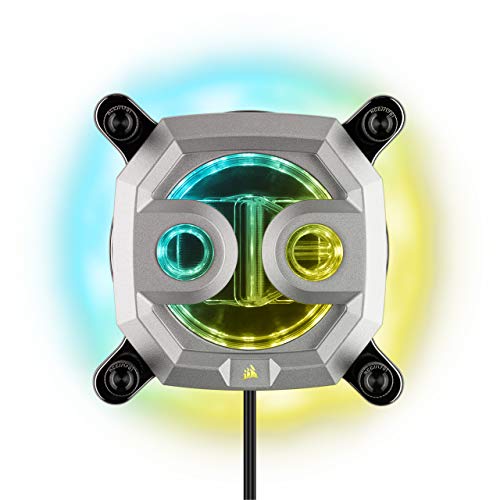
Here is the pick that removes the most friction from a first build: everything you need to bolt it down is already on the block. Corsair pre-installs the mounting screws and pre-applies the thermal material, so you are not hunting for a bracket or guessing at paste thickness. It fits Intel LGA 1200, LGA 115X and AMD Socket AM4 from the start.
For cooling, a nickel-plated copper cold plate sits under more than 60 high-efficiency micro-cooling fins — ridges that multiply the surface area your coolant drags heat off. A transparent flow chamber lets you see the coolant moving through, which helps when you first fill a loop and want to confirm it is circulating. The lighting is where this one leans hard into show: 16 individually addressable LEDs give 360° of lighting, and a 5V ARGB motherboard adapter cable is included so you can skip Corsair’s own controller if your board supports it.
The listing gives the weight as 0.19 kg, versus the EK-Quantum Velocity 2 at 0.3 kg — not the reason to choose either. The honest limit is socket reach. If you are building on Intel LGA 1700 or AMD AM5, this block does not list those platforms and you should look at the Alphacool or EKWB picks instead.
What earns its place
- Mounting screws and thermal material come pre-installed, so installation is short
- 60-plus micro-cooling fins on a nickel-plated copper cold plate
- 16 addressable RGB LEDs with a 5V ARGB adapter cable for motherboard control
- Clear flow chamber lets you visually confirm coolant is moving
What to weigh first
- Socket list stops at LGA 1200, LGA 115X and AM4 — no LGA 1700 or AM5
- Full lighting control via Corsair iCUE needs a separately sold iCUE Controller
Reach for it if: you are on AM4 or an Intel 115X/1200 board and want a loop filled and running the same evening.
Think twice if: your board is LGA 1700 or AM5 — this block does not name either socket.
2. Bykski CPU-XPR-C-M High-Efficiency CPU Water Cooling Block
Two-tenths of a millimeter of fin spacing, aimed squarely at Ryzen.
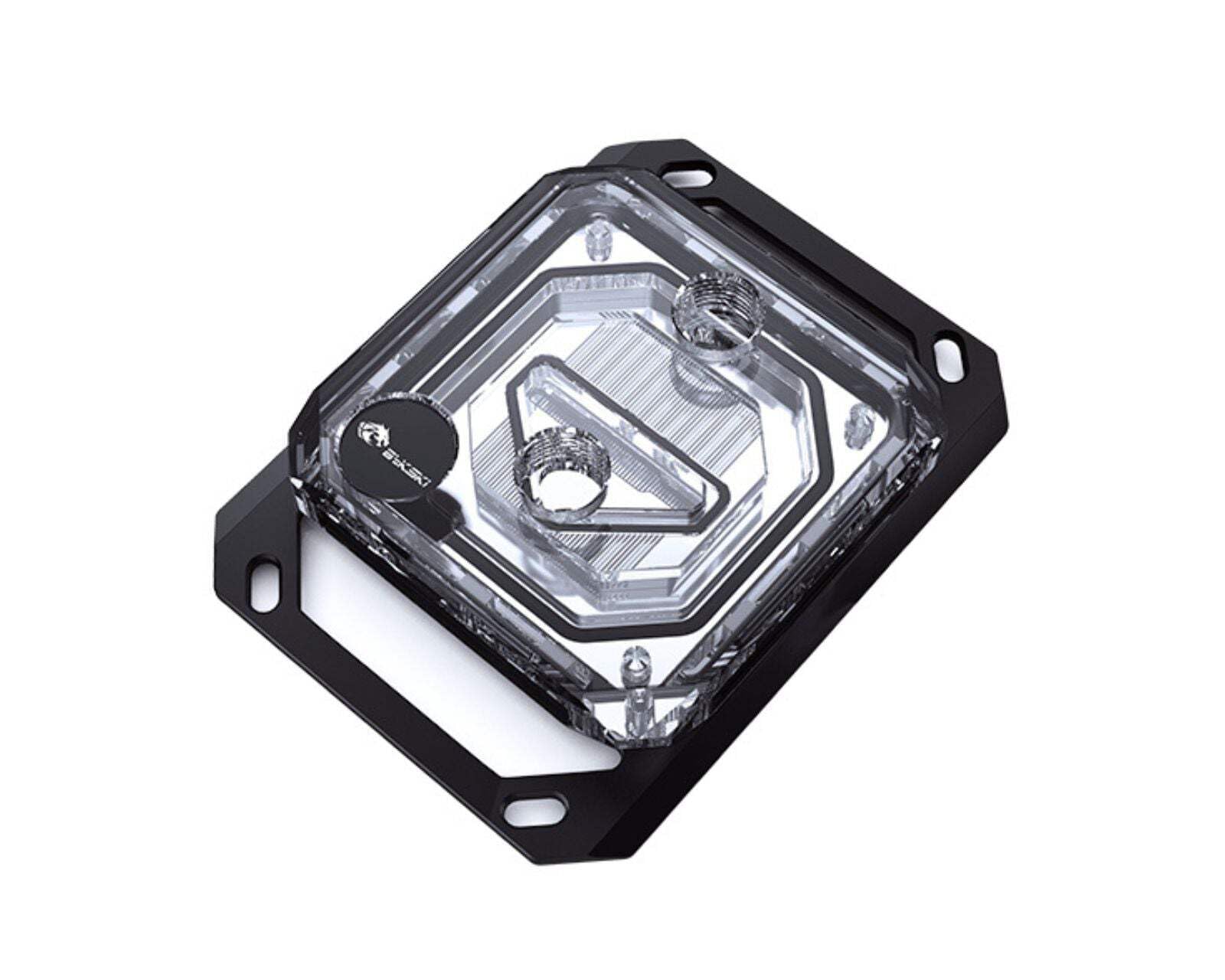
If you are running a Ryzen chip, this block’s whole design brief is your socket. It supports Ryzen 3, 5, 7 and 9 on both AM4 and AM5, so a platform upgrade does not retire the block. The 0.2mm spray-type micro-channel design widens the heat-absorption surface area and tunes flow rate through the block — dense channels that grab heat quickly rather than letting it pool.
The base is nickel electroplated copper, a pairing chosen for corrosion resistance inside a mixed-metal loop. Thermal paste and all the mounting hardware ship in the box, along with a stated 1-year warranty covering defects.
One spec will stop you mid-scroll: the listing gives the item weight as 4 pounds. The Watercool HEATKILLER IV Pro AMD is listed at 1.3 pounds. Treat that figure as what the listing states, and check the shipping weight before you plan a vertical GPU mount around it. Budget for the fact that this is an AMD-only block, too. On an Intel board it simply will not fit.
Why Ryzen builders gravitate here
- 0.2mm spray-type micro-channel fins tuned for heat pickup
- Covers Ryzen 3/5/7/9 on both AM4 and AM5
- Nickel electroplated copper base for corrosion resistance
- Thermal paste and full mounting hardware included, with a stated 1-year warranty
The fine print
- AMD sockets only — no Intel mounting option
- Listing states a 4-pound item weight versus 1.3 pounds for the Watercool block
Built for: AM4 and AM5 Ryzen owners who want fin density first and have no plans to move to Intel.
Worth knowing: there is no Intel bracket path here, so an LGA 1700 board rules this one out entirely.
3. Alphacool Core 1 – Black (13443)

A block with no plastic in the housing and no extra bracket to buy.
What wins people over with the Core 1 is the build itself: a nickel-plated copper base under a housing milled from brass, finished in black. No acrylic top to scratch, no plastic shell to yellow over a few summers. Both AMD and Intel mounting sets ship in the box — the AMD set covers AM4 and AM5, the Intel set plus Core Backplate covers LGA 1700 and LGA 1851 — so neither side needs a separately sold bracket.
The 3D jet plate is the performance story. Alphacool’s own framing is that modern desktop processors keep producing more waste heat, and the jet plate directs coolant at the hottest region rather than letting it wash across the plate. Two G1/4 ports handle your loop connections, and the body measures 72 x 72 x 26.50 mm.
The footprint is worth a second look in a crowded case. Alphacool lists this block at 1.04″L x 2.83″W x 2.83″H, while the Corsair XC7 is listed at 3.66″L x 3.66″W x 3.66″H; if your RAM heat spreaders or VRM shroud sit close to the socket, check both footprints against your board before you buy. Owner feedback consistently praises the build quality, and the included brackets cover both AMD and Intel platforms. Skip past this one only if you insist on lit hardware — there is no RGB anywhere on the standard Core 1, which is exactly why the Aurora version exists.
Where it earns the nod: full-metal construction, a 3D jet plate aimed at hot-spot cooling, and a dual-platform bracket set in the box at a mid-range position.
Where it makes you decide: the 72 x 72 x 26.50 mm brass body brings no lighting at all, so a glass-panel showcase build needs the Aurora variant instead.
The right call for: builders who care about metal, socket coverage and a compact footprint, and who could not care less about LEDs.
Look elsewhere if: a lit loop is part of the plan — this black Core 1 stays dark.
4. Watercool HEATKILLER IV Pro AMD Pure Copper

Pure copper, no jet plate, and a mounting system you work by hand.
The specification that shapes everything here is the material: this is a pure copper block, not a nickel-plated one. In a loop with mixed metals, pure copper paired with copper radiators and fittings keeps the galvanic pairing simple. It weighs 1.3 pounds, versus the Bykski block’s stated 4 pounds.
The mount is tool-free, built around a 25mm thread distance. That means you can seat and re-seat the block by hand when you are testing contact pressure, then lock it down. The high-flow design runs without a jet plate entirely, so coolant moves through with less restriction — a real advantage on a loop driven by a modest pump or a long tubing run.
That same no-jet-plate layout is the honest trade-off. A jet plate concentrates flow at the hottest part of the die, and going without one trades some peak pressure for flow. It suits a high-flow loop with a solid pump; a tight, low-flow loop gets less out of it. Note the compatibility line reads simply “AMD processor” — confirm your specific socket before ordering, because this block does not publish a per-socket list the way the Alphacool and EKWB parts do.
The case for pure copper: a copper-on-copper loop with nothing plated to worry about, at 1.3 pounds and with a tool-free mount that comes apart by hand.
The honest catch: no jet plate means flow takes priority over pressure, so pair it with a pump that can push volume.
Pick this one when: you are building an all-copper AMD loop and want hand-tighten mounting with minimal restriction.
Check first: the compatibility line names only “AMD processor” — verify your socket before you buy.
5. EK-Quantum Velocity 2 CPU Water Block D-RGB 1700

One socket, engineered around it, down to the paste in the box.
This block makes its bet up front: it is built for Intel LGA 1700-based platforms, with the listing also noting LGA 1851 support. That is a narrow target compared to the dual-platform Alphacool parts — the Core 1 covers the same Intel sockets plus AM4 and AM5 on one block. If you already know you are staying on Intel, the narrowing is the point. The cooling engine is socket-specific rather than a universal plate, and it mounts through EK’s exact Mount system.
Weight lands at 0.3 kg, versus the Corsair XC7 at 0.19 kg. The nickel cold plate sits under a plexi top, and Thermal Grizzly’s Hydronaut thermal paste is included rather than a generic sachet. D-RGB lighting works with the major motherboard manufacturers’ lighting software, so you are not tied to one ecosystem to control it.
Two things to plan around. The plexi top is the visible surface of the block, so it wants gentle handling during install. And EK-Matrix7 compliance means the block is dimensioned to align with EK’s own loop layout standard — handy inside an EK loop, less relevant if your tubing runs are already set. If your board is AMD, this is the wrong pick, full stop.
Why Intel builders shortlist it
- Socket-specific cooling engine built for LGA 1700, with LGA 1851 also listed
- Thermal Grizzly Hydronaut thermal paste included
- D-RGB compatible with major motherboard makers’ lighting software
- eK exact Mount system and EK-Matrix7 compliant dimensions
Before you commit
- No AMD support at all — AM4 and AM5 boards need a different block
- Plexi top needs careful handling compared with an all-metal housing
Fits the builder who: is on an Intel LGA 1700 board and wants the cooling engine shaped for that socket plus real paste in the box.
Settle it first: this is Intel-only — an AMD board makes it the wrong purchase no matter how good the mount is.
6. Alphacool Core 1 Aurora – Black (13446)

The Core 1 you can see working, with 18 LEDs washing over brass.
The difference between this and the standard Core 1 is a row of light and a cable. Where the non-Aurora block goes dark, this one carries 18 digital aRGB LEDs on a 3-pin 5V connection, tucked under a brass housing that is subtly illuminated rather than drowned in glow. The cooling underneath is unchanged: a nickel-plated copper cold plate, dual mounting sets in the box for AM4/AM5 and LGA 1700/1851, and the same 3D jet plate pushing coolant at the hot spot.
Cooling capability is what this block is bought for. Buyers report it handling a 10% undervolted 13700K effectively, and the feedback treats the lighting as a bonus on a capable plate rather than the reason to buy. Two G1/4 ports, the 72 x 72 x 26.5 mm body, and an ARGB adapter cable in the box for connecting to your board’s header.
Here is the follow-up question a buyer should ask: is the light worth moving up the range from the standard Core 1? Both are the same metal, same jet plate, same bracket sets. You are paying for the LED array and the adapter, not extra cooling. If your case has a window and your loop is meant to be seen, the Aurora is the version that shows off the hardware. If nobody will look at it, the standard core block covers the same sockets for less.
The honest read on the lights: 18 digital aRGB LEDs on a 3-pin 5V header, on top of the same copper cold plate and 3D jet plate as the standard Core 1 — verified cooling that happens to glow.
What you give up: nothing in compatibility, since both AMD and Intel bracket sets still ship in the box, and the milled brass housing stays.
The choice for: a glass-panel build on either AM4/AM5 or LGA 1700/1851 that wants lighting without giving up the metal housing.
Not worth the step up if: your case is closed — the standard Core 1 runs the same plate and brackets without the LED premium.
7. ASUS ROG Ryujin III WB CPU Water Block

A water block with a screen, a fan and a noise figure of 14.4 dB.
You are not buying this for fins alone. The Ryujin III WB carries 178 micro-cooling fins on a copper alloy cold plate, which is the part that does the cooling work — everything else on the block is about what happens around it. The embedded Axial-tech VRM fan is the genuinely useful extra: it moves air over your motherboard’s voltage regulator area, and ASUS rates the fan as cutting VRM temperatures by up to 35°C. If your VRM heatsink sits hot and close to the socket, that airflow is real hardware doing real work.
The 3.5-inch full-color LCD renders at a 60 FPS refresh rate, which is the sort of feature you either build a showcase around or ignore. All-copper ROG fittings ship with it, and socket coverage is the widest here: Intel LGA 1700, 1200 and 115X alongside AMD AM5 and AM4. A stated 3-year warranty covers it, and noise sits at 14.4 dB.
The trade-off is scope. The screen and the fan bundle turn a comparatively simple loop component into an electronics installation, and the Ryujin is rated lower than every other block on this list. Some buyers will find the display worth that, because nothing else here puts a live readout on your CPU. If you want pure cooling per unit of complexity, the plate-only Alphacool and EKWB blocks get you there with fewer cables to route.
What is genuinely different here
- 178 micro-cooling fins on a copper alloy cold plate
- Embedded Axial-tech VRM fan rated by ASUS to cut VRM temperatures by up to 35°C
- 3.5-inch full-color LCD at a 60 FPS refresh rate
- Widest socket coverage listed: LGA 1700/1200/115X plus AM5/AM4, with a 3-year warranty
The cost of the extras
- The lowest rating of the group, so the screen-first approach does not suit every builder
- Extra cabling and setup versus a plate-only block
Go for it when: you want a visible readout on the block and a VRM fan working alongside your loop, on almost any current socket.
Step back if: you want maximum cooling with minimum electronics — the display and fan add setup a plain copper block does not.
Know the Specs
Cold Plate Material
The cold plate is the flat metal surface that presses against your CPU’s heat spreader. Nickel-plated copper and pure copper both conduct heat well and hold up inside a loop without corroding quickly. Pure copper pairs most naturally with copper radiators and fittings. Plated copper is common because it resists tarnish and looks clean through a plexi top. Neither is wrong — the material matters less than whether the plate is flat, seated correctly and paired with enough fin area.
Micro-Fins and Jet Plates
Micro-fins are the tiny ridges cut into the cold plate that the coolant runs across. More fins and tighter spacing mean more surface for heat to transfer into the water. A jet plate is a plate that aims coolant straight at the hottest part of the die instead of letting it wash across evenly. Jet plates push pressure at the hot spot, while high-flow designs skip the jet plate so coolant moves freely. Which you want depends on your pump and your loop restriction, not on which sounds more advanced.
Socket Compatibility
Your motherboard’s socket is the physical connector the CPU sits in, and a water block must be made for it. Intel LGA 1700 and LGA 1851 are not the same as AMD’s AM4 or AM5, and the older LGA 1200 and 115X sockets differ again. A block that lists both families lets you move platforms without replacing it. A block that lists one family is fine if that is your board — and a wasted purchase if it is not. Always check the socket list before the spec sheet.
Ports, Mounting and Lighting
G1/4 is the standard thread size for custom-loop fittings, so all the blocks here accept standard connections. Two ports is the usual layout, and where those ports point decides how easy your tubing runs are. Mounting hardware in the box saves you a separate bracket purchase; some blocks include both AMD and Intel sets, others one. Addressable RGB, written aRGB, is lighting on a 3-pin 5V connection and does nothing for temperatures — just budget for the cable and possible controller.
Common Questions
Will the Corsair XC7 fit an Intel LGA 1700 board?
Which of these blocks covers both AMD and Intel sockets?
Do I need a jet plate for a water block to work well?
Is pure copper better than nickel-plated copper?
What does a 0.2mm fin spacing actually change?
Will the EK-Quantum Velocity 2 work with a standard motherboard RGB header?
Does a VRM fan on a water block make any difference?
Do these blocks include the mounting brackets or do I buy them separately?
What is the difference between the Core 1 and the Core 1 Aurora?
How much noise does a CPU water block make on its own?
The Bottom Line
For most custom-loop builds, the block that solves the most problems at once is the Corsair Hydro X Series XC7 RGB White — pre-installed mounting screws and pre-applied thermal material mean you are running the same evening, with a nickel-plated copper plate and more than 60 micro-cooling fins underneath, as long as your board is AM4 or an Intel 115X/1200 socket.
If you are on Ryzen and want dense fins, the Bykski CPU-XPR-C-M covers AM4 and AM5 with its 0.2mm micro-channel design. If you switch platforms or want a compact all-metal block, the Alphacool Core 1 Black brings brackets for both families and no bracket purchase at all. And if you want to see the block working, the Alphacool Core 1 Aurora puts the same copper and jet plate behind 18 aRGB LEDs.
The one nudge worth making: decide your socket first, then your lighting, then your mounting kit — in that order. Get those three right and every block here mounts and cools as intended; get the socket wrong and none of them will bolt down.
How we choose
We do not accept paid placement. Every pick is matched to a real buyer and a real use-case; we do not hands-on test units.
Sources
Specifications: manufacturer listings and product documentation. Review insights: verified customer reviews, as of November 2026. Pricing: not shown on this page (it changes often); check the current price via the retailer link.
As an Amazon Associate, Tactical Gear Guy earns from qualifying purchases. This does not affect which products we feature.