Specs are compiled from manufacturer listings and verified buyer reviews and can change over time — please confirm the key details on the product page before buying.
You set your mouse down at night and pick it up full in the morning, with no cable hunt behind your desk. These mice deliver that in two ways: some drop onto a Qi pad (the same flat charging standard your phone uses), and some ship with their own magnetic dock that doubles as a charging stand. The short answer: the 8Bitdo R8 is the safest all-round pick for most desks, because it pairs a PAW 3395 sensor with a dock that keeps it topped up. The Lenovo Go is the one to grab if you split your day between three devices and want the widest travel flexibility.
This guide is built by comparing the manufacturers’ published specifications and the patterns across verified customer reviews, so you get each pick’s real strengths and trade-offs instead of marketing spin.
Charging style, sensor quality, and hand fit decide whether a mouse disappears into your workflow or turns charging into a nightly chore. This breakdown of the best wireless mouse with wireless charging keeps each pick tied to a real desk scenario so you can match one to your grip.
Top Picks


How To Choose The Best Wireless Mouse with Wireless Charging
“Wireless charging” means two different things on these mice, so get that straight first. Some drop onto a Qi pad, so one pad can top up your phone and your mouse. Others come with a dedicated magnetic dock that holds the mouse upright and often houses the wireless receiver too. Neither is better in the abstract — it depends on if you want one pad for everything or a dedicated parking spot on your desk.
Qi pad or dedicated dock?
A Qi-certified mouse is the flexible option if you already keep a charging pad on your desk, because the mouse simply joins the devices that share it. A dedicated dock is the tidier option: the mouse lives in one place, charges while parked, and on several models the dock also acts as the wireless receiver so the connection stays strong. Docks are also where you find the quick-charge claims — a short top-up before a session is a real convenience if you forget to charge overnight.
The sensor is what you actually feel
DPI (dots per inch, the sensitivity setting) gets printed in big numbers, but the sensor model underneath matters more. A PAW3395 or PAW3950 optical sensor tracks movement accurately at speed, so your cursor goes where your hand goes instead of skipping. Higher DPI just means you can push sensitivity further before tracking gets jumpy. For office work you will rarely go near the top of the range; for fast gaming, sensor quality and polling rate matter far more than the headline DPI figure.
Weight, hand size, and grip
Light mice (around 60 g to 75 g) flick faster and tire your wrist less over a long session, but they can feel twitchy if you are used to a heavier shell. Heavier mice (around 140 g) feel planted but cost you speed. Hand size matters just as much: a shell built for medium-to-large hands will cramp a smaller hand, and a compact travel mouse will feel tiny to someone with big palms. Read the listed dimensions against your current mouse before you commit.
Side-by-Side Comparison
| Model | Best For | Charging Type | Weight | Sensor | Amazon |
|---|---|---|---|---|---|
| 8Bitdo R8★ Best Overall | All-round desk pick | Charging dock | 0.24 kg | PAW 3395 | Amazon |
| ATTACK SHARK X11Budget Champion | Budget gaming starter | Magnetic RGB dock | 62 g | PixArt PAW3311 | Amazon |
| Perixx PERIMICE-713RXWrist Saver | Wrist-friendly vertical grip | Qi pad + USB-C | 0.09 kg | Optical, 1000/1600 DPI | Amazon |
| MechLands AJAZZ AJ139 V2 MC | Light gaming with dock | Magnetic charging base | 66 g | PAW3311 | Amazon |
| DAREU A950 | Long-session gaming | RGB magnetic dock | 88 g | AIM-WL | Amazon |
| Corsair Dark Core RGB Pro SE | Qi-certified FPS play | Qi wireless + USB-C | 142 g | PAW3392, 18,000 DPI | Amazon |
| DAIDAI Ajazz AJ159 APEX | Status-screen dock fans | RGB dock + TFT screen | 56 g | PAW3950 APEX | Amazon |
| Lenovo Go Multi-Device | Multi-device travelers | Qi wireless + USB-C | — | Blue optical, 800/1600/2400 DPI | Amazon |
| MSI Clutch GM41 | Competitive FPS on a budget dock | Charging dock | 74 g | 20,000 DPI | Amazon |
Detailed Reviews
1. 8Bitdo R8 Mouse with Charging Dock
Our pick — 4.5+★ from 850+ verified ratings; the strongest balance of quality and price.
A retro-styled gaming mouse with a real sensor and a dock that keeps it parked.
The PAW 3395 optical sensor is the reason this one earns the top spot. It tracks fast movement cleanly, so your aim holds together during quick flicks instead of drifting. The dock doubles as a signal extension for the 2.4G wireless connection, which means the receiver sits in the stand rather than dangling off a USB port, and the mouse recharges every time you set it down. Eight buttons give you left/right-hand mode switching and six DPI levels, adjustable through 8BitDo’s Ultimate Software V2. Build quality is what wins people over — the metal enclosure feels denser and more solid than the plastic shells on most of the cheaper picks here.
Desk presence is the honest trade-off. At 0.24 kg it is the heaviest mouse on this list, and a flick-heavy esports player will notice it next to the 56 g DAIDAI below. Swapping the left and right buttons for a left-handed grip is available, but the side-button placement sits in a spot that buyers either love as Xbox-style or find awkward mid-game. Neither is a defect — it is a fit question. The Kailh Sword GM X micro switches are rated for up to 100 million clicks, so long-term use is not the concern here.
What makes it earn the top slot
- PAW 3395 sensor for accurate fast tracking
- Dock acts as signal extension, keeping the wireless link steady
- 8 programmable buttons with left/right-hand mode switching
- Kailh Sword GM X switches rated up to 100 million clicks
What to weigh before committing
- At 0.24 kg it is the heaviest pick here
- Side-button placement divides opinion
- Metal enclosure costs you flick speed versus ultralight shells
Best for: desk setups that want a solid-feeling all-rounder with a tidy dock and no cable hunting, plus gamers who prefer a planted mouse over an ultralight.
Think twice if: you play flick-heavy competitive FPS and every gram matters, or you need a left-hand ergonomic shell rather than a swappable-button ambidextrous one.
2. ATTACK SHARK X11 59g Lightweight Wireless Gaming Mouse
A 59 g starter gaming mouse that charges on a magnetic RGB dock without draining your budget.
Start with the weight: the X11 is listed at just 59±3 g, and the actual item weight lands at 62 g. That is a few grams lighter than the 66 g MechLands pick below, and it is the kind of shell you can whip across a mousepad without arm fatigue in a long session. The magnetic RGB dock handles charging, and the company claims 5 hours of use on a 10-minute charge — useful when you forget to park it overnight. Three connection modes (USB-C wired, 2.4GHz, and Bluetooth) switch with a rear button, so the same mouse moves between a desktop and a laptop with one press.
Your fingers get a shaped home here: the concave left and right buttons are molded to your grip, and at 5″ long by 2.5″ wide the shell suits medium-to-large hands — the shape the makers tuned for that group. Buyers report ergonomics and value as the standout wins. The PixArt PAW3311 sensor with 22,000 DPI keeps tracking sharp enough for casual-to-serious FPS play, so quick flicks stay on target. The switch gear — a TTC encoder for the scroll wheel and HUANO micro switches rated to 20 million clicks — gives a firmer click than the price suggests.
Durability is the honest catch, and it is the one to pay attention to. Some owners mention the mouse failing well short of a year, and a few describe it dying after an hour or two of use from the start. That is not universal — plenty of buyers are perfectly happy — but it nudges this one toward “great starter, not a forever mouse.” If you need one purchase to last several years, look at the 8Bitdo or Corsair above and below instead.
Grab this if: you are buying your first lightweight gaming mouse and want a dock, tri-mode connection, and a 62 g shell without paying premium money.
Keep looking elsewhere if: you expect a mouse to run year in and year out without incident — durability complaints are the recurring theme here.
3. Perixx PERIMICE-713RX Wireless Rechargeable Vertical Mouse
The vertical shell holds your wrist upright, and a Qi pad in the box keeps it topped up.
Reach for this one if your wrist aches after a long desk day. The vertical shape holds your wrist in a neutral upright position instead of the flat, twisted posture a normal mouse forces, and the left/right buttons are silent enough to click through emails in an open office. At 0.09 kg — far lighter than the 0.24 kg 8Bitdo — it is easy to steer, and the 2.4GHz wireless link reaches up to about 30 ft, so the receiver can sit further away than most.
Charging is genuinely flexible: the box includes a wireless charging pad and the mouse also takes USB-C wired charging. That pad supports 7.5W for iPhone 13–17 models, 10W for S20–S25 series, and 5W for other wireless-charging devices such as mice, so the same pad can serve your phone. Note the scroll wheel and back/forward buttons are not silent — only the left and right clicks are. The soft rubber coating gives a secure grip, and DPI steps at 1000 and 1600 cover everyday productivity fine.
Adjustment is the real cost. First-time vertical-mouse users typically need a short break-in — most adapt within 1–2 weeks, but that first stretch can feel clumsy. The bigger thing to know is that this is not a programmable mouse: the buttons do not remap, and the back/forward buttons do not work on macOS. Quality and durability also draw mixed feedback, and a few units behave only when plugged in, so treat it as a comfort tool first and a spec-list winner second.
The comfort case: a neutral vertical wrist angle, silent main clicks, and a wireless charging pad that doubles with your phone make this the most wrist-kind pick on the list.
The honest limit: no programmable buttons, no macOS back/forward support, and a short adaptation period for anyone new to vertical mice.
Reach for this if: hours of office work leave your wrist stiff and you value a quiet click over remapping buttons.
Don’t pick it for: gaming macros or swappable-button flexibility — this one is wired for comfort, not customization.
4. MechLands AJAZZ AJ139 V2 MC Gaming Mouse with Charging Base

FPS-grade precision on a 66 g shell, with a magnetic dock that charges while it waits.
The PAW3311 sensor in the AJ139 V2 MC covers up to 12,000 DPI with 300 IPS tracking speed and 35G acceleration — numbers aimed squarely at FPS and MOBA players who need fast headshots and quick cursor flicks. Build quality is what earns the most praise from owners, and the 66 g weight lands between the 59 g ATTACK SHARK above and the 88 g DAREU below. The magnetic charging base glows with RGB, and dropping the mouse on it means it is always ready to grab, so battery anxiety mostly disappears.
You can hop between a gaming desktop and a laptop on the go, because BT (Bluetooth), 2.4GHz wireless, and USB-C wired all switch over. The micro-switches are rated to 80 million clicks, so feedback stays crisp even under heavy play. Owners frequently describe battery life as lasting a whole week, which pairs well with the dock’s set-and-go charging. The right-hand ergonomic shell and solid plastic body fit comfortably for most users. Several customers note the 66 g frame is on the light side — a good match if you prefer a shell you can whip around fast.
Why it earns its spot: a PAW3311 sensor with 12,000 DPI, 300 IPS, and 35G acceleration gives you real gaming precision, and the magnetic dock keeps a 500 mAh battery topped up with no cable fuss.
Where it flexes: the light 66 g body is a matter of taste — pick this if speed is the priority, skip it if you prefer a heavier, planted feel.
Best for: gamers who want PAW3311 accuracy and a charging base without spending premium money, at a weight that suits fast hands.
Not the fit if: you prefer a heavier shell — the 66 g lightness is a feature some love and others find twitchy.
5. DAREU A950 Wireless Gaming Mouse with RGB Charging Dock

A 120-hour battery, a 10-minute top-up for 10 hours, and a dock that lights up your desk.
Battery life is the headline. With a listed average of 120 hours, and a charging dock that gives up to 10 hours of play on a 10-minute charge, the A950 is built for players who treat charging as an afterthought. The AIM-WL sensor, designed by DAREU for competitive use, consumes only 2.3mA at full speed. A 1000Hz polling rate delivers about 1ms of delay, so the cursor feels locked to your hand.
Weight sits at 88 g, which is heavier than the 59 g ATTACK SHARK and 66 g MechLands but lighter than the 142 g Corsair. The skin-like gloss surface gives a comfortable grip, and the six programmable buttons, up to 12,000 DPI, and macro support through the software cover serious gaming. The RGB dock is customizable, which is a small thing but a real one if your desk is lit up. Quality and battery life are the standout strengths in owner feedback.
The one to watch: connectivity. Several reviewers point out frequent disconnections, so keep the receiver close and clear of interference for the cleanest 2.4G link. Durability also lands mixed. Those caveats aside, this is a strong choice for long-session players who want a big battery and a dock rather than ultralight weight — the DAREU KBS II button system also avoids debouncing delay, which cuts unintended misclicks.
The standout spec: 120 hours of listed battery life and up to 10 hours on a 10-minute dock charge means you rarely plan around charging.
The catch: mixed connectivity reports mean a clean, close receiver link matters more here than on most picks.
Pick it when: a long battery and a charging dock matter more to you than being the lightest mouse in the room.
Look past it if: you have had wireless dropouts before and want the most bulletproof connection available.
6. Corsair Dark Core RGB Pro SE Wireless Gaming Mouse

A 142 g FPS mouse that charges on any Qi pad, no proprietary dock required.
This is the one for players who already own a Qi charging pad and want a mouse that uses it. The Corsair Dark Core RGB Pro SE is Qi-certified, so it drops onto any Qi-compatible device such as the CORSAIR MM1000 mouse pad to charge — or you can plug in via the reversible USB-C port. Under the hood is a custom PixArt PAW3392 sensor tuned for wireless use, running up to 18,000 DPI and adjustable in 1 DPI steps for very fine control. Hyper-polling reaches 2,000Hz, and the sub-1ms SLIPSTREAM WIRELESS link or low-latency Bluetooth keeps the connection nimble.
Weight is where it separates itself: at 142 g it is one of the heaviest mice here, versus the 56 g ultralight DAIDAI, and that planted feel suits players who want stability over speed. Ergonomics are the standout strength from owners — the contoured shape comes with two interchangeable side grips for a tailored fit. The eight buttons are fully programmable through iCUE, the nine-zone RGB is there for customization, and the Omron switches are rated for more than 50 million clicks. Battery life runs up to 50 hours of continuous wireless play, and you can plug in to keep gaming while it charges.
The reminders: this listing is a renewed unit, so expect a refurbished mouse rather than a sealed new one. Reliability and connectivity draw mixed feedback, with some owners noting the wireless charging can be finicky and the connection prefers being near the USB dongle. Keep the receiver close and set expectations for a renewed device.
The Qi advantage: no proprietary dock to lose — any Qi-compatible pad charges it, plus a reversible USB-C option for wired charging.
Set your expectations: this is a renewed unit, and reports of finicky wireless charging and a distance-sensitive dongle mean you should position the receiver near the pad.
Choose this if: you already have a Qi pad on your desk and want a planted 142 g gaming mouse with a premium 18,000 DPI sensor and open-ended programmability.
Pass if: you want a sealed new unit or a featherweight shell — neither fits here.
7. DAIDAI Ajazz AJ159 APEX Wireless Gaming Mouse
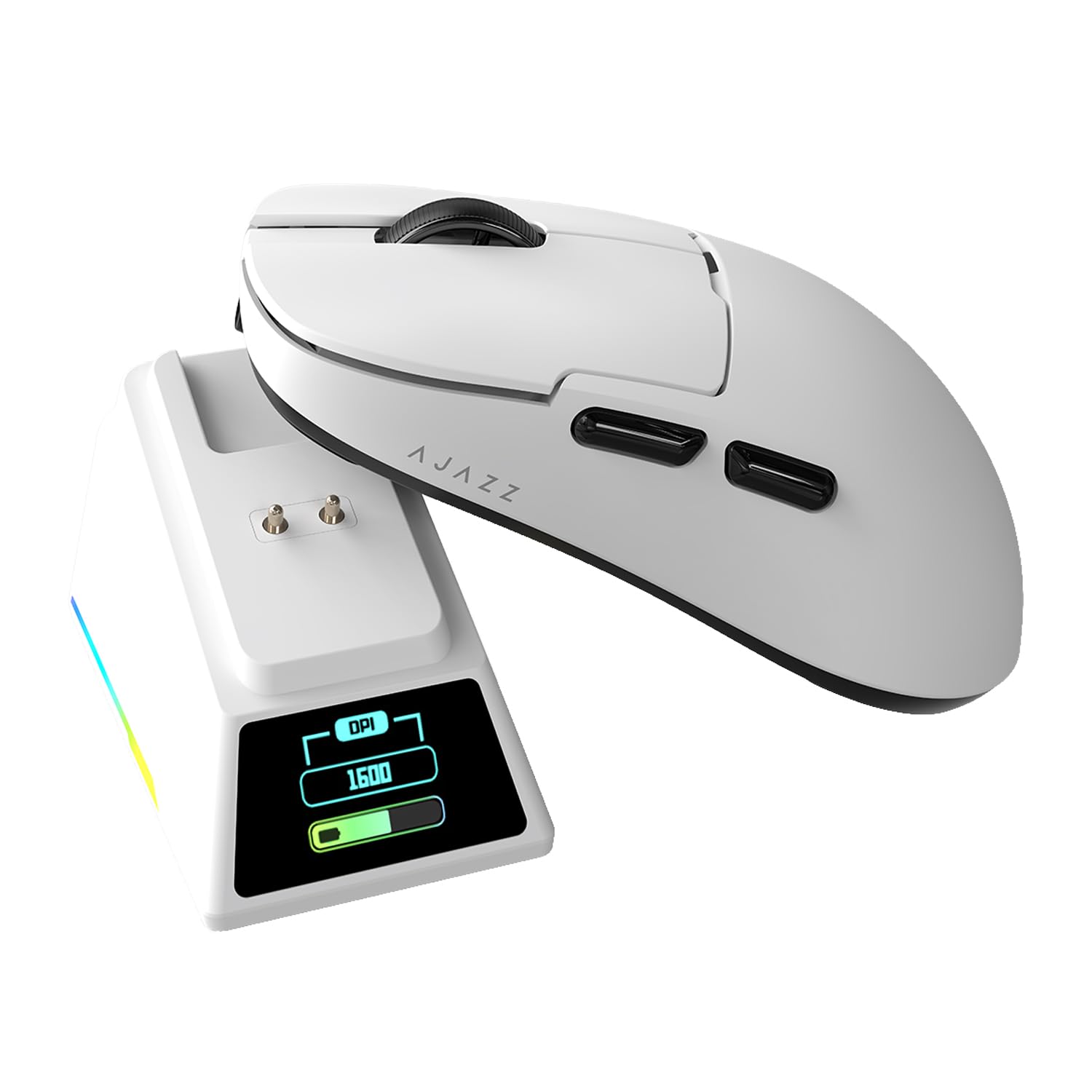
The lightest pick here, with a charging dock that shows your battery on a color screen.
At 56 g this is the lightest mouse in the lineup — well below the 66 g MechLands and even the 59 g ATTACK SHARK — and the shell stays rigid despite the thin wall. The trick up its sleeve is the dock: its magnetic charging station has a built-in 8K receiver and a customizable TFT color screen (a small full-color display) that shows live status, including DPI, LOD (lift-off distance — how high you raise the mouse before tracking stops), battery level, and polling rate, plus custom GIF animations. Drop the mouse on it and it charges while you check the screen. The PAW3950 APEX sensor is the flagship here, rated to 42K DPI with 750 IPS tracking and 50G acceleration. An 8000Hz polling rate at 0.125ms delivers pixel-level tracking in wireless mode.
The feel is a genuine selling point. A premium ice-sensitive tactile finish gives a sweat-resistant grip and, combined with the low weight, keeps wrist fatigue down over marathon sessions. The ambidextrous shape fits both hands, and the Huano green switches are rated past 100 million clicks, with pure Teflon ETFE skate feet for smooth glides. Tri-mode connectivity (Bluetooth, 2.4GHz, USB-C) and a pro driver for remapping, macros, and LOD adjustment round it out.
Here is the honest note: performance and wireless connectivity draw mixed feedback, with some units reporting connection issues alongside positive reports of month-long reliability. The screen and dock are genuinely fun, but they add complexity, and a couple of early units have shown wireless problems. For a confident buy, set the receiver close and keep an eye on firmware updates.
Made for: gamers who want to be among the lightest at 56 g and who like a dock that displays status — the PAW3950 APEX and 8K polling put it at the performance end.
Skip if: connectivity reliability is your top concern, or you prefer a simpler setup without a screen-fitted dock.
8. Lenovo Go Multi-Device Wireless Mouse

Pair it with three devices and top it up on any Qi pad between meetings.
This is the traveller’s mouse. It pairs with up to three devices over USB-C and Swift Pair-enabled Bluetooth, with a quick-switch button to hop between them, and it supports a Lenovo unified pairing receiver so one dongle can serve multiple devices. Charging is dual-mode: USB-C wired or wireless Qi charging on a pad. The battery is the quiet hero — up to 3 months of use on a single 1.5-hour charge means you can forget about it for weeks.
The blue optical sensor handles almost any surface with on-the-fly DPI steps at 800, 1600, and 2400, so you can move from a desk to a café table without losing precision. Silent clicks keep an open office or a quiet room calm, and the compact ambidextrous shell is built to travel. Quality and reliability are the strengths that hold up, and it works well for laptops that only offer thunderbolt or USB-C ports, where a USB-A dongle simply will not fit.
What it is not: a performance gaming mouse. There are only five buttons, no programmable gaming macros, and DPI tops out at 2400 — fine for spreadsheets and Teams calls, not for twitch shooters. The default utility button shortcuts target Microsoft Teams meetings, which is handy for office workers but a nudge to re-map for everyone else.
Where it shines for commuters
- Up to 3 months per 1.5-hour charge
- Qi wireless or USB-C wired charging
- Pairs to three devices with a quick-switch button
- Silent clicks for shared spaces
Where it caps out
- DPI tops out at 2400, well below the gaming picks
- Five buttons and no gaming macro depth
- Teams-oriented shortcuts may need re-mapping
Best for: the three-device life — laptop, desktop, and tablet — with a charging routine that runs on any Qi pad and a battery that lasts months between top-ups.
Not the pick for: anyone who needs high-DPI gaming performance or deep macro programming.
9. MSI Clutch GM41 Lightweight Wireless Gaming Mouse

A 74 g FPS mouse that charges from zero to full in 90 minutes and runs up to 80 hours.
Charge time is the real story here. A 10-minute top-up gives up to 9 hours of use, and a full charge from 0% to 100% takes just 90 minutes for up to 80 hours of play — so even a rushed morning can rescue a dead session. The 2.4G RF wireless link is rated at 1ms latency. The sensor runs up to 20,000 DPI, and the Omron switches are rated to 60 million clicks.
At 74 g it is light for a gaming mouse, and the symmetrical shape with soft rubber side grips fits either hand. Six programmable buttons and RGB Mystic Light round out the setup. Quality, battery life, and comfort are the strengths owners consistently report, with some noting the battery outlasts expectations.
The honest catches: responsiveness draws mixed feedback, with a few reports of it not working correctly, and the grip gets a mixed reception — some love the feel while others find the sides short on texture. Value also divides opinion. If you want a fast-charging, well-shaped FPS mouse, this is a strong fit; if reliability reports worry you, the Corsair and 8Bitdo above offer steadier footing.
The charging win: a 10-minute top-up for up to 9 hours and a full charge in 90 minutes for up to 80 hours makes it the fastest-recovery pick in the group.
Know before you buy: grip texture and responsiveness divide opinion, so this suits players who want a 74 g symmetrical FPS mouse with quick-charge convenience.
Reach for it if: fast charging and a light symmetrical shell matter most and you play games that reward 1ms levels of responsiveness.
Look elsewhere if: you want a guaranteed-consistent connection or a heavily textured grip.
Know the Specs
Qi wireless charging
Qi is the flat charging standard your phone uses. A Qi-certified mouse charges on any compatible pad, so one pad on your desk can top up the mouse and your phone. You get flexibility because there is no proprietary dock to lose, but the pad must actually be Qi-compatible — the mouse without the pad cannot charge wirelessly. On the Lenovo Go and the Corsair this is the route to a cable-free desk.
Dedicated magnetic dock
A dedicated dock holds the mouse in one place and charges it every time you set it down. Several models, like the 8Bitdo R8 and the DAIDAI AJ159, use the dock as the wireless receiver too, so the dongle is not dangling from a USB port. Docks also allow quick-charge claims: the MSI GM41 gives up to 9 hours on a 10-minute charge, and the DAREU A950 gives up to 10 hours on a 10-minute dock charge.
Polling rate and latency
Polling rate is how many times per second the mouse reports its position to the PC, measured in Hz. A 1000Hz rate delivers about 1ms of delay, so the cursor follows your hand tightly. Higher numbers — the DAIDAI AJ159 runs 8000Hz at 0.125ms, and the Corsair Dark Core reaches 2000Hz — report more often, which matters most in fast games. In a spreadsheet, the difference is invisible; in an FPS, it is real.
DPI and sensor quality
DPI (dots per inch) sets sensitivity, and bigger numbers only help if the sensor can track cleanly at that setting. The 8Bitdo R8 uses a PAW 3395 sensor, the MechLands and ATTACK SHARK step down to a PAW3311, and the DAIDAI runs a PAW3950 APEX. A good sensor tracks fast movement without skipping, which is what you actually feel. For office work, anything from 800 to 2400 DPI covers the job.
Common Questions
Do I need a special pad for a Qi wireless charging mouse?
How long does a charging dock take to top up the mouse?
Will a wireless charging mouse work through a mouse pad?
Is a vertical mouse like the Perixx good for gaming?
Can I use a wireless charging mouse while it charges?
Which wireless mouse has the longest battery per charge?
Do all wireless charging mice use a charging dock?
What weight should I look for in a wireless gaming mouse?
Is 2.4GHz wireless better than Bluetooth for a charging mouse?
The Bottom Line
For most desks, the wireless mouse with wireless charging winner is the 8Bitdo R8, because it pairs a PAW 3395 sensor with a dock that also steadies the wireless connection, plus a metal shell that feels built to last. If you want the most flexibility, the Lenovo Go charges on any Qi pad and pairs to three devices for commuter life. And if you want the lightest weight with a status-screen dock, the DAIDAI Ajazz AJ159 APEX is the one to reach for at 56 g.
How we choose
We do not accept paid placement. Every pick is matched to a real buyer and a real use-case; we do not hands-on test units.
Sources
Specifications: manufacturer listings and product documentation. Review insights: verified customer reviews, as of November 2026. Pricing: not shown on this page (it changes often); check the current price via the retailer link.
As an Amazon Associate, Tactical Gear Guy earns from qualifying purchases. This does not affect which products we feature.