Specs are compiled from manufacturer listings and verified buyer reviews and can change over time — please confirm the key details on the product page before buying.
You want to put a camera, laptop or game console on a screen across the room without dragging a 30-foot HDMI cable through the doorway. A wireless video transmitter does exactly that — but the spec that sells it and the spec that matters are two different things. The headline range on the box is measured in a clear open field. Put one interior wall in the way and that number collapses. So the real buying decision is not “how far does it reach,” it is “how far does it reach in my room,” plus how much delay sits between the source and the screen you are watching.
This guide is built by comparing the manufacturers’ published specifications and the patterns across verified customer reviews, so you get each pick’s real strengths and trade-offs instead of marketing spin.
Below you will find nine kits split into everyday presentation gear and pro filmmaking systems, with the honest gap between the claimed range and the usable range spelled out. Every pick here is a capable wireless video transmitter, and the right one depends on whether you are mirroring a slideshow or framing a shot.
Top Picks

How To Choose The Best Wireless Video Transmitter
Start with the picture, not the range. A kit that holds a clean 1080p signal through one interior wall beats one that claims a quarter-mile and stutters across the hallway. Work backwards from what your source device outputs and what your screen can show.
Match the resolution to your actual source
A 4K label on the box does not mean you get 4K at the far end. Several kits here accept a 4K input and decode it down to 1080p at the receiver, which is fine for a projector or a meeting-room TV. Check the output line, not just the input line — the kits that state 1080P@60Hz output are being honest about what lands on the screen.
Latency decides gaming, sports and live camera work
Latency is the delay between the source and the screen, measured in milliseconds. For a slideshow you would never notice it. For a live camera feed you are pulling focus on, or a racing game, a delay you can feel is a real problem. Anything stated in single or double-digit milliseconds is built for real-time viewing; a kit that does not state a figure is aimed at static or slow content.
Power both ends, always
Every kit in this list needs the transmitter and the receiver plugged into their own USB power. Some sellers note that a HDMI port alone cannot supply enough current, so the transmitter light dims and the signal drops out. If your TV’s USB port cannot deliver enough, use a wall adapter — budget for two chargers per kit.
One transmitter, several screens
If you want the same feed on more than one display, check the receiver count the transmitter supports and the distance it holds at that count. Adding receivers almost always shortens the usable range, and several kits spell out the reduced figures for each extra screen.
Side-by-Side Comparison
| Model | Best For | Stated Range | Max Resolution | Stated Latency | Amazon |
|---|---|---|---|---|---|
| POFAN Wireless HDMI 4K Kit★ Best Overall | Plug-and-play presentations | 165FT/50M | 1080P@60Hz output | Not stated | Amazon |
| VENTION 656FT with LED ScreenMulti-Screen Pick | Multi-screen expansion | 393ft/120m | 1080p@60fps output | ZeroDrop (no figure) | Amazon |
| BRAIDOL TR30Most Refined Everyday Kit | Travel and home streaming | 98 feet/30 meters | 1080P/60Hz output | Minimal (no figure) | Amazon |
| Hollyland Pyro H | On-set multi-receiver monitoring | 1,300ft (400m) | 3840×2160@30fps | 60ms | Amazon |
| Hollyland Mars 4K | SDI broadcast workflows | 450ft LOS | 3840×2160@30fps | 66ms | Amazon |
| DJI SDR Transmission Combo | Long-distance live monitoring | 3 km/10,000 ft | 1080p/60fps | 35 ms | Amazon |
| Accsoon CineView Master 4K | 4K60 live streaming | 8202FT/2.5km | 3840×2160@60fps | 1080P<25ms | Amazon |
| Teradek Ace 750 | Zero-delay 6GHz capture | 750FT / 230 meter | 4Kp30 10bit HDR | less than 0.01s | Amazon |
Detailed Reviews
1. POFAN Wireless HDMI Transmitter and Receiver 4K Kit
Our pick — 4.5+★ from 650+ verified ratings; the strongest balance of quality and price.
The plug-and-play pick: no app, no driver, no network login — it pairs and mirrors in seconds.
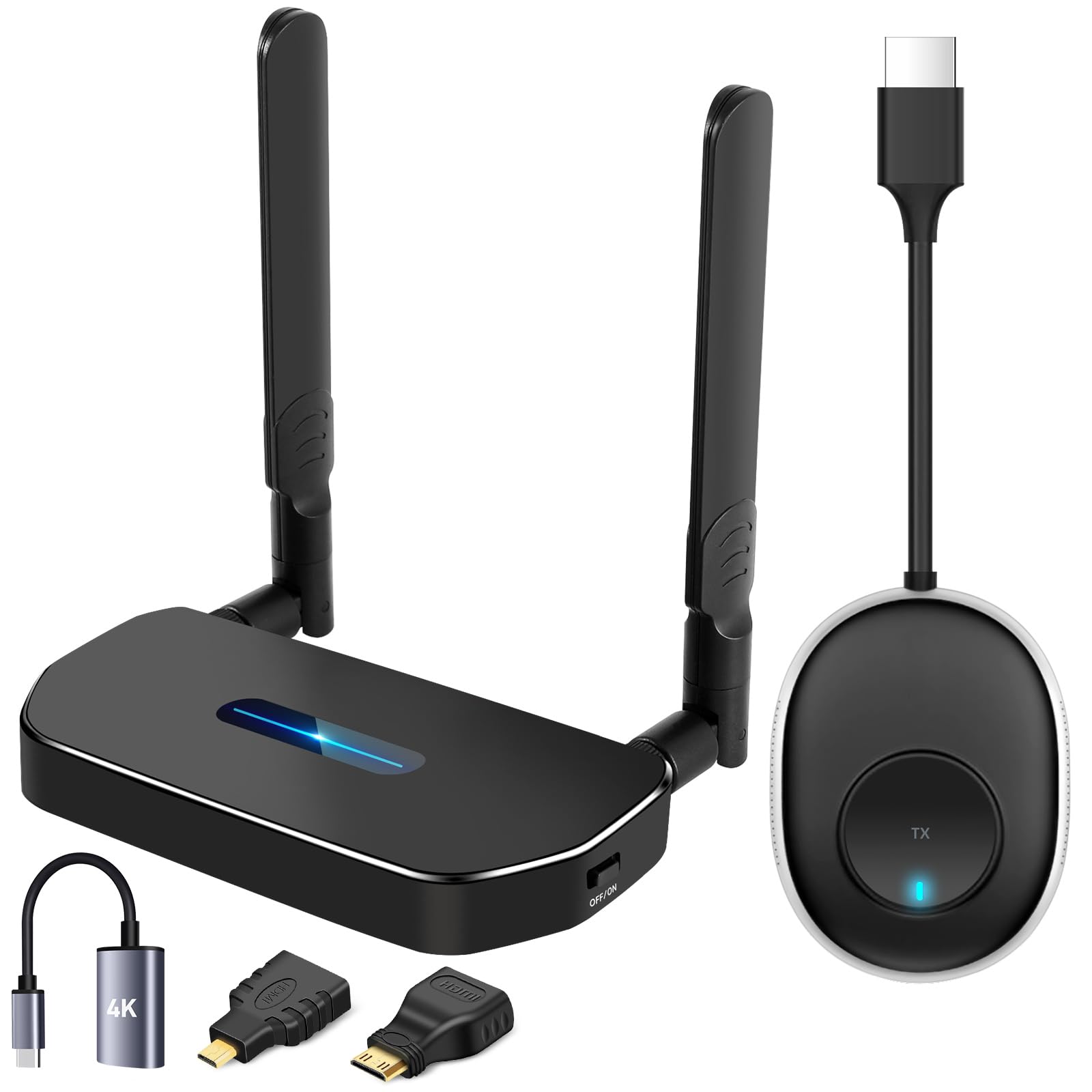
This is the pick for the person who wants to walk into a meeting room, plug the transmitter into a laptop, plug the receiver into the projector, and be showing slides before anyone finishes opening their coffee. There is no driver to install and no app to download — it pairs and mirrors. The kit ships as a transmitter plus receiver (the listing counts 2 items) with two Type-C charging cables, an HDMI cable and a manual, and it deliberately does not include the 5V/2A wall chargers, so plan on two.
What you actually get on the screen is 1080P@60Hz — a Full HD image at 60 frames per second, which is smooth enough for video and games and sharp enough to read spreadsheet text across a conference table. The signal is rated for 165FT/50M, and the maker is upfront that a cement wall between rooms can cut usable distance down to 3-5 meters. That is the honest version of every range claim in this category: open air is one thing, drywall is another, poured concrete is a third. Owners routinely report it holding a solid link well out into a room — one buyer measured 95 feet of steady signal — so treat the long number as an outdoor ceiling, not an indoor promise.
You get more ways to plug in, thanks to the little pile of adapters. A mini adapter and a USB-C to HDMI adapter (a plug that turns a phone or laptop port into a full-size HDMI socket) mean the difference between “works with my laptop” and “works with my laptop, my iPad and the camera in the corner.” One receiver can also pair with up to 8 transmitters, so you can flip between computers in a meeting without unplugging anything. One thing to know before you buy: the transmitter is listed at 0.4 kg, which is heavier and bulkier than the dongle look suggests, so it is a desk kit rather than a pocket kit.
What earns its keep
- Truly plug-and-play — no app, no driver, no network login
- 165FT/50M rated range with the real-world wall caveat stated plainly
- Extra mini and USB-C to HDMI adapters cover laptops, tablets and cameras
- One receiver can switch between up to 8 transmitters
Where it asks something of you
- The 5V/2A chargers are not in the box — bring two
- Output tops out at 1080P@60Hz, so a 4K-native source gets downscaled
- Cement or brick walls can shrink usable range to a few meters
Reach for this if: you need a presentation kit that just works on laptop, tablet or camera with zero setup.
Think twice if: your screen is 4K and you want true 4K arriving at the far end.
2. VENTION Wireless HDMI Transmitter and Receiver 656FT
One transmitter, a stack of screens, and a little LED panel that tells you what went wrong.
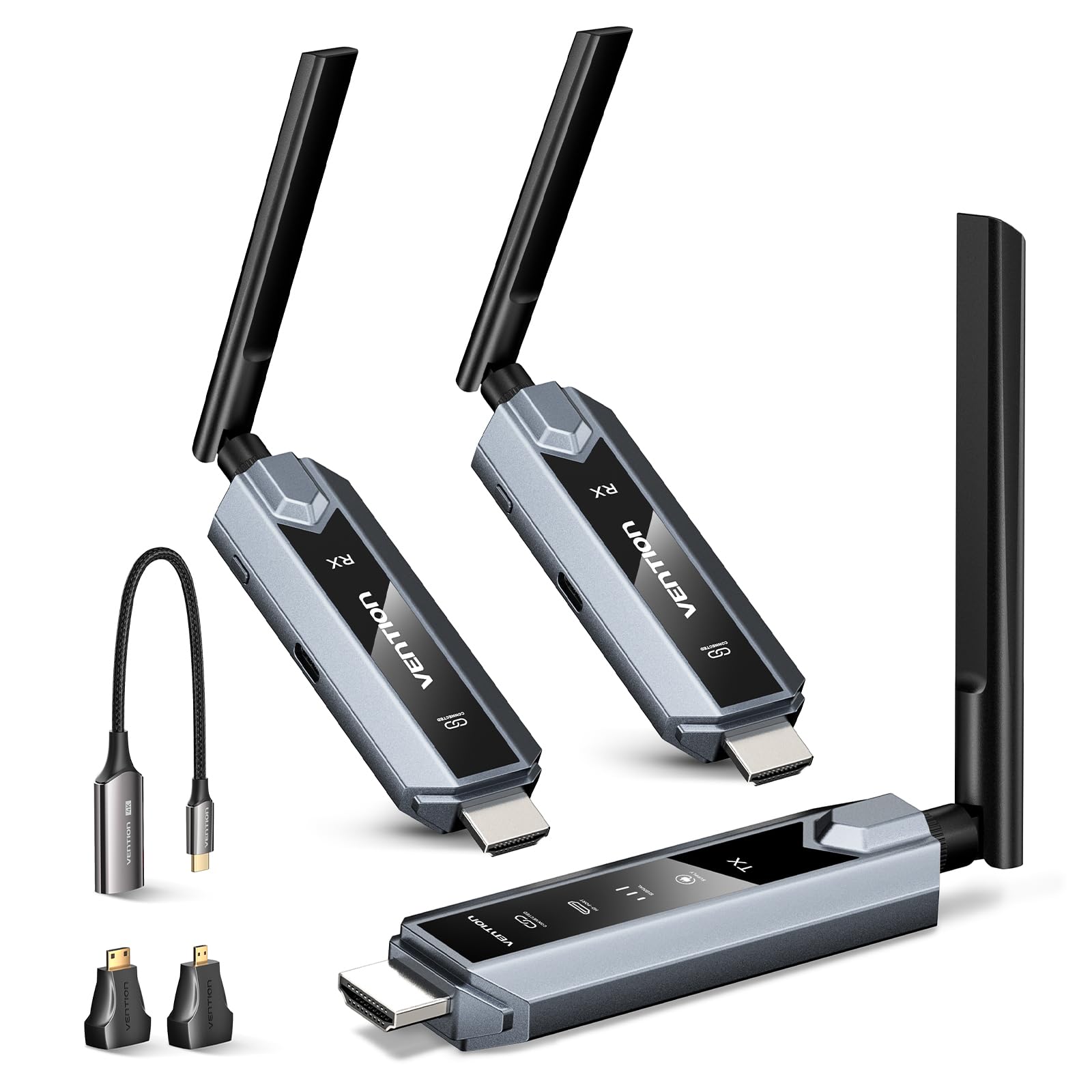
If your problem is “I want the same feed on the TV in the lounge and the monitor in the kitchen,” this kit is built around that job. One transmitter coordinates multiple receivers, and the system supports output to as many as 6 devices. The kit itself ships with 3 items — a transmitter and two receivers — so you start with two screens and add more as you need them.
The range figure here beats the POFAN above by a wide margin, and the maker states it plainly: 393ft/120m versus 165FT/50M. It also counts one more piece in the box, 3 items against 2. Those are real, published differences, and they explain why this one suits a building-wide setup while the POFAN suits a single room. The catch is written in the specs too: through walls the figure drops to roughly 50FT/15M, and thick walls or large obstacles are called out as the enemy. So the 120m headline is a clear-sightline number.
The detail that earns the pick its place is the front-panel LED readout. Separate indicators for connection, signal, output and power turn a mystery dropout into a readable status — you can see at a glance whether the transmitter lost power or the link went weak. Setup is the part owners praise most; it is plug-and-play with no drivers. Connectivity, though, is the most-discussed topic on the listing and the verdict there is genuinely mixed, with some buyers chasing intermittent drops. That makes it a strong fit if you can keep transmitter and receivers in the same open space, and a weaker one if you are pushing through several walls.
The honest trade-off: a multi-screen kit that rewards an open floor plan and punishes masonry. Feed each end from a proper 5V/2A supply, per the maker’s minimum, and the dropouts buyers describe become far less common.
Built for: one source feeding several displays in one open space, where a status light saves you a diagnostic headache.
Look elsewhere if: your transmitter and screens sit in different rooms behind solid walls.
3. BRAIDOL TR30 Wireless HDMI Transmitter and Receiver
The shortest range on this list at 98 feet, and the smoothest to live with day to day.
Here is the counterintuitive one. The TR30 claims the shortest reach of any kit on this list at 98 feet/30 meters, and it is still the pick I would hand most people for home and travel use. Why? It runs on a 2.4G/5G dual-band protocol (two radio lanes, so it can use either the crowded 2.4 GHz band or the cleaner 5 GHz band for a stronger, steadier link). And the experience of using it is where it wins.
That experience shows up in what owners talk about. Ease of use is the most-praised thing about it, followed closely by connectivity, then latency, then video quality — a set of priorities that tells you people are not fighting this kit, they are using it. It does screen mirroring and screen extension, so you can either clone your laptop display or stretch your desktop across to a second screen. Output is 1080P/60Hz with 4K decoding on the input side. One limit to note: the maker states this one is not suitable for connecting to phones or tablets, so it is a laptop, PC, camera and set-top-box tool.
Two practical notes. First, if your computer cannot push enough power out of its HDMI port, plug the transmitter into a 5V/2A adapter — the listing says so directly, and it is the fix for stutter. Second, at 9.88 ounces for the pair it is genuinely portable, which is the whole point for a business trip or a family gathering. Compatibility is the mixed spot: most devices connect cleanly, but Apple TV is the recurring trouble case, so check that box before you commit if that is your source.
Best for: laptop-and-projector life, where a short, clean 30-meter link beats a long, fragile one.
Not the one for: phone or tablet mirroring, or an Apple TV source.
4. Hollyland Pyro H Wireless HDMI Video Transmission System

The first rung of professional: 1,300 feet of range, 4K at 30fps, and up to four receivers on one camera feed.
This is where the list changes character. A consumer kit moves a laptop screen to a TV. The Pyro H moves a camera feed to a director, a focus puller and two more crew members, all watching the same frame at a stated 60ms of delay. It transmits to up to 4 receivers, and the Hollyview app lets phones and tablets join the same feed. For a small production that means no more huddling around one monitor.
The video path runs through HDMI and handles up to 3840×2160@24/25/30fps — 4K at up to 30 frames per second — with a loop-out so the camera operator keeps a local screen. Range is stated at 1,300ft (400m), and the dual-band 2.4 GHz / 5 GHz design with Smart Channel Scan picks a clean frequency on startup and reports the status back on the receiver. There is also UVC support, which means the kit can feed a computer as a plain webcam-style source for live streaming without extra capture hardware. The box includes the transmitter, receiver, five cylindrical antennas, a rotatable cold-shoe mount and a USB-C OTG adapter.
Owners talk about performance most here, and the practical read is that it works from the start and is quick to set up. The fair warning is picture quality and connectivity, which split opinion — some setups are rock solid, while a few buyers report pixelation or flicker at the receiver. On a set, most of that depends on antenna placement and channel choice, which is exactly what Smart Channel Scan (an automatic search for a clear channel) exists to solve. Pair it deliberately and give it clean sightlines.
Choose it if: you shoot with a small crew and need several people watching one camera feed without cables.
Hold off if: you only ever mirror a laptop — the range and multi-receiver build are wasted there.
5. Hollyland Mars 4K Wireless Transmitter Receiver

SDI in and out, decimal frame rates, and a metal shell that expects to be dropped.
If you are feeding a video switcher, you need SDI — the professional broadcast connector that carries video over a locking BNC cable, not the consumer HDMI plug. The Mars 4K has both: HDMI up to 3840*2160P input and output, plus a 3G-SDI port that outputs broadcast and production frame rates at 23.98/29.97/59.94 FPS. When you feed a decimal-point frame rate in through SDI, it passes out through both HDMI and SDI. That single detail is why this kit ends up in production trucks rather than living rooms.
The stated range is 450ft line of sight with 66ms of delay, measured in an interference-free lab environment — the maker says so, and it is worth holding them to that wording. It encodes in H264 and runs 8-20Mbps bit-rate depending on whether you pick HD, Balance or Speed scene mode. Signal quality is what owners praise most, and latency is right behind it, which matches a kit designed to keep a director’s monitor trustworthy on a crowded set.
Physically it is built for work: a metal shell, bullet-style antennas that stay attached so you cannot lose them, a joystick menu with a full-color LCD, and ESD protection. Power options are broad — 6-16V DC, an NP-F970/750/550 battery, or 5V/2.5A USB Type-C — though the listing warns that QC/PD protocol and 5V/2A charging are not supported. Monitoring is flexible too: one transmitter to one receiver allows two monitors over HDMI and SDI plus two phones by app, and one transmitter with no receiver allows four app monitors. The one concern to know is that multiple owners mention devices disconnecting on their own, so a stable power source and clean channel are worth the setup time.
The reason to pay up: SDI with decimal frame rates is a genuine professional requirement, not a marketing bullet — it is the difference between plugging into a switcher and hunting for a converter.
Suits: broadcast and live-production crews already working in an SDI signal chain.
Overkill for: a home theater or a classroom projector, where the HDMI-only kits do the same thing for far less.
6. DJI SDR Transmission Combo

Three kilometers of link at 1080p/60fps, 35ms of delay, and SDR auto-hopping across 2.4GHz, 5.8GHz and DFS bands.
Distance is what defines this kit: a transmission range of up to 3 km — 10,000 feet — the kind of reach you need on a live event, a big outdoor set or a building-wide install. It gets there with SDR transmission (software-defined radio, which auto-hops across 2.4 GHz, 5.8 GHz and DFS bands to dodge interference), plus penetration aimed at complex environments where signals have to push through clutter. Video runs at 1080p/60fps (1080p is full HD; 60fps means 60 frames per second for smooth motion) with a bit-rate up to 20 Mbps and a stated 35 ms of latency (a 35-millisecond delay between camera and screen).
Where it pulls ahead of the Hollyland Mars 4K is the remote-control side. It pairs with DJI’s RS-series stabilizers for remote camera control and monitoring tools, giving a gimbal operator a full wireless monitoring chain without extra boxes. Broadcast mode lets one transmitter connect to an unlimited number of receivers, so a whole crew can pull the same feed. Monitoring options include SDI/HDMI output, a direct Wi-Fi connection, and a USB-C output that the listing positions as the stable, convenient route.
Functionality is the part owners rate most highly — the system does what it says — and one buyer rates it above the Hollyland Mars 4K outright. Setup is the honest friction point: several buyers found it harder to get running than they expected. At 10.2 ounces for the transmitter or receiver, it is genuinely light to fly on a gimbal, and the combo ships with a camera adapter plate and a gimbal adapter plate so both mounting routes are covered.
Where it leads
- 3 km / 10,000 ft stated range — the longest link before the Accsoon on this list
- 35 ms latency at 1080p/60fps and up to 20 Mbps bitrate
- Broadcast mode connects an unlimited number of receivers
- Native RS-series gimbal control and USB-C monitoring
What slows you down
- Setup takes more patience than a plug-and-play consumer kit
- You are buying into DJI’s ecosystem to get the gimbal features
Made for: event and outdoor shoots that need the feed to survive long distances and crowded airwaves.
Wasted on: a single-room mirroring job where 30 feet is the whole journey.
7. Accsoon CineView Master 4K Wireless Video Transmission
4K at 60 frames per second over tri-band 2.0+/5/6GHz, plus a zero-latency USB-C feed straight into your iPhone.
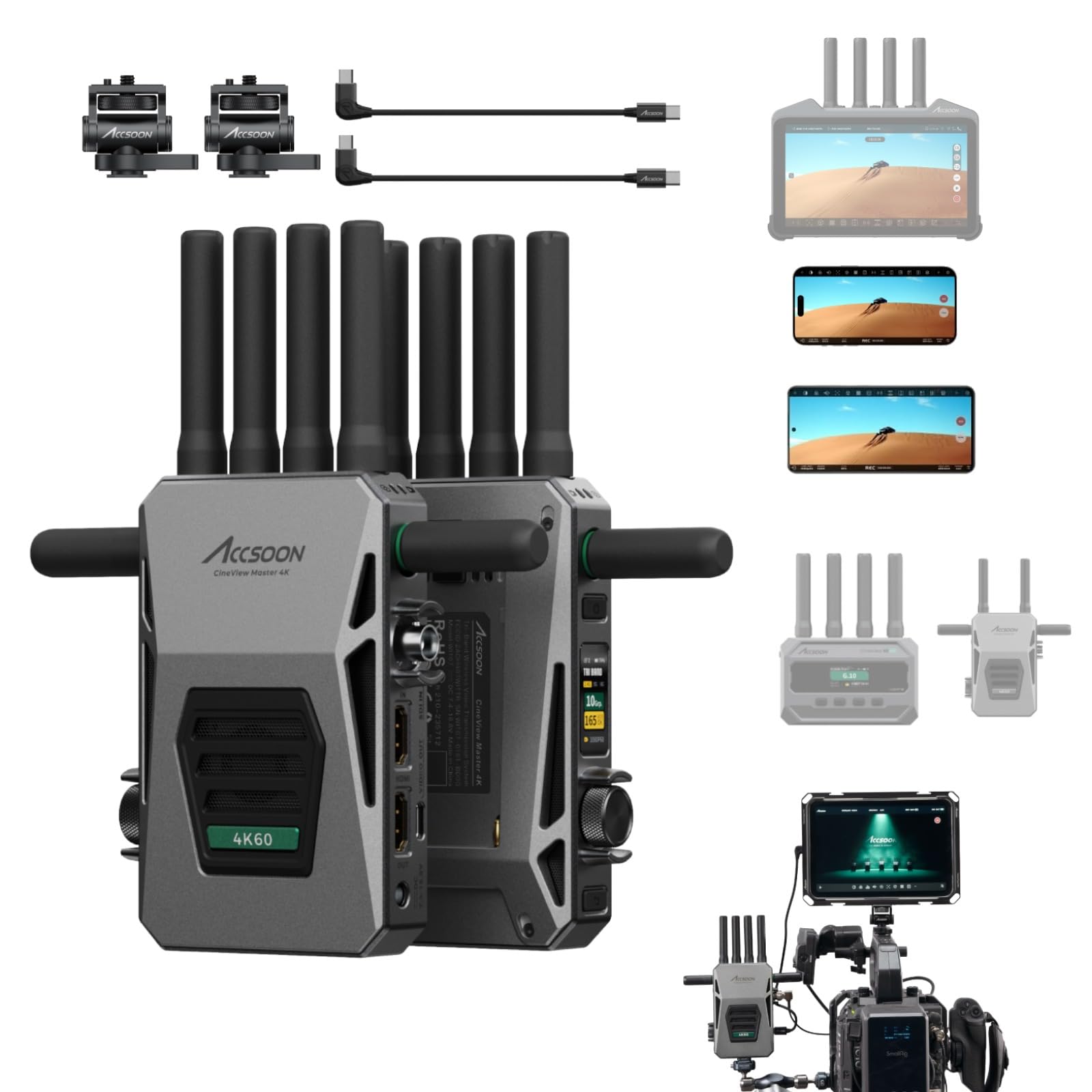
The frame rate is the sell here. Most 4K kits cap at 30fps; the CineView Master 4K handles HDMI input and output up to 3840×2160 at 24/25/30/50/60 fps — 4K60, which is the smooth, broadcast-grade cadence for fast motion like sports, concerts and action work. It also carries 1080P over SDI and HDMI for crews running legacy gear. Latency is stated as under 25ms at 1080P and under 35ms at 4K.
Reach is enormous on paper: 8202FT/2.5km in an open environment with no obstructions or interference, measured at 1080P resolution with a 1 Mbps CBR bitrate. That is a lab-condition figure and the listing frames it that way — hold it to the same standard as every other long-range claim here. What makes it stable over that stretch is tri-band transmission across 2.4 GHz, 5 GHz and 6 GHz, so it has three lanes to choose from when one gets crowded.
Then there is the monitoring trick that no other kit on this list does. The transmitter has a USB Video Out port that feeds an iPhone or iPad over a USB-C cable with zero latency — a wired feed to a phone that is not competing for wireless bandwidth. Add the Accsoon SEE app and you get live streaming straight out to YouTube, Facebook, TikTok or Twitch over RTMP/SRT with no capture card, plus focus peaking, waveforms, false color and audio meters. Power comes from NP-F970/750/550 batteries, a 12V/2A DC input, or a V-Mount — none included, so budget for cells. The kit ships with a generous antenna set: eight 2.4GHz/5GHz antennas and four 6GHz antennas.
The right tool when: you need 4K60 motion and a phone-based monitor or live stream without extra hardware.
Budget for: batteries for both ends — the box ships without any power source at all.
8. Teradek Ace 750 4K Wireless HDMI Transmitter and Receiver Set

Under 0.01s of delay on a dedicated 6GHz channel, with 10-bit HDR color at up to 4Kp30.
Every other kit here buys its range with a delay of milliseconds. The Ace 750 attacks the problem differently, using Teradek’s BB3 silicon chip for less than 0.01s of latency — effectively the picture arriving as the camera sees it, which is the whole point for focus pulling and live action that cannot tolerate a lag between subject and screen. It sends up to 4Kp30 at 10-bit HDR (4K resolution at 30 frames per second, with 10-bit color depth and high dynamic range), so you get the color depth that graded footage needs, not a flattened consumer image.
It runs on 6GHz, which is the clean, uncongested lane above the busy 2.4 and 5 GHz bands, and the listing calls it one of the only systems with 12 new frequency options plus auto channel selection. Range is stated at 750FT / 230 meter, described as the furthest in its class at that frequency. It is also fully compatible with Bolt 4K and Bolt 6 systems, so it slots into an existing Teradek workflow rather than starting a new one. Setup is paired from the start with Bluetooth control through the Bolt Manager app.
Two things a buyer needs to plan for. Power: the set includes one AC adapter and one D-Tap cable so the transmitter can run off camera power, but a second AC adapter for the receiver side of a studio build is sold separately. And the honest part — the range of opinions here is narrow, and the recurring doubt is whether the premium over the Hollyland kits above is worth it. If your work hinges on genuinely zero delay and 10-bit color, it is; if you just need to see the frame, it is more kit than the job requires.
What you are really paying for: the least delay anywhere on this page. Under 0.01s on a 6GHz link is a different category of tool from a 35ms or 60ms kit — you feel it the moment a subject moves.
Worth it for: focus-critical camera work where a frame of delay ruins the take.
Probably not for: anyone whose screen is 60 feet away and mostly showing slides.
Know the Specs
Latency (measured in milliseconds)
Latency is the delay between the source sending a frame and the screen showing it, expressed in ms. A reading of 35ms or 60ms is the kind of small gap that suits live camera monitoring and presentations. Under 0.01s is effectively instant and is reserved for focus-critical work. A kit that states 0.06s is being clear that it carries a noticeable but small delay.
Line-of-sight range versus through-wall range
Range figures are usually quoted over open ground with nothing in the path — “line of sight,” or LOS. Drywall costs you some of that; brick, cement and thick obstacles cost you much more, and several listings here literally warn that distance can drop to a handful of meters through solid walls. Plan your placement around clear sightlines whenever you can.
Resolution: input versus output
Read both lines. Some kits accept a 4K input and decode down to 1080P@60Hz at the receiver, which is fine for projectors and TVs but not true 4K end to end. Others, like the pro kits, carry 4K all the way through. The output spec is what lands on your screen.
HDMI versus SDI connectors
HDMI is the consumer plug found on laptops, consoles and TVs. SDI is the locking broadcast connector used in switchers and production gear. If you are feeding professional video hardware, you need SDI on the transmitter or you will be adding a converter.
Receivers per transmitter
A count of receivers tells you how many screens can share one feed. Adding receivers often shortens range — one kit here publishes a clear curve that drops as more screens join. Check that number before you plan a multi-screen install.
Power requirements
Almost every kit needs both ends powered from USB, and several listings state a minimum of 5V/1A or 5V/2A. A weak port is the single most common cause of dropouts. Wall adapters are frequently not included, so plan on two chargers per kit.
Common Questions
Will a wireless HDMI transmitter work through a wall?
What latency is too much for gaming or live camera work?
Do I need to plug both the transmitter and the receiver into power?
Will my phone or tablet work with a wireless HDMI kit?
Can one transmitter feed several screens at once?
Is a 4K kit actually sending 4K to my TV?
Do I need an app or driver to use one?
What is SDI and do I need it?
How do I power a pro transmitter on a camera rig?
Will a wireless transmitter interfere with my Wi-Fi?
The Bottom Line
For most people the wireless video transmitter winner is the POFAN Wireless HDMI 4K Kit because it pairs instantly, needs no app, and carries 1080P@60Hz (full HD at 60 frames per second) over a 165FT/50M link — the most painless way to get a laptop, tablet or camera onto a big screen. If your source box and your screen live in different rooms and you still want the remote to work, take the Vrriis 250m Extender for its loop-out (a second output that feeds a local monitor) and IR control (it relays your remote’s infrared signal to the far room). And when the feed has to survive a real production day with several people watching, the Hollyland Pyro H is the one to reach for. Buy for the range your room actually allows, feed both ends their own 5V/2A supply, and you will not need to buy twice.
How we choose
We do not accept paid placement. Every pick is matched to a real buyer and a real use-case; we do not hands-on test units.
Sources
Specifications: manufacturer listings and product documentation. Review insights: verified customer reviews, as of November 2026. Pricing: not shown on this page (it changes often); check the current price via the retailer link.
As an Amazon Associate, Tactical Gear Guy earns from qualifying purchases. This does not affect which products we feature.