Specs are compiled from manufacturer listings and verified buyer reviews and can change over time — please confirm the key details on the product page before buying.
If your game audio arrives a beat after the action, no amount of driver tuning fixes it. A USB dongle builds its own private 2.4GHz link between the buds and your PC or console, and that is the whole reason this shelf exists. Below you get the picks that actually ship the dongle in the box, sorted by what each one does best.
This guide is built by comparing the manufacturers’ published specifications and the patterns across verified customer reviews, so you get each pick’s real strengths and trade-offs instead of marketing spin.
The cheat sheet up top shows the three specs that decide everything, then each pick gets a straight read on where it wins and where it stings. Here is the honest shortlist of wireless earbuds with usb dongle worth your desk space.
Top Picks


How To Choose The Best Wireless Earbuds with USB Dongle
The dongle is the part that decides whether these work on your machine. Drivers, EQ modes, and RGB matter far less than whether that transmitter holds a stutter-free link to your console or PC. Confirm dongle compatibility first, then weigh the rest.
Check the dongle against your console first
A USB-C dongle slots straight into a PS5, a Steam Deck, or a laptop with a modern port. A USB-A dongle is the safer bet for an older desktop tower. Some picks ship both in the box, and some ship an adapter that converts one to the other — check before you commit. One caveat worth knowing up front: Cleer states plainly that its dongle does not work with Xbox, which needs a different authorization.
Read the latency number, not the marketing word
Latency is the delay between the picture and the sound, measured in milliseconds. A 20ms figure is effectively instantaneous to your ear. A 40ms figure is still fine for calls but starts to feel loose in a fast shooter. Anything under 30ms is the zone competitive players care about.
Know whether the battery figure is buds-only or with the case
Manufacturers quote both and they mean different things. A “30 hours” claim usually means the buds plus the recharge the case holds. The number that matters for a single session is the per-charge figure, so look for that separately. If a listing only gives the combined total, treat the per-charge runtime as the real question to answer before you buy.
Decide if you need dual-mode or just dongle mode
Dongle mode gives you the low-latency link to your PC or console. Bluetooth mode gives you phone calls. The best of these switch between the two without you touching a menu — that is what multipoint means, and it is the feature you will notice most on a workday that turns into a gaming night.
Side-by-Side Comparison
| Model | Best For | Latency | Battery Life | Bluetooth | Amazon |
|---|---|---|---|---|---|
| Middle Rabbit SW5★ Best Overall | Fast-paced gaming | 20 ms | — | 5.4 | Amazon |
| Middle Rabbit SW4 ProBest for Calls | Calls and work | 40 ms | 7 hours | 5.1 | Amazon |
| Razer Hammerhead HyperSpeedBest Battery | PlayStation 5 | — | 30 hours | 5.2 | Amazon |
| Cleer ARC 3 Gaming | Marathon play sessions | 30 ms | 50 hours | 5.4 | Amazon |
| JBL Quantum TWS | PC positional audio | — | 16 hours | 5.2 | Amazon |
| Sony INZONE Buds | PS5 with on-screen status | 30 ms | 12 hours | 5.2 | Amazon |
| ASUS ROG Cetra SpeedNova | Hybrid multipoint | — | 46 hours | 5.3 | Amazon |
| SteelSeries Arctis GameBuds | Xbox households | — | 10 hours | 5.3 | Amazon |
Detailed Reviews
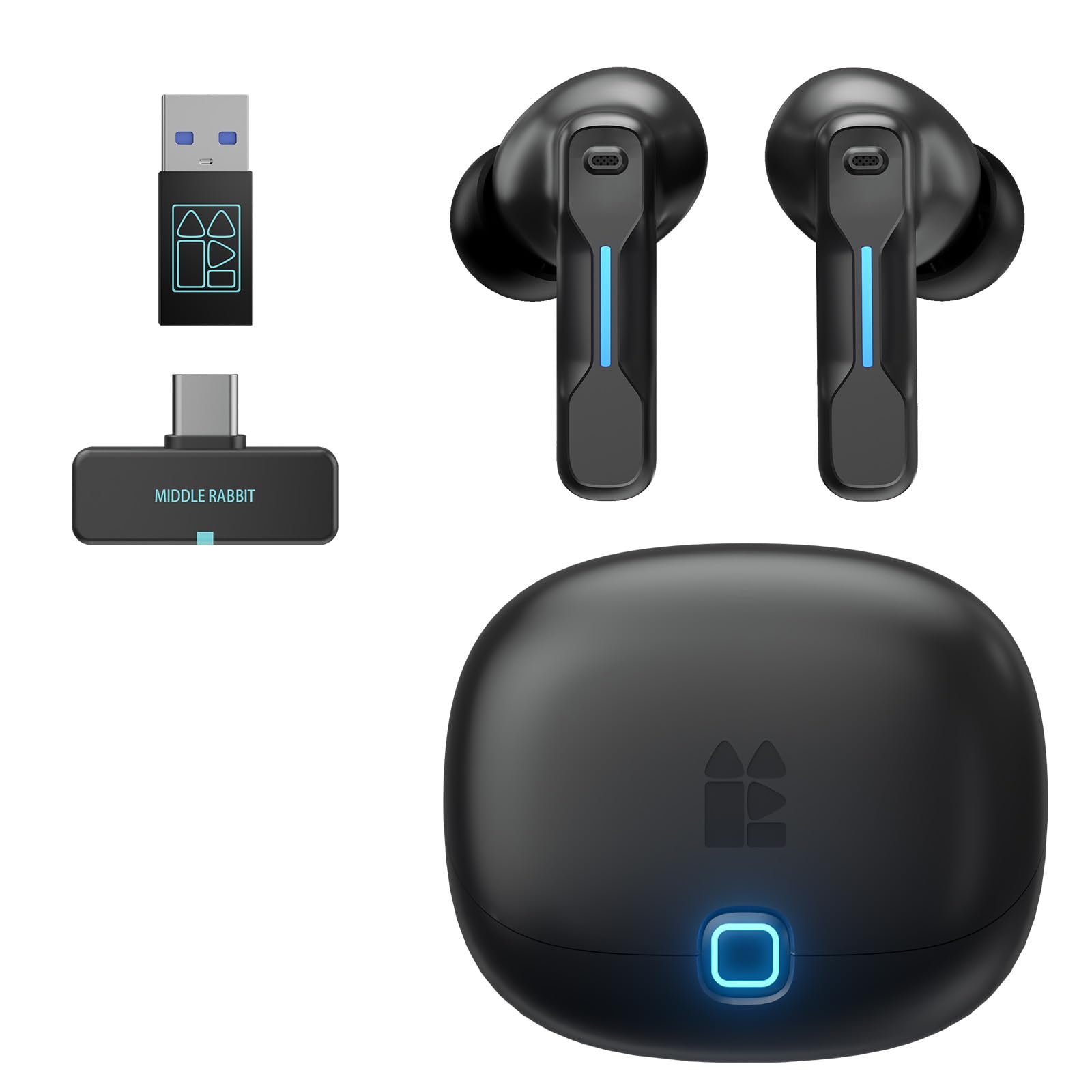
1. Middle Rabbit SW5 Wireless Gaming Earbuds
At 20ms, this is the lowest-latency dongle set in the lineup.
The number to care about is 20 milliseconds. That is the delay between the picture and the sound, and it is the tightest figure in this entire lineup. For a fast shooter or a racing game, that gap is small enough that your brain stops noticing it — you react to what you see, and the audio lands with it. The SW5 runs that link through a 2.4G dongle included in the box, with Bluetooth 5.4 as the second road in.
Sound is what wins people over here, and there is a reason the deep end of the range gets the attention. The dynamic drivers push a full low end that suits explosion-heavy games, while the mids and highs stay separated enough that footsteps and callouts do not smear together. Four built-in microphones handle the talking, and the app lets you pick between Music, Game, and Podcast EQ modes or build your own curve.
The dual-device piece is the quiet hero. You can hold a console session and a phone call at the same time, which means an incoming call does not force you to unpair anything. The Middle Rabbit app also pushes firmware updates over the air, so the buds you own in a year are not frozen at the software they shipped with. Two honest edges to plan around: the reliability and connectivity side draws a mixed read, and some units need a re-pair to settle in. Treat the dongle pairing step as a one-time setup task, not a thing you repeat every session.
The case for the SW5
- 20ms latency is the tightest in this lineup — the audio lands with the frame
- Runs two devices at once, so a call does not interrupt a match
- App-based EQ with Music, Game, and Podcast presets plus a custom curve
- OTA firmware updates keep the feature set current
Where it gets fussy
- The connection side reads mixed — a fresh pair-up occasionally needs a retry
- No per-charge battery figure is published, so plan around the case
Made for the shooter: you want the shortest possible gap between what you see and what you hear, and you split your time between a console and a phone.
Think twice if: you need a documented per-charge runtime before you commit — that number is not on the sheet.
2. Middle Rabbit SW4 Pro USB Wireless Earbuds
Built for the desk, not the deathmatch — and the meeting calendar is the thing it serves.
Each bud carries two microphones, for four in total, so your voice arrives from whichever side you turn. That is the part that matters when you spend the day on conference calls and only a slice of the evening on games. The audio latency sits at 40 milliseconds — twice the gap of the SW5 above, and enough that a competitive shooter will feel slightly loose. For video calls, it is invisible.
Battery lands at 7 hours on a charge, with a 1.5-hour top-up. That is a useful benchmark against the Cleer pick further down, which refills in 1 hour — half an hour quicker when you are scrambling before a meeting. The 10mm drivers do the heavy lifting for the sound, and the app lets you flip between a music mode and a low-latency game mode, which is exactly the switch a hybrid workday needs.
Connectivity is the honest catch. These pair easily with specific devices, but staying paired is where the mixed feedback lives — the mic occasionally drops out mid-session. If your day is a string of calls, test that first. The 2.4G dongle does plug-and-play, and the package includes a USB-C to USB-A adapter so an older tower is covered too.
What it gets right: four microphones and a 7-hour per-charge runtime make this the pick for anyone whose primary machine is a work laptop. The 1-year warranty is a real cover note on a device that lives in a bag.
The trade you accept: at 40ms it is the slower of the two Middle Rabbit models, so a twitch shooter is not the job it was hired for.
Reach for this if: your dongle is destined for a work laptop and the mic matters more than the millisecond count.
Look elsewhere if: you want the tightest latency — the SW5 above is the faster twin.
3. Razer Hammerhead HyperSpeed
Thirty hours of runtime is the headline, and it is nearly five times what the SW4 Pro offers.
Put the two numbers side by side and the gap is stark: 30 hours here against 7 hours on the Middle Rabbit SW4 Pro. If you are the type who charges a case on Sunday and forgets about it, that difference is the whole ballgame. The 2.4GHz link runs through the included USB-C dongle, and Razer lists compatibility across PS5, PS4, PC, Mac, phones, tablets, and handheld devices with a USB-C or USB-A port.
Active noise cancellation detects and nullifies background hum, which is genuinely useful if your setup shares a room with a fan or a fridge. Dual environmental noise cancelling microphones handle the outgoing side, cutting the room out of your voice so teammates hear you and not the washing machine. Bluetooth 5.2 handles the phone side and reconnects to the last paired device automatically.
Now the part you need to hear. Sound quality draws a genuinely split read — some find it full and some describe it as muffled, like listening through water. That inconsistency is worth knowing before you click, because audio is the one thing you cannot patch. The RGB Chroma lighting is a taste call and nothing more. If the visual flourish is what sells you, it is here; if it is not, the 30 hours is the reason to buy.
Where the value sits: 30 hours of total playtime plus ANC plus console compatibility is a lot of ground covered in one package.
The risk to weigh: the sound read is split, so buy this for the runtime and the noise cancelling, not on a promise of pristine audio.
The long-haul pick: you want to stop thinking about charging and you game in a room that is never quiet.
Not your set if: you are picky about tone — the audio here divides people more than the battery does.
4. Cleer ARC 3 Gaming Earbuds

These sit outside your ear canal entirely, and they still run past the fifty-hour mark.
Open-ear means the driver rests against the ear rather than inside it, so you keep hearing the room around you. If you want to hear the room while you play, that is the selling point; if you want isolation, it is the dealbreaker. For a long session on a hot day it is a real comfort advantage — nothing is pressing into the canal for hours. The trade is that bass lives closer to your eardrum, and the low end here reads as thinner than a sealed set delivers.
Fifty hours is the largest figure in this lineup: 10 hours on the buds plus 40 more in the case. A 5-minute top-up gives you up to 1.5 hours of play, which is the number that saves you when you sit down and realize the case is flat. Charging runs at 1 hour, against 1.5 hours on the SW4 Pro — a meaningful half-hour when you are heading out the door.
The 16.2mm drivers are the biggest on this list, and combined with Dolby Atmos and Snapdragon Sound they produce genuine spatial placement. Bluetooth 5.4 is the newest version here, ahead of the SW4 Pro’s 5.1, and multipoint pairing holds two devices at once. The dongle is USB-C only, so a laptop or PS5 is fine and an older USB-A desktop needs an adapter. Cleer is also upfront that the dongle does not work with Xbox.
The fit story: the around-ear hook is what keeps these comfortable through a long session — and what keeps the bass polite rather than punchy.
Built for marathon sessions: the 50-hour total and the open-ear design suit players who stay in for hours and hate the sealed-in feeling.
Check your port first: the dongle is USB-C, and it will not work on an Xbox — that needs different authorization.
5. JBL Quantum TWS

Directional audio on PC is the prize here, and it comes with a charging habit attached.
JBL QuantumSURROUND puts sound around you rather than in front of you, so you can place a sound source by direction. One limit worth flagging: that feature only works on PC and only alongside the JBL QuantumENGINE software. On a console you are getting the standard stereo image. The USB-C dongle fits snugly into the charging case, which means you are far less likely to lose the thing that makes the whole product work.
Six beamforming microphones handle your voice, and JBL Dual Source lets an incoming phone call interrupt a 2.4GHz session over Bluetooth and hand you back afterwards. True Adaptive noise cancelling calibrates itself automatically, and Ambient Aware lets the room back in when you need to hear someone at the door.
The catch is runtime. The case holds 16 hours, but the buds themselves drop around the 3-hour mark on a full charge — and a full recharge takes 8 hours. That is a lot of downtime for a set built around long sessions. Connectivity also draws complaints about the right bud failing to pair. Buy this for the surround processing and the mic array, not for all-day stamina.
Why PC players shortlist it
- QuantumSURROUND gives real directional placement on PC
- Six beamforming mics keep your callouts loud and clean
- Dongle stores in the case, so it travels without getting lost
What will annoy you
- Roughly 3 hours per bud charge, with an 8-hour recharge
- The right earbud has a pairing failure pattern worth knowing
- Surround only open up on PC with the JBL software installed
Best matched to a desktop: you play at a PC, you want to hear which side the threat is on, and you keep the case on your desk.
Pass if you roam: the short per-charge runtime and the slow refill make this a poor fit for all-day carry.
6. Sony INZONE Buds

The dongle plugs into a PlayStation and the console reports back on screen.
Sony’s integration with the PS5 is the thing no other pick here matches. Volume, battery level, and mic mute all show up in the console’s own status display, so you are not guessing. PS5 Tempest 3D Audiotech handles the spatial side, and Sony’s algorithm tunes 360 spatial sound to your ear shape. The buds are 8.4mm drivers, and the AI-assisted microphone strips environmental noise out of your voice.
Comfort holds up over a full day without ear fatigue, which is a harder claim to make about most in-ear sets. Sound quality is the standout — the noise cancelling is strong enough that one owner measured it against a 3D printer running nearby and reported it silenced. Active noise cancelling also switches to transparency mode so you can hear the room when you need to.
Here is the part that decides it for a lot of people. Twelve hours per charge extends to 48 with the case using LE Audio, and a 2-hour charge time. But Bluetooth LE Audio is not compatible with iPhone or iPad, and the classic codecs SBC, AAC, aptX and LDAC are not supported at all. If you want these for a phone, check that first. Connectivity and reliability both draw a negative read, which is a real headwind for a set at this level.
The PS5 argument: on-screen status plus Tempest 3D plus a 2-hour charge makes this the most console-native set here.
The compatibility trap: the Bluetooth situation is narrow by design — iPhone and iPad are out for LE Audio, and the classic codecs are simply not supported.
Buy it for the console: you play on PS5 and want the status readout and spatial audio built for that machine.
Skip if your phone is the target: the Bluetooth support here is narrow enough that an iPhone or iPad is not the right pairing.
7. ASUS ROG Cetra True Wireless SpeedNova

Two connections running at once — one on the dongle, one on Bluetooth — is the trick here.
Hybrid multipoint is the feature that separates this from the rest of the list. You can hold a 2.4GHz dongle link to your PC and a Bluetooth link to your phone simultaneously, so a call never means abandoning the game. The dongle covers PC, Mac, Android, Nintendo Switch, PS4, and PS5 in 2.4GHz mode. Bluetooth 5.3 covers PC, Mac, iOS, Android, and Switch.
The audio side is genuinely ambitious. In 2.4GHz mode you get 24-bit/96kHz resolution, which is a far higher data rate than a standard Bluetooth link carries, and Dirac Opteo processing adds detail on top. Bone-conduction AI microphones pick your voice up through the bone rather than the air, which isolates it from the room. Adaptive ANC measures your in-ear fit and ear canal shape and adjusts itself to the ambient noise.
Battery runs up to 46 hours in Bluetooth mode with the RGB off, and a 5-minute in-case charge delivers up to an hour of use. The case charges wirelessly or over USB-C. Two honest notes: the sound read is split right down the middle, and the durability side draws a negative signal. Neither makes this a bad set — it makes it a set you should buy for the connection flexibility and the high-resolution mode, with your ears open on the rest.
The multipoint pitch
- 2.4GHz and Bluetooth run at the same time, not one or the other
- 24-bit/96kHz audio in dongle mode is the highest resolution here
- 5-minute charge yields up to an hour of play
- Case takes wireless charging or USB-C
Honest caveats
- Sound splits opinion hard — some find it excellent, some do not
- Durability draws a negative read over time
- The Aura RGB lighting costs battery if you leave it on
The switchboard pick: you want a PC dongle link and a phone link live at the same time, and high-resolution audio is the spec you chase.
Go in clear-eyed: tone is a coin flip here, so buy for the connectivity and the resolution rather than for a signature sound.
8. SteelSeries Arctis GameBuds

Xbox owners get a set built for their console, at a runtime that asks for discipline.
Quick-switch dual wireless means a high-speed 2.4GHz link built specifically for Xbox and console gaming, with Bluetooth 5.3 for mobile when you switch over. That Xbox focus matters because the Cleer dongle does not work there at all. Four-mic hybrid ANC handles immersion, with a transparency mode for when you need to hear the room.
The 100+ game audio presets in the Arctis Companion App are the underrated part. You can boost the specific sounds that matter in a given title on Xbox, PC, and more, rather than living with one tuning. Custom neodymium magnetic drivers carry the 360° spatial audio, which gives you directional cues in the mix.
Ten hours on a charge is modest against the 46 and 50-hour figures elsewhere on this list, and a full recharge takes 10 hours. The Qi charging case adds 3 extra charges for up to 40 hours of total use, which takes the edge off. Sound quality draws genuinely split feedback, including reports of high-pitched screeching and garbled voice, and durability has a negative signal. Buy this if Xbox is your platform and you want a dedicated 2.4GHz link for it.
Where it earns its spot: the Xbox-native 2.4GHz link plus the preset library is a combination the rest of this list does not offer.
What to plan around: 10 hours per charge and a 10-hour refill mean a charging routine — the Qi case softens it but does not erase it.
The Xbox answer: you want a dongle set that actually works on Xbox and you like tuning per-game audio from an app.
Look at the long-runners instead: if runtime is your priority, the 46 and 50-hour picks above go far longer between charges.
Know the Specs
Latency in Milliseconds
Latency is the gap between the frame on screen and the sound in your ear, measured in milliseconds. A 20ms figure is the tightest in this lineup, and it is fast enough that your reaction and the audio land together. A 30ms to 40ms figure suits calls and slower games but can feel loose in a twitch shooter. Lower is better for competitive play, and it is the single number the dongle exists to protect.
Dongle vs Bluetooth
The dongle builds its own dedicated 2.4GHz link, which is the low-latency road. Bluetooth is the everyday road — it pairs with a phone and handles calls. Dual-mode sets run both, and the best ones switch between them without a menu. Check the connector before you buy: USB-C suits a PS5 or a modern laptop, while a USB-A tower may need an adapter in the box.
Battery Life vs Per-Charge Runtime
A total battery figure usually counts the buds plus the recharge stored in the case. The per-charge number is what you get in one sitting, and they are very different things. A 50-hour total can mean 10 hours per charge. Look for both figures, because the total tells you how long the package lasts and the per-charge tells you how long you can play before you need the case.
Open Ear and Driver Size
Sealed in-ear buds push sound toward the eardrum and deliver fuller bass. Open-ear designs rest against the ear, which feels lighter over long hours but thins out the low end. Driver size in millimeters is a rough indicator of how much air the bud can move — a 16.2mm driver is larger than an 8.4mm one — but tuning matters more than the raw diameter.
Common Questions
Will these earbuds work on a PS5 from the start?
Do any of these dongle earbuds work with Xbox?
Is 40ms latency too slow for gaming?
Can I use the dongle and Bluetooth at the same time?
Do I need a separate app to get the most out of these?
How long does the battery actually last per charge?
Are open-ear earbuds worse for gaming?
Will the microphone sound good enough for work calls?
What happens if the dongle is lost?
Do these work with a phone as well as a PC?
The Bottom Line
For most people, the wireless earbuds with usb dongle that earns the top spot is the Middle Rabbit SW5, because 20ms of latency is the tightest link in this lineup and dual-device connection means a call never costs you a match. If marathon runtime is what you want, the Cleer ARC 3 Gaming runs to 50 hours and keeps your ear canal clear the whole time. And for a PlayStation setup that reports back on screen, the Sony INZONE Buds is the one built for that console.
How we choose
We do not accept paid placement. Every pick is matched to a real buyer and a real use-case; we do not hands-on test units.
Sources
Specifications: manufacturer listings and product documentation. Review insights: verified customer reviews, as of November 2026. Pricing: not shown on this page (it changes often); check the current price via the retailer link.
As an Amazon Associate, Tactical Gear Guy earns from qualifying purchases. This does not affect which products we feature.