Specs are compiled from manufacturer listings and verified buyer reviews and can change over time — please confirm the key details on the product page before buying.
Short answer first: if you want the crispest, most trustworthy click under your finger without paying top-tier money, the GameSir G7 Pro is the one to buy. It pairs a micro-switch trigger with a full analog pull, is officially licensed for Xbox, and owners consistently rank it above pricier elite models. Below are five pads that all put a real micro-switch behind the trigger — no mushy membrane imitations — sorted so you can pick the right one for your hands, your console, and how you actually play.
This guide is built by comparing the manufacturers’ published specifications and the patterns across verified customer reviews, so you get each pick’s real strengths and trade-offs instead of marketing spin.
A mouse-click trigger fires the instant its micro-switch closes rather than at the end of a spring-loaded pull, which is why shooters feel quicker with one. You will see exactly which pads offer that snap, what each one gives up, and how to match it to your setup. The picks below cover every budget tier worth considering among xbox controllers with mouse-click triggers.
Top Picks
How To Choose The Best Xbox Controllers with Mouse-Click Triggers
The first thing to get straight is that “mouse-click” on a controller can mean two very different things. Sometimes it describes the trigger itself — a micro-switch that fires the moment you touch it, with almost no pull distance. Sometimes it describes the back buttons, which Razer builds from the same switches used in its gaming mice. Read the listing carefully, because a pad can have one, the other, or both.
Dual-mode triggers are the feature you will actually use
A dual-mode trigger lets you flip between a hair-trigger click and a normal long-pull analog squeeze. That matters because the instant click is brilliant for shooters, where you want the shot to register the second your finger moves — but it is terrible for a racing game, where you need to feather the throttle in small increments. If you play more than one genre, dual-mode is worth prioritizing over almost any other spec.
Stick technology: Hall Effect and TMR versus old-school potentiometers
Traditional thumbsticks wear down where the sensor rubs, which is what produces the slow drift that makes your aim wander. Hall Effect sticks use magnets instead of physical contact, and TMR (tunnel magnetoresistance) sticks are a magnetic variant the makers position as more accurate while drawing less power. Either one is a real upgrade if you keep a controller for years rather than swapping it each season.
Check what the trigger and stick upgrades cost you elsewhere
A pad packed with switches and sensors has to fit them into a shell, and that shell has weight, shape, and connectivity trade-offs. Weigh the listed ounces against how long you play in one sitting. Also check whether the pad connects by a dedicated 2.4GHz dongle, Bluetooth, or wired USB-C — and confirm the mode you want is certified for your specific Xbox model, because PC features like a high polling rate often do not carry over to console.
Side-by-Side Comparison
| Model | Best For | Trigger Type | Battery | Weight | Amazon |
|---|---|---|---|---|---|
| GameSir G7 Pro★ Best Overall | All-rounder with dual triggers | Hall Effect + micro-switch | 1200mAh | — | Amazon |
| ASUS ROG Raikiri IILongest Runtime | Long sessions and travel | Micro-switch + TMR sensor | 30 hours (2.4GHz) | 9.6 ounces | Amazon |
| Nacon Revolution X Unlimited | Deep hardware tweakers | Micro-switch, adjustable | 10 hours | 230 g | Amazon |
| Razer Wolverine V3 Pro | Mouse-click back buttons | Pro HyperTriggers | — | 14.72 ounces | Amazon |
| Razer Wolverine V4 Pro | Competitive PC players | Pro HyperTriggers, adjustable | — | 14.72 ounces | Amazon |
Detailed Reviews
1. GameSir G7 Pro Wireless Xbox Controller
Our pick — 4.0+★ from 2,000+ verified ratings; the strongest balance of quality and price.
Two triggers in one shell — click when you need it, squeeze when you do not.
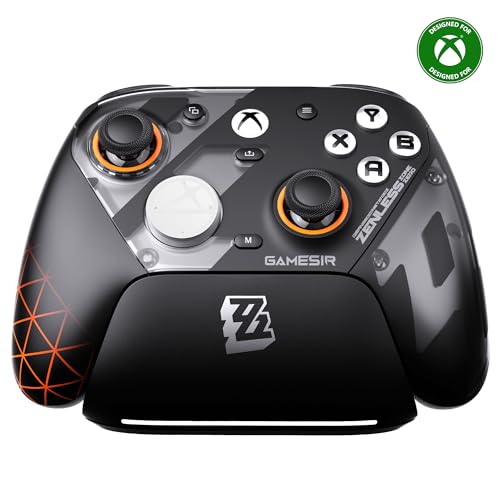
The G7 Pro solves the biggest annoyance of buying a click-trigger pad: committing to the click for everything. Its two trigger types switch between Hall Effect analog travel and a micro-switch pull, so a shooter gets the instant snap and a racing game gets a proper throttle. That switchable trigger is why this pad takes the top spot for most players.
Under your thumbs sit TMR joysticks — magnetic sticks that use tunnel magnetoresistance sensing to hold their accuracy without the physical wear that causes drift. GameSir pairs those with optical micro-switch face buttons and a mechanical micro-switch D-pad, so every input across the top of the controller gives you the same crisp confirmation. It is officially licensed for Xbox Series X|S and Xbox One, and it wakes your console with one press over its 2.4G wireless link.
You also get four remappable buttons — two mini bumpers near the shoulders and two lockable back paddles — plus a three-part magnetic faceplate and two spare D-pads in the box. The Zenless Zone Zero artwork is loud, so only pick this edition if you actually like the look. The built-in 1200mAh battery recharges simply by setting the pad on its included station, and pickup resumes play instantly. The 1000Hz polling rate (how often the pad reports to your machine, in times per second) works only on PC — Xbox consoles stay on their own stable rate.
Where the G7 Pro earns its keep
- Switchable Hall Effect and micro-switch triggers cover shooters and racers without a second controller
- TMR sticks resist the drift that ruins cheaper analog sticks
- Four remappable buttons and bundled spare faceplates and D-pads
- Drop-on charging station with a 1200mAh battery
Things to weigh before you commit
- The 1000Hz rate is PC-only, not an Xbox feature
- The bold collaboration artwork will not suit everyone
- Deeper tuning lives in the GameSir Nexus app rather than on the pad
Right for you if: you play more than one genre and want the click without losing analog control.
Think again if: you want a plain black shell or need the highest polling rate on console rather than PC.
2. ASUS ROG Raikiri II Xbox Wireless Gaming Controller
The travel-ready pad that keeps clicking long after the others need a cable.
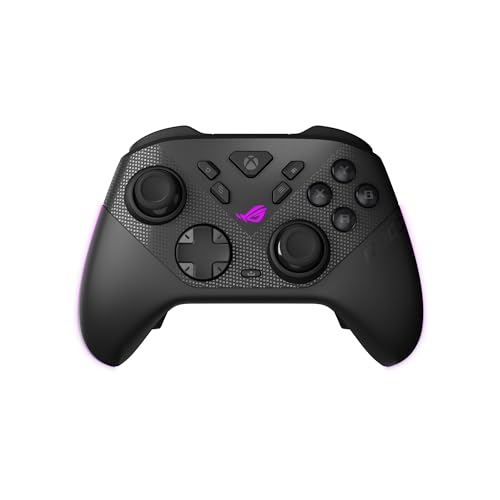
Battery is where the Raikiri II laps the field. ASUS rates it at 30 hours of 2.4GHz wireless play on a charge — with RGB lighting, audio, and vibration off — against the Nacon Revolution X Unlimited sitting at 10 hours for the same kind of play. That 20-hour gap is why this pad suits anyone who games on the couch without a charger nearby.
The triggers themselves run two modes: micro-switch with short travel for a quick click, or TMR sensor triggers with full travel when you want analog control. It is the same click-then-squeeze idea the GameSir above uses, and both are a clear step past a standard membrane trigger. ASUS also puts micro-switches under the D-pad, ABXY buttons, rear buttons, and bumpers, so every press gives you tactile confirmation.
Connectivity is unusually flexible — 2.4GHz RF, Bluetooth, or wired USB-C for PC and the ROG Xbox Ally, with Xbox certification through USB-C and 2.4GHz RF. Four programmable rear buttons sit under your fingers, and the box includes a carrying case that lets you charge the controller while it is still inside, plus a charging stand and two detachable joystick caps. At 9.6 ounces it is much lighter to hold than the Razer Wolverine V3 Pro at 14.72 ounces, which shows up over a long evening. The build splits opinion, though: some find it solid and others find it flimsier than they expected, and dropped wireless connections are a recurring gripe worth knowing about before you buy.
Real-world stamina: 30 hours of untethered play is the standout, and the charging case means a top-up between matches takes no extra gear.
The honest catch: wireless stability is the weak spot — a controller this light with connection gripes means you may end up running it wired, which costs you the battery advantage.
Battery first, everything else second: this is the pick for long wireless sessions away from a wall socket.
Consider another pad: if rock-solid wireless is non-negotiable, the GameSir’s 2.4G link is the safer headline.
3. Nacon Revolution X Unlimited Precision Wireless Controller
A tinkerer’s pad with more buttons, weights, and sticks than you can shake a stick at.
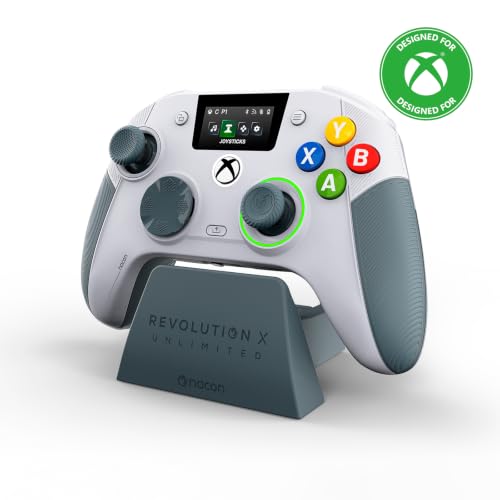
The Revolution X Unlimited suits players who want to swap D-pads, weights, and stick heads to fit their play rather than adapt to the stock setup. Nacon rates its trigger components as precision micro-switches for ultra-reactive pulls, with four vibration motors — two in the handles and two in the triggers — for feedback that lands in your palms as well as your fingertips. Its Hall Effect sticks and triggers use magnetic sensing to keep drift out of the picture.
Then comes the physical side, which is genuinely unusual at this level. You get a 4-way and a 6-way directional pad, three sets of weights, three sets of joystick heads (concave, convex, and high-dome), and two sets of joystick rings in medium and large. The controller carries 29 buttons in total, including six mappable shortcuts that can be reassigned through the PC and Xbox apps — and on PC you can map keyboard keys straight onto controller buttons.
Nacon quotes ultra-low latency of 1ms wired and 2ms wireless in PC mode, and it can simulate a joystick or D-pad with its gyroscope. An onboard LCD screen handles customization, remapping, and audio mixing without bouncing to another device. Just note the battery: it is rated at up to 10 hours, so it wants to live near the included charging station.
Battery and footprint trade-off: the shell runs 2.76 x 6.34 x 4.49 inches — noticeably more compact than the Razer Wolverine V3 Pro at 9.02 x 3.5 x 7.99 inches — while giving up hours of runtime to the ASUS.
Who it rewards: players who enjoy dialing in weight and stick feel and will actually use the 4-way and 6-way D-pads instead of leaving them in the case.
Pick it for the workshop feel: the hardware variants and on-pad LCD make it the most personalized pad here.
Look past it if: you want a grab-and-go controller with the longest battery and zero setup fuss.
4. Razer Wolverine V3 Pro Wireless Gaming Controller

Four mouse-click back buttons and claw-grip bumpers — this is the click-first build.
Razer builds the Wolverine V3 Pro’s four back buttons from the same switches found in its gaming mice, tucked into rubberized handles, with two claw grip bumpers on top for extra control. If you want mouse-click back buttons over a dual-trigger design, this is the pad built around exactly that.
Pro HyperTriggers can be set for instant actuation with zero travel time, or for ultra precise analog control with integrated haptic vibration. The thumbsticks are Hall Effect units tuned to be accurate and smooth with anti-friction rings, and the face buttons combine microswitch speed with a cushioned rubber membrane so long presses stay comfortable. A dedicated Razer app stores a personalized profile for Xbox and PC, and wired Tournament Mode on PC enables a 1000Hz polling rate.
It is the heaviest here at 14.72 ounces and the largest in overall dimensions at 9.02 x 3.5 x 7.99 inches, so this is a desk-and-couch controller rather than a pocket one. The box includes a custom carrying case, two replaceable thumbstick caps, and a 10 ft cable. Buyers love the tactile feel and the Hall Effect sticks, but two honest caveats recur: some experience random disconnects from Xbox, and the D-pad has a durability question for a handful of owners. Treat the D-pad gently and the rest holds up well.
The click-first argument
- Four mouse-click back buttons built from Razer’s gaming-mouse switches
- Zero-travel HyperTriggers or full analog, switchable in the app
- Hall Effect sticks with replaceable caps and a carrying case in the box
Where it asks for patience
- Heaviest pad here at 14.72 ounces
- Wireless disconnects from Xbox are a reported frustration
- D-pad durability is inconsistent across units
Choose it when the click is the point: back-button shooters and PC tournament play suit it best.
Hands off if: a light controller and flawless wireless matter more to you than the tactile buttons.
5. Razer Wolverine V4 Pro Controller

The spec monster — 8000Hz polling, contactless sticks, and clicks that can be removed.
Two specs define this pad: 8000Hz polling on PC and contactless capacitive thumbsticks. Razer HyperPolling at up to 8000 Hz means the controller reports to your machine thousands of times a second, which is where competitive players chase the last sliver of input lag. The anti-drift sticks use contactless sensors rather than rubbing parts, so precision should hold up over time.
Triggers are the adjustable Razer Pro HyperTriggers, letting you switch between instant mouse-click activation and full-range analog control — so it adapts from an FPS to a racing sim without a hardware swap. Four removable mouse-click back buttons and two claw grip bumpers sit where your fingers rest, and you can remap them to trigger commands without lifting your thumbs from the sticks.
Customization runs deep: interchangeable thumbstick caps, a magnetic faceplate, and four onboard profiles you can carry between setups through Razer Synapse 4 and the Razer Controller app. Connection is Bluetooth, wired USB-C, or 2.4GHz HyperSpeed wireless, and it is built for both Xbox Series X|S and PC. At 14.72 ounces it carries the same heft as the Wolverine V3 above — this is a substantial pad, not a featherweight, and the premium tier puts it at the top of the range.
The competitive edge: 8000Hz PC polling and contactless sticks are specs the other picks here simply do not list, and that is the entire case for buying up.
Keep in mind: the massive polling benefit is a PC-only feature, so console players are paying premium-tier money for refinements they may never feel.
For the aspirational PC competitor: maximum polling and drift-free sticks make it the ceiling of this list.
Skip the splurge if: you play primarily on the console, where the 8000Hz figure never comes into play.
Know the Specs
Micro-switch versus Hall Effect triggers
A micro-switch trigger closes a contact the instant it is pressed, which gives the click and the near-zero travel that shooters love. A Hall Effect trigger measures a magnet’s movement instead, so it tracks a smooth analog pull from feather to floor. Dual-mode pads let you pick either, which is why they suit players who move between game genres. The trade-off is complexity — more moving parts to learn and configure.
Polling rate and what 1000Hz or 8000Hz means
Polling rate measures how often the controller reports its position to your machine, in times per second. A 1000Hz rate means a thousand reports a second; 8000Hz means eight thousand. Higher rates shorten the window between your input and the game registering it, which competitive players chase in shooters. The crucial caveat: those high rates on these pads are PC-only features, and Xbox consoles run their own stable rate regardless.
Hall Effect and TMR sticks explained
Standard thumbsticks use parts that physically rub together, and that wear eventually causes drift — the slow wander of aim even when you are not touching the stick. Hall Effect sticks sense a magnet’s position without contact, and TMR sticks are a magnetic variant makers position as more accurate while using less power. Both are worth having if you keep one controller for years rather than replacing it often.
Why the trigger click helps and when it hurts
In a shooter, a hair-trigger click means your shot fires on the smallest finger movement, which is exactly what you want when snap reflexes decide a fight. In a racing game, that same instant switch makes smooth throttle control nearly impossible, because there is no travel to modulate. That is why the best click-trigger pads for most people include a mode switch rather than hardwiring the click in.
Common Questions
Do these controllers work on Xbox Series X and Series S?
What exactly is a mouse-click trigger?
Is a click trigger actually better for shooters than a normal trigger?
Why do some of these pads have Hall Effect sticks and others TMR sticks?
Can I use the remappable back buttons on Xbox, or only on PC?
How long does the battery last on a wireless click-trigger controller?
Will these controllers drift after a few months of heavy use?
Do these pads come with a case and cable?
Can the high polling rate be used on a console?
What is Tournament Mode on the Razer Wolverine V3 Pro?
The Bottom Line
The strongest overall pick here is the GameSir G7 Pro, because it is the only pad on this list that gives you both a micro-switch click and a full analog pull in one controller, with TMR drift-resistant sticks and a drop-on charging station to match. If long wireless sessions are your priority, the 30-hour ASUS ROG Raikiri II outlasts the Nacon’s 10-hour rating by a wide margin. For pure click obsession, the Razer Wolverine V3 Pro puts mouse-switch buttons under your back fingers — and if you want the highest spec ceiling for PC, the 8000Hz Wolverine V4 Pro is the one to reach for.
My one nudge: if you are torn between the GameSir and a premium Razer, start with the G7 Pro. It holds 4.0+ stars across 2,000+ ratings and gives you both trigger modes, so you learn which click you prefer before paying premium-tier money.
How we choose
We do not accept paid placement. Every pick is matched to a real buyer and a real use-case; we do not hands-on test units.
Sources
Specifications: manufacturer listings and product documentation. Review insights: verified customer reviews, as of November 2026. Pricing: not shown on this page (it changes often); check the current price via the retailer link.
As an Amazon Associate, Tactical Gear Guy earns from qualifying purchases. This does not affect which products we feature.