Specs are compiled from manufacturer listings and verified buyer reviews and can change over time — please confirm the key details on the product page before buying.
Buying an XInput game controller is mostly a question of trust: will your PC actually see it as an Xbox pad, or will you spend the evening in a driver menu? Every controller below recognizes the XInput standard, which is the protocol Windows games use to read an Xbox-style pad without extra software. The 8BitDo Pro 2 in Transparent Green takes the top spot because it pairs real XInput support with a 1000 mAh battery and a four-way mode switch you flip to reach it. The rest of this page sorts the field by what each pad does best: drift-resistant sticks, tournament-grade polling, or a shell you can physically reshape.
This guide is built by comparing the manufacturers’ published specifications and the patterns across verified customer reviews, so you get each pick’s real strengths and trade-offs instead of marketing spin.
Some pads here need a mode button pressed before Windows reads them as Xbox pads, while others are certified out of the gate. Below you will find the full field compared on connection type, drift-resistant stick technology and battery, so the best XInput game controller for your setup is an easy pick.
Top Picks
How To Choose The Best XInput Game Controller
The usual beginner mistake is buying a pad because a game blog praised its grip, then discovering Windows treats it as a generic DirectInput device. XInput is the language modern PC games expect from an Xbox pad. A controller that only speaks DirectInput will show up as unrecognized in some titles, while a true XInput pad slots in as if Microsoft made it. Check that XInput mode is named on the box or in the listing before you commit.
Make sure XInput is a real mode, not a footnote
Some pads switch to XInput with a dedicated mode button rather than doing it automatically. The 8BitDo Pro 2, for example, uses a four-way switch that flips between Switch, macOS, D-input and X-input. That is a plus if you float between consoles, but it also means you must remember which position Windows wants. A controller that auto-detects is simpler for a single-PC setup.
Stick technology decides how long it lasts
Analog sticks wear out because their carbon tracks grind down, which shows up as drift — your character creeping when your thumb is still. Hall Effect sticks replace that physical contact with magnetic sensing, so there is nothing to wear. Several pads here use Hall Effect or TMR (a newer magnetic variant tuned for lower power draw). If you log hundreds of hours in one game, this is the spec to prioritize.
Wired versus wireless, and the battery you give up
Wired pads skip charging entirely and often hit their highest polling rate. Wireless models add convenience but need a battery, and capacity varies widely across this list. Polling rate is the other number to watch: a pad that reports at 1000 Hz sends its stick position to your PC far more often than a basic pad, which can translate to tighter aim in shooters. For fighting games and platformers, most buyers will not notice the difference.
Side-by-Side Comparison
| Model | Best For | Connection | Stick Tech | Battery | Amazon |
|---|---|---|---|---|---|
| 8BitDo Pro 2★ Best Overall | All-around XInput value | Bluetooth / USB | Hall Effect | 1000 mAh | Amazon |
| abxylute C6Budget Champion | Budget multi-device play | Bluetooth / Dongle / Wired | Hall Effect | 600 mAh | Amazon |
| FLYDIGI Vader 5STunable Pick | Tunable stick tension | Wired | Hall Effect | — | Amazon |
| GameSir G7 Pro 8K | Competitive PC latency | 2.4GHz / Wired | TMR | Rechargeable + dock | Amazon |
| Victrix Pro BFG Reloaded | Modular swappable parts | Bluetooth / USB | Hall Effect | 20-hour rechargeable | Amazon |
| ASUS ROG Raikiri II | Long-session battery | 2.4GHz / Bluetooth / USB-C | TMR | 50-hour | Amazon |
| Xbox Elite Series 2 Core | Console-native feel | Xbox Wireless / Bluetooth / USB-C | Adjustable tension analog | 40-hour rechargeable | Amazon |
| Nacon Revolution X Unlimited | Deep physical tuning | 2.4GHz / Bluetooth / Wired | Hall Effect | 10-hour | Amazon |
Detailed Reviews
1. 8Bitdo Pro 2 Controller
Our pick — 4.5+★ from 950+ verified ratings; the strongest balance of quality and price.
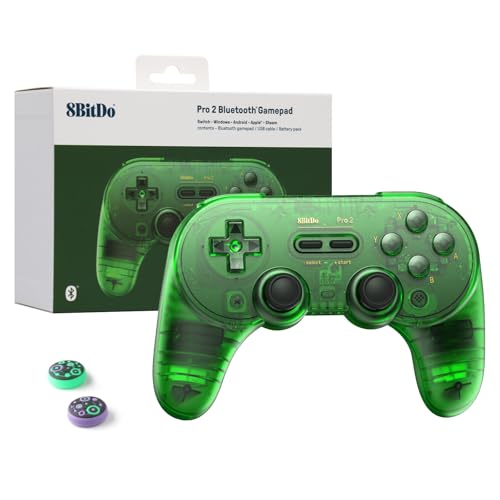
A four-way slider flips it between Switch, macOS, D-input and X-input, so Windows reads it as a plain Xbox pad.
The 8BitDo Pro 2 earns the top slot because it is the least fussy way to get a genuine XInput connection on a PC. Flip the four-way mode switch to X-input and Windows reads it as an Xbox pad, no drivers to install. Flip it the other way and it becomes a Switch or macOS controller, which is why one pad can cover a desk PC and a living-room console. That 1000 mAh built-in lithium battery is also the largest capacity on this list, and 8BitDo rates it at 20 hours of play with 4 hours to charge.
What wins people over is the overall controller feel — a solid, old-school build that buyers rate as one of the best third-party options going. The Pro-level back buttons sit where your fingers already rest, and you can assign any function or macro through the 8BitDo Ultimate Software. Three profiles switch on the fly, so you can keep a racing layout and a shooter layout queued up without opening a menu mid-match. Those thumb grip caps in the box are a small thing, but they keep the analog sticks clean.
Here is the catch a buyer should know before ordering. Compatibility is the most-discussed topic in this pad’s reviews, and it cuts both ways: on Switch, some players hit connection quirks and the odd report of the pad dropping out entirely. On PC in X-input mode the story is calmer, but budget a minute to test your first pairing at home rather than assuming it just works. The 6-axis motion sensor and adjustable vibration are welcome extras, though neither is a deal-maker on Windows where most shooters ignore them.
What earns its place
- 1000 mAh battery, rated for 20 hours of play and 4 hours to charge
- Four-way mode switch flips into X-input for Windows without software
- Two back buttons and three on-the-fly profiles via 8BitDo Ultimate Software
- Plugged in or wireless, thanks to Bluetooth plus the included USB cable
Where it needs patience
- Switch pairing is the weak point — budget a test session at home
- The controller is chunkier than a slim pad, so very small hands may notice the size
Built for: the player who wants one pad to jump between a Windows PC and a Switch without learning two layouts.
Think twice: if you refuse to ever touch a mode switch, a pad that auto-detects will feel simpler.
2. abxylute C6 Controller
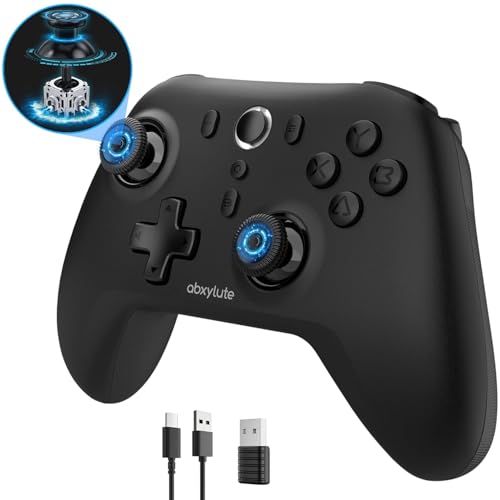
A budget pad that pairs with Windows, Android, iOS, Mac, Steam Deck, Switch and Tesla, with three ways to connect.
The abxylute C6 is the value champion of this group, and the first thing to note is reach: Windows, Android 8.0 and up, iOS 13 and above, Mac, Steam Deck, Switch and even Tesla Model 3 and Model Y. For a first XInput pad or a second one for a laptop bag, that combination is tough to argue with.
The 1000 Hz polling rate is the headline spec, and it means the pad reports your stick position to the PC 1000 times per second — the abxylute hits that figure in wired and Bluetooth dongle modes. Compare that to the GameSir G7 Pro 8K above, which runs up to 8000 Hz, and the gap is real in shooters, but 1000 Hz is still a solid, responsive feel for most players. Both joysticks and both triggers use Hall Effect sensing, so there is no physical wear track to drift on. A 600 mAh battery delivers up to 18 hours of play, which is smaller than the 8BitDo Pro 2’s 1000 mAh but plenty for a weekend of sessions.
Four vibration levels let you dial the rumble down from 100% to 30%, and the turbo feature can be mapped to any button. In Switch games the gyroscope kicks in for motion aiming. The honest trade-off is the fine print on the dongle: abxylute explicitly says it is a Bluetooth dongle, not 2.4G, and recommends it for the lowest latency. Plug it in wired if you want the sharpest response. Build quality leans light rather than tank-like, which fits the price but means it may not survive being tossed in a backpack without a case.
Best-value call: for the cost of one premium pad you can kit out a spare bag and a desktop setup, and both will read as XInput in Windows games.
Plain-language trade-off: the 600 mAh battery and light build are the price of the low sticker; treat it as a desk pad, not a travel tank.
Reach for this if: you want Hall Effect sticks and 1000 Hz response without spending premium money.
Look elsewhere if: you need the pad to double as a rugged travel companion.
3. FLYDIGI VADER 5S Controller
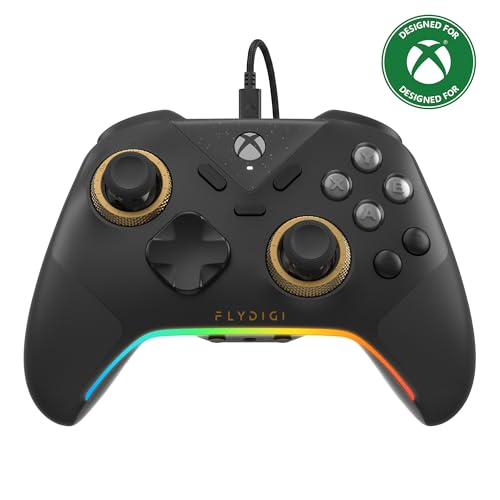
A wired pad with a physical dial that sets stick tension from 40gf to 100gf without opening software.
If you play both shooters and racing games on one PC, the Vader 5S answers a question most pads ignore: how stiff should the sticks be? A dial on the controller lets you set tension anywhere from 40gf to 100gf, a measure of how many grams of force it takes to move the stick. Lighten it for flick shots in an FPS, tighten it for smoother steering in a racing game. Those Hall Effect sticks also recenter cleanly and ship with zero deadzone, so a worn-in pad does not slowly lose its aim.
The trigger story is just as physical. FORCESWITCH triggers toggle between micro-click and Hall Effect linear modes, so you can pick a snappy trigger for shooting and a smooth travel trigger for throttle control. Four vibration motors, split between the triggers and the grips, throw recoil and road feel back into your hands. Seventeen buttons in total, with six remappable through the FLYDIGI software, give you plenty to work with — map jump, crouch and ping to the rear and shoulder buttons and keep your thumbs on the sticks.
Two facts shape the buying decision. This is a wired controller, so there is no battery to charge or lose — the cable stays in. And ergonomics, in the long run, come down to the grip, which the reviews call out as comfortable across marathon sessions. The trade-off is the missing cable freedom; if you mostly play from a couch across the room, a wired pad will feel tethered. For a desktop PC setup, that cable is a non-issue and the tension dial earns its keep.
Reasons it stands out
- Physical joystick tension dial from 40gf to 100gf, adjustable mid-game
- Trigger switch toggles between micro-click and Hall Effect linear travel
- Four vibration motors across the triggers and grips
- Six remappable buttons plus quick in-game profile changes
Buy with eyes open about
- Wired only — no wireless mode on this model
- The 450 g body is on the heavier side, so lighter pad fans may feel the difference
The honest verdict: if you want a wired desk pad with knobs you can actually feel, this is the tuner’s choice.
Not your pad: if you play from a couch and want cable freedom, pick a wireless model instead.
4. GameSir G7 Pro Controller
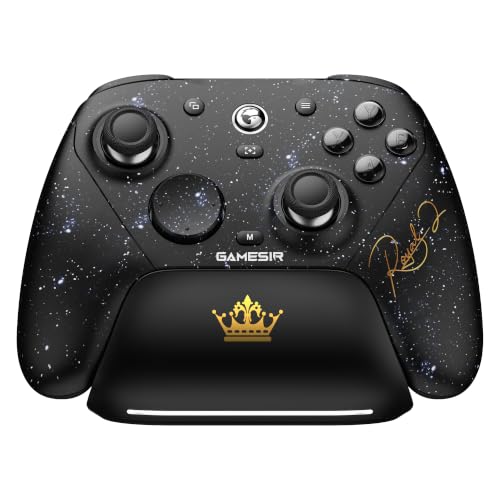
8000 Hz polling over wired and 2.4GHz wireless — the highest report rate on this page.
The GameSir G7 Pro 8K exists for one reason: latency. Its 8000 Hz polling rate on PC, over both wired and 2.4GHz wireless, means the pad reports your stick position 8000 times per second. Compare that to the abxylute C6 at 1000 Hz and you can see where the extra money goes. In competitive FPS play, that density of reports helps the game track your aim at tight margins. It ships with a charging dock and rechargeable battery, so the pad has a home on your desk instead of a tangle of cables.
The Gen-2 TMR sticks mix the precision of a traditional analog stick with the anti-drift durability of magnetic sensing, so there is no carbon track to wear through. Optical micro-switch ABXY buttons and a mechanical micro-switch D-pad give a crisp, clicky feel. Two lockable back buttons plus two mini bumpers each carry up to 32-step macro recording — long combos fire from a single press.
One thing buyers should know before ordering: the G7 Pro 8K is a PC-and-Android-focused pad in this configuration, and its real strengths (8000 Hz, gyro aiming, macro recording) all live in the 2.4GHz or wired mode. If you live on an Xbox Series X console, this is not the pad for that shelf. The six-axis gyroscope is a nice extra on PC for motion aiming in games that support it. With the dual-mode trigger stops, you can flip between linear and clicky response per genre, same as the Vader 5S below.
The case for the 8K badge: if you chase every millisecond of input lag in a competitive shooter, the 8000 Hz ceiling here is the highest on this page.
The catch: for racing, RPGs and platformers, 8000 Hz will not be felt. Do not pay for it if you do not compete.
The crowd it suits: competitive PC players who want the fastest report rate here and a dock for the pad.
skip it if: console-only play is your routine — this pad’s features are built for Windows.
5. Turtle Beach Victrix Pro BFG Controller
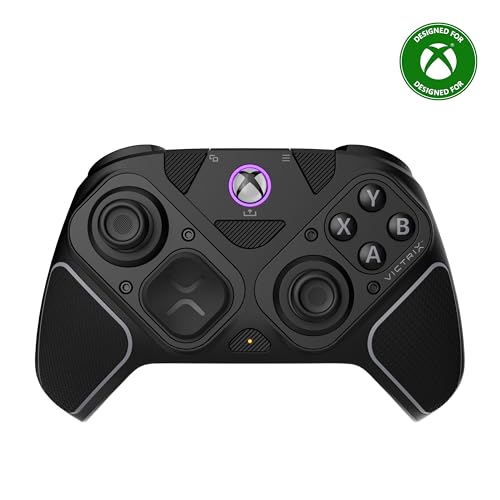
A modular controller with three swappable Hall Effect modules, 11 interchangeable parts and a carrying case for the spares.
The Victrix Pro BFG Reloaded treats controller preference as a hardware question. Three customizable modules, all with Hall Effect internals, let you move the stick and button layout around rather than accept one shape forever. The bundle includes 11 interchangeable components and a module tool, so you can swap pieces at the desk. Turtle Beach also throws in a six-button fightpad module with Kailh microswitches — useful if you play fighting games and want dedicated buttons without buying a separate stick.
Its 5-stop Hall Effect clutch triggers include a hair-trigger mode for faster shooting input, and four mappable quick-action buttons sit within reach. The 3.5mm audio jack carries a lifetime Dolby Atmos subscription for headset play. Officially licensed by Xbox, it works wired or wireless, and the rechargeable battery is rated to 20 hours per charge. A free Victrix Control Hub app on Xbox and PC handles the deeper remapping.
Where does this one land realistically? The customization is winning praise — changing the module layout is the heart of the pitch and buyers lean into it. The recurring gripe is the trigger and button response: the trigger locks work for many, but the extra shoulder buttons can get in the way of normal grip for some players. Treat this as a pad that rewards dialing-in. If you never touch the modules, you are paying for flexibility you will not use.
Fit for the fiddler: the 3 modules, 11 interchangeable parts and fightpad option make this the pad for someone who wants to experiment.
Fair warning: the extra buttons take a session or two to get used to; the first hour will feel eccentric.
Made for: tinkerers who play multiple genres and want a fightpad option in the same box.
Steer clear if: you want a controller that is done and set on day one with nothing to adjust.
6. ASUS ROG Raikiri II Controller
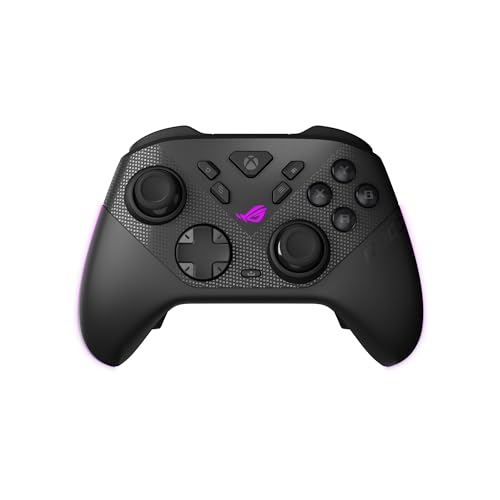
A 50-hour battery rating and tri-mode 2.4GHz, Bluetooth and USB-C for players who hate hunting for a cable.
The number that sets the ROG Raikiri II apart is 50 hours — that is the battery rating ASUS publishes, and it dwarfs most pads on this page. If you game in long sessions and hate stopping to plug in, that is the spec to care about. The tri-mode connection keeps it flexible: low-latency 2.4GHz RF, Bluetooth, or wired USB-C, and it is certified for Xbox over both USB-C and 2.4GHz RF. ROG SpeedNova wireless tech runs underneath the 2.4GHz mode.
The pad carries a 1000Hz polling rate in PC wired and 2.4GHz wireless modes, so while it does not match the GameSir’s 8000 Hz, it is a genuinely responsive pad. The TMR joysticks use magnetic sensing and ASUS says they draw less power than Hall Effect while delivering anti-drift performance. Dual-mode triggers toggle between micro-switch with short travel and TMR sensor triggers with full travel. Four programmable rear buttons, a skin-friendly anti-slip grip, and travel case round out the package.
The honest concern is consistency. Build quality is the split topic in this pad’s reviews — some like the solidity, others find it flimsy, and connection stability is a recurring complaint in the mix. That does not make it a bad pad; it means buy it from a source with a return window and test your wireless handshake in the first week. The 9.6 ounce weight is light enough for long sessions without feeling hollow.
What the money buys
- 50-hour battery rating — the longest on this list by a clear margin
- Tri-mode: 2.4GHz RF, Bluetooth and wired USB-C
- Certified for Xbox over both USB-C and 2.4GHz RF
- Four programmable rear buttons and dual-mode trigger travel
What to watch for
- Wireless stability is the recurring complaint — test it early
- Build feel splits opinion; some want a chunkier shell
The right buyer: someone who games for hours and wants to charge the pad roughly twice a month, not twice a week.
Second-guess it: if you have had wireless dropouts on other pads in your home, test this one in the return window.
7. XBOX Elite Series 2 Core Controller

An official Xbox controller, so Windows reads it as an Xbox pad with no mode switch to set.
When you want XInput with zero fuss, there is a simple argument for going straight to the source: the Xbox Elite Series 2 Core is an Xbox controller, so Windows reads it as one, period. Xbox Wireless, Bluetooth and USB-C give you three connections, and it plays across Xbox Series X|S, Xbox One, Windows PC and cloud streams. The Robot White shell was designed with Xbox Design Lab, so the color runs across the top case, bumpers, triggers and ABXY buttons.
The adjustments live where your hands are. Adjustable-tension thumbsticks let you change resistance to fine-tune aim, and three-step hair trigger locks shorten the pull for faster response in competitive play. A wrap-around rubberized grip keeps the pad planted over long sessions. The battery is rated to 40 hours per charge, and a 3.5mm headphone jack takes any wired headset. Through the Xbox Accessories app you can remap buttons, adjust dead zones, and even pick the color of the Xbox button light.
This page’s biggest review base belongs to this pad, and the honest read is that it splits the room. Many call it the best controller they have owned; others hit reliability problems — a pad that stops responding, or a shell that does not last. Core Essentials also means what it says: the parts you need are included, but the extra paddles, thumbsticks, D-pad, carrying case and dock live in the Complete Component Pack, sold separately. Know what is in the box before you order.
Where it wins: official XInput behavior with no mode switch, plus adjustable tension and hair triggers for anyone who tunes their aim.
The honest caveat: the reliability split is real, and this is the Core model — extra paddles and cases are a separate purchase.
Choose it for: a console-first player who wants the official pad and does not want any mode-switching ritual.
Consider the trade-off: if you want paddles and a case in the box, plan for the component pack.
8. Nacon Revolution X Unlimited Controller

An LCD screen on the pad handles button mapping and audio mixing without opening a PC app.
The Revolution X Unlimited is the most physically tunable pad in this lineup, and it makes its case on the hardware side. Hall Effect joysticks and triggers use magnetic sensing to avoid drift. You get a 4-way D-pad and a 6-way D-pad in the box, three sets of weights, three joystick head shapes (concave, convex, high-dome), and two joystick ring sizes. Nacon counts more than 60 customization combinations from those parts — a real number, not marketing padding.
The LCD screen on the controller is where the distinctive side shows. It handles mapping and audio source mixing without you opening a PC app. High-performance PC mode is rated at 1ms latency over wired and 2ms over wireless, and the gyroscope can simulate a joystick or the D-pad. Six mappable shortcut buttons, plus the ability to map PC keyboard keys to buttons, gives competitive players room to build a layout. Four vibration motors — two in the handles, two in the triggers — keep feedback where you feel it.
Battery life is the trade-off on this one: it is rated to 10 hours, the shortest wireless runtime on this page. A charging station is included, so the pad has a home and the top-ups are less of a chore, but if you game in long stretches the Raikiri II’s 50-hour rating is the better fit. Ergonomics get warm reviews — comfortable, with precise dead zones. Connectivity is the more mixed area, with some preferring the wired route for stability. The one-month Game Pass Ultimate code in the box is a bonus for new subscribers only.
Why it earns a slot
- Over 60 customization combinations from the included parts
- LCD screen for on-pad mapping and audio mixing
- Hall Effect sticks and triggers, plus 4-motor vibration
- 1ms wired / 2ms wireless latency in PC mode
What you accept
- 10-hour battery is the shortest on this list
- Connectivity could use the wired cable for a rock-solid link
Perfect for: the player who measures a controller by how many parts they can swap, and does not mind charging more often.
Not your pick: if you want maximum battery between charges, look at the long-runtime wireless models above.
Know the Specs
Polling Rate (Hz)
Polling rate is how many times per second the controller tells your PC where its sticks and buttons are. The unit is hertz, written Hz. A 1000 Hz pad reports 1000 times each second; the GameSir G7 Pro 8K reaches 8000 Hz. Higher rates reduce the delay between your thumb moving and the game registering it, which is why shooters and fighting games benefit most. In slower genres, a lower rate is rarely noticeable to the player.
Hall Effect vs TMR Sticks
Both are magnetic stick designs, which means no physical contact track wears down and drift is much less likely. Hall Effect sticks use a magnetic field to sense position. TMR (tunnel magnetoresistance) is a newer variation that several pads here use — ASUS and GameSir both lean on it, and ASUS says it draws less power than Hall Effect. For the buyer, both spell fewer drift headaches than standard analog sticks; the difference is in power efficiency and feel.
XInput Mode and the Four-Way Switch
XInput is the standard Windows uses to read an Xbox-style pad without extra software. Some controllers make the switch automatic, while others like the 8BitDo Pro 2 use a physical mode switch — its slider covers Switch, macOS, D-input and X-input. If your controller has one, you must set it to X-input before launching a game. A pad without a switch usually detects the connection type for you.
Battery Capacity (mAh) and Runtime
Battery capacity is measured in milliampere-hours, or mAh — a bigger number is a bigger tank. The 8BitDo Pro 2 carries 1000 mAh rated for 20 hours; the abxylute C6 has 600 mAh rated for up to 18 hours; the Nacon runs 10 hours, the Elite Series 2 40 hours, and the ROG Raikiri II 50 hours. Runtime always depends on whether vibration and gyro are running, so treat the manufacturer’s hours as a ceiling rather than a promise.
Common Questions
Will an XInput controller work with every Windows game?
What is the difference between XInput and DirectInput?
Do Hall Effect sticks actually stop controller drift?
Is an 8000 Hz polling rate really noticeable compared to 1000 Hz?
Can I use these controllers wirelessly on a PC?
How long does it take to charge a wireless controller?
What are back paddles and are they worth having?
Does the Xbox Elite Series 2 Core come with extra paddles and a case?
Can I map keyboard keys to these controllers on PC?
The Bottom Line
For most people shopping for the xinput game controller, the winner is the 8BitDo Pro 2 — a real X-input mode that Windows reads without fuss, a 1000 mAh battery rated at 20 hours, and a price that sits in the middle range. If you chase input lag in competitive shooters, the GameSir G7 Pro 8K brings the highest polling rate on the page plus a charging dock. And for a console-first player who wants zero mode-switching ritual, the Xbox Elite Series 2 Core is the official pad that just works. If maximum battery is your priority, the ASUS ROG Raikiri II and its 50-hour rating is the one to pick.
How we choose
We do not accept paid placement. Every pick is matched to a real buyer and a real use-case; we do not hands-on test units.
Sources
Specifications: manufacturer listings and product documentation. Review insights: verified customer reviews, as of July 2026. Pricing: not shown on this page (it changes often); check the current price via the retailer link.
As an Amazon Associate, Tactical Gear Guy earns from qualifying purchases. This does not affect which products we feature.