Specs are compiled from manufacturer listings and verified buyer reviews and can change over time — please confirm the key details on the product page before buying.
You do not need a full desk keyboard to type on an Xbox One. You need the right one — either a small pad that snaps under your controller, or a wired combo you plug into the console’s USB port. The difference matters: a snap-on chatpad keeps your hands on the sticks, while a full keyboard and mouse set is a desktop setup you share with a console. This guide splits the two clearly so you buy the one that actually fits how you play.
This guide is built by comparing the manufacturers’ published specifications and the patterns across verified customer reviews, so you get each pick’s real strengths and trade-offs instead of marketing spin.
Below you will find full QWERTY pads, compact 87-key wireless combos, and backlit sets, each checked for Xbox compatibility and everyday typing comfort, all sorted into the best Xbox One Keyboard picks for your setup.
Top Picks


How To Choose The Best Xbox One Keyboard
Start by deciding where your hands will be while you type. A chatpad is a small keypad that clips onto the bottom of your Xbox controller, so your thumbs stay near the sticks. A wired combo is a regular keyboard and mouse that sits on a desk or lap board and plugs into the console. Pick the one that matches where you type, not which sounds more capable.
Chatpad or full keyboard
A chatpad is for quick messages: redeeming a code, replying in party chat, searching the store. It adds almost nothing to the controller’s weight, and it draws its power from the controller itself, so there is no charging cable to manage. A full keyboard is for longer typing sessions and for games that actually support mouse and keyboard input — but you lose the couch-and-controller feel.
How the wireless link works
Most chatpads use a 2.4GHz connection, which is the same short-range radio band used by wireless mice. It pairs through a small USB receiver or directly with the controller, and it is generally stable within a room. Range figures in the specs (8-10 meters, or 10 meters on one model) describe ideal open space, so treat a wall or a floor between you and the console as a real limit.
Count the keys before you commit
Key counts vary wildly here, and the number tells you a lot. A pad with 47 keys gives you 0-9, the alphabet, and some function keys — enough for real sentences. A pad listed with 19 or 10 buttons is a shortcut pad, not a typing pad. Full desktop keyboards sit around 87 keys for a compact layout or 104 keys with a number pad.
Side-by-Side Comparison
| Model | Best For | Type | Keys | Weight | Amazon |
|---|---|---|---|---|---|
| Gaming Keyboard and Mouse 104 Keys (CHONCHOW)★ Best Overall | Full desk setup with mouse | Wired combo | 104 | 0.91 kg | Amazon |
| FYOUNG Keyboard for Xbox Series X/S ControllerMost Popular Chatpad | Quick in-game chat | Controller chatpad | 100 | 0.08 kg | Amazon |
| Keyboard and Mouse Gaming LED Combo 4800DPITop Performer | Long typing sessions | Wired combo | 104 | — | Amazon |
| Pomya Game Controller Keyboard | Low-profile chatpad fit | Controller chatpad | — | — | Amazon |
| FASTSNAIL Wireless Controller Keyboard | Typing from the couch | Controller chatpad | 16 | — | Amazon |
| Auarte Keyboard for Xbox Series X/S, One, Elite | Elite controller owners | Controller chatpad | 47 | — | Amazon |
| TNP Xbox One Chatpad Controller Keyboard | Thumb-friendly layout | Controller chatpad | 19 | — | Amazon |
| MoKo Green Backlight Keyboard | Typing in a dark room | Controller chatpad | 10 | — | Amazon |
| Wireless Gaming Keyboard Mouse LED Combo | Cord-free desk setup | Wireless combo | 87 | 0.8 kg | Amazon |
Detailed Reviews
1. Gaming Keyboard and Mouse 104 Keys
Our pick — 4.5+★ from 300+ verified ratings; the strongest balance of quality and price.
The complete desk answer: a full 104-key board and a matching mouse in one plug-and-play box.
If you want to type properly on your Xbox One rather than thumb-peck a controller pad, this is the setup to beat. You get a 104-key layout — that means the full alphabet, a number row, a number pad, and 12 multimedia function keys on top. The keys carry an RGB backlight, which is coloured lighting under each cap, so the characters stay readable when the room is dark. Nineteen anti-ghosting keys mean those nineteen press cleanly when you hit several at once, so fast key combinations register instead of dropping out.
The matched mouse is a real part of the value, not a filler. It runs 7-colour breathing backlighting and four DPI settings (800, 1600, 2400 and 4800) — DPI being how far the cursor travels per inch of mouse movement — so you can slow it down for precision or speed it up for sweeping turns. It also has an anti-skid scroll wheel and an ambidextrous shape, so it works in either hand. Connection is plain USB with no drivers or software to install, which is exactly what you want on a console.
Here is where the weight headline lands. At 0.91 kg this combo is a genuinely hefty desk piece, and that is the point — it stays put. Compare it to the FYOUNG chatpad at 0.08 kg and the difference is obvious: one is a desk fixture, the other is a clip-on accessory. Owners consistently point to build quality first and functionality right behind it, and the price-to-performance read comes up often too. The honest catch is in the compatibility column: a handful of buyers hit setup friction pairing it with a console rather than a PC, so check your specific game and console settings before you assume mouse-and-keyboard support.
What earns the top spot
- Full 104-key layout with number pad and 12 multimedia keys
- 19 anti-ghosting keys keep fast combos from dropping
- Mouse included with four DPI steps up to 4800
- Plug-and-play USB — no drivers, no software
Where it asks something of you
- 0.91 kg makes it a fixed desk setup, not a lap accessory
- Console support varies by game, so verify before relying on it
- Wired, so you are tethered to the console’s USB port
Made for: the player who wants one proper keyboard-and-mouse rig that handles chat, store searches and supported games without buying two separate pieces.
Think twice if: you play from the couch and want zero cables — a clip-on chatpad suits that far better.
2. FYOUNG Keyboard for Xbox Series X/S Controller
A full QWERTY pad that clips under your controller and never needs a charging cable.
Text entry is the whole job here, and the FYOUNG does it without dragging you out of the game. It carries a full QWERTY layout — 100 buttons’ worth — so you can type a message, enter a code or send an email between matches. The 2.4GHz link is how it talks to the controller, and it pulls its power straight from the controller itself. That means no battery, no charging lead, no mid-session swap.
What wins people over is the chatting itself. Players describe it as the difference between replying properly and giving up on the on-screen keyboard. There is also a dual audio arrangement: the original earphone jack plus a 3.5mm audio port, so you can plug in headphones without unclipping the keyboard first. And here is the weight contrast that matters — at 0.08 kg versus the 0.91 kg desk combo above, which is why it disappears onto the controller instead of dominating a table.
The catch is reliability, and it is worth going in with clear eyes. Functionality and connectivity draw mixed feedback, and a share of buyers report the pad working fine at first and then cutting out after a few days. Fit is another area where experiences split — some controllers take it cleanly, others feel tight. Buy it as a chat convenience for a controller you already like, keep the receipt, and test it in the first few days.
The typing experience: firm, silica-gel-topped keys over a metal dome switch give a positive click that suits short messages far better than the on-screen keyboard.
The fit question: it is built for Xbox Series X/S and Xbox One/One S controllers, and it works after a software update — so update the console before you judge it.
Reach for this if: your main irritation is typing party-chat messages with a thumbstick and you want the cheapest fix that keeps your hands on the sticks.
Look elsewhere if: you need rock-solid long-term reliability above all — a wired desk board is the steadier bet.
3. Keyboard and Mouse Gaming LED Wired Combo
The high-DPI sleeper: four sensitivity steps up to 4800 on a wired combo that types all night.
Speed is what separates this from the cheaper combos. The mouse tops out at 4800 DPI across four steps (800, 1600, 2400 and 4800). That higher top step suits big, fast cursor sweeps across a large TV screen. The keyboard side runs 104 keys with 19-key anti-conflict, meaning those nineteen keys register simultaneously so combos and quick inputs do not cancel each other.
Where it pulls ahead for long sessions is the visual detail. Characters are lit so they read clearly in a dark room, and the keyboard offers three brightness levels with two modes — constant or a rotating rainbow. The mouse mirrors that with seven-colour breathing backlight and shows its current DPI level through the lighting, so you can tell your setting at a glance. Cables are a high-strength sleeved fibre type, which handles being dragged around more gracefully than a thin lead.
Build quality is the thing owners talk about first, and the value read follows closely behind. Lighting is the honest variable — the spec sheet promises brightness, and the real-world view is a little more divided, with some finding it glowing and others wanting more punch. Durability also carries some mixed notes over the very long haul. Buy it as a daily driver for its DPI and keys, not as a long-term tank.
The gains that matter
- 4800 DPI mouse with four sensitivity steps
- 104 keys with 19-key anti-conflict
- Sleeved fibre cables resist everyday abuse
- DPI level shown through the mouse lighting
The honest limits
- Brightness impressions split between buyers
- Long-term durability draws some mixed notes
- Wired only — no wireless option here
Best matched to: players who want the fastest mouse sensitivity in this lineup without moving to a premium tier.
Worth knowing: the lighting is the one area where the listing and real-world impressions drift apart, so buy it for the DPI and keys, not the glow.
4. Pomya Game Controller Keyboard
A low-profile chatpad that keeps your grip natural while you type between rounds.
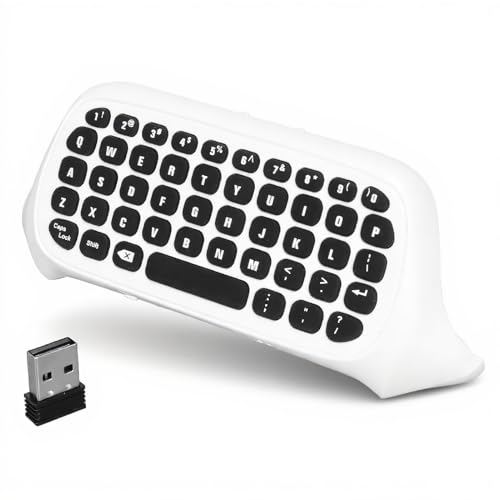
For a chatpad, staying out of the way is the whole trick. This one clips onto Xbox Series X, Series S, Xbox One and Xbox One S controllers and sits low enough that your fingers reach it without shifting your hold. Power comes from the controller through the 2.4GHz connection, so there is no charging cable to route around your lap — a genuine gain over anything battery-powered.
The audio side is handled properly too. A built-in 3.5mm headphone jack lets you run game audio and voice chat through your own headphones without unclipping the keyboard first, which is the small convenience that adds up over a long session. Buttons are described as sturdy with a responsive mechanism, aimed at the things you actually do with a chatpad: send a message, enter a code, talk in a group.
One thing to note honestly: this pad has the smallest review footprint in the lineup, so the consensus is thinner than on the big names. The design brief is sound, the snap-on fit is the point, and the audio passthrough is a real feature. Just expect less owner history to lean on. For a couch player, that clip-on-and-forget fit is the whole appeal.
The fit design: compact enough to stay on the controller during play, so you are not clipping and unclipping it every match.
The setup: it snaps into place and draws power from the controller, so there is nothing to charge and nothing to configure.
Pick it when: you want a chatpad with a headphone jack and a genuinely low profile that will not throw off your aim.
Bear in mind: the owner track record is thinner than the major chatpad names, so a return window is your friend.
5. Wireless Controller Keyboards for Xbox Series X/S

A 10-meter wireless reach that lets you type from the back of the couch.
Range is the number that jumps out. This FASTSNAIL pad holds a wireless connection up to 10 meters (roughly 33 feet) with no delay, so you can sit across a room and still get a clean signal. Setup is a two-step affair: plug the receiver into the console’s USB port, pair the matching code, and you are typing. No drivers, no software install.
Chat is treated as a two-way job. It handles text input for messages and codes, and it also supports online group chat when you plug headphones into the 3.5mm audio jack or the original headset jack. The key surface uses imported silica gel over metal dome switches, which the listing describes as giving a better hand feel than plain membrane keys. The lightweight design is meant to let your palm support it for long stretches without strain, and there is a year of after-sale support behind it.
The dividing line is function. What earns praise is the snug, unobtrusive fit on Series X controllers — it does not get in the way of play. Where the story splits is whether the unit works right from the start at all, with a portion of buyers hitting a pad that simply will not respond. Its listed button count is also modest at 16, so read the layout carefully if you expect a full alphabet. Buy it for the 10-meter range, then test it on day one while the return window is open.
Why couch players like it
- Wireless range up to 10 meters (33 feet) with no delay
- Dual 3.5mm and original headset jacks for voice chat
- Lightweight build meant for long sessions without strain
- Snug fit that stays out of the way during play
What to weigh carefully
- Some units fail to respond at all, so test it early
- Only 16 listed buttons — confirm the layout suits full typing
- Requires the console USB port for its receiver
The right call for: anyone whose console is far from the sofa and who wants a chatpad that reaches without a cable.
Before you commit: the all-or-nothing reliability is the real risk, so open and test it on day one.
6. Auarte Keyboard for Xbox Series X/S

The one that also fits your Elite controller — and gives you 47 real keys to type on.
Compatibility is the reason to look here. This Auarte pad fits Xbox Series X/S, Xbox One, One X/S, and both Elite controllers — the Elite One and Elite 2 — which makes it the pick for anyone who upgraded their controller and found the usual chatpads no longer sit right. It also carries a 3.5mm audio headphone jack and speaker function, so a headset plugs straight into the pad.
The key count is the other differentiator. Forty-seven keys covers 0-9, all 26 letters, and a set of assistant keys — genuinely enough to update a profile, message friends or punch in a code in seconds. For context, the FYOUNG pad above lists 100 buttons while the TNP pad lists 19; this sits in the middle, sized for real typing without a full desktop footprint. Installation is a simple align-and-snap with no charging cable needed, and the USB receiver stores back in the controller slot when you are done.
Fit and ease of use are what come up first in a positive light — it goes on cleanly and stays put. The honest caveat is that the typing feel and long-term durability draw a spread of opinions, so it is best bought as a chat accessory rather than a primary keyboard. Range is listed at 8-10 meters (26-33 feet), which covers a normal living room.
The standout fit: Elite 1/2 support is the rare feature here — most chatpads stop at the standard controller.
The honest note: typing feel and durability are the areas where opinions spread, so judge it fast inside the return window.
Suits you if: you play on an Elite controller and need a chatpad that actually clips on.
Better options exist if: you want a desk keyboard for long typing — this is a controller add-on, not a replacement board.
7. TNP Xbox One Chatpad Controller Keyboard Attachment
Low-profile keys spaced for two thumbs, built to speed up codes and party chat.
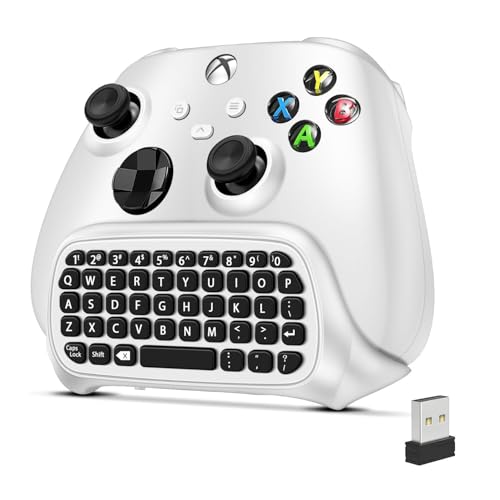
The design idea is simple: make a pad you type on with both thumbs rather than one. Low-profile, well-spaced keys sit under your thumbs so you can message teammates, redeem codes or search the store without putting the controller down. Setup is plug-and-play — a 2.4GHz receiver and a 3.5mm audio jack, with no drivers and no extra cables.
It covers the controller bases you would expect: Xbox One, One X/S, Xbox One Elite, Elite 2, and Series X/S. Power comes straight from the controller, so there is no separate device to charge or battery to swap mid-match. The lightweight attachment snaps under the gamepad without covering the buttons or analog sticks. Range is described as couch distance with no noticeable lag, which is all a chatpad really needs to do.
Here is the honest part, and this one deserves your attention more than most. Functionality and overall quality draw a genuinely split verdict, and the value question draws the most pushback — some buyers feel the asking price outstrips what arrives. Its listed button count is 19, so if you expect a full alphabet be sure to check the layout before ordering. The thumb-spaced layout is sound, but quality and value complaints make it a gamble at this price.
Reasons it still earns a look
- Plug-and-play 2.4GHz setup with no drivers
- Powred by the controller — nothing to charge
- Snaps on without blocking buttons or sticks
- Wide controller compatibility, including both Elite models
Genuine reasons to pause
- Quality and function draw a split verdict
- Value is the most-challenged point
- 19 listed buttons — check you get the full layout
Consider this when: you want a thumb-spaced layout for fast code entry and can accept a little inconsistency.
Safer alternatives: the elite-ready Auarte pad offers more keys and a broader fit for the same controller.
8. MoKo Green Backlight Keyboard for Xbox One Controller, Black

Green-lit keys so you can write messages in a dark room without hunting.
The backlight is the feature that sold this one to a lot of people, and it is easy to see why. Push it into the Xbox One controller and press the Xbox key, and the keys light up green. If you stop typing for 10 seconds, the light drops into a power-saving state on its own. That means you can write a message in a dark room without turning the lights on, and you are not draining the controller while the pad sits idle.
Chatting is the core function: firm buttons for text, email and code entry, with 2.4GHz wireless transfer through the included receiver. It also supports 4-stage 3.5mm earphones, so audio runs through the pad without unclipping it. The enclosure is ABS, and the wireless connection draws power from the controller, so there is no battery to manage. The included kit is the keyboard, the 2.4G receiver and a manual.
Ease of setup and the backlight are the two things that get talked about in the nicest terms. The recurring gripe is reliability over time — a portion of pads eventually stop working or lose their pairing — and the build draws more mixed feedback than you would hope. It is the pick for a dark-room typist who values the glow, so long as you treat it as an accessory rather than a permanent fixture.
The dark-room win: green backlighting plus a 10-second idle timeout gives you readable keys without lighting up the whole room.
The reliability asterisk: long-term pairing and build quality are the weak points, so keep that return window open.
Choose this if: you type messages at night and want lit keys that do not constantly drain power.
Prefer a desk keyboard if: you need something that will last years without babysitting.
9. Wireless Gaming Keyboard Mouse

Cord-free and rechargeable: a 2000mAh keyboard battery and a 500mAh mouse.
For a wireless setup, the numbers that matter are the batteries. This CHONCHOW combo runs a 2000mAh built-in battery in the keyboard and a 500mAh battery in the mouse, with a charging cable included. You are not buying batteries on repeat. The keyboard sleeps after 60 seconds idle and the mouse after 10 minutes, and any key wakes it up, so the charge goes further between top-ups. One caution from the maker: only charge with a 5V2A adapter.
It drops to an 87-key layout, which sheds the number pad and saves desk space compared with the 104-key combos above. That compact shape is also the more portable one — it fits in a backpack if you want to use it on PC or share it with a laptop. Both pieces connect over 2.4GHz and share one USB adapter, and they can also be used separately. The effective distance is 10 meters with no delay, matching the wired boards on responsiveness.
The rainbow backlight runs three brightness and breathing-speed settings, and all keys are lit so you can find them in the dark. Compatibility is wide on paper — PC, laptop, PS3, PS4, PS5, Xbox and Mac — but the maker is upfront that console support depends on each game’s own settings. Check that before you count on it for a specific title. Appearance and the soft backlit look came in for warm words; connectivity drew a spread of experiences, particularly around PS5.
Where the value shows up
- 2000mAh keyboard and 500mAh mouse batteries, cable included
- Auto-sleep at 60 seconds (keyboard) and 10 minutes (mouse)
- 87 keys save desk space and travel well
- One shared 2.4GHz adapter, usable separately, 10m range
Details to plan around
- Console support depends on each game’s settings
- Connectivity experiences vary, especially on PS5
- Requires the specific 5V2A charger for charging
Made for: budget-conscious buyers who want a cord-free keyboard and mouse combo with built-in batteries.
Check first: confirm your specific game supports mouse and keyboard on console before you buy.
Know the Specs
Chatpad vs. Full Keyboard
A chatpad clips under your controller and keeps your hands near the sticks — best for messages, codes and party chat. A full keyboard, like a 104-key or 87-key combo, sits on a desk for longer typing and supported mouse-and-keyboard games. Pick by where your hands sit while you type, then use key count to confirm the layout.
Key Counts and Layouts
47 keys means the full alphabet plus a number row — real typing. 87 keys is a compact desktop layout without a number pad. 104 keys adds the number pad and multimedia keys. Pads listed at 19 or 16 buttons are shortcut pads, so check the actual layout before expecting full sentences.
Power and Charging
Most chatpads draw power directly from the controller, so there is nothing to charge. Wireless combos use built-in batteries (2000mAh keyboard and 500mAh mouse on one model) and need a charging cable. Pay attention to any charger-voltage requirement in the listing, and note the idle sleep timers that extend between-charge life.
2.4GHz Wireless and Range
2.4GHz is a short-range radio band used by wireless mice and keyboards. It gives low-latency typing without pairing headaches. Range figures like 8-10 meters or 10 meters assume open space, so a wall or floor can cut them shorter. If your console sits far from the sofa, favour the wider-range pads.
Common Questions
Will a chatpad work on an Xbox Series X controller as well as an Xbox One controller?
Do I need to charge a chatpad?
What is the difference between a 47-key and a 104-key keyboard?
Can I use a keyboard and mouse on Xbox One games?
How far can I sit from the console with a 2.4GHz chatpad?
Do the chatpads block the controller’s buttons or sticks?
Can I plug headphones into a chatpad?
Do these keyboards need drivers or software to work?
Will a chatpad drain my controller battery faster?
What DPI should I set on a combo mouse for Xbox?
The Bottom Line
For most players, the xbox one keyboard winner is the Gaming Keyboard and Mouse 104 Keys because it gives you a full 104-key board and a 4800 DPI mouse in one plug-and-play box, with anti-ghosting keys built for real typing. If your priority is quick in-game chat without leaving the sticks, the FYOUNG chatpad puts a full QWERTY layout right under your thumbs. And for Elite controller owners who need a pad that actually clips on, the Auarte is the one to reach for — thousands of owners have made the FYOUNG the most popular chatpad here, but the Auarte is the safer bet for an Elite setup.
How we choose
We do not accept paid placement. Every pick is matched to a real buyer and a real use-case; we do not hands-on test units.
Sources
Specifications: manufacturer listings and product documentation. Review insights: verified customer reviews, as of November 2026. Pricing: not shown on this page (it changes often); check the current price via the retailer link.
As an Amazon Associate, Tactical Gear Guy earns from qualifying purchases. This does not affect which products we feature.