Specs are compiled from manufacturer listings and verified buyer reviews and can change over time — please confirm the key details on the product page before buying.
Faded barcodes, blank gaps in mid-label, or a printer that suddenly refuses to feed are usually not a broken machine. They are a worn printhead or a tired battery — and you can swap either yourself in minutes if you buy the right part number. The trick is matching your exact Zebra model and resolution before you order, because these components are not universal.
This guide is built by comparing the manufacturers’ published specifications and the patterns across verified customer reviews, so you get each pick’s real strengths and trade-offs instead of marketing spin.
Below you get six verified Zebra replacement parts sorted by what each one actually fixes, plus the fit list, resolution, and part numbers spelled out so you order once. I wrote this best zebra printer parts breakdown so you can match a part to your own printer model without a guess.
Top Picks


How To Choose The Best Zebra Printer Parts
The first thing to understand is that these are components, not printers. A printhead is the heated bar that burns the image onto the label — it is the part that wears out, not the whole machine. Get the part number right and the repair takes minutes.
Match the part number before anything else
Every Zebra printhead and battery carries a part number printed on the component itself or in the printer’s manual. A printhead sold as P1037974-010 is built for the ZT230, ZT220 and ZT210 series. It will not seat correctly in a ZD420. Pull your old part, read the number, and search that number in the listing before you add to cart.
203dpi must match 203dpi
Resolution is measured in dpi, or dots per inch — the number of tiny heating points the printhead uses to form each line of the label. A 203dpi printhead belongs in a 203dpi printer. Fitting the wrong resolution throws off the dot spacing and your barcodes scan badly or not at all.
Direct thermal versus thermal transfer
Direct thermal printers burn the image straight onto heat-sensitive label paper with no ribbon. Thermal transfer uses a ribbon that melts onto the label. The two need different printheads, so know which one your GK420 or GX420 is before you order. The part meant for the d-series will not fit the t-series.
Battery swaps: read the milliamp-hours
A mobile Zebra printer runs on a removable lithium-ion pack, and capacity is listed in mAh (milliamp-hours) — how much charge the cell holds. A higher mAh number generally means more printing between charges. Match the part number to your old pack and check the connector before purchase.
Side-by-Side Comparison
| Model | Best For | Resolution | Fits | Part Number | Amazon |
|---|---|---|---|---|---|
| PARTSHE Printhead for GX420D GK420D ZP450★ Best Overall | Desktop label printers | 203dpi | GK420d / GX420d (direct thermal) | 105934-037 | Amazon |
| oliadeo 3400mAh ZQ520 ZQ620 BatteryRecharge Pick | Mobile printer battery replacement | — | QLN320, QLN220, ZQ500, ZQ510, ZQ520, ZQ620 and more | P1051378 / P1089503-003 / P1023901 | Amazon |
| GETPARTS P1037974-010 for ZT230 ZT220 ZT210 | Industrial printers | 203dpi | ZT230 / ZT220 / ZT210 | P1037974-010 | Amazon |
| GETPARTS P1080383-415 for ZD420 ZD620 ZD621 | High-volume desktop runs | 203dpi | ZD621 / ZD620 / ZD420 / ZD421c | P1080383-415 | Amazon |
| GETPARTS P1112640-019 for ZD421 Series | Newest desktop ZD421 models | 203dpi | ZD421 / ZD421d / ZD421t | P1112640-019 | Amazon |
| GETPARTS P1058930-009 for ZT410 ZT411 | Heavy industrial barcode runs | 203dpi | ZT410 / ZT411 | P1058930-009 | Amazon |
Detailed Reviews
1. New Printhead for Zebra GX420D 203dpi 105934-037
Our pick — 4.0+★ from 150+ verified ratings; the strongest balance of quality and price.
The direct thermal printhead that gets a dead GK420d shipping station back to printing labels.
You are standing at a packing bench and the label printer has gone blank. This PARTSHE printhead is the part that gets you back to shipping today, because it drops into the GK420d and GX420d direct thermal models with a 203dpi spec that matches the printer’s own rating.
What wins people over is that it just works once seated — functionality is the thing praised most across its owner base, with the biggest cluster of comments built around a printer coming back to life. Installation lands second in the same reports, with the swap described as straightforward. That is what an owner cares about when the clock is running on a shipping deadline.
Here is the catch, and it is a big one: this printhead fits the direct thermal GK420d and GX420d only. It does not fit the GK420t or GX420t thermal transfer versions. Check the model letter on the front of your machine before ordering. If your printer is a t-model, this is the wrong part.
Where it earns its keep
- 203dpi matches the printer’s own resolution
- Fits a long run of GK420d and GX420d model numbers
- Built for direct thermal printing only
What to watch for
- Will not fit GK420t or GX420t thermal transfer units
- You must match your exact printer part number before buying
The right buy for: anyone running a GK420d or GX420d direct thermal printer that prints blank or faded labels.
Look past it if: your machine is a GK420t or GX420t — this printhead is not made for that thermal transfer setup.
2. oliadeo 3400mAh ZQ520 ZQ620 Battery Replacement
A 3400mAh lithium-ion pack that keeps a mobile Zebra printing through a full shift.
The number to look at here is 3400mAh — milliamp-hours, the measure of how much charge the lithium-ion cell holds — because that capacity is the whole reason you replace a worn mobile printer battery rather than nursing it through another shift. It is a rechargeable lithium-ion pack sized for Zebra’s handheld and mobile printers.
The compatibility list is wide. It covers the QLN320, QLN220, QLN220HC, QLN320HC, ZQ500, ZQ510, ZQ520, ZQ521, ZR628, ZR638, ZQ610, ZR658, ZR668, ZQ620, ZQ511 and ZQ52, and it cross-references part numbers including P1051378, P1089503-003 and P1023901. Read that list against the sticker on your old battery before you buy.
One detail the maker calls out: charge and activate a new battery first, which they say helps it last longer. The pack also carries protection against over-charging, over-discharging, overheating, over-current and short-circuit faults, so a full overnight charge does not leave you worrying about the cell. At a component price, it saves you the cost of a new handheld printer.
The practical reality: a 3400mAh cell in a mobile printer means more scanning and printing per charge before you reach for the dock. Weigh it by the number of labels you print per shift, not by the label on the box.
The honest catch: the fit list is long, so a quick glance is not enough — cross-check your exact Zebra model and the part number on your old pack, because a misread model number sends the wrong battery.
Most useful when: your mobile Zebra falls off charge partway through the day and a new pack costs less than downtime.
Second-guess it if: you cannot confirm your printer’s model or the part number on the old battery — the list is wide, but not universal.
3. GETPARTS P1037974-010 Printhead for Zebra ZT230 203dpi

Built for the ZT200 industrial line, where a dead printhead stops a whole production run.
Industrial printers live on hard duty, and the ZT230, ZT220 and ZT210 are the three this printhead is cut for. At 203dpi it matches the standard resolution of that series. The maker backs it with a 3-month warranty or 30km of printing, whichever comes first.
Downsides? The list price puts it up around the premium end for a component, which is fair for an industrial-grade part. The bigger care point is fit: it seats in ZT200-series machines, including sub-models like ZT23042-T01100FZ and ZT22042-D01000FZ. It does not cross over to the desktop ZD line, so confirm the series on the front panel before you order.
Backed up: that warranty or 30km print target gives a warehouse operator a genuine failure schedule to plan around.
Skip if: your printer is a desktop model from the ZD family — this printhead is built only for ZT200-series industrial machines.
Reach for this if: you run a ZT230, ZT220 or ZT210 and need the printhead matched to a real duty cycle.
Leave it if: the printer on your bench is a ZD-series desktop unit rather than a ZT200 industrial one.
4. GETPARTS P1080383-415 Printhead for Zebra ZD420 203dpi
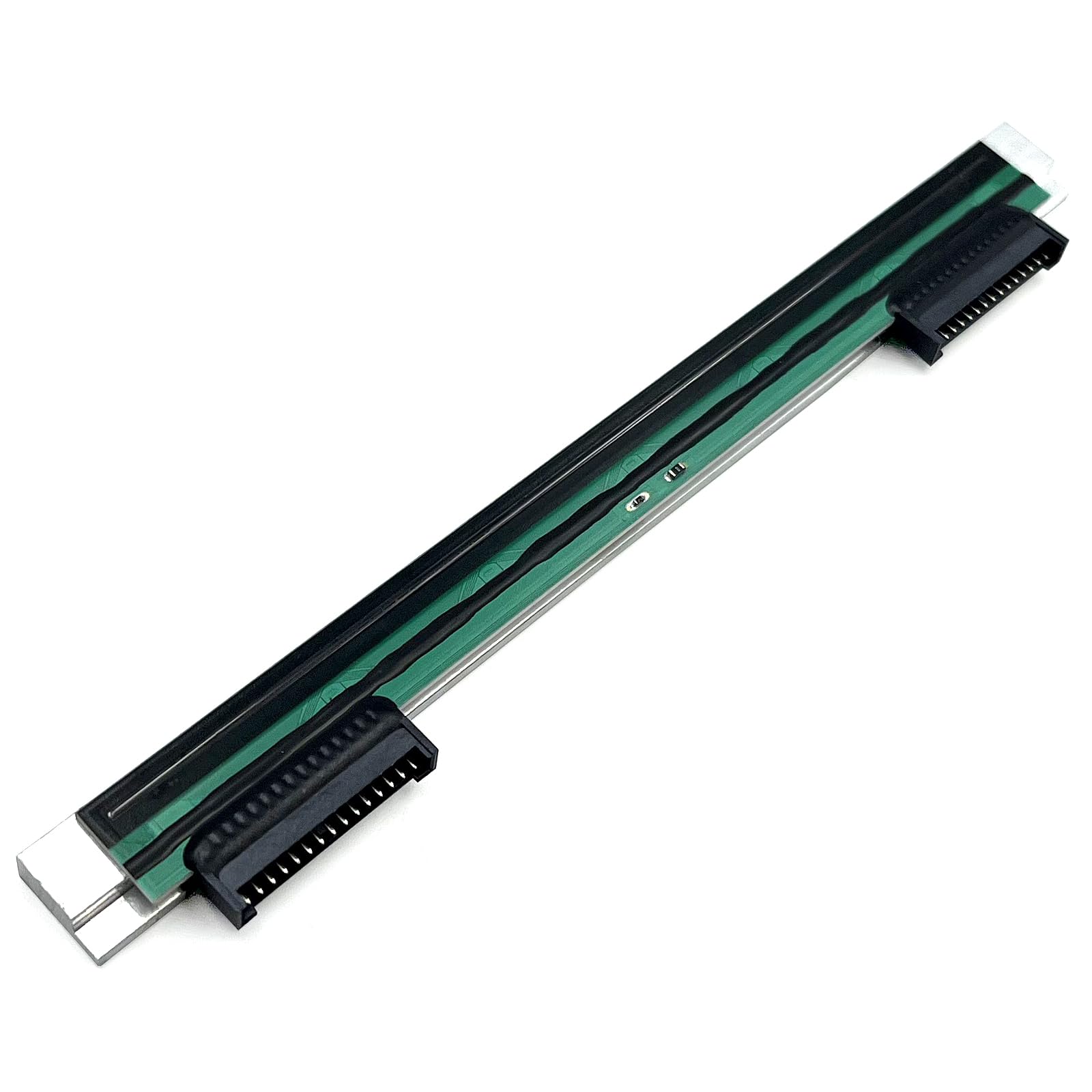
A 203dpi printhead built for ZD-series desktop printers that run batch after batch.
The defining number is the printhead itself: 8 dots per millimetre, or the familiar 203dpi, formed by a precision ceramic heating array. That array is what burns the image onto the label, and it is built to hold steady output under continuous high-volume printing. The maker rates it to support full speed at 6 ips — that is 6 inches per second (152 mm/s) — so a busy shipping bench keeps its pace.
Unlike the PARTSHE unit for the GK420d above, this one is rated for continuous high-volume desktop printing at 6 ips. The ZD-series fit covers the ZD621, ZD620, ZD420 and ZD421c, with part numbers P1080383-415, P1080383-226, P1112640-050 and P1112640-240 cross-referenced.
The catch runs the other way from most parts on this list: it is built for a specific desktop family and it will not fit the ZT200 or ZT410 industrial series. If your machine is an industrial model, look at the GETPARTS P1037974-010 or P1058930-009 instead — this is a desktop-only component.
The read: a desktop printhead specced for the ZD421c, ZD620 and ZD621 family, at a price that sits comfortably between the entry component and the industrial grade picks.
Fit note: the ZD-series fit is narrow by design, so double-check your sub-model — a ZT-series industrial printer needs a different part entirely.
Best matched to: a shipping desk running ZD420, ZD620 or ZD621 printers and feeding labels all day.
Not the one if: you are on a ZT industrial model — that calls for a different printhead in this lineup.
5. GETPARTS P1112640-019 Printhead for Zebra ZD421 203dpi

The 203dpi printhead keyed to Zebra’s ZD421, ZD421d and ZD421t desktop printers.
If you have already moved to Zebra’s ZD421 line, this printhead is cut to your printer. It carries the same 8 dots per millimetre, 203dpi ceramic heating array as the ZD620 part above, rated for 6 ips full-speed printing under continuous runs. The warranty and part cross-reference run P1112640-019, P1112640-218 and P1112640-026.
What makes it distinct is the fit. Where the ZD620 printhead is built for the ZD621, ZD620 and ZD420 family, this one keys to the ZD421, ZD421d and ZD421t — including sub-models like ZD4A042-D01E00EZ. Newest-series owners get the right part here, not a hand-me-down.
One thing the maker is explicit about: it does not fit the ZD421c. That is the case, colour-capable variant of the ZD421, and it takes a different printhead. Read the model letters on your printer before you buy, because the one-character difference decides whether this part seats at all.
Where it fits: ZD421, ZD421d and ZD421t printers, matched by part number rather than a generic “ZD series” label.
The one exclusion: it will not work in a ZD421c, so a case-variant owner needs the colour-print-capable part instead.
Pick this one when: your machine reads ZD421, ZD421d or ZD421t on the label and you want a printhead built for that exact series.
Different part needed if: you run the ZD421c case variant — this printhead is not specced for it.
6. GETPARTS P1058930-009 Printhead for Zebra ZT410 203dpi

Thin-film 203dpi printhead built for the ZT410 and ZT411 industrial barcode printers.
This is the heavy-duty part in the lineup. It uses thin-film printhead technology — a layered heating element built to handle the duty cycle of industrial barcode printers — and it fits the ZT410 and ZT411 series at 203dpi. Sub-models including ZT41142-T010000Z, ZT41142-T01A000Z and ZT41042-T010000Z are all covered by the fit list.
Trade-offs? At premium-tier pricing it is the most expensive component here, and that is aimed at a buyer whose machine runs production volumes rather than a home desk. The 4 x 6 inch maximum media size is the standard label size in warehousing and shipping, so if you print larger stock you are looking at the wrong class of printer entirely.
Compared with the ZD-series parts above, this one is built for the ZT410 and ZT411 industrial family rather than a desktop unit — a different animal in both duty cycle and price. If your line runs those industrial printers, the extra cost is what keeps labels printing shift after shift.
Why industrial operators take it
- Thin-film technology built for hard industrial use
- Fits ZT410 and ZT411 barcode printers at 203dpi
- Cross-references a full list of ZT4xx sub-model numbers
The fine print
- Premium-tier price — the most expensive part on this list
- Built for the ZT410 and ZT411 only, not the desktop ZD line
Made for: shops running ZT410 or ZT411 barcode printers at warehouse volumes, where that price is a line-item, not a splurge.
Not that buyer? A desktop ZD printer takes the ZD-series parts above, not this ZT410/ZT411 printhead.
Know the Specs
Resolution in dpi
Dots per inch measures how finely a printhead forms the image on a label. Every printhead on this list runs 203dpi. That is the standard barcode resolution and matches a 203dpi printer. Match resolution to your machine, not to a bigger number — a mismatched dpi ruins the scan quality you rely on.
Part numbers
A part number like P1037974-010 or 105934-037 is the identity card of the component. It tells you the exact printer family the part was manufactured for. Ordering by part number rather than by picture is the single most reliable way to avoid a return.
mAh on batteries
Milliamp-hours (mAh) describes how much charge a battery holds. The mobile pack here is rated 3400mAh, and the cell is lithium-ion. Look for a matching part number and check the connector before swapping the battery in your mobile printer.
Print speed in ips
Inches per second (ips) describes how quickly a printer feeds labels. A printhead rated for 6 ips can support fast printing without artifacts. A slower head, or a worn one, is usually why a busy line starts reprinting labels.
Common Questions
How do I find the part number for my Zebra printhead?
Will a 203dpi printhead work in my Zebra printer?
What is the difference between a GK420d and a GK420t printhead?
Can I replace the printhead myself or do I need a technician?
Will a mobile Zebra battery fit both a ZQ520 and a QLN320?
How often does a Zebra printhead need replacing?
Do these printheads work for Zebra printers outside the models listed?
Is an OEM printhead better than a third-party replacement?
What size labels will the ZT410 and ZT411 printhead handle?
What should I do first when I install a new mobile printer battery?
The Bottom Line
For a dead GK420d or GX420d label printer, the PARTSHE P105934-037 printhead is the straightforward fix that gets you back to shipping, and its direct thermal fit is the whole reason it works in that machine. If the printer that is stalling is a ZD421, grab the GETPARTS P1112640-019 for the exact ZD421d and ZD421t series. And if your mobile pack is the thing that dies mid-shift, the oliadeo 3400mAh battery is the pick that keeps a handheld Zebra printing. Whatever your model, read the part number off the printer before you order — that one step is what makes the swap a five-minute job.
How we choose
We do not accept paid placement. Every pick is matched to a real buyer and a real use-case; we do not hands-on test units.
Sources
Specifications: manufacturer listings and product documentation. Review insights: verified customer reviews, as of November 2026. Pricing: not shown on this page (it changes often); check the current price via the retailer link.
As an Amazon Associate, Tactical Gear Guy earns from qualifying purchases. This does not affect which products we feature.