Specs are compiled from manufacturer listings and verified buyer reviews and can change over time — please confirm the key details on the product page before buying.
Your first uploads looked soft, the audio was hollow, and you blamed the camera. It usually is not the camera’s fault — but it is the camera’s job to make things easy. This guide covers mirrorless kits, pocket gimbals, and vlogging compacts that record clean video, flip a screen toward your face, and plug into a computer without a converter. One note on the list itself: some picks here are close matches rather than exact, since a few models share the same job and the same shelf. Where a model is a close match rather than an exact one, it still fills the same job, and every pick below is built for YouTube-style video.
This guide is built by comparing the manufacturers’ published specifications and the patterns across verified customer reviews, so you get each pick’s real strengths and trade-offs instead of marketing spin.
Below you will find real sensor sizes, autofocus point counts, and battery ratings spelled out in plain terms, so you can pick a camera that still fits your hands and your workflow months from now. Every pick below is ranked by what it actually does well for talking-head video.
Top Picks


How To Choose The Best YouTube Beginner Camera
Buying a camera for talking-head videos is different from buying one for photography. You are recording yourself, often alone, often in a room with one lamp. So the things that matter most are the screen that faces you, the autofocus that keeps your face sharp, and the microphone port that lets you fix audio later.
The screen has to face you
A flip-out screen (also called a vari-angle LCD) swings around so you can watch yourself while recording. Without one, you are guessing whether you are in frame. Every pick below either flips, rotates, or tilts its screen toward you, because framing blind is the fastest way to record a video you cannot use.
Sensor size versus lens flexibility
A larger sensor gathers more light, which keeps your footage cleaner in a dim room. A 1-inch sensor sits between a phone sensor and a big APS-C sensor. An APS-C sensor is the larger type found in interchangeable-lens kits — those let you swap lenses later, so the camera grows with you instead of capping out.
Fixed lens or interchangeable
A fixed-lens camera is sealed and simple — nothing to swap, nothing to clean. An interchangeable-lens camera takes lenses on and off, which means a kit lens today and a fast prime lens next year. If you plan to stay behind a desk, fixed is fine. If you plan to keep going, buy the mount you can grow into.
Side-by-Side Comparison
| Model | Best For | Sensor / Resolution | Battery Rating | Screen Type | Amazon |
|---|---|---|---|---|---|
| Canon EOS R100★ Best Overall | Growing into lenses | 24.1MP APS-C CMOS | — | — | Amazon |
| Canon PowerShot V10Best Pocket Pick | Pocket-first filming | 15.2MP 1-inch CMOS | 2 hours | Retractable front-facing | Amazon |
| Xtra MuseBest Stabilized Value | Shaky-hands capture | 1-inch CMOS, 4K/120fps | 161 minutes | 2-inch touch screen | Amazon |
| DJI Osmo Pocket 3 | Travel and walk-and-talk | 1-inch CMOS, 4K/120fps | 166 minutes | 2-inch rotating touch screen | Amazon |
| Nikon Z 30 | Livestreaming | APS-C, 4K 30p | — | Flip-out selfie monitor | Amazon |
| Sony ZV-E10 | Product and desk videos | 24.2MP APS-C Exmor CMOS | — | — | Amazon |
| Sony ZV-1 | One-and-done compact | 20.1MP stacked 1-inch CMOS | — | 3.0-inch side flip-out LCD | Amazon |
| Insta360 Luna Ultra | High-resolution portraits | 8000-pixel video output | Up to 4 hours | Detachable screen | Amazon |
| Nikon Z 50 Two-Lens Kit | Two-lens flexibility | 20.9MP APS-C sensor | — | Flip-down touch LCD | Amazon |
| Fujifilm X-T30 III | Color straight from camera | APS-C, 20 Film Simulations | — | — | Amazon |
| Fujifilm X-S20 | Long-form recording | 26.1MP X-Trans CMOS 4 | 750 frames Normal mode | 180° Vari-Angle touchscreen | Amazon |
Detailed Reviews
1. Canon EOS R100 Mirrorless Camera RF-S18-45mm Lens Kit
Our pick — 4.5+★ from 700+ verified ratings; the strongest balance of quality and price.
The starter kit that does not box you in, because the lens comes off.
What makes this the top pick is the lens mount. The R100 uses Canon’s RF mount, so the 18-45mm lens in the box is a starting point rather than a ceiling — you can add glass later instead of replacing the whole camera. The body is the smallest and lightest in Canon’s EOS R series, which matters the first time you carry it to a desk, a shelf, or a bag and leave it there because it is easy to grab.
The image side is a 24.1 megapixel APS-C sensor (the larger sensor type that gathers more light than a phone or a 1-inch compact) paired with Canon’s DIGIC 8 processor. Autofocus is the quietly impressive part: Dual Pixel CMOS AF covers up to 143 zones and detects faces and eyes, so when you turn to check a note on screen it finds you again. Video tops out at 4K at up to 24 fps, with Full HD at 60 fps and HD at up to 120 frames per second for slow motion. Continuous stills run at 6.5 frames per second in One-Shot AF, versus the PowerShot V10’s 30 frames per second, while this one is the expandable camera.
What buyers describe again and again is crisp, clean picture quality from a body small enough to be unremarkable on a shelf. The recurring caution is on long-term function — a minority have had a unit stop working, and the reliability notes sit in the mixed column rather than the praise column, so buy from a seller with a clear return window and register the warranty. The audience for this camera is the beginner who wants a real lens system under their fingers, not a sealed pocket gadget.
Where it earns the top spot
- RF mount means the 18-45mm kit lens is the first of many, not the last
- 24.1MP APS-C sensor with 143 autofocus points and eye detection
- 4K at up to 24 fps, Full HD at 60 fps, HD at 120 fps
- Smallest and lightest body in the EOS R line
Weigh before buying
- Burst speed of 6.5 fps, against the pocket V10’s 30 fps
- Some units have failed early; check the return policy first
- No flip-out selfie screen listed, so framing yourself takes practice
Reach for this if: you want a camera body you can add lenses to for years, and you are fine learning to frame without a selfie screen.
Look elsewhere if: you mostly film yourself at arm’s length and want the screen to swing around automatically.
2. Canon PowerShot V10 Compact Vlogging Camera
Fits in a fanny pack, films you head-on, and stands itself up on a desk.
Most compact cameras make you guess your framing. This one pulls a screen straight out the front and pairs it with a stand that folds forward or back, so you can prop it on a table and talk into it hands-free. Owners rave about the size first — one buyer’s description of it sliding into a fanny pack is the whole point of the design, and the 15.2 megapixel 1-inch back-illuminated sensor (a bigger-than-phone sensor that helps in low light) is the engine behind the video quality people keep mentioning.
The lens is a fixed 19mm wide-angle, measured the 35mm way — wide enough to fit a small room behind you without a fisheye look. Video records at 4K up to 30 fps or Full HD up to 60 fps, with 14 movie color filters if you want a look without editing. Audio uses two stereo microphones plus a third in the middle to cut background noise, and there is a micro-HDMI port and an external mic jack if you want to upgrade sound later. Burst shooting reaches 30 frames per second, versus the R100’s 6.5 fps.
The catch is endurance. Canon rates the battery at 2 hours, and the honest caveat is that long sessions need a charger nearby or USB-C top-ups between takes. Durability is the second thing to watch — a few units have quit after a few months of use, so buy somewhere with a return path. Neither issue changes what this camera is: the easiest way on this list to record yourself without a tripod, a table clamp, or a helper.
The honest trade-off: a 2-hour battery rating and a fixed lens mean this is a shoot-then-charge camera, not an all-day rig. Plan your recordings in blocks rather than one marathon session.
Buy it for: desk talks, quick updates, and anything where setup time kills the impulse to film.
Pass if: you plan hour-long unbroken recordings and refuse to keep a charger within arm’s reach.
3. Xtra Muse Vlogging Camera with 1” CMOS & 4K/120fps
A pocket gimbal camera that keeps the frame level while you move.
The number that does the work here is the 3-axis gimbal (a motorized mount that physically counteracts your hand’s shake). Walk, jog, or gesture at the lens and the footage stays smooth without a stabilizer rig. That 1-inch CMOS sensor records 4K at up to 120fps, and the 2-inch touch screen switches between horizontal and vertical framing — which is why the same clip can go to a wide player and a short-form feed.
Color is the sleeper feature. True 10-bit X-Log (a flat color profile that preserves more shades for editing later) delivers up to a billion colors, so a sunset gradient stops turning into a hard band. Auto focus with face and object tracking follows you when you mount it on a tripod and move around the frame. The bundle includes a carrying bag, a wrist strap, and a 1/4-inch threaded handle, so a tripod mount is there before you buy one.
Battery is rated at 161 minutes — the DJI Osmo Pocket 3 below rates 166 minutes, so these two run close to the same length per charge and the difference is not what should decide it. The real differentiator is smoothness and price-to-feature: what wins people over is how much stabilization and color depth you get for a budget-friendly position in this lineup. Micro SD cards in the V60 speed class are what it wants — plan for one, since it is not included in the listed bundle.
This is your match if: you film while moving and want gimbal-smooth footage without learning a gimbal.
One thing to know: it arrives without a memory card, so budget for a V60-rated Micro SD before your first shoot.
4. DJI Osmo Pocket 3 Vlogging Camera with 1” CMOS & 4K/120fps
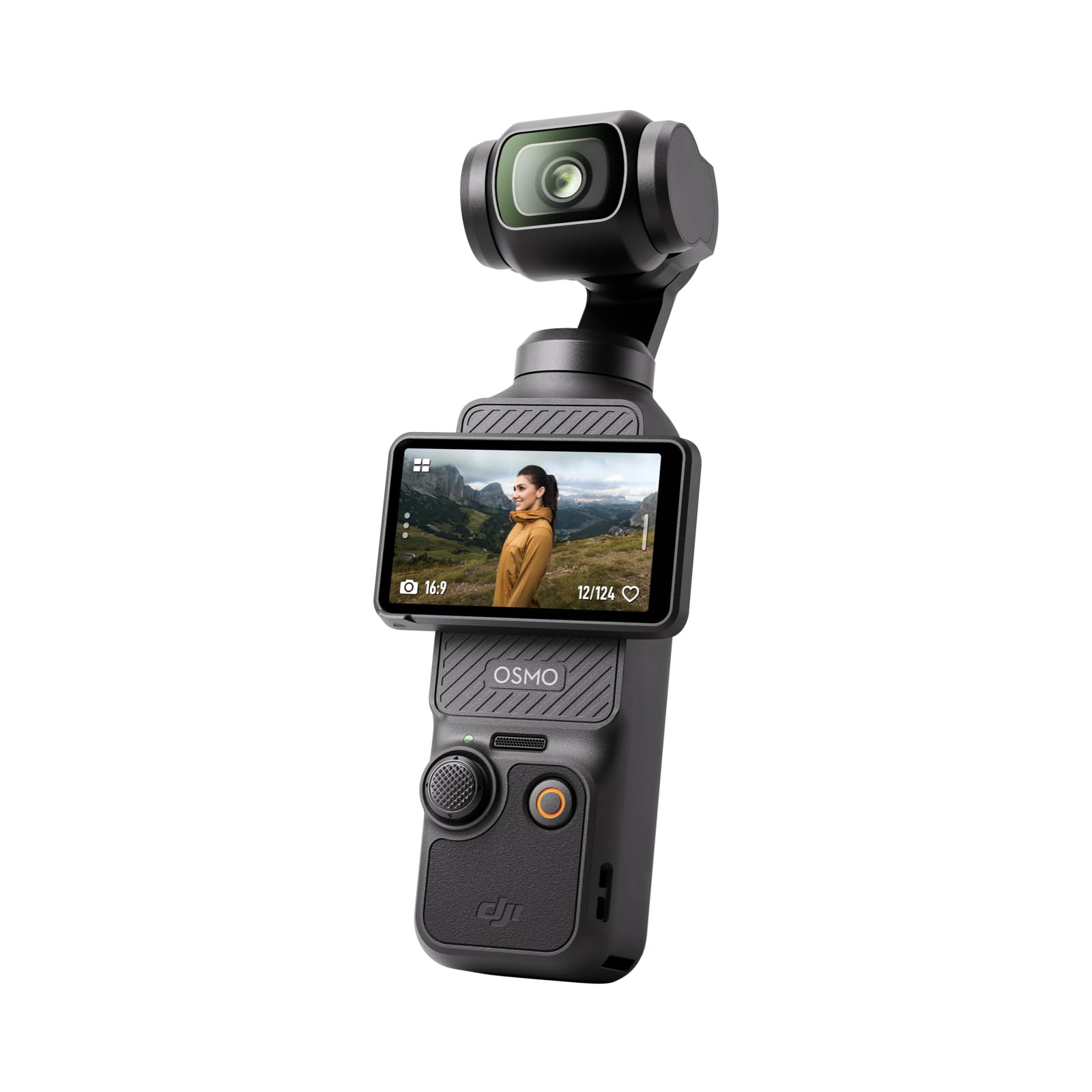
The walk-and-talk camera that keeps your face centered without a tripod.
If you record moving — pacing a room, walking a trail, chasing a dog — this is the tool built for it. A 1-inch CMOS sensor records 4K at up to 120fps, and the 3-axis mechanical stabilization (motors that physically hold the lens steady) smooths the bounce out of a stride. ActiveTrack 6.0 keeps you center-frame even when you spin or jump, so a solo creator gets a cameraman’s result.
The 2-inch touch screen rotates for horizontal or vertical shooting, and the digital zoom reaches 4x — the Canon PowerShot V10 above stops at 3x, so the Pocket 3 gives you more reach on a distant subject. D-Log M with 10-bit color depth records up to a billion colors for grading later. Stereo recording handles audio in-camera, and DJI OsmoAudio connects directly to two DJI Mic 2 or Mic Mini transmitters when you need serious sound.
The thing people love most is the sheer quality of the footage from something this small. The honest friction is value: reliability and battery life land in mixed territory, and a real share of owners think the kit should include more for the price. None of that undercuts the core — 166 minutes of rated battery and 4K at 120fps in a pocket is a specific, hard-to-match combination. If you film on the move, nothing on this list is easier to carry and harder to shake.
Why people keep it in a pocket
- 1-inch sensor with 4K at up to 120fps and mechanical 3-axis stabilization
- Rotating 2-inch screen flips to vertical in a second
- Direct pairing with two DJI Mic 2 or Mic Mini transmitters
- 4x digital zoom, more reach than the PowerShot V10’s 3x
The friction worth knowing
- Battery, reliability, and value all sit in the mixed column
- Pricier than the gimbal-equipped Xtra Muse above
- Accessories beyond the wrist strap and cover are extra
The right buy for: travelers, walkers, and anyone whose videos happen while moving.
Fair warning: the value question is live — if accessories matter more to you than smoothness, the Xtra Muse hears you.
5. Nikon Z 30 with 16-50mm Zoom Lens

Built for the person who wants to go live without a capture card.
What sets the Z 30 apart is the streaming path. Plug in over USB-C and it behaves as a webcam with smooth Full HD 60p streaming, or push 4K 30p out over HDMI, with constant power over USB-C while it runs. That last detail matters when you are three hours into a livestream and the battery warning appears — no battery warning here.
The rest of the kit reads like a creator checklist: a flip-out touchscreen selfie monitor, a built-in stereo microphone with adjustable sensitivity, a red REC light so you can see from across the room that you are live, and a phone app for remote control. Autofocus is contrast, hybrid, and phase detection across 209 points, and the body takes any NIKKOR Z lens — fast primes, macro, whatever comes next.
What wins people over is the autofocus speed and the manual controls; the 16-50mm zoom in the box covers a desk shot and a head-and-shoulders frame. The honest caveat comes from owners reporting charging trouble — units that would not charge while plugged in — plus a few that failed early. Test the charging port the day it arrives. Image quality is the other split verdict, with some calling it a small step up rather than a leap. For a first livestream setup that also shoots stills, it earns its slot.
The streaming advantage: constant USB-C power while it streams over USB-C means a marathon broadcast is not a battery countdown.
The thing to test early: charge it while it is plugged in and running on day one — that specific behavior is the most-flagged issue, and a quick test catches it inside the return window.
Pick this one if: your channel is livestreams and desk segments, and you want one cable instead of a capture card.
Skip the upgrade if: you already own a recent phone with a good camera — the streaming convenience is the reason to buy, not the picture upgrade.
6. Sony ZV-E10 APS-C Mirrorless Camera with 16-50mm Lens
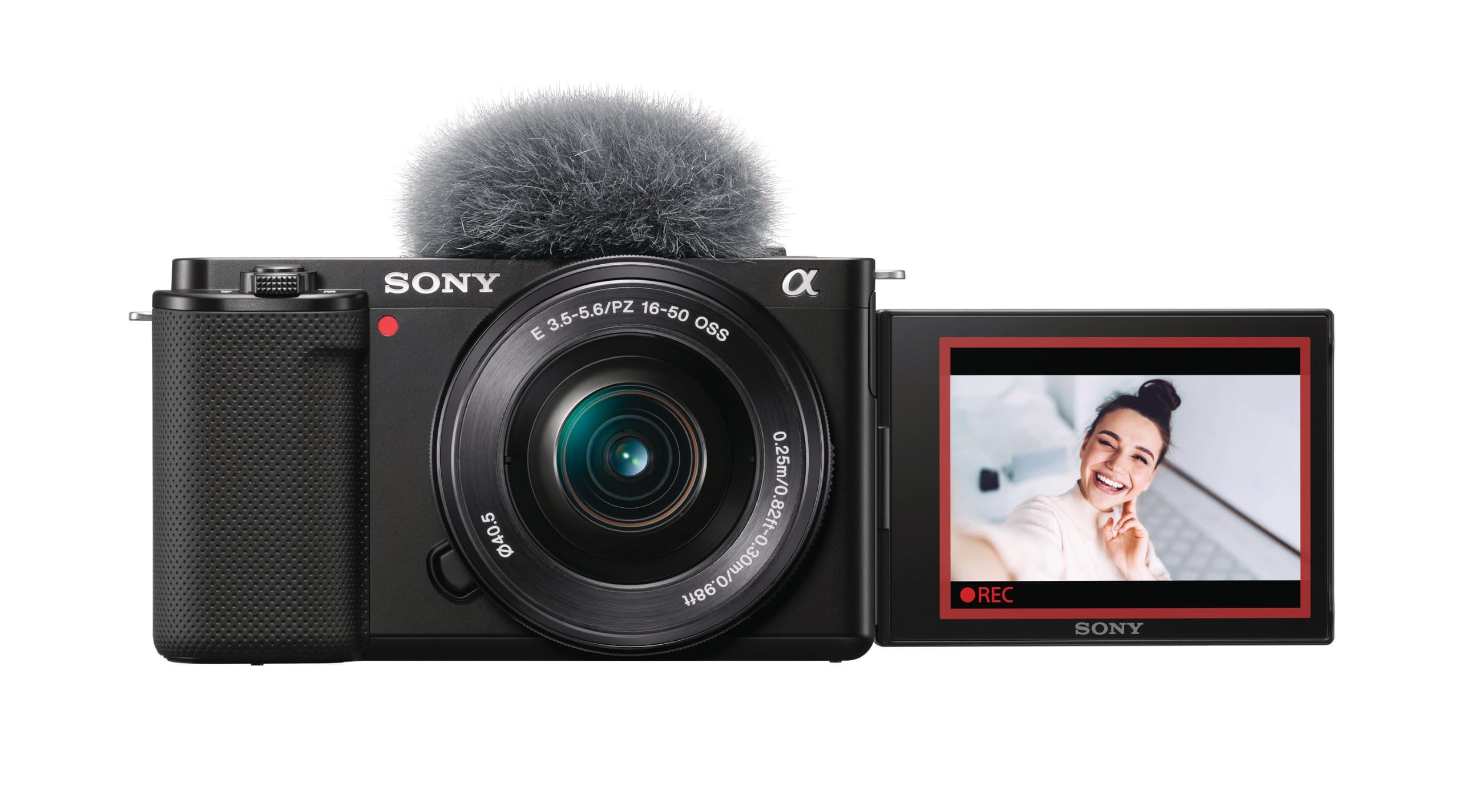
Made for unboxings, where the camera has to switch focus on command.
Sony built this one around a specific trick: the Product Showcase Setting, which transitions focus from your face to an object held up in front of the lens. The Background Defocus button toggles the blurred-background effect on and off in a single press. If you review gadgets or show products on camera, those two buttons eliminate the most common awkward moment — the camera refusing to look at what you are holding.
The hardware is a 24.2 megapixel APS-C Exmor CMOS sensor with a fast BIONZ X processor, and 4K movie footage is oversampled from 6K with full pixel readout and no pixel binning — plain English, the camera reads every pixel and downsamples, which keeps detail sharp rather than mushy. Autofocus runs 425 points with eye, face, contrast, hybrid, and phase detection. Live streaming works over a single USB cable with no extra hardware or software, and E-mount compatibility means the 16-50mm kit lens is a starting point.
What wins people over is camera quality, described as excellent 4K footage and real flexibility from the interchangeable lens. The honest note is autofocus consistency — most report quick locks, but a minority have seen it stop working, so test focus thoroughly in your first week. One trade-off unique to this kit: no microphone port is listed in the specification data here, so if clean audio matters, confirm the port situation before you rely on it.
What it does better than most
- 4K oversampled from 6K with full pixel readout, no pixel binning
- 425 autofocus points with eye and face detection
- Product Showcase and Background Defocus buttons built for on-camera demos
- Single-cable USB live streaming, no capture hardware
Loose ends to tie off
- Autofocus gets mixed feedback; a minority report it failing
- Audio port options are not confirmed in the listed specs
- Kit lens only; extra glass adds cost quickly
Made for: review channels and demo videos where the subject changes every thirty seconds.
Think twice if: you record in the field and need a proven microphone path right from the start.
7. Sony ZV-1 Digital Camera for Content Creators and Vlogging

The compact that already has the mic, the screen, and the wind screen sorted.
This is the sealed-box answer to vlogging. The lens is a 24-70mm F1.8-2.8 ZEISS Vario-Sonnar T — that wide F1.8 aperture (how much light the lens lets in) is the reason a dim room still looks bright on screen. The sensor is a 20.1 megapixel stacked back-illuminated 1-inch Exmor RS CMOS with DRAM, and it shoots 4K HDR video. The 3.0-inch side flip-out LCD also tilts up and down, so you can compose from above or below without lying on the floor.
Audio needs no accessories to start: a forward-directional on-board mic with a detachable wind screen handles outdoor voice, and both a 3.5mm mic jack and an MI shoe open up better microphones later. Real Time Eye Autofocus and Real-time tracking across 425 points hold your face, and Automatic Exposure keeps it lit as you shift around. HLG, S-Log3, and S-Log2 are there for grading. Image stabilization suppresses shake even while walking — not gimbal-level like the Pocket 3, but useful.
Owners praise the picture and video quality most, and a large group specifically credit how suited the camera is to beginners. The caveat is financial honesty: buyers genuinely disagree on whether it earns its premium position, and autofocus draws mixed reports. Weigh that against what you would spend adding a mic and a wind screen to a cheaper body — this one arrives with both.
What you are really buying: a complete kit in one box — flip-out screen, directional mic, wind screen, and a bright F1.8 lens with no accessories to shop for.
The question to ask yourself: whether the sealed-lens convenience is worth more to you than the ability to swap lenses later, which the ZV-E10 and R100 both offer.
One-box solution for: solo creators who want to unbox it and hit record the same afternoon.
Not your pick if: you want a lens collection — this one is sealed on purpose.
8. Insta360 Luna Ultra Creator Bundle
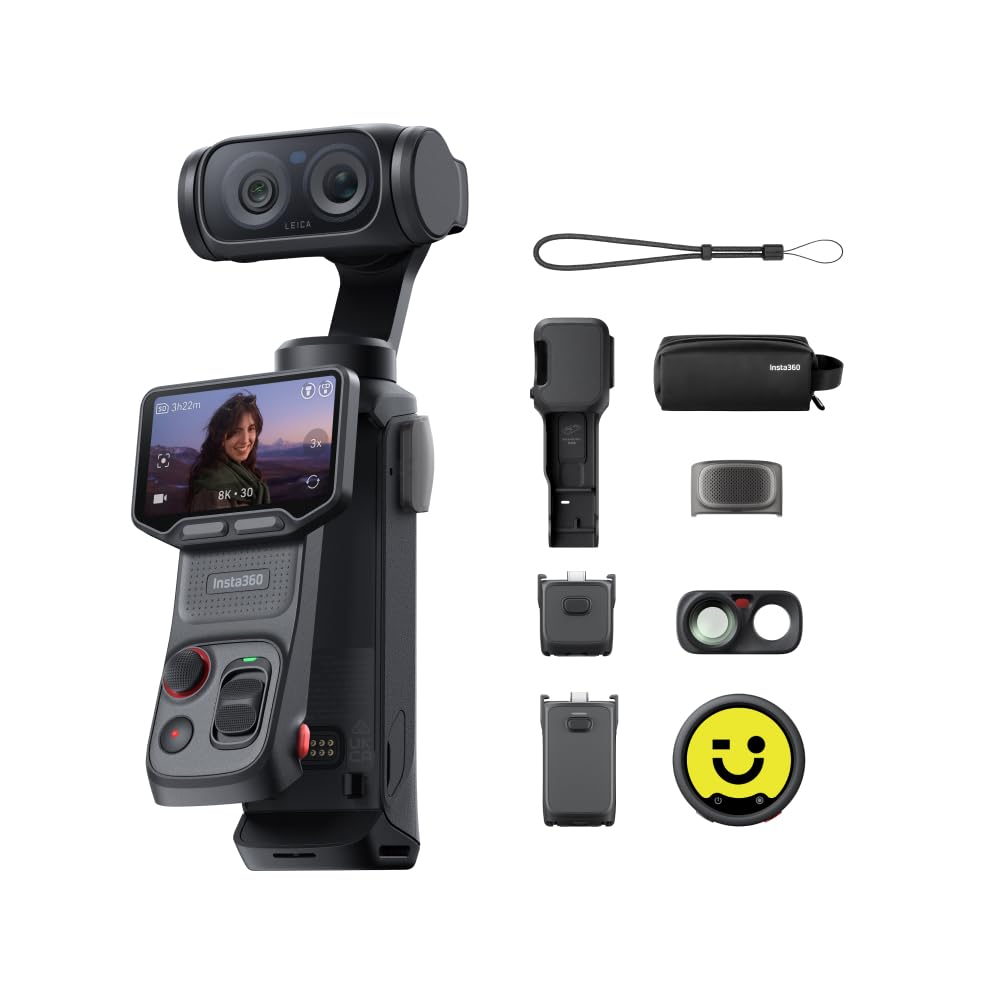
A handheld that can see you from across the room, screen detached.
The screen comes off. That single design choice changes how you film — you can set the body on a shelf and hold the screen in your hand to check framing, or clip it where your talent can see themselves. The display tops out at 8000 pixels, and the camera records 4K portrait video with a Beauty Mode that adapts to different skin tones with adjustable smoothing.
Battery is the headline number: up to 4 hours on a single charge, with fast charging to 80% in just 23 minutes. Compare that to the Pocket 3’s 166-minute rating or the Xtra Muse’s 161 minutes and the difference is a whole second filming session. Color control comes through 10-bit I-Log with support for ACES workflows and DaVinci Resolve integration. A Mic Pro transmitter, a wide-angle lens, a battery handle, a wind guard, and a carrying bag ship in the bundle, so audio and grip are covered on day one.
Owners praise the image and video quality most, with the detachable screen earning its own following as the clever feature. The fair caveat is cost — opinions split on whether the whole package justifies its position, and reliability and battery sit in the mixed column rather than pure praise. For a creator who needs long runtime and a screen they can move, this solves problems the cheaper picks cannot.
Choose it when: runtime and screen placement are your two biggest headaches, and you film in sessions longer than two hours.
Weigh first: the value argument is contested, so decide how much the detachable screen and 4-hour rating are worth to you.
9. Nikon Z 50 with Two Lenses

Two lenses in one box, so the wide shot and the tight shot both come free.
Most kits give you one lens and a wish list. This one ships with the 16-50mm wide zoom and a 50-250mm telephoto, which covers a desk frame and a distant subject without buying anything extra. A flip-down touch LCD makes self-framing possible, and the body is the first DX-format mirrorless to use a large 55 millimeter lens mount — a wider opening that helps with light and image quality.
Inside is a 20.9 megapixel sensor with 4K UHD video, 209 autofocus points across contrast and phase detection, 14-bit depth, and built-in Wi-Fi and Bluetooth for pairing to your phone. The Z mount accepts NIKKOR Z lenses, and F-mount glass works with an FTZ adapter sold separately. It is compact and durably constructed, which is the kind of phrase that matters once you have carried a bag of gear for an hour.
The praise centers on picture quality and compact size, and owners describe the two included Z lenses as the standout of the kit. Charging is the recurring caution — units that would not charge while plugged in — so verify that on day one. If you want coverage of wide and tight in a single purchase, this is the bundle that gives you both without a second receipt.
The bundle logic: a 16-50mm and a 50-250mm in one purchase means one checkout covers two focal lengths that would otherwise be two separate buys.
Test on arrival: plug it in and charge while it is on — that is the specific behavior to confirm while the return window is open.
Right for: the creator who wants reach without a second shopping trip.
Look elsewhere if: you film at a single desk distance — you would be paying for a telephoto you never mount.
10. FUJIFILM X-T30 III Mirrorless Camera with XC13-33mm Lens Kit
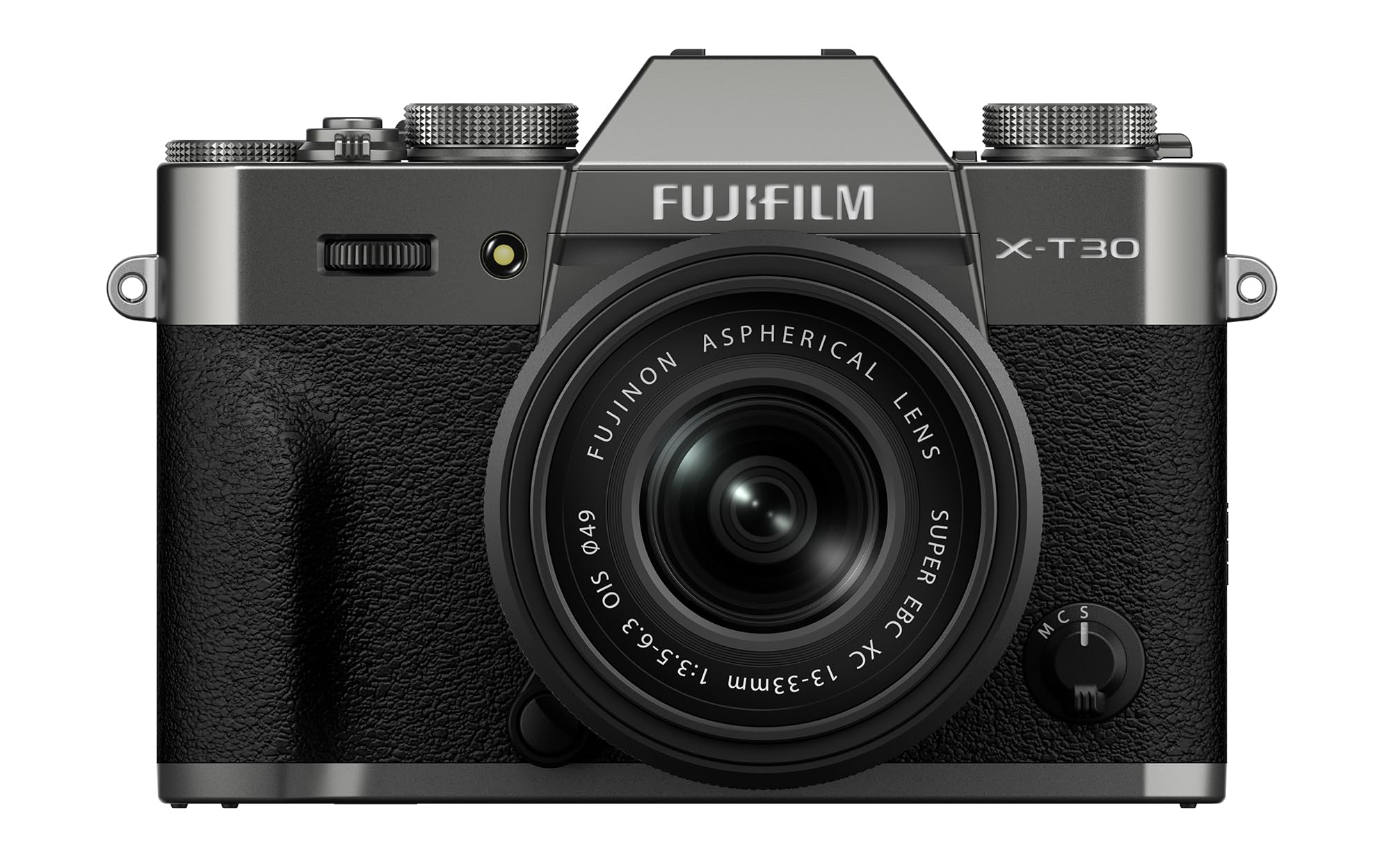
Set the dial, skip the editing session, post the clip as it looks.
Twenty built-in Film Simulations are the reason to care here. Each one is a preset color look baked into the camera, so your footage has a finished style before it hits an editor. For a beginner whose editing time is limited, that saves the whole grading step. The body itself is deliberately small and timeless-looking, and an Auto mode keeps the settings handled while you concentrate on what you are saying.
Autofocus uses AI-powered subject detection across 425 points with phase detection, which means it recognizes what it is pointed at rather than just hunting for contrast. Continuous shooting reaches 20 frames per second, and the FUJINON XC13-33mmF3.5-6.3 OIS kit lens pairs with the 14-bit depth for smooth tonal steps. Bluetooth handles the phone handoff, and the Fujifilm X mount opens up the brand’s lens catalog.
What wins people over is image quality — professional-looking results without heavy editing, in the words of the crowd. The honest catch is the dial-heavy layout: some owners need a session or two to internalize it. That is a reasonable cost for a camera whose colors arrive finished, and the small body means it actually leaves the shelf.
Worth it if: you would rather pick a look on the dial than spend an evening color grading.
skip it if: you want the camera to decide everything and never touch a control.
11. Fujifilm X-S20 Mirrorless Digital Camera XC15-45mm Lens Kit

Seven stops of stabilization and a rating that outlasts the session.
Shaky handheld footage is the beginner’s most common failure, and this camera attacks it physically. Five-axis in-body image stabilization (a system that moves the sensor to cancel out your hand’s tremble) is tuned to up to seven stops of compensation — one stop better than the previous X-S10 system. That means longer handheld takes and dimmer rooms without a tripod. The body weighs 491g (1.08 lb) with a deep handgrip that keeps a sizable lens balanced.
For video, a Vlog mode defocuses a cluttered background with a tap or keeps a product sharp while you unbox it. Stream 4K/60P straight from USB-C, or record internally at up to 6.2K/30p in 4:2:2 10-bit color. A 3.5mm jack accepts accessories and the optional TG-BT1 grip adds hands-free wireless control. The 180° Vari-Angle LCD touchscreen swings to face you for selfie framing.
Runtime is the reason this sits at the top of the range: the NP-W235 battery delivers 750 frames in Normal mode or 800 in economy mode. Noise control comes from a 26.1 megapixel X-Trans CMOS 4 sensor paired with the X-Processor 5 engine and an AF algorithm with Auto Subject Detection. The trade-off to be honest about is focus points — 171 here against the 425 on the Sony ZV-E10, so the Sony gives you a denser focusing grid. For long-form recording at high resolution, though, this is the most capable body here.
The endurance case: 750 frames in Normal mode and 800 in economy mode from one NP-W235 battery means a full shooting day without a mid-session swap.
Where a rival leads: the Sony ZV-E10’s 425 autofocus points outnumber this camera’s 171, so if dense focus coverage is your priority, the Sony has the edge there.
Built for: long recordings and high-resolution work where running out of battery mid-session is not an option.
Consider the alternative if: you shoot fast-moving subjects and want the densest autofocus grid on this list.
Know the Specs
Sensor Size and Type
The sensor is the light-catching chip inside. A 1-inch sensor is larger than a phone’s and gathers more light in a dim room. An APS-C sensor is larger still and paired with a lens mount you can change. Megapixels describe the size of the still image, not the quality of the video — a 15.2 megapixel 1-inch sensor and a 24.1 megapixel APS-C sensor are different tools for different jobs, and neither is simply “better.”
Autofocus Points
Focus points are the spots the camera can target and lock onto. More points means more places it can grab your face or a product without hunting. A 143-point system and a 425-point system will both track a talking head — the larger grid helps more when your subject moves across the frame or sits off-center.
Frame Rate at a Given Resolution
Recording 4K at 120fps means more frames each second, which lets you slow a clip down in editing. Recording 4K at 24fps is the standard smooth look for a talking-head video. Higher frame rates generally use more card space, so pair a high rate with a fast Micro SD card like the V60 speed class the Xtra Muse specifies.
Battery Ratings in Minutes vs Frames
Battery figures are quoted two ways: minutes for video recording and frames for stills. A 166-minute rating is about two and a half hours of recording; a 750-frame rating is about a long day of stills. They are not the same test, so never compare a minutes rating directly to a frames rating — compare like with like.
Common Questions
Will a camera like the Canon EOS R100 work as a webcam for livestreaming?
Do I need a memory card, and which type?
Is a flip-out screen really necessary for YouTube videos?
Canon EOS R100 vs Sony ZV-E10 for a first YouTube camera?
How long can these cameras actually record on one battery?
Do I need an external microphone, or is the built-in mic enough?
What does gimbal stabilization do that in-body stabilization does not?
Can I mount these cameras on a tripod or a desk stand?
Is a 1-inch sensor enough, or should I go APS-C?
What resolution should I actually record at for YouTube?
Does the camera come with a lens, or do I buy one separately?
The Bottom Line
For most people chasing the youtube beginner camera decision, the Canon EOS R100 wins because it hands you a 24.1 megapixel APS-C sensor and an RF mount you can grow into for years — a real lens system instead of a sealed gadget. If you want a screen that faces you and a body that stands itself on a desk, grab the Canon PowerShot V10. And for filming while you walk, the DJI Osmo Pocket 3 is the one to reach for, with 4K at 120fps and 3-axis mechanical stabilization in a pocket.
Two more worth naming: the Fujifilm X-S20 if long sessions and high-resolution recording are the priority, and the Nikon Z 30 if your channel is mostly livestreams over a single USB-C cable. Whichever way you lean, prioritize a screen that faces you and a lens mount you can afford to grow into — those two choices outlast every other spec on this page.
How we choose
We do not accept paid placement. Every pick is matched to a real buyer and a real use-case; we do not hands-on test units.
Sources
Specifications: manufacturer listings and product documentation. Review insights: verified customer reviews, as of November 2026. Pricing: not shown on this page (it changes often); check the current price via the retailer link.
As an Amazon Associate, Tactical Gear Guy earns from qualifying purchases. This does not affect which products we feature.