Specs are compiled from manufacturer listings and verified buyer reviews and can change over time — please confirm the key details on the product page before buying.
You want console-style sticks under your thumbs while the game runs on your phone’s screen, and the wrong pick will fight you the whole session. The make-or-break detail is how the controller talks to your phone: a direct USB-C link gives you near-instant response, while Bluetooth can add a delay you feel in shooters and racing games. Below you get nine controllers that all mount a phone and work with Xbox Game Pass and xCloud, sorted so you can pick the one that matches your games, your phone, and your patience for pairing screens.
This guide is built by comparing the manufacturers’ published specifications and the patterns across verified customer reviews, so you get each pick’s real strengths and trade-offs instead of marketing spin.
Pairing quirks, phone-case fit, and stick drift decide whether a controller lasts past the honeymoon phase, and those are exactly the points covered here. Read on for a straight answer to the question behind every Xbox Phone Controller search.
Top Picks
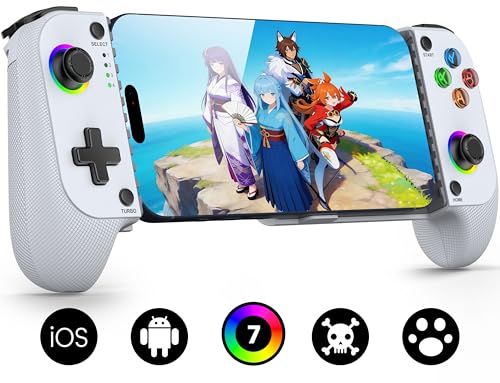


How To Choose The Best Xbox Phone Controller
Start with the connection type, because it decides how the game feels in your hands before any other feature matters. A controller that plugs straight into your phone’s USB-C port (the same socket you use to charge) sends the button press with almost no wait. A Bluetooth controller pairs wirelessly but often carries a small delay that shows up most in fast shooters.
USB-C Versus Bluetooth: The Delay Question
USB-C models like the Razer Kishi and the Backbone One skip the pairing step entirely — you clamp the phone in and play. Bluetooth models give you freedom from cables and often work across more devices, but you should expect to press the Home button once after the first pairing to reconnect. If you mostly play slower, story-driven titles, Bluetooth is perfectly fine. If you play competitive shooters, the direct link is the safer choice.
Stick Type: Hall Effect Versus Carbon Film
The joysticks are the part that wears out first. Traditional carbon-film sticks rub against a track and eventually drift, meaning the character moves without you touching the stick. Hall-effect sticks use magnetic sensing with no physical contact, so there is nothing to wear down. Several picks here rate their Hall-effect sticks at 5 million cycles, so compare that number against a cheaper stick’s rating before you commit.
Phone Fit: Cases, Cameras, and Screen Size
Check your phone’s length and your case thickness before anything else. Some controllers stretch to a specific maximum length, some leave a recessed pocket for the camera bump, and some accept a case up to a stated thickness. A phone that is too big for the clamp still often works over Bluetooth, but you lose the whole point of a grip-mounted controller.
Side-by-Side Comparison
| Model | Best For | Connection | Battery Life | Stick Type | Amazon |
|---|---|---|---|---|---|
| Mocagen MC1★ Best Overall | All-round value pick | Bluetooth | Up to 6 hours | Hall Effect | Amazon |
| ShanWan Q133PLongest Battery | Long sessions, big phones | Bluetooth 5.0 | About 25 hours | Adjustable height | Amazon |
| 8Bitdo Ultimate MobileMost Customizable | Customization and layout | Bluetooth | — | Hall Effect | Amazon |
| Mocagen MC200 | Tablets and iPad Mini | Bluetooth | Up to 8 hours | Hall Effect | Amazon |
| Razer Kishi | Zero-lag Android play | USB-C | — | Clickable analog | Amazon |
| GameSir X5 Lite | Plug-and-play tablet fit | USB-C | — | Hall Effect | Amazon |
| Turtle Beach Atom | Compact carry | Bluetooth | 20 hours | Console style | Amazon |
| PowerA XP-ULTRA | Home and travel hybrid | Xbox Wireless / Bluetooth | Up to 60 hours | Precision analog | Amazon |
| Backbone One | Instant USB-C Xbox setup | USB-C | — | Standard analog | Amazon |
Detailed Reviews
1. Mocagen MC1 Phone Controller
Our pick — 4.0+★ from 850+ verified ratings; the strongest balance of quality and price.
A console-feel grip that clamps your phone without making you strip the case.
The MC1 gets the fundamentals right for a phone controller: it pairs over Bluetooth as “XBOX Wireless Controller,” then reconnects with a single press of the Home button afterward. Its Hall-effect joysticks are rated for a 5-million-cycle lifespan, so the stick holds center instead of drifting. That is the single number that matters most here, because a drifting stick is what turns a phone controller into a paperweight.
Case support is generous for the category. It accepts phone cases up to 0.47 inches (12mm) thick and carves a 0.2-inch recess on the left side for the camera bump. You keep your case on, and your lens avoids scratches against the clamp. The 600mAh battery runs up to 6 hours in brightness mode, and the 7-color light ring can dim or switch off — the ABXY lights can be turned off entirely, though their colors stay fixed.
What wins people over is the overall build: the grip texture reduces hand fatigue, and the responsiveness comes through cleanly in cloud titles like Xbox Game Pass and GeForce NOW. Keep in mind this controller only works with games that support controller input, and it does not support PS Remote Play. Its battery figure is also the shortest in this lineup, so plan a charge between long sessions. Consider the ShanWan if you want 25 hours instead of 6.
clamp grip stability
- Hall-effect joysticks rated at a 5M-cycle lifespan hold their center far longer than carbon-film sticks
- Accepts cases up to 0.47 inches thick, so you skip the remove-and-reclip routine
- Camera recess protects your lens against scuffs
- 3-level Turbo at 5/12/20 shots per second plus dual vibration motors
bulky carry case
- 6 hours of battery in brightness mode is on the short side for marathon play
- No PS Remote Play support
- Reconnecting and pairing live in Bluetooth, so expect the occasional re-pair
daily phone player: you want console-style layout, drift-resistant sticks, and case-on convenience from a mid-range pick.
wants slim fit: you play unplugged for many hours at a stretch — a 6-hour ceiling will send you hunting for the cable.
2. ShanWan Mobile Game Controller Q133P
Twenty-five hours of play and four macro paddles for people who hate the charging cord.
Battery is the pitch here: about 25 hours of normal play versus 6 hours from the MC1. That gap changes your routine — you charge this one on your own schedule instead of between rounds. It refills over the included Type-C cable in just under 2 hours, and it shuts itself off after 15 minutes of idle time to preserve that reserve.
The layout gives you more inputs than most rivals. There are four configurable M1–M4 back buttons for mapping complex macros, and the joysticks rotate to switch heights without needing a tool. Linear shoulder buttons read input across multiple stages, so you can feather your speed in a racing game rather than flooring it. Bluetooth 5.0 handles pairing, and the top and bottom rails are sturdy rubber so a large phone stays put instead of sliding around in the clamp.
The phone fit deserves attention if you carry something oversized: long phones and cases both sit securely in the sunken left-side design. The honest catch is consistency. Button response and connectivity are the two spots where buyers report the most uneven experience, and Bluetooth always carries some inherent delay compared to a USB-C clamp. If you play twitch shooters at a high level, that trade-off is worth weighing against the battery win.
macro button layout: four back buttons at this range is uncommon — most picks in this lineup give you two or none, so a fighting-game or shooter player who maps inputs to paddles gets real room to work.
firm trigger travel: rubber-clamped grip and Bluetooth reliability mean this is a comfort-and-endurance pick, not a competitive-latency pick.
macro-heavy gamer: a full-week charge and four macro paddles matter more than the last word in trigger precision.
needs soft triggers: your wins depend on split-second trigger response — Bluetooth here is fine for most play, not tournament-grade.
3. 8Bitdo Ultimate Mobile Gaming Bluetooth Controller
Ten buttons, two back paddles, and software that lets you rebuild every stick curve.
This is 8BitDo’s officially Xbox-licensed mobile pad, and the hardware count says why it commands attention. It carries 10 buttons versus the 4 on the Mocagen MC1, with two Pro back paddle buttons and tactile bumpers and a tactile D-pad. Hall-effect sticks and triggers are upgraded for precision, and the metal joystick rings resist wear from heavy thumb use.
The telescopic clamp fits phones from 100–170mm in length, so measure yours before ordering — the range is stated, not flexible. Once clamped, Ultimate Software V2 on your phone lets you remap buttons, tune each stick, and adjust trigger ranges for faster response. That level of control is the reason to choose this over a fixed-layout pad.
The catch is weight. At 0.57 kg it is the heaviest pick here — compared with 0.31 kg for the ShanWan, it is noticeably more substantial in hand, which some players will love for stability and others will feel after an hour. It also lists no battery figure in its specs, so treat play time as the unknown to verify for your own sessions before you commit. For a player who wants to dial in every input, that trade-off is the whole point.
8Bitdo loyalist: you want to remap, retune, and reshape a controller until it matches your hands exactly.
long session player: you want a featherweight grip for long play sessions or a clearly stated battery number.
4. Mocagen MC200 Mobile Gaming Controller

The one that stretches to an iPad Mini and still gives you analog trigger feel.
Most phone controllers top out at phone size. This Mocagen expands to 8.1 inches, which is enough for an iPad Mini or any tablet under 8.1 inches — a real advantage if your cloud gaming happens on a bigger screen. Its 800mAh battery also outruns the MC1’s 600mAh, delivering up to 8 hours of continuous use with the lighting on.
The triggers are the interesting part. Hall-effect analog triggers give you gradual throttle and brake in racing games, and a quick M+LT/RT combo swaps them between analog (smooth) and digital (instant) modes without a restart. That means the same controller handles a sim racer and a shooter without you digging through menus. The joysticks carry the same 5-million-cycle Hall-effect rating as the MC1, and the 7-color RGB ring has three adjustable brightness levels, plus an off setting.
The grip texture and button layout follow the same design language as the MC1, and the feel tracks what buyers of this line already expect — Xbox-controller familiarity rather than a generic slab. One limit to know: this clamps tablets under 8.1 inches, so a larger Android tablet will not fit the jaws even though it still works over Bluetooth. Off the clamp, you lose the built-in-controller feel and go back to a loose pad and a propped screen.
tablet width support: the 8.1-inch expand on a grip that still feels like an Xbox pad, with analog/digital trigger switching that suits racing and shooting on the same device.
large pocket burden: the clamp stops at 8.1 inches, so bigger tablets get Bluetooth only, not a mounted play setup.
tablet-first setup: your cloud gaming screen is an iPad Mini or a smaller tablet rather than a handset.
phone-only user: you own a large Android tablet — it clamps only to 8.1 inches.
5. Razer Kishi Mobile Game Controller

It skips Bluetooth entirely and plugs straight into the charging port for instant input.
Razer’s approach is the opposite of every Bluetooth pad above: the Kishi clamps on and talks to your Android phone through the USB-C port. Razer describes it as zero latency because there is no wireless link, and that is the whole sales pitch. In a cloud shooter, that is exactly the difference you feel on the trigger pull.
The hardware supports that promise. Clickable analog thumbsticks give you both movement and a button press in one stick, with tactile feedback on the face buttons and D-pad. It has 18 buttons — the most of any pick here — so you are not hunting for inputs mid-match. A USB-C passthrough port lets you charge the phone while you play, which matters because a gaming session drains a battery fast. At 5.6 ounces, it stays comfortable clamped on a phone during long sessions.
Fit is the honest caveat. It clamps on Android phones, and compatibility is where feedback runs both ways — some titles and setups work perfectly, others do not, so check your specific phone and service before you buy. It also has no battery of its own to top up, which is a plus, but it does tie you to the USB-C port (the oval charging plug most newer phones use). So it will not work with an iPhone on Lightning (Apple’s older charging plug) or an older Android without USB-C.
low lag seeker: an Android phone, a USB-C port, and a preference for zero wireless delay in cloud shooters.
thick case owner: phone compatibility is the deciding factor — a clamp it does not fit is a controller you cannot use.
6. GameSir X5 Lite for XBOX
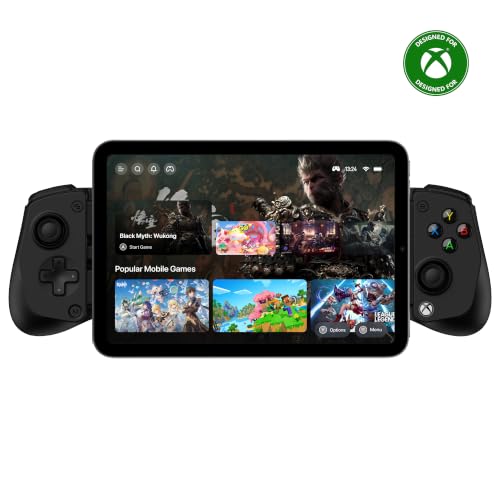
A 145g clamp that stretches to 213mm and never needs a pairing screen.
The spec that carries this one is weight: 145 g, which is light enough to toss in a bag without noticing it. It is officially licensed by Xbox and Apple MFi certified, so Game Pass Ultimate works from the start, and the direct connection means no Bluetooth pairing ritual at all — you clamp and go.
The expandable design stretches to 213mm, which covers compatible smartphones and tablets including iPad mini models. Hall-effect sticks and hall-effect analog triggers give you progressive speed control in racing games and drift resistance over time. There is a physical ABXY button swap, so you can move the button layout to match a different platform without learning new muscle memory. Pass-through charging keeps your device topped up during a long session, and the GameSir app handles remapping and tuning.
The trade-off is the unknown factor. There is no battery figure to judge because it draws from your phone through the direct connection, which means your phone’s charge is now the clock on your session. If your phone battery is already marginal, this setup may not be the right pairing for a long play window. For a light, cable-simple controller that fits a tablet, the fit and weight are the reasons to pick it.
Xbox button mapping: 145g and a 213mm stretch is a rare combination — light enough to carry daily, wide enough for an iPad mini to clamp in.
lite plastic shell: with no battery of its own, the session ends when your phone does — pack a power bank if you play long.
Xbox cloud fan: you want a light plug-in grip that clamps a tablet and never asks you to pair.
wants metal build: your phone charge is tight and you need a controller with its own battery reserve.
7. Turtle Beach Atom Mobile Game Controller

Two halves that snap together magnetically, then split around your phone.
What sets the Atom apart from the clamps above is the design: the two halves magnetically fuse into one compact block when they are not in use, so it drops into a bag without a flared-out bracket catching on everything. Once split, adjustable phone clamps fit most smartphones, and the console-style controls include a 16-button layout with the familiar feel you would expect from a dedicated gamepad. Bluetooth connectivity (a short-range wireless link, no cable needed) is aimed at Android devices and cloud services like Xbox Game Pass, GeForce Now, and more.
Battery lands at 20 hours with quick-charge support, which is enough to get through a couple of long weekends between top-ups. The package is genuinely complete for the price band: a 3.3-foot USB-C to USB-A cable, a carrying bag, a quick-start guide, and a one-month Xbox Game Pass Ultimate subscription are all included. An Atom companion app handles extra features and firmware updates.
Now the real caveat. Reliability is the most-discussed concern in owner feedback — some units keep working fine, while others stop doing their job after a few months, and overall owner sentiment sits well below the clamps in this lineup. The included carrying bag and the one-month Game Pass code are real value, but they do not replace a solid long-term experience. If confidence over time matters most, you may prefer a higher-rated clamp here.
switch grip player: the fuse-together shape is what makes you actually carry a controller in a bag.
wired audio user: you want the most proven-durable pick — reliability is the soft spot in owner feedback.
8. PowerA XP-ULTRA Wireless Controller

A full Xbox pad at home that shrinks for the phone clip when you leave.
This is the one in the lineup that does two jobs. The modular design gives you a detachable full-sized grip and a MOGA mobile gaming clip, so it plays like a normal Xbox controller on the couch and clips to your phone when you leave. The battery is the headline: up to 60 hours per charge from a 2000 mAh pack, or up to 40 hours over Bluetooth. No other pick here comes close to that figure.
The rest of the hardware is console-grade. Two mappable back buttons can be programmed mid-game, dual rumble motors sit in both the detachable grip and the mini pad, and impulse triggers plus a 3.5mm stereo headphone jack round out the experience. The analog sticks run on anti-friction rings for smooth motion, and the detachable clip has dual articulation points so you can angle the screen where you can actually see it.
Here is the honest difficulty. This is the pick where owner feedback about the wireless link is the least settled — disconnects and freezing after firmware updates (software updates that fix bugs) come up in reviews, and the manufacturer points to a firmware update through the app to address wireless drops. As an officially licensed Xbox controller it works with Xbox One, Series X|S, Windows 10/11, Android, and smart TVs, but the portable half leans on a wireless protocol (a wireless connection standard) rather than a cable. Do the firmware update before your first session, and you sidestep most of the reported pain.
swappable stick tops: one controller that covers console duty and phone duty, with up to 60 hours from the 2000 mAh battery.
premium price tag: the wireless connection is the point of friction in owner feedback, so update the firmware promptly after unboxing.
tinkerer at heart: one device for both your console and your phone is the whole reason you are shopping.
budget constrained: you want a set-and-forget wireless link — this is the one pick where a firmware update is step one.
9. BACKBONE One Mobile Gaming Controller, Xbox Edition
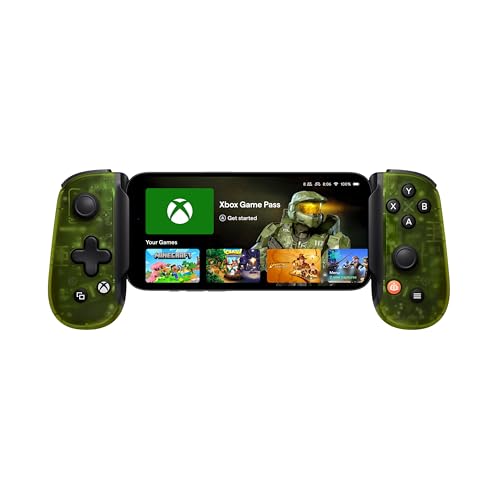
The Xbox-branded clamp that turns a phone into a handheld console in one connection.
Backbone built this in collaboration with Xbox, and the layout copies the console pad: responsive joysticks, tactile buttons, and a familiar D-pad. The connection is USB-C direct, so your iPhone or Android phone is recognized instantly with no setup, and the input is lag-free the way only a cable link can be. It ships with 1-month Xbox Game Pass Ultimate access through the Backbone app.
The app does more than redeem a code. It organizes your games and services in one place, and pulls in Xbox Remote Play, cloud gaming, Apple Arcade, and Steam Link. There is also a 3.5mm audio jack plus Bluetooth audio through the phone, so you can keep private sound going while the controller handles the game. At 10.56 ounces, it is a light clamp for a direct-connection pad.
Build durability is where this one gets complicated. Feedback on the core build and long-term reliability is mixed — some units feel well-made, others are described as flimsy, and some owners see them stop working after a couple of months. That makes this a great fit if you want the cleanest instant Xbox setup and treat it as a phone accessory, but think twice if you expect a decade of hard play. It is still the simplest path to playing Game Pass on a phone with zero pairing steps.
Xbox Game Pass user: you want a plug-in Xbox handheld experience with zero pairing and an app that organizes every service in one place.
bare phone hater: long-term durability matters more than instant setup — owner feedback on lasting build is mixed.
Know the Specs
Hall-Effect vs Carbon-Film Sticks
Hall-effect sticks sense movement with magnets, so nothing rubs and nothing wears. Carbon-film sticks press a wiper against a track, and that track is what eventually causes drift. A 5-million-cycle Hall-effect rating tells you the stick is built to outlast the carbon kind by a wide margin, which matters most if you put a lot of hours into a single game. The practical result: your character stays still when your thumb is off the stick.
USB-C Direct vs Bluetooth
A USB-C controller clamps to your phone like a shell and pipes input straight through the charging port. The phrase “zero latency” shows up here because there is no wireless hop. Bluetooth controllers pair once, then usually reconnect with a single Home-button press, and they free you from a fixed phone size. If you play cloud shooters, the wired feel is worth the clamp. If you play anything slower, Bluetooth’s convenience usually wins.
Stretch Range and Case Clearance
The stretch number tells you the longest device the clamp will hold — a controller rated to 213mm takes a tablet, while a phone-only clamp will not. Case clearance is separate: check the thickness your controller accepts and whether it carves out room for the camera bump. A clamp rated for cases up to 0.47 inches lets you skip the remove-and-reclip routine every session.
Trigger Modes and Back Buttons
Linear triggers read how far your finger presses, which is exactly what a racing game wants for braking. Analog-to-digital switching lets the same trigger snap to instant response for a shooter. Back buttons and paddles let you map a face-button action to your fingers without moving your thumb off the stick — four of them is a generous count for a phone pad, and two is common.
Common Questions
Will an Xbox phone controller work with Xbox Game Pass Ultimate?
Is USB-C or Bluetooth better for cloud gaming?
Will my phone case fit in these controllers?
Do Hall-effect joysticks actually stop stick drift?
How long does the battery last on a phone controller?
Can I use these controllers with an iPhone?
What are back buttons and paddles for on a phone controller?
Will a larger tablet fit in a phone controller clamp?
Do these controllers include a Game Pass subscription?
What is the difference between a clamp controller and a clip-on pad?
The Bottom Line
For most players, the xbox phone controller to buy is the Mocagen MC1, because its Hall-effect sticks with a 5-million-cycle rating, case-on clamp, and considered ergonomics cover the fundamentals without a long list of trade-offs. If you want the longest sessions away from a charger, grab the ShanWan Q133P — roughly 25 hours versus the MC1’s 6. And for an instant lag-free Xbox handheld feel, the Backbone One with its USB-C direct connection is the one to reach for.
If your phone’s screen is a tablet and you want the biggest picture, the Mocagen MC200’s 8.1-inch expand is the answer. One nudge before you close the tab: the controllers that keep players happy longest are the ones with drift-resistant sticks (thumbsticks that do not wear out and start moving on their own) and a clamp that fits on the first try — so measure your phone, check your case, and buy for the games you actually play.
How we choose
We do not accept paid placement. Every pick is matched to a real buyer and a real use-case; we do not hands-on test units.
Sources
Specifications: manufacturer listings and product documentation. Review insights: verified customer reviews. Pricing: not shown on this page (it changes often); check the current price via the retailer link.
As an Amazon Associate, Tactical Gear Guy earns from qualifying purchases. This does not affect which products we feature.