Specs are compiled from manufacturer listings and verified buyer reviews and can change over time — please confirm the key details on the product page before buying.
You plug a keyboard into your Xbox Series S expecting it to just work, and half the time it doesn’t. The console only accepts a keyboard and mouse in games that specifically support them, so the set you buy has to be a genuinely plug-and-play USB or wireless one. This guide walks you through nine combos that actually talk to the console, sorted by what each one does best.
This guide is built by comparing the manufacturers’ published specifications and the patterns across verified customer reviews, so you get each pick’s real strengths and trade-offs instead of marketing spin.
You will see how key count, mouse sensitivity, battery size, and wired versus wireless connection change the way a set behaves in your hands, and which trade-offs actually matter for console play. Here are the best Xbox Series S keyboard and mouse sets for plug-and-play console gaming.
Top Picks


How To Choose The Best Xbox Series S Keyboard and Mouse
The single biggest thing that decides whether a keyboard and mouse set is worth buying for a Series S is not the RGB lighting or the price — it is console support. A set that works perfectly on a desktop can sit dead on a console if the game you play does not accept keyboard and mouse input. Start there, then work down to layout, sensitivity, and battery.
Confirm console support before anything else
Xbox Series S games only accept keyboard and mouse controls in titles that were built for it, and the specific game has to support it. Several sets in this list explicitly list Xbox in their compatibility notes. Others are marketed for PC and list PS5, PS4, and Xbox alongside it. Read the manufacturer’s own compatibility line carefully and check your game before you commit, because a keyboard that works on a laptop will not magically work in a game that ignores it.
Pick a key count that leaves room for your mouse
A full-size keyboard carries a number pad and a function row, which takes up desk width you probably want for sweeping a mouse in a shooter. A 60% board drops the number pad and the function row entirely, and an 87-key board (often called TKL for tenkeyless) drops just the number pad. Both free up real desk space, but a 60% board also pushes the arrow keys and function keys onto secondary layers you have to press a key combo to reach.
Understand what DPI does on a gaming mouse
DPI stands for dots per inch, and it measures how far the mouse cursor travels on screen for each inch you move your hand. A mouse with adjustable levels lets you dial it down for precise aiming or up for fast turning. A 7200 DPI sensor only helps if you actually play at that sensitivity; most players settle somewhere in the low thousands. What matters more is that the levels are adjustable on the fly and that the sensor tracks smoothly without stutter.
Side-by-Side Comparison
| Model | Best For | Keys | Mouse DPI | Connection | Amazon |
|---|---|---|---|---|---|
| AULA T102 Combo★ Best Overall | Wired all-rounder | 104 | 1200-2400-4800-7200 | USB-A wired | Amazon |
| CHONCHOW USB Wireless ComboBest Wireless Value | Wired-free desk setup | Full-size | 1600-2400-3200 | 2.4GHz wireless | Amazon |
| CHONCHOW G112 TKLBest Compact Wireless | Compact wireless | 87 | Adjustable | 2.4GHz wireless | Amazon |
| CHONCHOW LED Combo | Console-first buyers | 87 | Adjustable | 2.4GHz wireless | Amazon |
| BlueFinger 60% Combo | Mechanical feel | 61 | 800-1200-1600-2400 | USB wired | Amazon |
| RedThunder 60% White | Ultra-light mouse | 61 | 7200 | USB wired | Amazon |
| RedThunder 60% Black-White | Fast FPS setup | 61 | 7200 | USB-A wired | Amazon |
| Redragon 75% Combo | Tri-mode flexibility | 75% layout | 400-800-1600-2400-3200 | Bluetooth / 2.4GHz / USB-C | Amazon |
| Orzly Hornet RX-250 | Full four-piece bundle | 104 | 1200-1600-2400-3200 | Wired | Amazon |
Detailed Reviews
1. AULA T102 Gaming Keyboard and Mouse Combo
Our pick — 4.5+★ from 2,500+ verified ratings; the strongest balance of quality and price.
The wired set that treats your mouse hand seriously, with room to crank the sensor high.
The headline here is the mouse sensitivity range: 1200-2400-4800-7200 DPI, adjustable in four steps from the mouse itself. That 7200 DPI top setting is the highest ceiling of any set on this list, well above the CHONCHOW wireless combo’s 3200 maximum. You step through those levels right on the mouse with a button instead of digging into a menu.
The keyboard is a full 104-key board with a 2.0mm keystroke — 2.0mm is how far each key travels before it registers, and that shallow throw is built for fast rebounds. There are 26 anti-ghosting keys (meaning 26 keys can be pressed at once and all still register), which is what stops a keypress from vanishing mid-firefight. The panel is aluminum and the whole thing weighs 2.2 pounds, so it sits planted on your desk rather than skidding when you press hard.
What wins people over is the build for the money — quality is the thing the review pages circle back to most, ahead of the value and the look. The RGB runs 3 illumination modes with 3 brightness levels, so you can dim it for a dark room or leave it steady. The recurring gripe is the membrane feel: it is not a mechanical board, and a small share of buyers wanted sharper feedback on the keys.
For a Series S player who wants a reliable wired connection and a mouse that can go aggressive, this is the pick to start with. It connects over USB-A and lists Xbox among its compatible devices.
What sets it above the pack
- 7200 DPI ceiling — the highest top setting on this list
- 26 anti-ghosting keys for simultaneous presses
- 2.0mm keystroke built for fast rebound
- Aluminum panel holds the board steady
Where it asks you to compromise
- Membrane keys, not mechanical
- Full 104-key width eats desk room for the mouse
- Wired only — no cable-free option
Go for it if: you want a wired set with the widest mouse sensitivity range and a heavy aluminum panel.
Look elsewhere if: a mechanical key feel is a must, or you want a keyboard without a number pad.
2. CHONCHOW USB Wireless Gaming Keyboard and Mouse Combo
A wireless pair that shares one USB stick, so your console sees a single tidy connection.
The whole set runs on one 2.4GHz wireless connection (a short-range radio link, like a cordless mouse uses) over a shared USB adapter. Both the keyboard and mouse talk to your Series S through that one stick, which sits stored in the back of the mouse when idle. That is the cleanest way to go cable-free on a console without juggling two receivers.
Battery is the real story: the keyboard carries a 2500mAh cell and the mouse a 500mAh cell. With the backlight on they run for 10 hours continuously, and auto-sleep kicks in after 5 minutes of no input, waking on any key. That 2500mAh keyboard figure is the same as the CHONCHOW G112 below, but larger than the 2000mAh cell in the CHONCHOW LED combo.
The lightness is the part you notice first — at 1.8 pounds this is the lightest set in this whole roundup, a full 0.4 pounds under the AULA. The RGB keycaps are all backlit with light that reads clearly in a dark room. The honest catch is reliability: while plenty of buyers report solid everyday use, the charge does not always hold as long as expected and a few units stop powering on after a couple of weeks.
Weight you can feel: at 1.8 pounds it is the lightest pick on this list, so it slides into a bag or shifts across a desk with barely any heft.
The trade-off to weigh: a small share of buyers hit battery and reliability trouble, so if you need a set to survive constant daily dragging, a wired pick is a safer bet.
Reach for this if: you want one wireless adapter for both devices and the lightest set in the roundup.
Pass on it if: you cannot tolerate any risk of a weak charge over time.
3. CHONCHOW G112 Gaming Wireless TKL Keyboard Mouse
The wireless board that clears the number pad off your desk and hands the space back to your mouse arm.
87 keys is the whole point. A TKL (tenkeyless) keyboard drops the number pad so the board ends sooner and your mouse has more room to sweep. That is the difference you feel most in a shooter, where a wide board crowds the exact arc your hand wants.
Under the hood it packs a 2500mAh rechargeable keyboard battery and a 500mAh mouse cell, with an auto-sleep mode and a physical power switch to save charge between sessions. The 2.4GHz USB link is plug-and-play with no driver setup. The mouse adjusts DPI and emits LED light, and the keyboard gives you breathing, static, or light-off modes across 3 brightness levels.
The lighting and gaming feel are what owners single out, and it lands well with younger players. The honest catch is battery consistency — some report it stops charging around the one-month mark, so treat the charge cable like part of the kit. At 87 keys it is also narrower than the AULA and drops the number pad entirely.
Who it fits: Series S players who want a wireless board without a number pad hogging desk space.
What to watch: keep the charging routine steady, since a few units have stopped taking a charge.
4. Wireless Gaming Keyboard Mouse

A compact wireless combo that names your console right on the box — with one caveat worth reading.
This one lines up with console buyers most directly: it lists PS3, PS4, PS5, Xbox, and Mac support alongside Windows. The set walks you through plug-and-play with no drivers. The manufacturer is also upfront that console game support depends on the game’s own settings, so confirm your title accepts keyboard and mouse before you commit.
It runs a 2000mAh keyboard cell and a 500mAh mouse cell, charged with the included cable. A 2.4GHz adapter is shared between the two, but unlike the CHONCHOW above they can also be used separately if you only want one out. The 87-key layout is compact at 13.5 by 5.5 by 1.2 inches, which is small enough to carry in a backpack and open up desk room. The keyboard dozes after 60 seconds of no input and the mouse after 10 minutes.
The catch a console player should know about is PS5 compatibility, which flushes out as inconsistent across buyers — some connect easily while others hit trouble. On Xbox the setup is more straightforward. The appearance and soft backlight earn steady praise.
Pick it for: a compact wireless board that lists Xbox support and packs into a bag.
Think twice if: you also game on PS5, where the connection reports are mixed.
5. BlueFinger 60% Mechanical Gaming Keyboard and Mouse Combo
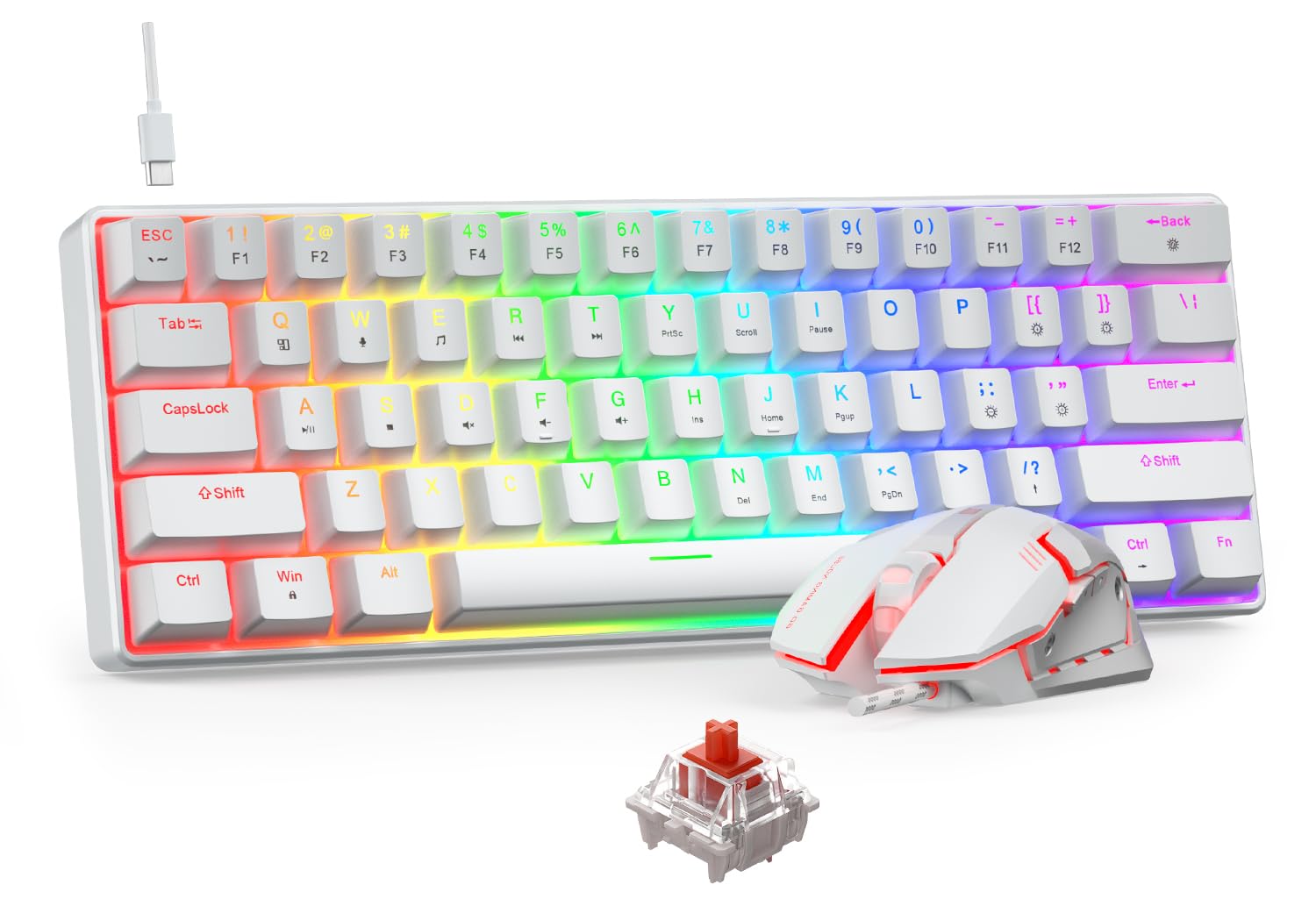
Real mechanical switches in a tiny 61-key frame, for the player who wants a quiet, linear press.
These are red mechanical switches — a linear switch with no tactile bump, so the press is smooth and quiet with lower resistance. That is a different feel from the membrane keys on the AULA and CHONCHOW sets, and it is the reason this board is the mechanical option of the group. The keyboard lights in 19 RGB modes across 5 brightness levels and 5 speed settings.
The 61-key layout strips out the number pad and the function row, so the board is short enough to leave a wide runway for your mouse hand. Every key has its own independent switch, backed by full-key anti-ghosting so a fast combo registers cleanly. The wired mouse runs 4 DPI levels (800/1200/1600/2400) with a 4-color LED you switch on the mouse itself, and the cable is detachable Type-C for travel.
The catch is reach. On a 60% board the function and arrow keys sit on secondary layers you press with a Fn combo, so if you rely on those keys for shortcuts it takes adjustment. It also has the smallest buyer base here, so the track record is thinner than the big full-size sets.
Why the mech crowd will like it
- Red linear mechanical switches, quiet and smooth
- 19 RGB modes, 5 brightness levels, 5 speed settings
- Full-key anti-ghosting on every switch
- Detachable Type-C cable for travel
The honest friction points
- 61 keys push function keys onto Fn layers
- Smaller buyer base than the big full-size sets
- Wired only
Made for: players who want mechanical red-switch feel and a tiny footprint.
Not ideal for: anyone who leans on dedicated arrow and function keys.
6. RedThunder 60% Mini Gaming Keyboard and Mouse Combo (White)

A honeycomb-shell mouse that weighs about 65 grams — the lightest pointer here — paired with a tiny board.
The mouse is the star. Its perforated honeycomb shell brings it down to roughly 65 (+-5) grams, and that low weight is what lets you flick and stop without fighting inertia. The sensor runs 7200 DPI with a 12000fps scan rate, 1000Hz report rate, and 400IPS tracking speed — all of which is a fancy way of saying it reacts fast and tracks smoothly on quick movements. It is symmetrical, so it suits left or right hand equally.
The 61-key keyboard is water-resistant with a triple protection design, and the braided USB cable has an anti-interference magnet ring and gold-plated connector for steadier data. Anti-ghosting and full-core water resistance keep it useful for long sessions. The RGB runs in multiple colors and modes with adjustable brightness and breathing speed. Where it lands short of a 7200-range full-size set is the smaller board, but it matches the RedThunder sibling below on DPI exactly.
The thing to know honestly is durability: while the build quality earns the most praise, a handful of owners mention the keyboard giving out around the five-month mark. The value question splits opinion for the same reason. Treat it as a light-duty gaming set rather than a decade-long workhorse.
The number that matters: 65 (±5) grams on the mouse — light enough to flick across a full swipe and stop on a dime.
What to size up: a few keyboards have failed around five months, so if you want long-term service, plan for a possible swap sooner than with the full-size wired sets.
Go for this if: a featherweight mouse is your priority and you want a compact wired board to match.
skip it if: you need a set built to last for years without a replacement.
7. RedThunder 60% Gaming Keyboard and Mouse Combo (Black-White)

Same tiny-board idea as its white sibling, dressed in black and white, with a 7200 DPI sensor on tap.
The core specs mirror the white RedThunder above: a 61-key compact board, a 7200 DPI optical sensor, 12000fps scan rate, 1000Hz report rate, 40G acceleration, and 400IPS tracking. The difference is the black-and-white colorway and the finish, and it lists compatibility with Linux and Windows across laptop and PC. If you dislike bright white plastic on a dark desk, this version solves that.
The mouse keeps the ultra-light honeycomb shell and symmetrical shape for left or right hands. The keyboard is water-resistant with triple protection, the braided cable has an anti-interference magnet ring and gold connector, and the RGB offers multiple modes with adjustable brightness. The mouse and keyboard both plug in over USB-A, so there is no charging to think about.
What buyers respond to most here is straightforward gaming performance — the set simply works when you plug it in, and it earns steady praise for that. It is a lower-profile pick than its white sibling in review volume, so the long-term picture is thinner.
Best matched to: FPS players who want a lightweight 7200 DPI mouse and a small board in a darker colorway.
The honest limit: thinner review history than the white version, so you are trusting a shorter track record.
8. Redragon Wireless Gaming Keyboard and Mouse Combo
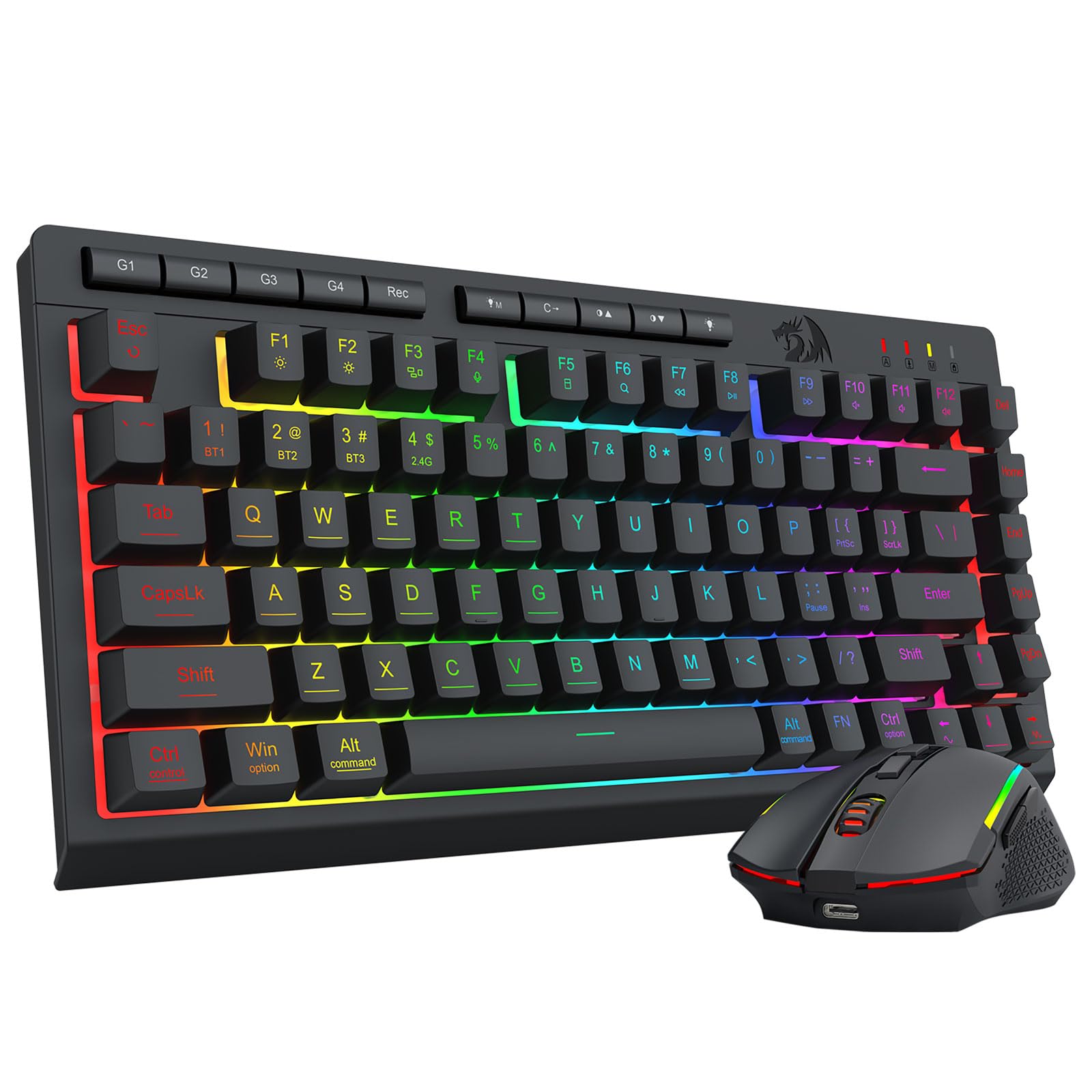
Three ways to connect — Bluetooth, 2.4GHz, and USB-C wired — with the biggest battery on the list.
Most sets here give you one connection. This one gives you three: Bluetooth 5.0 for a tablet or phone, a 2.4GHz wireless stick, and a USB-C wired option. That tri-mode setup means you can jump between a console, a PC, and a tablet without unplugging anything. The 2-in-1 receiver runs keyboard and mouse together, and hotkeys plus side buttons switch devices instantly.
Battery is the standout figure: a 4000mAh keyboard cell and a 700mAh mouse cell, the largest keyboard battery on this list. An auto-sleep kicks in after 2 minutes of quiet to conserve power. The RGB is the most granular here — 16.8 million colors, 8 dynamic effects, 6 DIY modes, and 7 solid colors, with 5 brightness and speed levels. The mouse switches across 5 DPI levels (400/800/1600/2400/3200) and customizes up to 12800 via the driver. It is fully programmable with 26-key anti-ghosting.
The honest drawback is wireless reliability — the connection draws mixed feedback, with some praising the wireless and others hitting drops. The 75% layout also trims the number pad but keeps the function row, so it is a middle ground between a full board and a 60%. For someone who moves between devices and wants one set to do it all, that flexibility is worth the setup study.
What makes it the most flexible
- Bluetooth 5.0, 2.4GHz, and USB-C wired in one set
- 4000mAh keyboard battery — the largest here
- 16.8M colors across 8 effects and 6 DIY modes
- Fully programmable with 26-key anti-ghosting
Where it can trip you up
- Wireless connection reports are mixed
- Setup takes more study than a plug-and-play board
- Higher price tier than the wired basics
Reach for this if: you juggle a console, PC, and tablet and want one set with three connection modes.
Weigh this first: the wireless link is not the most reliable, so a wired fallback via USB-C is a smart habit.
9. Orzly Hornet RX-250 4-in-1 Gaming Bundle

Four pieces in one box — keyboard, mouse, headset, and a mouse pad — made for the new console owner.
This is the only set here that throws in a headset and a mouse pad on top of the board and mouse. The keyboard is a full-size 104-key wired membrane board with 19-key rollover and anti-ghosting, rated for 8 million keystrokes with spill-resistant drainage. The mouse is a 90-gram ambidextrous design with 4 DPI levels (1200/1600/2400/3200) and switches rated for up to 1 million clicks. The pad has an anti-skid rubber base and high-density cloth surface.
The headset rounds it out with a lightweight aluminum frame, a suspended headband, soft cushioned cups, and a foldable microphone with 120-degree rotation plus in-line volume. It is pitched squarely at PS5, PS4, Xbox Series X/S, Xbox One, Steam Deck, and ROG ALLY owners. That writeup lists the current-generation Xbox consoles by name, so a Series S owner checking compatibility has it stated directly.
The catch is functionality: mostly it works well and children in particular enjoy it, but a portion of customers note the keyboard or mouse not behaving properly. Durability shows up as a concern too. It is the highest-priced pick in the roundup, and you are paying partly for the two extras rather than a step up in the keyboard itself.
What you get in the box: keyboard, 90g mouse, stereo headset, and a cloth mouse pad — a full desk setup in one purchase.
The fair warning: the quality and value win people over, but functional glitches surface for some buyers, so check the return window.
Best for: a first-time Series S owner who wants a complete setup in one order, including a headset.
Consider the alternatives if: you already own a headset and would rather put the money into the keyboard and mouse alone.
Know the Specs
Key count and layout
A keyboard’s key count tells you how much desk it covers. A 104-key board is full-size with a number pad. An 87-key board (TKL) drops the pad. A 61-key board is a 60% layout that also folds the function and arrow keys onto a secondary layer via the Fn key. Fewer keys means more space for your mouse, but it also means more key combos to memorize.
Mouse DPI
DPI (dots per inch) sets how far the cursor travels per inch of hand movement. Higher numbers make the pointer faster; lower numbers give finer control. Adjustable DPI levels let you switch on the fly — dial down for a precise shot, dial up for a fast turn. A high ceiling like 7200 does not make a mouse better by itself; it just gives you more headroom if you play at high sensitivity.
Battery capacity in mAh
On wireless sets, the mAh (milliamp-hour) figures show how much charge each half carries. A bigger keyboard cell lasts longer between charges. Auto-sleep timers stretch that further by cutting power when you stop input. Wired sets skip batteries altogether, so there is nothing to top up but also no cable-free use.
Wired vs wireless connection
A wired USB or USB-C connection avoids charging entirely and never drops a signal. A 2.4GHz wireless link needs a small USB receiver and trades the cable for a battery routine. Bluetooth adds a third option that pairs without a receiver. On a console, a wired setup is the simplest path to a working set, while wireless frees your desk from cables at the cost of recharging.
Common Questions
Will a keyboard and mouse set work on my Xbox Series S?
Do I need a wireless set or is wired fine for console gaming?
What key layout is best for a small desk?
Is higher DPI always better?
How long do the rechargeable sets run between charges?
Do these sets need drivers to work?
Can the mouse and keyboard be used separately?
Is a mechanical keyboard better than a membrane one for console gaming?
Will the backlight drain the battery faster on a wireless set?
Are the wireless sets reliable enough for competitive play?
The Bottom Line
For most Series S players, the xbox series s keyboard and mouse pick is the AULA T102 Combo. It gives you the widest mouse sensitivity range on this list, so you can dial in a slow aim or a fast flick. A steady aluminum panel keeps the keyboard planted, and the wired connection never drops mid-match. If you want to cut the cable, the CHONCHOW USB Wireless Combo runs both parts off one USB adapter and is the lightest set here. For a first setup that includes a headset and mouse pad in the box, reach for the Orzly RX-250 bundle. Whatever you pick, confirm the set lists Xbox support and check that your game accepts keyboard and mouse. Those two checks save more frustration than any spec on the page.
How we choose
We do not accept paid placement. Every pick is matched to a real buyer and a real use-case; we do not hands-on test units.
Sources
Specifications: manufacturer listings and product documentation. Review insights: verified customer reviews, as of November 2026. Pricing: not shown on this page (it changes often); check the current price via the retailer link.
As an Amazon Associate, Tactical Gear Guy earns from qualifying purchases. This does not affect which products we feature.