Specs are compiled from manufacturer listings and verified buyer reviews and can change over time — please confirm the key details on the product page before buying.
That is doable, but the cheap end of this market has one big trap: most of these controllers are 2.4GHz-only, shipping with a small USB receiver and no Bluetooth at all. So before you buy anything, check whether you are gaming on a console or a PC — that single answer decides which of these nine pads will actually pair up.
This guide is built by comparing the manufacturers’ published specifications and the patterns across verified customer reviews, so you get each pick’s real strengths and trade-offs instead of marketing spin.
Some pads here run 10-14 hours on a charge, others take AA batteries, and a couple need that dongle plugged in at all times. Below you get the straight breakdown of each so you can pick the one that fits your setup, and this is the honest shortlist of the cheap wireless xbox controller options worth your time.
Top Picks


How To Choose The Best Cheap Wireless Xbox Controller
The first thing to get straight is how the pad talks to your machine. Almost every sub-premium controller in this category uses a 2.4GHz wireless connection — that is a dedicated radio link that runs through a small USB dongle (receiver) you plug into the console or PC. It is fast and stable, but the dongle must be plugged in, and the pad will not talk to a phone or tablet.
Dongle or Bluetooth — pick your lane first
A 2.4GHz-only pad pairs in seconds and stays locked to that receiver. The catch is portability: lose the dongle and the controller is dead weight. Bluetooth pads work without any receiver, but you will pay more for that convenience. Check which connection your console or PC supports before you pick a colorway.
Battery: built-in cell vs AA
A built-in lithium battery rated in mAh (milliamp-hours — a measure of how much charge it holds) means you recharge over USB-C and never buy batteries again. An AA-powered pad means you swap in fresh cells the moment it dies, with zero charging downtime. Neither is wrong — it depends on whether you would rather recharge over USB-C or swap in fresh AA cells.
Sticks, triggers, and the drift question
Stick drift — where the thumbstick reports movement even when you are not touching it — is the most common long-term failure on any budget pad. Some listings here mention Hall effect sticks, which use a magnetic sensor instead of physical contact, theoretically reducing wear. Treat that as a spec to weigh, not a guarantee.
Do you actually need macro buttons?
Programmable back buttons (often labeled M1/M2 or ML/MR) let you map a face button or trigger to a paddle under your fingers. Turbo functions repeat a button press while held. Macro paddles and turbo pay off in fighting games and shooters, but casual players can skip them. Do not pay extra for paddles you will never map.
Side-by-Side Comparison
| Model | Best For | Connection | Battery | Headset Jack | Amazon |
|---|---|---|---|---|---|
| ADHJIE Xbox One Controller★ Best Overall | Console-first budget play | 2.4GHz dongle | 800mAh, 8-10 hrs | 3.5mm | Amazon |
| HaeBorl RGB ControllerMost Customizable | Custom look and macro play | 2.4GHz dongle | 800mAh, 6-12 hrs | 3.5mm | Amazon |
| SZYUYU Wireless ControllerLongest Runtime | Long sessions on PC or console | 2.4GHz dongle | 1000mAh, 10-14 hrs | 3.5mm | Amazon |
| YUYIU RGB Controller | RGB lovers wanting big battery | 2.4GHz dongle | 1000mAh, 10-14 hrs | 3.5mm | Amazon |
| SZDILONG Wireless Controller | Macro and turbo tinkerers | 2.4GHz dongle | 1000mAh, 10-14 hrs | 3.5mm | Amazon |
| NINIFEI For Xbox One Controller | Red colorway on a tight budget | 2.4GHz dongle / USB-C | AA batteries (not included) | 3.5mm | Amazon |
| Dinosoo RGB Controller | PC gaming versatility | 2.4GHz dongle / wired | Built-in | 3.5mm | Amazon |
| XBOX Wireless Controller Carbon Black | The safe all-rounder | Bluetooth / USB-C | AA batteries | 3.5mm | Amazon |
| Xbox Controller Velocity Green (Renewed) | Official feel, refurbished | Bluetooth / USB-C | Up to 40 hrs | 3.5mm | Amazon |
Detailed Reviews
1. ADHJIE Xbox One Controller, 2.4GHz Wireless
The plug-in-and-play dongle pad that gets you off the console couch without a wire.
This one pairs by plugging a small 2.4GHz receiver into your console, then holding the HOME button until the light stays on — about 3 seconds of setup. Once it locks, you have a working range of 30 ft, which is enough to sit back from a TV across a normal living room.
The built-in 800mAh battery takes about 2 hours to reach full and then runs 8-10 hours per charge, so a long evening session fits comfortably inside one charge. It carries 10 buttons and a 3.5mm headphone jack, meaning you can plug a headset straight into the pad for voice chat instead of routing audio through the TV. At 0.28 kg it sits in your hands without feeling hollow.
Here is the honest part. One thing to know before ordering: the included cable is USB-B, not USB-C, so keep a spare around. The bigger consideration is longevity — owner feedback is genuinely split on how these hold up over months, and a headset plugged into the jack is where connection gripes cluster. Treat it as a solid console pad for casual play, not a tournament piece.
What earns its place
- 30 ft wireless range from the bundled dongle receiver
- 800mAh battery charges in 2 hours, runs 8-10 hours
- 3.5mm jack for headset chat without extra adapters
- Ergonomic palm shape that stays comfortable over long sessions
Where it asks patience
- USB-B charging cable, not the newer USB-C
- Reports of dropped connection once a headset is plugged in
- Durability over time is a coin flip rather than a sure thing
Reach for it if: you play on an Xbox One or Series X/S and want a wireless pad with a headset jack without paying official-controller money.
Think twice if: you need rock-solid headset audio every single session or you plan to travel with it — the dongle has to come too.
2. HaeBorl Xbox One Controller, RGB LED Light, Deep Pink
Seven glow colors and two macro paddles on a pad that leans hard into personality.
The headline is the lighting: 7 colors of RGB LED that switch on with the HOME button and cycle through blue, green, yellow, light yellow, pink, purple, and light blue via a button on the back. That back panel also houses two programmable M1/M2 macro buttons you can map to face buttons, triggers, or directions — a real advantage over the simpler pads in this list.
Battery is a built-in 800mAh cell that takes 3-4 hours to fill and then delivers 6-12 hours of play. That is a noticeably wider range than the ADHJIE’s tighter 8-10 hour estimate, and on a good run it stretches further between charges. Charging is slower, though — the HaeBorl’s 3-4 hours runs longer than the ADHJIE’s 2-hour top-up.
Worth flagging: the 3.5mm headset jack handles party chat, but some owners say this pad feels less solid than a standard Xbox controller, and it is priced above the cheaper dongle pads here. The deep pink finish is the whole point for a lot of buyers — go in for the look and the macro flexibility, not for a pro-grade feel.
The color sells it: pink is the loudest thing about this pad, and it earns that attention. The 7-color LED ring plus the back-mounted M1/M2 paddles give you more to tinker with than the budget dongle pads around it.
Set expectations on build: it works and it glows, but a few owners find the plastic feel lighter and less premium than the official Xbox pad. For casual play that rarely matters; for competitive play it might.
Pick this one when: a specific color and a couple of mappable back buttons matter more to you than the most rock-solid build in the category.
Look elsewhere for: a pure durability-first pick — this is a style-and-features buy, not a longevity bet.
3. SZYUYU Wireless 2.4GHz Controller (Purple)
A 1000mAh cell and a 33 ft radio link built for marathon evenings.
If battery anxiety is your thing, this is the pad to look at. The built-in 1000mAh lithium cell charges over USB-C in 2-3 hours and then runs 10-14 hours — meaningfully more headroom than the ADHJIE’s 800mAh setup. It also broadcasts over 33 ft of 2.4GHz range, slightly more reach than the ADHJIE’s 30 ft, so you can stretch out on the couch with room to spare.
What buyers keep coming back to here is how solid it feels. Build quality is the single most praised thing about this controller, with the comfortable-in-hand shape a close second — the 360° omnidirectional sticks snap back fast and feel accurate, and the dual vibration motors give decent rumble feedback. You also get ML/MR programmable back buttons and a 4-mode RGB system, though the lights are more garnish than necessity.
The caveat is fit, not fault. This pad is 2.4GHz-only — no Bluetooth — so it will not talk to a TV or a phone, and it needs the receiver plugged in. A few buyers report connection wobbles and short battery runs, so if you need bulletproof pairing every session this is a small gamble. For casual console and PC play on a budget, it is one of the better-rounded picks here.
The case for it
- 1000mAh battery gives 10-14 hours per 2-3 hour charge
- 33 ft 2.4GHz range for relaxed couch distance
- Build quality and hand comfort are the things buyers mention most
- Programmable ML/MR back buttons and 4 RGB modes
The catch to weigh
- 2.4GHz only — no Bluetooth, so no phone or TV pairing
- Receiver must stay plugged in to the console or PC
- A minority report connection and battery inconsistencies
Best matched to: Xbox or Steam PC players who want the longest runtime in this lineup and pair fine with a dongle.
Steer clear if: you want Bluetooth freedom for a tablet, phone, or TV — this one simply cannot do it.
4. YUYIU 2.4GHz Wireless RGB Controller (Pear White)
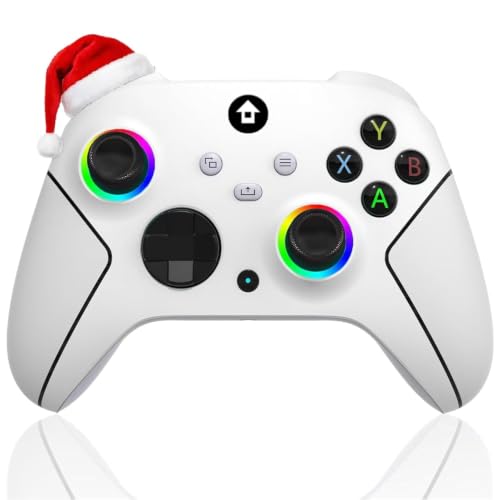
Hall effect sticks and a full RGB system in a clean pear-white shell.
The detail that makes this pad interesting is the stick tech. It lists Hall effect sticks — those use a magnetic sensor rather than physical contact, which is the design aimed at reducing drift over time — plus dual vibration motors and a 360° omnidirectional joystick. If you have ever booted a game to find your thumbstick wandering on its own, this is the spec to care about.
Battery and range are strong: the 1000mAh cell charges over USB-C in 2-3 hours and lasts 10-14 hours, and the 2.4GHz link reaches out to 33 ft. Both figures match the SZYUYU’s numbers exactly, so if you are comparing the two you are really choosing on color and the Hall effect claim here rather than runtime. You get programmable ML/MR back buttons, auto-turbo, a 3.5mm stereo jack, and 4 RGB lighting modes.
Same limitation as the other dongle pads: the controller needs its 2.4G receiver plugged in and has no Bluetooth, so no pairing with a TV or phone. It is also the lowest-rated pad in this bunch, which is worth knowing before you commit. If Hall effect sticks and the pear-white finish are exactly what you want, it is a reasonable buy; if a higher owner consensus matters more, look up at the SZYUYU.
Stick tech that earns a look: Hall effect thumbsticks are the standout line here — the drift-resistant design is a genuine reason to choose this over the plainer dongle pads.
The honesty note: it carries a 3.5+ rating with no large body of praise behind it, so go in expecting solid-not-perfect.
Worth grabbing for: RGB fans who specifically want Hall effect sticks and a white-shell aesthetic for console or PC play.
Skip the gamble if: you would rather lean on the better-reviewed SZYUYU with identical battery and range numbers.
5. SZDILONG Wireless 2.4GHz Controller (Yellow)

A turbo tinkerer’s pad: combo mapping, auto-fire, and a bright yellow shell.
For anyone who likes to remap, this pad is loaded. The ML/MR back buttons can map to A/B/X/Y, LB/RB, L3/R3, or the D-pad, and combined they reach up to 16 function keys. Turbo runs three ways — set it, auto-turbo it, or clear it per-button — so a quick tap on a shooter or a held repeat in a fighter is a few button presses away.
On the hardware side it matches the other 1000mAh pads closely: USB-C charging in 2-3 hours, 10-14 hours of runtime, and 33 ft of 2.4GHz range. The 360° joystick and dual vibration motors are here too. Colors come in via a 7-color RGB system with 4 lighting modes, so you are not losing the light show to get the mapping features.
The recurring concern with this one is reliability — owner experience is genuinely mixed, with some pads running perfectly and others developing faults over time. That is a fit note, not a disqualifier: for a player who wants macro flexibility on a yellow pad and mostly plays casually, it delivers. For someone who wants the lowest-risk purchase, the SZYUYU edges ahead on consistency.
Why it’s on the list
- ML/MR paddles reach up to 16 mapped function keys
- Triple-mode turbo (set, auto, clear per button)
- 1000mAh cell with 10-14 hours and USB-C charging
- 33 ft 2.4GHz range and 7-color RGB lighting
What to keep in mind
- Reliability is a mixed bag across owners
- 2.4GHz-only — no Bluetooth, receiver required
- Battery life called inconsistent by some
The natural home for it: tinkerers who live in remap menus and want the most mappable buttons in this price band.
Not the pick for: someone who wants a set-and-forget pad and would rather trade mapping depth for tighter quality consistency.
6. NINIFEI For Xbox One Controller, Wireless Gaming

Sixteen buttons and a red shell, but you bring your own batteries.
Right away, the power setup here is different: this pad runs on AA batteries you supply yourself, so there is no charging cycle to wait through — you swap in fresh cells and keep playing. It carries 16 buttons, the highest count here besides the official pads, and pairs over 2.4GHz through the included adapter or plugs in over USB-C for direct play on console or PC. A 3.5mm headset jack handles chat.
The connecting process takes a little setup. Once batteries are in, you press the reset button on the back, then re-pair with the charger and console — same routine for PC. When it pairs cleanly it works, and for the money some owners find it excellent. That said, connectivity is where the complaints concentrate: some pads will not connect at all or drop mid-game, and functionality splits along the same lines.
This is the pad to choose only if two things are true: you like a bold red controller, and you would rather run AA batteries than chase a USB-C cable. If stable pairing is your top requirement, the SZYUYU or the official pad lower down are safer bets. It is not a bad pad — it is just the most setup-sensitive one in this group.
Bright and button-rich: a red Xbox-style shell with 16 buttons and AA-battery simplicity — swap cells, keep going, no charging downtime.
Where the risk sits: pairing reliability is the sore spot, so buy it for the color and battery style, not for the most dependable connection.
Suits you if: you want a red pad with plenty of buttons and prefer AA batteries over built-in charging.
Better to pass if: you have no patience for re-pairing steps or need a connection that never wobbles.
7. Dinosoo RGB Wireless Controller with Hall Trigger

The pad that plays nice with nearly everything — Xbox, Android, and Windows.
What makes this one stand out from the dongle crowd is reach across platforms. It lists compatibility with Xbox One, Series X, Series S, One S, One X, Android, and Windows 11/10/8/7, wired or wireless, with the 2.4GHz link stretching over 30 feet. If you bounce between an Xbox and a gaming PC, having one pad that covers both without complaint is a genuine draw.
The control hardware is thoughtful too: vibration motors sit in both the side grips and the triggers, so weapon recoil and collisions come through your fingertips as well as your palms. You get an 8-mode RGB system, a TURBO button for combos, and PL/PR mappable buttons you clear by holding “Set” for 3 seconds. A 3.5mm jack and a rechargeable internal battery round out the package.
The weak point is feel under your thumbs. Response and stick movement come in for mixed feedback, with stick drift and input lag reported by some players — that matters in twitchy shooters more than in slower games. Build quality gets good marks for feeling close to an original controller. Buy it for PC versatility and multi-platform use; do not buy it expecting competitive-grade precision.
Strengths to note
- Works across Xbox, Android, and Windows 11/10/8/7
- Wired or 2.4GHz wireless, over 30 feet of range
- Vibration in both grips and triggers for tactile feedback
- Build quality compared favorably to original controllers
Trade-offs to accept
- Stick drift and input lag reported by some owners
- Button responsiveness draws its share of mixed notes
- Not the pad for precision-heavy competitive play
Made for: the gamer who splits time between a PC and an Xbox and wants one controller that covers both.
Not ideal for: ranked shooters where every millisecond of stick response counts against you.
8. XBOX Wireless Gaming Controller, Carbon Black
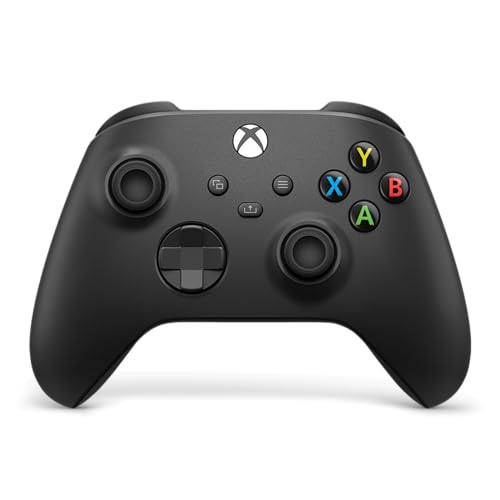
The official pad — no dongle, no fuss, and the connection you never think about.
If you want the least drama, this is it. It connects over Bluetooth or USB-C, pairing and switching between console and PC without a receiver in sight — and the description notes it works across console, PC, and cloud. That Bluetooth freedom is the exact thing most of the dongle pads above cannot offer, and it is why this one is worth the step up.
The design details are the upgrade. Sculpted surfaces and updated geometry keep your hands comfortable over long sessions, a hybrid D-pad sharpens directional inputs, and textured grips on the triggers, bumpers, and back case help you keep hold. There is a dedicated Share button for screenshots and clips, a 3.5mm jack for headset chat, and custom remapping through the Xbox Accessories app. It takes AA batteries and weighs 13.12 ounces with 19 buttons total.
The honest note is price — this is the most premium standard pad in the group, and owner opinion on whether it is worth it splits down the middle. Quality reads as mixed in the same way. Neither is a red flag on a controller this widely used; it just means you are paying for the official brand and reliability rather than rock-bottom cost. What wins people over is how dependable it feels day to day, which is the whole reason to buy first-party.
Why it earns the step-up: real Bluetooth, real USB-C, and the hybrid D-pad plus textured grips that the budget pads approximate but do not match.
The one catch: it costs noticeably more than the dongle pads here, and that premium is for the brand and reliability, not extra features you cannot get elsewhere.
Right for you when: you want the no-receiver, no-fiddling experience and a pad that pairs to anything you own.
Hold off if: staying at the lowest possible spend is the whole goal — the dongle pads up top get you playing for less.
9. Xbox Wireless Controller, Velocity Green (Renewed)

The official green pad, refurbished, with a claimed 40 hours per set of batteries.
This is the same official Xbox controller design in Velocity Green, sold as a renewed unit — meaning it is a refurbished rather than factory-new pad. The battery claim is the highest figure in this entire article at up to 40 hours, and it runs on AA batteries in the rear so you swap cells rather than wait on a cable. Bluetooth and Xbox Wireless handle console, PC, mobile, and tablet connections, and USB-C handles direct play.
Comfort and control follow the same modernized template as the Carbon Black: sculpted surfaces, refined geometry, a hybrid D-pad, and textured grips on the triggers, bumpers, and back case. The Share button, the 3.5mm headset jack, and remapping through the Xbox Accessories app are all present. Twenty standard-ish buttons (19 on the spec sheet) — everything the official design offers.
Two things to weigh. First, “renewed” is not new — quality reads excellent on the majority of units, but you are accepting a refurbished product, so inspect it on arrival. Second, some units reportedly arrive looking different from the listing photos, especially the green shade, so go in expecting cosmetic variance. If you want the official feel and the longest battery claim here and you are comfortable with renewed condition, it is a smart pick.
What it delivers
- Up to 40 hours on AA batteries — the longest claim in this guide
- Full official design: hybrid D-pad, textured grips, Share button
- Bluetooth and USB-C for console, PC, mobile, and tablet
- Quality praised across most renewed units
What to inspect on arrival
- Renewed, not new — condition varies by unit
- Some units reportedly look different from the listing photos
- Cosmetic variance on the green finish
A smart buy for: anyone who wants the official controller feel and the longest battery life here while saving on a refurbished unit.
Pause if: you insist on factory-new condition and a colorway that matches the photos exactly.
Know the Specs
2.4GHz Wireless vs Bluetooth
A 2.4GHz connection is a dedicated radio link that runs through a small USB dongle (receiver) you plug into the console or PC. It pairs fast and stays locked to that receiver, but the dongle must be plugged in and the pad will not talk to a phone or TV. Bluetooth is built-in wireless that needs no receiver — the official Xbox pads use it, most budget pads here do not. Check which one your setup supports before you buy.
Battery mAh and Play Time
mAh (milliamp-hours) measures how much charge a built-in battery holds. A 1000mAh cell typically runs longer between charges than an 800mAh one, though the manufacturer’s hour estimate is what tells you the real play time. Built-in cells recharge over USB-C; AA-powered pads swap in fresh batteries instantly with no charging wait. Pick based on whether you would rather recharge over USB-C or keep spare AA cells on hand.
Hall Effect Sticks and Drift
Stick drift is when a thumbstick reports movement you did not make, and it is the most common long-term failure on budget controllers. Hall effect sticks use a magnetic sensor instead of physical contact, a design aimed at reducing that wear. It is a genuine spec to weigh, but treat it as one factor rather than a promise — other parts of the pad can still wear.
Macro Buttons and Turbo
Programmable back buttons (labeled M1/M2 or ML/MR) let you map a face button, trigger, or direction to a paddle under your fingers. Turbo repeats a button press while held, and on some pads it can be set, switched to auto, or cleared per button. Macro paddles and turbo matter most in fighting games and shooters; casual players can skip paying for them.
Common Questions
Will a 2.4GHz dongle controller work with my Xbox Series X?
Can a cheap wireless Xbox controller pair with my phone or TV without a receiver?
How long does the battery actually last on these controllers?
Is Hall effect better than a standard thumbstick for avoiding drift?
Do these budget controllers have a headset jack for voice chat?
What is the difference between a cheap dongle controller and the official Xbox pad?
Should I buy a renewed Xbox controller to save money?
Will these controllers work on a Windows PC?
Do programmable macro buttons and turbo work on every game?
How much wireless range do these cheap controllers manage?
The Bottom Line
You want a wireless pad that works without paying official-controller money. For most console players, the cheap wireless xbox controller winner is the ADHJIE. It pairs in about 3 seconds through its dongle (a small USB plug that handles the wireless link), so you are playing fast. You also get a 3.5mm headset jack (the round plug for wired headphones) and an 800mAh battery (the cell’s capacity) that runs 8-10 hours. Know what you are getting: its USB-B cable (an older, squarer USB plug) and the connection gripes around headset use mean it is a casual-play pick, not a tournament piece. If runtime is your priority, grab the SZYUYU for its 1000mAh cell and 10-14 hours of play. And for the least-drama experience with real Bluetooth (the standard wireless link built into most devices) and USB-C (the small oval plug that fits either way), the official Xbox Carbon Black is the one to reach for. Decide dongle or Bluetooth first — that single choice narrows the list to the right pad.
How we choose
We do not accept paid placement. Every pick is matched to a real buyer and a real use-case; we do not hands-on test units.
Sources
Specifications: manufacturer listings and product documentation. Review insights: verified customer reviews, as of November 2026. Pricing: not shown on this page (it changes often); check the current price via the retailer link.
As an Amazon Associate, Tactical Gear Guy earns from qualifying purchases. This does not affect which products we feature.