Specs are compiled from manufacturer listings and verified buyer reviews and can change over time — please confirm the key details on the product page before buying.
You want to watch Netflix on your Xbox without fumbling for a game controller every time you hit pause. That is the whole job of an Xbox One multimedia remote. It puts play, pause, volume and a Home button in your hand so the console becomes a streaming box instead of a game machine. The tricky part is that these small infrared remotes vary wildly in range, button count and backlighting, and some connect more reliably than others. Below are seven that are actually built for Xbox One, sorted by what they do best.
This guide is built by comparing the manufacturers’ published specifications and the patterns across verified customer reviews, so you get each pick’s real strengths and trade-offs instead of marketing spin.
Some remotes here run on two AAA batteries, others take alkaline cells, and a few add a learning function so one remote also runs your TV. The range figure matters most, because infrared needs a clear line of sight to the console. The best Xbox One multimedia remote reaches your couch and lights up in the dark.
Top Picks


How To Choose The Best Xbox One Multimedia Remote
The first thing to understand is that these remotes talk to your console over infrared (IR) — an invisible light beam that needs a clear path, like a TV remote. That single fact changes how you buy. A game controller uses a wireless radio link and works through a couch cushion; an IR remote will not, so placement and range come first.
Range and line of sight
Check the maximum range figure before anything else. Some remotes here claim 10 meters, one lists 8 meters, and one lists 25 feet. Those numbers only hold up when nothing blocks the beam. If your Xbox sits inside a closed cabinet, no remote in this list will help — you need the sensor visible. Point the remote toward the console’s front sensor, and the rated distance is what you can expect.
Backlighting for dark rooms
A backlit remote lights every button when it senses your hand or a press. That matters when you are watching a movie with the lights off and do not want to squint. Not every pick here has it, and the ones that do trigger it differently — some on any button press, some on motion. If you watch a lot at night, this is worth prioritizing.
Learning buttons and TV control
Several remotes here include learning keys — buttons you teach using your TV or soundbar’s own original remote. That lets one remote run both the Xbox and your television’s volume. The catch is a real one: you must still own the original remote to program the learning buttons. If your TV remote is already lost, that feature is unavailable to you.
Battery type and count
Most of these run on AAA batteries, and batteries are generally not included. A few take alkaline cells specifically. Note the battery type on each listing so you are not stuck unboxing a remote with nothing to power it. Buy the batteries with the remote so it works from the start.
Side-by-Side Comparison
| Model | Best For | Buttons | Max Range | Backlit | Amazon |
|---|---|---|---|---|---|
| Remote Control Replacement for Xbox One S and X★ Best Overall | Couch-side streaming | 15 | 10 meters | Full LED | Amazon |
| Anderic Xbox One Media Remote with LearningAlso Great | Best Overall | 21 | 25 feet | — | Amazon |
| Nyko Media Remote – Xbox One | Reliability to count on | — | 9 meters | — | Amazon |
| 8Bitdo Media Remote (Short Edition) | Best Backlight | 20 | 10 meters | Motion activated | Amazon |
| Replacement Remote Control for Xbox Gaming Media (White) | Compact Pick | 4 | 8 meters | Yes | Amazon |
| Pre-Programmed Universal Media Remote | Most Versatile | — | 10 meters | — | Amazon |
| Full Function Media Remote (Blue) | Budget Champion | 14 | 10 meters | Motion activated | Amazon |
Detailed Reviews
1. Remote Control Replacement for Xbox One S and X
Our pick — 4.0+★ from 600+ verified ratings; the strongest balance of quality and price.
Fifteen buttons, full LED backlighting and a ten-meter reach that covers most couch distances.
This UBay replacement lights every single button through full LED backlighting, so a dark-room pause is a straight shot rather than a guess. Fifteen buttons include the A, B, X, Y controls for digging through Movies, TV shows, Music, Videos and Apps. It is preprogrammed — you drop in batteries and it works, with no setup or programming step.
The ten-meter range is a comfortable middle figure on this page, longer than the Retrosun’s 8 meters and level with the 8Bitdo. It also aims at your TV’s channel and volume, so it handles more than just the console. It is compatible with Xbox One, Xbox Series X and Xbox Series S.
The honest note on this one is connectivity, which draws mixed reports — some units connect instantly while a few buyers find theirs will not pair with the console at all. Batteries and a user manual are not included. Still, for a backlit fifteen-button remote that asks nothing of you at setup, it is a sensible grab.
The value read: you get full LED backlighting on all fifteen buttons and a ten-meter reach for the console and TV audio controls, all preprogrammed.
The caveat that matters: pairing is the spot to watch — confirm it links to your console before you lean on it daily.
Go with this if: you want an all-lit, fifteen-button remote with a ten-meter range and zero setup.
Hold off if: you have had pairing trouble with off-brand remotes before.
2. Anderic Xbox One Media Remote Control with Learning
Twenty-one buttons and a learning mode make this the one that runs your TV too.
The Anderic earns the top spot on button count and flexibility. It packs 21 buttons — well over the 4 on the Retrosun white remote — and that includes the full A, B, X, Y cluster you need to dig through Xbox menus. You also get a Guide button for one-touch access to your favorites and dedicated playback keys for Blu-ray discs and streaming video.
The learning function is the real reason it tops the list. You teach it your soundbar or TV volume commands, so one remote handles the Xbox and your audio without swapping back to the TV clicker. And it stays powered between presses rather than needing a wake-up, so you are not turning on a controller just to browse.
What wins people over across its review pages is that it programs easily and saves you the battery drain of running the console through a game pad. The recurring gripe is button responsiveness — a fair number of presses feel soft or need a firm push. Range is listed at 25 feet, and with two AAA batteries (sold separately) you are set. If you want the most capable third-party remote here, this is it.
Why it leads the list
- 21 buttons cover the A, B, X, Y cluster plus playback and Guide
- Learning keys let it control soundbar or TV volume alongside the Xbox
- Stays on between presses, so no controller wake-up needed
Worth knowing first
- Buttons can feel soft and need a firm press
- 2 AAA batteries are not included
- No backlighting for dark-room use
Made for: anyone who wants one remote controlling both the Xbox and their TV volume.
Think twice if: you watch mostly in the dark and want lit buttons.
3. Nyko Media Remote – Xbox One
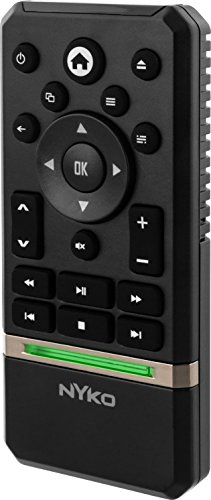
A dark gray workhorse with dedicated Pause and Fast Forward keys built for binge sessions.
This is the remote for the person who watches back-to-back episodes and hates hunting for controls. It has dedicated Play, Pause and Fast Forward buttons, so playback of streaming and physical media is one press instead of a menu dig. It powers the Xbox on and off and can handle volume, channels and power on your TV.
The quality and reliability of the Nyko are what people keep coming back to. It works with most apps including One Guide, Netflix, Hulu Plus and Amazon Instant, and there is no programming step to trip over. Setup is a simple matter of dropping in two AAA batteries, which are not included.
Here is the honest limit: it lists a maximum range of 9 meters, which is shorter than several rivals on this page, and button responsiveness draws mixed notes. Some presses land softer than you would like. It also weighs 1.6 ounces and sits comfortably in hand. If rock-solid everyday streaming control at a fair value is the goal, this is a safe grab.
Where it shines: dedicated playback keys turn episode-hopping into single presses, and the app support spans the big names — Netflix, Hulu Plus, Amazon Instant and One Guide.
The honest catch: at 9 meters of listed range it reaches less far than the Anderic’s 25 feet, so keep a clear sightline.
Reach for this if: you want a dependable, value-priced remote with real Pause and Fast Forward buttons.
Look elsewhere if: your console sits far from the couch or behind glass.
4. 8Bitdo Media Remote for Xbox One

Motion-activated backlighting and a compact 20-button layout made for dark-room movie nights.
Pick this one up and the buttons glow — the 8Bitdo uses motion-activated backlighting, so it lights when it senses movement rather than waiting for a press. That is a meaningful difference from remotes that only illuminate on a button push. A dedicated Home button also wakes your Xbox instantly, skipping the slow boot to the dashboard.
It is a genuinely compact design that sits neatly on a coffee table, with 20 buttons and a short-edition profile for simple controls. It is compatible with Xbox Series X, Series S and Xbox One, so it survives a console upgrade. Navigation across menus and apps leans on dedicated Xbox buttons rather than menu digging.
The trade-offs show up in batteries and presses. Battery life draws clear negative notes — it goes through cells faster than you would expect, so keep spares on hand. Button responsiveness splits, with some presses needing a second push to register. At 10 meters of range it matches several rivals here but falls well short of the Anderic’s reach. If backlit control is your priority, this is the pick.
The standout: motion-activated backlighting plus a Home button that wakes the console instantly — the combo that makes this the best lit remote on the page.
Suits you if: you want glowing buttons that respond to a reach, not a press, in a dim room.
Skip the glow if: you would rather not feed it batteries often.
5. Pre-Programmed Media Remote Control Compatible with Xbox One

The one that comes pre-loaded for LG and Vizio TVs and adds seven do-it-yourself learning keys.
If your living room is a pile of remotes, this is the pick to reach for. It arrives pre-programmed for LG and Vizio TVs and soundbars on the Power, Mute and Vol+/− keys, then hands you seven extra learnable buttons — Vol+/−, Mute and four DIY keys — to pull in commands from Roku, Sony, Samsung and other original remotes.
The spec sheet leans on durability numbers: the maker rates the buttons for over 150,000 clicks, and the maker claims 0.2-second button response and a transmitting distance over 35 feet. It runs on two AAA alkaline batteries (not included) and ships with an upgraded smart chip for stable performance. It works only with Xbox One, One S and One X — not previous-generation consoles.
The recurring gripe is functionality that lands inconsistent for some owners, and it is an infrared-only remote — no Bluetooth, RF or Wi-Fi, and no headphone jack, pairing button or voice search. You also need the original remote to program any learning key. For the buyer who wants to consolidate LG or Vizio gear under one clicker, it is tough to match.
What earns it the versatility crown
- Pre-programmed for LG and Vizio power, mute and volume
- Seven learning keys pull in commands from other remotes
- Buttons rated for over 150,000 clicks
The fine print
- Infrared only — no Bluetooth, RF or Wi-Fi
- Needs the original remote to program learning keys
- Not compatible with Roku stick
Ideal for: an LG or Vizio household drowning in remotes that wants one to rule the TV and the Xbox.
Pass on it if: your TV brand falls outside the pre-programmed list and you no longer have its original remote.
6. Replacement Remote Control for Xbox Gaming Media
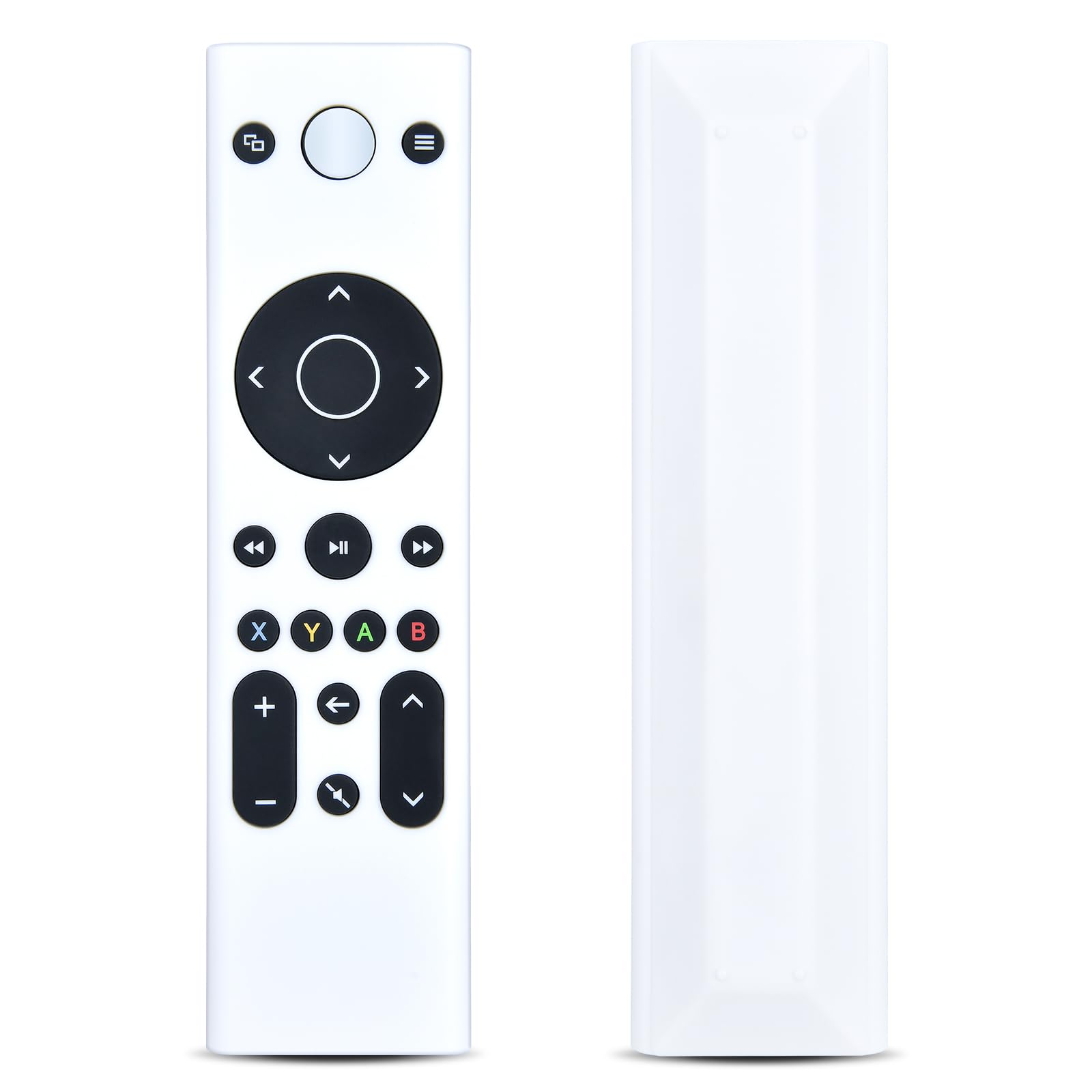
A basic white replacement that lights on touch and skips programming entirely.
This Retrosun remote takes a minimalist approach. There is no pairing or programming step, just two AAA alkaline batteries (not included) and go.
Where the spec sheet separates it from its bigger siblings is range. It lists a maximum of 8 meters, which is the shortest reach on this page and shorter than the Anderic’s 25 feet. That gap matters if your couch sits far from the console, so plan on a clear, close sightline.
Buyers report mixed results on how well it works beyond a short distance, and button presses can feel soft rather than crisp. The backlight touch-wake is genuinely handy in a dark room, though. For a budget-friendly second remote to keep on the side table, it fits the bill — just keep the console in view.
Second-remote value: touch-any-button backlighting and no programming make it a low-fuss backup clicker for the side table.
The honest catch: the 8-meter listed range is the shortest here, so its reach is the trade-off for its simplicity.
Best for: a basic spare remote when your console sits close and unobstructed.
Not for: a long living room where the console is far from the couch.
7. Media Remote Control Compatible with Xbox One System

A blue fourteen-button remote with motion-activated lighting and numeric keys for straight streaming.
This UBay model stands out for its motion-activated full LED backlighting across all buttons plus numeric keys — the numeric input is something fewer rivals here offer. It counts 14 buttons, hits the common A, B, X, Y cluster, and covers the Xbox One, TV, Blu-ray and streaming media in one remote.
There is no setup or programming to deal with; alkaline batteries go in and it works. Its 10-meter range matches the 8Bitdo and the other UBay on this page, giving you decent couch reach. It connects over infrared, so the usual clear-sightline rule applies.
Batteries and a user manual are not included, so plan to add those. The numeric buttons make channel and app entry quicker if you skip through lots of titles. For a budget-friendly pick with lit buttons and numeric keys, this is the value play.
The distinctive bit: motion-activated lighting on all fourteen buttons plus numeric keys for fast title entry — a rare combo in this set.
Plan for: batteries and a manual are not in the box, so pick those up with it.
Pick it up if: you want lit buttons and numeric keys without paying up for extra features.
Give it a miss if: you need a list of confirmed-owner reliability evidence before buying.
Know the Specs
Infrared connectivity and range
These remotes connect over infrared, a light beam that must reach the console’s front sensor. Software lists the maximum range in meters or feet — 8, 9, 10 meters or 25 feet here. That figure assumes a clear line of sight, so placement in an open shelf beats a closed cabinet every time.
Button count and learning keys
Button count tells you how much control sits under your thumb. A 4-button remote handles the basics; a 21-button model adds playback, Guide and learning keys. Learning keys let you pull TV or soundbar commands in from their original remotes, which is how one remote ends up running the whole setup.
Backlighting behavior
Backlit buttons glow in a dark room. The trigger differs: some light on any button press, others on motion. Motion-activated is handier because the remote is ready before you press. When you are watching a movie with the lights off, that difference is what keeps you from squinting at the clicker.
Battery type
Most picks here run on AAA batteries, and a few call for alkaline cells specifically. Batteries are generally not included, and one model draws clear complaints about going through them fast. Match the battery type to the listing and keep spares on hand so the remote never dies mid-episode.
Common Questions
Will an Xbox One multimedia remote work with the Series X or Series S?
Do these remotes need to be paired or programmed?
Why does my remote only work from certain spots in the room?
Can I control my TV’s volume with the same remote?
What batteries do these remotes take?
Is a backlit remote worth choosing?
Will one of these replace my game controller for streaming?
What does the maximum range number actually mean?
Are these remotes compatible with older Xbox consoles?
Do I need the original TV remote to set up the learning buttons?
The Bottom Line
For most people, the xbox one multimedia remote that earns the top nod is the Anderic Xbox One Media Remote, because 21 buttons and a learning function let one clicker run both the console and your TV volume. If dark-room viewing is your habit, grab the 8Bitdo Short Edition for its motion-activated backlighting and instant Home wake. And for a living room stacked with LG or Vizio gear, the Pre-Programmed Universal Media Remote is the one to reach for, with its seven learning keys and 150,000-click button rating.
How we choose
We do not accept paid placement. Every pick is matched to a real buyer and a real use-case; we do not hands-on test units.
Sources
Specifications: manufacturer listings and product documentation. Review insights: verified customer reviews, as of November 2026. Pricing: not shown on this page (it changes often); check the current price via the retailer link.
As an Amazon Associate, Tactical Gear Guy earns from qualifying purchases. This does not affect which products we feature.