Specs are compiled from manufacturer listings and verified buyer reviews and can change over time — please confirm the key details on the product page before buying.
You want a controller that plugs in and works, and you do not want to pay a lot to get there. Almost every pad in this bracket is wired, so the cable is your power source — no charging, no pairing, no dead battery mid-match. The split that actually matters is stick technology: cheap pads use old carbon-film sticks (a resistive film that wears out and starts drifting), while a few in this bracket now use Hall Effect sticks (magnetic sensors that read position without physical contact and do not drift). If you remember one spec from this guide, make it the stick type.
This guide is built by comparing the manufacturers’ published specifications and the patterns across verified customer reviews, so you get each pick’s real strengths and trade-offs instead of marketing spin.
Every pad here works on an Xbox One, and each pick is ranked by what it does best rather than by price. Here is the honest read on the best Xbox One Controller Under $25 for your setup.
Top Picks


How To Choose The Best Xbox One Controller Under $25
At this level you are not buying luxury. You are buying a pad that holds its aim after a few hundred hours. Four specs decide that: stick technology, cable length, headset jack, and Turbo or remappable buttons.
Stick technology beats everything else
Hall Effect sticks use magnetic sensing instead of physical contact, so there is nothing to wear down. A few pads here have them, and those pads are the ones that stay centered after heavy use. Older-style analog sticks can develop drift over time. If longevity worries you, start with a Hall Effect pad.
Cable length decides your couch position
A wired pad is tethered to the console, so measure the gap from your USB port to your seat before you buy. A 7.2 ft cable (about two meters) is fine for a desk or a chair pulled close. A 10 ft cable buys you real slack on a sofa. Measure from your console’s USB port to where your hands sit before you commit.
Check for a 3.5 mm jack if you play online
A 3.5 mm jack is the small round headphone socket. On a wired pad it is how you get game audio and team chat, because a wired controller carries the audio signal down the USB cable. Without one you are plugging your headset into the TV or the console instead, which is clumsy.
Turbo and remappable buttons are a taste, not a need
Turbo repeats a button press automatically while you hold it, which helps in shooters and racing games. Programmable rear buttons let you move a face-button command to the back of the pad. Neither is required to play, so treat them as tiebreakers between pads that already fit your setup.
Side-by-Side Comparison
| Model | Best For | Stick Type | Cable | Buttons | Amazon |
|---|---|---|---|---|---|
| PowerA Wired Controller★ Best Overall | Couch play and longest reach | Precision-tuned analog | 10 ft | 10 | Amazon |
| conwin Wired Controller 102LMost Customizable | RGB and remapping | Standard analog | 9.8 ft | — | Amazon |
| YUYIU Wired Controller 024 | Drift resistance with back buttons | Hall Effect | 7.2 ft | 14 | Amazon |
| Kamylorus X7 | Hall Effect on a budget | Hall Effect | 7.2 ft | 22 | Amazon |
| YAEYE White | Matching a white console | Precision-tuned analog | 7.2 ft | — | Amazon |
| YAEYE Black | Turbo on a tight budget | 360° analog | 7 ft | — | Amazon |
| GMVOX Wired Controller | Phone and tablet play too | Hall Effect | 7.2 ft | — | Amazon |
Detailed Reviews
1. PowerA Wired Controller for Xbox Series X|S – White
Ten feet of cable and an official Xbox license — the least risky buy in the bracket.
If your console sits under the TV and you sit back on a sofa, this pad solves your problem with a single number: a 10 ft USB-C cable. That is the longest cable in this group, and against the YUYIU and Kamylorus pads at 7.2 ft it gives you noticeably more slack before you feel the tug. The cable is USB-C, so it detaches at the controller end and you can swap it if it ever fails.
What you get under the shell is a 10-button layout with precision-tuned analog sticks and anti-friction rings — thin collars around the stick bases that cut the grind as you roll the stick to the edge. Two rumble motors handle the bumps, and separate motors inside the triggers add a kick on things like acceleration and recoil. There is a 3.5 mm stereo jack for a headset, so party chat runs through the pad. It is officially licensed by Xbox and works on Xbox One as well as Series X|S and Windows 10/11.
The honest catch is the stick tech. These are conventional analog sticks, not Hall Effect, so they are the parts most likely to loosen over a long life — several years of heavy play is where you would notice it, not in month one. The other thing to know is that this is not a battery-free luxury pad with back paddles or macro buttons; you get a clean, standard layout and nothing exotic. PowerA also runs a free Gamer HQ app for testing and calibrating the sticks, which is a genuinely useful check-in tool when a pad starts feeling off.
official xbox licensed
- 10 ft USB-C cable — the longest reach here, so a sofa setup stays comfortable
- Officially licensed for Xbox, and it runs on Xbox One, Series X|S and Windows 10/11
- Impulse triggers with their own motors add feedback the plain rumble motors miss
- Gamer HQ app lets you test and recalibrate the sticks yourself
- Detachable USB-C cable means a damaged cord is a cheap swap, not a dead pad
wired only no battery
- Conventional analog sticks rather than Hall Effect, so drift is a long-term possibility
- No back buttons, no Turbo, no macro remapping
- White shell shows fingerprints and dust quickly
grab the white: you want a standard-layout pad with the longest cable and an official Xbox license behind it.
skip for wireless: you specifically want drift-proof Hall Effect sticks — the Kamylorus or YUYIU pads cover that ground.
2. conwin Wired Controller 102L
Seven lighting modes, a 9.8 ft cable, and a layout you can reprogram to your taste.
This pad is for the player who wants their setup to look like theirs. You get 7 RGB lighting modes, and the combo of the light button with left or right on the D-pad cycles them, while up and down on the D-pad dims or brightens. A 9.8 ft cable puts it second only to the PowerA’s 10 ft reach, so a living-room chair is still comfortable.
The features above the basics are what sell it. Turbo holds a rapid-fire repeat on one button, and the programmable buttons let you push a complicated command onto a single input. Dual vibration motors handle the impact feel, and a 3.5 mm jack takes a headset for chat. It handles Xbox One, Series X|S and Windows 10+ PC over USB. One practical note: conwin says a one-time firmware update over PC may be needed if your console has updated, and the file lives on their support page. It is a two-minute job, but it is a job.
Where this one splits opinion is reliability. The functionality feedback runs both directions — plenty of buyers find it works fine, and a share hit a unit that did not. That is worth flagging honestly: if you buy it, test every button and stick on day one rather than the second week. The RGB is a taste call: some players cycle the modes daily, others switch it off after a week.
bright rgb lighting: the 7 lighting modes and the D-pad brightness controls give you the most tactile feedback on this pad, so you can adjust the look without looking away from the screen. At 9.8 ft, the cable reaches farther than the 7.2 ft pads without breaking the group’s pattern.
test buttons early: the pad’s functionality is the contested part of its reputation, so a day-one check of every input is the smart move.
worth a look: you want visible RGB and remappable buttons without stepping up to the Drift-Free Pick’s price tag.
think twice: you want a pad that behaves identically from the start with no firmware step — the PowerA needs none.
3. YUYIU Wired Controller 024
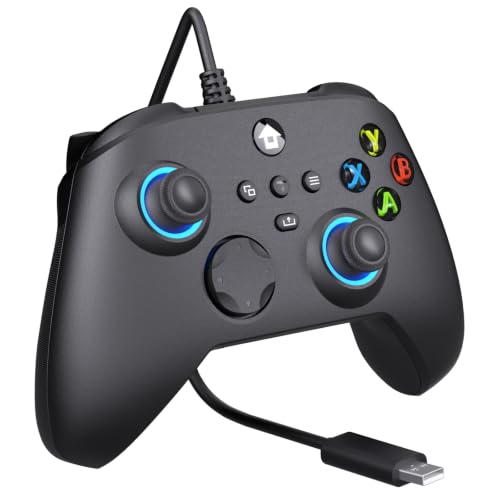
Magnetic sticks and two back buttons — the durability argument in a wired pad.
Stick drift is the reason most pads get replaced, and this one sidesteps it. The joysticks and triggers both use Hall Effect sensing, which reads position with a magnetic field instead of a worn contact pad, so there is less of a mechanism to degrade. A 14-button layout adds M1 and M2 macro buttons on the back, which you can program to fire off a command your thumbs would otherwise have to reach for.
The rest fills in cleanly. Turbo repeats a press while held, and an 8-way D-pad gives you diagonal inputs for fighting games and menu navigation. Dynamic RGB lights the shell, dual vibration motors carry the impacts, and a 3.5 mm jack takes a wired headset. Connection is USB-C over a 7.2 ft cable — versus the PowerA’s 10 ft, so measure your seating gap if you play from a couch. Note too that the maker lists it as not compatible with PlayStation, TVs or phones, so this is a console-and-PC pad only.
The trade-off is familiarity. This is a third-party pad with a 14-button layout, and the extra back buttons take a session or two to learn if you have never used them. The RGB is present but modest next to the conwin’s 7 modes. Neither is a defect — they are the trade-offs you accept for magnetic sticks and back buttons at this price.
make this pick: you are tired of replacing pads and want magnetic sticks plus back buttons in one buy.
look elsewhere: your console lives across a wide room — the 10 ft PowerA cable reaches further.
4. Kamylorus X7 Wired Controller
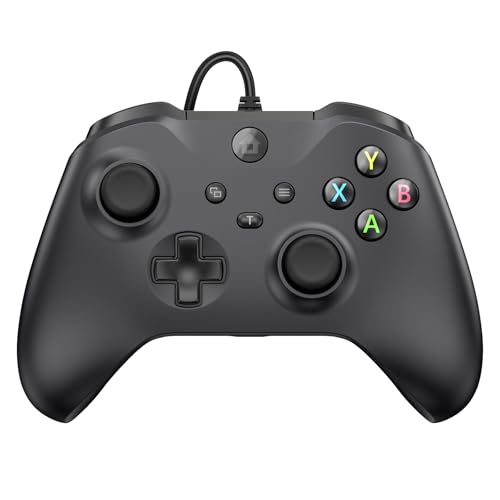
The most buttons here by a wide margin, with magnetic sticks thrown in.
Count the inputs on this one and the picture changes fast. The Kamylorus lists 22 buttons against the PowerA’s 10, so you get more controls within thumb reach. The shell measures 4.5 x 2 x 6.3 inches against the PowerA’s 2.56 x 6.14 x 4.21 inches, so it is the chunkier pad in the hand. That extra real estate is what lets it carry a wider spread of controls. If your hands are on the larger side, the fuller grip is a plus rather than a complaint.
Under those buttons sit Hall Effect joysticks and triggers, the same non-contact magnetic approach the YUYIU uses, which the maker says eliminates drift. Turbo runs at 8Hz, meaning it fires about eight presses a second while you hold the button — useful for shooters and fighting games. A 7.2 ft fixed USB cable plugs straight into the console with no pairing or charging, dual vibration motors carry the feedback, and a 3.5 mm jack handles headset chat. It covers Xbox One, Series X|S, Windows and Android.
Now the part you need to hear. This pad’s quality feedback is genuinely split — some buyers find it solid and good value, others describe the build as feeling cheap. The functionality feedback splits the same way, with working units and non-working ones both reported. That is a wide spread for a pad at this tier, and it means a day-one test of every input is not optional. Treat it as a high-feature gamble rather than a safe default.
x7 model appeal: 22 buttons is the biggest input count in this group, and that density is why players who want every command at hand gravitate here over slimmer pads like the PowerA.
needs return window: build quality is the most contested thing about this pad, so keep the box and the receipt long enough to test it properly.
try it out: a high button count and magnetic sticks matter more to you than a safe bet on feel.
skip the risk: you want a pad that arrives feeling the same for everyone — the YUYIU has the steadier reputation for its stick tech.
5. YAEYE Wired Controller – White
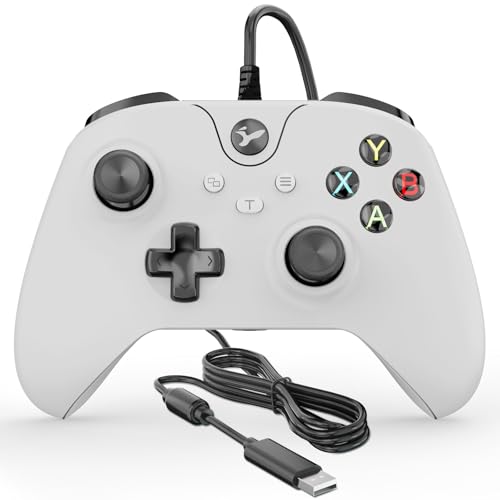
A white pad for a white console — plain setup, nothing to configure.
If your Xbox One or Series S is the white model, this is the pad that stops the mismatch on your shelf. It is a straightforward plug-and-play pad for Xbox One, Series X|S and Windows 10/11, with no pairing step and no battery to manage.
Inside the shell you get precision-tuned analog sticks with anti-friction rings, the collars that keep the stick from grinding as you push it to the edge. Dual vibration motors carry the rumble, and a 3.5 mm headset jack takes your headset for chat. The build is described as lightweight, which keeps long sessions comfortable, and the buttons are the standard Xbox-style spread with no extras bolted on.
What this one does not do is protect you from drift. These are old-style analog sticks rather than Hall Effect, so the wear question is the same one you would face with the PowerA. It also carries no Turbo, no back buttons and no macro remapping — this is the plain version of the idea. If you want the extras, the YUYIU covers that ground; if you just want a white pad that works, this is the simple answer.
pick for looks: a white console deserves a white pad, and this one matches without asking you to configure anything.
not for you: you want drift resistance or extra buttons — neither is on this pad.
6. YAEYE Wired Controller – Black
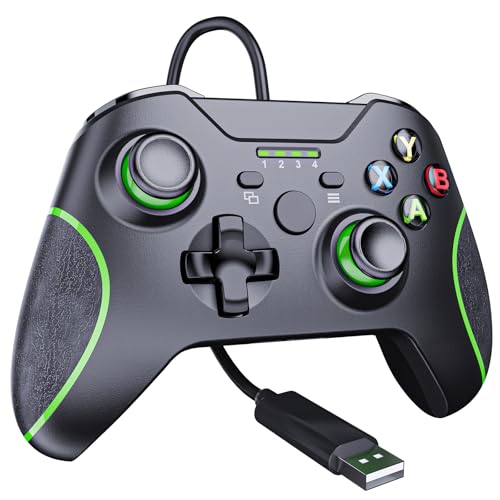
Turbo, textured grips, and 360° sticks — the cheapest route to the extras.
Two things stand out on this black YAEYE pad, and neither is cosmetic. First, the anti-sweat grips — the material under your palms is textured to keep your hands from sliding when a match gets long. Second, adjustable Turbo, which lets you dial in the auto-repeat rather than just switching it on. For a pad that plays everything on Xbox One, Series X|S and Windows 10/11, that is more control than the plain white YAEYE offers.
The stick spec here is listed as 360° joysticks, paired with pressure-sensitive LT and RT triggers — the shoulder triggers that read how far you pull them, which matters for throttle and braking in racing games. A 7 ft USB cable is the shortest in the group, against the 7.2 ft pads, so keep your console close. Plugging in lights the indicators automatically, and holding the Home button for 2–3 seconds powers the pad on or off. A 3.5 mm jack takes a headset.
As with most pads at this tier, the sticks are analog rather than Hall Effect, so this is not the drift-proof option in the lineup. There is also no macro remapping — the Turbo is the only programmable-ish extra. Buy it for the anti-sweat grips and adjustable Turbo, not for drift resistance.
reach for it: sweaty palms and a need for Turbo are your two real complaints.
look up first: you want a longer cable or magnetic sticks — the Drift-Free Pick covers both.
7. GMVOX Wired Controller

Magnetic sticks, an 8Hz Turbo, and it will talk to your phone as well as your console.
Most pads in this bracket stop at the console and the PC. This one keeps going — it works with Xbox One, One S/X, Series S/X, Windows PC, iOS and Android, so the same pad you use on the TV can go in a bag with a tablet or phone. The connection is a fixed 7.2 ft USB cable, and there is no pairing or charging to think about.
The internals follow the same pattern as the other Hall Effect pads here. Magnetic joysticks and triggers use contactless sensing that the maker says eliminates drift, and the 8Hz Turbo fires about eight presses a second so your thumb gets a break in shooters. Dual vibration motors carry the impacts, and a 3.5 mm headset jack handles voice chat. It is a full-size gamepad rather than a compact travel shell, so the multi-platform trick does not come at the cost of grip.
The caveat is consistency. This pad’s functionality and build quality both draw mixed feedback — some units work well, others arrive with issues, and one describes the feel as janky. That is not unusual for a third-party pad in this bracket, but it does mean you should test every input the day it lands. It is also listed at the top of this group’s range, so the extras are what you are trading for.
worth it here: you want one pad that covers the console, the PC and a phone or tablet without swapping gear.
hold off now: you want the most settled build quality in the bracket — the PowerA has the longer track record on that count.
Know the Specs
Hall Effect Sticks and Triggers
Hall Effect sticks read the stick’s position with a magnetic field instead of a physical contact that rubs as you move. Because there is no contact to wear down, these sticks tend to hold their center far longer, which is why the term gets attached to drift resistance. On a pad with Hall Effect sticks and triggers, your aim stays where you put it and racing throttle feels smoother. This bracket includes several Hall Effect pads, so you do not have to pay extra for the tech here.
Turbo Fire and What 8Hz Means
Turbo repeats a button press automatically while you hold it. The rate is given in Hz — 8Hz means about eight presses a second. That is fast enough to matter in shooters and fighting games, and it spares your thumb in long sessions. Not every pad here has it, and one has an adjustable version, so check before you buy if rapid fire matters to you.
Wired Cable Length and Reach
A wired pad draws power and sends input down the cable, so the cable is your range. In this group the cables run from 7 ft up to 10 ft. The difference sounds small until you sit back on a sofa. Measure from your console’s USB port to your natural seated spot, then add a little slack. A detachable cable is also easier to replace than a fixed one.
The 3.5 mm Headset Jack
The 3.5 mm jack is the standard round headphone socket. On a wired Xbox pad, plugging a headset into that jack gives you game audio and voice chat through the controller, so your TV stays quiet and your team stays audible. All seven pads here list a 3.5 mm jack, so you’re covered if party chat is the reason you are buying.
Common Questions
Will a wired third-party pad work on my original Xbox One console?
Do Hall Effect sticks really stop controller drift?
How long is the cable on these pads, and does it detach?
Can I plug a headset into these controllers for party chat?
Is Turbo cheating, and do I need it?
Which pad works with a phone or tablet as well as the console?
Do these wired pads need batteries or charging?
What is the difference between analog sticks and Hall Effect sticks?
Can I remap buttons on a budget wired pad?
The Bottom Line
For most players, the xbox one controller under $25 winner is the PowerA Wired Controller because it pairs the longest cable in the group with an official Xbox license — the least risky way to spend here. If drift is the thing that has been costing you controllers, the YUYIU Wired Controller gives you Hall Effect sticks plus M1/M2 back buttons. And if you want one pad that also talks to your phone and tablet, the GMVOX Wired Controller covers the widest platform list.
My one nudge: buy the pad whose defining spec matches your actual complaint. If drift killed your last controller, do not buy another analog pad and hope — the magnetic-stick pads exist for exactly that reason, and they are sitting in this bracket already.
How we choose
We do not accept paid placement. Every pick is matched to a real buyer and a real use-case; we do not hands-on test units.
Sources
Specifications: manufacturer listings and product documentation. Review insights: verified customer reviews, as of November 2026. Pricing: not shown on this page (it changes often); check the current price via the retailer link.
As an Amazon Associate, Tactical Gear Guy earns from qualifying purchases. This does not affect which products we feature.